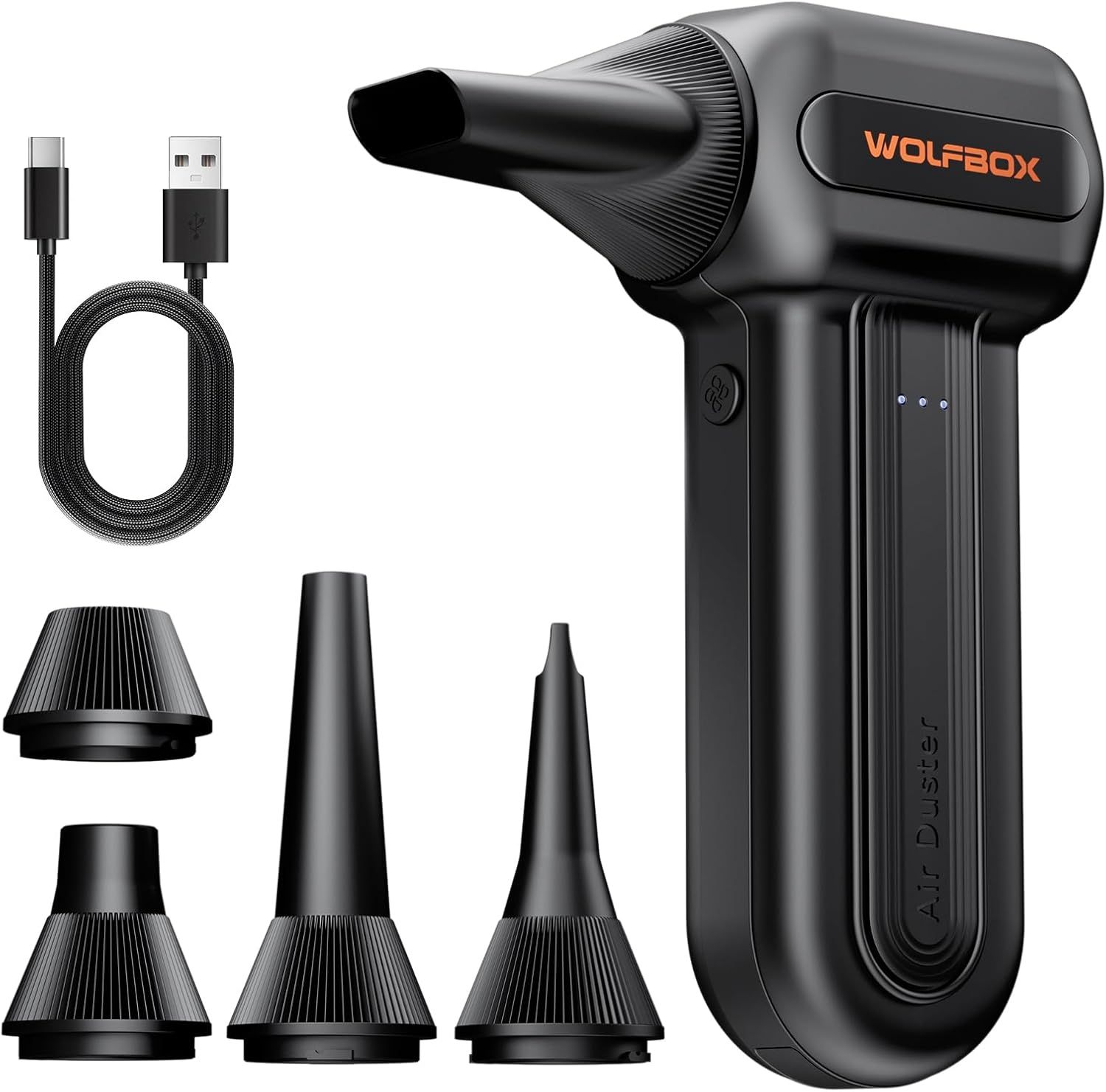
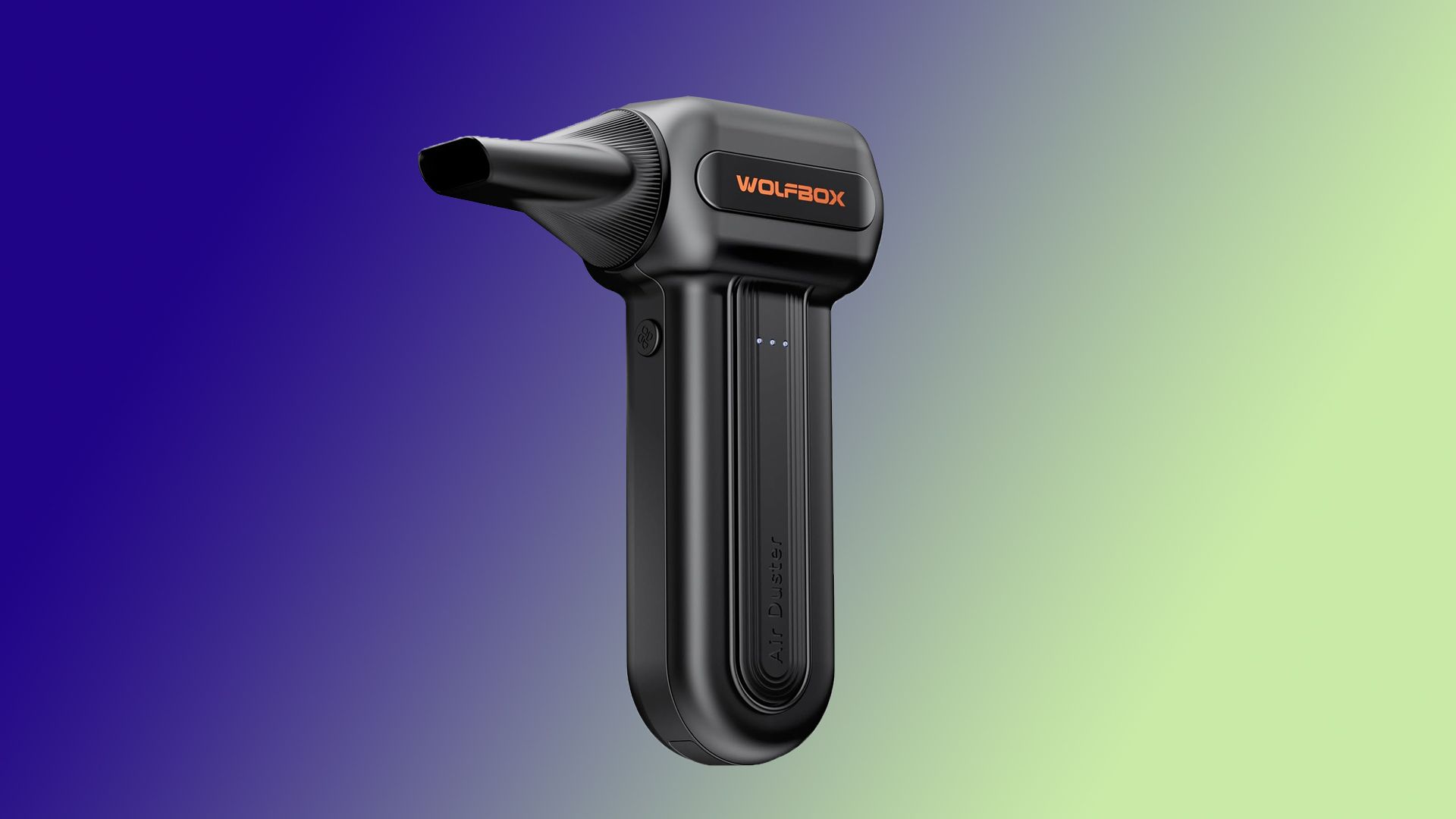
Dust buildup is one of the primary causes of performance throttling, and it is highly recommended to clean your PC as part of its regular maintenance. One of the easiest ways to keep your system dust-free is to invest in a powerful air duster. Right now, the Wolfbox MF60 is currently available at a 32% discount on Amazon, bringing the price down from $49.99 to just $33.99.
Cooling fans within your PC case or laptop end up pulling in a lot of dust, lint, and even small debris that can clog heatsinks, radiators, and various other components. This results in inefficient heat dissipation that can lead to hotter components and a drop in performance. While compressed air cans work well, a high-powered electric air duster is a much better option in the long run.
The Wolfbox MF60 is a wireless rechargeable air duster offering three fan speed levels and is claimed to deliver air speeds of up to 72.4 m/s with fan speeds of up to 110,000 RPM. Featuring dual 2,500mAh batteries, the company claims up to 240 minutes of runtime at its lowest fan speed of 25,000 RPM. The air duster can be fully recharged via USB Type-C in about 3.5 hours. It also includes multiple attachments, including a round all-purpose nozzle, a flat nozzle for blowing dust off PC cases and desks, a long nozzle for deep-cleaning computer keyboards and car vents, and a dedicated nozzle for inflating pool floats, beach balls, air mattresses, and more.
If you're on the lookout for a convenient way to keep your PC clean without relying on disposable compressed air cans, the Wolfbox MF60 is definitely worth considering. At its discounted price of $33.99, it's a practical addition to your PC maintenance toolkit, especially if you regularly clean your PC, laptop, or other electronics.
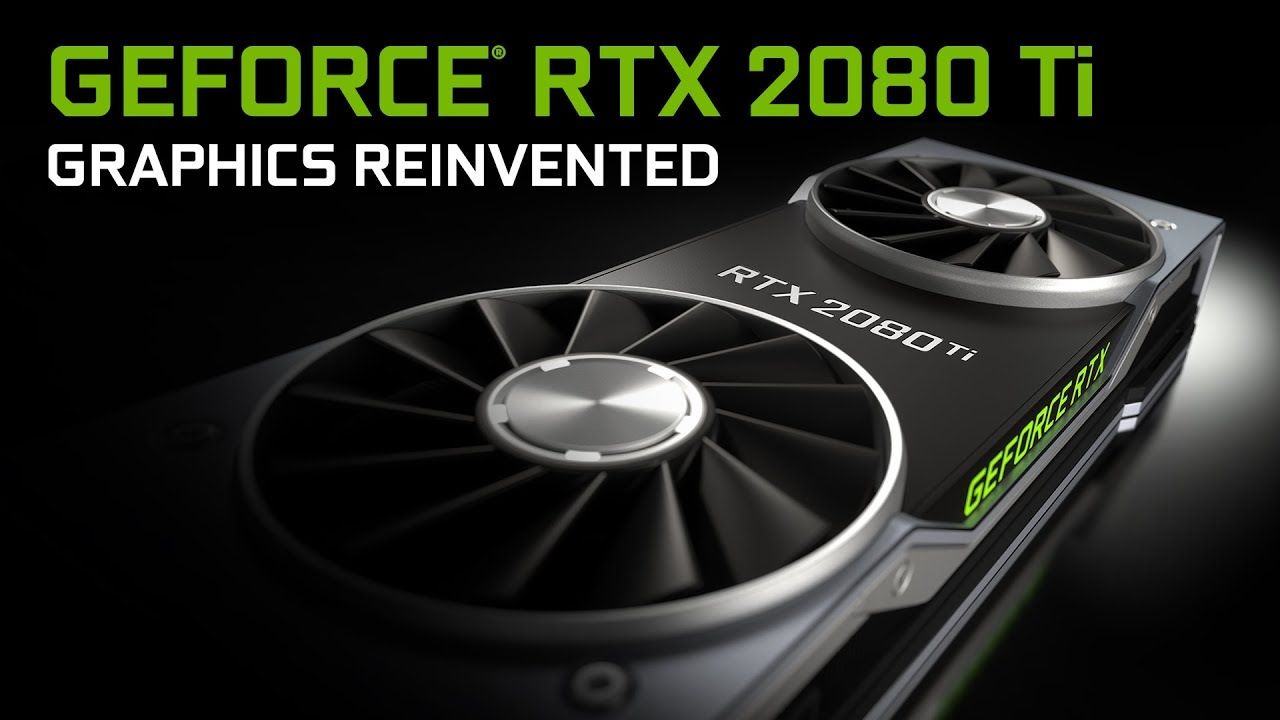
Nvidia’s Turing GPUs became available to enthusiasts for the first time on this day eight years ago. This wasn’t just another accelerated GPU generation, though, at least according to Nvidia. The GeForce 20 series pioneered a “20 years in the making” ability to deliver hybrid graphics enhanced by real-time ray tracing. Nvidia made this new technology available at the high-end first, via the GeForce RTX 2080 and RTX 2080 Ti (review links). The more mainstream RTX 2070 wouldn’t become available until October.
In a blog post a month ahead of the release day, Nvidia CEO Jensen Huang didn't hold back in heralding the arrival of Turning for PC gaming graphics. “Turing opens up a new golden age of gaming, with realism only possible with ray tracing, which most people thought was still a decade away.” He went on to claim that “Once you see an RTX game, you can’t go back.”
Despite Huang’s boasts we can look back and confidently say that many gamers still don’t care about ray tracing. Nor do they wish to endure the performance impact even the latest generation mainstream graphics cards from Nvidia (and AMD, and Intel) still suffer from when this feature is turned on. Moreover, at the time of launch back in 2018, and for quite a few months onwards, there was little in the way of content that made the new RTX 20 series' distinguishing feature seem worthwhile. Early in-game showcases that garnered a lot of pixel peeping and chin rubbing included Battlefield V, Metro Exodus, and Shadow of the Tomb Raider.
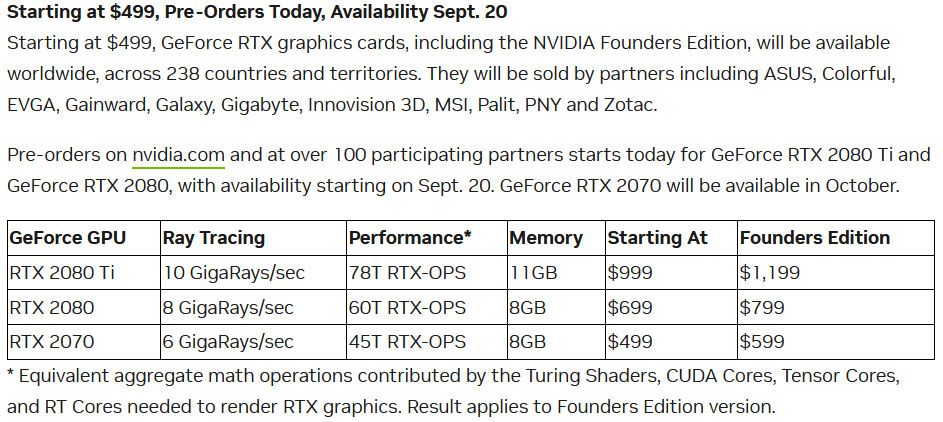
Our review of the RTX 2080 Founders Edition noted that this new second-fastest Turing architecture card managed to outpace the legendary GTX 1080 Ti. However, we grumbled about it being $100 more expensive than the former flagship. During this era, Nvidia Founders Editions were actually more expensive than the base models from AIBs. Thus the RTX 2080 FE had an MSRP of $799, but you might have been able to pick up an Asus, Colorful, EVGA, Gainward, Galaxy, Gigabyte, Inno3D, MSI, Palit, PNY, or Zotac for $699.
Our review of the GeForce RTX 2080 Ti flagship was more positive, despite the conclusion that the “$1200 price tag is out of reach for most gamers.” The 71% uplift in price wasn’t really worth it for the ~26% faster performance vs the GTX 1080 Ti. It was also about 20% faster in gaming than the pro Titan V, though.
Our review of the RTX 2080 Ti was 14 pages long, but here’s a direct link to some gaming benchmarks featuring the likes of Tom Clancy’s Ghost Recon, The Witcher 3, and World of Warcraft: Battle for Azeroth. During gaming, this new consumer flagship would typically consume about 280W.
Eight years later, we can say that realtime ray tracing has indeed proved popular. Even consoles and mobile games now use and boast of this visual tech, and probably couldn’t ignore it without getting sidelined. But adoption has been slow, and it has taken yet more layers of technology, such as DLSS for the green team, to make ray tracing at all accessible for budget / mainstream gamers, even in 2026.
Do you still rock a Turing GPU in 2026? If you do, or are just curious about how well an 8-year-old card would do in 2026, I'm sorry to say that Turing has slipped off the end of our famous graphics card hierarchy. However, the following generation RTX 3070 at $499 offered very similar performance to the prior-gen $1,199 flagship. Those were the days (except that the cryptomining craze happened).
A premium PC DIY fan brand has announced that one of its prized spinners is being used in a 4K camera. Noctua says that its NF-A4x10 5V PWM was used by the CAIM1 camera designers due to its quiet, compact nature and strong airflow and pressure performance. This camera runs two intensive processing tasks simultaneously within a compact shell, high-bitrate imaging and cryptography, hence the need for active cooling to prevent throttling.
CAIM1 proves its footage is real at the moment of capture. 4K60 capture and cryptographic proof generation at once push its processors to the thermal limit – inside a mostly enclosed shell.So it needs a fan. It just can't be heard or felt... https://t.co/2SL3rVc8N5 @CaimeraX… pic.twitter.com/Ogbe4YBRqXSeptember 18, 2026
The CAIM1 is something of a niche product. It has been designed to create photo and video captures that one can say with certainty haven’t been altered or generated using AI. Noctua says it is “cooling a camera built to prove reality.” CAIM1 is short for Counter Artificial Intelligence Machine 1.
From the brief description provided by the source, this anti-AI functionality seems to work by piping the imagery directly from the lens/sensor through an “onboard hardware attestation with edge cryptographic proof generation” process. This is stored on the camera’s “immutable, decentralized storage, enabling the origin of the media to be verified independently,” says the Austrian air-cooling specialist.
Of course Noctua’s involvement was beneficial to the camera makers for its high-quality precision fans. The CAIM1 generates heat through its high-bitrate 4K imaging activity, its cryptographic processing, all within the confines of a compact handling-friendly shell. Other key considerations of the designers were precise PWM fan control, and finding a fan with minimal noise (as the camera records audio) and minimal microvibrations.
NoctuaNoctuaNoctua
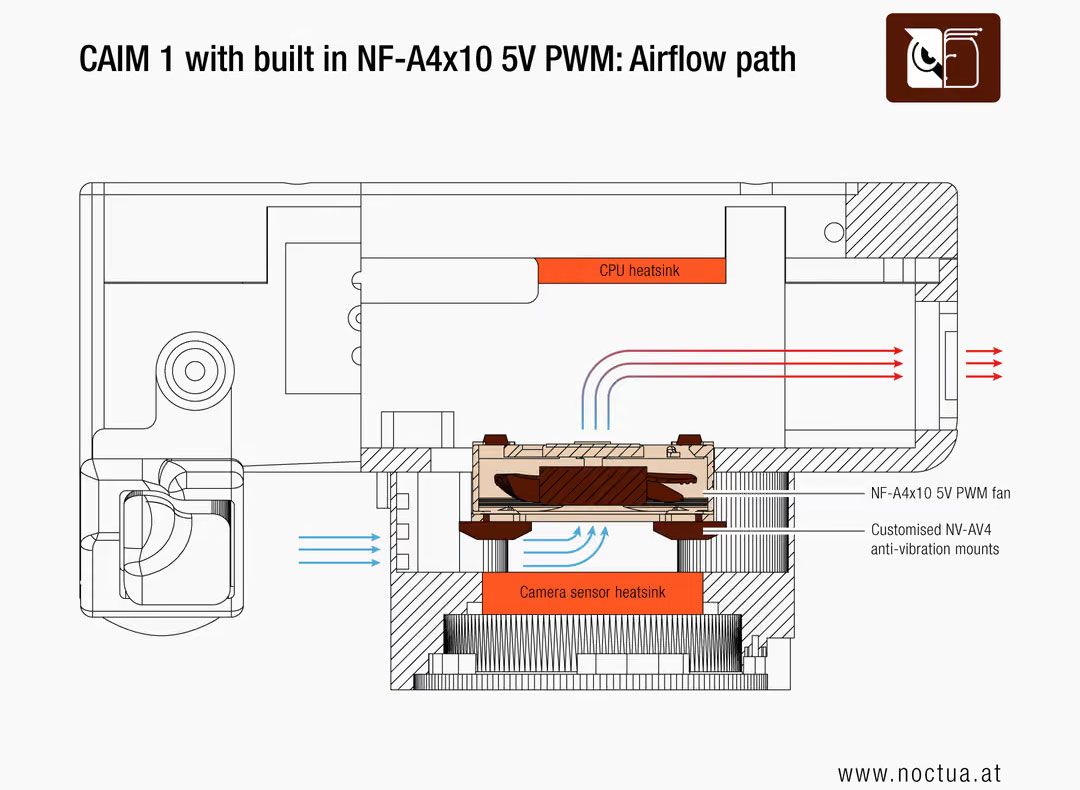
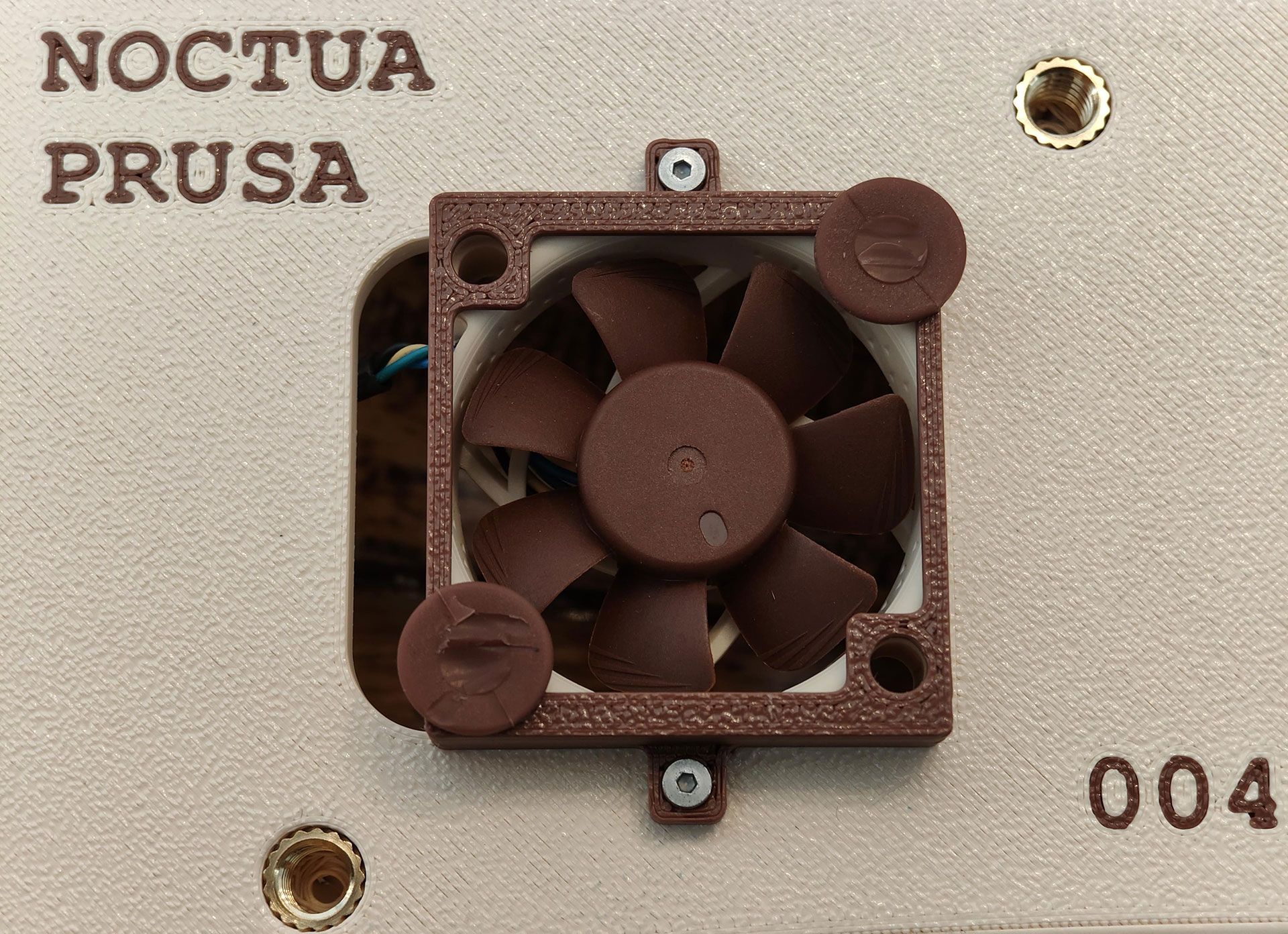
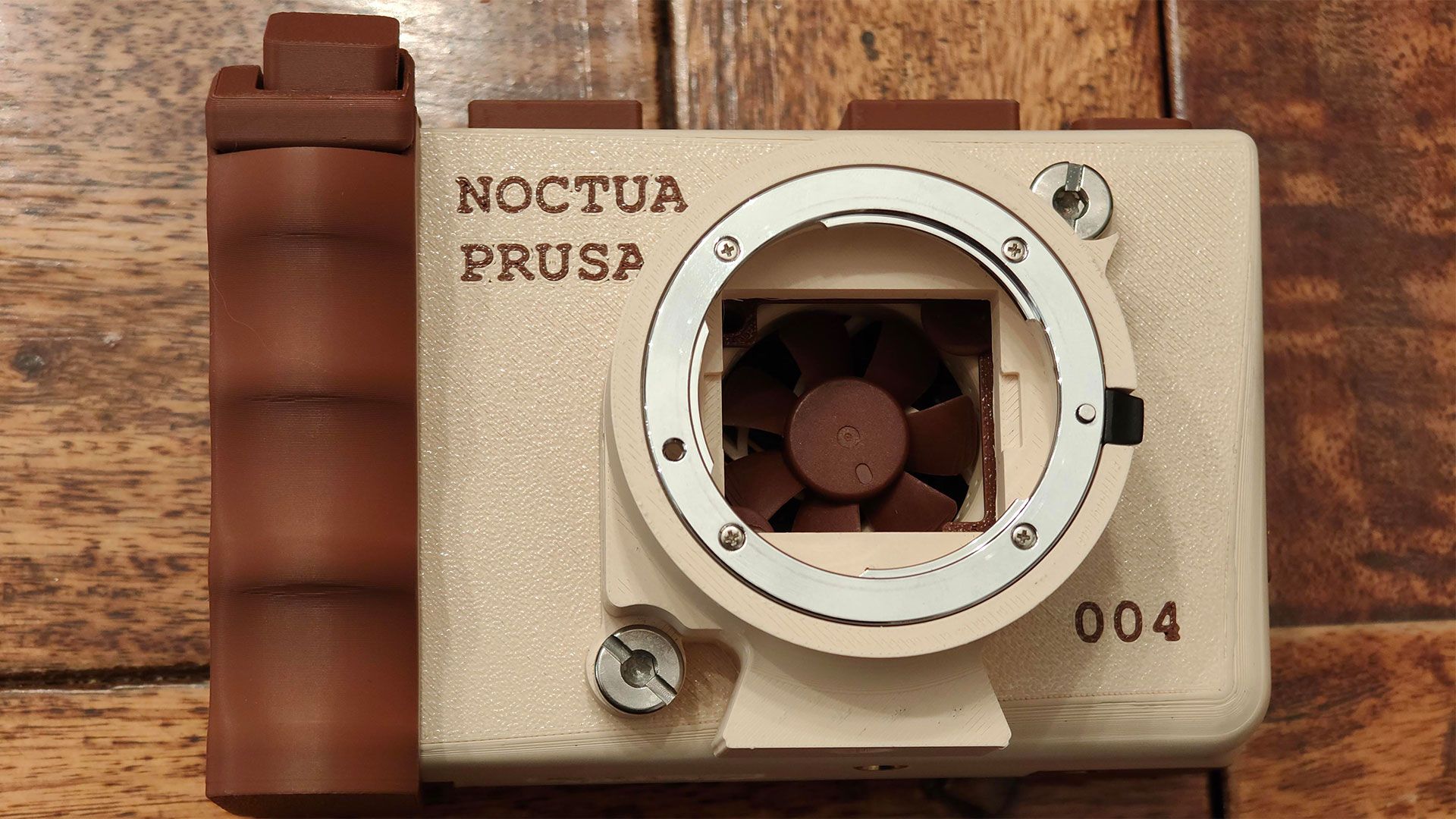
Noctua says its NF-A4x10 5V, with its PWM’s SSO2 bearing system and smooth motor drive fitted the bill. This tiny fan was leveraged in a unified single-airstream cooling design with custom anti-vibration mounts, situated right behind the image sensor. This directs air across the sensor’s alloy heatsink backplate, and which gets exhausted though the camera chassis left side.
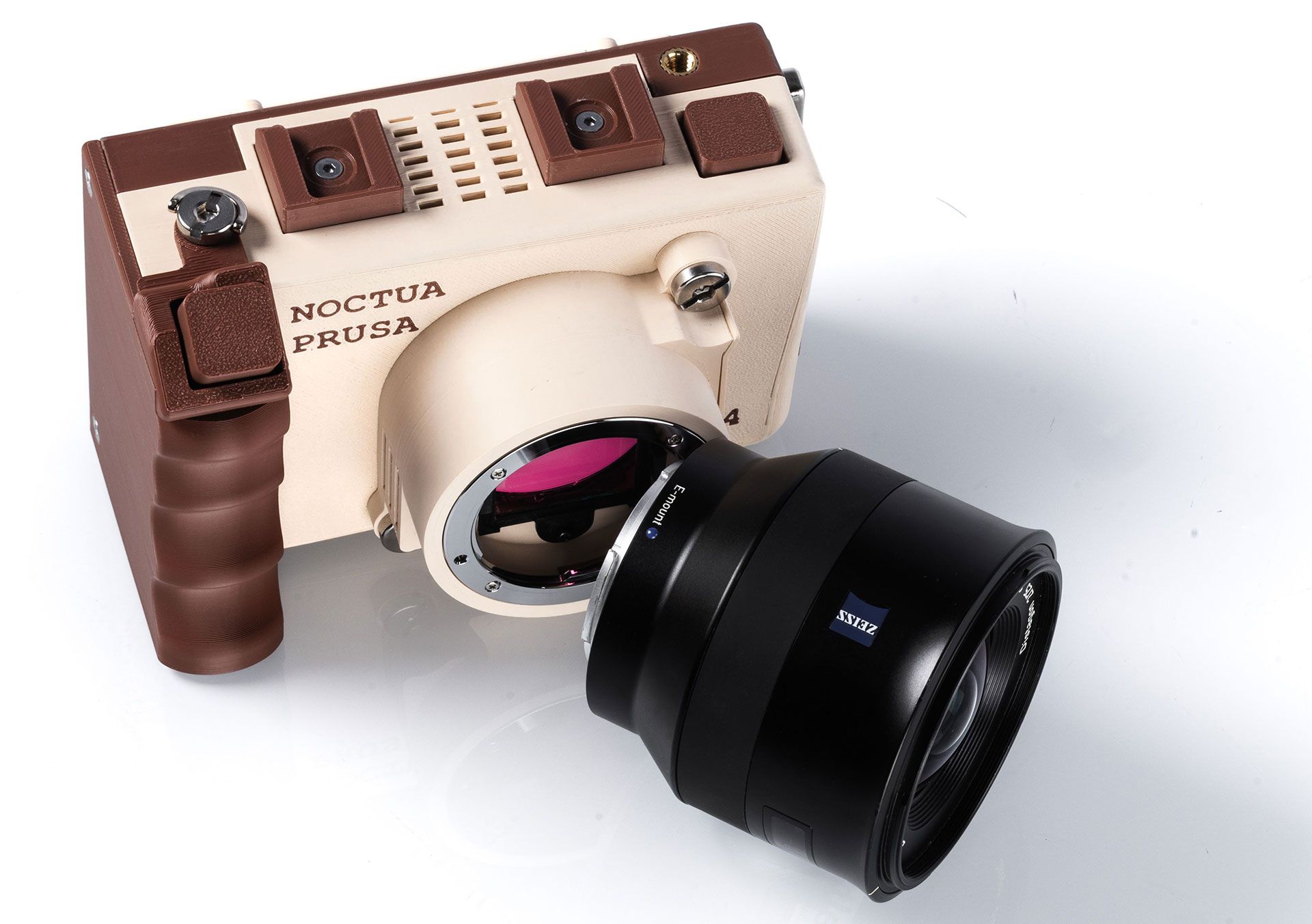
Our nozzle-headed readers will also be pondering over the Prusa branding on the camera body. The simple answer is that the CAIM1 is still at the prototyping stage and these models have been prepared using 3D printers and Prusament PETG Noctua Beige and Noctua Brown for the outer shell and fan mount. CAIM1 devices will be showcased at a handful of trade shows in Japan later this month. However, commercial batches are targeting Q1 2027 availability.
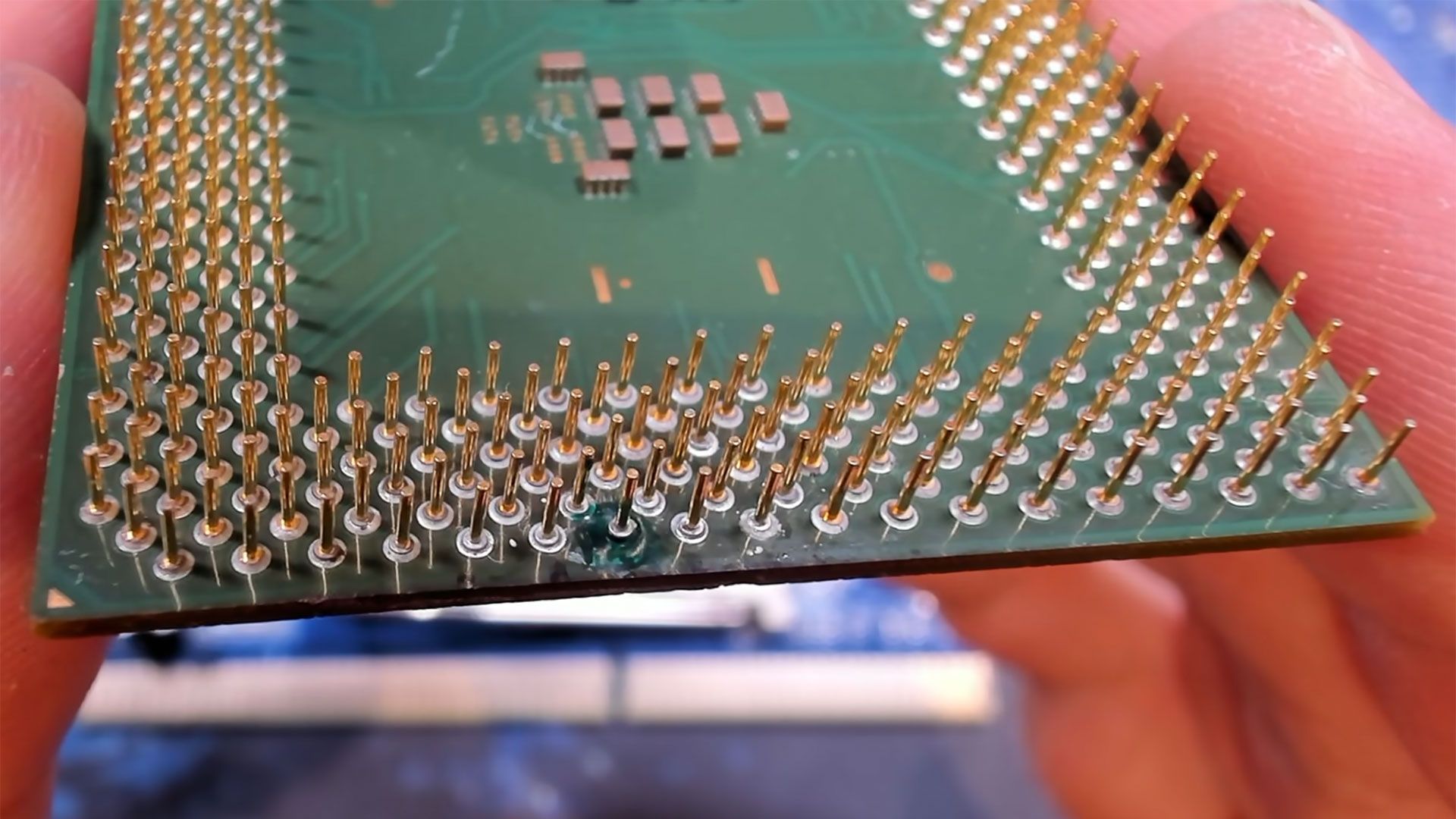
An Intel Celeron 1200 (Tualatin) was revived from the dead following an intricate bit of repair work by Bits und Bolts. The quarter-century-old chip looked like it had a fatal injury, with one of the pins missing and the underlying pad ripped off. As things stood, a system with this close relative of the Pentium III installed simply wouldn’t boot. However, thanks to careful digging “deep into the substrate” and some delicate preparation work, the enthusiast managed to solder on a donor pin and get this CPU running again – and then overclocked it by 33%.
As the Celeron 1200’s missing pin was a data pin (D47), this was a definite fix-or-be-damned situation. Sometimes CPUs can have a pin or two missing, and they will work anyway. I’ve seen CPUs shrug off such missing connections when several remaining pins duplicate a function – power or ground pins, for example.
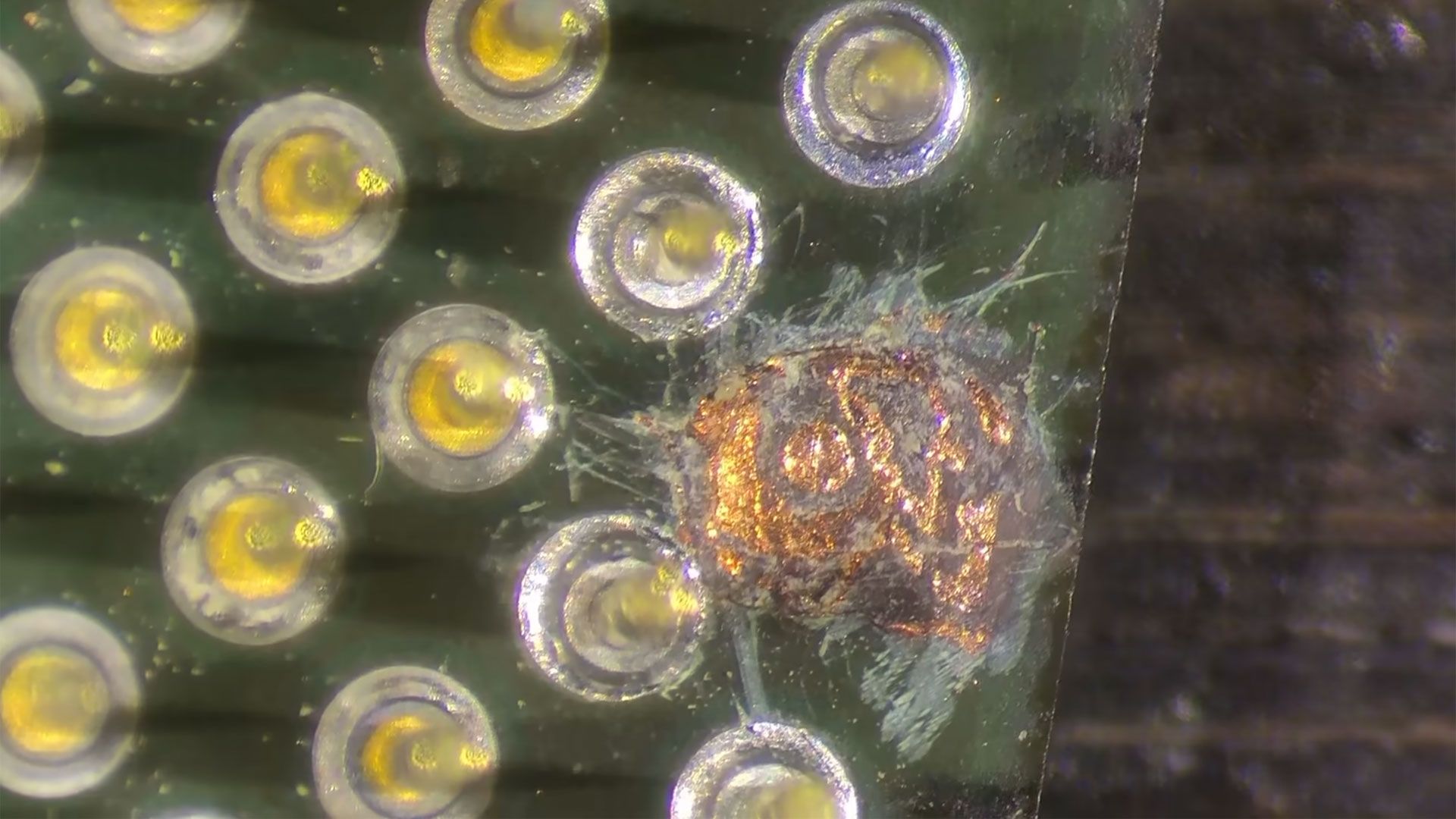
Bits und Bolts started the repair process with a close-up of the serious-looking damage. Then we see the missing pin area after they have apparently “dug a hole” so that the work/issue can be seen more clearly. Zoomed-in images show that there were several layers of copper exposed from under the green surface. The new pin must be connected solely to the central circular area you can see, and not accidentally connect with any of the copper planes surrounding it. Thus, the TechTuber started by applying solder mask to this area. Remember, these pins are very small, and it would have been an intricate job to mask the surrounding area solidly yet cleanly.
While the solder mask surrounding the Intel Celeron 1200’s vacant pin cured, Bits und Bolts harvested a few pins from another Tualatin chip that was “definitely broken.” Returning to the CPU under repair, it was time to add flux, then try to ‘tin’ the central circular copper area to which the donor pin would be soldered.
Soldering the donor pin went smoothly, leaving it perfectly in position and upright. You can definitely see which pin has been added by Bits und Bolts, but after nervously adding the repaired Celeron 1200 to a socket, the TechTuber was relieved that everything mated cleanly.
Bits und BoltsBits und BoltsBits und Bolts
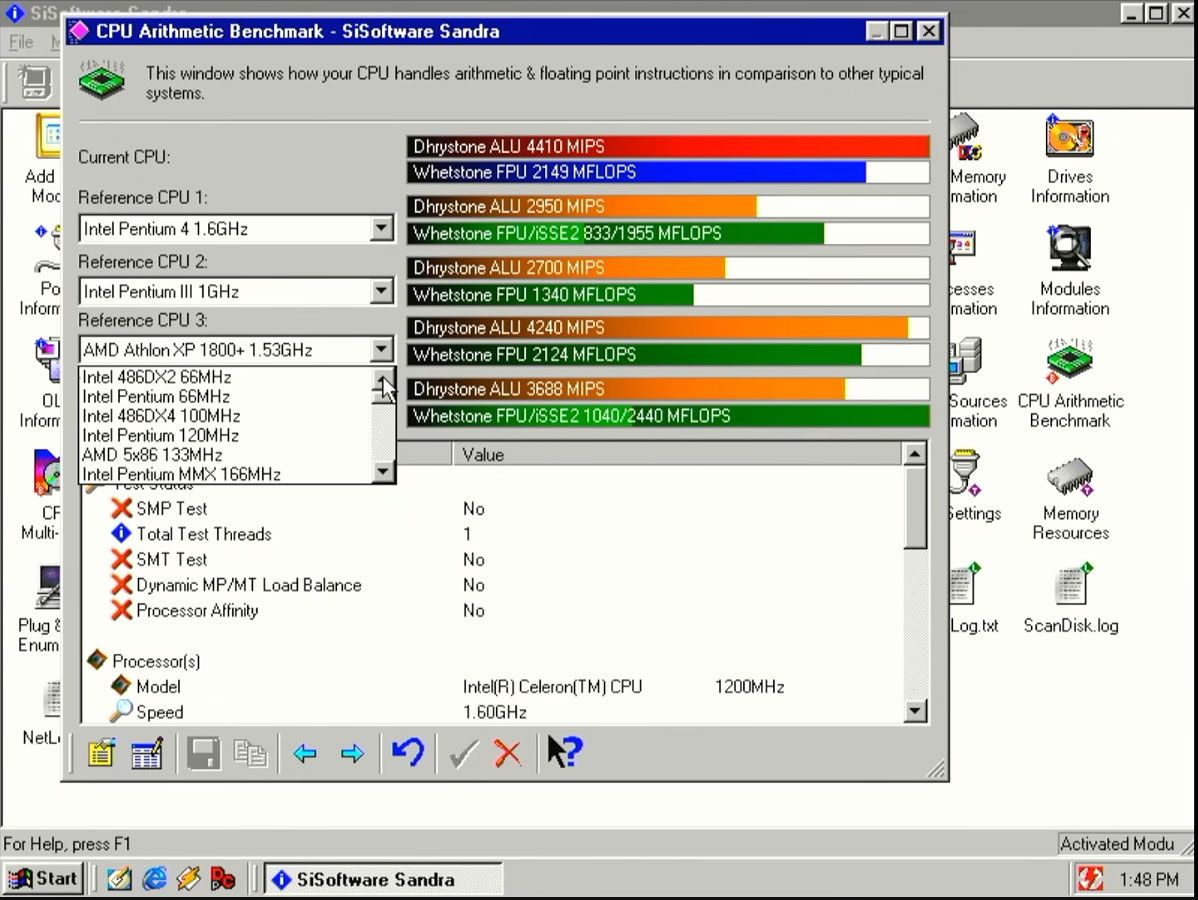
Instead of firing up the computer with the repaired processor installed straight away, the tech tinkerer took a few readings with their multimeter. There were no obvious issues. At last, the moment of truth came, and the patched-up processor-packing PC system booted without issues. Bits und Bolts commented that this was the first time they’d repaired a processor pin issue that looked so grave. The end of the video sees the CPU tested in various benchmarks, including SiSoft Sandra. Moreover, it was even overclocked by 33%, stable at 1,600 MHz.
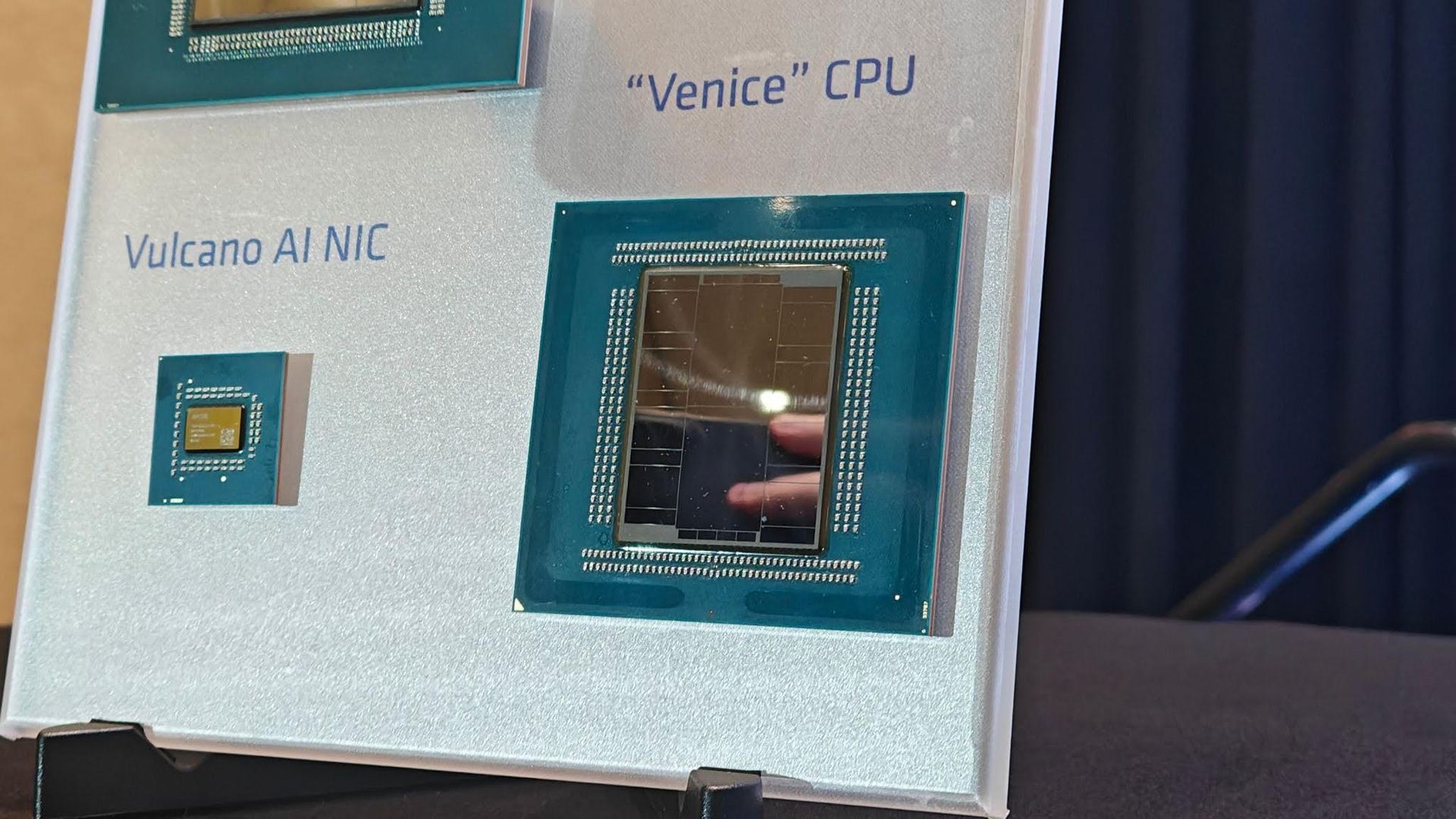
Following the launch of AMD's EPYC 'Venice' CPUs in July, AMD extended the performance claims for its upcoming generation of server chips on Friday. The high-level claim hasn't changed. AMD still says a 96-core, high-frequency Venice chip is around 20% faster than Nvidia's 88-core Vera in SPEC CPU 2026's Integer Rate test. However, the company went into far greater detail about the benchmarks in a new white paper.
There are several configuration differences depending on the benchmark throughout AMD's white paper, and although we'll call out those differences here to the best of our ability, we don't have all of the details. For the Vera comparison, in particular, AMD is mixing data from different sources, and in some cases, using different major releases of the GNU Compiler Collection (GCC). That can have a substantial impact on performance, so keep your salt shaker handy.
(Image credit: AMD)
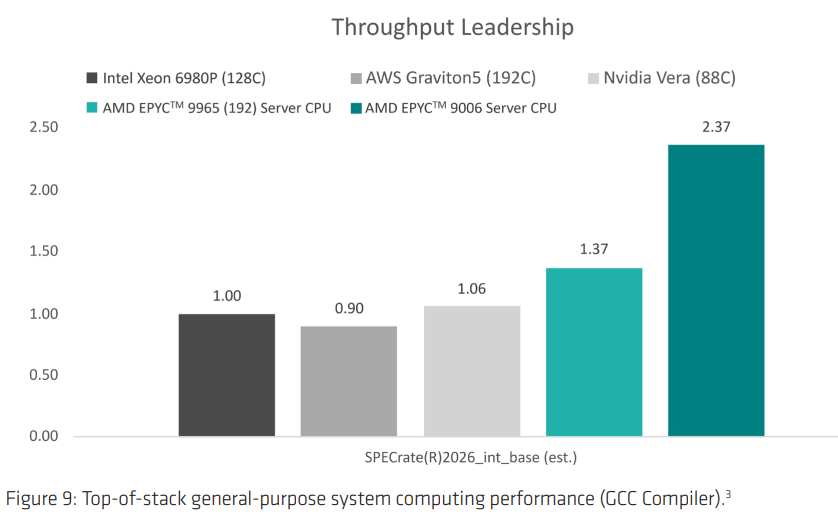
First up are results in SPEC CPU 2026 with the intrate test, looking at total throughput. These are older numbers, gathered in July with GCC 15.2. The intrate test runs multiple copies of an application on the same CPU, and the SOP is to run one copy per thread. Presumably, that's what AMD did here, but the white paper doesn't clarify, even in the footnotes.
The 256-core 9996 is 2.37x faster than the Intel Xeon 6980P and 2.24x faster than Vera according to the slide. The white paper clarifies the mystery 9006 CPU is the 256-core flagship. Perhaps most impressive is AMD's gen-on-gen comparison. According to these results, the 9996 is around 78% faster than last-gen's 192-core EPYC 9965.
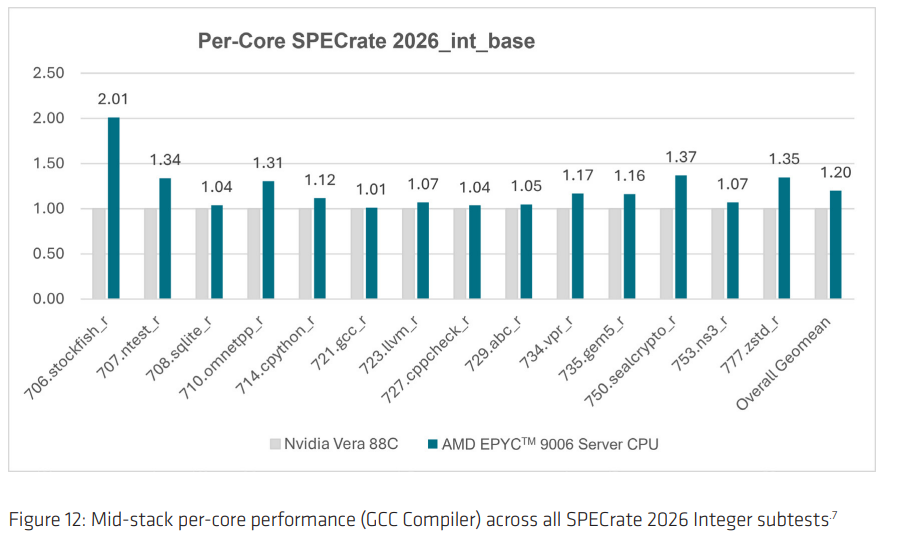
Although the high-level results bring in data from Intel and AWS, much of the white paper focused squarely on the comparison between Venice and Vera. AMD broke down the individual subtests of SPEC CPU 2026 intrate in the white paper, which you can see below.
(Image credit: AMD)
The comparison looks good for AMD, naturally, though there are a few wrinkles in the configuration. AMD is testing a down-cored EPYC 9996, dropping from 256 cores to 96 cores. It made no mention of power budget, but when AMD originally shared SPEC numbers, the 96-core model had access to the same 600W as the 256-core model — AMD's 96-core, high-frequency Venice SKU tops out at 500W. More consequential is the compiler, however. AMD is using GCC 16.1 and comparing the results to the ones Nvidia shared in its Vera white paper. Nvidia used GCC 15.2.
Michael Larabel over at Phoronix has a nice write-up about the difference between GCC 15 and 16, but the short story is that there are performance differences, not always for the better. GCC 16 takes longer to compile due to better optimizations, hence the lower scores on the GCC and LLVM compilations above. However, that leads to faster binaries. By how much depends on the flags, software, and a whole host of other factors. Regardless, it's not best practice to compare benchmarks using two different compiler versions. It makes sense that AMD used GCC 16.1 — it includes support for Zen 6 — but ideally Vera would also be on GCC 16.1.
(Image credit: AMD)
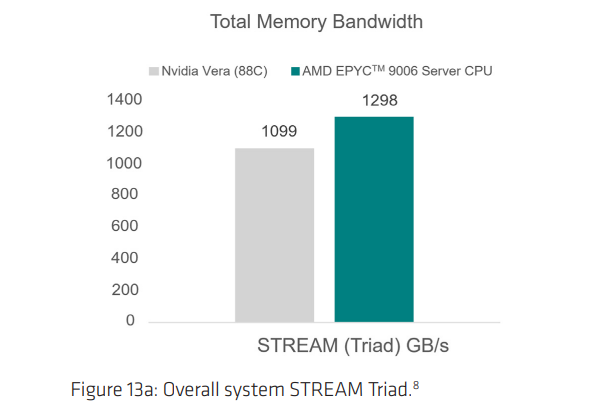
Speaking of Phoronix, AMD pulled some data for the publication's initial, controlled testing of Vera. Above, you can see the Stream, an industry-standard benchmark for measuring memory bandwidth. Again, AMD is using a down-cored 9996 from 256 cores to 96, and offering it a 600W power budget. Still, this is an impressive showing, as Vera absolutely clobbered the competition in the publication’s original Stream results. Here, AMD is ahead by about 18%, with per-core performance about 8% ahead.
(Image credit: AMD)
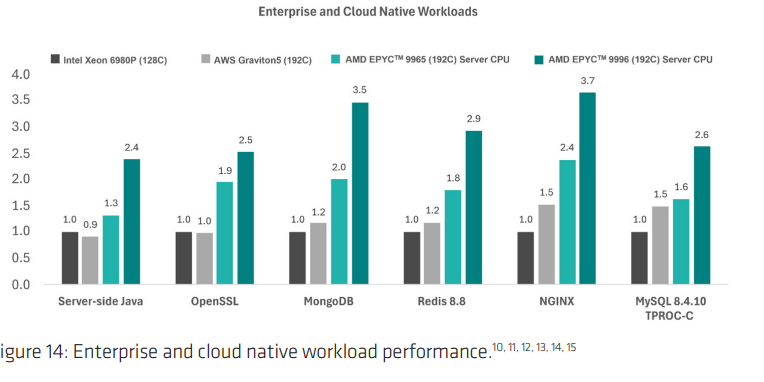
Breaking out of Vera, AMD also showed performance in cloud workloads, including database, Java, and cryptography. Once again, the gen-on-gen comparison stands out, as AMD was already leading in these workloads with its last-gen chips. AMD ran these tests itself, rather than relying on third-party data, though the Graviton5 results came from an AWS cloud instance.
(Image credit: AMD)
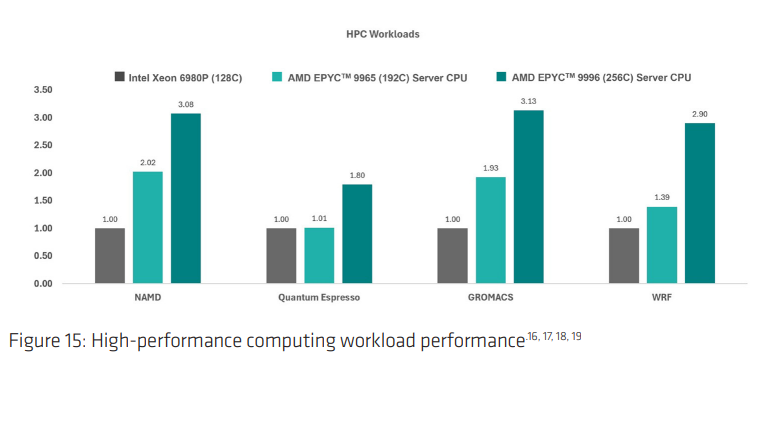
Similarly, in HPC workloads, AMD furthers its lead over Intel's flagship Granite Rapids-AP offering. Intel's next-gen data center CPUs, codenamed Diamond Rapids, are set to be released next year.
(Image credit: AMD)
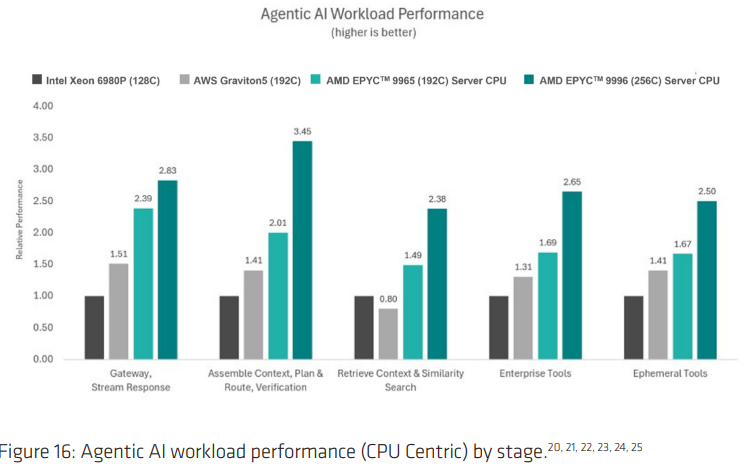
Finally, we have "agentic AI workload performance," which uses actual benchmarks for comparison, despite what the names in the chart above suggest. From left to right, AMD used NGINX, TPCx-AI kit, FAISS, TPC-H and TPC-C, and a replay of a multi-persona agent. For TPC-H and TPC-C, AMD says it derived workloads from those benchmarks, so the results here aren't comparable to published results.
Although looking at benchmark results is always interesting, it doesn't say much in the context of a server deployment, at least at the scale that AMD is targeting. Peak performance is only one of the major factors that go into server deployments, after all, and even then, performance can vary wildly depending on what software you're running and how it's built.
Still, Venice looks impressive, perhaps more so in the gen-on-gen comparison than any competitive comparison. Hopefully that bodes well for AMD's future Zen 6 rollout on consumer desktops, but we'll have to wait until Team Red has more to share before drawing any conclusions on that front.
Intel's Nova Lake CPUs are no stranger to leaks. We've been talking about the processors for close to two years now, with rumors swirling about bLLC and a 52-core flagship for well over a year. However, this week (and this month more broadly), we've seen leaks hit a fever pitch, suggesting that Intel is finally gearing up to release a generation of processors that's been the zeitgeist for over 24 months.
There are three stories that have come out over the past week and a half. First, a screenshot of some high-level details about Nova Lake surfaced online, showing the launch schedule and platform details. The slide in question is almost certainly from one of Intel's partners and not Intel itself.
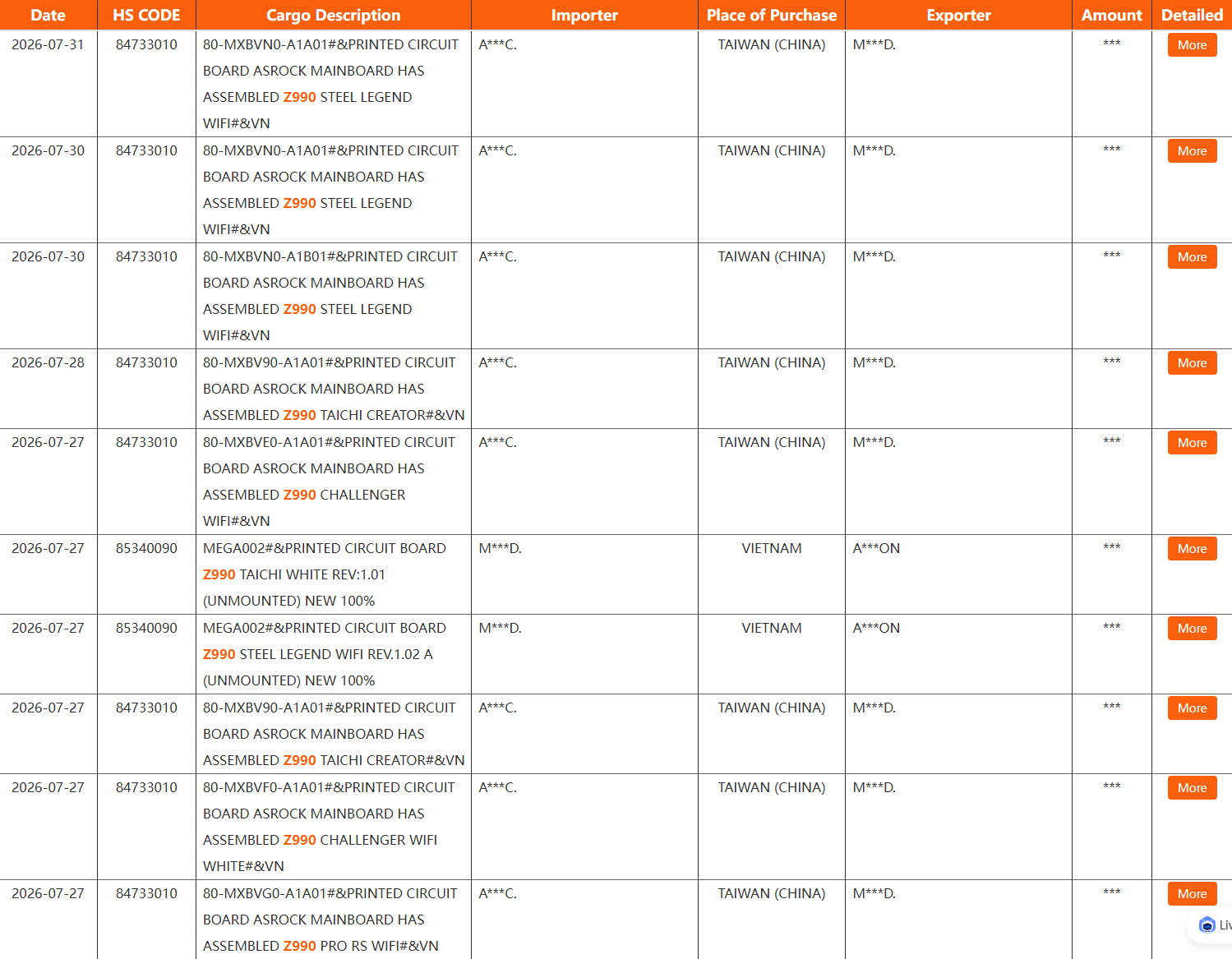
Just in the past few days, we've also seen a barrage of Z990 motherboards from ASRock surface in the NBD shipping database, as well as some entries in the SiSoftware database for a next-gen HP EliteBook X sporting an unknown Intel processor.
(Image credit: Tom's Hardware)
An increase in the number of leaks/rumors, especially those that are more than a known leaker writing up a post on X, usually points to an imminent launch. We've heard about Nova Lake for over two years, yes, but now we're seeing more concrete details. In addition to the shipping manifest, snapped slide, and SiSoftware results, we also saw two Z990 motherboards ourselves at Computex earlier this year, with a third rumored. We will not predict the Nova Lake release date here. However, the launch is coming soon. That much we're confident in.
Intel's typical release cycle for desktop CPUs
In order to establish a timeline, we first need to look back. We could go back far, but we're cutting the timeline short here at Alder Lake. That was when Intel finally moved off 14nm, following generation after generation of either an underwhelming launch or a delayed one, and it's most relevant to what Intel is doing today.
Intel desktop CPU release cadence
Generation
Announcement Date
Release Date
Alder Lake (12th-Gen)
October 27, 2021
November 4, 2021
Raptor Lake (13th-Gen)
September 27, 2022
October 20, 2022
Raptor Lake Refresh (14th-Gen)
October 16, 2023
October 17, 2023
Arrow Lake (15th-Gen)
October 10, 2024
October 24, 2024
Arrow Lake Refresh (15th-Gen Plus)
March 11, 2026
March 26, 2026
The timeline above is fairly straightforward. Intel has, short of 2025, launched a new generation of desktop processors in the fall every year for the past five years. This annual cadence was even more intense previously; 7th-Gen and 8th-Gen CPUs were both released in 2017, and 9th-Gen in 2018. Then, Intel took a year off and followed up with 10th-Gen in 2020 and 11th-Gen in early 2021. Keep in mind that we're talking about desktop CPU launches with a new microarchitecture here. Obviously, Intel has released a ton of other products in between the gaps.
The interesting bit about the timeline is actually the end with Arrow Lake Refresh. When we spoke to Robert Hallock earlier this year, he told us that a team that was "pretty much completely different" worked on Arrow Lake Refresh compared to Arrow Lake. That might explain the strangely large gap between Arrow Lake and Arrow Lake Refresh. Even looking at the Arrow Lake and Arrow Lake Refresh stacks side-by-side, it's obvious that a different mentality went into how they were positioned in the market. That team is in in-place now, and Hallock told us the team is "moving faster than we ever have in product, in release cadence."
Don't take Hallock's comments about Intel moving faster than ever at face value — he was probably being at least a little hyperbolic — but the sentiment is clear. Following the poor reception of Arrow Lake, Intel reorganized and set a new roadmap in motion that extends out to 2030, and now, that roadmap is being executed, starting earlier this year with Arrow Lake Refresh. That sets up Arrow Lake Refresh similar to 11th-Gen Rocket Lake, serving as somewhat of a stopgap before the next generation properly arrives (that is, thankfully, where the comparisons between Arrow Lake Refresh and Rocket Lake end).
Back to Nova Lake. Earlier this year at Computex, we saw two Z990 motherboards, one of which we confirmed was not a finalized unit. The complete development process takes generally four to six months for a motherboard, and you can add another two months or so on top of that for channel sales, as pallets of PCBs are loaded onto ships and swim across the Pacific Ocean. That was in June.
The shipping manifest that surfaced this week showed shipments in July for ASRock. Critically, it also shows shipments from two different sources: Taiwan and Vietnam. Given what we saw at Computex and the two different sources for ASRock, we're firmly past the early prototype and engineering validation stage of motherboard design. Assuming everything goes according to plan, that means Z990 motherboards should be ready to go on store shelves by no later than October or November.
Keep in mind that does not mean Nova Lake will launch in October or November, just that motherboards will most likely be ready by then. This aligns with what motherboard vendors told us earlier this year, with some brands pointing to Q3 but most to Q4 for a Z990 rollout.
Parsing the details about Nova Lake so far
Currently, there are two camps when it comes to when Nova Lake will release. Some say it'll arrive this year, likely in Q4, while others say CES 2027 in January of next year. As we wrote earlier in the article, we will not predict the Nova Lake release date. However, we will side with one of the camps here as more likely based on what we've seen so far.
Given everything we've seen, a late 2026 launch is more likely. The strongest evidence of that is the comment from Tan earlier this year, where the executive said Nova Lake is "coming at the end of 2026." The critical context is that Tan made that comment as part of his prepared remarks, preceding the actual financials that you hear in an earnings call. An earnings call is not a keynote, and making material promises you knowingly can't keep can land you in hot water.
Executives massage the truth all the time during earnings calls — that's half the reason there are prepared remarks ahead of the financials. However, that key detail about an end of 2026 launch isn't massaging the truth. It's a concrete claim devoid of weasel words and qualifiers. In addition, Intel's fiscal year aligns with a calendar year; when Tan said end of 2026, he meant end of 2026, regardless of fiscal or calendar year.
It's possible that something changed between now and January when that call took place. However, the timeline still lines up given the various motherboards that showed up between June and July of this year. At this point, Intel can slide the actual release date around by a bit, but not by months. Retailers aren't going to sit on pallets of motherboards with no home indefinitely.
The one wrinkle in this is the leaked slide you can see above, which claims Nova Lake will enter mass production in Q4, with a launch in Q1 2027. There are reasons to be skeptical of this slide, however. For starters, the slide doesn't say anything that hasn't been heavily rumored for months (sometimes even years) at this point: 52-core flagship, up to 288MB of bLLC, LGA 1954 socket, and multi-generation socket support. The strange bit is a mention of Hammer Lake at the bottom of the slide.
We've heard very little about Hammer Lake, and nothing that's passed muster for us to cover on Tom's Hardware. Even among the rumors, the launch has been pinned somewhere in the 2029/2030 range, if the lineup is even real to begin with. Regardless, Hammer Lake isn't what we'd expect to see next to Razor Lake — the generation rumored to follow Nova — and certainly not what we'd expect to see under a "Q4 2027+" badge.
That doesn't mean the slide is fake; it doesn't appear to be fake. There's some very critical context missing from it, though. It's a Chinese source, but did it come from an OEM? A distributor? A retailer? The validity of the slide changes dramatically depending on that. Further, we're only seeing maybe half of a single slide here. There's too much context missing to take this single slide and run with it as concrete truth.
At the very least, it fares poorly against prepared comments made by Intel's CEO, motherboards we've seen (and held) ourselves, and have circulated through photos online, and strong indications from Intel's motherboard partners that they'll be ready for a launch in Q4. Add on top of that the fact that Intel took 2025 completely off for new desktop launches (and its usual cadence of launching in the fall), and a Q4 rollout of Nova Lake looks far more likely.
Likely isn't the same as confirmed. We're still awaiting details on Nova Lake from Intel proper, and hopefully those will arrive soon. Given the anticipation Intel has already built around Nova Lake without a single performance claim or spec shared, we'll have a lot to talk about.
A new report claims Chinese DRAM champion CXMT is eyeing production of 3D NAND memory. Reuters reports, citing three people familiar with the company's plans, that CXMT intends to build a 3D NAND R&D production line at its second manufacturing facility near Beijing. There is no information on when the experimental production line will become operational, though, given that CXMT's second Beijing fab has not even broken ground yet, the line is at least two or three years away. In addition, the memory maker has established a research institute in Beijing that has NAND flash development among its projects, according to one source. CXMT has not formally confirmed any 3D NAND initiatives, so the information should be taken with a grain of salt.
For now, there are no details on CXMT's 3D NAND architecture, number of active layers, process technology, expected performance, or production capacity. Nevertheless, the report claims that CXMT has already discussed its NAND ambitions with prospective customers. One of them is said to be a recently established company that plans to use CXMT-made NAND devices in storage products aimed at AI and supercomputing applications.
It remains to be seen whether CXMT's 3D NAND project will eventually progress to high-volume manufacturing, but if it does, the initiative will take CXMT beyond its traditional DRAM specialization and directly into YMTC's territory. Until recently, China's two major memory producers had focused exclusively on their 3D NAND and DRAM realms where they have achieved quite a success. Yet, it looks like both companies want to become one-stop shops for DRAM and NAND — just like their bigger rivals Micron, Samsung, and SK hynix — as YMTC is reportedly exploring DRAM production.
While CXMT's alleged plan to build 3D NAND may look somewhat logical from business diversification point of view, it does not make a lot of commercial sense for now.
Or China's industrial policy?
CXMT is China's dominant DRAM producer and posted $22.41 billion in revenue and $11.57 billion in net profit in the first half of the year after years of bleeding money. Despite obvious success, the company is still considerably smaller than the Big Three memory suppliers, which means it has plenty of room to expand in the industry where it already has experience, process technology, fabs, and customers. Furthermore, AI gives CXMT an obvious reason to focus resources on advanced DRAM as well as HBM3E, which are arguably much more strategically valuable products than commodity 3D NAND.
That said, for CXMT, allocating resources to 3D NAND, which requires completely different process technologies, manufacturing expertise, and equipment, does not make much economic sense. However, from the Chinese government's perspective, turning CXMT into the country's second major 3D NAND producer fits almost perfectly within its semiconductor self-sufficiency plans.
CXMT was created with Hefei government money (which held a 37% stake in the company during its IPO) and received support from China's Big Fund, which means that federal and local governments retain control over the company and may shape its strategic decisions, which is exactly what they do. Whether or not CXMT can indeed become a decent 3D NAND maker is an entirely different question.
The memory chip that makes a router remember how to be a router is a world away from the sleek GPUs that are attracting eye-popping investments and alarming valuations, as well as sending stock markets shooting upwards. They’re small, historically have been cheap, and are based on technology that has been around for years.
But despite being a world away from GPUs, the price of these often overlooked chips is skyrocketing, thanks to the all-encompassing memory price crisis caused by the AI boom.
While public and press attention has focused on the expensive chips, there’s an equally large impact beginning to be felt on older, less attractive memory chips. HBM is vital for AI accelerators, while DRAM and high-capacity NAND are being swallowed up by rapidly expanding data centres. AJune report from Morgan Stanley reckons memory prices have risen more than sixfold over the last year, breaking with decades in which memory became steadily cheaper as production increased.
An increase in prices will have an impact on the tech we use day in, day out. NOR flash is commonly used to store boot and program code, and is a core part ofautomotive, industrial, and networking equipment. SLC NAND is deployed across a number of uses because of its reliability and endurance when placed in embedded hardware with long lifespans.
Both are vital. And both are being overlooked in favour of higher-margin chips — pushing the supply crunch to tech that previously never faced any issues. “The SLC NAND market is probably under a billion dollars a year,” said Jim Handy, a semiconductor and SSD analyst at Objective Analysis, in an interview with Tom’s Hardware Premium. That tiny scale adds up to a big problem, because it disincentivises any new investment.
“What you've got going on is a purely economic phenomenon,” said Handy. Hyperscalers and cloud providers are “all trying to outspend each other”, pouring unprecedented sums into semiconductors to build AI infrastructure. That willingness to spend big means the most profitable customers naturally move to the front of the queue.
Companies including Nvidia, Broadcom and Marvell need huge amounts of semiconductor manufacturing capacity for chips destined for AI systems. “They’re sucking up all of the wafers,” says Handy. “And then the companies who make NOR flash and SLC are having a hard time getting wafers to build their product, and so they have to raise prices.”
The problem is even starker in the NAND market. Bryan Ao, research manager at TrendForce, told Tom’s Hardware Premium in an interview that major NAND manufacturers, including Micron, Kioxia and SK Hynix, have been cutting the wafer capacity devoted to SLC because they can make considerably more money using it for newer NAND technologies. Ao estimates that a 12-inch wafer devoted to mainstream NAND can ultimately generate close to $20,000 in revenue. Use the same space to produce SLC and the figure is closer to $6,000 to $8,000.
Even if they wanted to, smaller SLC suppliers in China and Taiwan can’t just spin up new production. Lead times for some semiconductor manufacturing equipment have stretched to between 12 and 15 months, said Ao. The result is what he calls “severe undersupply”.
Big prices, big returns
BNP Paribas forecasts the average NAND price will hit $279.50 per terabyte during 2026, up from $73.10 in 2025. JPMorgan expects the memory shortage to persist for at least another two years, with customers getting just 70% to 80% of their orders fulfilled. TrendForce says manufacturers areshifting capacity towards advanced, higher-value memory products, with mature processes increasingly squeezed as a result.
There are some alternatives available.Kioxia says its serial SLC NAND is an alternative to NOR flash. But moving an existing industrial or networking product onto a different chip can itself require engineering work and qualification. Nor is there much incentive for memory manufacturers to fix the problem by building new SLC capacity – which means manufacturers are unlikely to invest billions in capacity whose useful market may disappear. That creates an unusual trap: there may not be enough demand to justify new factories, but there is still more demand than the shrinking supply can satisfy.
Hardware manufacturers can eat the higher component bill and accept lower margins, or pass it on. “We'll just have to either have lower margins, or we'll have to raise the prices to the consumer,” Handy said.
An ongoing issue
The problem is one that seems to have no solution – at least in the short term. Ao expects memory prices to remain high over the next five years and does not expect them to return to 2023 or 2024 levels. That broadly fits with the structural nature of the shortage identified by TrendForce, which saysthere are no significant capacity expansion plans for NOR flash or SLC NAND.
Handy sees one possible way out, but it is hardly reassuring. “As long as the race between the hyperscalers keeps up to spend, then it will continue to be an issue,” he said.
Handy compares the AI buildout to the internet infrastructure boom of the late 1990s. Rather than enough capacity eventually arriving to restore balance, he thinks spending may simply overshoot what the market can economically support.
“I'm expecting the same kind of a thing to happen here that we've got too many people spending too much money on AI, and not really making any return on it yet,” he said.
Until then, the least exciting memory chips in a computer may become some of the hardest to replace. Or, as Ao put it: “Pretty much we have to get used to this high price, no matter which segment of memory.”
A modder by the name of MAAN has reportedly gotten Nvidia DLSS 5 working in a browser window with an interactive demo, according to a report by VideoCardz. The developer said the technique also works on macOS. The demo is hosted on Cloudflare Workers with some default scenes, starting with "Cowboy Gramps," with a variety of adjustable settings and a comparison view.
DLSS 5 running in the browser with #webgpu And yes it works on MacOS too. Try the the live demo here https://t.co/frqdwHzeDv You can also try it with your own models #WebDev #AI #threejsSeptember 16, 2026
DLSS 5 is Nvidia's neural rendering feature used to improve graphical quality using AI. Nvidia launched it earlier this month for NBA 2K27, the first game with official support for the technology. DLSS 5 is officially RTX 50-series only, aside from GeForce NOW. The DLSS 5 DLL file has since been pushed onto RTX 40- and RTX 30-series, and even AMD hardware. There is also a mod to unlock it for RTX 20-series hardware.
(Image credit: 2K)
According to MAAN, the demo uses model weights extracted from a leaked DLSS 5 library file. They did not know whether this file differs from the official one. Normally, Nvidia offers DLSS through its NGX interface or the Streamline SDK on DirectX and Vulkan. The documentation does not list WebGL or WebGPU, the outlet noted. MAAN plans to publish the source code on GitHub this weekend.
In our quick test of the demo on an RTX 40-series desktop, the 3D viewer was smooth to rotate, but each DLSS 5 render took a second or two and was notably slow in live mode.
MAAN said that the demo is DLSS 5's neural network reimplemented using WebGPU compute shaders. The weights are around 147MB, with a JavaScript runtime of around 1MB compressed. WebGPU has no trouble running on macOS, so the only surprise here is the DLSS part. Normally this needs an RTX GPU and Nvidia's driver, but a WebGPU implementation would not inherently require Nvidia hardware.
The outlet suggested the approach could suit architecture, 3D model previews, and other work where real-time speed matters less. MAAN's X post said users "can try it with your own models" and the demo's page accepts common 3D formats by file or drag-and-drop. Due to the technology's current restrictions, a browser demo is a way for more people to see the effect on a model without owning the game or appropriate hardware. Nvidia has said official RTX 40-series support is coming.
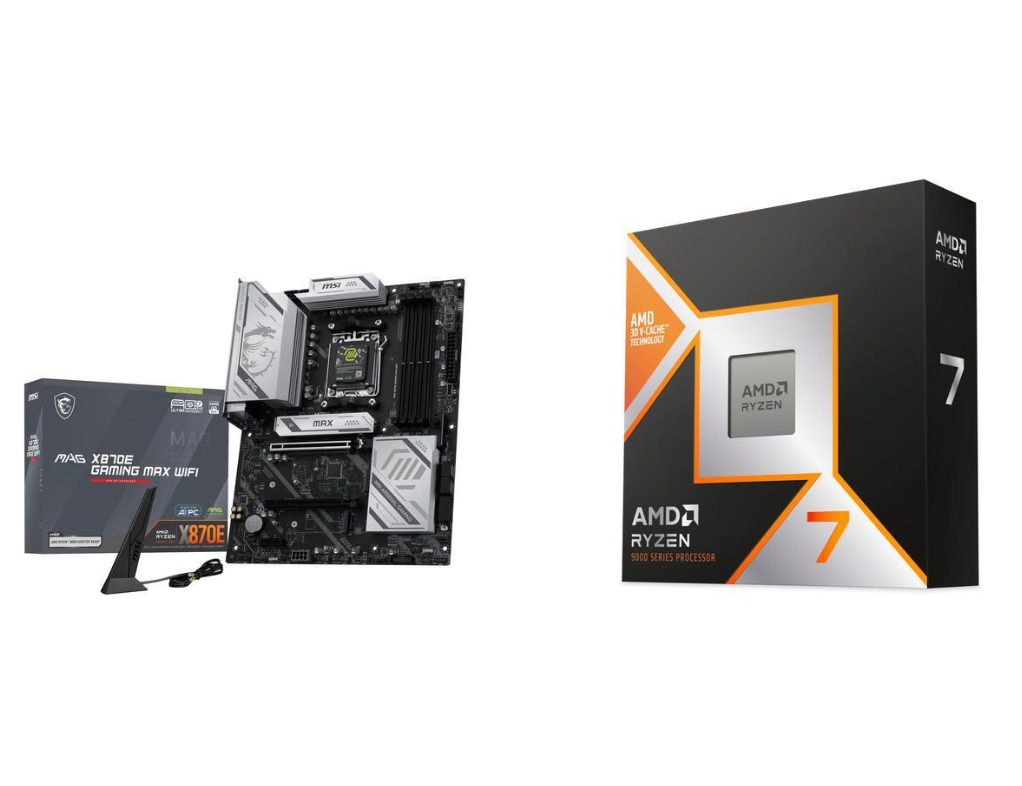
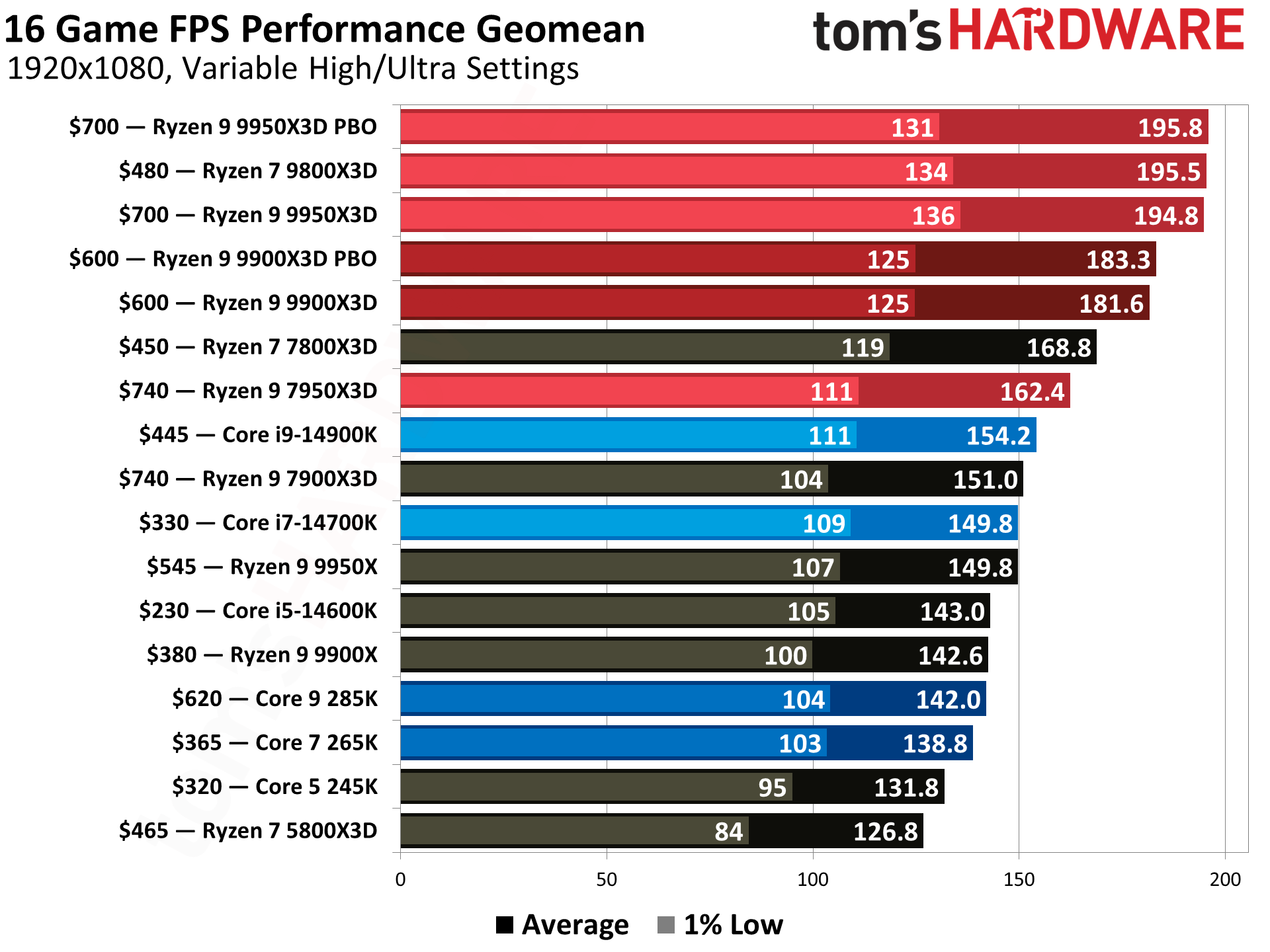
First, and the star of the show, is one of the most popular and fastest current-generation CPUs for gaming, the Ryzen 7 9800X3D. This 8-core/16-thread Zen5-based processor has a base clock of 4.6 GHz and a max boost of 5.2 GHz, which is plenty of speed for any task. The X3D variant's 96MB of L3 cache helps with gaming (among other things), making it one of the fastest gaming CPUs available. It is also a well-rounded performer that excels in games and suits most applications. This combo also includes a free Cooler Master Elite Liquid 240 AIO (a $80 value), which easily handles the 120W processor.
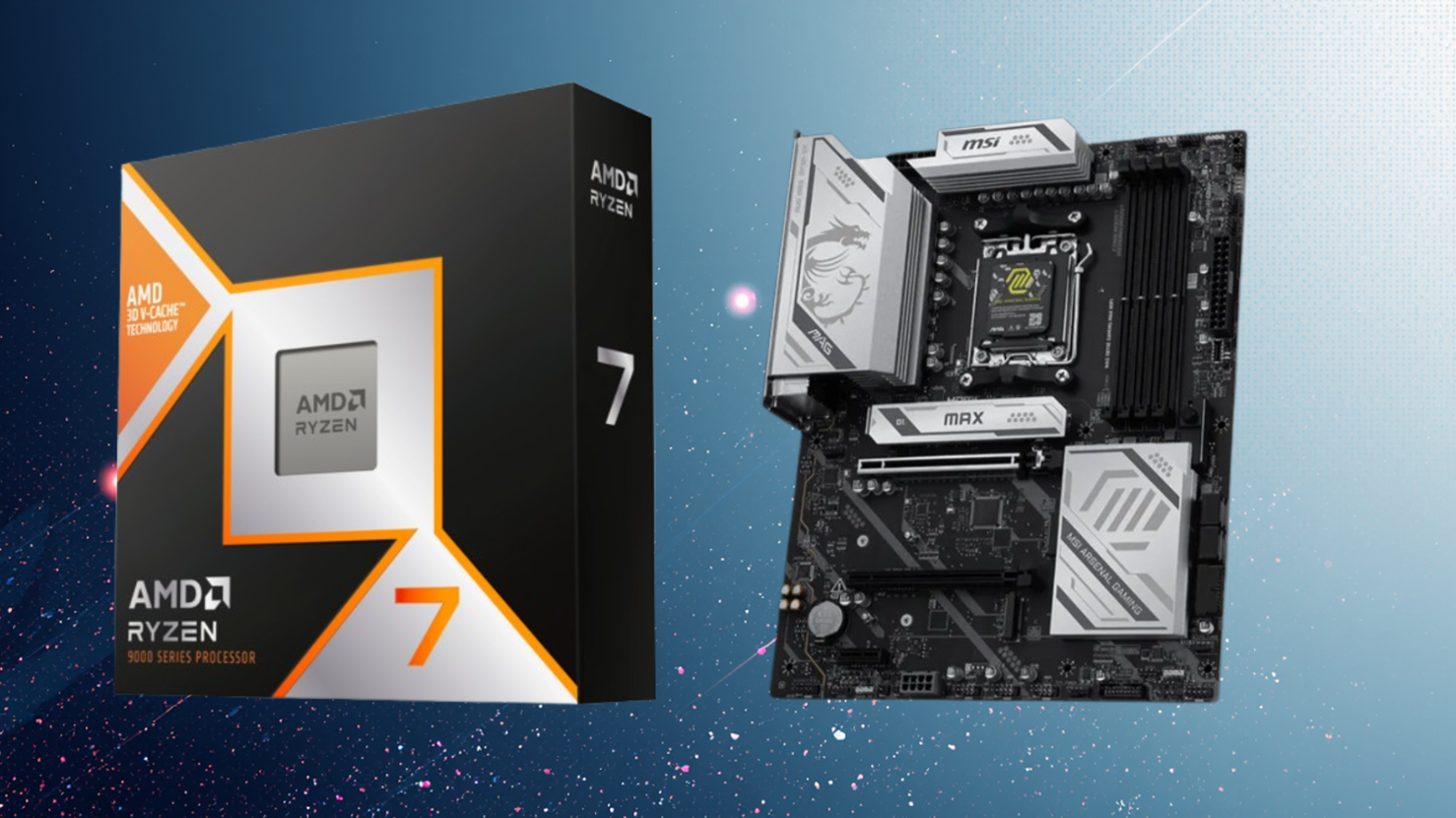
Snag a great deal on a AMD Ryzen 7 9800X3D in this 2-item Newegg combo. You get a quality MSI X870E motherboard with plenty of connectivity, and the star of the show one of the best gaming CPUs aroundView Deal
The combo includes the MSI MAG X870E Gaming Max Wifi motherboard, a solid mid-range refresh board with all the platform's latest features. You get fast networking with integrated Wi-Fi 7 (160MHz) and 5 GbE, DDR5 support up to 8200 MT/s, ample storage options with three M.2 sockets (one PCIe 5.0) and four SATA ports, and 10 USB ports on the rear I/O, including a fast 40 Gbps Type-C port. Plenty of connectivity. It also looks good with the black PCB and silver heatsinks and can blend into most build themes, as long as you don’t want a solid black or solid white aesthetic. I didn’t review this specific motherboard, but I do like most of MSI’s X870E offerings.
Tom's HardwareTom's HardwareTom's Hardware
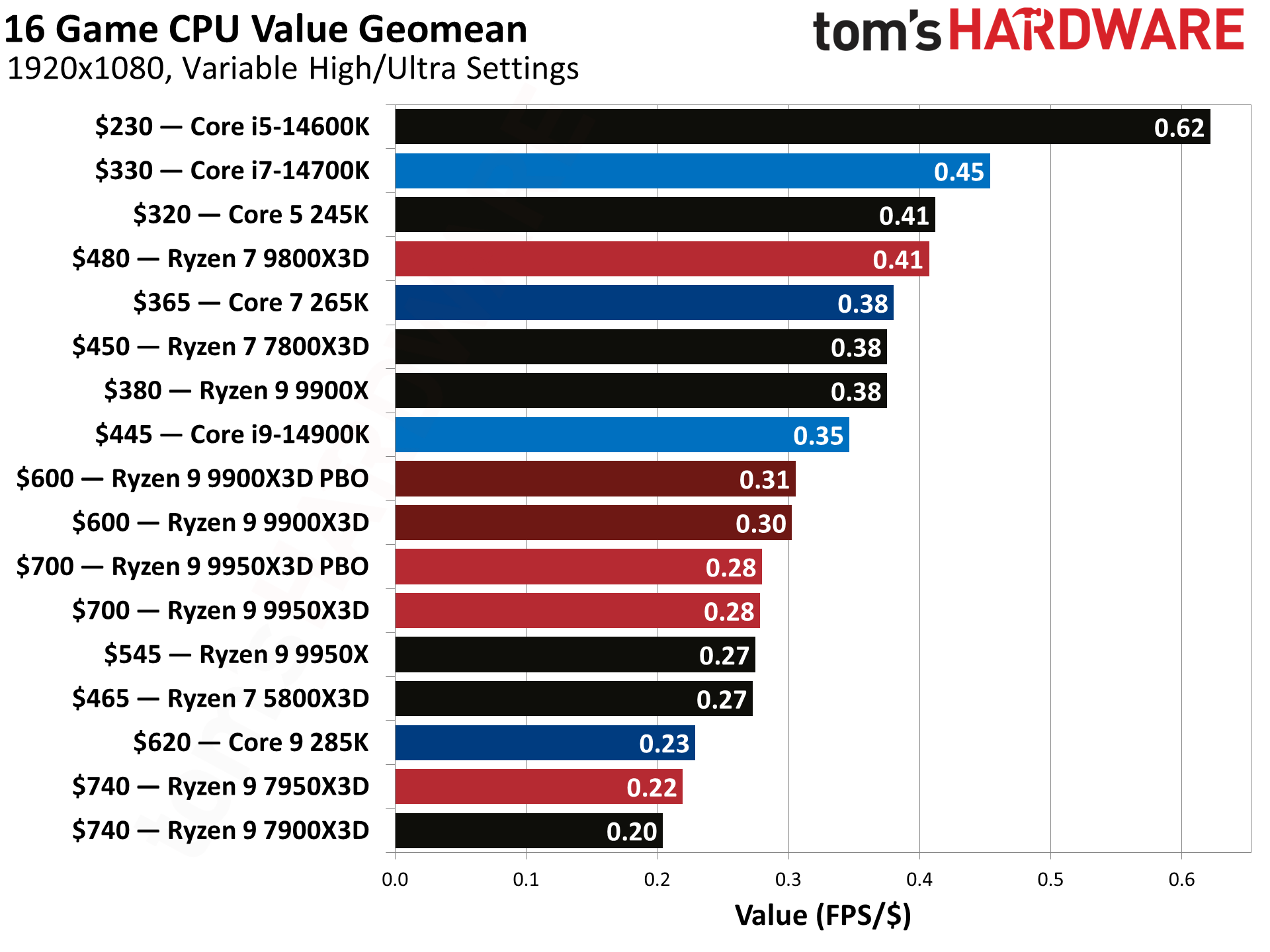
Newegg combos are getting scarcer lately. Where there were a few gems per week, there are now maybe one or two that are truly worthwhile, and this is one of them. For just $578, this combo nets you one of the best gaming processors around for only $320 (as cheap as we’ve seen it by far), a solid MSI X870E-based motherboard, and a couple of freebies with the Cooler Master AIO and AMD game bundle. If you're thinking about updating or buying a new AM5 rig and need the processor, I'd jump on this deal before it expires.
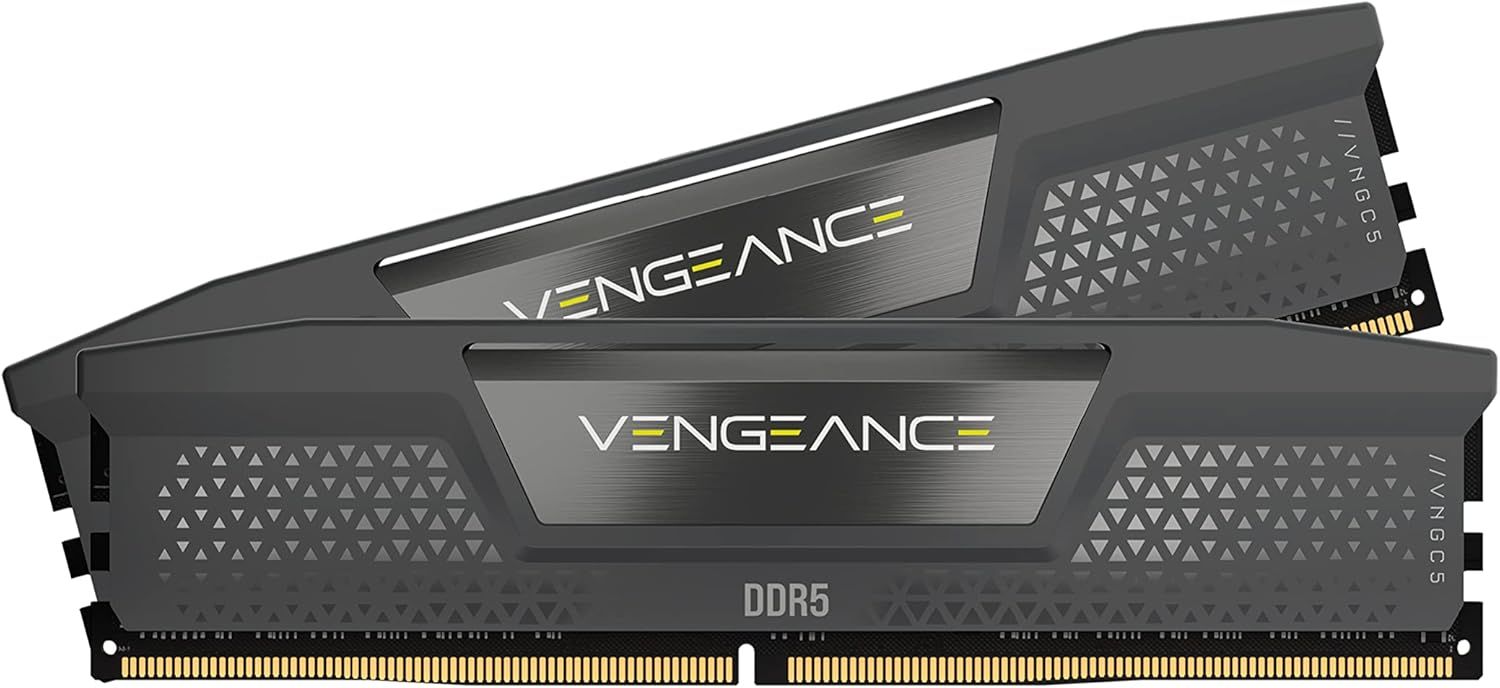
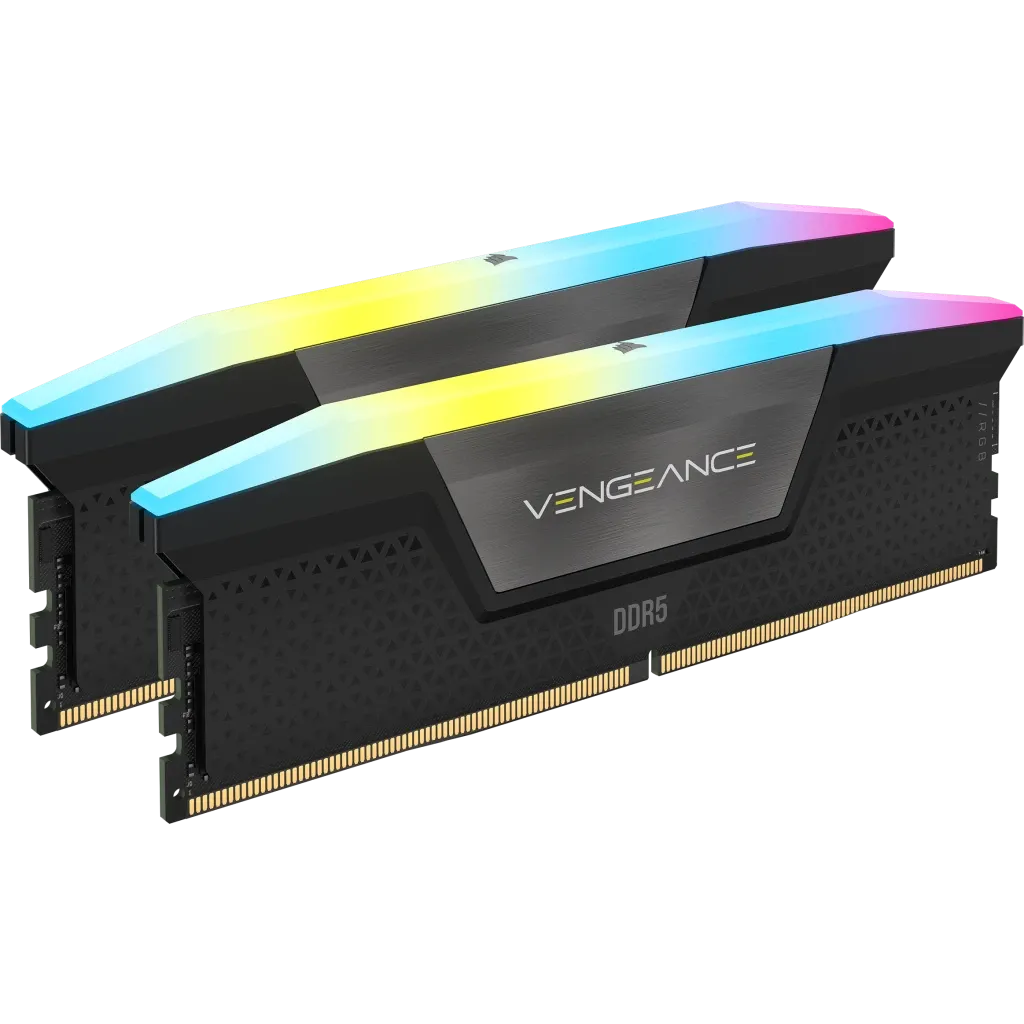
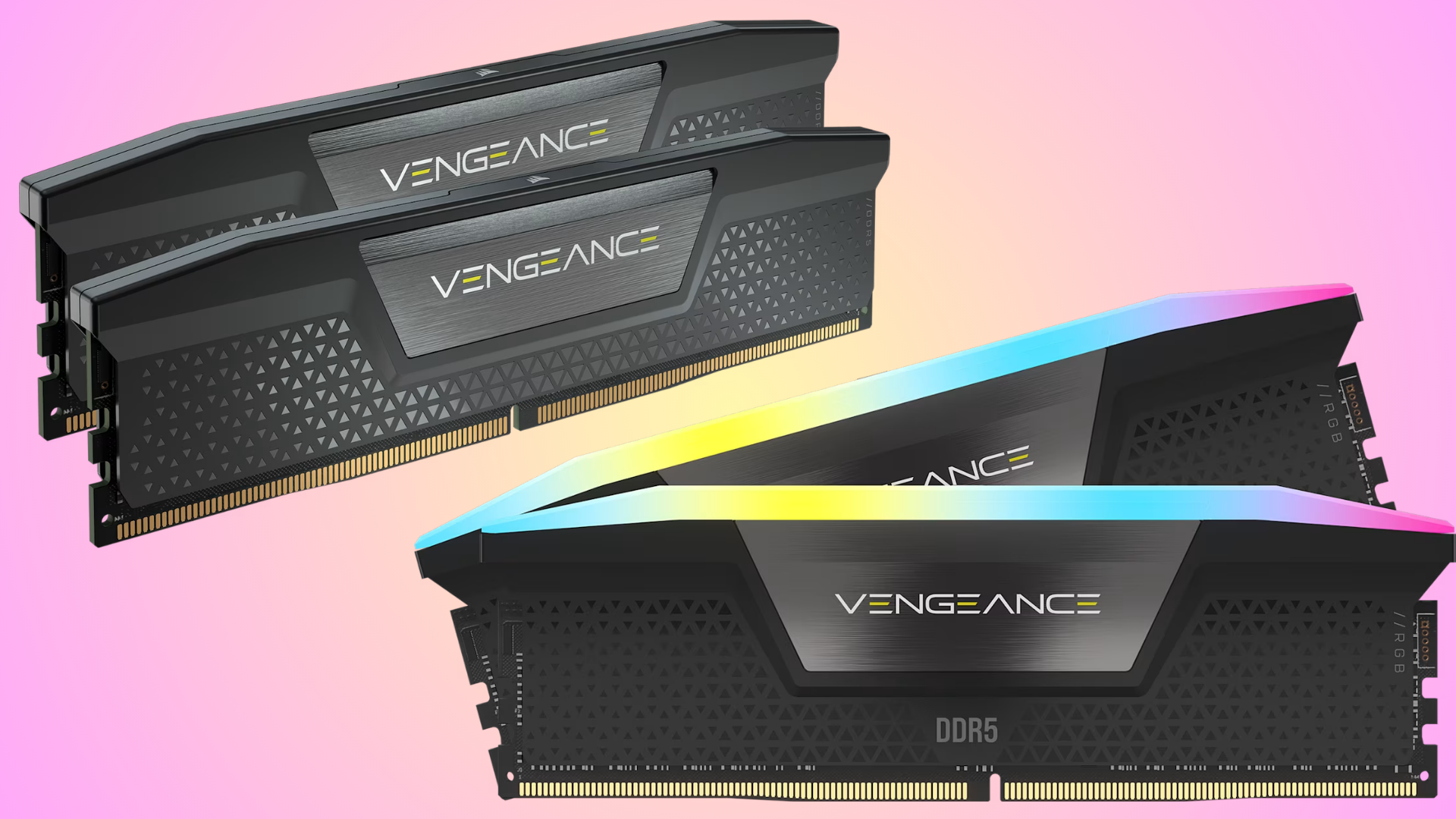
We've talked about the RAMpocalypse extensively, but there's seemingly no end to the continuing rise in memory pricing at the moment. Luckily, Corsair is keeping its store stocked with some gamer-friendly Vengeance RAM, with a 32GB DDR5-6200 set for $419.99, or a slower option for $409.99, offering the best price on these kits in the current market.
No, we're not talking record-low pricing here, but memory prices aren't a joke right now. AI is pushing them higher and higher, and after $400 for 32GB DDR5 was breached recently, you won't find better-priced DDR5 RAM elsewhere. You'll need a kit like this if you're planning a new gaming PC build or upgrade.
The Corsair Vengeance range continues to be a popular option among gamers, and while we've not given this particular kit a test, the similar spec'd Corsair Vengeance RGB DDR5-6000 C36 performs well. You're getting even faster RAM here, at 6,200 MT/s. It isn't the fastest, but this is priced right in the middle of slower kits that range from 4,800 to 5,600 MT/s, so you're at least getting better bang for your buck.
This particular kit comes with two 16GB modules, with those rated speeds of 6,200 MT/s. It's significantly faster than older DDR4 RAM modules, which typically cap out at 3,600 MT/s. It has CAS latency and memory timings of 36-46-46-100, comes in a black colorway, and has a solid aluminum heat spreader to keep things cool. 6,200 MT/s is a good speed for a gaming RAM kit, and while you can get faster, you'll typically pay more.
That said, every dollar counts when gaming PC builds can go for thousands more than they did last year. You can save $10 and get this DDR5-5600 Corsair Vengeance 32GB kit for $409.99. Like the DDR5-6200 model above, this has two 16GB modules, but with a slower speed of 5,600 MT/s, with CAS latency and memory timings of 40-40-40-77. It also comes with adjustable RGB lighting, a feature missing on the spec above, if you want a more colorful kit. You're probably better off spending the extra $10, but if you're building a mid-tier or budget PC, the speed difference isn't likely to matter as much, but any extra savings might.
The $419.99 price for this 32GB Corsair Vengeance DDR5-6200 RAM is the best price you'll find for RAM with these speeds and capacity, although you can go a little cheaper with the $409.99 DDR5-5600 kit instead. Corsair even has cheaper, and slower RAM, but these two offer the best value for performance that you'd expect for a DDR5 gaming PC build. You'll want to grab this deal while you can before the RAM prices inevitably go up even more.
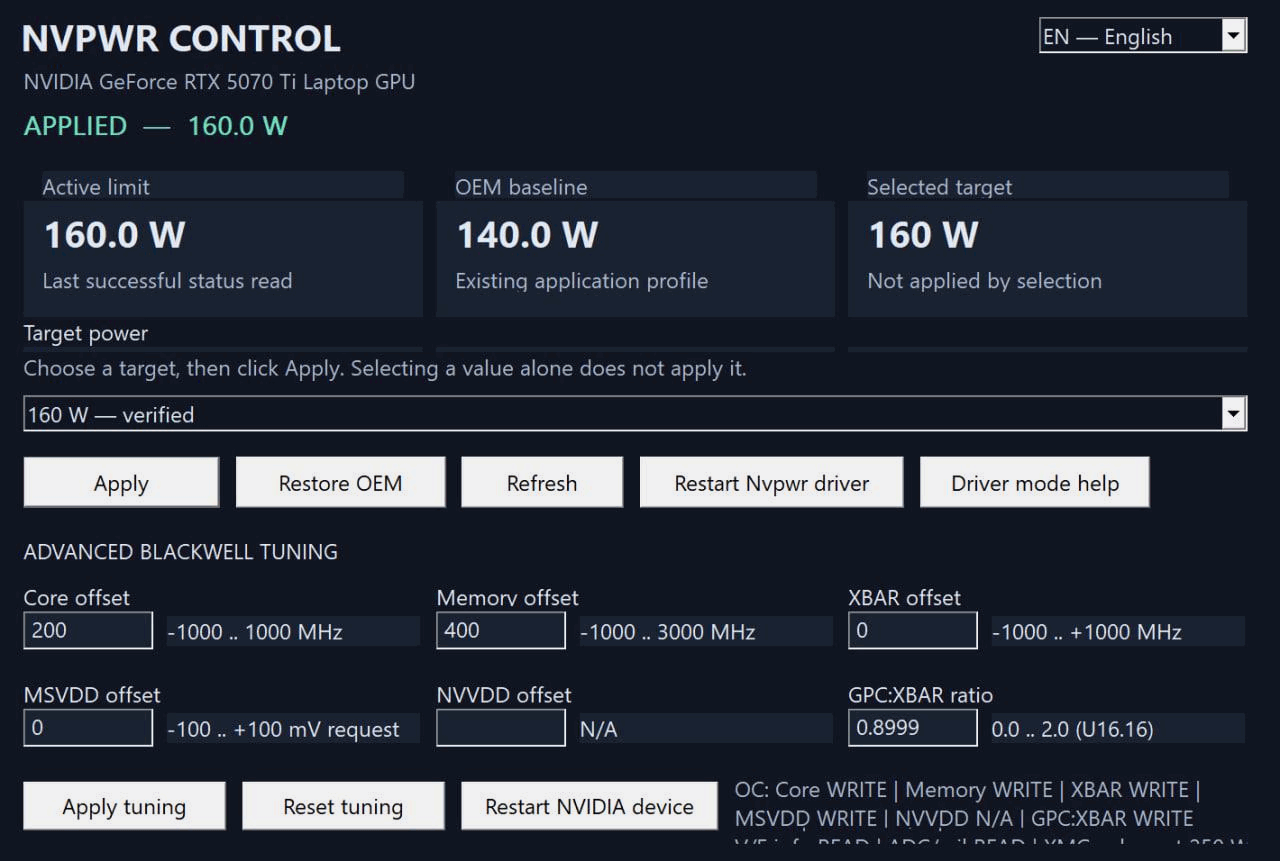
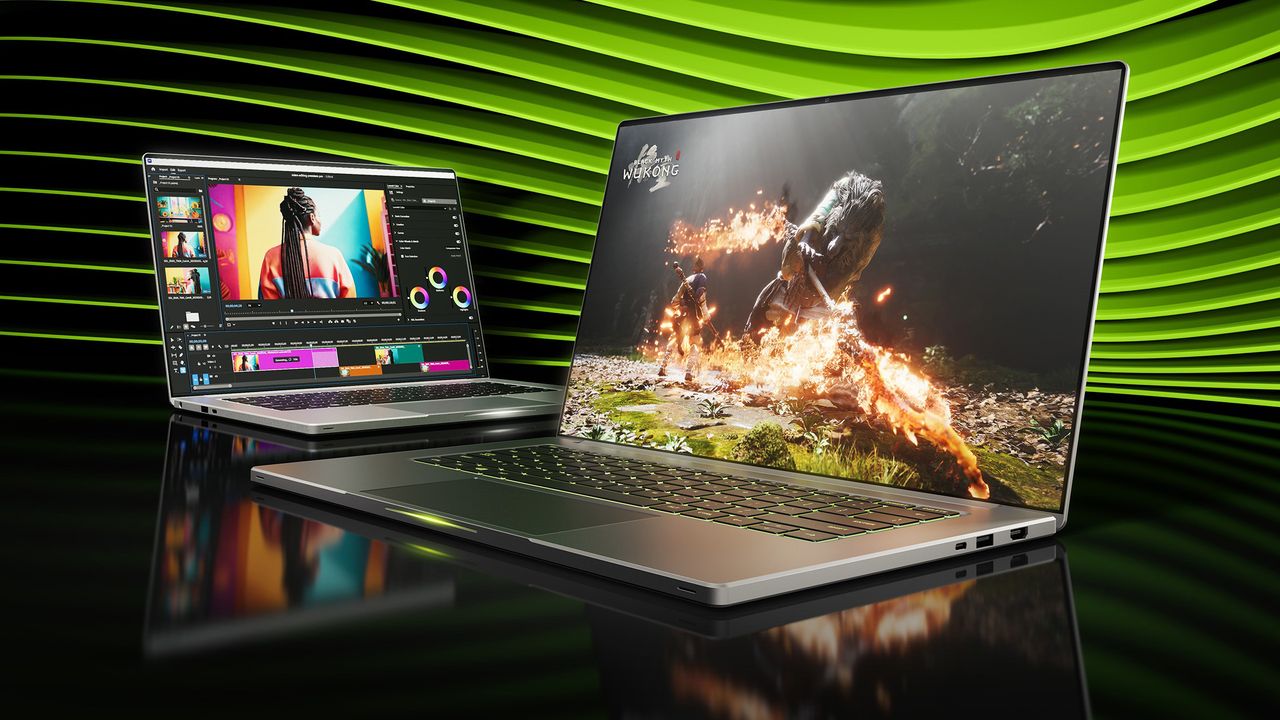
Folks with Nvidia-based gaming laptops can now use a new tool called NvpwrControl to unlock additional performance from their assuredly power-limited mobile GPU, as long as they're willing to accept the risks of cranking their GPU power limit by as much as 40 watts. The tool, spotted by VideoCardz, is available for download on GitHub, and it is labeled as 'experimental', so you'll want to be very sure you're willing to damage the reliability, if not the lifespan, of your fancy discrete GPU gaming laptop before using it.
NVIDIA GeForce RTX 50 Series Laptop GPU Power Limits
GPU Name
GPU Power (varies per laptop)
Dynamic Boost Max
Mod Max (Experimental)
GeForce RTX 5050 Laptop
35 - 100W
15W
140W
GeForce RTX 5060 Laptop
45 - 100W
15W
140W
GeForce RTX 5070 Laptop
50 - 100W
15W
140W
GeForce RTX 5070 Ti Laptop
60 - 115W
25W
180W
GeForce RTX 5080 Laptop
80 - 150W
25W
225W
GeForce RTX 5090 Laptop
95 - 150W
25W
225W
In Nvidia's case, the GPU models (aside from the RTX 30 Series) don't match at all between laptop and desktop, but even with the smaller size of the laptop GPUs, the chips are still sharply limited in performance by their stringent power limits. These limits top out at 150W, with an extra jolt, usually 25W, available from Dynamic Boost if the CPU isn't heavily loaded. This is, frankly put, not enough power for even the mobile GeForce RTX 5070 Ti to stretch its legs, to say nothing of the GeForce RTX 5080 Laptop or GeForce RTX 5090 Laptop. In high-intensity gaming situations, these GPUs can score pretty similarly due to having the same power limit.
That's what makes this tool attractive. By cranking the power limit, you can give these power-limited GPUs a performance boost. The developer doesn't provide any benchmarks, but I can say from experience that testing power limit adjustments on a power-limited GPU can give nearly linear performance gains, meaning that increasing the power limit from a stock 140W all the way up to 180W could potentially give a GPU performance uplift in the neighborhood of 25% or more, although it is impossible to verify this without testing.
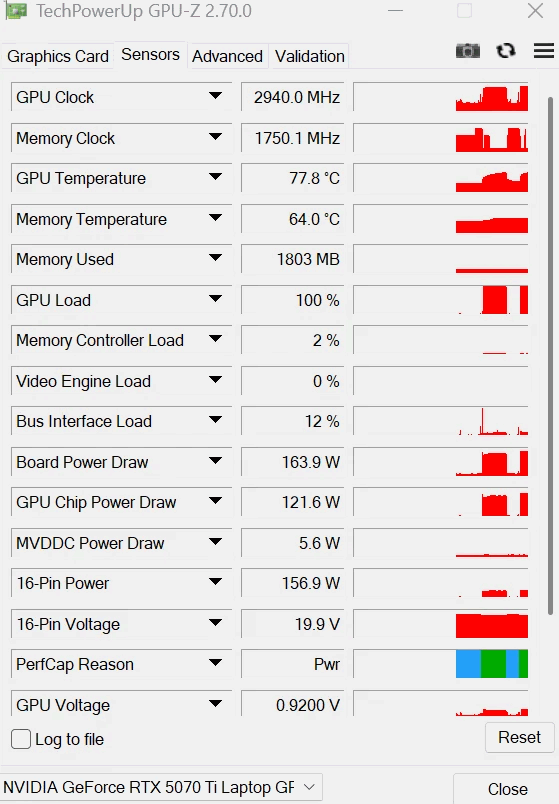
There are quite a few caveats to this utility, though. For one thing, even the author describes it as 'experimental ', and for another thing, it's clearly AI-generated in the largest part. The developer is called "LevinAI", after all, and there are the hallmarks of generative AI all over the GitHub repository. Still, there are a few reports on both GitHub and Reddit suggesting that users have been testing it, and the developer claims that it works on his GeForce RTX 5070 Ti laptop, posting the proof below.
The developer's screenshot of GPU-Z, showing a board power draw of 163.9 watts on a GeForce RTX 5070 TI Laptop, well above the stock 140W cap. (Image credit: /u/Ecstatic_Hamster2208 on Reddit)
Other notable qualifiers include that it only supports Blackwell GPUs for now, and it only enables power controls when it can recognize the power policy layout and OEM baseline. If your GPU already ships with a wacky power configuration, this tool may not work for you. It's also not verified to work on every brand of laptop nor every model of GeForce RTX 50-series GPU, so we absolutely wouldn't try this unless you're willing to replace your Blackwell-based laptop.
The partially AI-generated project description (likely chosen as the author's native language appears to be Russian) explains that the developer investigated numerous layers of the software stack on top of the GPU to see where the power limit could be modified. The controls that NVIDIA exposes generally won't let the user raise the power limit above the value set by the OEM for fear of potentially damaging the hardware, since the power delivery and cooling mechanisms were likely not designed with the higher power draw and thermal output in mind.
The solution he found was apparently to modify a low-level NVIDIA power policy that isn't normally exposed to end-users. He says, "One of the important findings was that the power-management chain contains internal policy values that are not exposed through the normal consumer power-limit controls. This is the path that eventually led to a working experimental implementation." However, due to the method employed, the tool does require the user to disable Windows driver signature verification, which is yet another 'gotcha' of the mod.
As amusing as it is to see that the developer left his AI assistant's instructions for constructing his GitHub repository (which he didn't follow), it's a reminder both of the reliability concerns around "vibe"-coded software in production as well as of the incredible potential of AI software development. Since we spotted the story on this utility, the developer has already bumped the version from 1.5.0 to 1.8.0 with a new release on GitHub, suggesting that the pace of improvements is extremely rapid.
A few users on Reddit, where the author posted the above screenshot, lambasted the developer for taking ownership of what they claim is "100% AI generated work" and also for not structuring his code repository correctly (since all of the source is packed in a ZIP file, not properly viewable on GitHub). However, the majority of other users seem enthusiastic about his work, and several have already posted proof that it seems to work, with huge gains in 3DMark and other benchmarks.
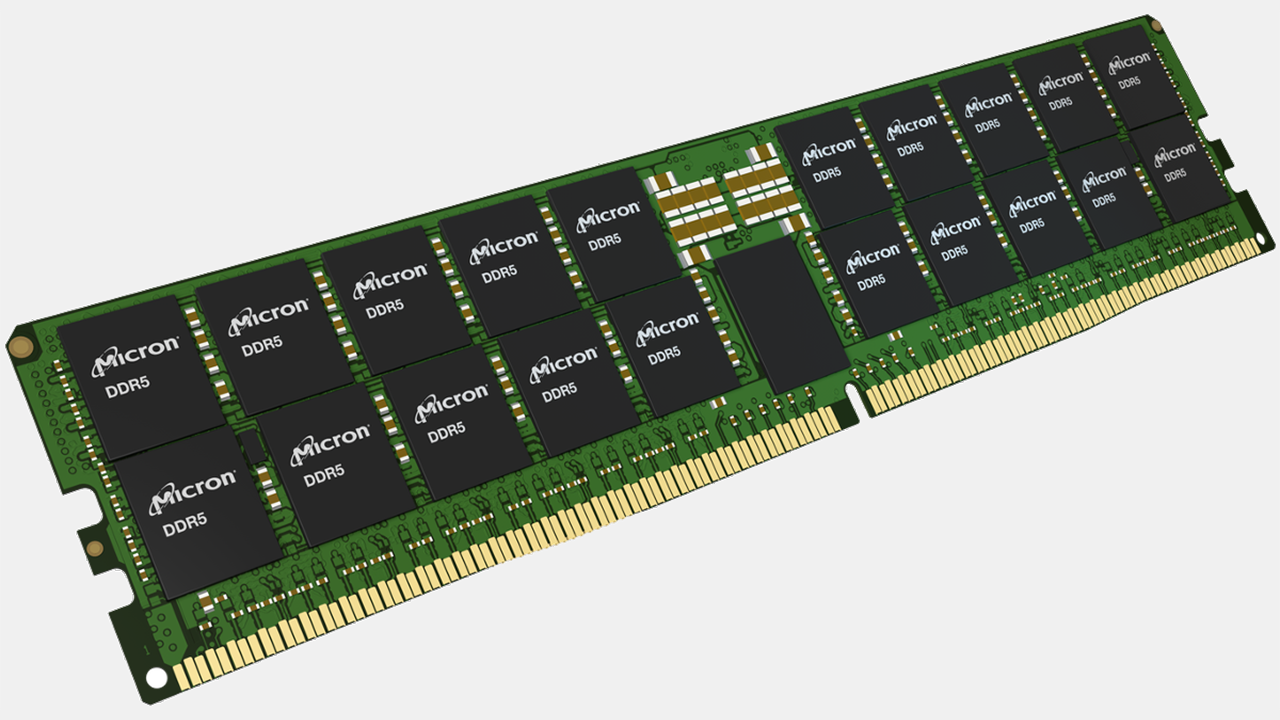
Micron this week introduced its first 512GB DDR5-9200 memory module that is designed for servers used for applications that demand a lot of memory. The new modules — which are currently being validated by AMD and Intel with their next-generation server platforms — will enable server makers to build machines with up to 12TB of fast memory. What remains to be seen is the price of such modules and servers.
To build its 512GB DDR5 RDIMM, Micron uses advanced packaging that stacks multiple DRAM dies vertically and connects them using through-silicon vias (TSVs). The company does not disclose which memory devices and how many of them it uses, but claims that a single 512GB RDIMM consumes over 60% less operating power than four 128GB modules — based on 16.0W for one 512GB module compared with the 44.2W total for four 128GB modules — which suggests that we are dealing with fairly advanced ICs.
Micron's 512GB module is not the industry's first 512GB DDR5 RDIMM — that achievement belongs to Samsung — but it is certainly the industry's first 512GB module certified to operate with a 9200 MT/s data transfer rate with standard 1.1V voltage (which implies on usage of Micron's 16Gb DDR5-9200 devices made on its 1γ (1-gamma) fabrication process that uses EUV lithography and consumes 20% less power than predecessors, though we are speculating).
Truth to be told, 512GB DDR5 memory modules are rather niche products, which is perhaps why Samsung's 512GB RDIMMs formally introduced in 2021 have not become widespread even after AMD and Intel introduced processors with over 100 cores. Micron positions its 512GB DDR5 RDIMM primarily for servers running analytics, in-memory databases, simulations, virtualization, agentic AI, and other workloads demanding high-core-count processors and plenty of memory. As processors with 200 or more cores emerge, 512GB modules may become more relevant as 12TB of memory in a server running two 256-core CPUs means 24GB per core, which no longer looks particularly excessive for applications like in-memory databases, analytics, or caching.
Micron claims that in memory-constrained Spark Support Vector Machine (SVM) analytics workloads, systems featuring 512GB memory modules can provide up to 1.4 times the performance of configurations equipped with 256GB DDR5 modules, though the company does not disclose how much memory in total these systems use. Micron also says the higher-capacity memory can increase throughput and concurrency for memory-intensive database and caching applications such as RocksDB and Redis.
AMD and Intel are working with Micron to qualify the new modules for their upcoming server platforms. Micron plans to begin volume production of its 512GB DDR5 RDIMMs sometime in the second half of 2027 and intends to align the schedule with customer requirements.
One of the more pressing questions about Micron's 512GB DDR5-9200 memory modules is their price. A 256GB DDR5-6400 RDIMM currently retails for around $19,000. Given the unique proposition that 512GB modules have for memory-constrained applications, such modules can cost significantly more than 256GB memory sticks, which will not help their broad adoption.
With the ongoing memory shortage, smaller smartphone and laptop manufacturers are reportedly looking at new ways to tackle the problem. While some are changing how they design their products, others are placing orders months in advance and are even forced to test incoming memory chips to make sure they are not fake. A Reuters report suggests that more than the price, availability has become a bigger problem, with manufacturers struggling to secure enough chips in the first place. Still, device makers like Fairphone say that memory now makes up nearly 60% of a device's bill of materials.
Back in July, memory maker SK Hynix’s CEO Kwak Noh-jung said that 2027 will be the "worst year" for the ongoing memory shortage and expects the memory crunch to last until 2030. For smaller manufacturers, however, simply paying more for memory isn't always enough. The situation is particularly difficult for budget-oriented phones and laptops, where memory makes up a much larger portion of the overall product cost.
According to Raymond van Eck, CEO of repairable-phone maker Fairphone, memory can account for almost 60% of the bill of materials in phones costing around $400. That itself is worrying, as a recent Counterpoint Research report expects global smartphone shipments to fall 13.9% this year to 1.08 billion units, marking the largest annual decline on record.
Finnish phone maker Jolla has designed two motherboard versions, allowing it to switch between combined packages for discrete chips depending on availability. The company is also testing samples from every batch it receives to ensure new memory isn't being sold as refurbished hardware.
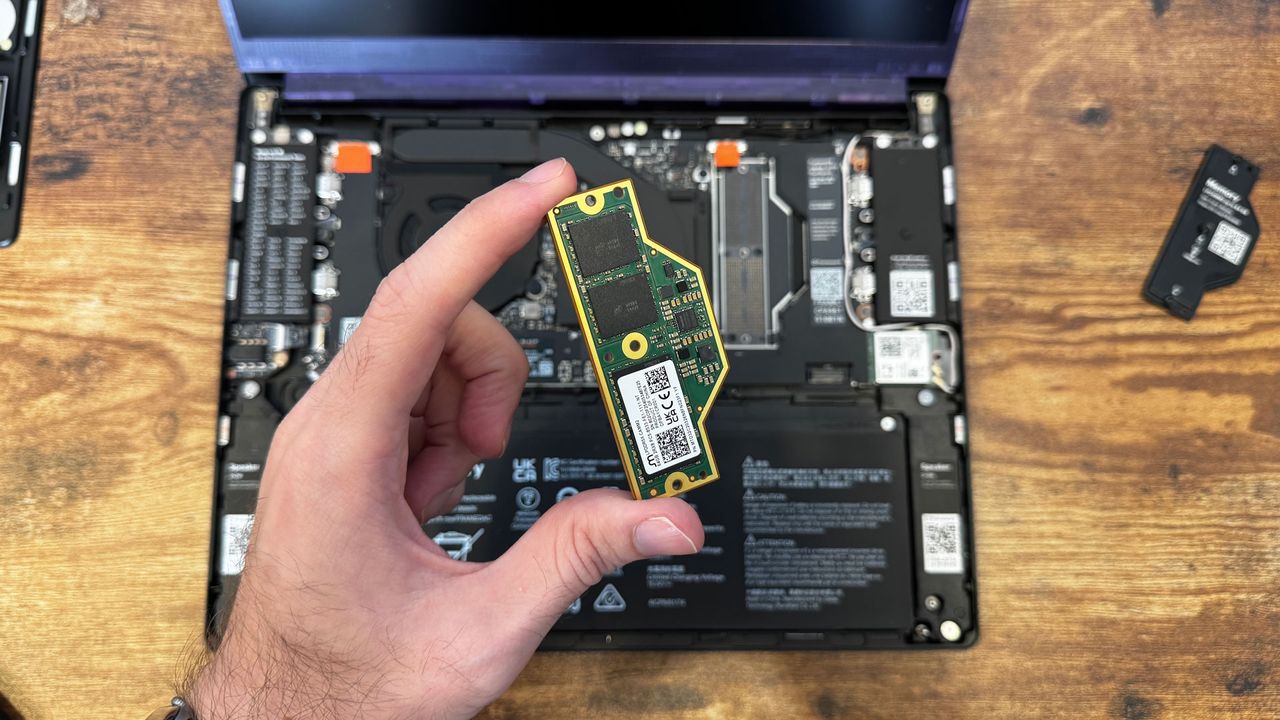
Similarly, laptop manufacturer Framework has been able to rely on its highly modular approach where customers can install memory salvaged from older laptops or opt for second-hand units, giving the company and its users another way to deal with limited supply. The company is also placing non-cancellable orders well in advance, even when it doesn't know the final price or exact delivery volume.
Back in July, it nearly doubled memory pricing for 32GB and 64GB variants of the Framework Laptop 13 Pro after receiving a cost update from its LPCAMM2 supplier. However, after sourcing new inventory at a reduced cost, the company recently announced a price drop for the same, including retroactive orders that have already shipped.
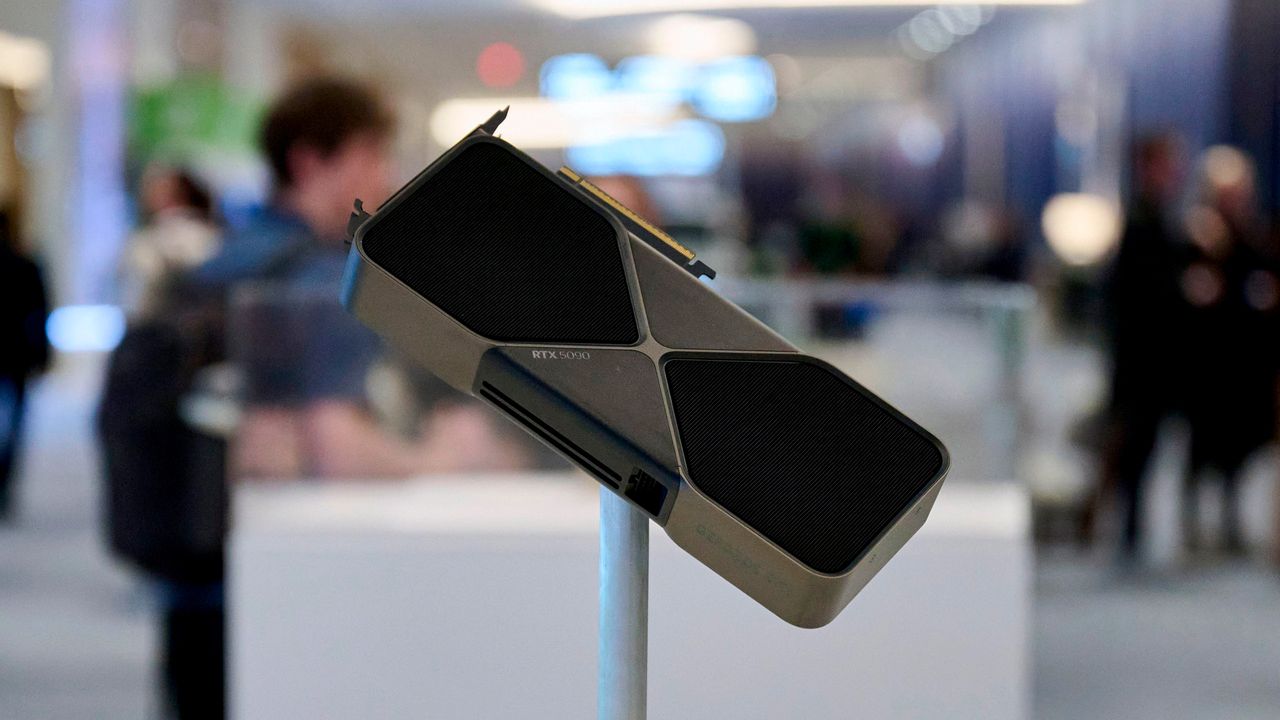
The GeForce RTX 5090 is the first thing that comes to mind when you think of the best graphics cards. However, you'd better pray the serial number on the inside of the metal bracket does not fade over time, since that could be a reason for Nvidia to reject warranty claims. At least one Redditor has shared a case of Nvidia reportedly denying a warranty claim because the bracket's serial number was unreadable.
The Redditor Willing-Avocado-4830, based in the UK, began experiencing black-screen crashes with a GeForce RTX 5090 Founders Edition graphics card under heavy load. The user sent the card to Nvidia for a warranty claim. After 30 days of radio silence, the owner finally received an email stating that their RMA request was rejected with no apparent explanation for the denial.
Seeking clarification, the user reached out to Nvidia for further information. According to the Redditor's recount, Nvidia support purportedly rejected the RMA because the serial number on the graphics card's metal bracket had faded. Like many gamers, Willing-Avocado-4830 claims never to have modified or tampered with the graphics card after installation. The fading serial number does not appear to be an isolated incident. Several other owners have reported similar issues in the Reddit discussion.
The metal bracket on graphics cards is susceptible to dust buildup, oxidation, and corrosion over time. This can cause it to look dirty, stained, or sometimes slightly discolored compared to when it was brand new. These same phenomena could have affected the serial number's legibility, especially since it is printed with ink onto the bracket's surface rather than etched for better durability. For comparison, the last-generation GeForce RTX 4090 Founders Edition had its serial number laser-etched onto the metal bracket.
One Redditor said that someone in the Nvidia Discord channel recommended cleaning the area with isopropyl alcohol to restore the serial number's visibility. However, that may not work if the ink is no longer present, as previous reports suggest the hot air expelled by the Founders Edition cooler could be erasing the serial number.
Surprisingly, Nvidia rejected a warranty claim solely because of a faded serial number on the graphics card’s bracket. The same serial number is clearly printed on a sticker on Nvidia's modular PCIe connector, which the chipmaker's technicians can verify when disassembling the GeForce RTX 5090. Moreover, you can pull the serial number from the graphics card through the command prompt with Nvidia SMI (System Management Interface), assuming the card is still working, which, in this case, it is. Willing-Avocado-4830 still had the original packaging and the original invoice from Nvidia U.K., so it would be easy to cross-reference the serial numbers.
Redditor hawok reportedly sent their GeForce RTX 5090 Founders Edition for RMA two months ago and encountered a similar situation. The serial number on the metal bracket was only partially visible. However, customer support seemingly accepted the RMA after the user sent photographs of the packaging that corroborated the serial number. It is unclear what Nvidia's policy is, or whether the chipmaker handles each case differently. We have reached out to Nvidia for clarification.
Some Redditors have suggested taking a photograph that shows the graphics card's serial number next to the packaging's serial number. Others jokingly recommend putting a piece of tape over the serial number. It might not be a bad idea, but you would need heat-resistant tape, something like Kapton tape.
GeForce RTX 5090 stock has practically disappeared from the U.S. market, with very few units starting at $6,500, 3.25X over the Blackwell flagship's MSRP. You cannot blame GeForce RTX 5090 owners for worrying. They already have a lot on their plates, dealing with the 16-pin power connector melting woes, and now also have to worry about fading serial numbers.
Intel won't launch a Nova Lake-S SKU with 12 Xe3P graphics cores, according to tipster Jaykihn, who originally flagged a beefed-up APU design with the Nova Lake architecture. The original SKU was said to come with 4 P-cores, 8 E-cores, and 4 LPE-cores, along with the 12 Xe3P cores, presumably offering an inexpensive onramp to a gaming desktop without a discrete GPU. Now, the leaker says that design is cancelled, and Intel intends to pick it back up with Razor Lake, the generation that will follow Nova Lake.
Nova Lake -S 12Xe has been changed to Razor Lake -S 12XeSeptember 14, 2026
Originally, Intel's 12 Xe3P Nova Lake SKU was said to require 65W of dedicated power to drive the iGPU, necessitating the use of two VCCGT phases on the motherboard for integrated graphics. Intel's Arc B390 GPU, which is the 12 Xe3-core model available in Panther Lake and Arc G-series processors, has a thermal design that can sustain up to 80W. However, it's currently being used in Panther Lake machines and handhelds like MSI Claw 8 EX AI+ that have lower power targets.
The Xe3P architecture is slotted for use in Intel's Crescent Island AI accelerator, but it hasn't been announced for any other products yet. Xe3P supports a wide deployment of Xe cores (up to 32), a deeper XMX engine with support for low-precision data types like FP8 and FP4, an increased 512KB L1 cache per Xe core, and a new unified L2 cache (32MB on Crescent Island).
Even by desktop APU standards, an 80W iGPU is a beefy accelerator to have on the same package. In addition, Intel's Nova Lake stack is said to extend up to a 175W TDP with the rumored top-end 52-core SKU, meaning the full 12 Xe3P iGPU would likely only be possible lower down the stack (and maybe only in the 4 + 8 + 4 + 12 Xe design originally suggested).
Earlier in the year, rumors suggested Intel was working on a mobile APU to counter AMD's Strix/Gorgon Halo products, featuring a large pool of unified memory and a large iGPU, dubbed Nova Lake AX. Now, the rumor mill suggests Intel will recycle the Nova Lake CPU cores for Razor Lake AX on mobile while pushing a larger iGPU.
Nova Lake-S rumored specifications
SKU*
Core Config (P+E+LPE)*
bLLC*
TDP (Unlocked/Locked)*
52 Cores (dual-tile)
(8+16)+(8+16)+4
288MB
175W
44 Cores (dual-tile)
(8+12)+(8+12)+4
264MB
175W
28 Cores
8+16+4
144MB
125W
28 Cores
8+16+4
-
125W / 65W
24 Cores
8+12+4
132MB
125W
24 Cores
8+12+4
-
125W / 65W
22 Cores
6+12+4
108MB
125W / 65W
22 Cores
6+12+4
-
125W / 65W
16 Cores
4+8+4
-
65W / 35W
12 Cores
4+4+4
-
65W / 35W
8 Cores
4+0+4
-
65W / 35W
6 Cores
2+0+4
-
65W / 35W
*Specs rumored, unconfirmed by Intel
Intel has told us that Nova Lake is one of the most important desktop CPU launches for the company ever, following on the heels of the mediocre Arrow Lake rollout. Perhaps the biggest addition to the lineup is rumored to be bLLC, or big last-level cache, which is said to show up on select SKUs to counter AMD's X3D assault among the best CPUs for gaming. The company has yet to confirm that bLLC is even possible with its current packaging capabilities, though enthusiast channel VP Robert Hallock hinted to Tom's Hardware that Intel has plans to address X3D in the next generation.
The main stack is rumored to climb up to 28 cores, with two additional dual-tile SKUs that can go as high as 52 cores. The dual-tile models look like a bid for HEDT, perhaps competing with AMD's Threadripper CPUs, though it's not clear how Intel will position its dual-tile models yet.
Alongside Nova Lake, Intel will introduce the new LGA1954 socket, along with the flagship Z990 chipset. We've already seen multiple Z990 motherboards in the flesh, suggesting Intel is preparing for a Nova Lake release in short order.
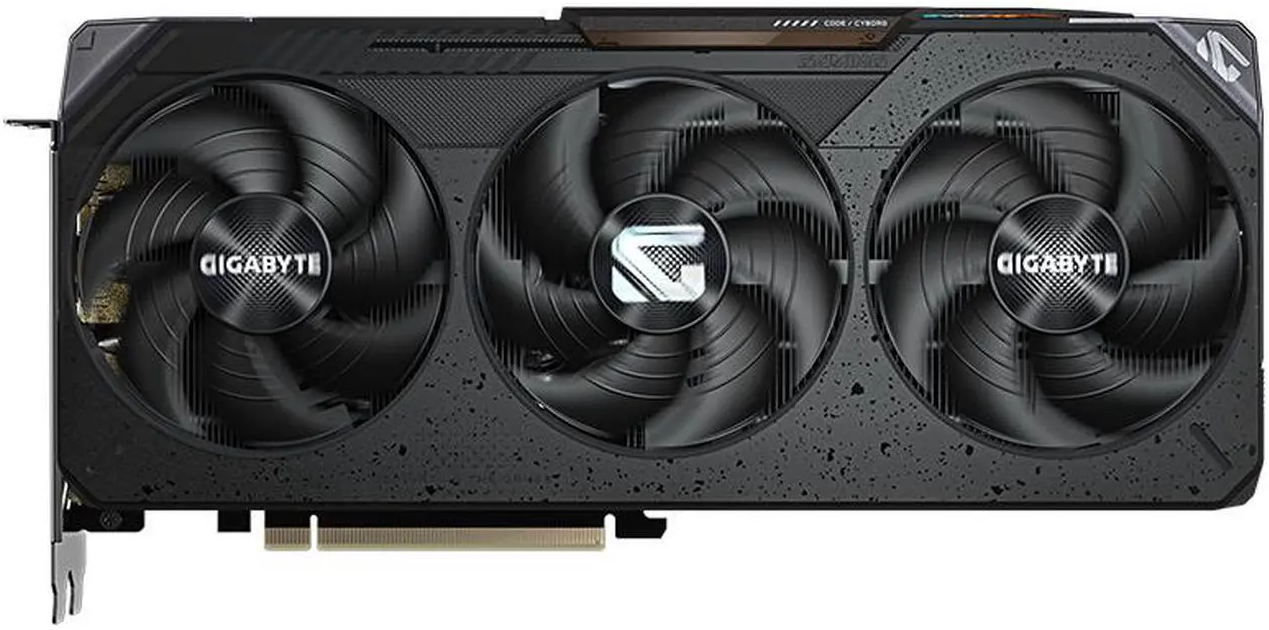
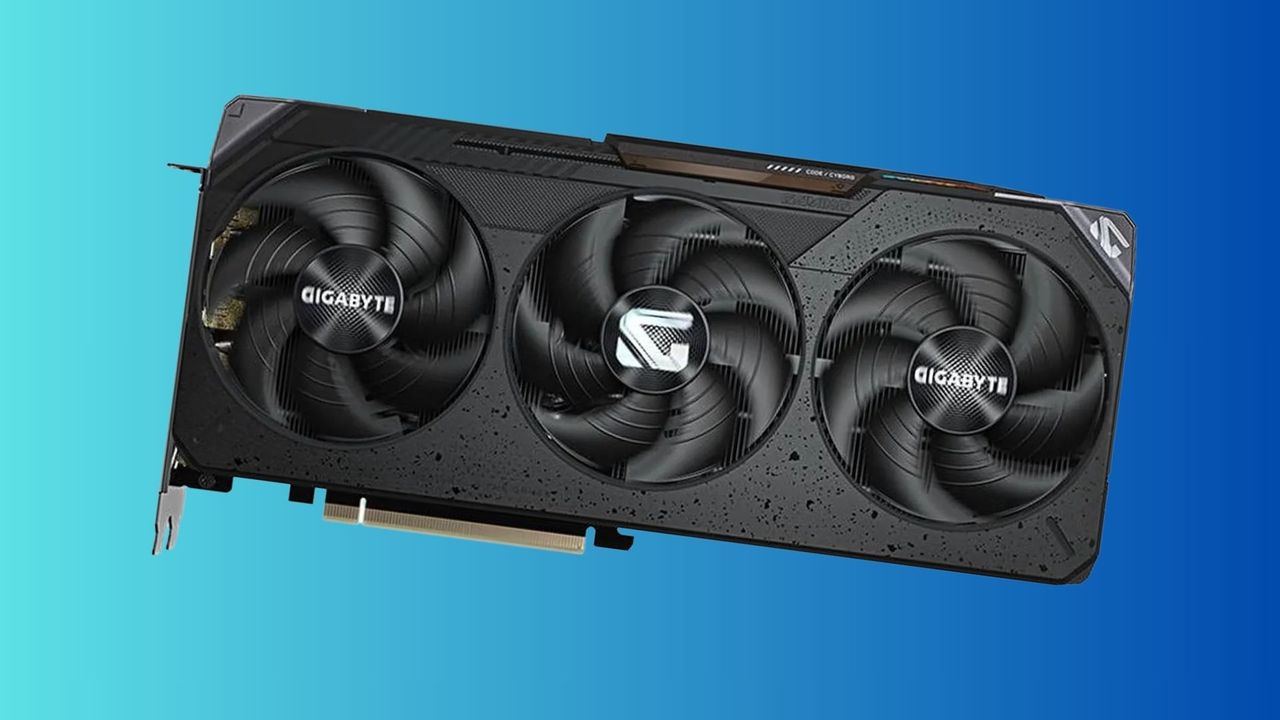
It's back: one of the best deals on a brand-new, current-generation, mid-range graphics card that packs 12GB of VRAM. There is a little hoop to jump through via Newegg to receive the discount, but it's more than worth it to slash $70 off the card and bring the price back down to its all-time low. AMD's Gigabyte Gaming Radeon RX 9070 GRE GPU is available at Newegg for $499. All you need to do is click on the "Extra Discount Available" link and enter your email address to receive the promotional code. Once you do that, you bring the price of this graphics card all the way down from its $569.99 list price. It's a very grim time for shopping for PC component upgrades, so to see an actual deal on a GPU that takes it below its MSRP in today's inflated market is a rare sight indeed.
The RX 9070 GRE was initially made available to the Chinese GPU market and received a few changes from the original RX 9070 XT. The available VRAM was cut from 16GB to just 12GB of GDDR6, but it still sports bandwidth speeds of 18 Gbps on a 192-bit bus, producing 432 GB/s of memory bandwidth in gaming and applications. The Radeon RX 9070 GRE is still built on AMD’s RDNA 4 graphics architecture and uses the same Navi 48 GPU as the Radeon RX 9070 and RX 9070 XT. The RX 9070 GRE features a cut-down version of the Navi 48 chip with 48 compute units compared to the RX 9070's 56. Using just 220W total power draw, the RX 9070 GRE has an Identical power footprint to the standard Radeon RX 9070 GPU, making it quite power efficient and not needing a huge power supply to run.
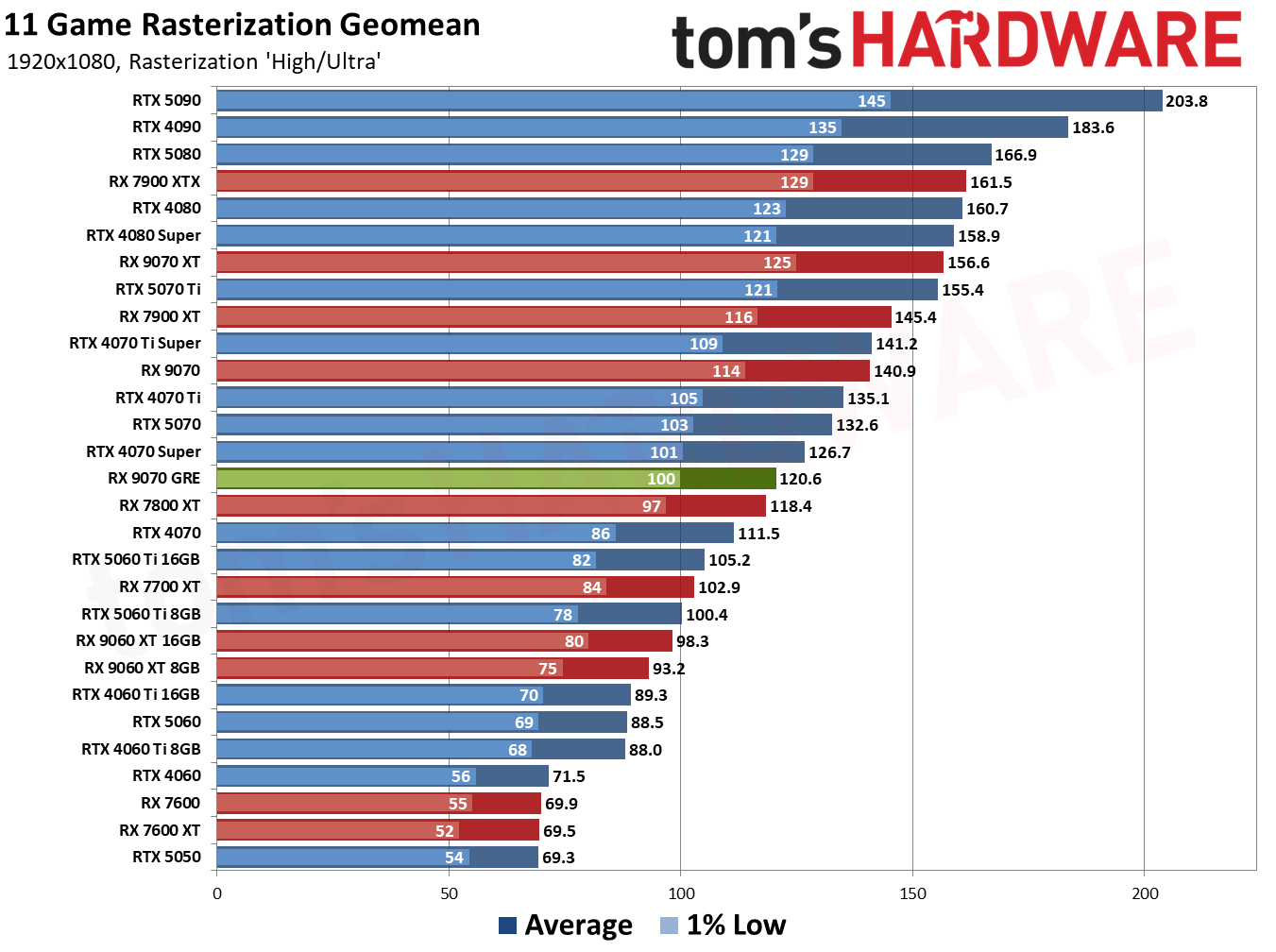
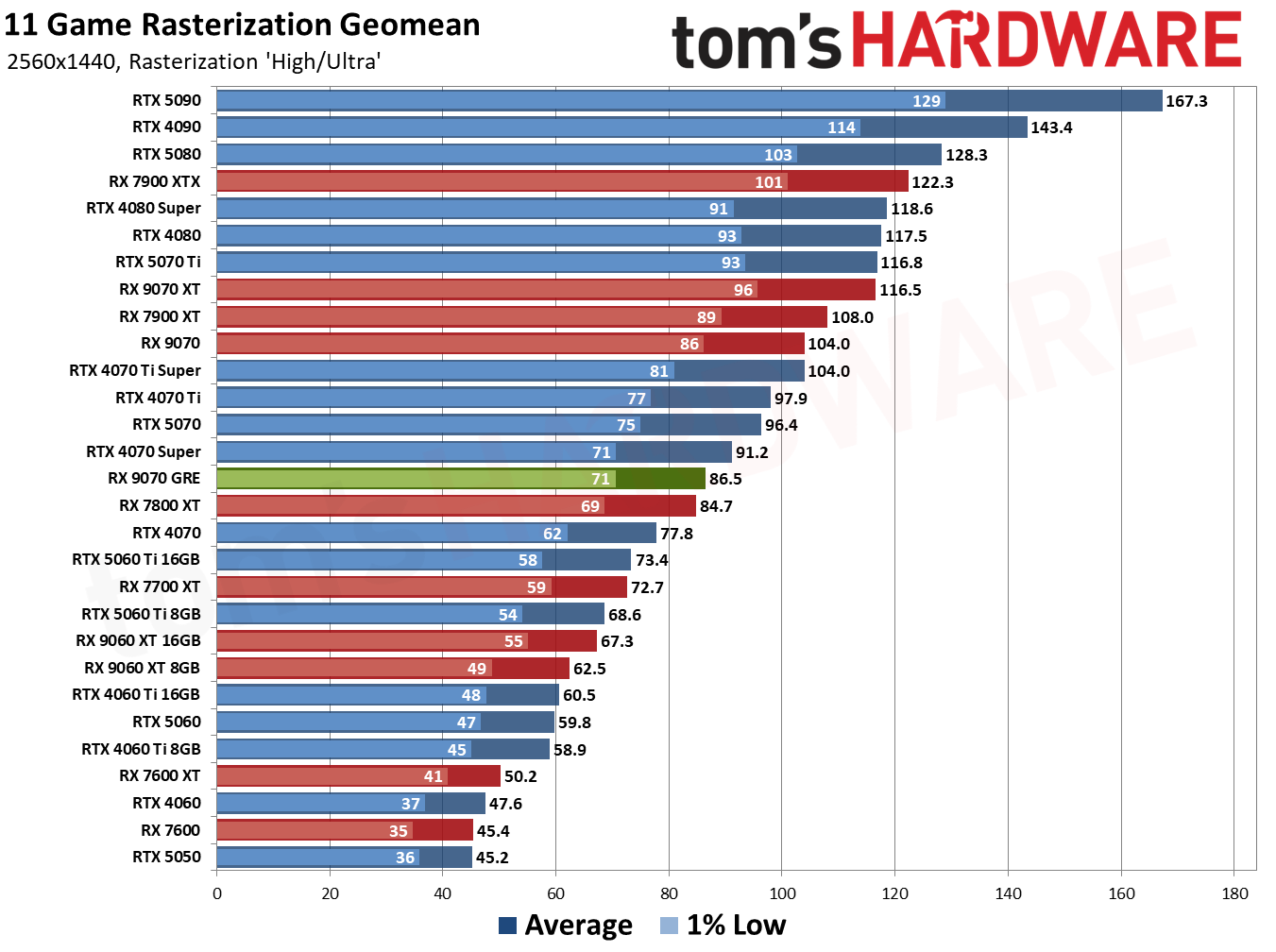
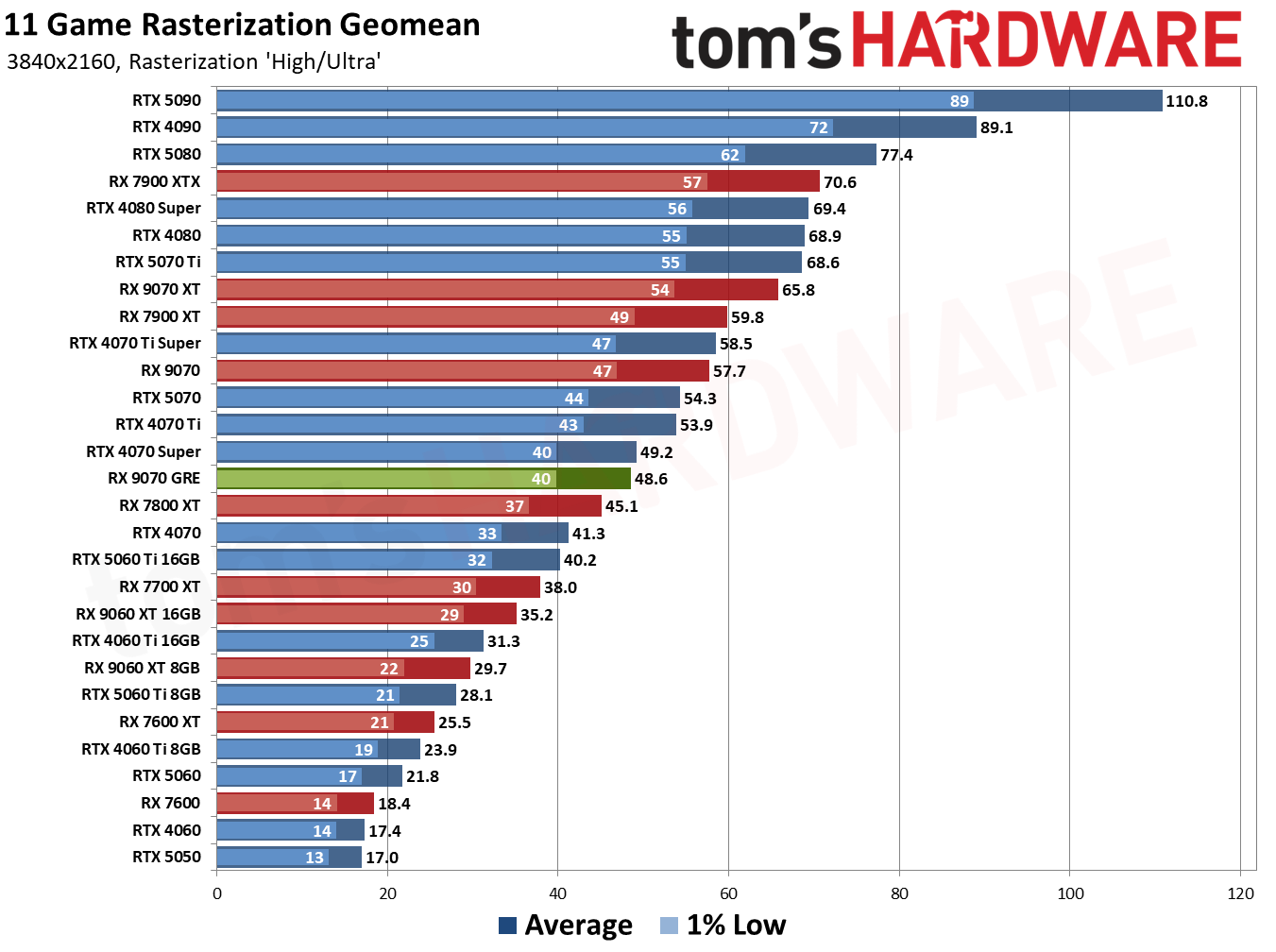
We benchmarked the Radeon RX 9070 GRE in our extensive review, putting it through its paces in our suite of games. We found the card averages a cool 120 FPS at 1080p settings and 86.6 FPS at 1440p across our 11-game raster-only test suite. This is a good GPU choice for 1080p and 1440p gaming, with the RX 9070 GRE packing ample VRAM for high settings at 1080p, but pushing ultra settings at 1440p may use up the 12GB of VRAM. AMD's Radeon RX 9070 GRE sits just behind Nvidia's RTX 5070 in our results chart that you can view below.
FutureFutureFuture
If you're actively looking for a new GPU in the current PC component market, you're more than aware of the considerable price hikes across the GPU lineups from both AMD and Nvidia. To see a graphics card on sale for under its launch MSRP is a very rare sight, and I personally did not expect to see this kind of deal again outside of a large sale event like Prime Day or Black Friday. So if you're looking for a competent card for 1080p and 1440p gaming, then jump on the Gigabyte Gaming RX 9070 GRE for just $499.99.
Nvidia's fastest gaming graphics card, the RTX 5090, has been on a tear of price increases over the past several weeks. However, over the past week, the available inventory has dwindled. Now, you can only find the RTX 5090 from third-party sellers at online retailers like Newegg and Amazon, commanding anywhere from $6,500 to $9,500 (or even higher) for Team Green's best GPU.
At Newegg, the cheapest RTX 5090 is the MSI Ventus 3X that's available from Slava Computers (a relatively new seller with 239 ratings and a 2.8 out of 5 rating at the time of writing) for $6,449. On Amazon, you can get the Asus TUF Gaming OC for $6,395 from Joes Tech Shop, a seller with an 81% positive rating. However, among the most recent reviews are a string of one-star reviews about orders never being fulfilled. The cost goes much higher, as well. The first result for "RTX 5090" on Newegg, for example, surfaces the MSI Ventus 3X OC for $8,699.
In June, the median price for an RTX 5090 was $4,299. At the beginning of September, we logged the lowest online price at $5,199 in our GPU price tracker. Now, in less than two weeks, the available stock has completely disappeared online, and the options available from third-party sellers have ballooned in price once again.
Naturally, we don't recommend buying from one of these third-party sellers. The RTX 5090 is selling at a vastly inflated price, but more importantly, we've seen no shortage of scams around high-ticket items like the RTX 5090. In January, 42 Amazon customers were duped into a scam involving a $999 RTX 5090, instead receiving a fanny pack in place of the GPU. Earlier this month, an online seller scammed two buyers with the RTX 5090, selling phantom graphics cards with the core and memory removed on the secondhand market for prices near MSRP.
The one exception to RTX 5090 inventory is Micro Center, which still has cards available around the average selling price. At a local Micro Center we checked, the cheapest in-stock option was $4,299. Micro Center has exclusively sold graphics cards in-person for several years, insulating it from online buyouts like what appears to be going on right now.
As usual, the reason why there's so much demand for the RTX 5090 is fairly obvious: AI. The RTX 5090 holds the GB202 GPU and 32GB of GDDR7 memory. For context, Nvidia's RTX Pro 5000 48GB comes with the same GPU with a third fewer shader units enabled, and lower memory bandwidth compared to the RTX 5090, and sells for between $7,000 and $9,000. In that context, the RTX 5090 starts to look attractive for building an AI server, even at $5,000 (or more) apiece.
At the same time, the RTX 5090 remains the fastest gaming graphics card on the market according to the testing in our GPU benchmark hierarchy. That's even more true now with Nvidia's launch of DLSS 5 Neural Rendering, which the RTX 5090 can fully capitalize on (though, thankfully, we've found playable performance on lower-end cards in our extensive DLSS 5 testing).
We've reached out to Nvidia for comment on whether it has any plans to stabilize inventory. We'll update this story when we hear back.
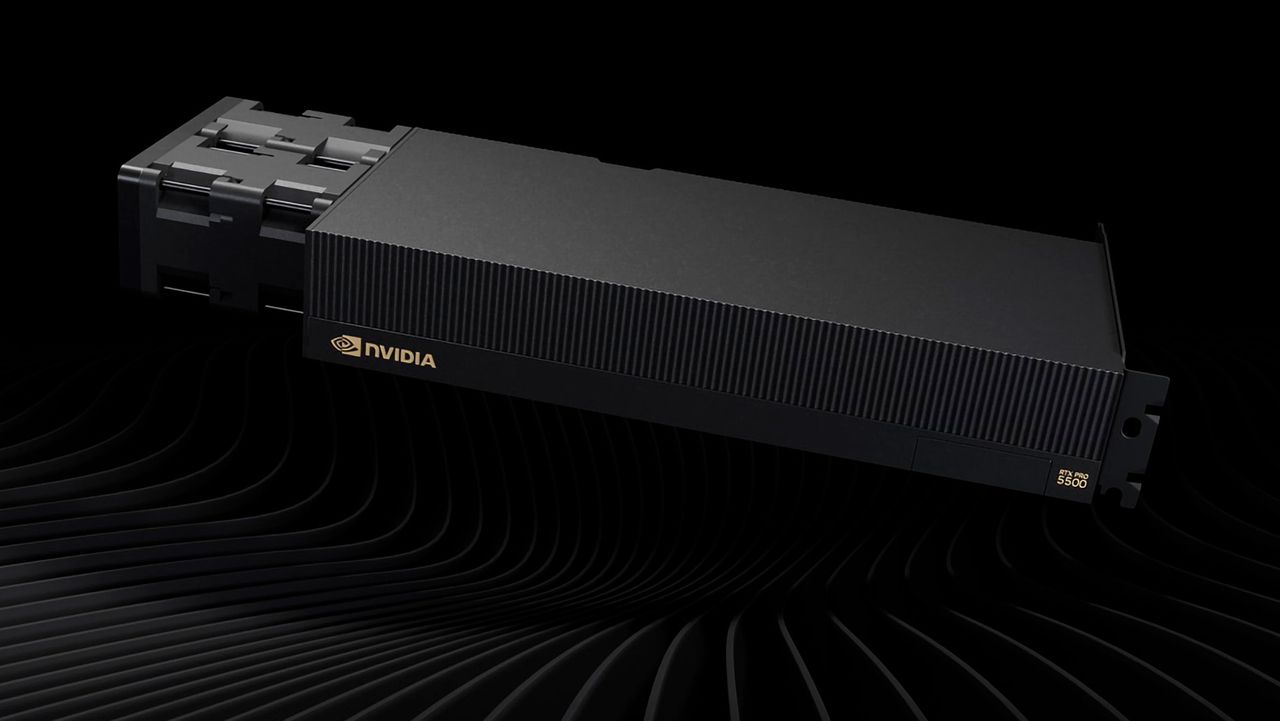
The GeForce RTX 5090 is undeniably one of the best graphics cards money can buy. Banking on the fact that many already use it for AI, Nvidia has bolstered it with even more memory and launched it as the new RTX 5500 Pro Blackwell Workstation Edition. It offers comparable specifications to the GeForce RTX 5090 but distinguishes itself with 84GB of GDDR7 memory, 2.6X more than the Blackwell gaming flagship.
The RTX Pro 5500 features the GB202 silicon, the powerhouse die that powers other high-end mainstream and professional Blackwell graphics cards, including the GeForce RTX 5090, RTX Pro 6000, and RTX Pro 5000. In fact, the RTX Pro 5500 uses the same die as the GeForce RTX 5090, which means 170 Streaming Multiprocessors (SMs) are enabled out of a possible 192. As a result, the RTX Pro 5500 has 21,760 CUDA cores and offers performance comparable to the GeForce RTX 5090. The differentiator is the memory subsystem, where the RTX Pro 5500 excels.
Nvidia equipped the RTX Pro 5500 with 84GB of GDDR7 memory. This is the second time Nvidia has launched a graphics card with 84GB of memory, with the first being the China-exclusive RTX Pro 6000D. The RTX Pro 5500's memory capacity lets the Blackwell graphics card sit comfortably between the RTX Pro 5000 and the upgraded RTX Pro 6000, with 72GB and 96GB of GDDR7 memory, respectively.
Nvidia RTX Pro 5500 Workstation Edition Specifications
Graphics Card
RTX Pro 6000
RTX Pro 6000D
RTX Pro 5500
RTX 5090
RTX Pro 5000
Architecture
GB202
GB202
GB202
GB202
GB202
Process Technology
TSMC 4N
TSMC 4N
TSMC 4N
TSMC 4N
TSMC 4N
Transistors (Billion)
92.2
92.2
92.2
92.2
92.2
Die size (mm^2)
750
750
750
750
750
SMs
188
156
170
170
110
CUDA Cores
24,064
19,968
21,760
21,760
14,080
Tensor Cores
752
624
680
680
440
Ray Tracing Cores
188
156
176
176
110
Boost Clock (MHz)
2,617
2,430
?
2,407
2,617
VRAM Speed (Gbps)
28
25
25
28
28
VRAM (GB)
96
84
84
32
48 / 72
VRAM Bus Width
512
448
448
512
384
L2 Cache
128
128
96
96
96
Render Output Units
192
192
192
176
176
Texture Mapping Units
752
624
680
680
440
TFLOPS FP32 (Boost)
126.0
97.04
?
104.8
73.69
Bandwidth (GB/s)
1,792
1,400
1,398
1,790
1,344
TBP (watts)
600
600
600
575
300
Nvidia achieved the 84GB memory capacity by outfitting the RTX Pro 5500 with 28 GDDR7 memory chips in a clamshell configuration. Each side of the PCB houses 14 24Gb (3GB) GDDR7 memory modules. They run at 25 Gb/s across a 448-bit memory interface, delivering up to 1,400 GB/s of bandwidth, which aligns with Nvidia’s official specification of 1,398 GB/s. In other words, the RTX Pro 5500 shares the same memory subsystem as the RTX Pro 6000D.
Samsung, Micron, and SK hynix only produce standard 28 Gb/s memory packages. Therefore, Nvidia downclocks the RTX Pro 5500's GDDR7 chips for its own reasons, whether to meet thermal and power targets or avoid cannibalizing higher-tier SKUs. From a memory-bandwidth perspective, the RTX Pro 5500 is not particularly impressive. Its bandwidth is only 4% ahead of the RTX Pro 5000, and it lags 22% behind both the flagship RTX Pro 6000 and the GeForce RTX 5090, which fully leverage 28 Gb/s GDDR7 memory chips.
To sum it all up, if RTX Pro 6000D and GeForce RTX 5090 had a child, it would be the RTX Pro 5500. Nvidia's main motivation was to launch the RTX Pro 5500 to fill the large performance and pricing gap between the RTX Pro 6000 and RTX Pro 5000. Also, the chipmaker makes substantially more profit by putting recycled GB202 into an RTX Pro 5500 than into a GeForce RTX 5090. By giving the former more memory with similar core specifications as the latter, Nvidia seemingly hopes to win more customers over to the RTX Pro 5500.
We reached out to both Nvidia and PNY for official pricing on the RTX Pro 5500, but neither company has responded. For reference, the flagship RTX Pro 6000 retails for $15,599, while an RTX Pro 5000 72GB starts at $9,209. Given the RTX Pro 5500's role as a bridge between the two models, it is reasonable to expect its launch price to fall somewhere within this range.
With the latest ROCm updates, AMD finally brought robust, official PyTorch and HIP SDK support to Windows for consumer GPUs, fully supporting the Radeon RX 7000 and the RX 9000 series. For native, supported frameworks, AMD on Windows is finally a viable reality, but what happens when you want to run a proprietary application, an older repository, or a specialized AI tool that absolutely refuses to support anything but NVIDIA's CUDA? That's where a new project, Speedstu's "CUDA-for-AMD-Windows," could save the day. It proves that running rigidly CUDA-exclusive workloads on AMD hardware in Windows is possible without virtualization or dual-booting.
To be clear, this project is not a brand-new runtime. Instead, it is a highly automated and reproducible PowerShell setup that bridges the gap between ZLUDA, the well-known, formerly AMD-funded translation layer, and AMD's native HIP/ROCm SDK for Windows. Through a series of clever scripts, the toolkit automatically detects the user's GPU architecture, grabs a specifically pinned version of ZLUDA (v6-preview.69), and, at least in theory, seamlessly maps it to the ROCm math libraries already present in Windows.
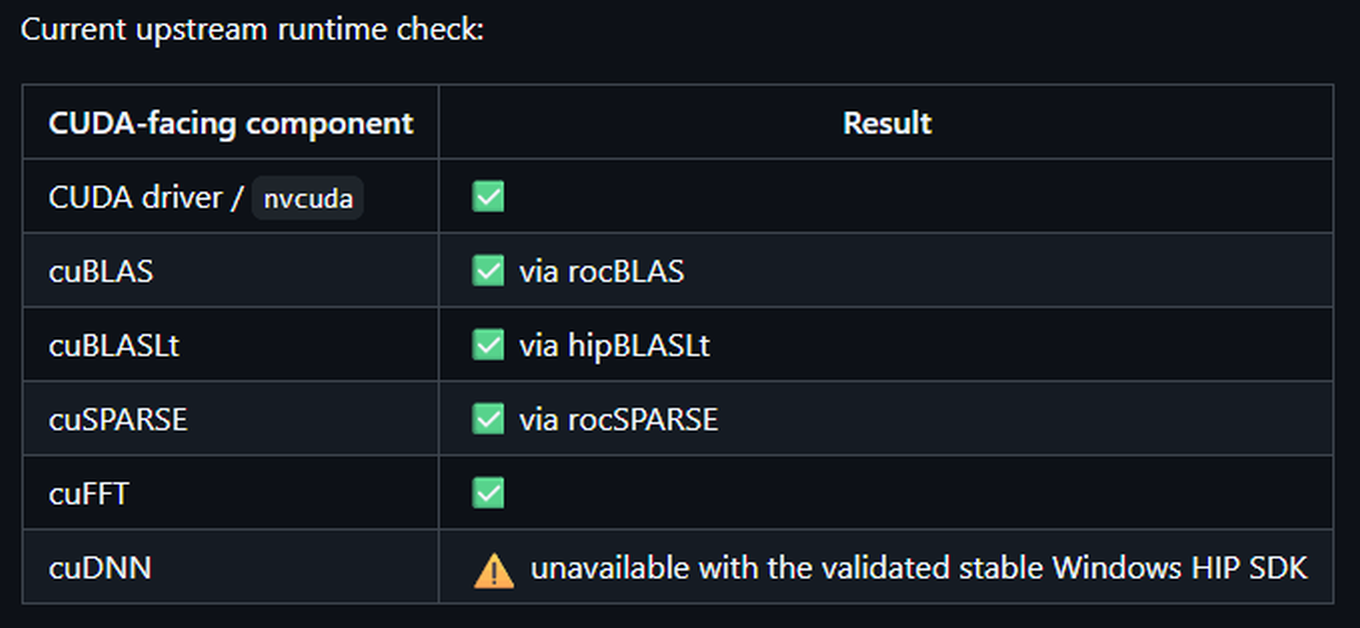
Several important CUDA libraries link up, but the important cuDNN doesn't work yet. (Image credit: Speedstu/GitHub)
The result is that the developer successfully intercepted and mapped the CUDA driver API as well as the cuBLAS, cuSPARSE, and cuFFT libraries directly over to their AMD equivalents. As a proof-of-concept, the author even trained a 2.2-million-parameter PPO reinforcement-learning network end-to-end using unmodified CUDA libraries on an AMD Radeon RX 9060 XT, which happens to be the only officially supported GPU at this time.
Even with AMD's official ROCm support on Windows, the local developer community frequently runs into dependency hell when trying out experimental GitHub repos or specialized AI tools that hardcode CUDA as a requirement. For developers who want to experiment with these CUDA-only tools natively on their Windows daily driver machines without dealing with WSL2 passthrough issues or waiting for the original author to write a HIP port, this project offers a highly desirable translation pipeline. It acts as a sort of hacky adapter for software that stubbornly demands an NVIDIA card.
Benchmark testing included in the project's documentation offers some interesting findings. In a controlled A/B test running a 2.2M-parameter reinforcement learning workload on a Radeon RX 9060 XT, the "public upstream path," which relies purely on official ZLUDA releases and AMD's stock HIP SDK 6.4, achieved a median throughput of 13,278 steps per second (SPS). By contrast, an optional "recovered custom overlay" apparently built from salvaged legacy ZLUDA binaries ran slightly worse at 12,876 SPS, making it roughly 3% slower. While the clean official setup is faster, the author notes that "a later rewrite removed LibTorch/ZLUDA from PPO and achieved substantially higher throughput," indicating that there is still a performance hit for this stack of translators.
CUDA for AMD Windows Official benchmarks (BENCHMARKS.md)
Metric
Public upstream
Recovered custom
Custom delta
Overall SPS, median
13,278.46
12,875.80
-3.03%
Overall SPS, mean
13,172.49
12,649.83
-3.97%
Collection SPS, median
63,306.00
59,360.67
-6.23%
Consumption SPS, median
16,806.36
16,445.66
-2.15%
Inference time, median
0.5863 s
0.6293 s
+7.33%
PPO learn time, median
3.2076 s
3.2958 s
+2.75%
Now, before anyone declares the CUDA moat officially drained, it is crucial to set realistic expectations. First, this is a solo open-source project, not an enterprise-grade solution. The author is extremely transparent about its narrow scope, as crucial machine learning libraries like cuDNN, TensorRT, and NCCL do not resolve yet. This means compatibility is strictly workload-dependent; if your specific AI tool relies heavily on cuDNN, this setup will fail. Furthermore, it's worth pointing out that ZLUDA itself is currently being maintained as a "weekend hobby project" after losing its commercial backing a second time. Relying on this pipeline for production-level work remains a massive risk. This repository is a tinkerer's tool, not a corporate IT deployment strategy.
Despite these limitations, "CUDA-for-AMD-Windows" is pretty exciting, as it proves that the barrier to entry for running CUDA-exclusive software on AMD GPUs isn't an insurmountable hardware flaw, but a relatively tractable translation tooling problem. Because the project is entirely open-source, its potential extends far beyond this initial proof-of-concept. With community contributions, we could see expanded hardware detection and clever patches to get more stubborn CUDA libraries resolving properly.
 登录
登录