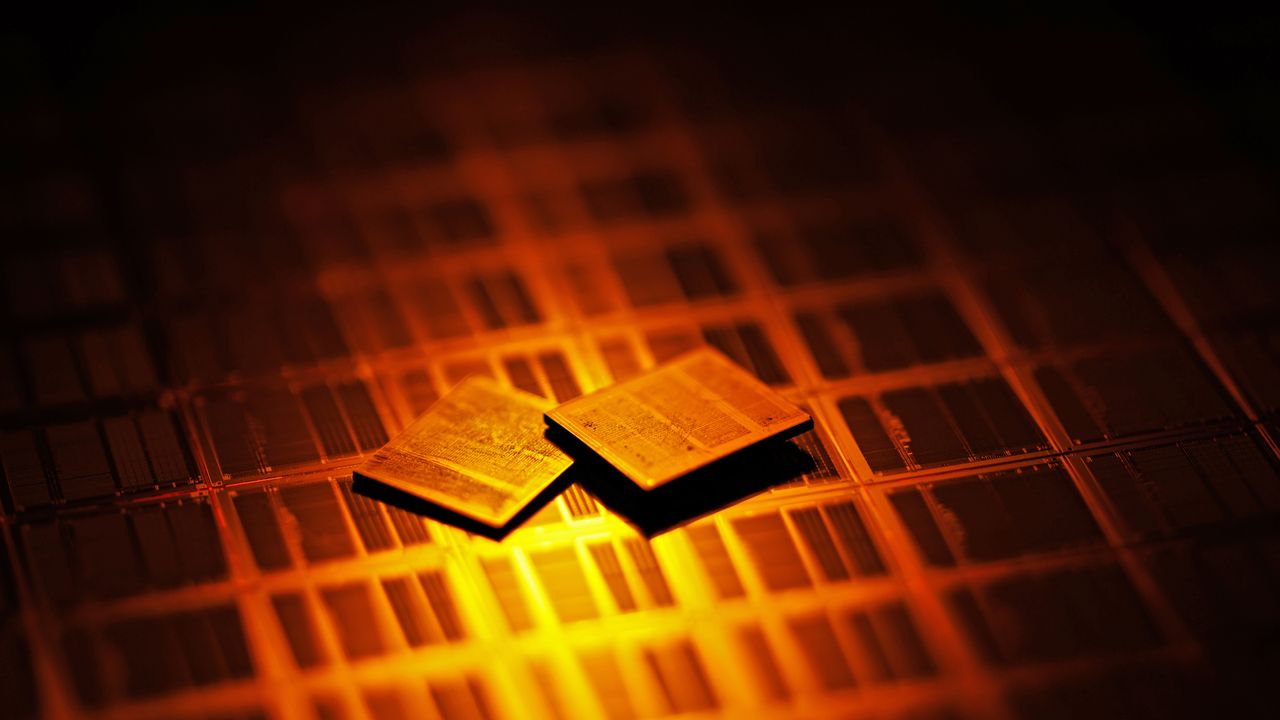
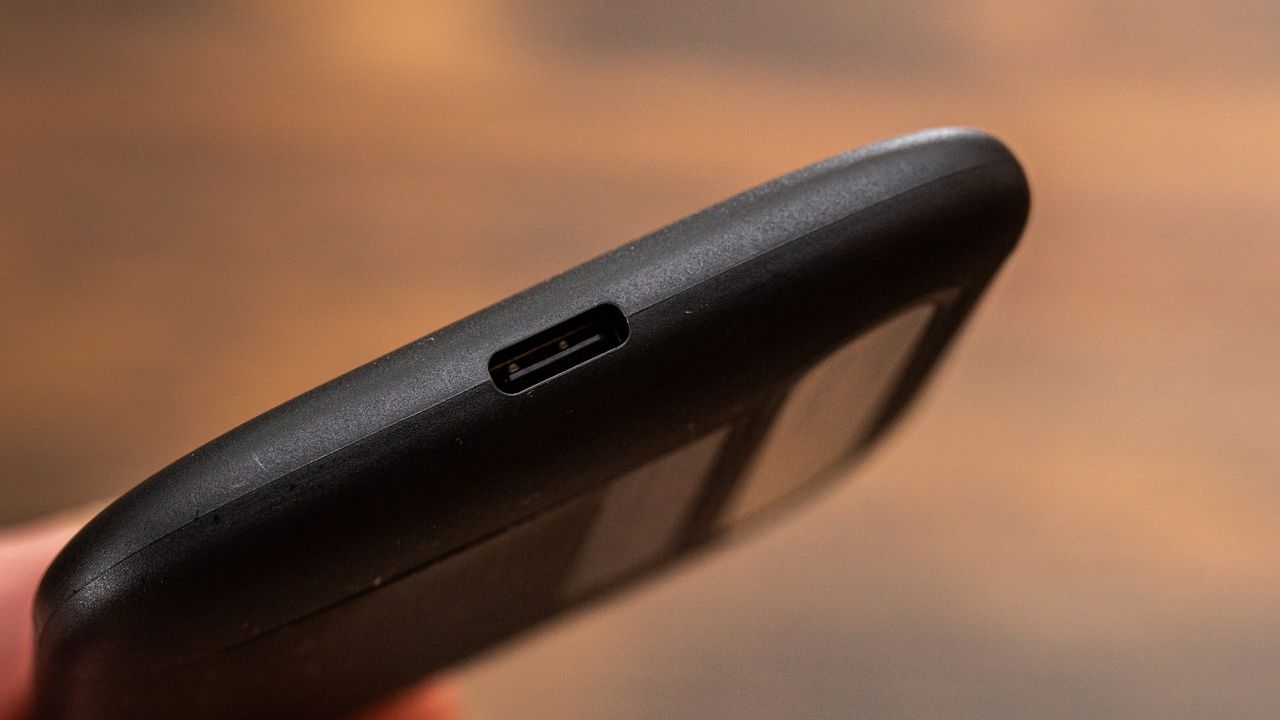
A new report claims Chinese DRAM champion CXMT is eyeing production of 3D NAND memory. Reuters reports, citing three people familiar with the company's plans, that CXMT intends to build a 3D NAND R&D production line at its second manufacturing facility near Beijing. There is no information on when the experimental production line will become operational, though, given that CXMT's second Beijing fab has not even broken ground yet, the line is at least two or three years away. In addition, the memory maker has established a research institute in Beijing that has NAND flash development among its projects, according to one source. CXMT has not formally confirmed any 3D NAND initiatives, so the information should be taken with a grain of salt.
For now, there are no details on CXMT's 3D NAND architecture, number of active layers, process technology, expected performance, or production capacity. Nevertheless, the report claims that CXMT has already discussed its NAND ambitions with prospective customers. One of them is said to be a recently established company that plans to use CXMT-made NAND devices in storage products aimed at AI and supercomputing applications.
It remains to be seen whether CXMT's 3D NAND project will eventually progress to high-volume manufacturing, but if it does, the initiative will take CXMT beyond its traditional DRAM specialization and directly into YMTC's territory. Until recently, China's two major memory producers had focused exclusively on their 3D NAND and DRAM realms where they have achieved quite a success. Yet, it looks like both companies want to become one-stop shops for DRAM and NAND — just like their bigger rivals Micron, Samsung, and SK hynix — as YMTC is reportedly exploring DRAM production.
While CXMT's alleged plan to build 3D NAND may look somewhat logical from business diversification point of view, it does not make a lot of commercial sense for now.
Or China's industrial policy?
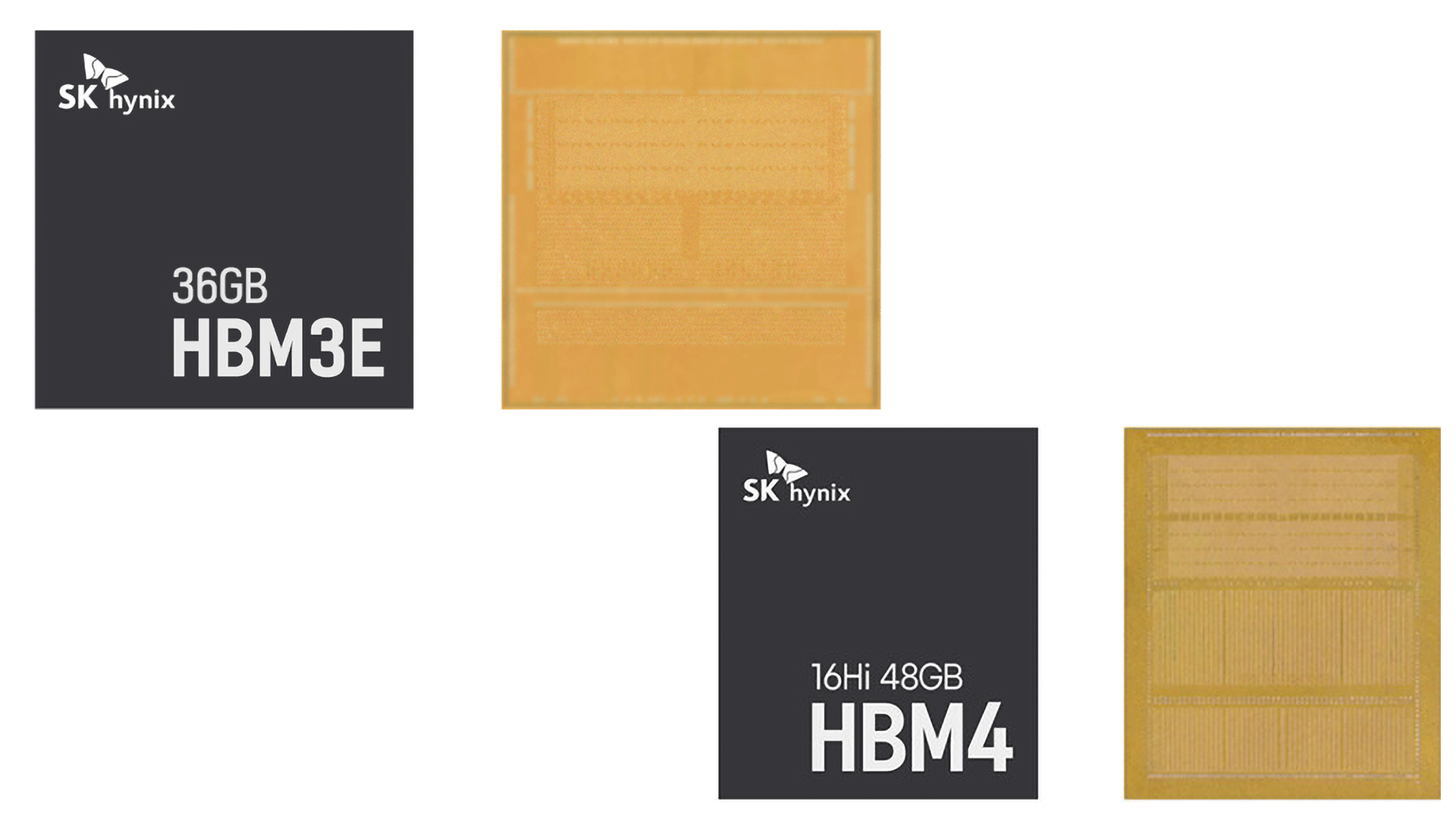
CXMT is China's dominant DRAM producer and posted $22.41 billion in revenue and $11.57 billion in net profit in the first half of the year after years of bleeding money. Despite obvious success, the company is still considerably smaller than the Big Three memory suppliers, which means it has plenty of room to expand in the industry where it already has experience, process technology, fabs, and customers. Furthermore, AI gives CXMT an obvious reason to focus resources on advanced DRAM as well as HBM3E, which are arguably much more strategically valuable products than commodity 3D NAND.
That said, for CXMT, allocating resources to 3D NAND, which requires completely different process technologies, manufacturing expertise, and equipment, does not make much economic sense. However, from the Chinese government's perspective, turning CXMT into the country's second major 3D NAND producer fits almost perfectly within its semiconductor self-sufficiency plans.
CXMT was created with Hefei government money (which held a 37% stake in the company during its IPO) and received support from China's Big Fund, which means that federal and local governments retain control over the company and may shape its strategic decisions, which is exactly what they do. Whether or not CXMT can indeed become a decent 3D NAND maker is an entirely different question.
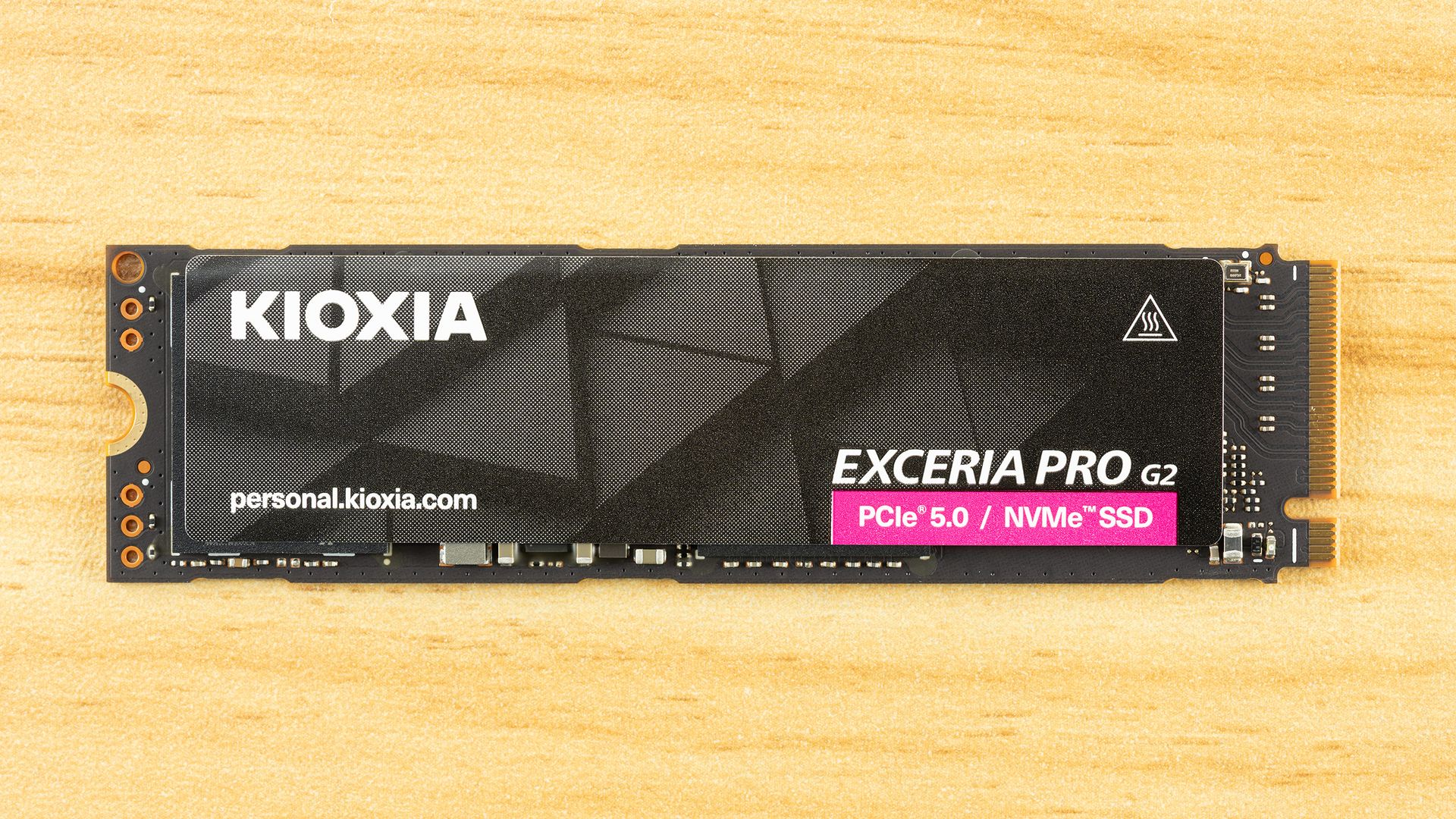
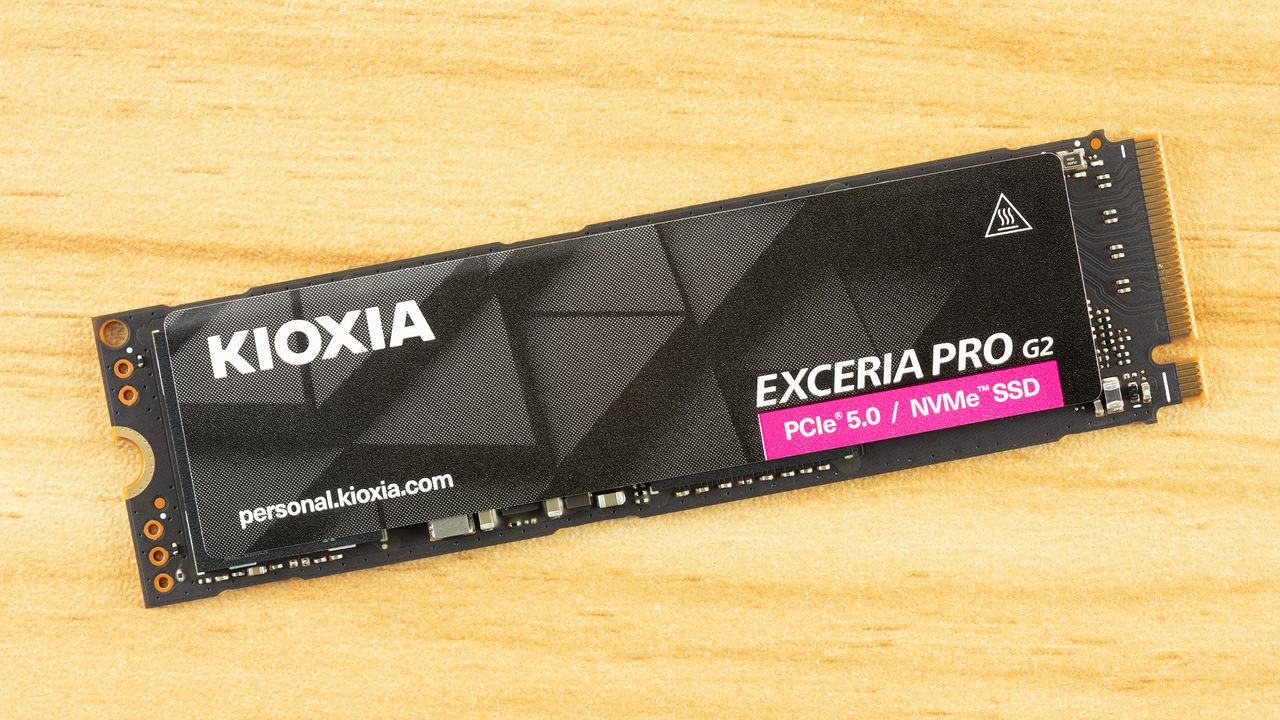
We always like to review Kioxia drives because they usually provide the perfect marriage of performance and reliability. We certainly wish they were more readily available in retail in the U.S., but we can still appreciate a good design when we see it. The Exceria Pro G2 continues in that lineage with all-new levels of performance you can only get with the newest hardware and a PCIe 5.0 interface. It’s like a Kingston Fury Renegade G5 made for OEMs, providing most of the performance you expect from this class of drive with reliability-minded firmware built in.
The important bit is that this drive still delivers what you’d expect. That means high performance, including sustained write performance, good power efficiency, and very low random read latency. These are the hallmarks of a drive that offers an excellent user experience. This is a very fast drive, just not the very fastest, but we make the argument that this is a deliberate trade-off for a drive with roots in an area where reliability is a bigger priority. For some, that might otherwise tip things in its favor. Regardless of your stance, though, its price in areas where it is available is competitive, and we can judge it by that.
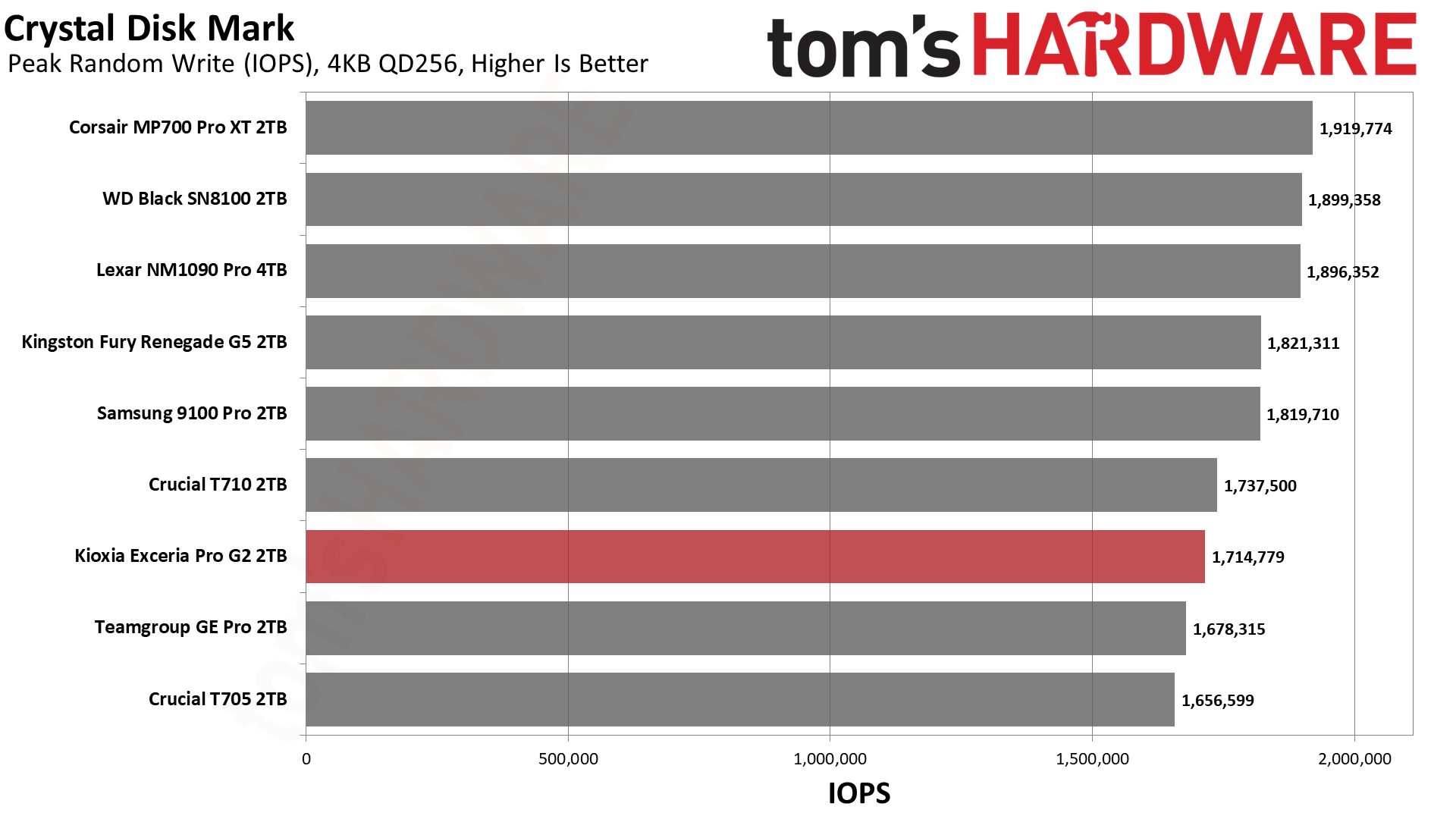
The Kioxia Exceria Pro G2 is available in 1TB, 2TB, and 4TB capacities. These are the most popular capacities, with 8TB yet again out of reach due to rising prices. The drive can reach up to 14,900 / 13,700 MB/s and 2,300K / 1,950K random read and write IOPS at the highest capacity. Most of this performance is achievable at 2TB, which is likely the sweet spot.
The drive has the usual five-year warranty with up to 600TB written per terabyte. Encryption support is not explicitly mentioned, and for a model in this line, we would expect TCG Pyrite and software encryption support only.
For pricing, we are making estimates based on pre-tax listings in the EU. Kioxia does not officially distribute the drive at U.S. retail, and the Amazon.com listings you find may be imports. These come in at ~$190, ~$340, and ~$650. These estimates make it look downright affordable, with the 1TB and 2TB models well under the WD Black SN8100, and the 4TB is roughly at parity at the time of review. It would be more expensive to import the drive, of course. One reason Kioxia can keep the price of the drive down is that it manufactures the flash it’s using, and its competition there – Crucial dropped out of the market, for one – is reduced.
Kioxia Exceria Pro G2 Software and Accessories
Kioxia supports its SSDs with SSD Utility Management Software, or SSD Utility for short. This SSD toolbox includes a summary of the drive and system, a firmware update feature, drive health monitoring, a secure erase function, password protection, and a section for troubleshooting. For data backup, we recommend MultiDrive for Windows – there is a portable version available, as well as a bootable WinPE image – or Clonezilla for other operating systems.
Kioxia Exceria Pro G2: A Closer Look
Tom's HardwareTom's Hardware
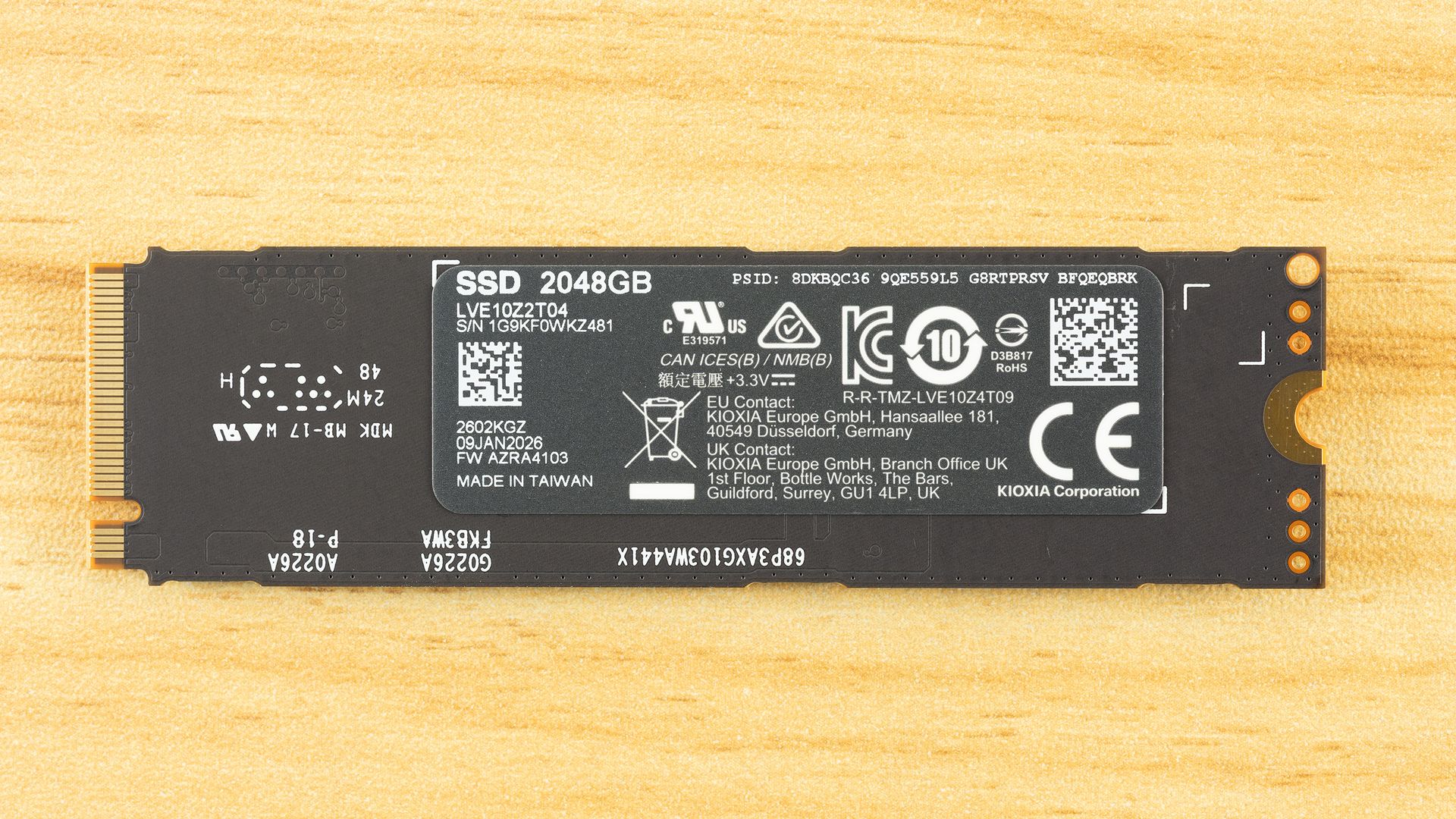
This is a single-sided drive in the M.2 2280 form factor. Specifically, the 1TB and 2TB conform to 2280-S3-M, while the 4TB is 2280-S4-M. These are all single-sided, but the 4TB is slightly thicker at 2.63mm versus 2.38mm. This is because it needs 16-die, rather than 8-die, NAND flash packages to achieve 2TB per package. The resulting extra height should not be an issue in most cases but is worth noting for devices with specific limitations.
The rear label has the Physical Presence Security ID (PSID), which allows a security reset to the factory state with an unlocked drive. This fits in with our expectation above that this drive is TCG Pyrite 2.01 compliant. The drive reports support for commands that TCG relies on, but Kioxia does not explicitly advertise hardware encryption.
Tom's HardwareTom's HardwareTom's Hardware
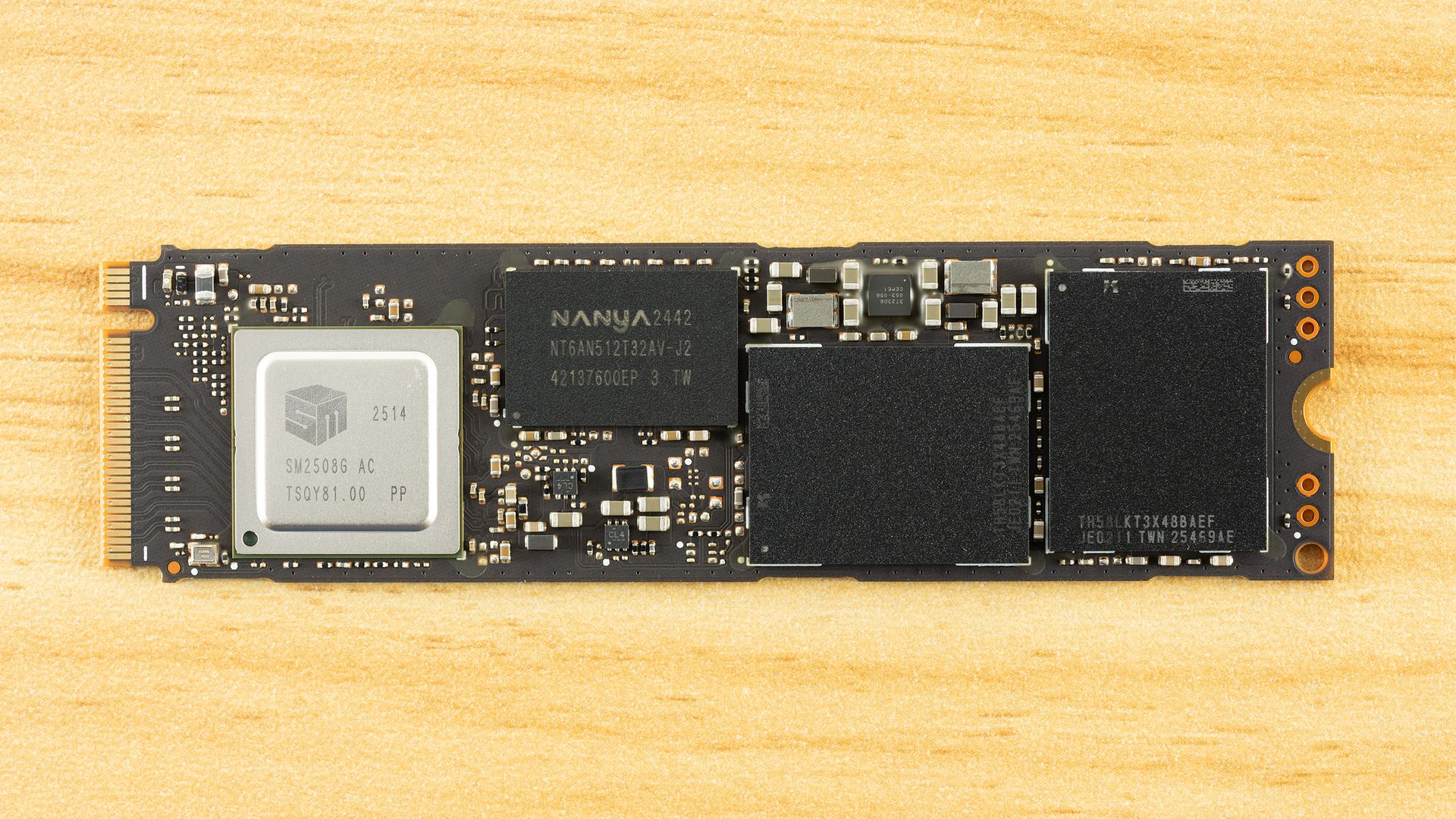
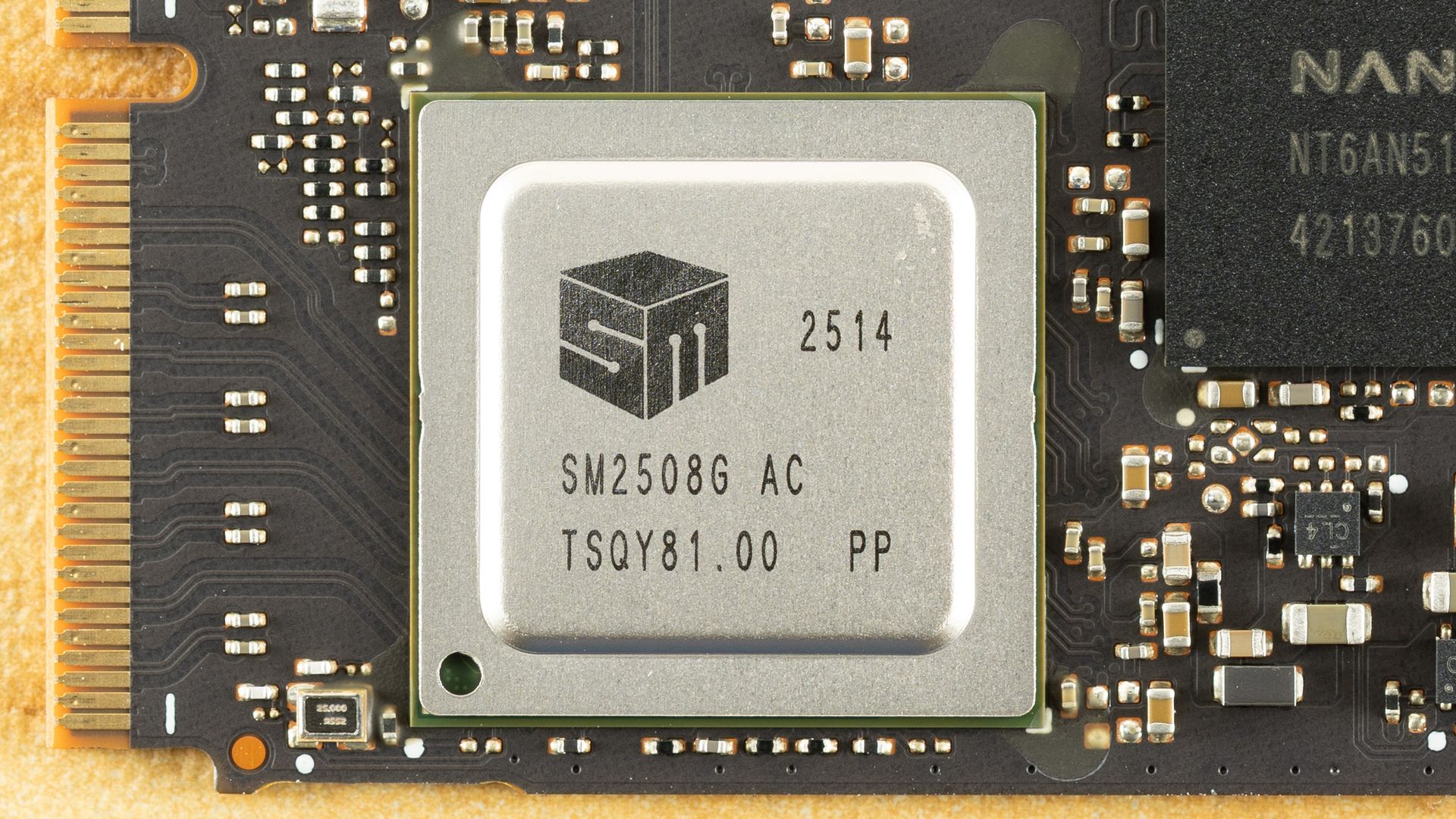
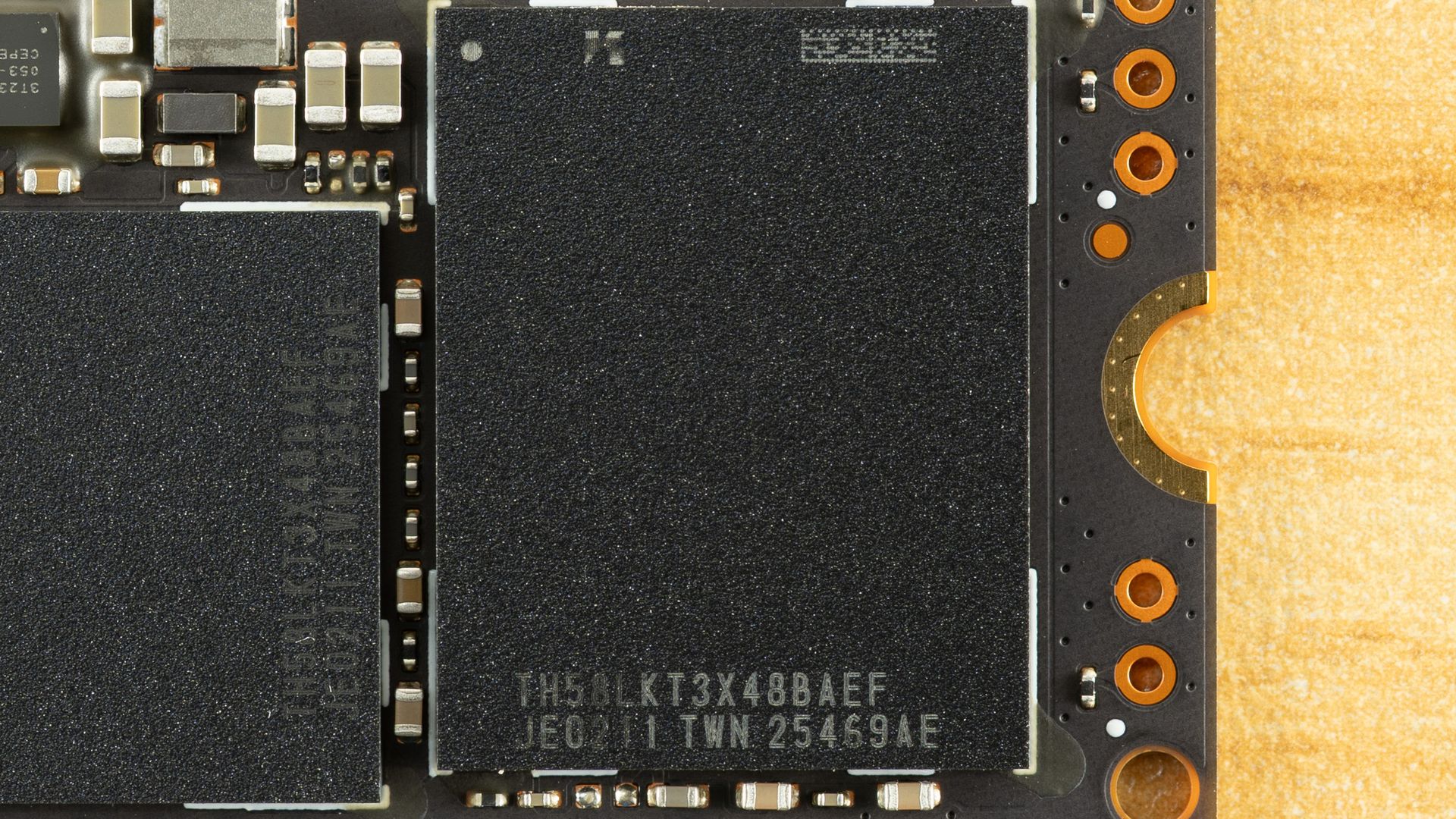
On the top of the drive, we see the Silicon Motion SM2508 SSD controller, a single DRAM package, and two NAND flash packages. We have covered the controller multiple times, and it has been paired with a range of flash, although the best-known model to use it is probably the WD Black SN8100. Both the Black SN8100 and Exceria Pro G2 are using 218-Layer BiCS8 TLC flash, but the former uses Sandisk BiCS while the latter uses Kioxia’s instead.
When we reviewed the Corsair MP700 Pro XT with Phison’s E28 controller, we noted that the E28 was supplied at one time or another with both types of BiCS. Our understanding is that there is at least one subtle difference between the two – in packaging, or so we’ve heard – and Sandisk has made it a point to emphasize its own flash on its drives. The launch E28 was faster than the prototype we previewed, but we expect firmware maturation was the most significant element. We would rather more carefully say that while Sandisk and Kioxia co-develop and share wafer output, downstream elements – die sorting, binning, package design, and possibly also how I/O speed is maintained – can differ. We wouldn’t lean towards one drive or another based on something like this, but must also point out that WD, Sandisk, and Kioxia all have their own firmware optimizations at play, which are generally more influential.
As for the DRAM, our sample has 2GB of LPDDR4X, but the exact memory will vary from drive to drive. This is not a huge consideration, but we do prefer LPDDR4/4X over DDR4 for even small power savings. The drive does have the correct 1GB-per-TB ratio of DRAM to NAND.
The Kioxia Exceria Pro G2, as a high-end drive, faces the stiffest competition we have on hand. This includes the fastest drives we’ve ever tested, the Corsair MP700 Pro XT and WD Black SN8100. We also have drives with the same hardware as the Exceria Pro G2, namely the Kingston Fury Renegade G5. The Crucial T710 uses the same controller but with Micron-made flash rather than BiCS. The T705 slots in as an example of an older high-end Gen 5 design. We also have the proprietary Samsung 9100 Pro, the more budget-oriented Lexar NM1090 Pro with older flash, and an InnoGrit-based offering from TeamGroup in the GE Pro. We are not comparing any DRAM-less drives like the Biwin Black Opal X570, as they are not in this class of drive.
Trace Testing — 3DMark Storage Benchmark
Built for gamers, 3DMark’s Storage Benchmark focuses on real-world gaming performance. Each round in this benchmark stresses storage based on gaming activities including loading games, saving progress, installing game files, and recording gameplay video streams. Future gaming benchmarks will be DirectStorage-inclusive and an evaluation for future-proofing is included where applicable.
Tom's HardwareTom's HardwareTom's Hardware
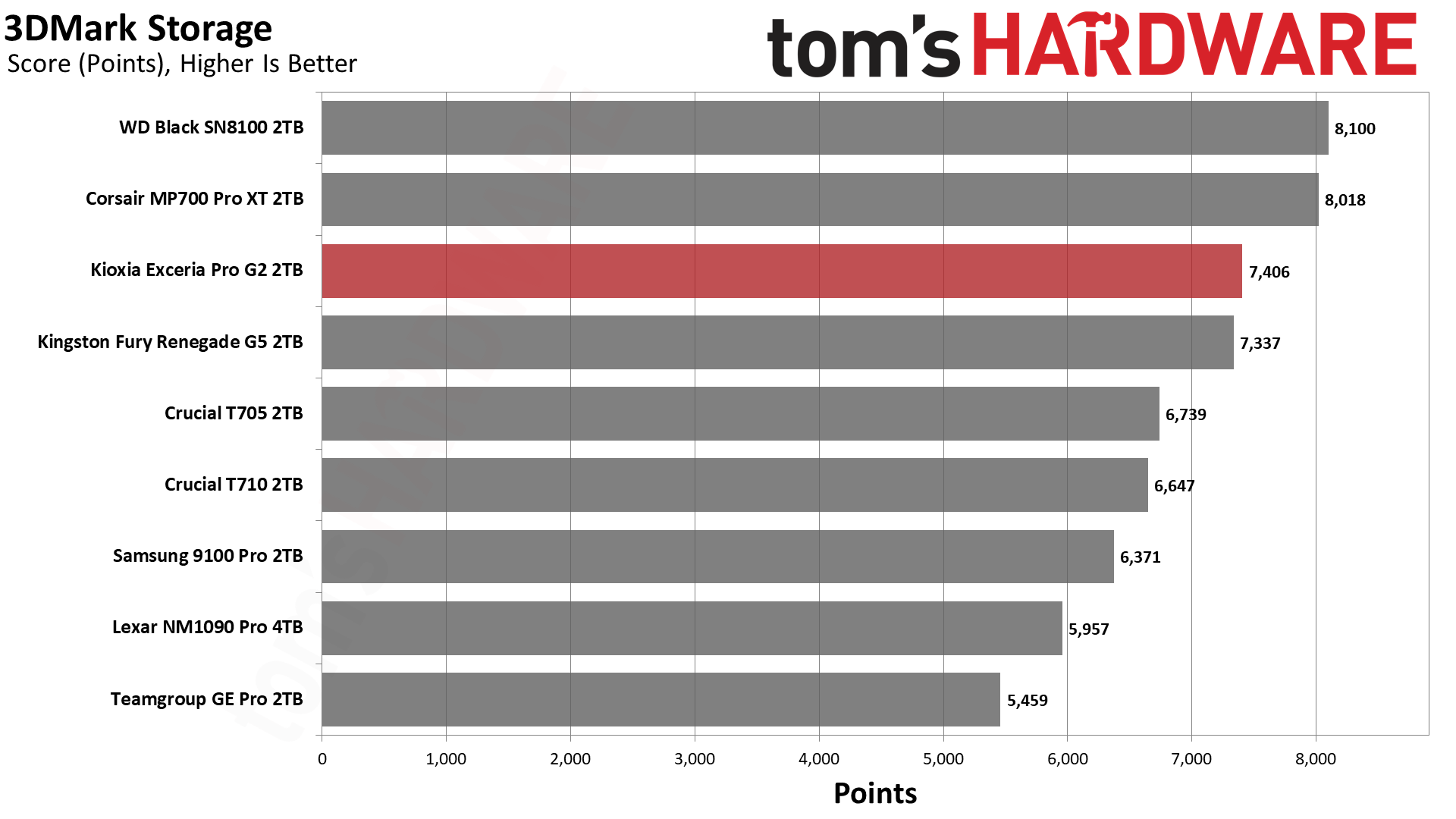
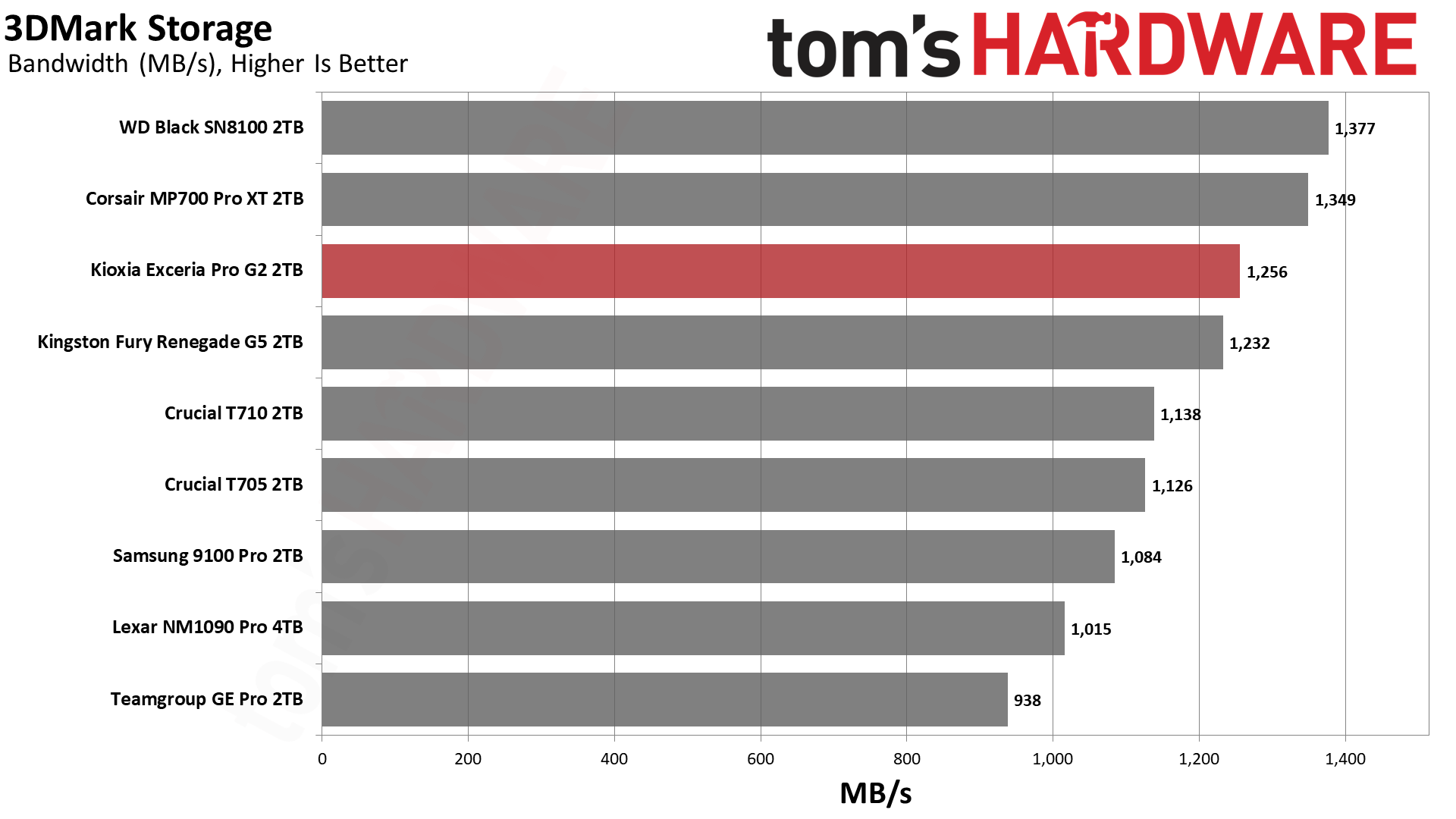
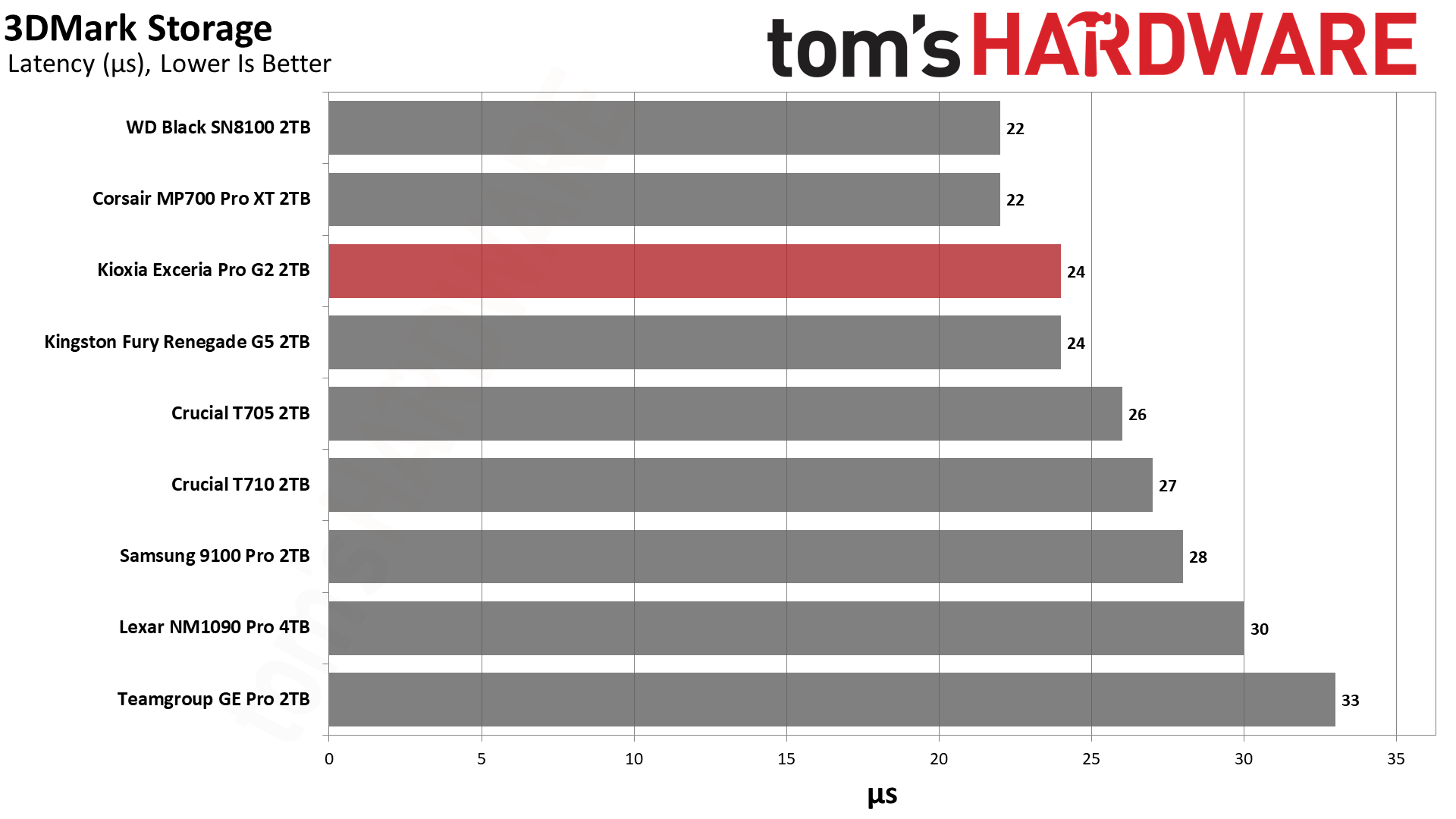
The Exceria Pro G2, being a high-end PCIe 5.0 SSD, is bound to be an excellent gaming drive. High bandwidth paired with the newest hardware is a win-win. Still, we like to qualify this with a 3DMark pass. Our finding is that the Exceria Pro G2 scores exactly where we would expect it to – right next to the Fury Renegade G5. These two drives have the same hardware, so no surprise there. The WD Black SN8100, which also has the same hardware, remains tied at the top with the Phison-controlled MP700 Pro XT. As we explained in the Black SN8100 review, this is because WD/Sandisk put some special magic in the firmware. Phison no doubt wanted to match that performance level, and actually did, but we have more than one SM2508-controlled drive to compare, which makes the SMI side of things more interesting.
Let’s look at the T710, for example. Same SM2508 controller but with Micron rather than Sandisk or Kioxia BiCS TLC flash. It’s a good performer, but clearly not as fast in 3DMark. The BiCS8 flash used on all of the fastest drives here has very low latency, which brings excellent results in many of our tests. Latency is, in fact, probably the number one thing enthusiasts look at with SSDs, with dreams of Optane-like performance. Consumer NAND flash, however, is simply not designed with that kind of ultra-low latency in mind. You are also usually bottlenecked elsewhere, to the point that improvements here lead to very little real-world value. Games load faster, sure, but there will be no improvement in FPS. That said, the Exceria Pro G2 will deliver a very good experience even in suboptimal circumstances, such as when the drive is very full.
Trace Testing — PCMark 10 Storage Benchmark
PCMark 10 is an industry standard trace-based benchmark that uses a wide-ranging set of real-world traces from popular applications and everyday tasks to measure the performance of storage devices. The results are particularly useful when analyzing drives for their use as primary/boot storage devices and in work environments.
Tom's HardwareTom's HardwareTom's Hardware
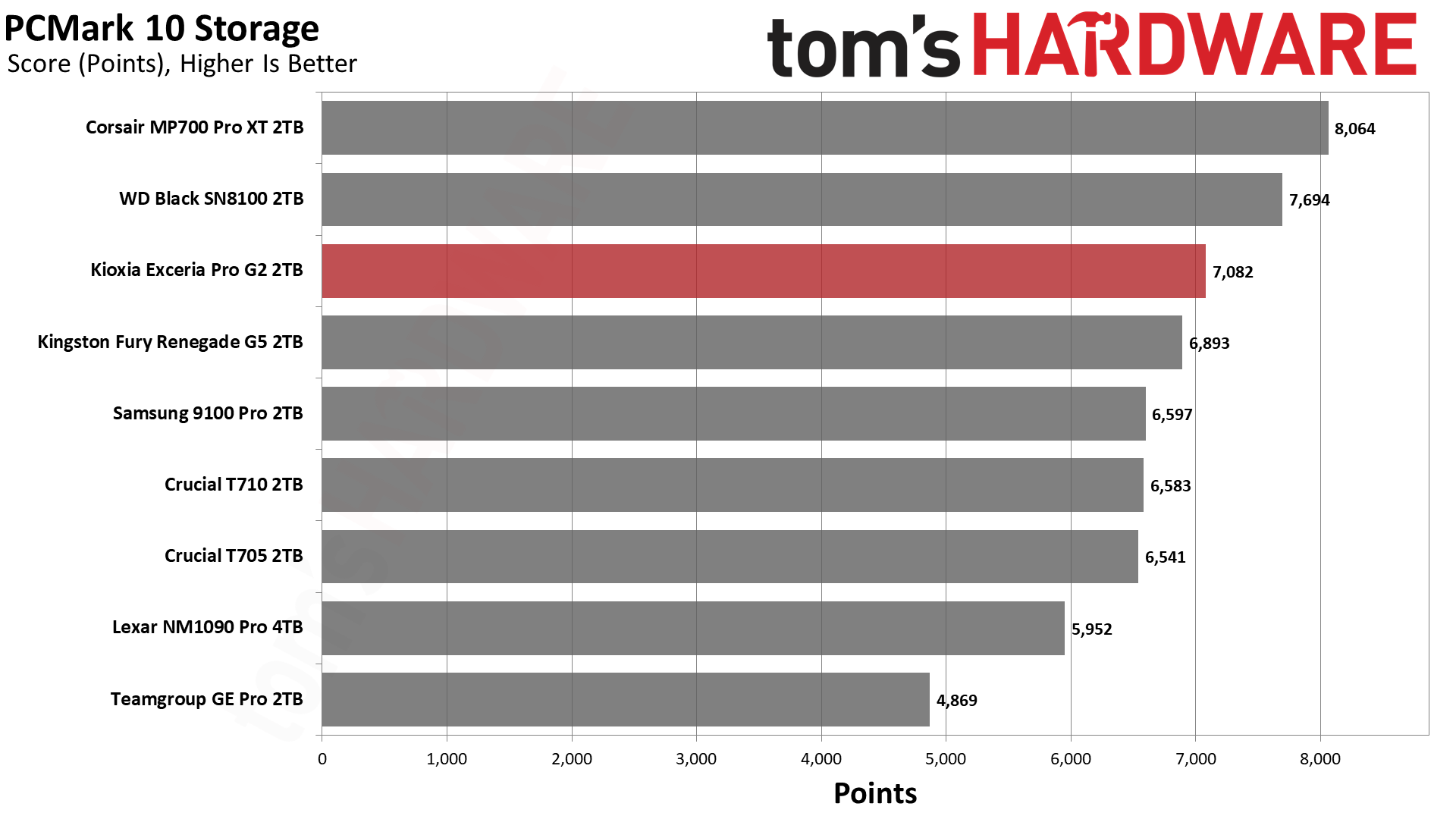
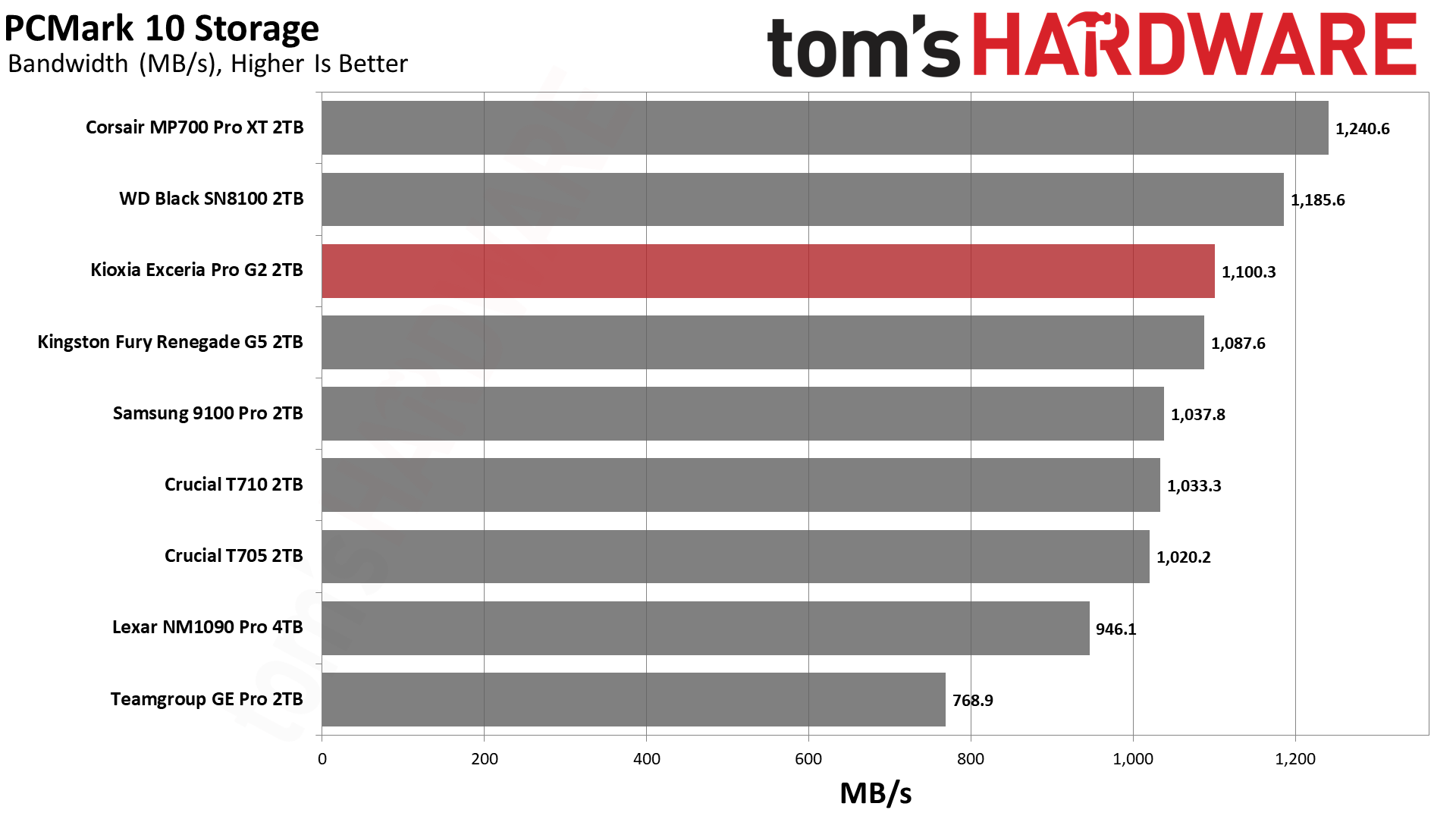
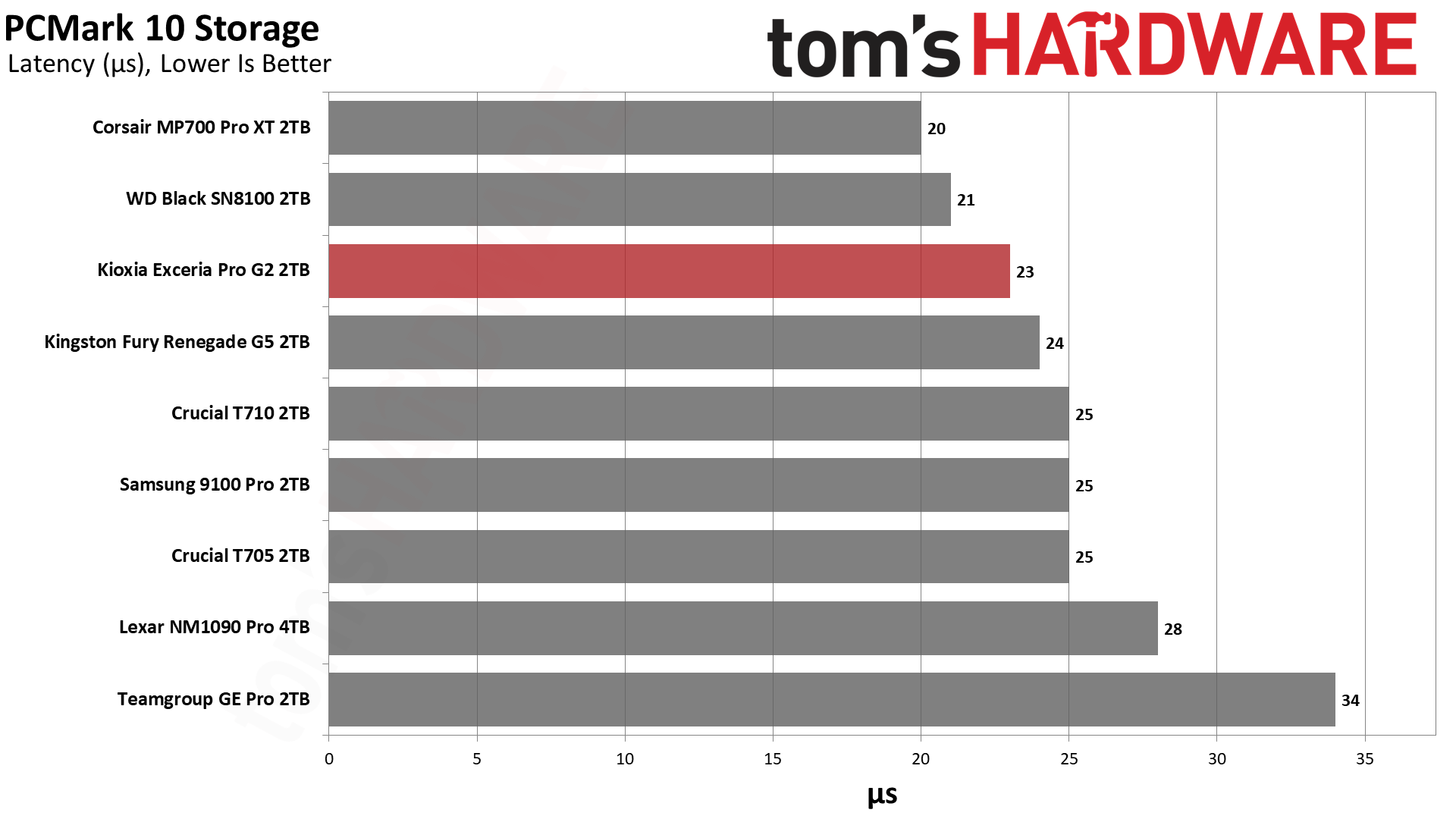
In PCMark 10, the Exceria Pro G2 lands a little bit above the Fury Renegade G5 – a good showing, considering they use the same hardware – but behind the MP700 Pro XT and Black SN8100. Performance is excellent in general, particularly for a drive that’s relatively affordable in its target regions. These numbers dwarf decent last-gen drives, with the Exceria Pro G2 scoring about 75% higher than something like the Crucial P5 Plus, for instance. That’s to be expected to some extent, as you have about twice the bandwidth with PCIe 5.0, but this drive also has significant improvements in latency.
Console Testing — PlayStation 5 Transfers
The PlayStation 5 is capable of taking one additional PCIe 4.0 or faster SSD for extra game storage. While any 4.0 drive will technically work, Sony recommends drives that can deliver at least 5,500 MB/s of sequential read bandwidth for optimal performance. Based on our extensive testing, PCIe 5.0 SSDs don’t bring much to the table and generally shouldn’t be used in the PS5, especially as they may require additional cooling. Check our Best PS5 SSDs article for more information.
Our testing utilizes the PS5’s internal storage test and manual read/write tests with over 192GB of data both from and to the internal storage. Throttling is prevented where possible to see how each drive operates under ideal conditions. While game load times should not deviate much from drive to drive, our results can indicate which drives may be more responsive in long-term use.
Tom's HardwareTom's HardwareTom's Hardware
A PCIe 5.0 drive for the PS5 is overkill, but it’s still important to test to make sure there are no anomalies with the drive. It’s within 1% of the fastest drive in the PS5’s internal read test, so no concerns there. Depending on the price, it can also be beneficial to use a PCIe 5.0 drive in the console. Such a drive will be running at a lower link speed and will be more efficient and cooler-running. Newer drives will use new technology and hardware, which means improved operation even in older host devices.
We generally recommend using less expensive drives for the PS5, but something like the Exceria Pro G2 remains an acceptable option. Kioxia has also validated the drive against Sony’s requirements with its own PS5 testing, relevant if you are someone who prefers to trust a drive so thoroughly tested. It’s also an acceptable use of the drive if you’re buying it ahead of a future build, whether you catch a sale or are trying to avoid future higher prices.
Transfer Rates — DiskBench
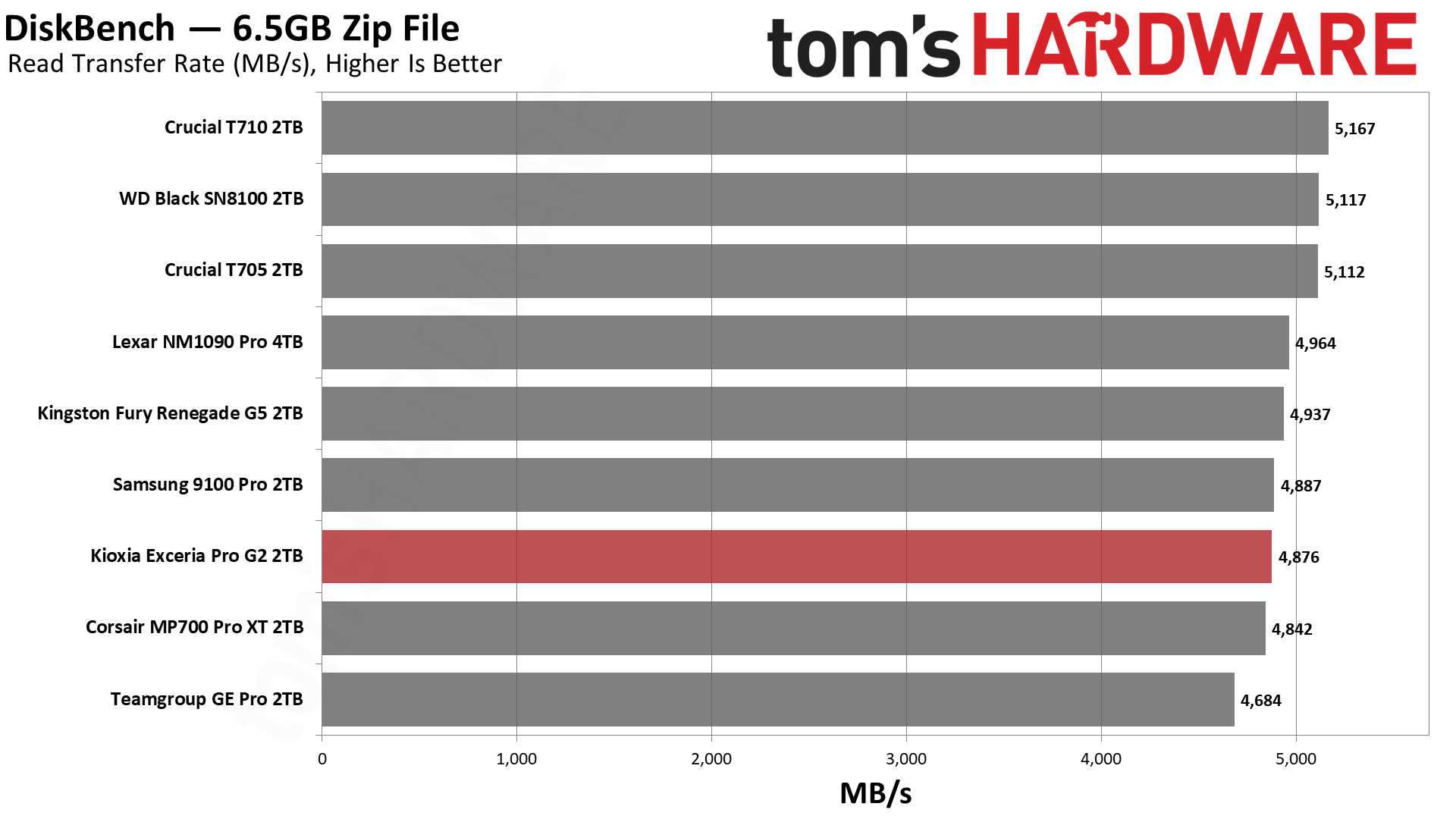
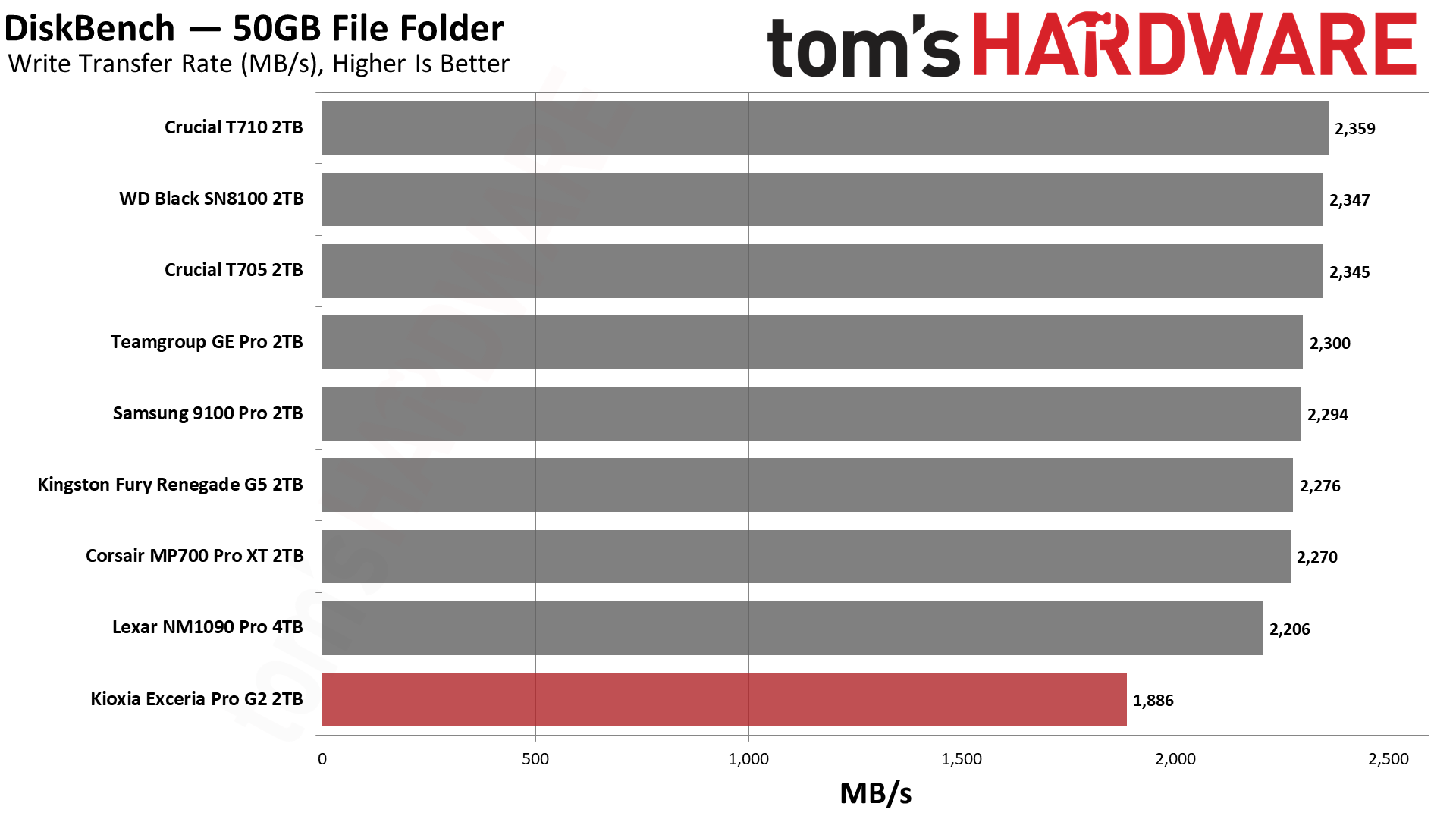
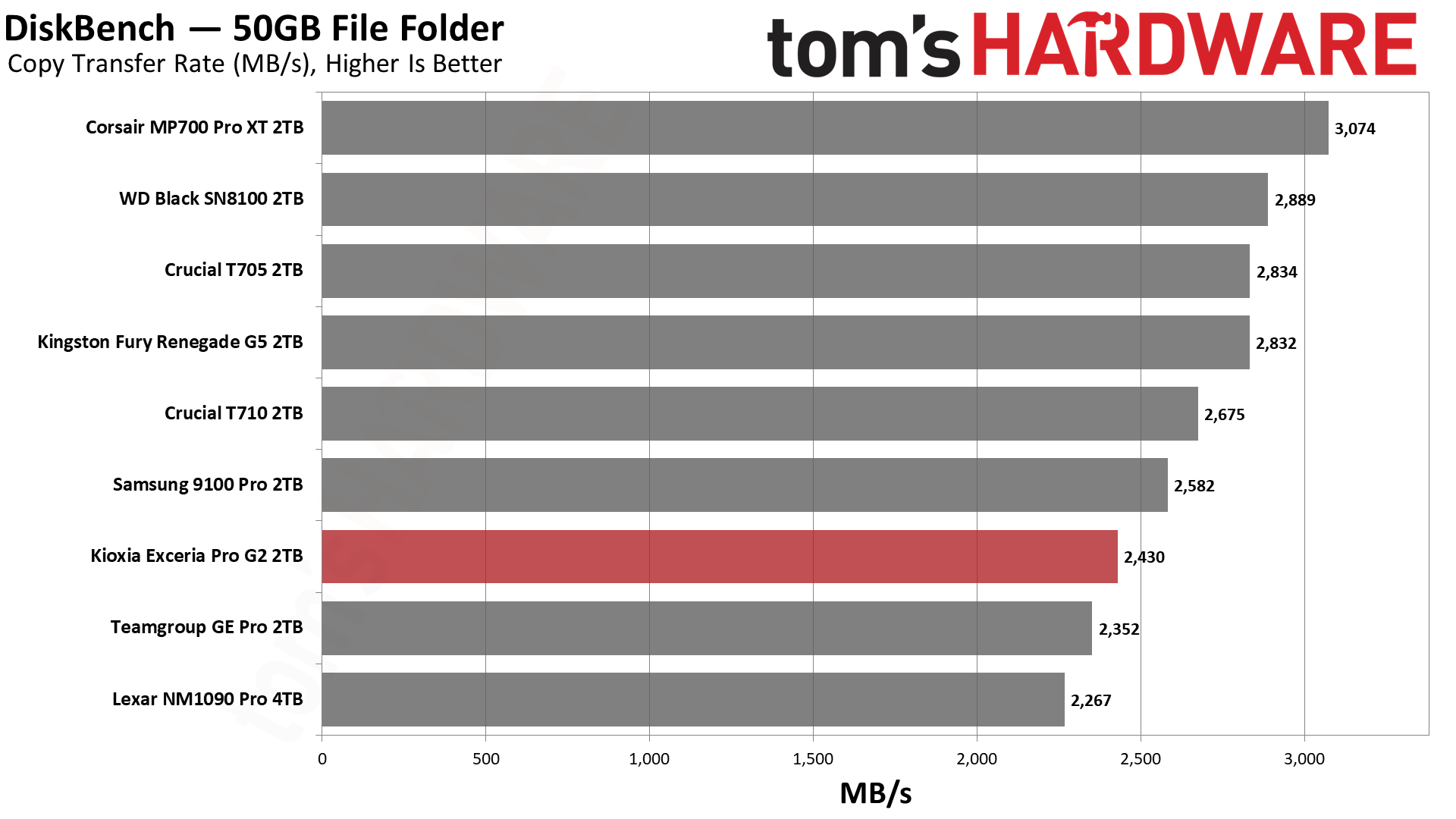
We use the DiskBench storage benchmarking tool to test file transfer performance with a custom 50GB dataset. We write 31,227 files of various types, such as pictures, PDFs, and videos to the test drive, then make a copy of that data to a new folder, and follow up with a reading test of a newly written 6.5GB zip file. This is a real-world type workload that fits into the cache of most drives.
Tom's HardwareTom's HardwareTom's Hardware
DiskBench is the Exceria Pro G2’s first misstep and worthy of further discussion since we know this hardware can do more. Read performance is reasonable – beating the MP700 Pro XT, matching the 9100 Pro, and coming close to the Fury Renegade G5 – but write performance is very weak. This also reduces the copy performance below even the 9100 Pro. This is almost certainly by design, in the sense that being conservative with writes is a trade-off. That can reduce wear and also keep thermal output to a minimum. For a retail drive with OEM/client origins, this makes a lot of sense. Obviously, you, as the user, don’t want slower writes, but we think most people would take reliability over burst write performance when push comes to shove.
This means the Exceria Pro G2 is not the drive to get if you want maximum performance, but it’s still very fast. It’s easier to put this into perspective when looking at the benchmark results as a whole. This requires you to look at write performance in our write saturation testing and also at heat output. To close out this section, though, we would point out that the drive still beats the GE Pro and NM1090 Pro in copy performance. We weigh copy performance most heavily for DiskBench as it’s a mixed workload. Those two are more budget-leaning high-end drives that may sometimes end up within a similar price range as the review drive, making any decision between them and the Exceria Pro G2 much easier.
Synthetic Testing — ATTO / CrystalDiskMark
ATTO and CrystalDiskMark (CDM) are free and easy-to-use storage benchmarking tools that SSD vendors commonly use to assign performance specifications to their products. Both of these tools give us insight into how each device handles different file sizes and at different queue depths for both sequential and random workloads.
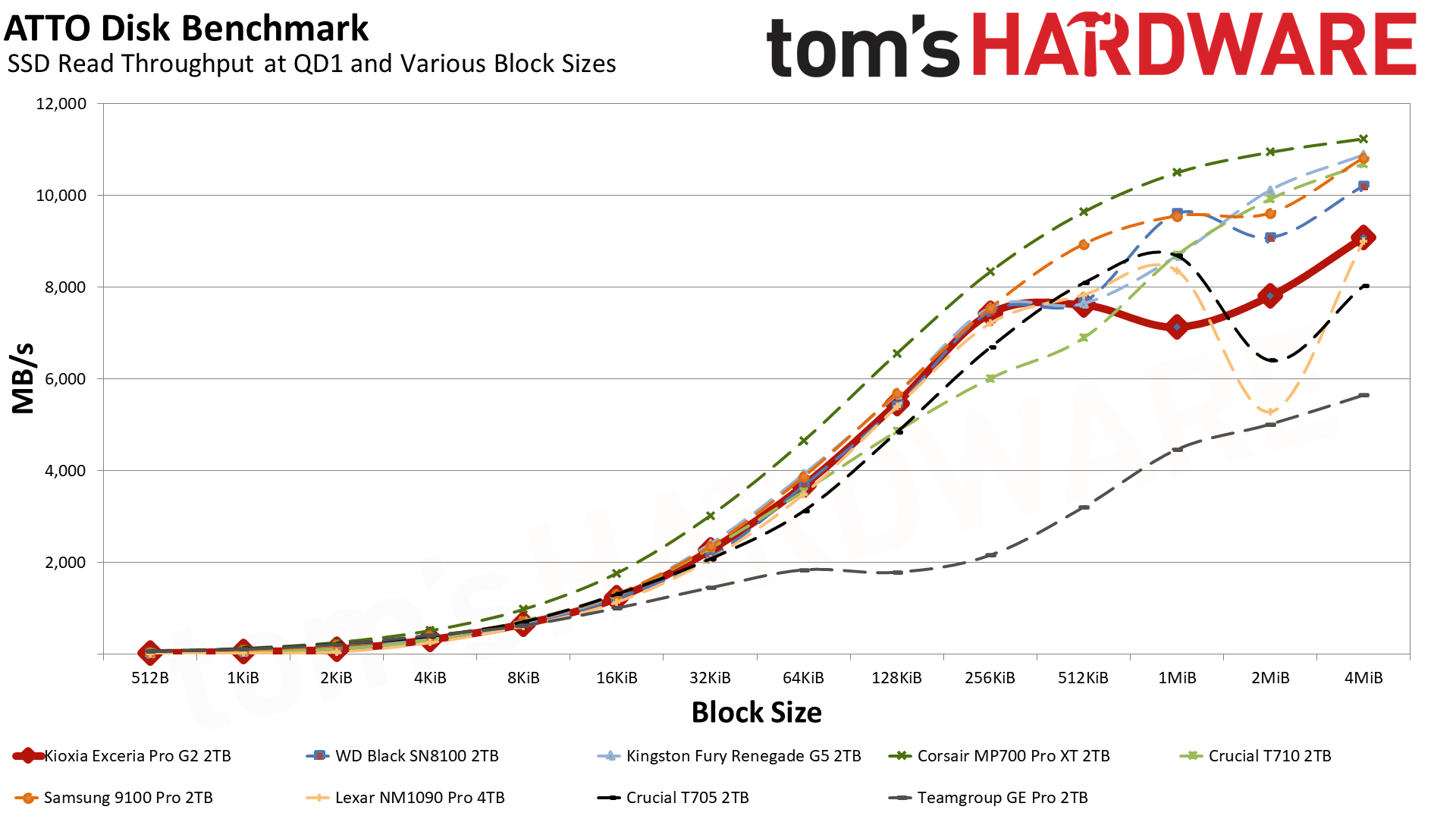
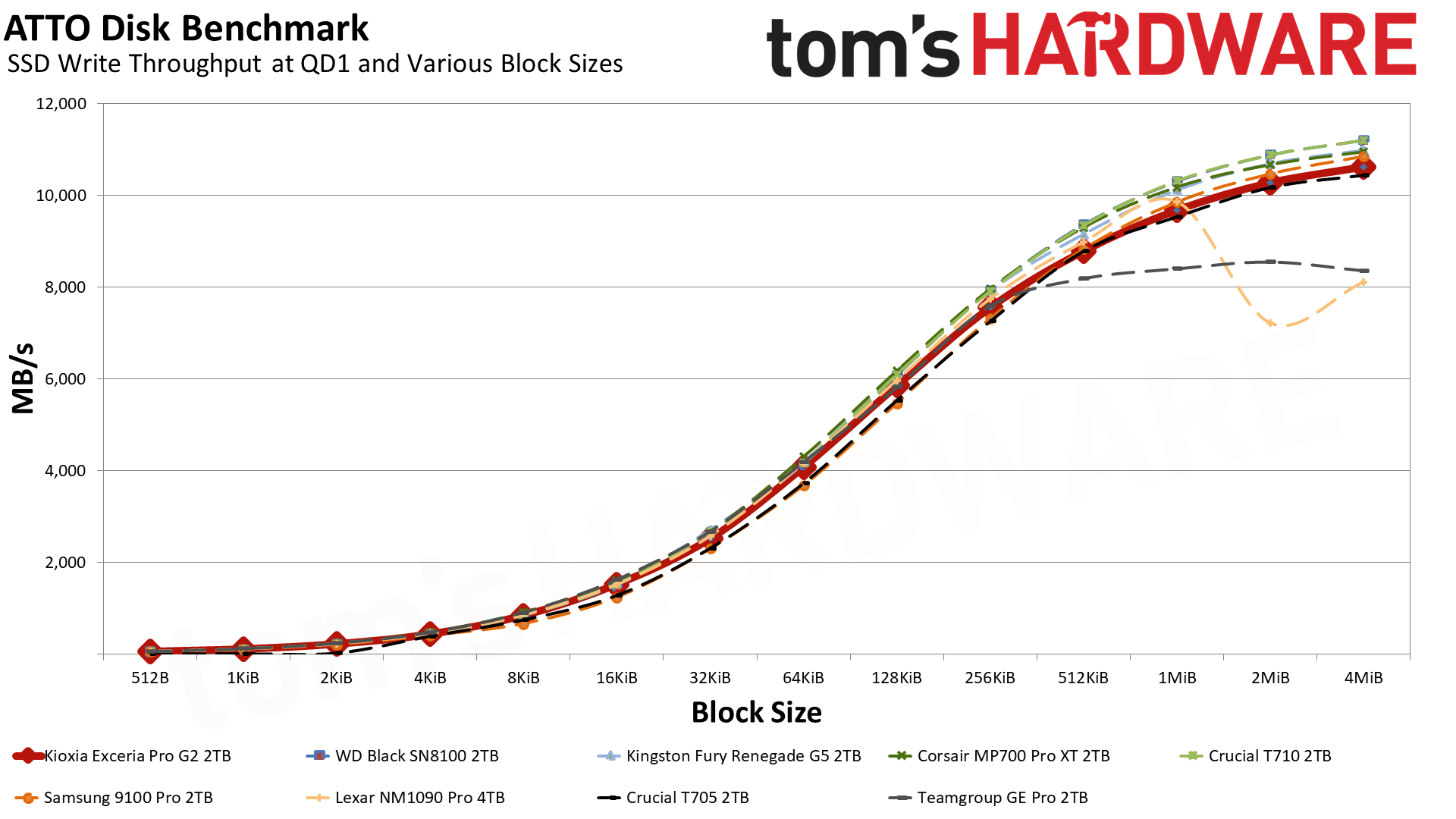
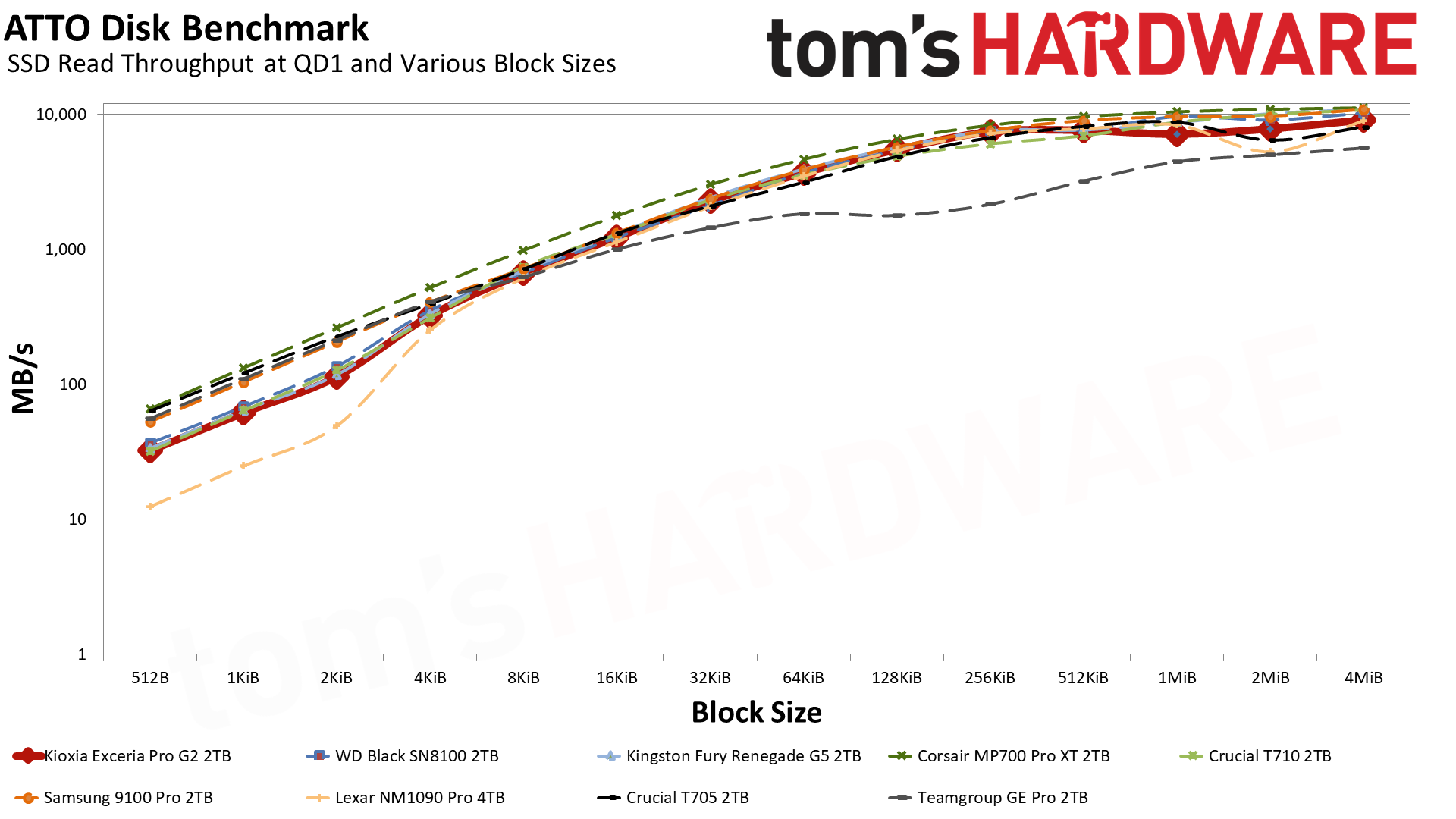
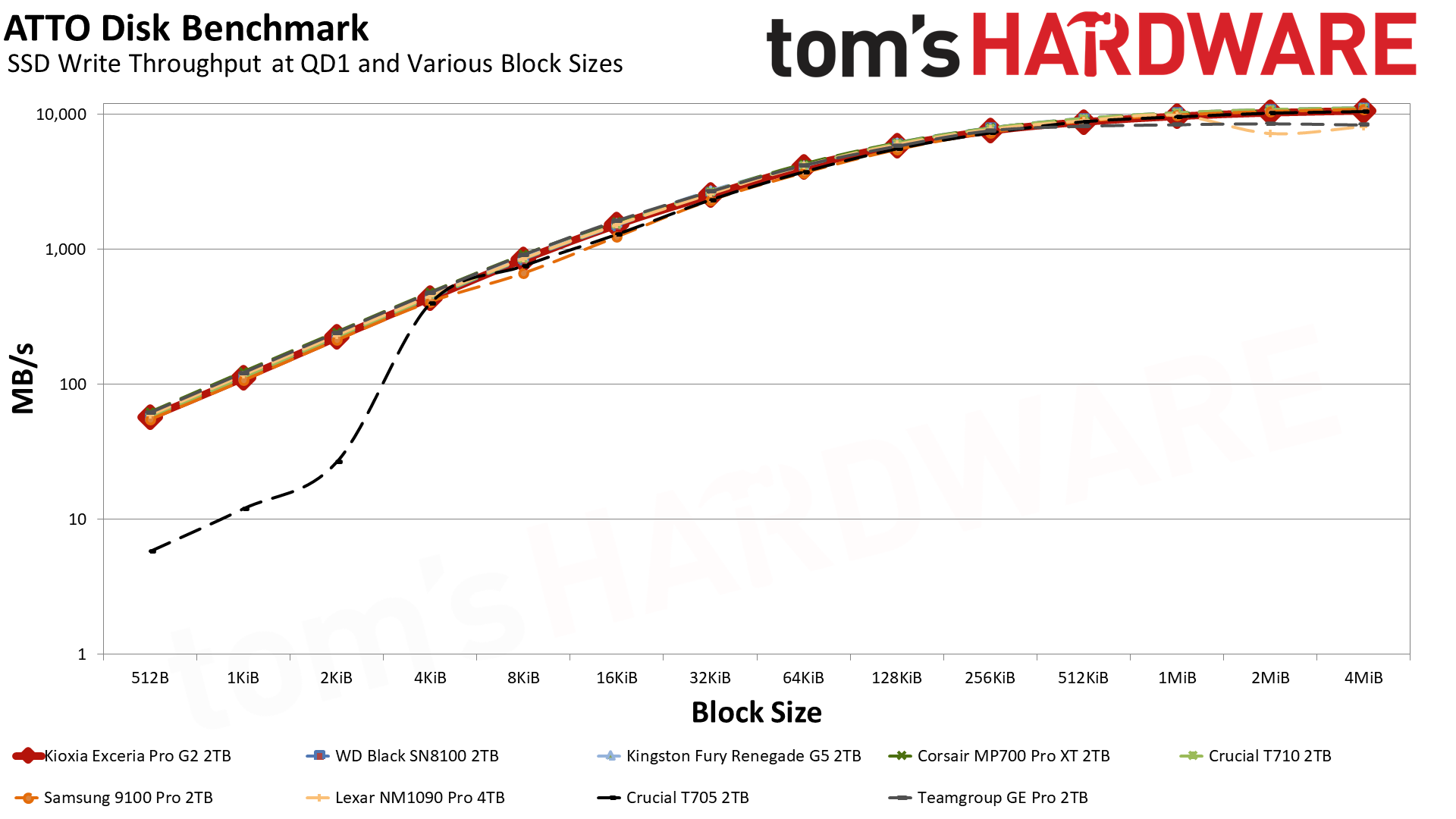
We start by looking at ATTO, which gives an idea of how the drive performs at different block sizes. We include the results on logarithmic graphs because that often puts things into perspective. For example, on the standard graph, the Exceria Pro G2 looks fine until it flattens at 512KiB and dips at 1MiB, while on the logarithmic graph it lags the MP700 Pro XT at small I/O, and the gap at larger block sizes is minimized. This lag at small I/O isn’t unusual, as drives with the same hardware, like the Black SN8100, show the same pattern. Both that drive and the Fury Renegade G5 are a little bumpy at larger block sizes, but the MP700 Pro XT is not. Likewise, the T710 is also pretty consistent. This means that the SMI controller and BiCS8 flash combination is less consistent with bigger I/O sizes, but this is only looking at a queue depth of 1.
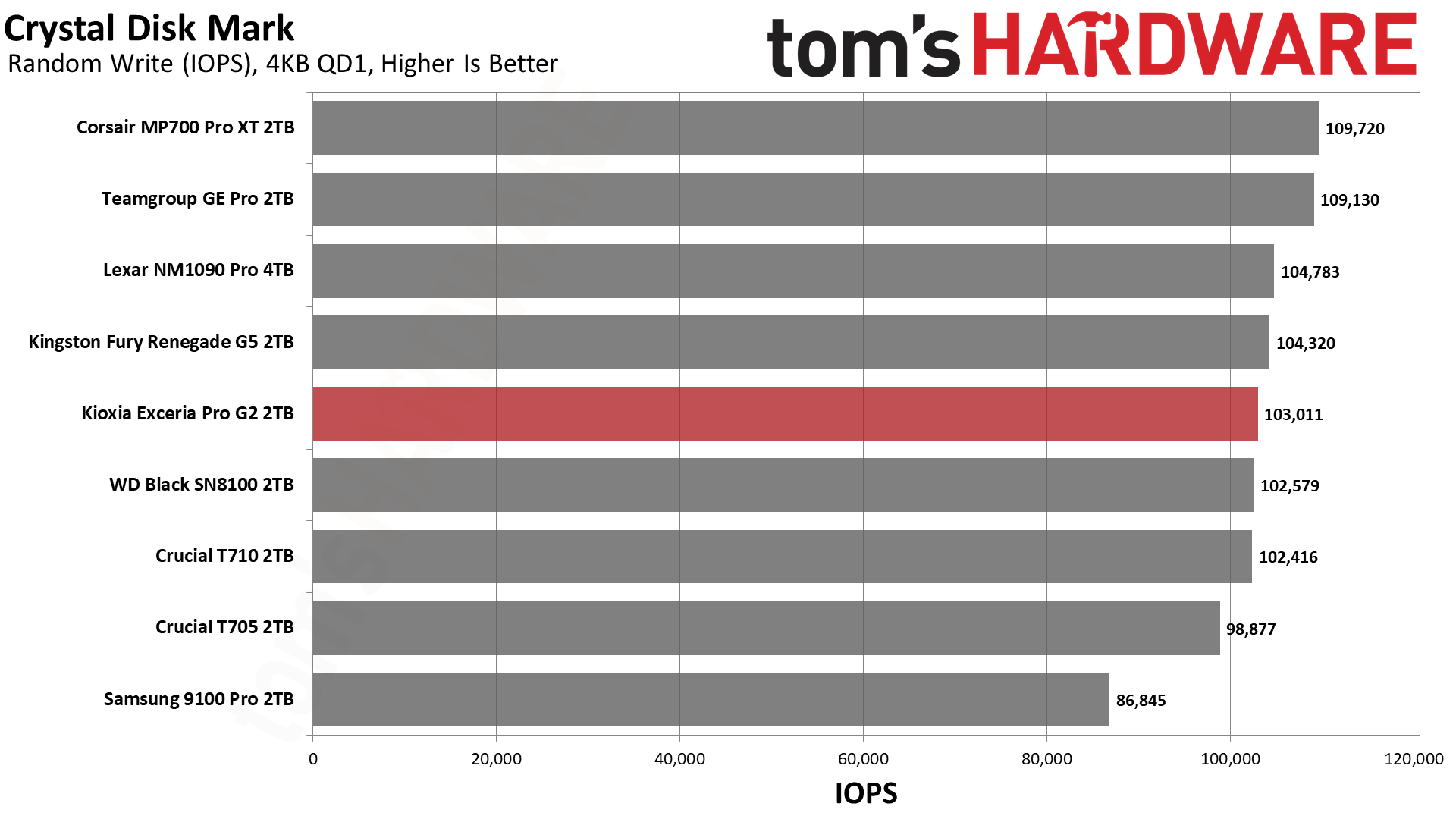
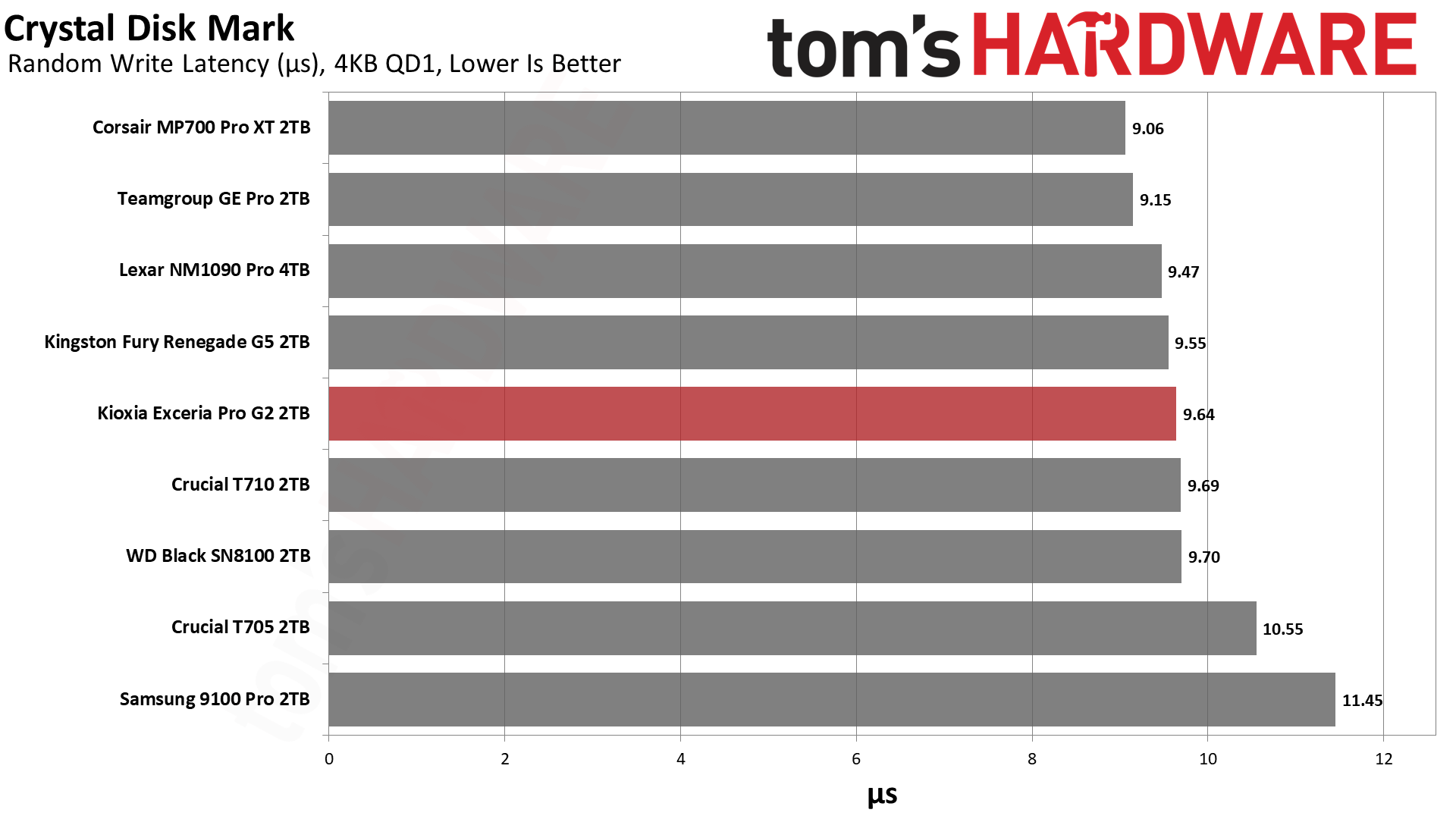
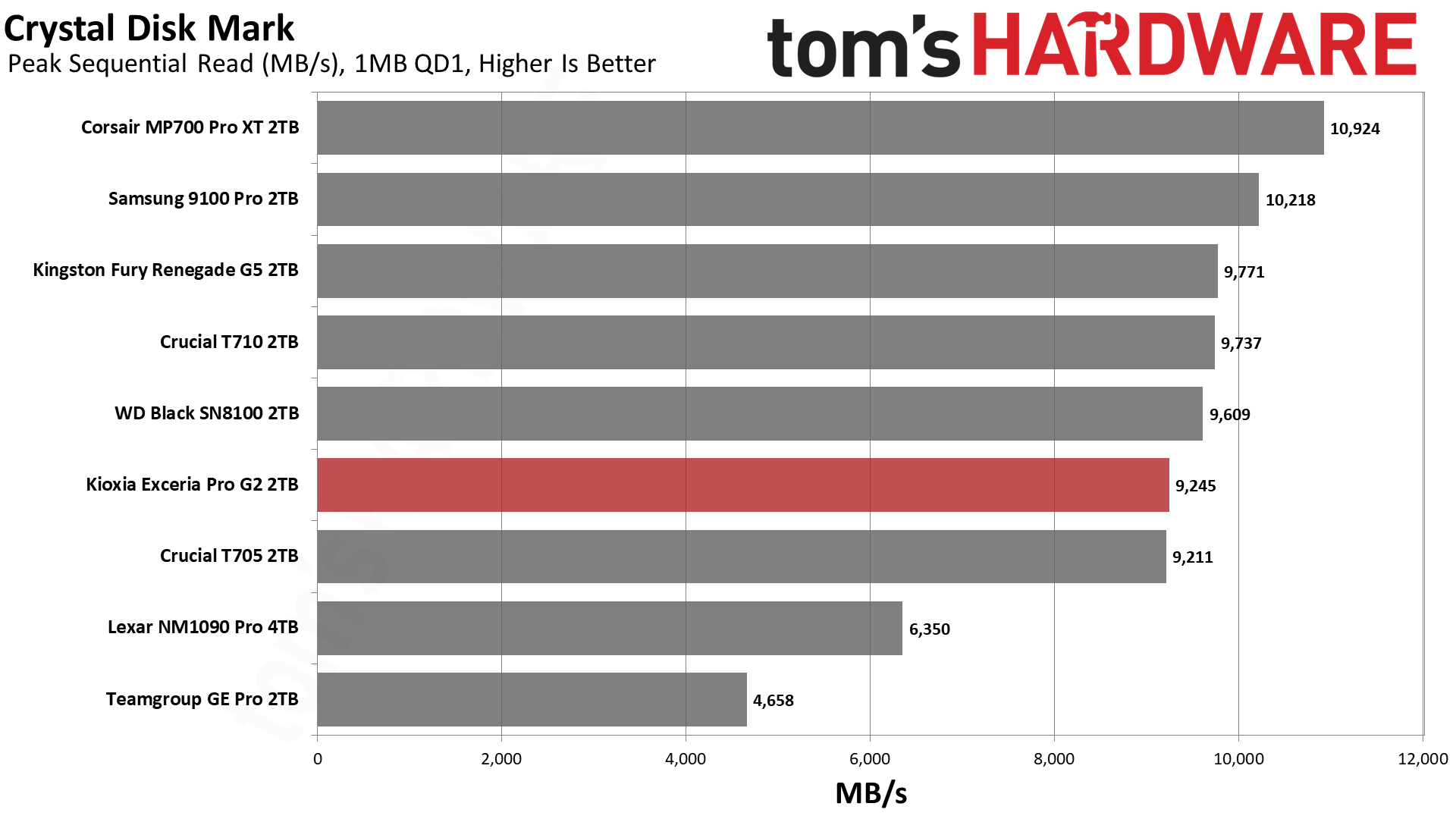
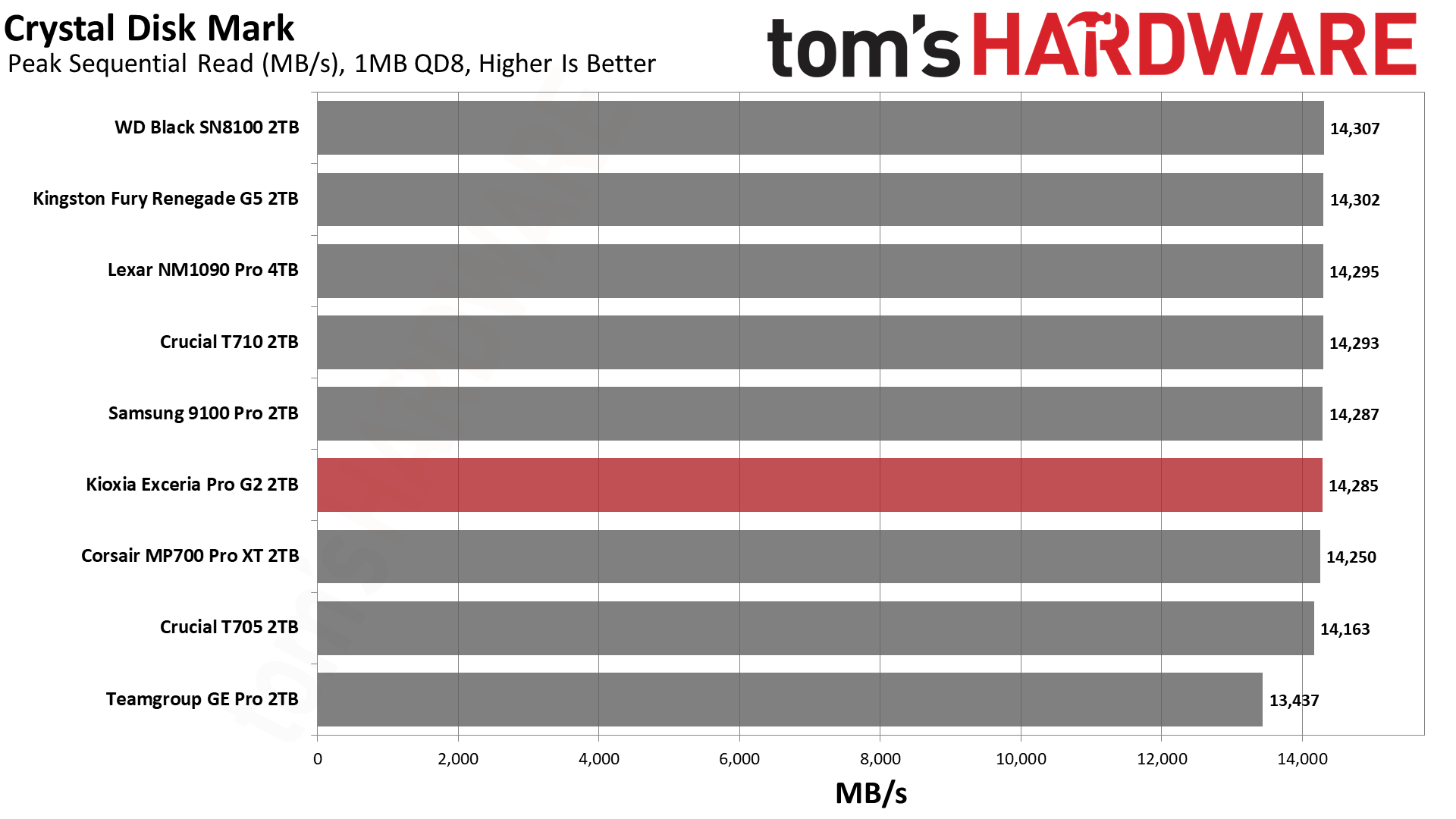
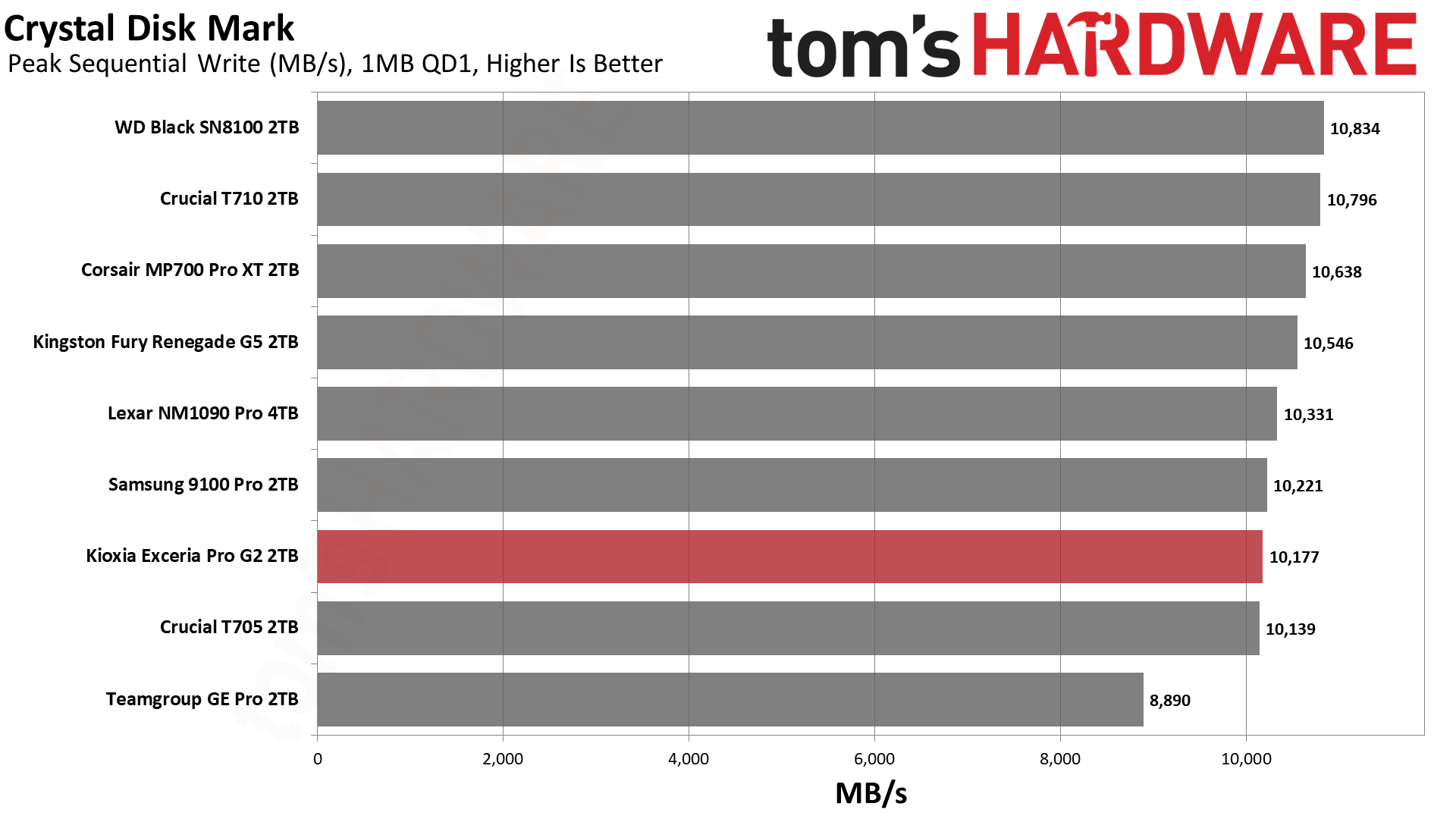
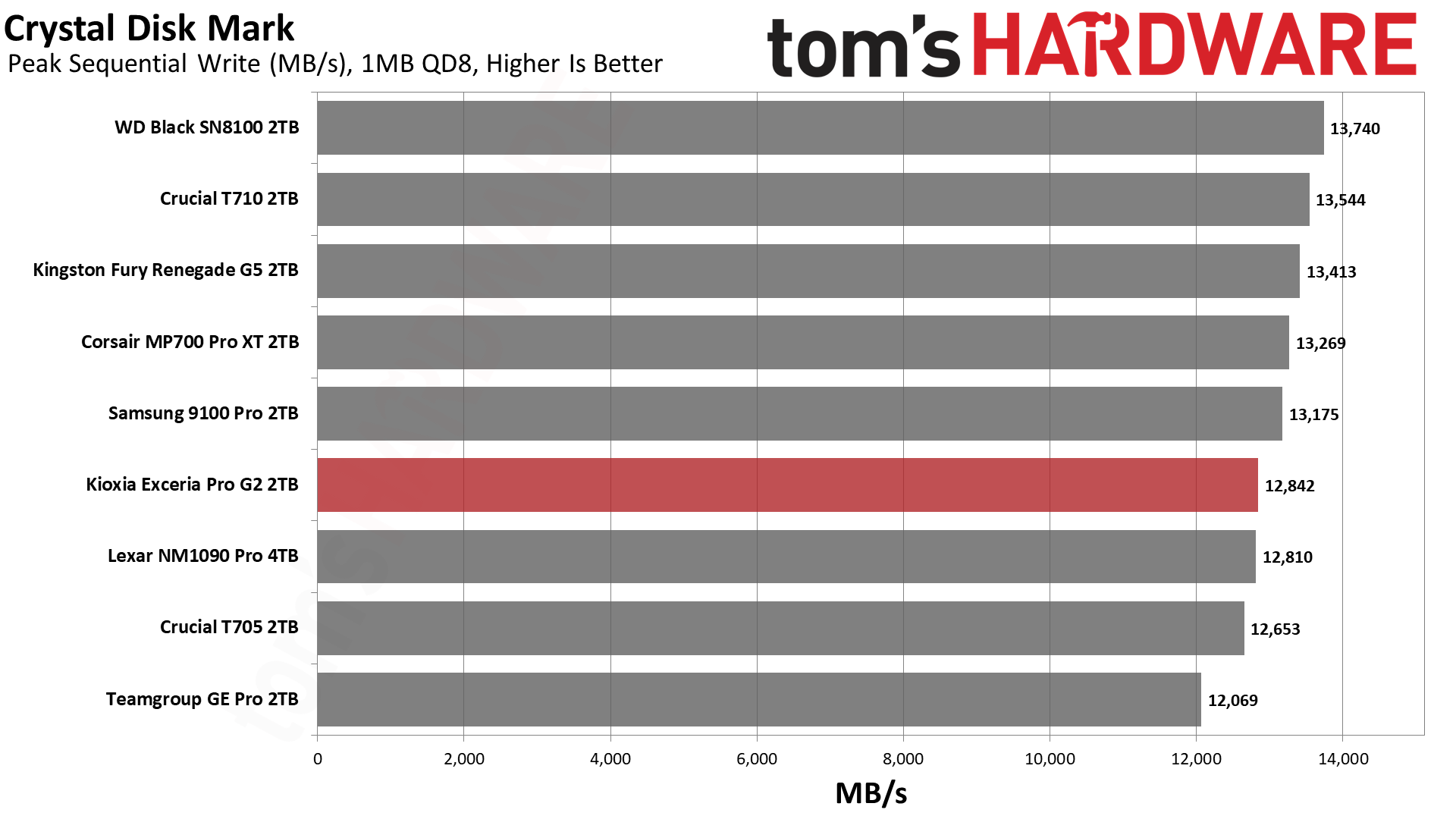
If we turn to CDM’s sequential results, we find agreement that the Exceria Pro G2 is a bit weak with QD1 reads at 1MB. This is a fairly realistic workload, as transferring files around this size is common and would usually be at QD1. You can see that the MP700 Pro XT, with the same flash but Phison’s controller, leads everything else here, with only the 9100 Pro coming close. It’s able to get more out of the flash and reduce the overhead – it is simply better at extracting bandwidth, even at low queue depths. To some extent, this is a function of firmware and not hardware, by which we mean the Exceria Pro G2 is not likely physically deficient in any way. It may instead be optimized to provide a slower but reliable experience, perhaps in the interest of inducing less wear on the drive. Reads don’t directly wear flash, but you’re also reducing heat output with this sort of optimization. It’s often said that flash prefers heat, but that only applies to writes. You generally want a lower temperature during reads.
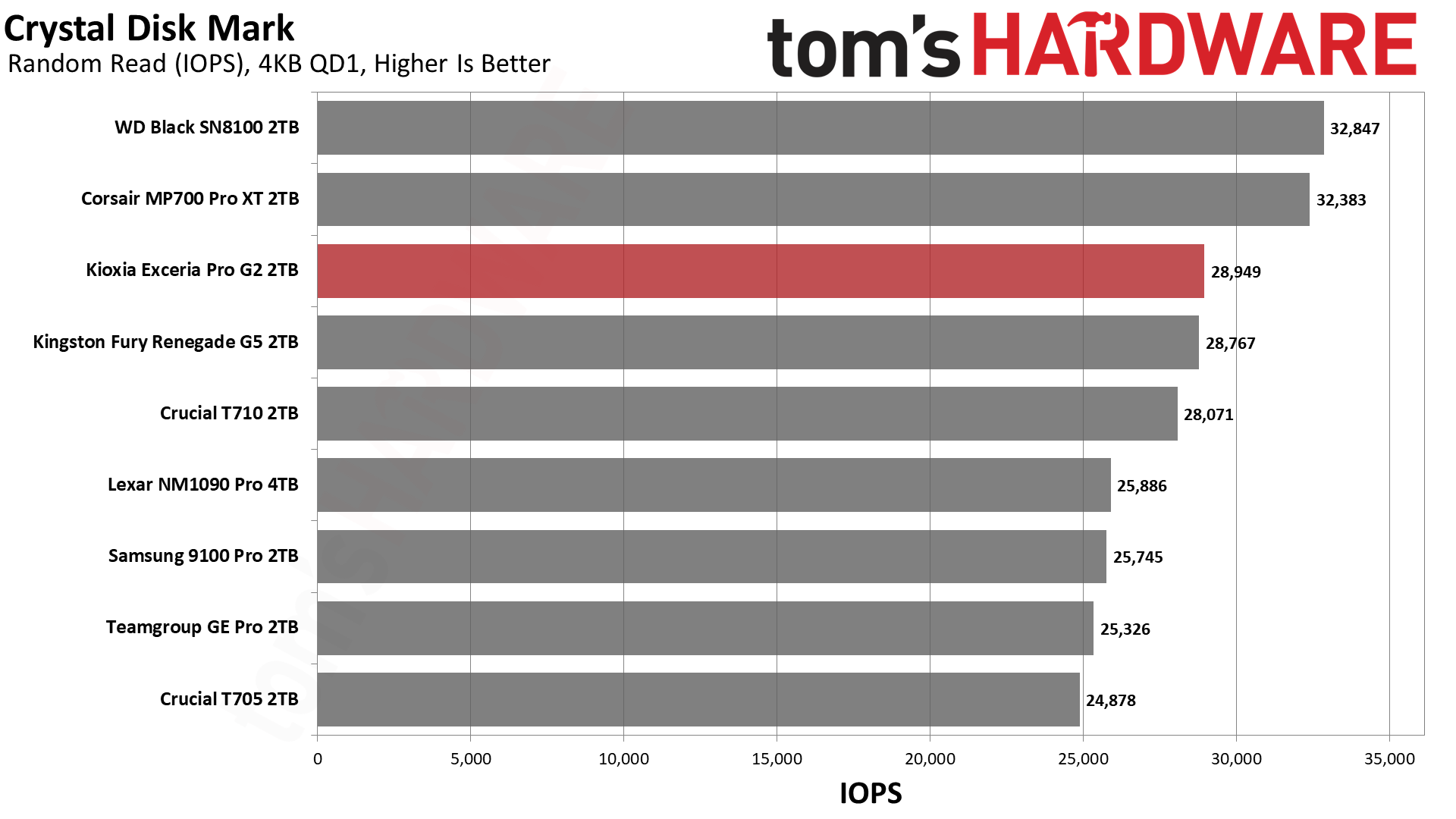
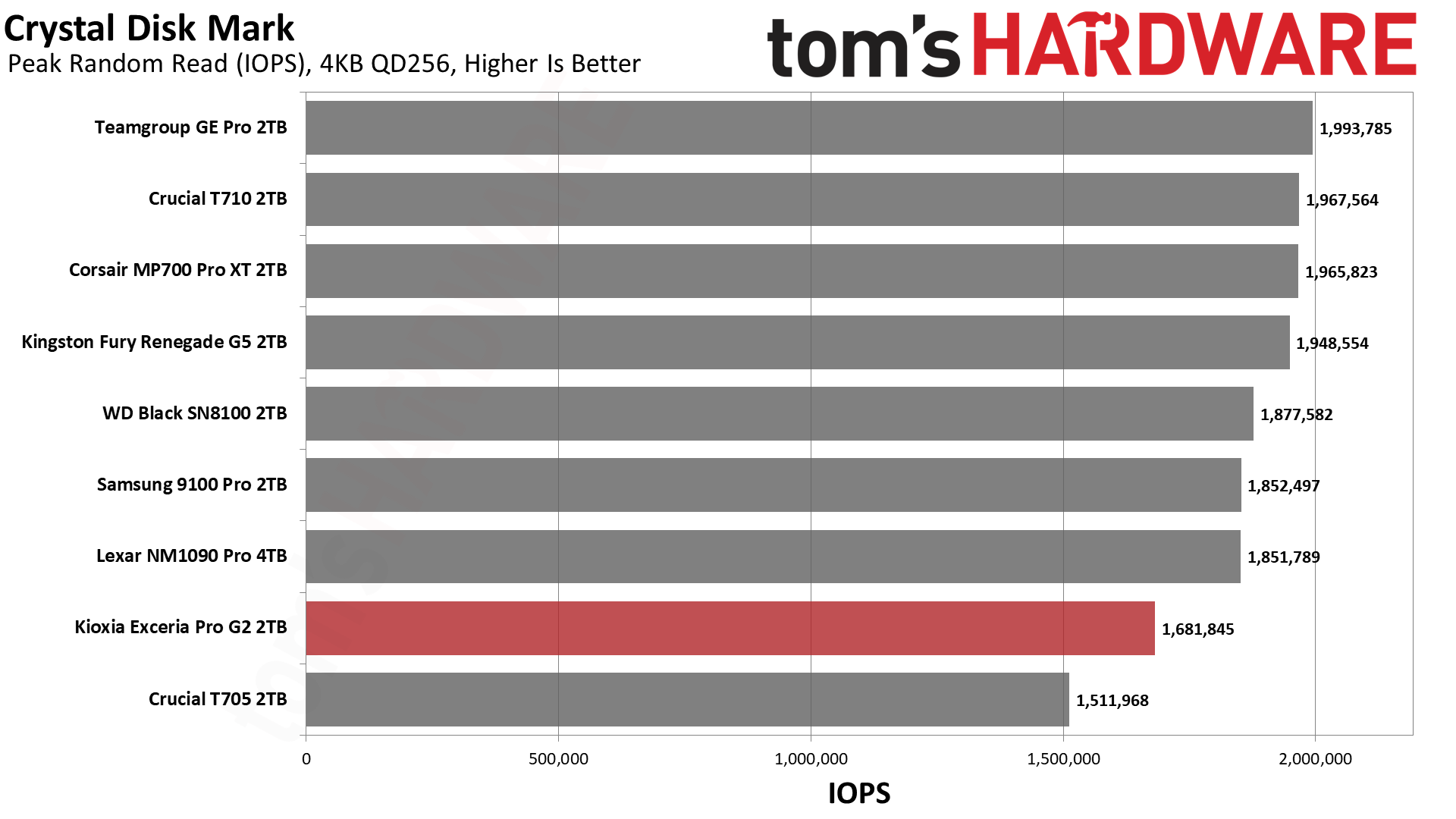
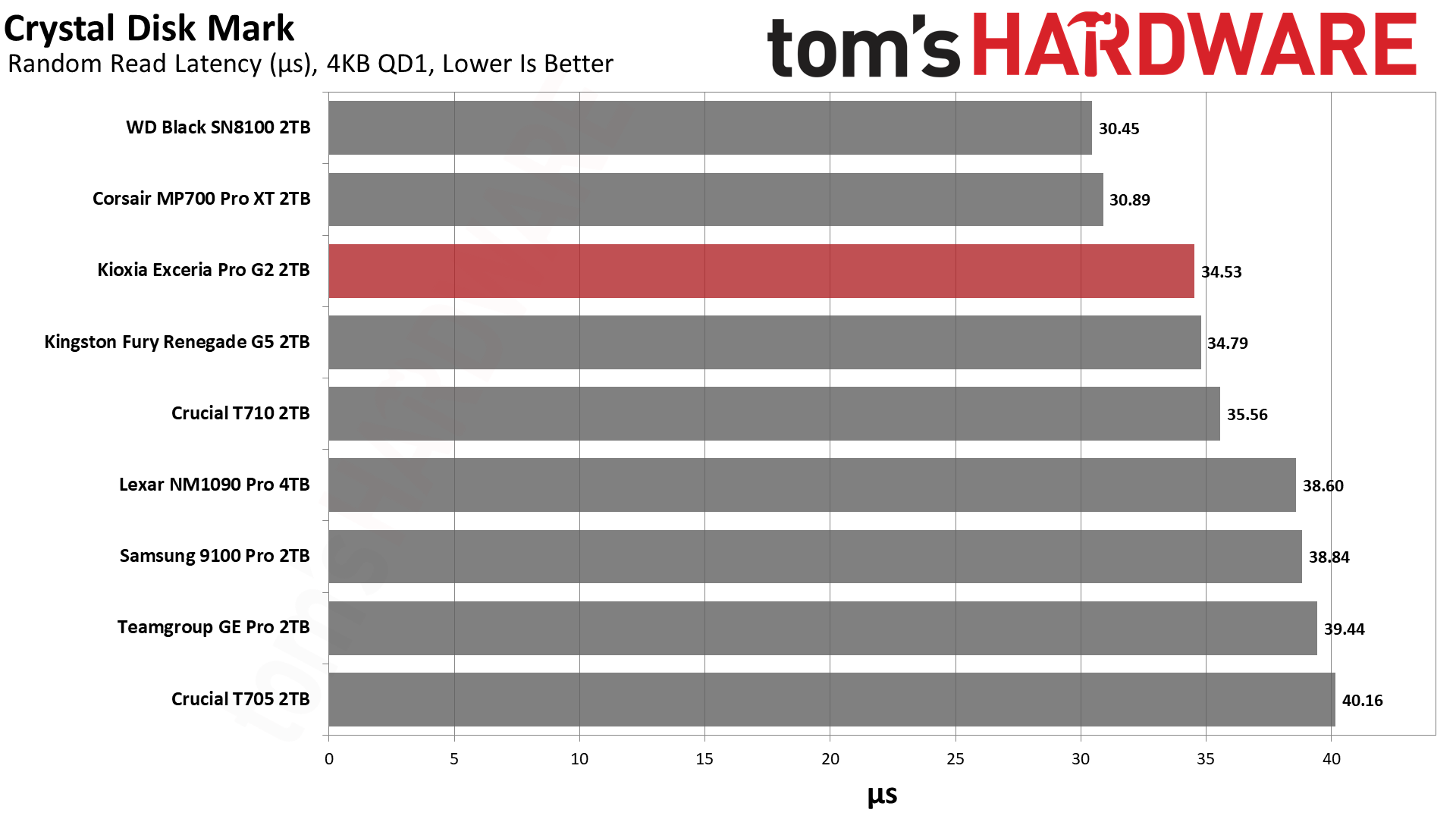
The one place the drive clearly trails its Fury Renegade G5 twin is with high QD random reads. This feels like the firmware may be holding something in reserve rather than being a strict hardware limit. The Exceria Pro G2 still has the excellent BiCS latency, though, coming in under 35µs for 4KB QD1 random reads. This is a fantastic result. It trails what WD and Phison can deliver, but it’s still exceptionally fast even by PCIe 5.0 standards. App and game load times are snappy, and there is a noticeable improvement over last-gen drives. We think this is a good trade-off as you’re more likely to be dealing with low QD random reads.
Sustained Write Performance and Cache Recovery
Official write specifications are only part of the performance picture. Most SSDs implement a write cache, which is a fast area of pseudo-SLC (single-bit) programmed flash that absorbs incoming data. Sustained write speeds can suffer tremendously once the workload spills outside of the cache and into the "native" TLC (three-bit) or QLC (four-bit) flash. Performance can suffer even more if the drive is forced to fold, the process of migrating data out of the cache in order to free up space for further incoming data.
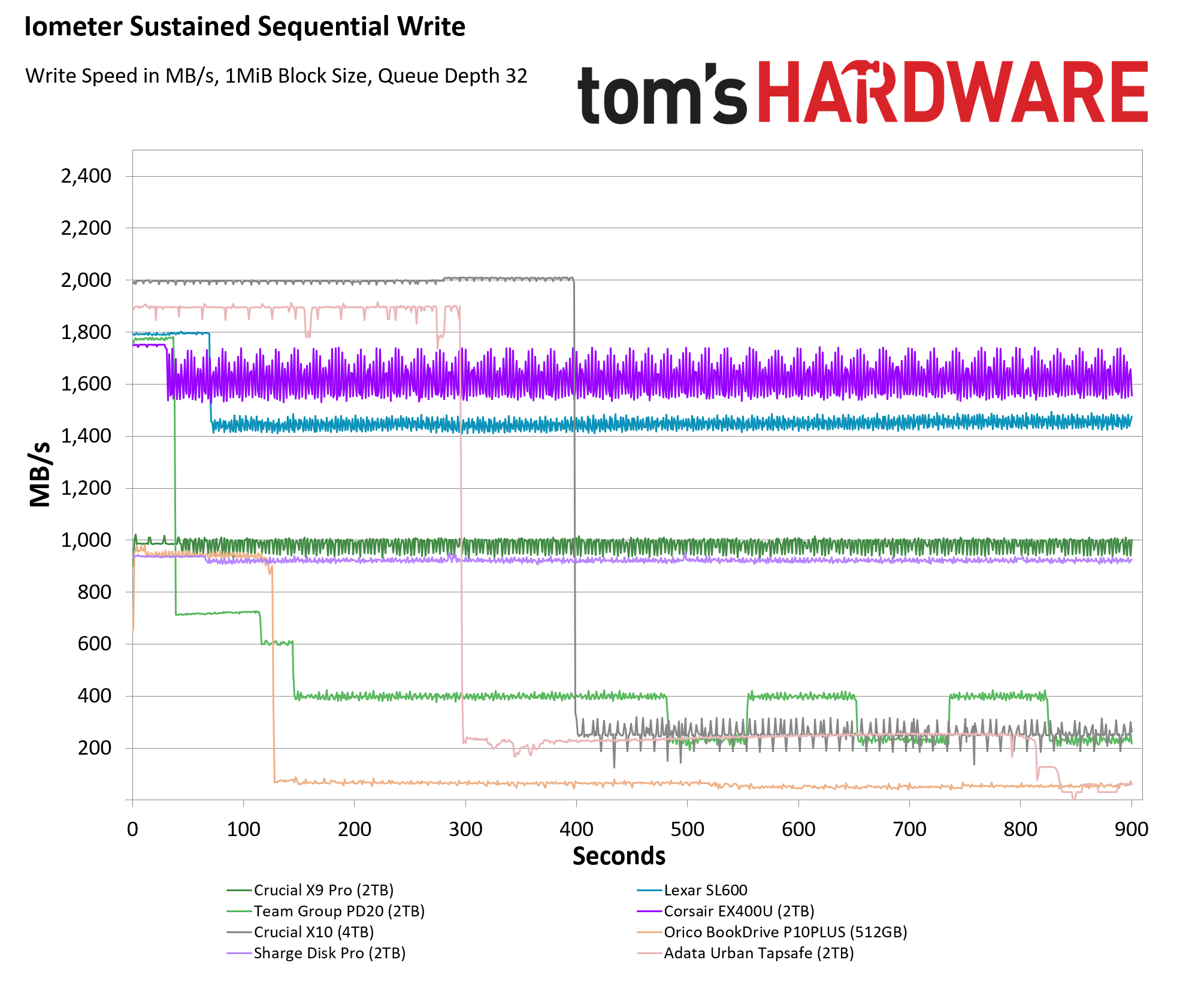
We use Iometer to hammer the SSD with sequential writes for 15 minutes to measure both the size of the write cache and performance after the cache is saturated. We also monitor cache recovery via multiple idle rounds. This process shows the performance of the drive in various states including the steady state write performance.
Tom's HardwareTom's HardwareTom's Hardware
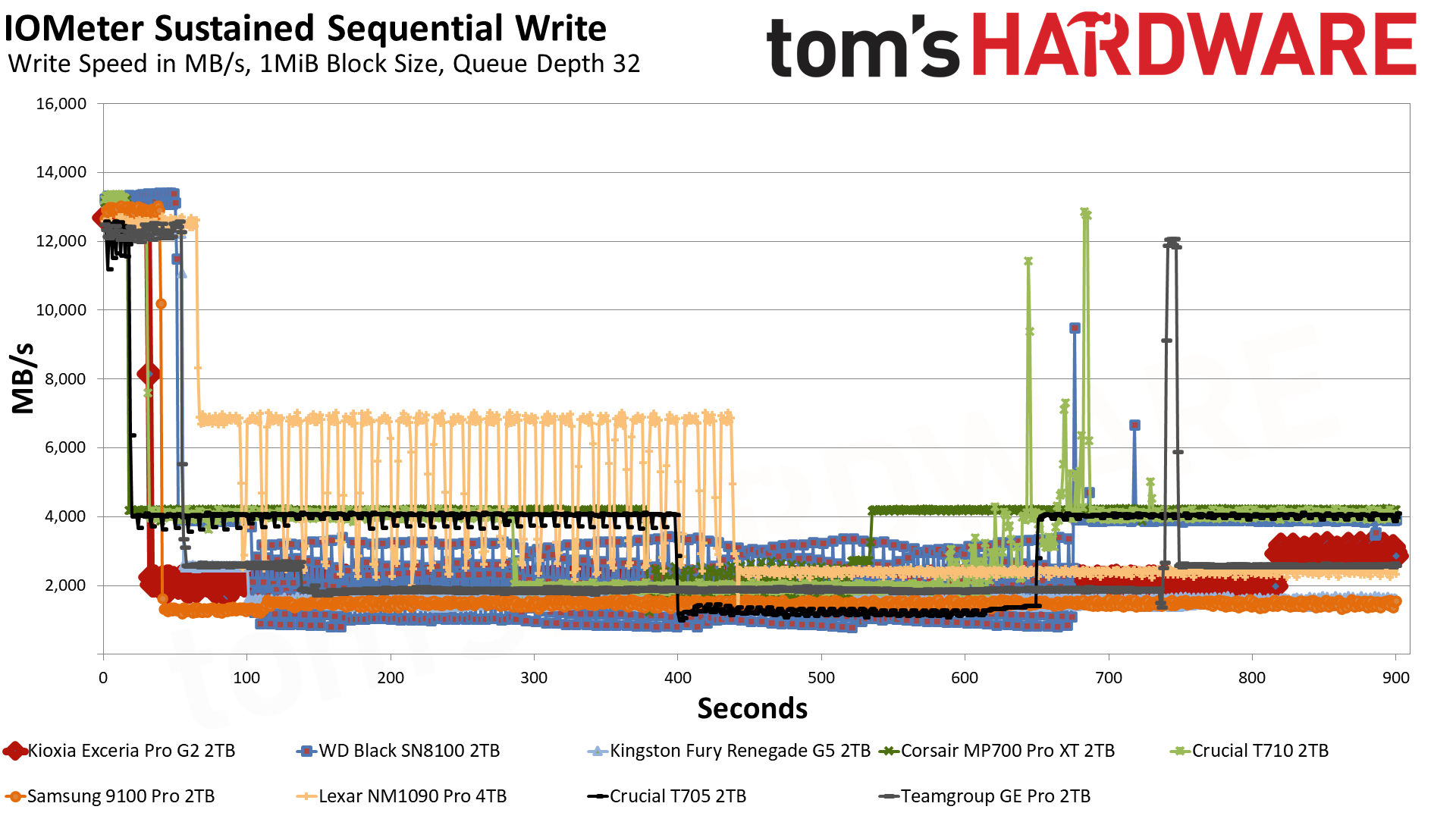
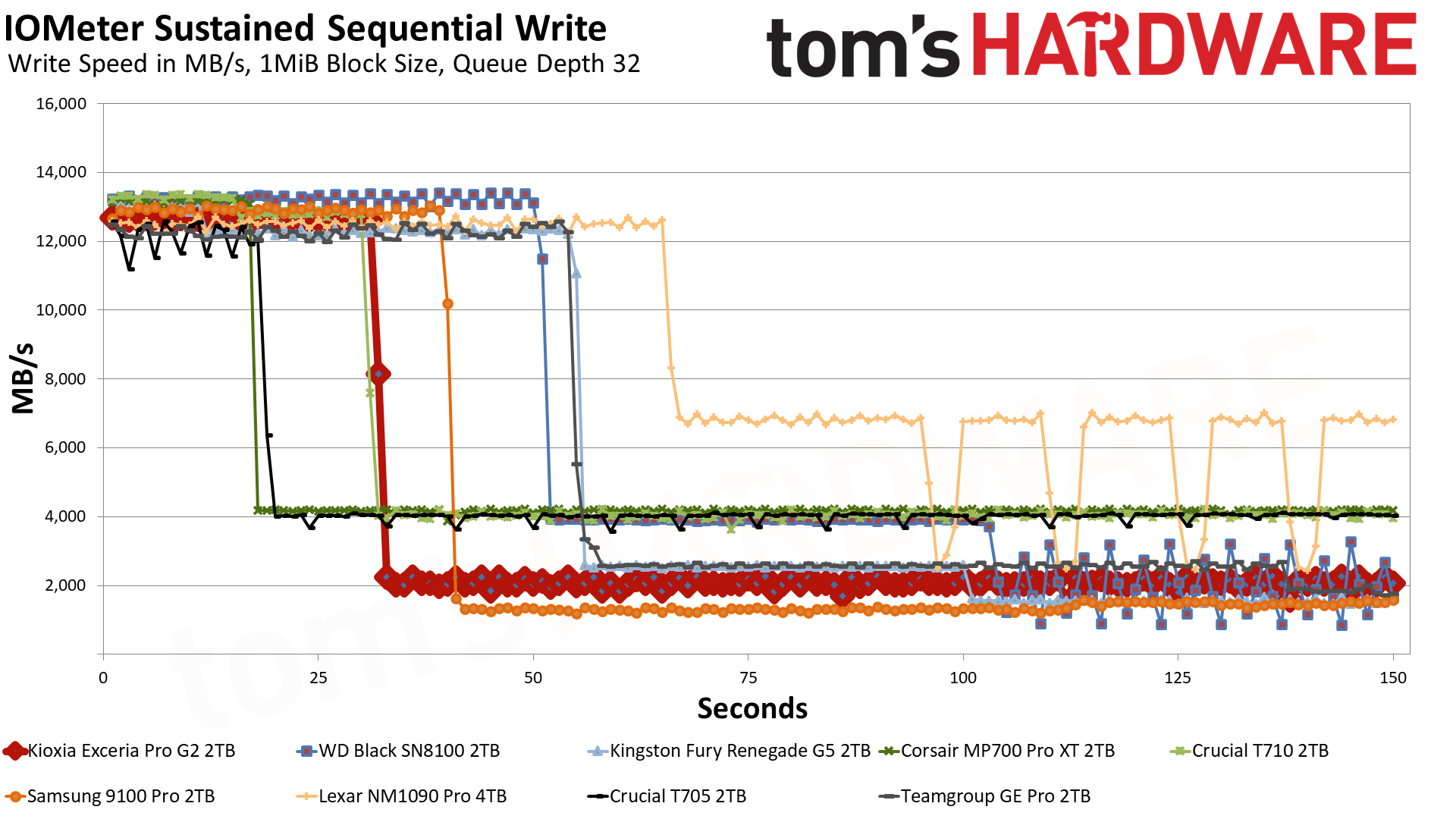
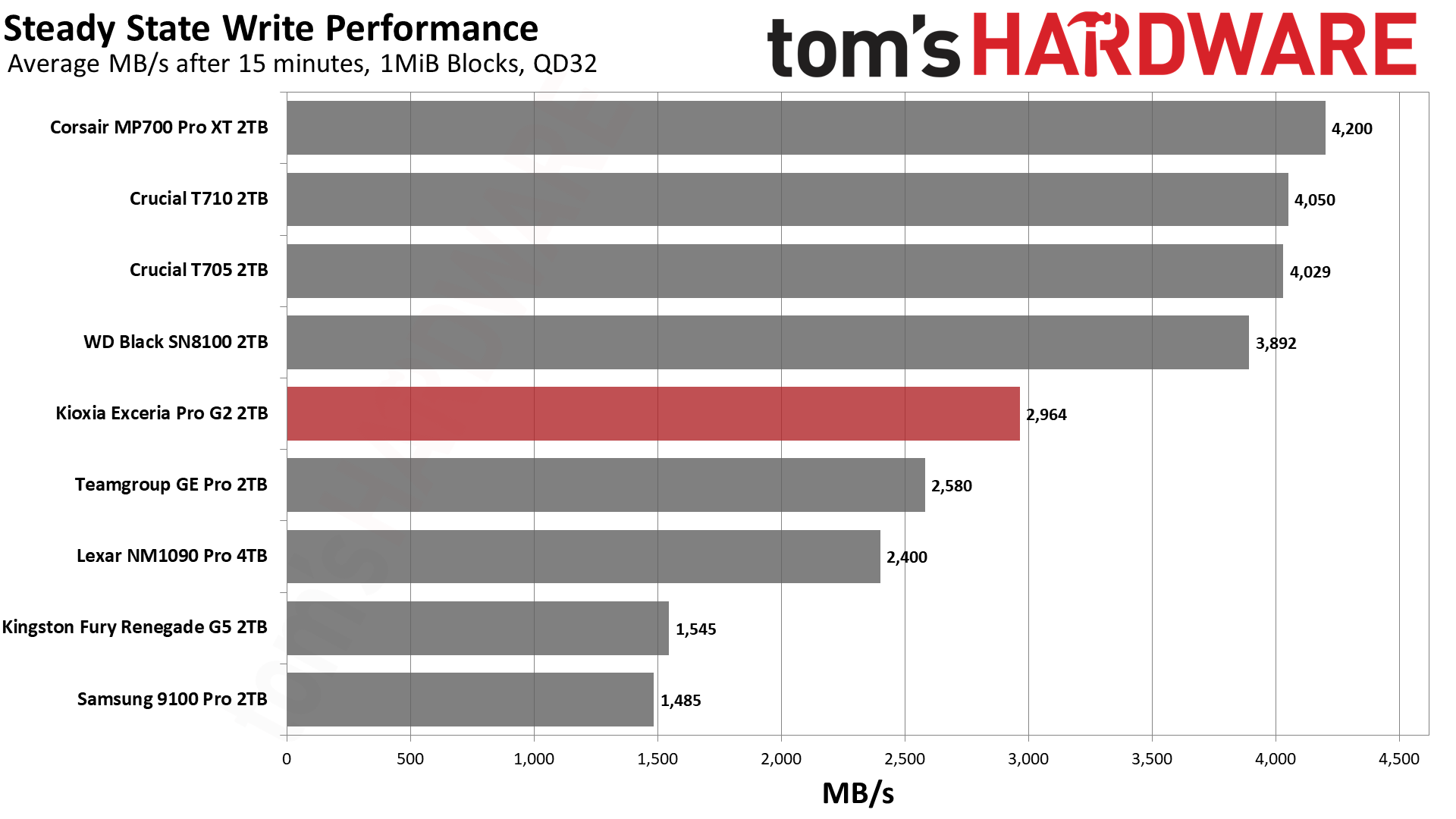
The Exceria Pro G2 hits over 12.6 GB/s in its fastest state, writing for over 31 seconds with a ~400 GB cache. On a 2TB TLC-based drive, this is only a moderately sized cache, not the largest it could be, but certainly larger than what was common a generation or two ago. The cache is smaller than what the Black SN8100 and Fury Renegade G5 use and more in line with the T710. It’s also larger than the MP700 Pro XT’s, unsurprisingly the fastest steady state drive on the list. Once the cache is exhausted, the drive settles down to 2.0 GB/s or so, engaging a mixed state where it’s writing to TLC and also copying data over from the cache. It holds there for roughly 13 minutes before recovering to a steady 2.96 GB/s for the remainder of the run. While this is slower than other drives in its class like the Black SN8100 and T710, it needs to be taken in context. It’s almost double what the Fury Renegade G5 manages after 15 minutes, despite the shared hardware, and well ahead of the 9100 Pro. This leaves the Exceria Pro G2 in the middle of the pack but far from slow.
It may sound like we’re making excuses for the drive here, but in reality we’re trying to ram home the point that not all drives are designed equally. There are very good reasons to have a drive behave this way. Having a large pSLC cache, as some of the other drives do, has its downsides. It’s not always the best design from a wear perspective and can leave the drive more vulnerable in certain edge cases. Your drive might run faster for longer, but that’s under an unrealistic workload that’s potentially inducing unnecessary wear.
The Exceria Pro G2 is designed for performance, yes, but also to keep on working in potentially more hostile environments. It needs to be reliable, and that comes with some trade-offs. From the buyer’s perspective, we would say that a drive like this – if you’re weighing it against something like the Black SN8100 – is still a worthy buy if you’re throwing it into an always-on Linux box that needs to be responsive but not always blazing fast. Or, as is becoming more common, in an always-on laptop where you are developing or running routines with AI and don’t really care about WD’s Dashboard or Game Mode. Just be aware of the power caveats, which we cover next.
Power Consumption and Temperature
We use the Quarch HD Programmable Power Module to gain a deeper understanding of power characteristics. Idle power consumption is an important aspect to consider, especially if you're looking for a laptop upgrade as even the best ultrabooks can have mediocre stock storage in terms of capacity and performance. Desktops are often more performance-oriented with less support for power-saving features so we show the worst-case for idle.
Some SSDs can consume watts of power at idle while better-suited ones sip just milliwatts. Average workload power consumption and max consumption are two other aspects of power consumption but performance-per-watt, or efficiency, is more important. A drive might consume more power during any given workload but accomplishing a task faster allows the drive to drop into an idle state more quickly, ultimately saving energy.
For temperature recording we currently poll the drive’s primary composite sensor during testing with a ~22°C ambient. Our testing is rigorous enough to heat the drive to a realistic ceiling temperature but real-world temperatures will vary due to the environment and workload factors.
One question the spec sheet raises: why is the 1TB Exceria Pro G2 rated for more active power than the 2TB and 4TB? Our DiskBench power test fits within the pSLC cache at any capacity, so it is not hitting a slower mode, and therefore the likeliest answer is duty cycle. The SM2508 controller has eight flash channels, and with sixteen dies at 2TB it can switch between dies on each channel, giving every die time to rest. The eight dies at 1TB get no such break yet are still capable of reaching most of the drive’s peak performance, so each one works harder. This should not be taken to mean the 1TB will run hotter, not least because it will run out of pSLC cache faster and hit the slower and lower-power TLC mode. It’s just a peculiarity of having a drive this fast with dense flash.
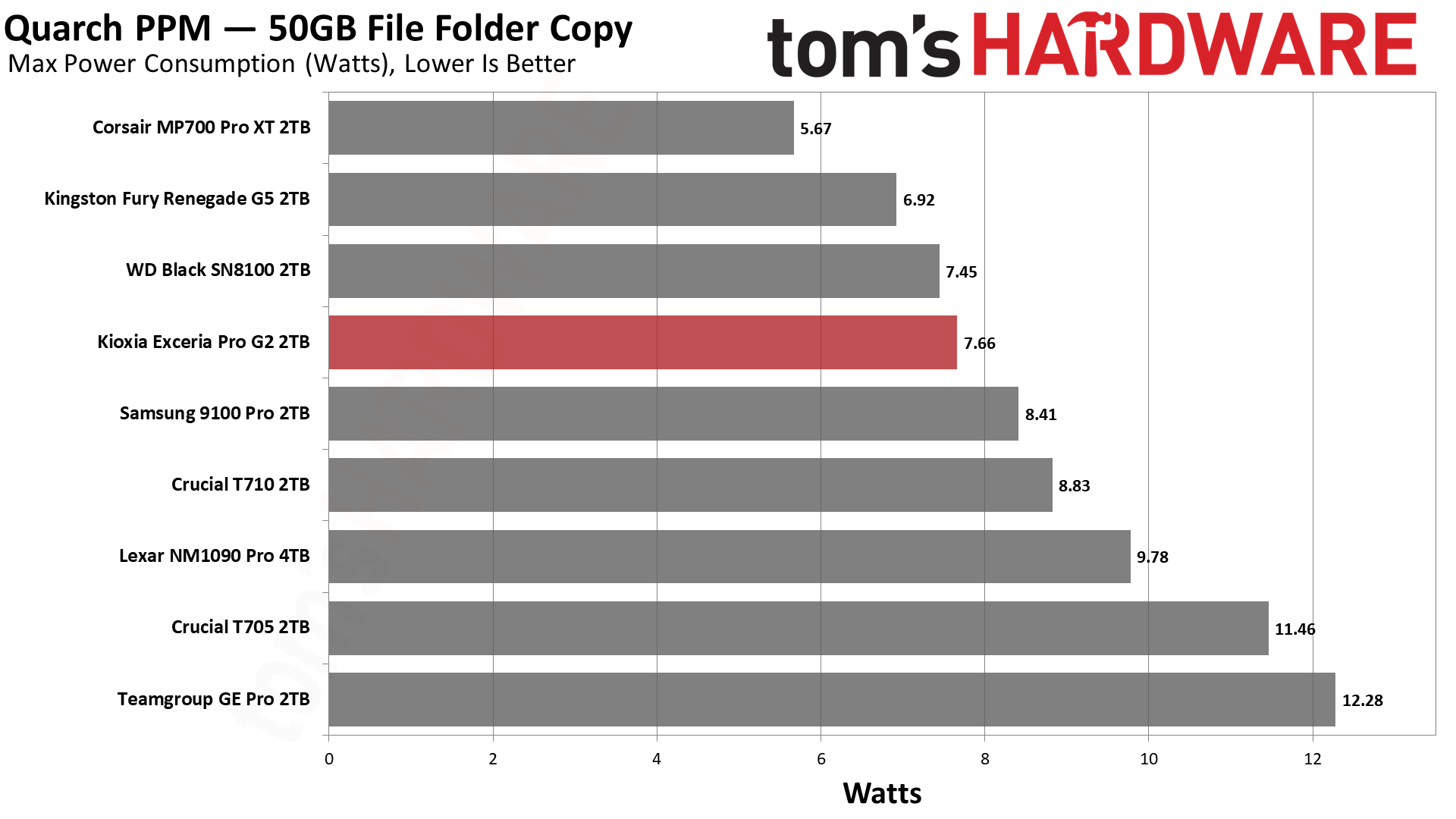
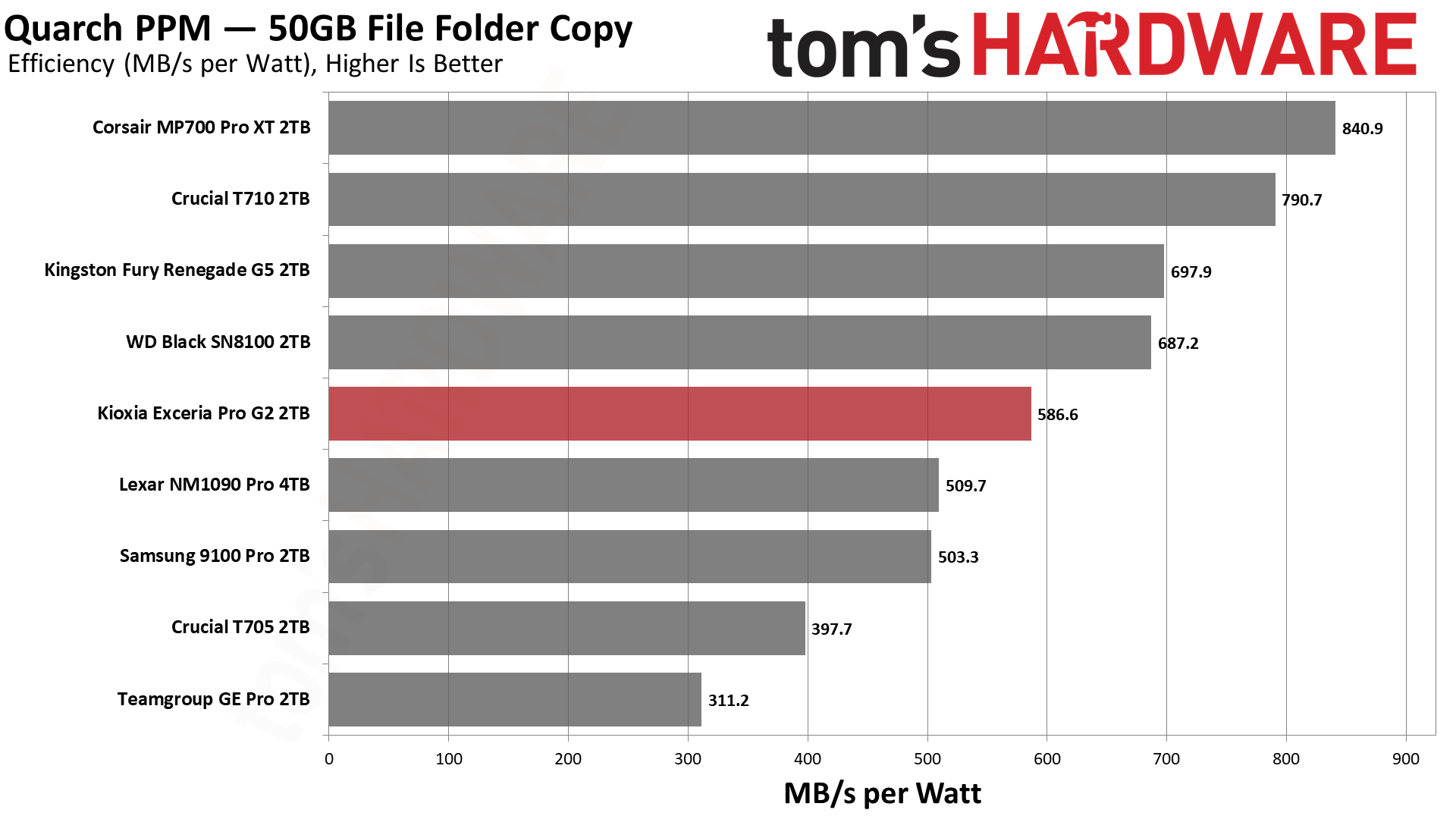
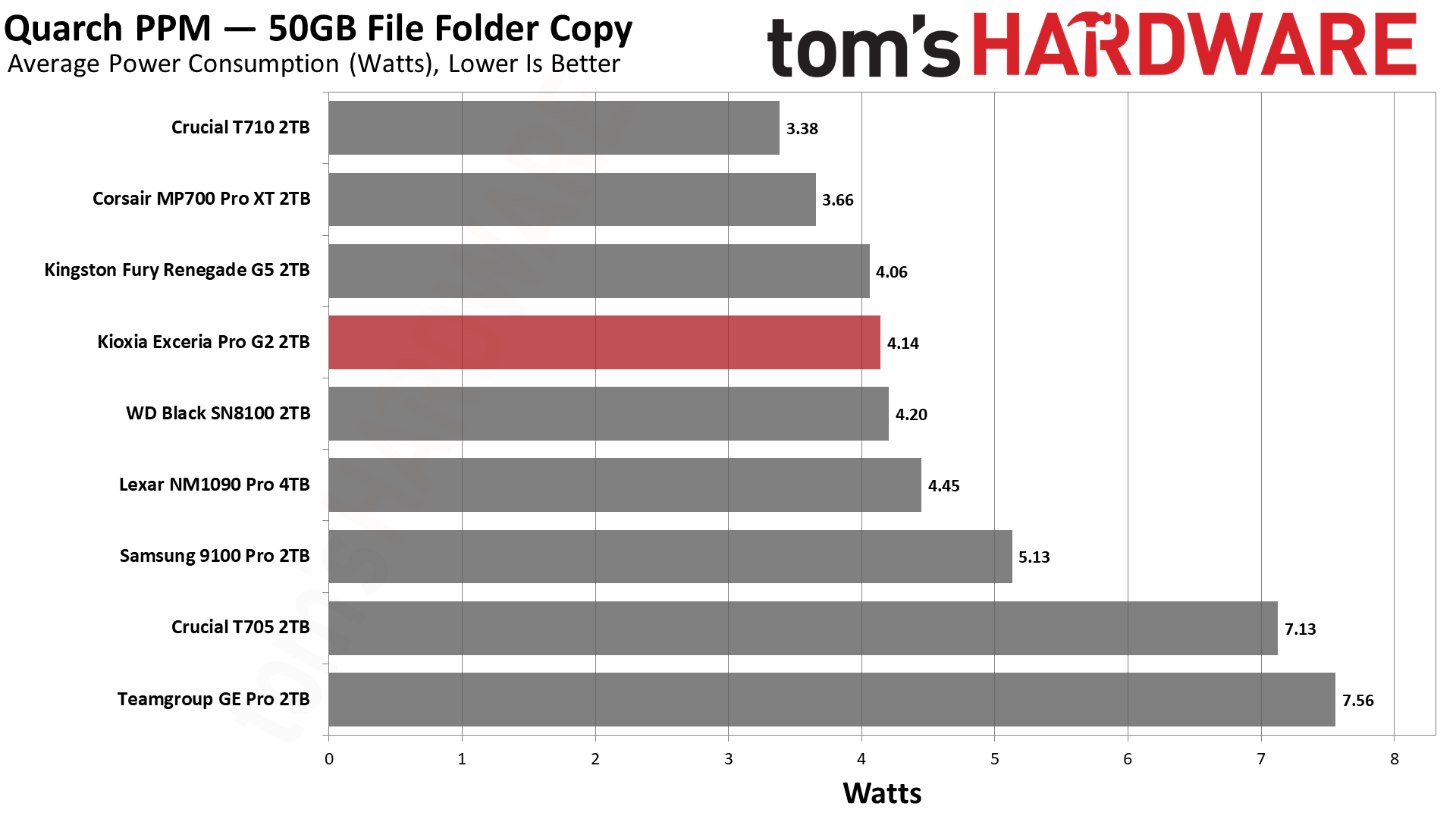
Power efficiency, in our testing, is a measure of work per watt, but it only tells part of the story. For that part of the story, the Exceria Pro G2 is average among all drives and below expectations for a drive of its class – see the Kingston Fury Renegade G5, which has the same hardware. Yet the drive proved to run as cool as a cucumber – 52C max, more than 30C below the drive’s 83C warning threshold. There are two reasons for this. The first is that, indeed, the Exceria Pro G2 has a heat-spreading label, which can be surprisingly effective. The second is that the drive is providing less bandwidth in the DiskBench test but also not pulling more power on average. This suggests that Kioxia designed this drive for OEMs, where you tend to have tighter thermal requirements. Kioxia’s own materials list the drive’s applications simply as “client desktop and laptop,” which supports our conclusion. Trading a little performance for reliability – with the assumption that running a high-end drive hotter in general is less than ideal – is reasonable here. The secret third reason is that our temperature logging comes from the Iometer-based write saturation run, which is sequential with a larger 1MiB block size. Historically we’ve found that mixed workloads, especially with smaller and random I/O, can push a drive a few degrees hotter than that.
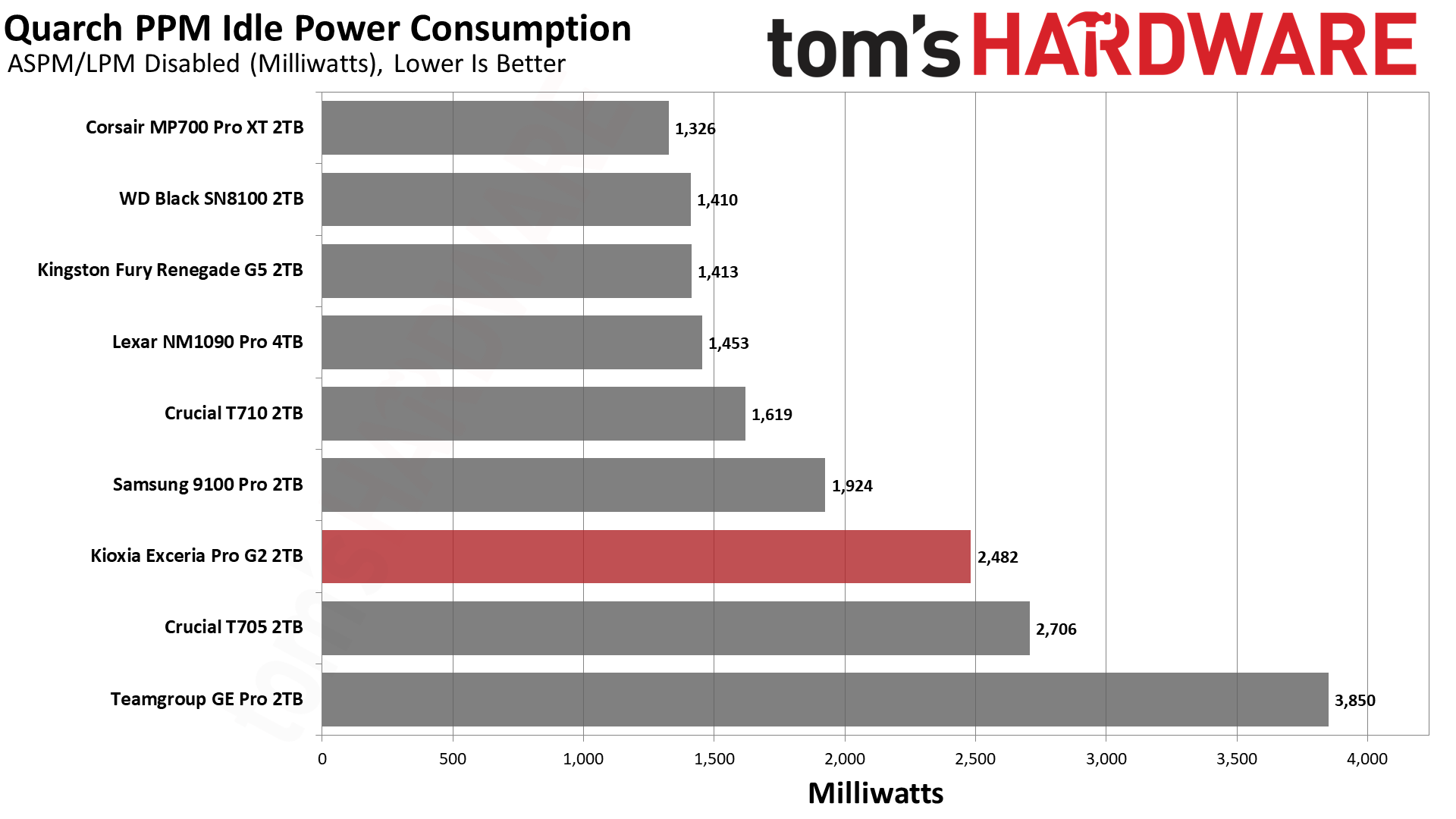
The drive’s high idle power consumption supports this conclusion. We test idle in the worst case, that is, for enthusiast desktops where there is no power saving. OEM systems and especially laptops are more likely to have these features enabled. That’s part of the explanation. The other side is in the drive’s advertised power states. The non-operational states have enter and exit latencies that, in comparison to drives with similar hardware, are consistent with a drive that prefers to stay in a ready state, somewhat like WD’s Game Mode. Our speculation is that it may be tuned that way for OEM machines. If we had results from a workstation-oriented drive like Kioxia’s own XG10, which is a client OEM model, we might find more clarity here. Our guess is that having a drive that can potentially wake faster is desirable.
Nevertheless, we would expect the Exceria Pro G2’s idle result to be more in line with the Black SN8100’s. It’s possible this is platform-specific – the drive might react differently on, say, an AMD system – or simply that it was more reluctant to go to a lower power state for us.
We use an Alder Lake platform with most background applications such as indexing, Windows updates, and antivirus disabled in the OS to reduce run-to-run variability. Each SSD is prefilled to 50% capacity and tested as a secondary device. Unless noted, we use active cooling for all SSDs.
Kioxia Exceria Pro G2 Bottom Line
This is a solid drive that hits all the right notes for us. It has high-end PCIe 5.0 bandwidth, excellent BiCS flash latency, good power efficiency, and good all-around performance, including reasonable sustained write speeds. While it’s not really available in the U.S., its pricing in other regions makes it extremely competitive. We also like the fact that it runs pretty cool and appears to have firmware optimization geared toward reliability, which is always welcome if you intend to run a drive like this in a laptop, an always-on system, or another challenging environment. The drive also advertises the usual NVMe low-power states, so users who want a drive that stays available should be well served, provided power management is properly enabled on their platform.
(Image credit: Tom's Hardware)
Where the drive falls flat is in comparison to some of the other fastest drives around, like the Black SN8100, which shares its hardware. Some of these drives are just plain faster and even consistently so, matching or beating it in an array of tests. The Exceria Pro G2 does out-write its hardware twin, the Fury Renegade G5, in steady state, but other contenders offer better efficiency numbers and higher sustained write speeds. It sometimes looks like the Exceria Pro G2 is being held back, which, to be fair, is probably true. The design philosophy behind this drive is closer to what you’d find in an OEM or client drive, where reliability is a big concern. In our opinion, this makes the drive a great addition and alternative in the market. Many users would value this over raw performance, especially if it’s more affordable. If you’re in a position to get this drive at a competitive price, it’s worth weighing your priorities.
Personally, we’re fond of the drive for what it does differently while still delivering an excellent user experience. A PCIe 5.0 drive is still overkill for most things, and SSDs are rather expensive at the moment. However, if you want to invest in something that will carry you for a long time, the Exceria Pro G2 is a reasonable choice. We think a lot of users will have a better time with the Black SN8100 – it may be more readily available and beats the Exceria Pro G2 in some areas – but at this performance level it’s kind of hard to go wrong. We’d lean towards the Kioxia if you want something more focused on a reliable experience with a drive that just works without ever being slow.
With its built-in USB / HDMI hub and a small fan to keep temperatures in check, Sharge's Disk Pro SSD is one of the more interesting (and generally useful) external storage drives in recent memory, easily earning a spot on our Best External SSD list. And the company is following that success up with a more DIY-focused Disk Pro 2, which lets you install your own M.2 drive (supporting 2230, 2242, and 2280 sizes and capacities up to 8TB), while adding greater fan flexibility, media card slots, and an HDMI port that's capable of more bandwidth – depending on the model you choose.
Sharge is offering the Disk Pro 2 in two varieties. There's the Lite model, with HDMI 2.0 (4K@60 Hz) and a 5W minimum operating power, and the Disk Pro Ultra (which we have in for testing) with HDMI 2.1 (4K@144 Hz or 8K@30 Hz), a lower 1.5W minimum power draw, and a faster card reader. Below is the full list of differences, according to the product page. The company even lists the internal chips, some of which you can see through its transparent top.
Disk Pro Ultra
Disk Pro Lite
HDMI
HDMI 2.1, 4K@144 Hz, 8K@30 Hz
HDMI 2.0, 4K@60 Hz
Minimum Operating power
1.5W
5W
Chips
VL822, VL605, RTL9210, SM2705
GVS2201S, VL822, GL3231, RTL9201
SD speed
Read 180 MB/s, Write 120 MB/s
Read 100 MB/s, Write 90 MB/s
(Image credit: Tom's Hardware)
The Ultra model is likely to appeal more to professionals and gamers, offering faster card transfers and higher monitor refresh rates. But the main limitation here is the overall bandwidth, as both models are capped at a 10 Gbps interface, just like the original Disk Pro. That makes either model better as kind of a travel-friendly Swiss Army hub than something you'd want to use as your primary hub / dock all the time. Because any modern M.2 drive can saturate all available throughput by itself, before you connect any video or USB devices. But there's no denying the utility of carrying around a pocket-friendly SSD that also lets you connect to a monitor or TV, plug in a couple extra peripherals, and empty your SD cards without an extra hub, adapters, or cables.
(Image credit: Tom's Hardware)
At 3.65 x 2.33 x 0.531 inches (92.6 × 59.2 × 13.5 mm) without the cable, the Disk Pro 2 is slightly thicker and longer than the original Disk Pro, but still smaller than some standalone drives. Again, with its size and transparent top, it reminds me of an old-school cassette tape.
(Image credit: Tom's Hardware)
One thing that has definitely improved over the original Disk Pro is that Sharge has made the USB-C cable removable. This is good in part because you don't have to worry about the cable breaking over years of use. But also, particularly if you're going to use the drive's hub capabilities, you might want something longer than the included cable's sub-nine-inch length. And when necessary, you might want to plug the drive into a USB-A port. So having the option of using different cables is a big plus.
The cable is also designed to function as a lanyard, which can be handy. But it's held in place solely by the USB-C connection, so I wouldn't trust it for much more than hanging the hub up somewhere at home, so you know where it is when you need it.
(Image credit: Tom's Hardware)
In terms of ports, starting from the bottom edge, you get the main USB-C port, capable of passing through up to 80W of power, a full-size HDMI port (2.1 on the Ultra model we're testing or 2.0 on the lite model), a USB 3.0 Type-A port, and a 10 Gbps USB-C port that can handle up to 100W of power input (and pass through up to 80W for charging a laptop or other device). The previous Disk Pro included a second USB-A 2.0 port here as well, but it's been ditched in favor of the removable USB-C cable, which I think is well worth the sacrifice.
(Image credit: Tom's Hardware)
On the opposite (top) edge, Sharge has added an SD card slot and a microSD card slot. These are capabilities the original Disk Pro didn't have, which make the newer model a lot more versatile for content creators. Just remember the Ultra model offers up faster read and write speeds for the card slots.
(Image credit: Tom's Hardware)
Around back, there's not a lot to see save for the fan intake, but the back is also magnetic, letting you snap the drive onto smartphones that support MagSafe devices or Qi2 magnetic peripherals — it's just a physical mount, though, not receiving power. I've also found this feature handy for sticking the drive to a refrigerator or other iron surface so I always know where it is when I need it.
(Image credit: Tom's Hardware)
It's also worth pointing out that the fan in the Disk Pro 2 is smaller than on the Disk Pro. But there are larger cutouts for air intake on the sides for when the hub is lying on a table or desk, and the Pro offers a three-mode switch (off, on, and turbo), whereas the original's switch had two settings (auto and on). I appreciate the active cooling, and it will certainly be helpful if you're using most of the hub's ports and the SSD at the same time. But if you're mostly using the Disk Pro 2 solely for basic, bursty storage tasks, the 10 Gbps interface and an efficient SSD aren't likely to get warm enough to require active cooling. Of course, that will heavily depend on which drive you install in the enclosure, as well.
Testing with Lexar's 710 SSD
Sharge sent along its Disk Pro 2 Ultra with a Lexar 710 M.2 SSD (a PCIe 4.0 drive that's capable of about 5x the bandwidth of the hub itself), and installing it is about as straightforward as you'd expect. Use the small included screwdriver to remove a tiny screw on the side, and the SSD cover lifts off. Loosen the drive anchor post, install the SSD, tighten the post, put the cover back on, and reinstall the cover anchor screw on the side.
You can, of course, install your SSD of choice, and below the 10 Gbps interface cap, your performance will vary by drive. Still, since the company sent along the Lexar drive, we ran a couple of our external storage benchmarks, and the Disk Pro 2 Ultra performed well for an SSD in this class, just like the original Disk Pro.
Trace Testing - PCMark 10 Storage Benchmark
PCMark 10 is a trace-based benchmark that uses a wide-ranging set of real-world traces from popular applications and everyday tasks to measure the performance of storage devices.
(Image credit: Tom's Hardware)
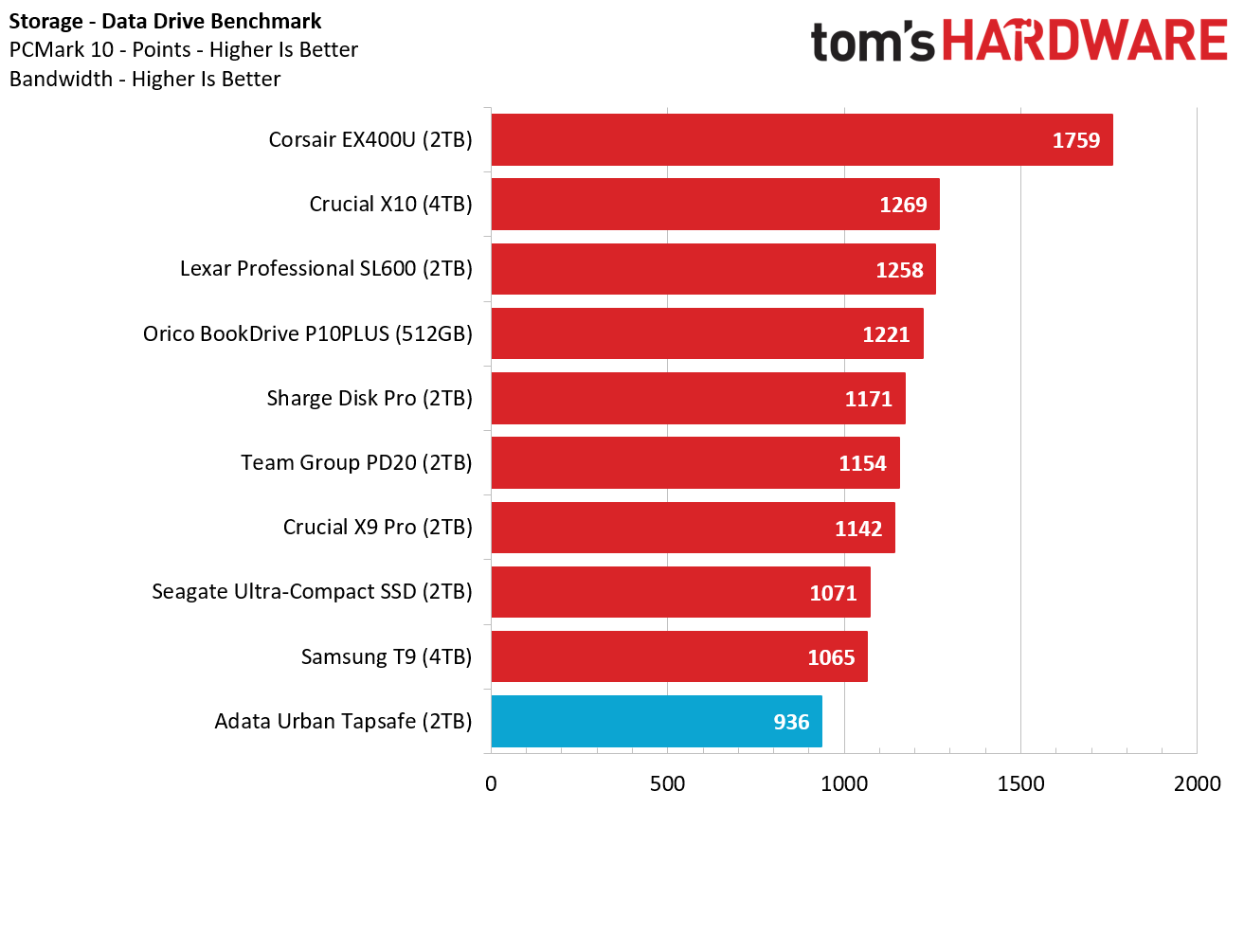
The Sharge Disk Pro 2 Ultra does exceptionally well here, beating everything save for Corsair's USB4-based EX400U. Impressively, the 10 Gbps drive even beat the 10 Gbps X10 Pro on this test, proving available bandwidth isn't everything when it comes to drive responsiveness.
(Image credit: Tom's Hardware)
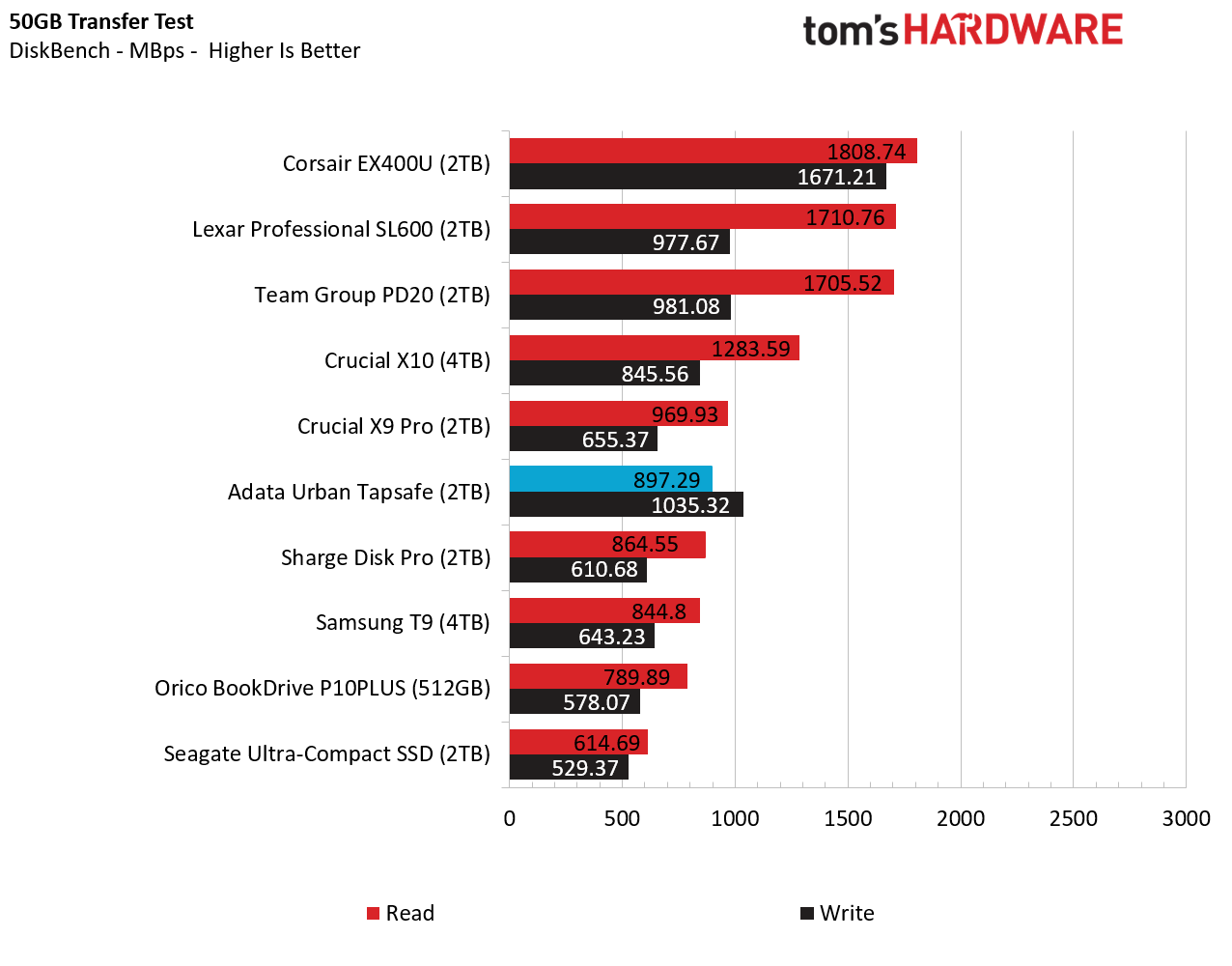
In this real-world bulk transfer test, Sharge's Disk Pro 2 Ultra lands in a comfortable fourth place, behind 40 Gbps and 20 Gbps drives, and one spot behind the 10 Gbps Crucial X9 Pro drive on reads. But on writes, Sharge's enclosure, running the Lexar SSD, again beats everything in this chart save for Corsair's USB4 drive.
Synthetic Testing CrystalDiskMark
CrystalDiskMark (CDM) is a free and easy-to-run storage benchmarking tool that SSD companies commonly use to assign product performance specifications. It gives us insight into how each device handles different file sizes. We run this test at its default settings
(Image credit: Tom's Hardware)
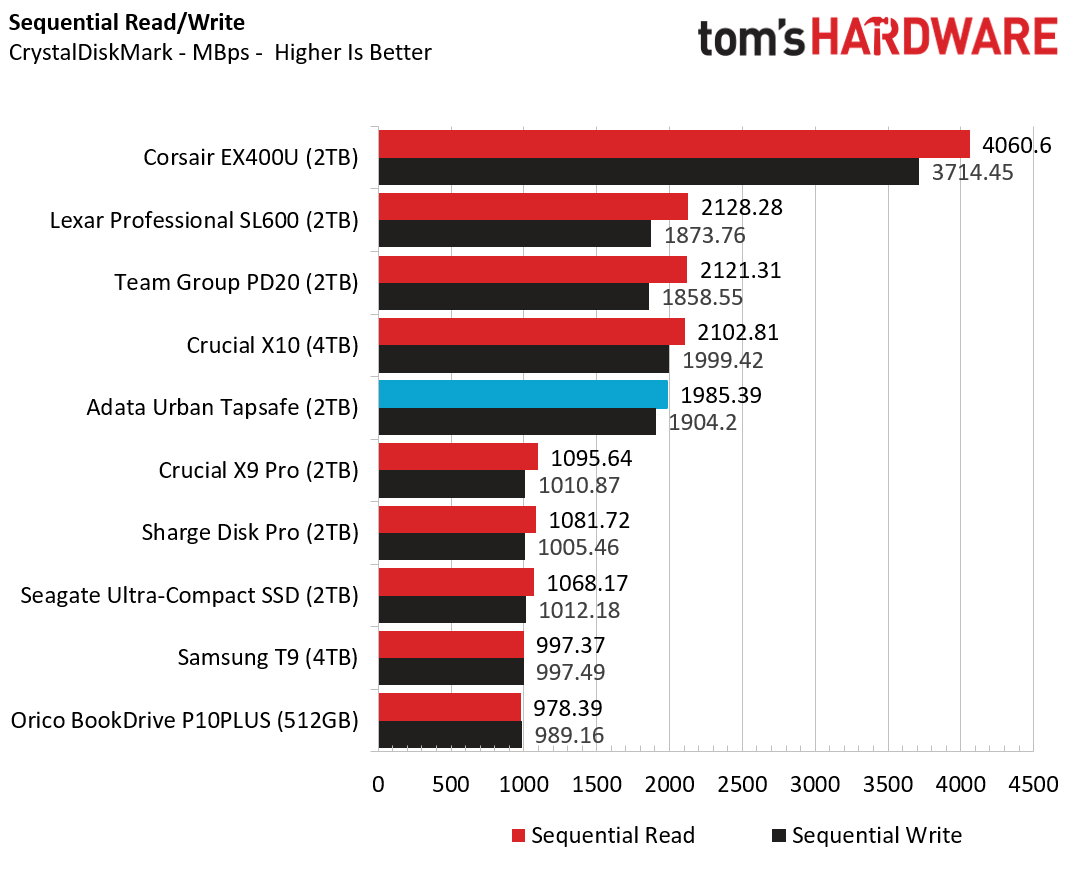
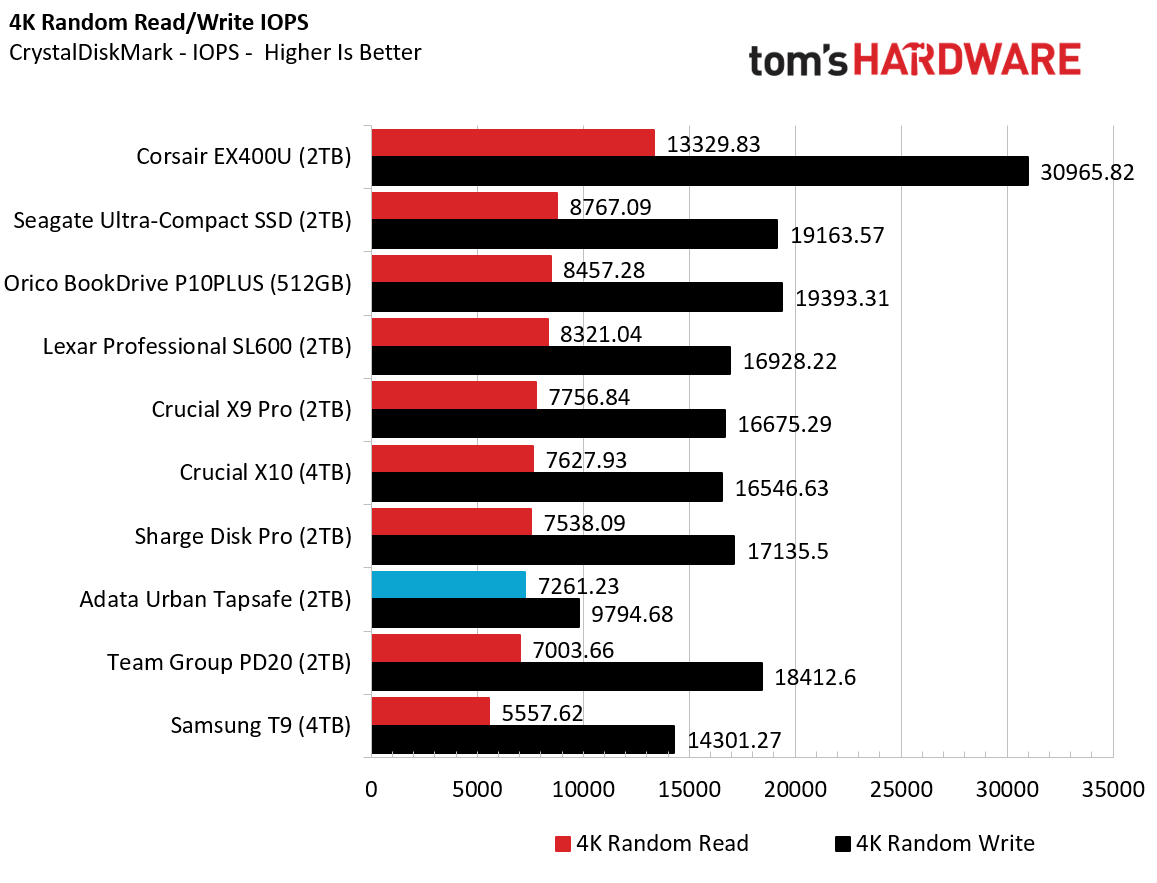
Lastly, in this best-case-scenario synthetic test, the Disk Pro 2 lands in fifth place when it comes to reads, but fourth place on writes.
Again, the Disk Pro 2's performance on benchmarks will depend largely on what drive you put inside it. But it's clear that the SSD enclosure is capable of performing well, despite its 10 Gbps bandwidth limitations.
Pricing and Bottom Line
(Image credit: Tom's Hardware)
If all you really care about is dropping in a drive and moving some files around, there are plenty of cheap 10 Gbps enclosures, often on sale for $20 or less. But if you travel a lot with tech and like the idea of a drive enclosure that includes a data and video hub with PD power passthrough, the Disk Pro 2 offers a lot to like, with the Ultra version we tested capable of handling video output bandwidth as high as 8K at 30 Hz (or 4K at 144 Hz). And the inclusion of card reader slots makes the enclosure even more useful for creators on the go.
It's far from cheap, at $109 for the Ultra version we tested or $79 for the Lite version, which is still capable of 4K video at 60 Hz, but won't play as well with phones, due to a higher minimum power draw. But Sharge's devices often go on sale, and when this was written, the Late model was selling for $66.51 and $80.91, directly from the company. This is technically a pre-order price, as the enclosures are expected to start shipping on October 15th.
There are also enclosure / hub combos on Amazon and Newegg that promise similar functionality for less. But the ones I saw have generally poor reviews, are larger than the Disk Pro 2, and none of them look as pleasing or are as feature-packed as Sharge's design, with its transparent cover, active cooling, and MagSafe-compatible back. For those looking for portable connectivity and up to 8TB of storage in one device on the go, the Sharge Disk Pro 2 is in a class of its own, and easily earns a spot on our best SSD and hard drive enclosure list.
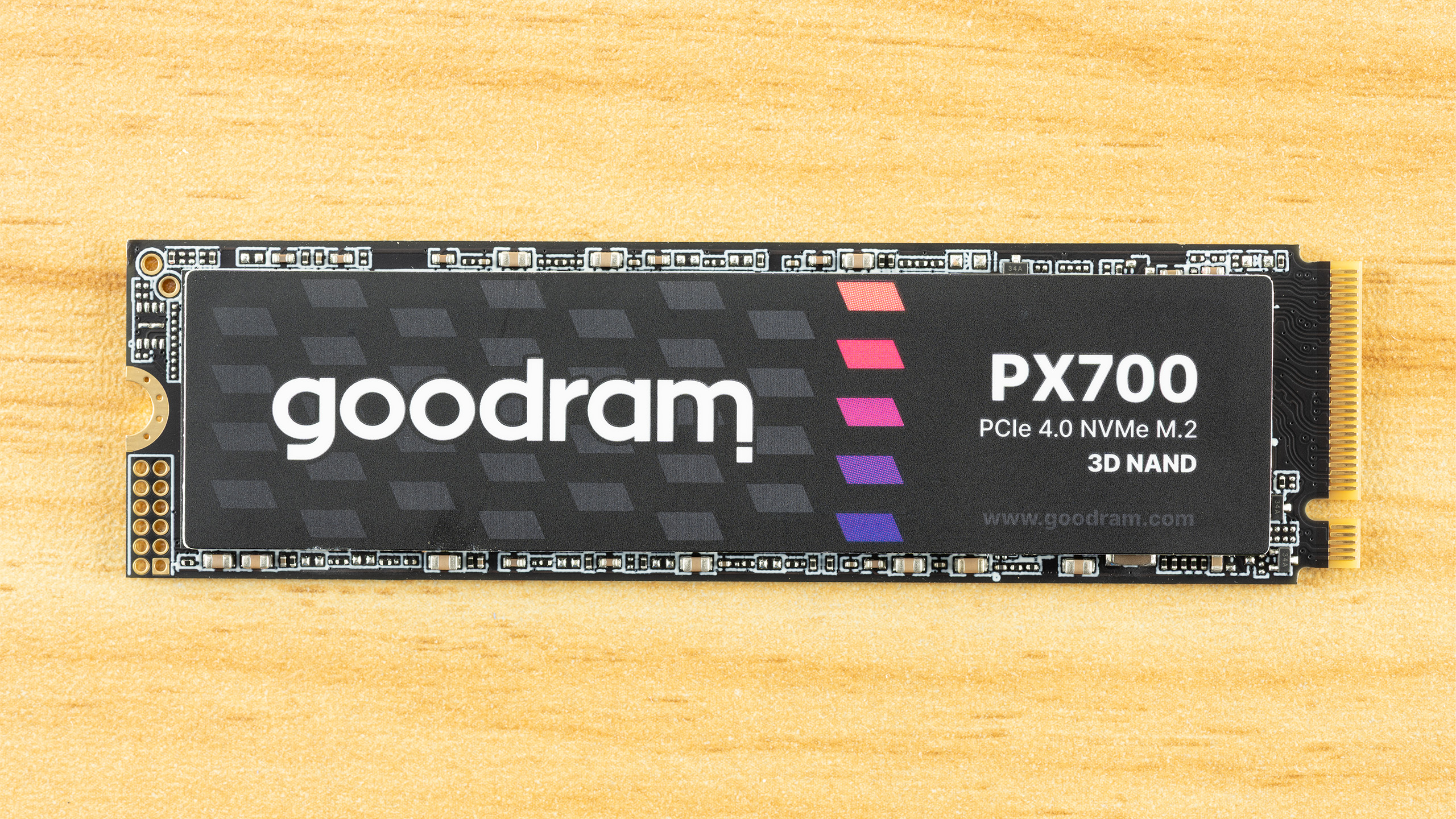
The Goodram PX700 is a budget PCIe 4.0 drive that delivers everything you need: good performance, great power efficiency, and all in a single-sided package that runs cool. Sometimes it really is as simple as picking one drive to meet whatever your storage needs are at the moment. It’s not the first model that comes to mind for this segment, but in our testing it performed better than expected as a good drive that may otherwise run under the radar.
Goodram is not a new or no-name company, even if the “good RAM” moniker seems a little too on the nose. Instead, it’s a memory assembler in the EU with quite some history. This, in fact, makes it more approachable in comparison to a lot of the new names we have seen on AliExpress and increasingly on Amazon. We expect reliability or at least good support from the company, and the TBW on this one seems to reflect that this isn’t an ultra-budget drive.
On the contrary, performance was not just what we expected – considering we’ve reviewed many drives in this segment, many with the same or comparable hardware – but above. Sometimes only by a small amount, but the gaps are real. Anywhere performance mattered, it delivered. One expects trade-offs for that, but in fact the PX700 is very power-efficient, and the drive provides an excellent storage experience. The only downsides are sustained write performance – which is of little importance in most cases – and, unfortunately, the price. At the right price point, this would be a great pick for any device.
The Goodram PX700 covers the most popular capacities of 1TB, 2TB, and 4TB. Smaller drives can be popular for upgrades and basic boot usage, especially with how prices are now, but modern flash scales best at 1TB and up. 8TB drives are great as a larger storage solution but require a significant investment. The PX700 sticks to what will sell, predominantly 1TB and 2TB. At the time of review, these are priced at $346 and $418, respectively. These prices are high and probably point to a lack of stock more than anything else. While the 1TB price is double what it should be, at 2TB a drive of this type should be closer to $300. Naturally, one has to take into account the pricing volatility in an SSD market besieged by a NAND shortage, but we recommend looking in that range for this drive or one comparable to it with similar or the same hardware.
The drive is full-fledged Gen 4 with performance up to 7,400 / 6,500 MB/s for sequential reads and writes and up to 1 million random read and write IOPS at 4TB with only 820K write at 1TB/2TB. This is standard for the class and is more than enough performance for everyday tasks, gaming, productivity workflows, and more. The drive has the standard five-year warranty with up to 600TB of writes for every TB. The last part of that is worth a second glance because it indicates this drive can come with TLC rather than QLC flash, since TLC, aside from being faster, has better endurance than QLC. However, we have reasons to believe our sample has QLC, which we will point out where the evidence supports that reasoning. We want to emphasize that you should not assume what flash a drive uses based on TBW alone.
Goodram PX700 Software and Accessories
Goodram does not offer any specialized or custom software for its SSDs. You will have to rely on third-party solutions. Software for SSDs essentially falls into three categories: health management, performance, and data backup. SSD toolbox applications from manufacturers will usually cover the first two, with, typically, an OEM version of Acronis True Image for the last. For free alternatives, we recommend CrystalDiskInfo for health information, CrystalDiskMark for basic benchmarking, and MultiDrive for data backup and imaging. MultiDrive is made for Windows and has a bootable WinPE image, so for other operating systems you can opt to use Clonezilla instead.
Goodram PX700: A Closer Look
Tom's HardwareTom's Hardware
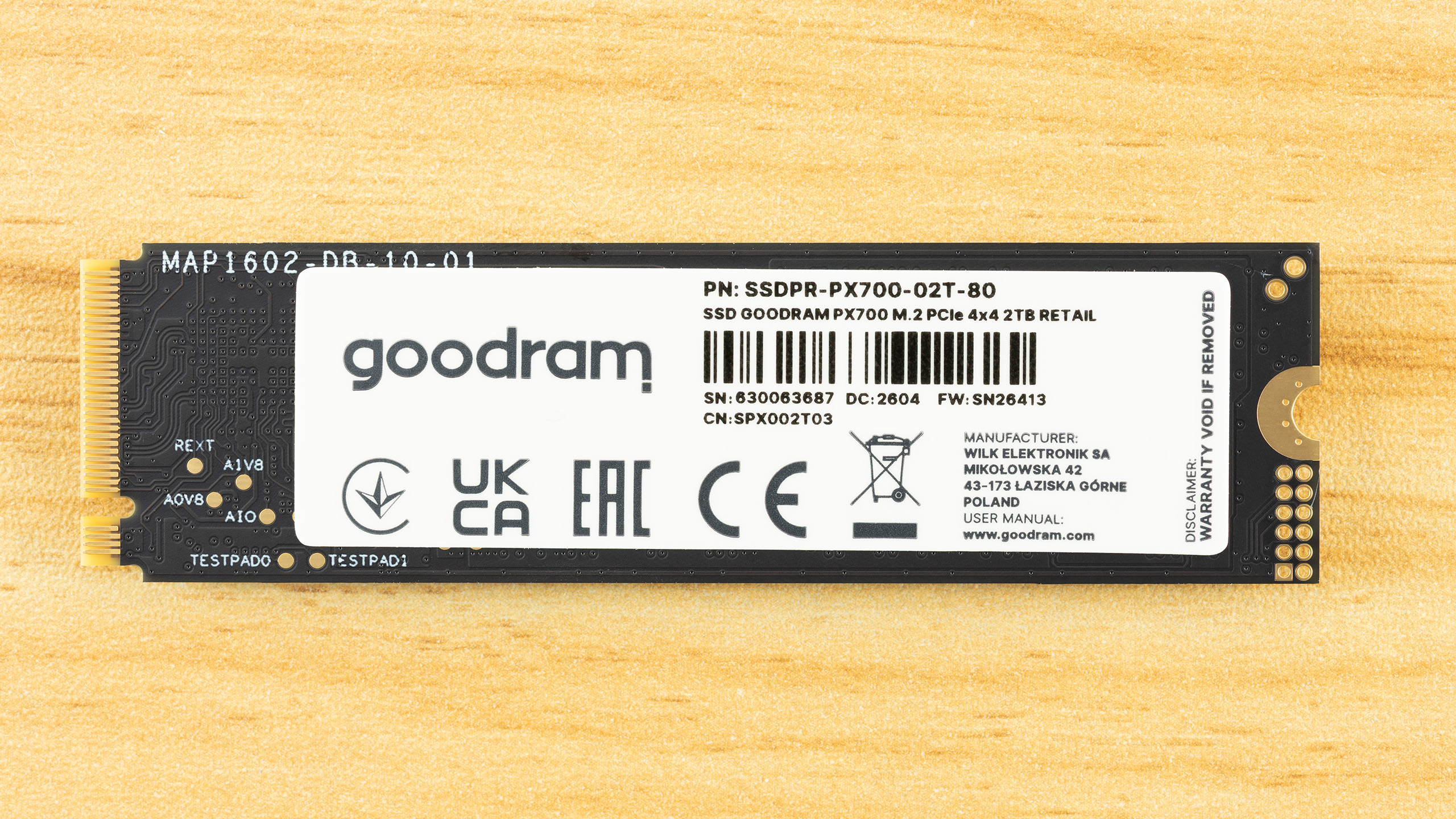
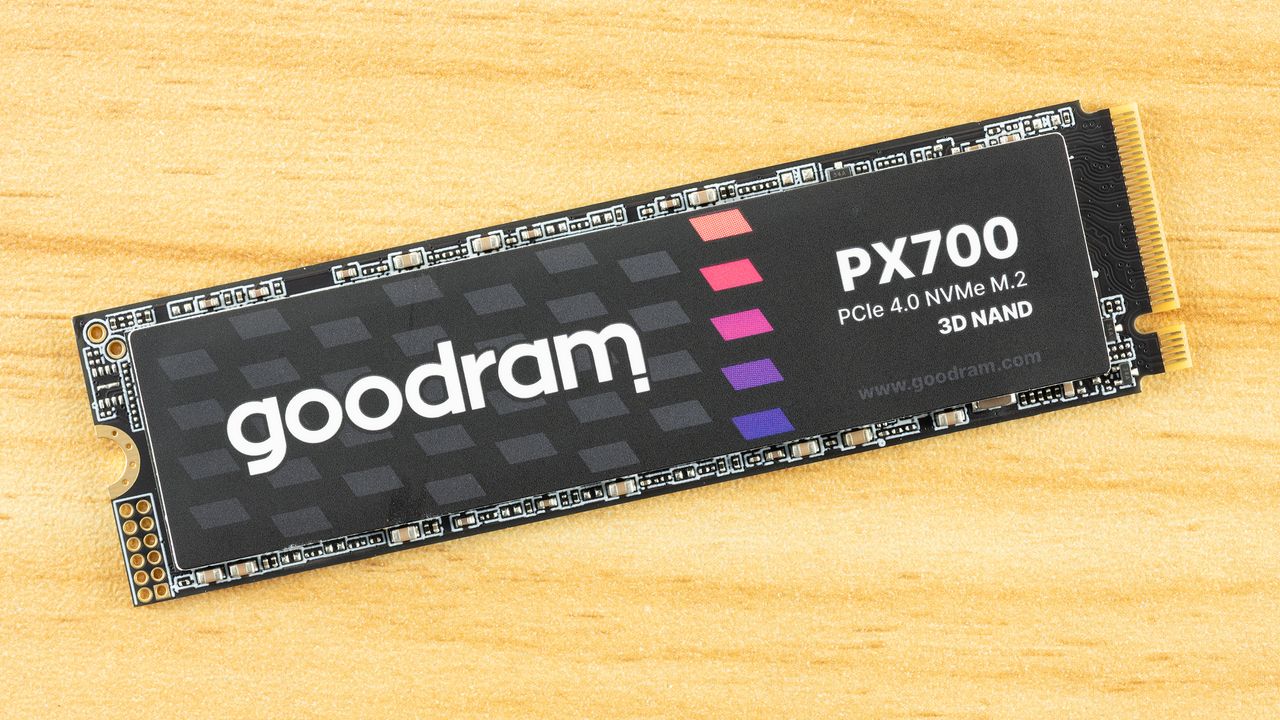
The PX700 is a single-sided drive at all capacity points. This makes it compatible with a wider range of systems and, if you need to cool the drive, it’s easier to tackle just one side of components. As it turns out, the drive runs cool enough that you probably don’t have to worry about this – check the Power Consumption and Temperature section below – but it’s still worth pointing out. The data on the rear label is standard, but we do want to say a little bit more about the listed manufacturer.
Wilk Elektronik is a Poland-based memory company, which makes this interesting, as that means the PX700 is a European-assembled SSD. Goodram covers the mainstream parts and IRDM enthusiast, although this is the first SSD from them that we’ve reviewed. As we are going to dig into the hardware in this section, we will say that the drive's silicon is sourced from Asia, as with virtually every SSD. If we say a drive is made in Poland, this means the drive is assembled, tested, and covered by warranty in Poland with an EU anchor. For some, that might be a positive factor in any purchasing decision.
Tom's HardwareTom's HardwareTom's Hardware
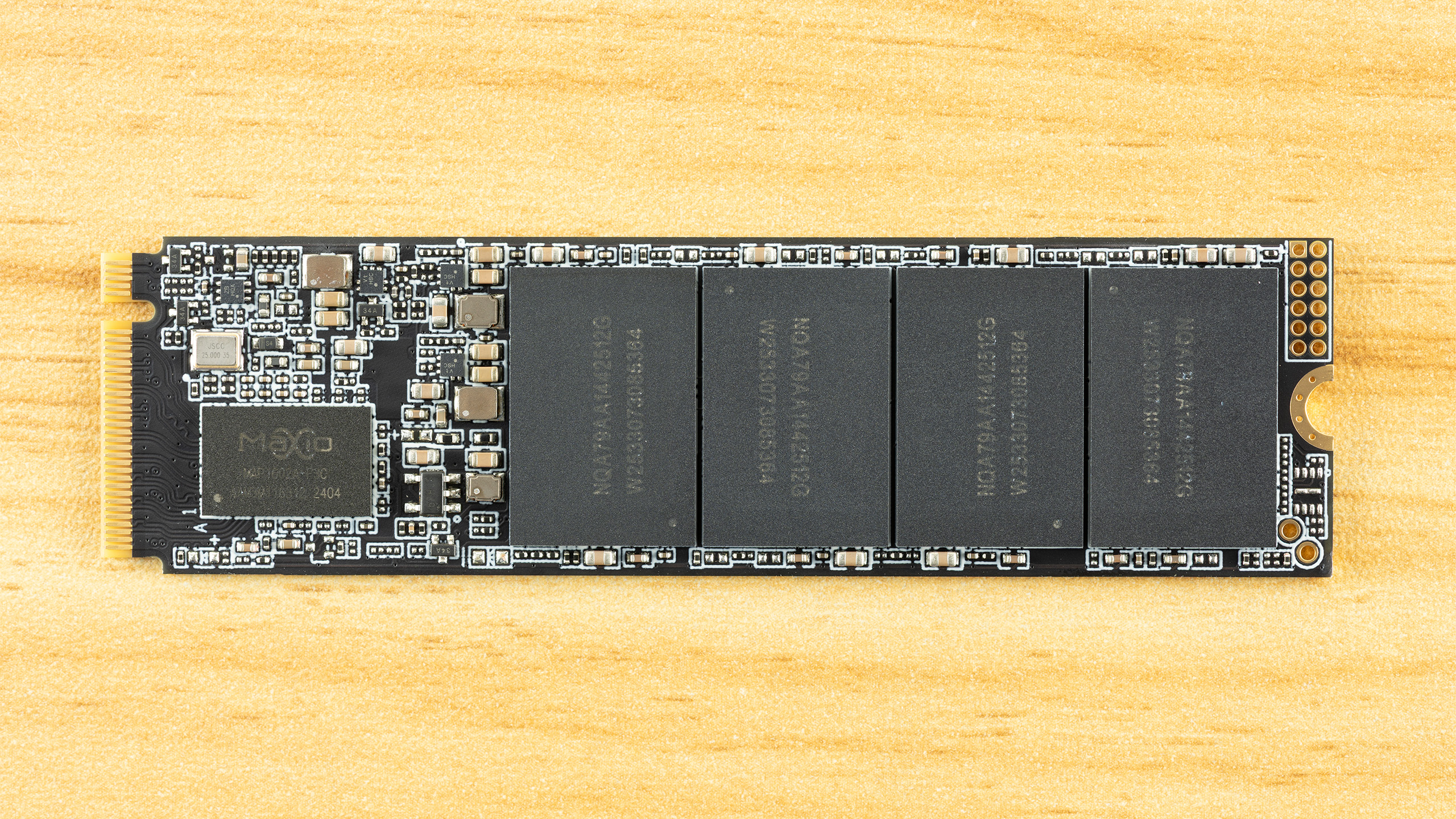
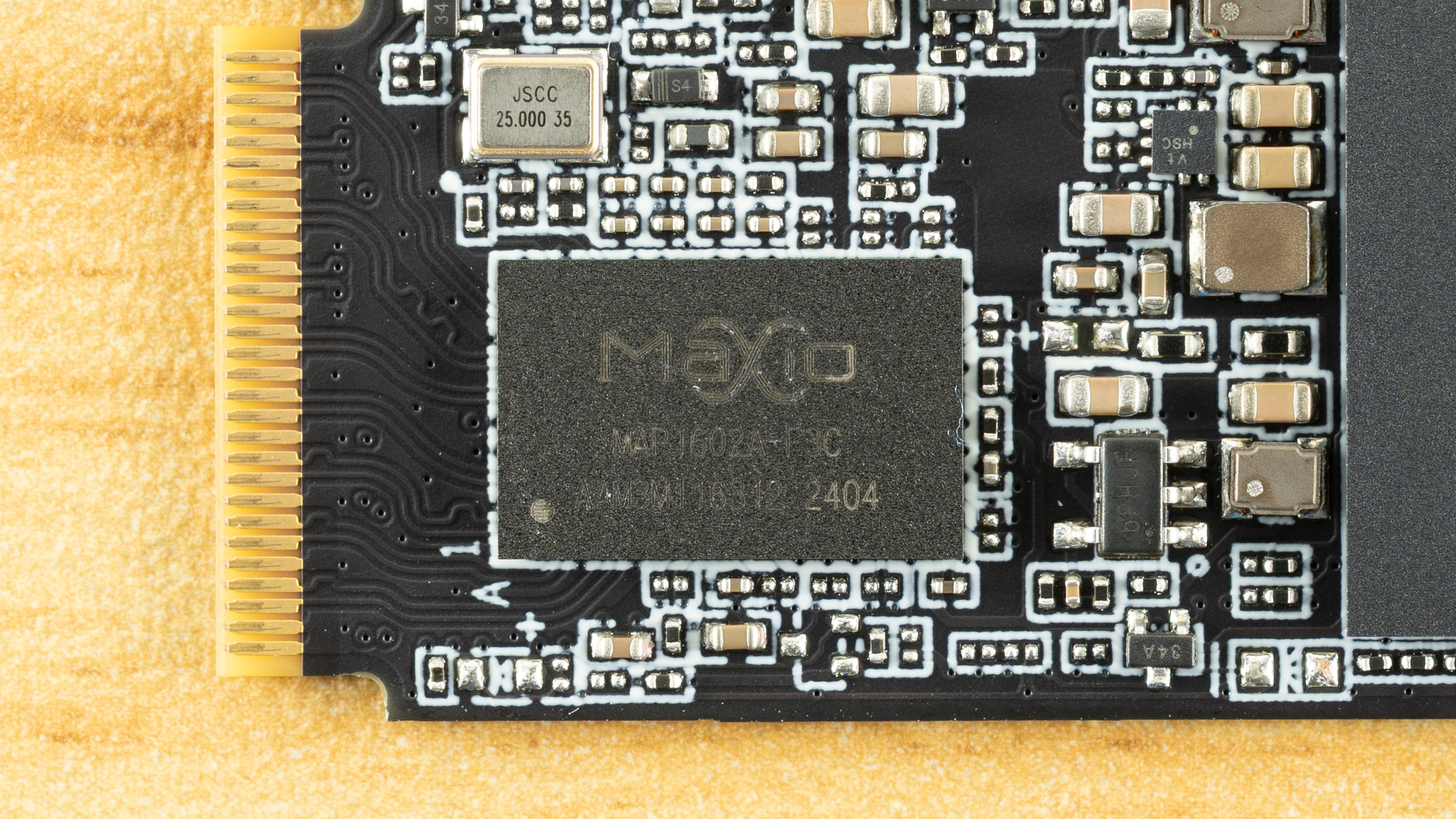
Identifying the hardware here is half simple and half challenging. The controller is clearly the Maxio MAP1602, a four-channel, DRAM-less part that’s been a budget champion for quite some time. There is not much mystery there aside from maybe this being a later revision, typically used for higher capacities.
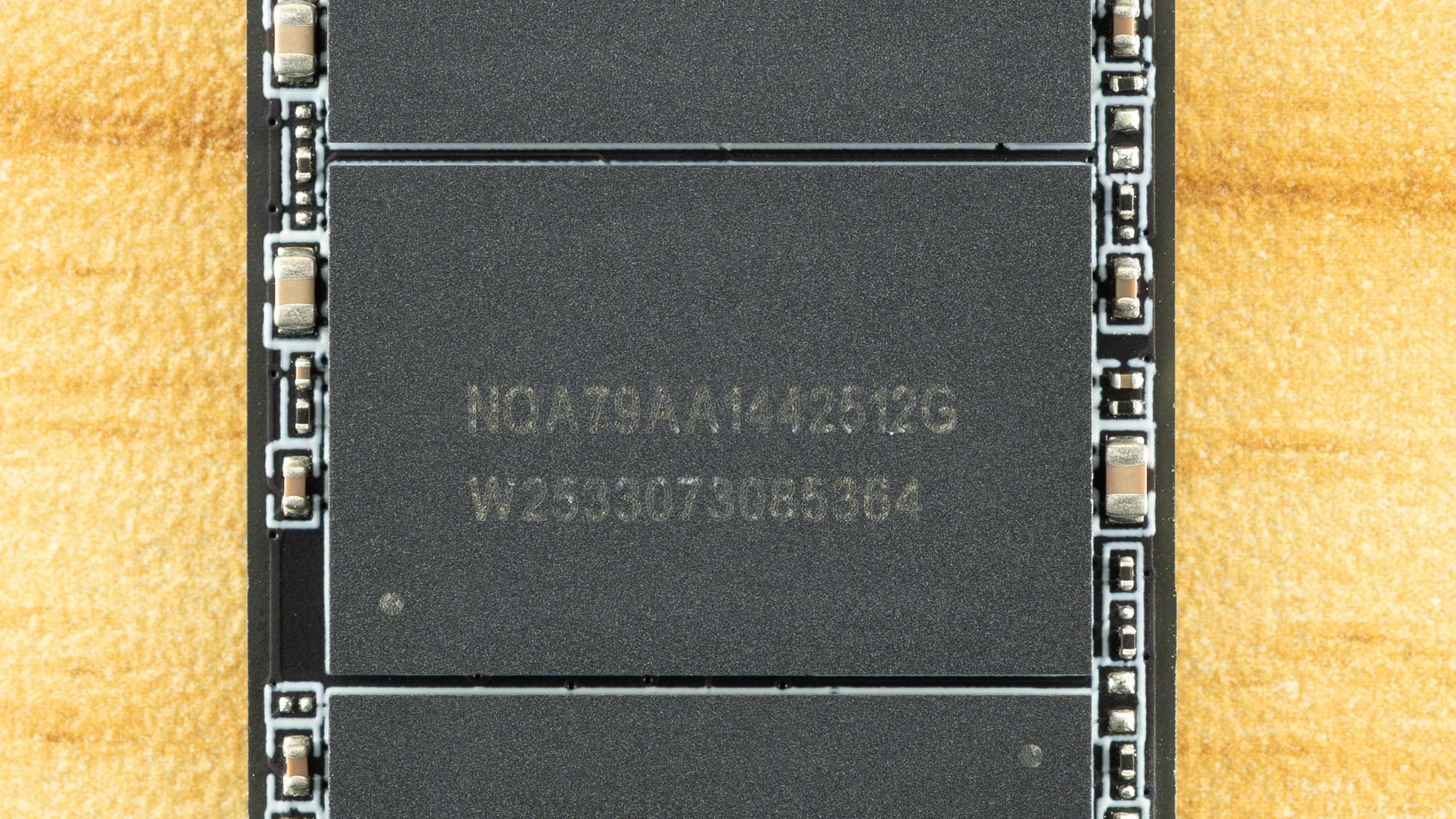
The flash is more difficult. We can ascertain that these are 512GB NAND flash packages from the “512G” – given modern flash is 1Tb or 128GB, four dies per package for a total of sixteen dies. That’s perfect for maximizing performance out of this controller. The “W2533” is likely the manufacture date of week 33, year 2025. All this indicates is that this is, at least, not older flash, although we already know it has to be 2,400 MT/s at a minimum to hit the specified performance.
It makes a lot of sense for the PX700 to use TLC flash, though, given the TBW and the fact that we’ve been seeing this controller with 232-Layer Micron TLC more frequently lately. The Biwin Black Opal NV7400 comes to mind. However, Goodram has access to YMTC flash, and that includes QLC. YMTC rather than Micron QLC is more likely, given the latter is in high demand in enterprise. Normally, you could use certain utilities to identify the flash, but firmware for this controller is often encrypted to avoid revealing the flash ID. It’s still possible to get around this with leaked MP tools, but otherwise the best way to identify it is simply to look at the performance. We’ll be doing that in this review with comparison drives to help back up the investigation.
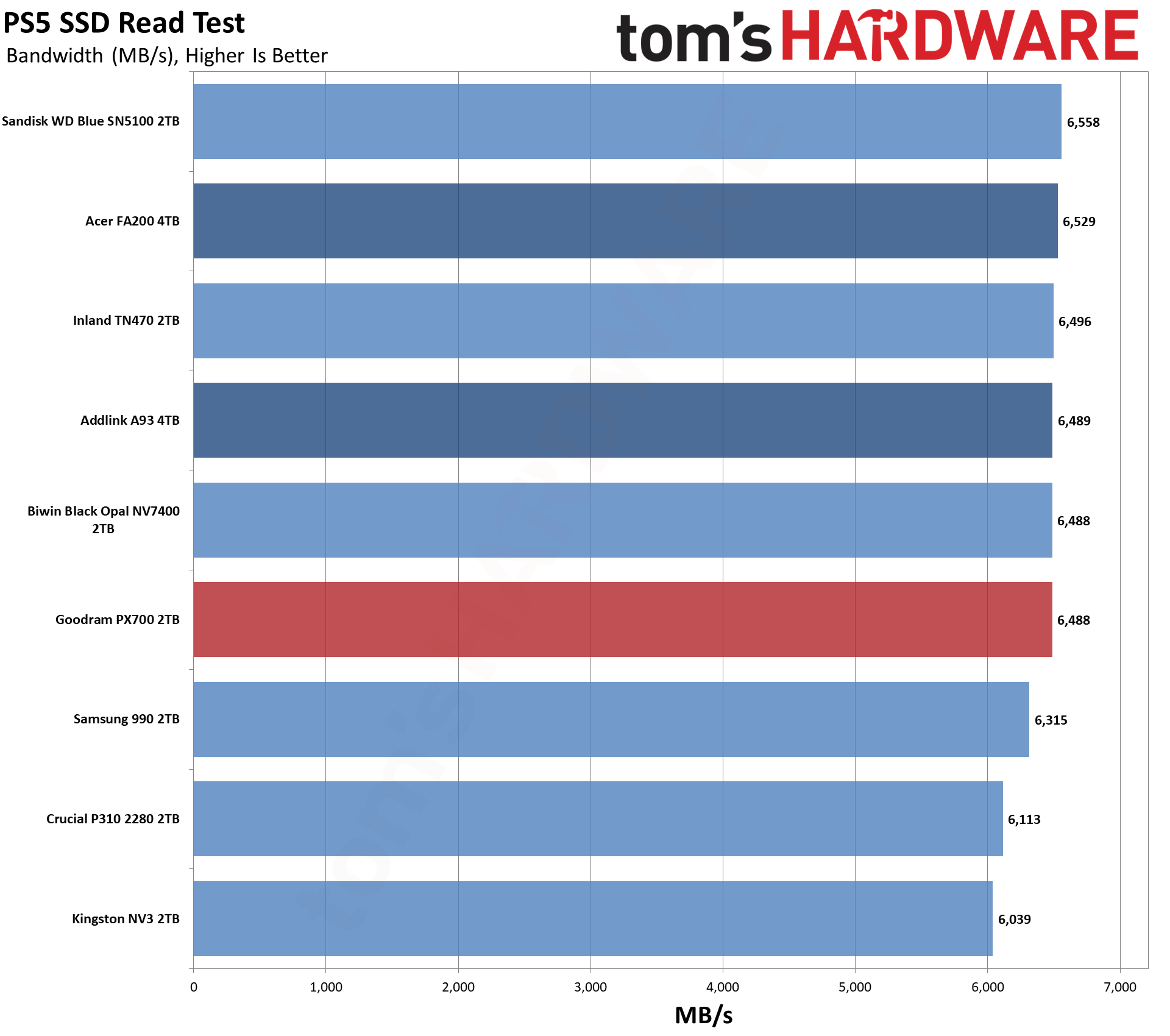
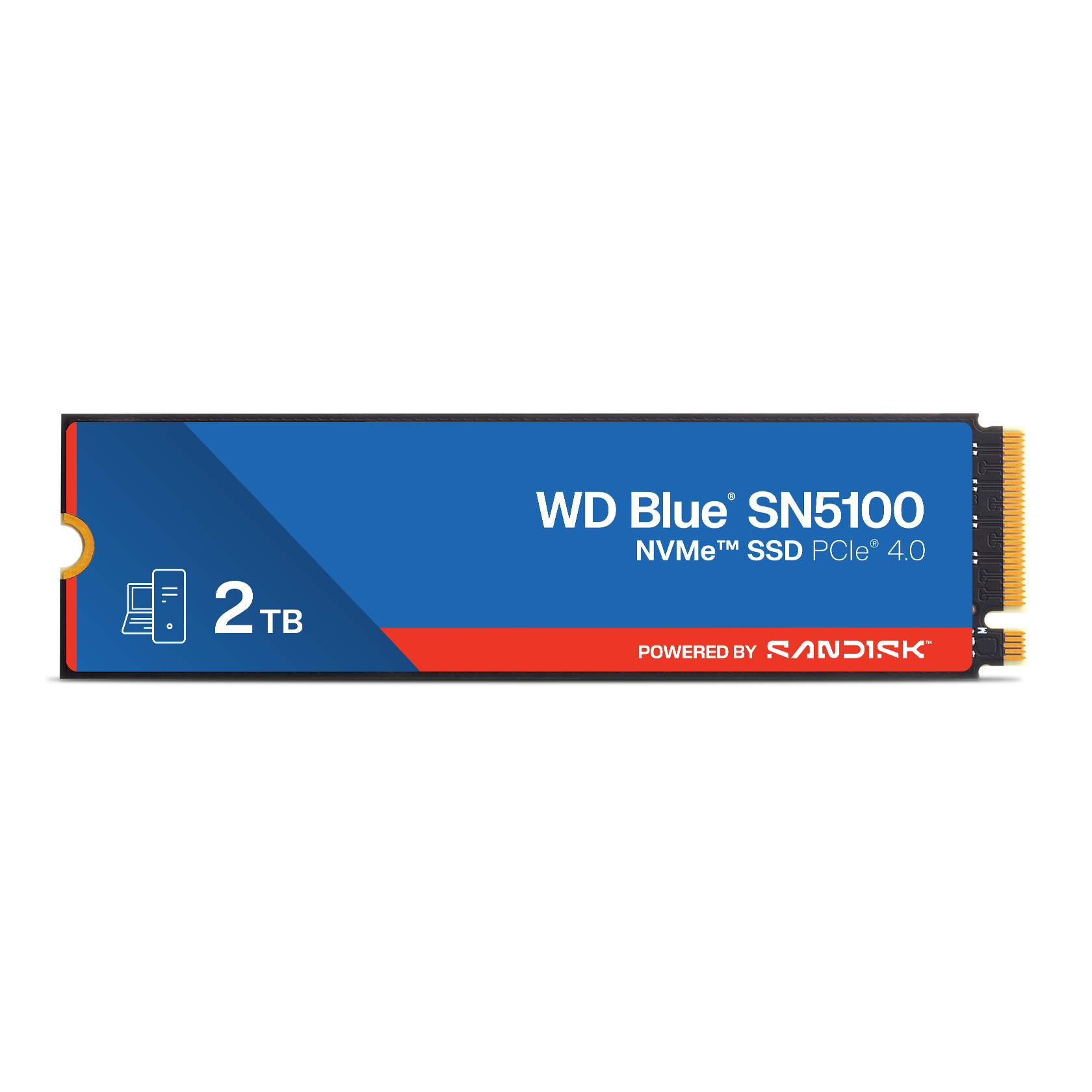
The Goodram PX700 is in a tight spot with ample competition in today’s market. This has been true for some years now, but some more recent releases have turned up the heat. These would include the Sandisk WD Blue SN5100 with its fantastic random read latency, the Crucial P310 with surprisingly good all-around performance, and even the Samsung 990, which was a very late arrival. Existing drives with comparable hardware to the PX700 include the Acer FA200 with QLC flash plus the Biwin Black Opal NV7400, Addlink A93, and Inland TN470 with TLC. The last of these also uses a Phison controller rather than the more common Maxio MAP1602. Lastly, we have the budget-minded Kingston NV3, which is always looming in the background.
Trace Testing — 3DMark Storage Benchmark
Built for gamers, 3DMark’s Storage Benchmark focuses on real-world gaming performance. Each round in this benchmark stresses storage based on gaming activities including loading games, saving progress, installing game files, and recording gameplay video streams. Future gaming benchmarks will be DirectStorage-inclusive and an evaluation for future-proofing is included where applicable.
Tom's HardwareTom's HardwareTom's Hardware
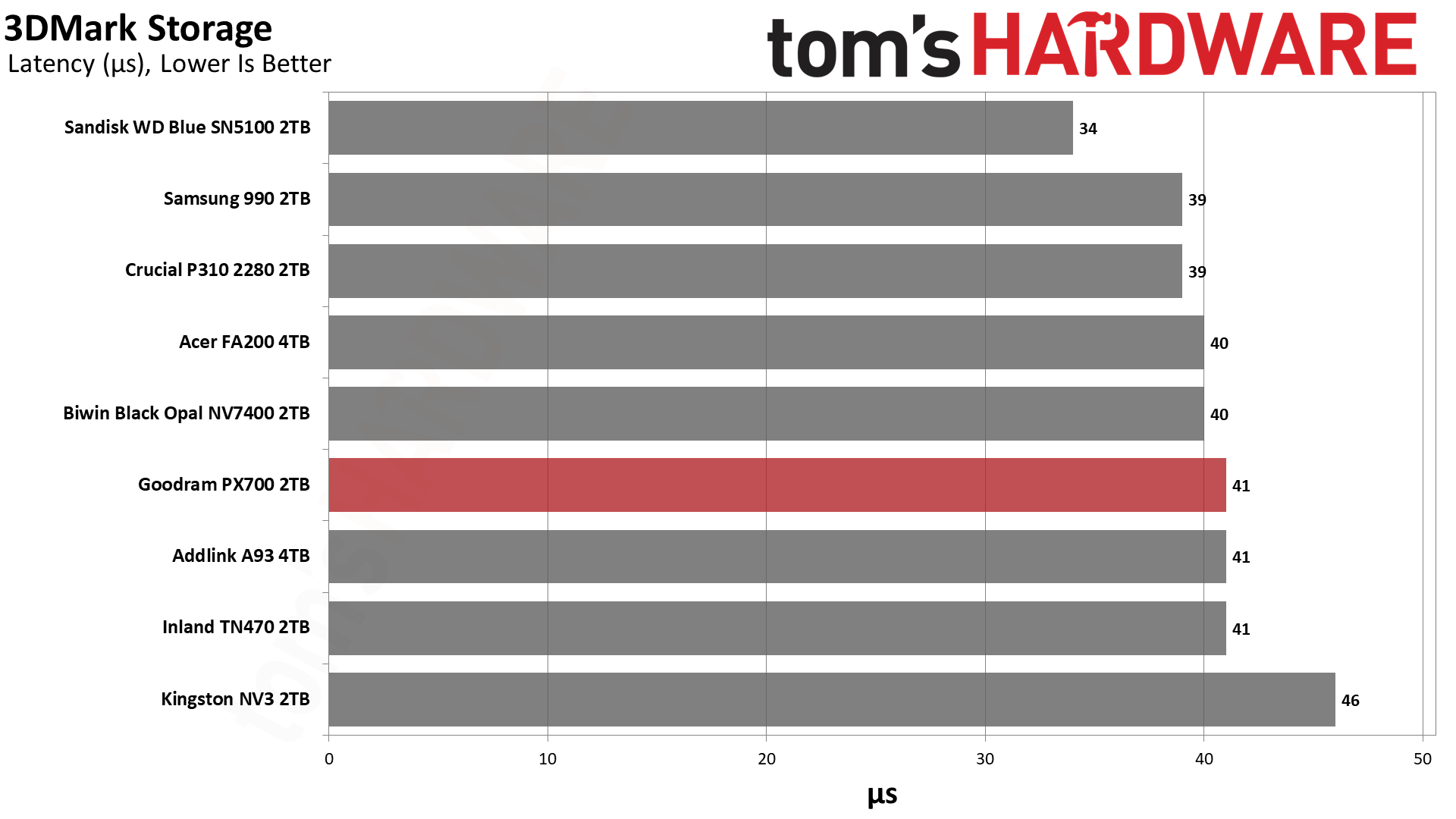
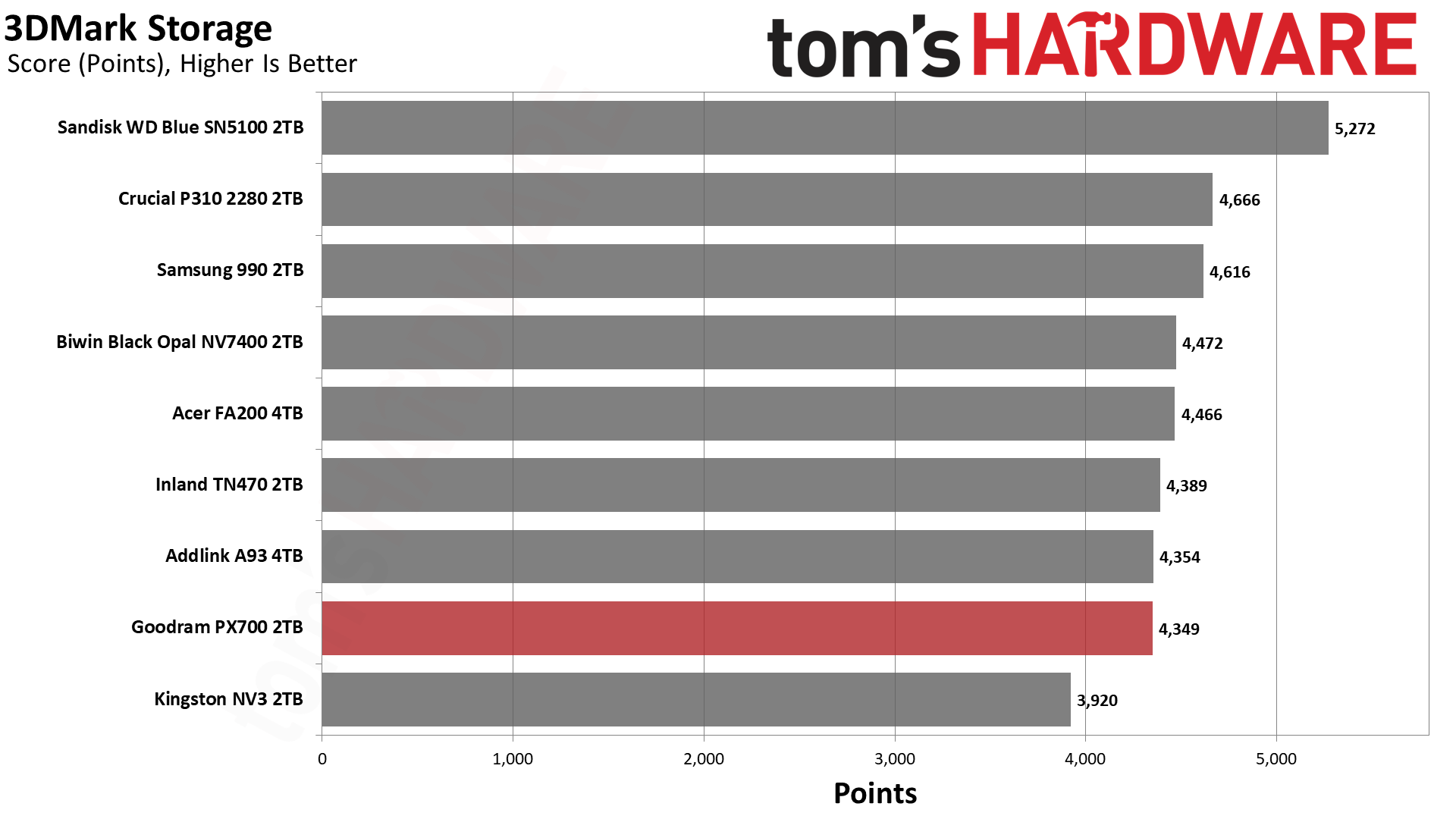
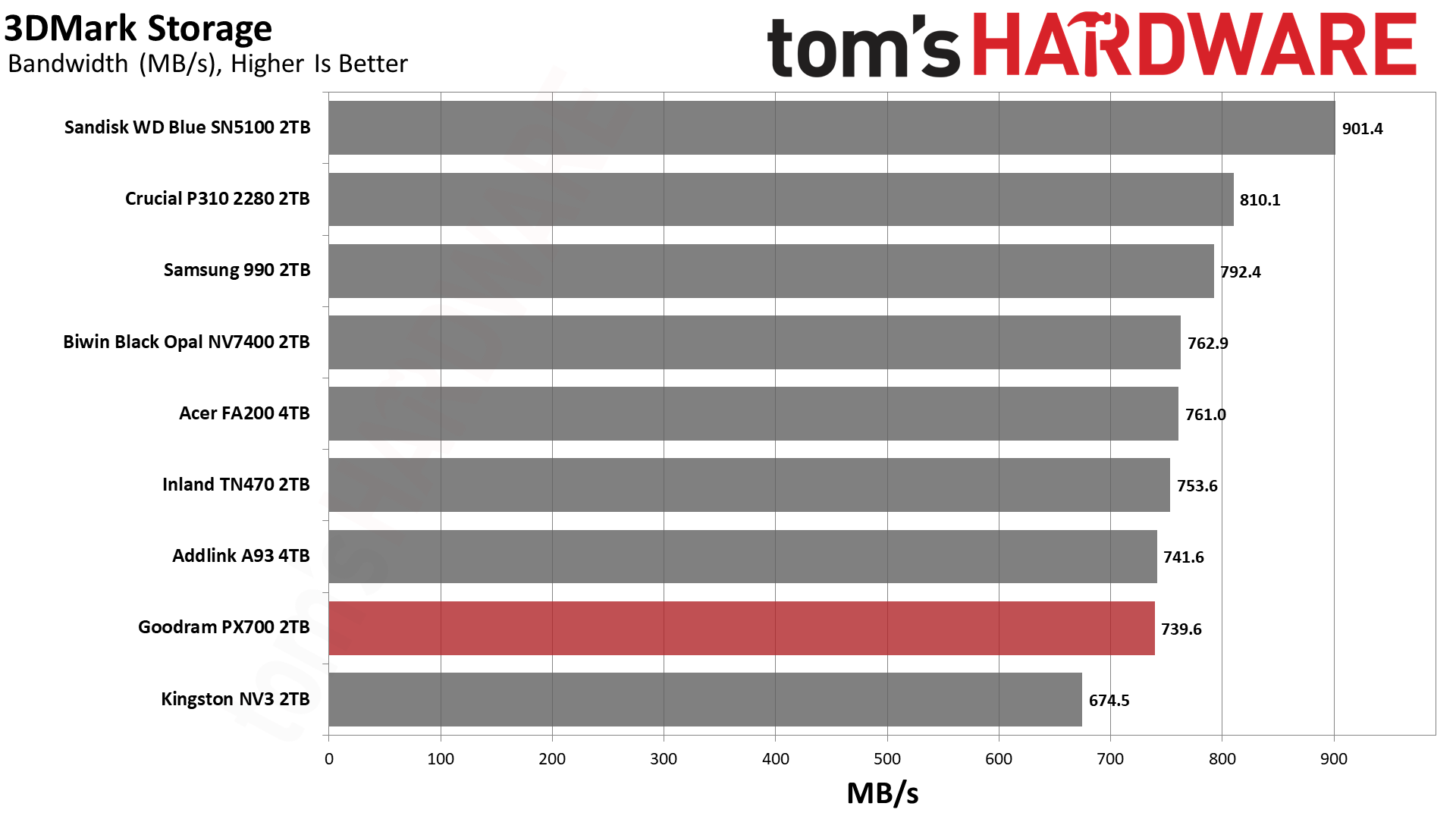
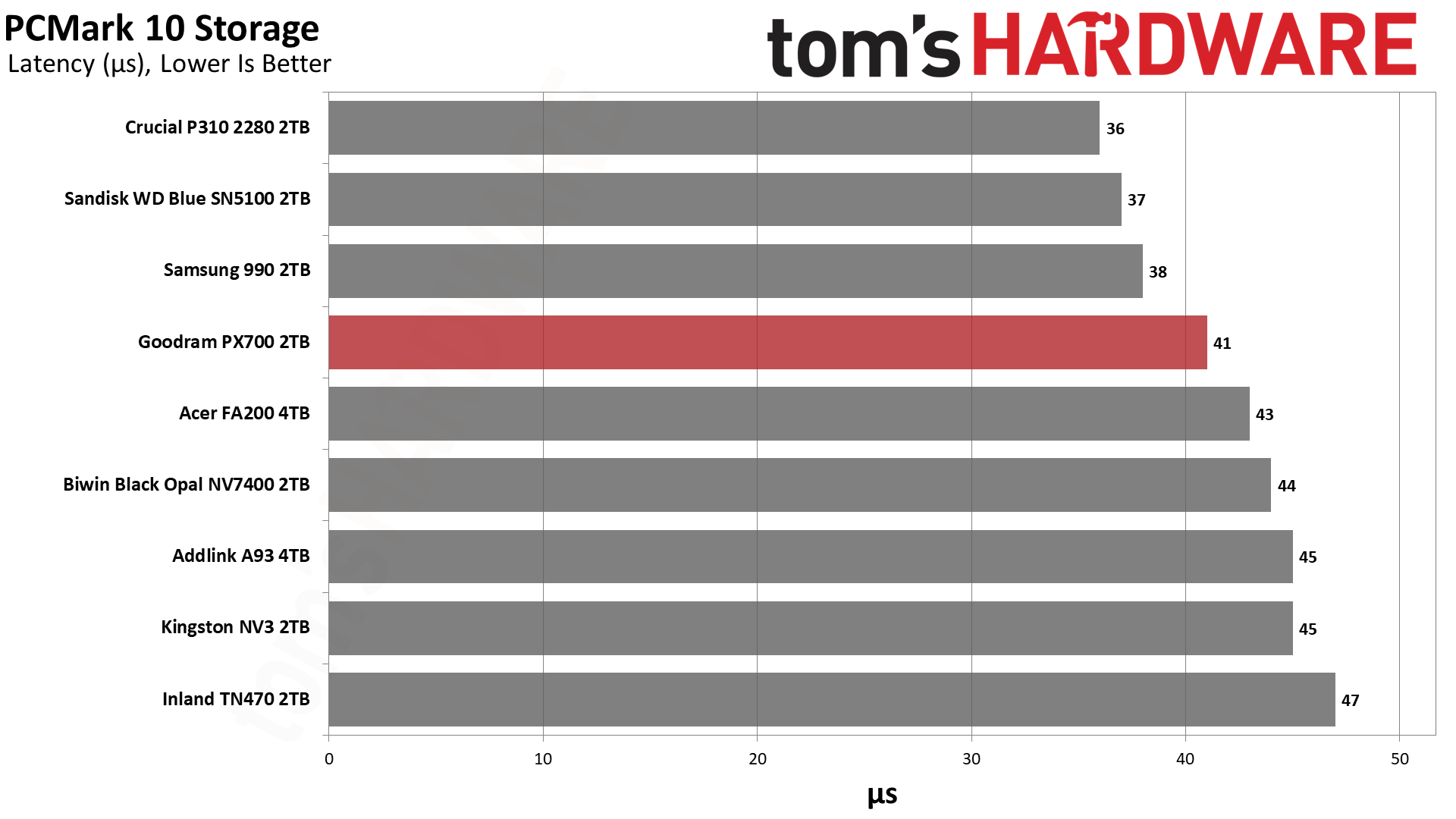
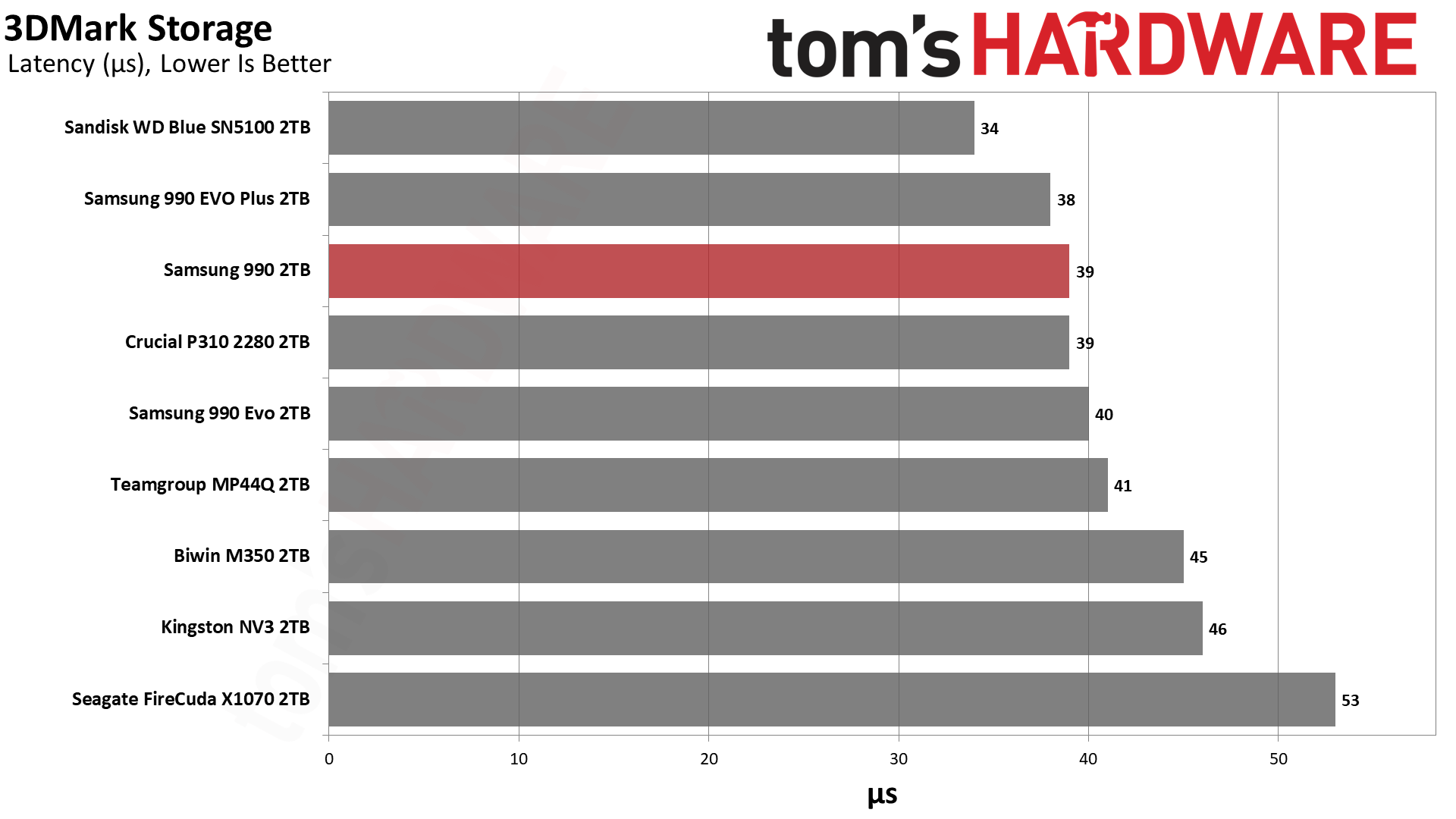
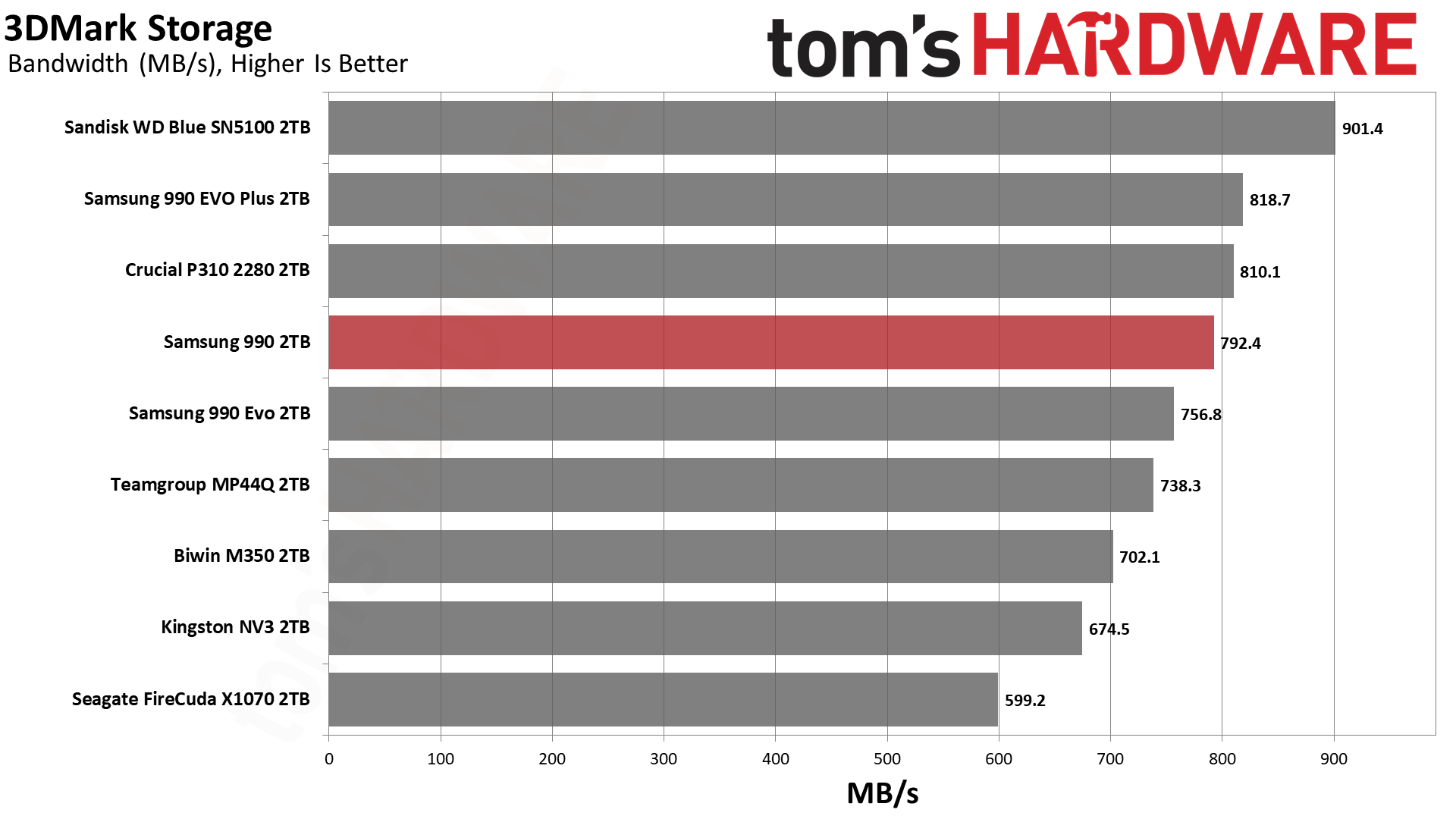
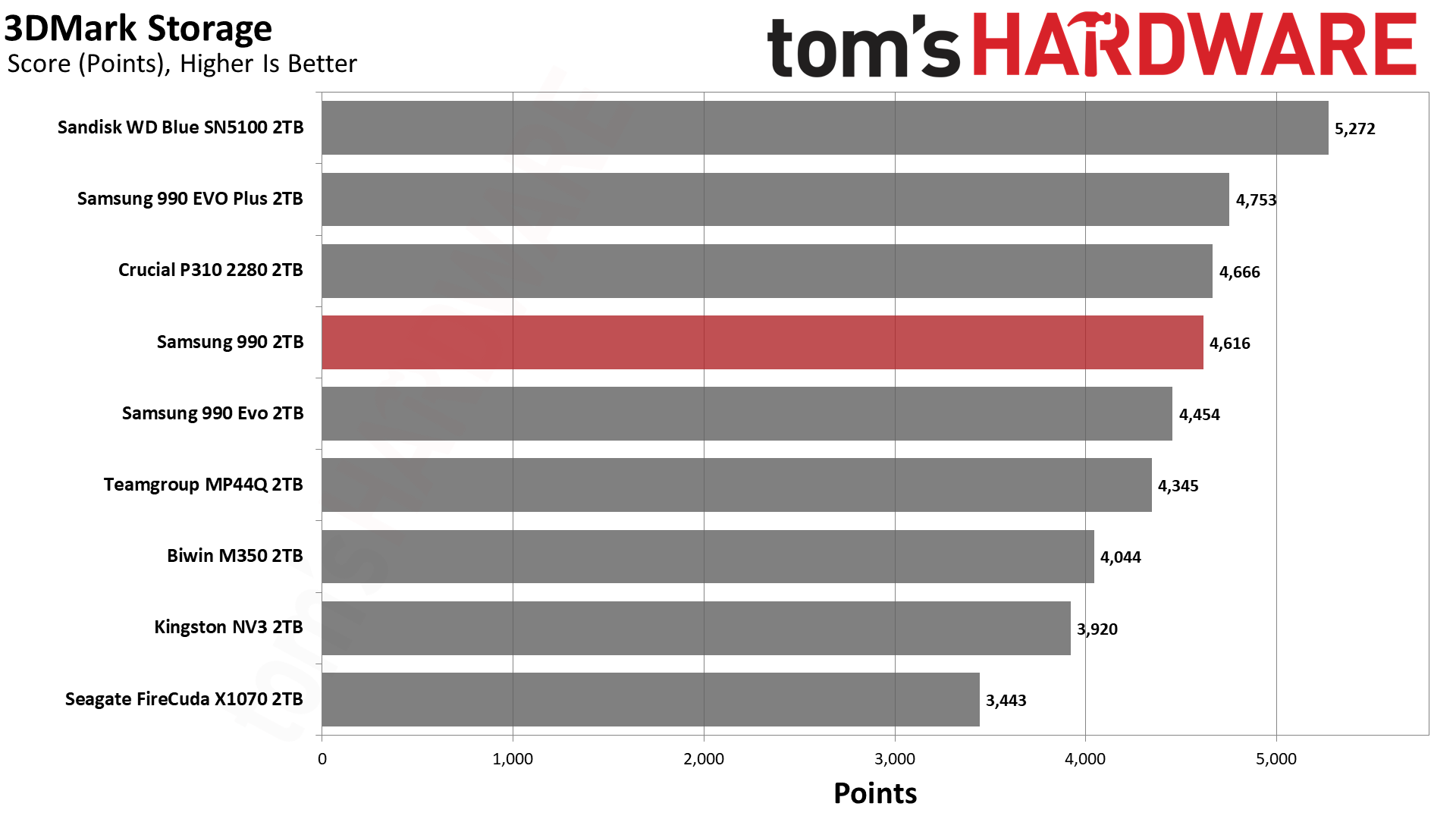
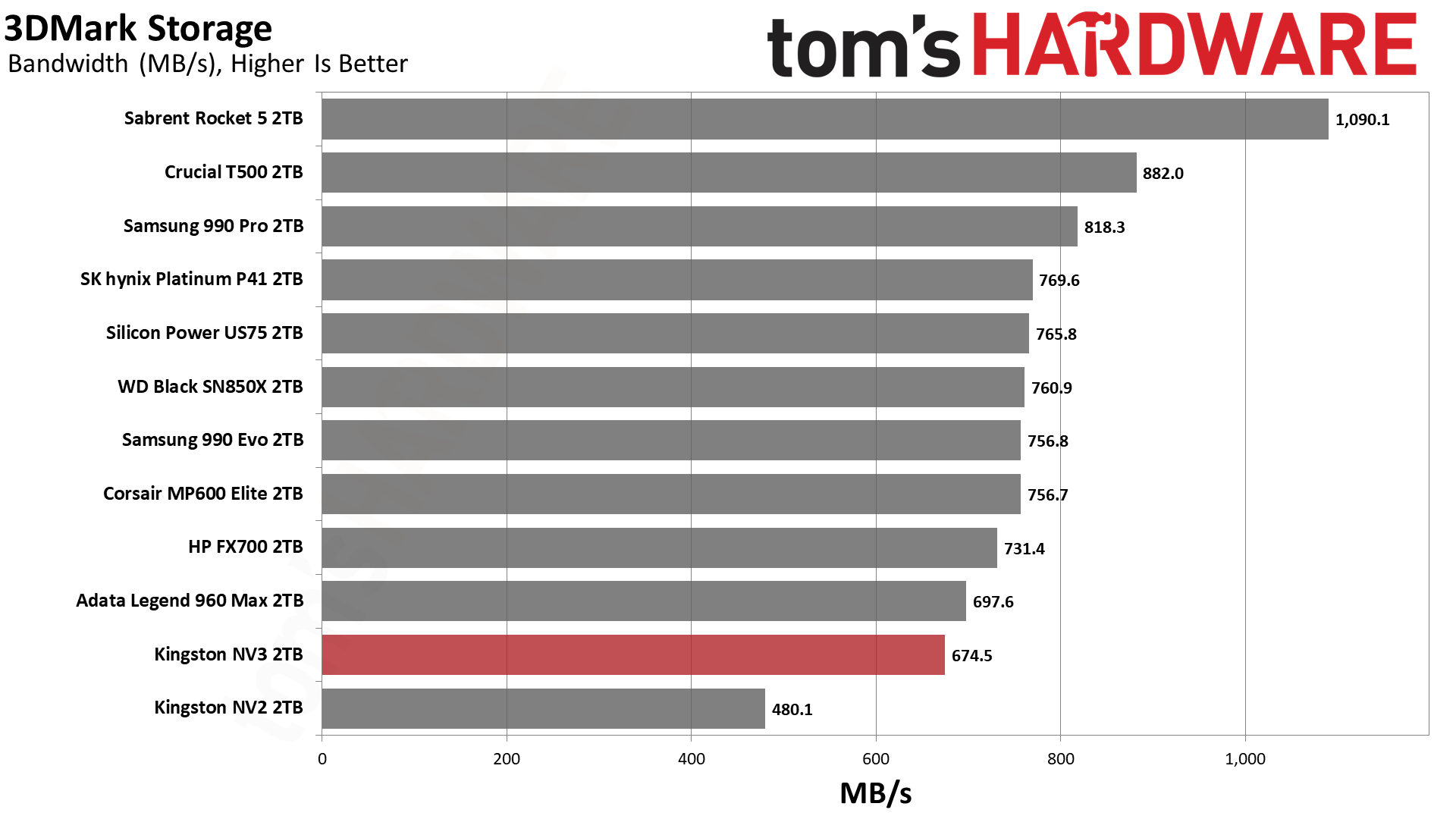
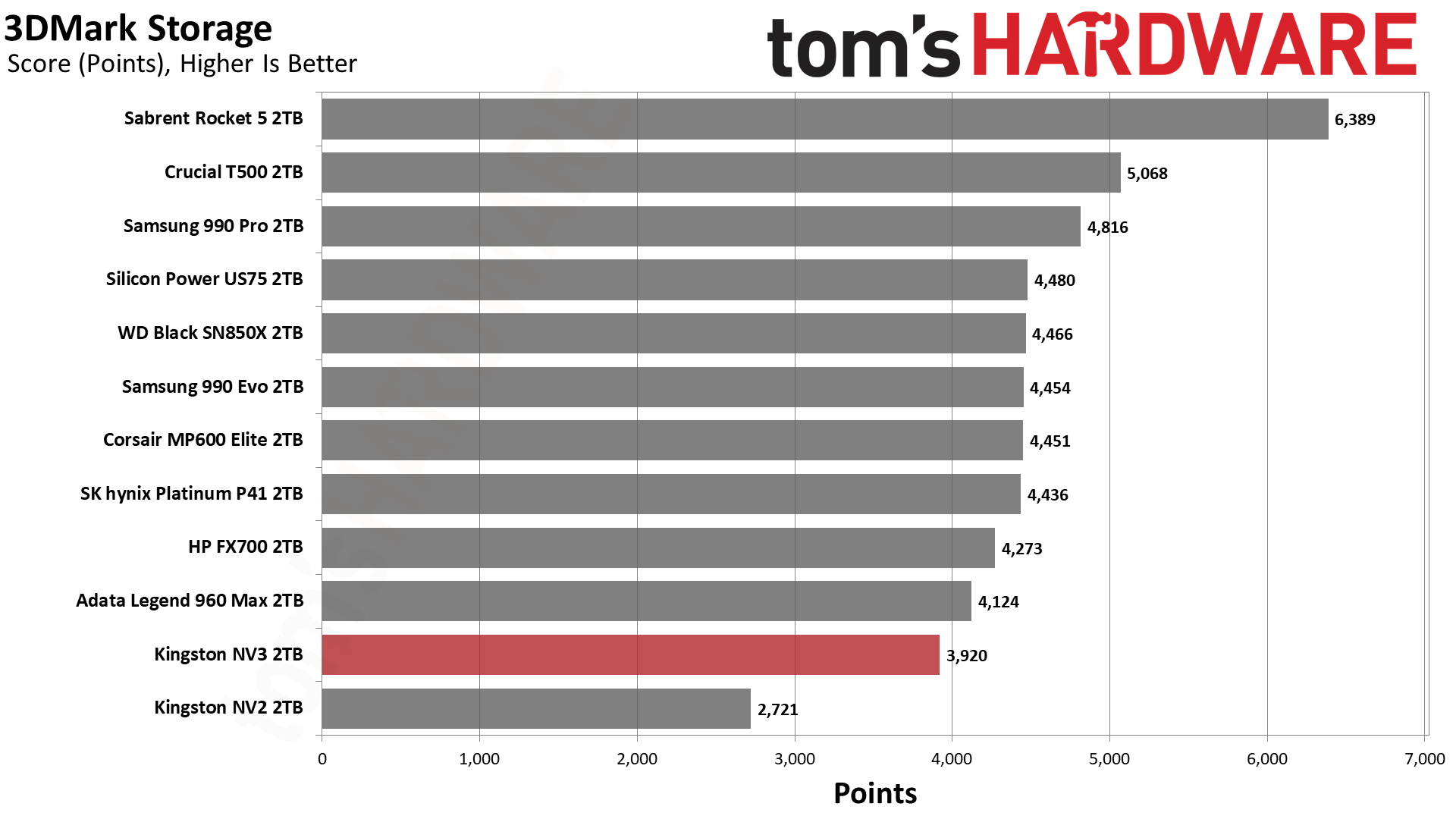
The PX700’s 3DMark results are spot-on for a drive of this caliber, hanging out at around 40µs for latency with bandwidth over 700 MB/s. This level of performance is excellent for gaming, and the only drive that wouldn’t fall into that category is the NV3. The NV3 is still fast enough for a games drive and remains a good budget choice, but there are faster options like the PX700. We want to emphasize that the PX700 is better than it looks in this lineup because it’s effectively within range of all drives but one, the WD Blue SN5100.
Among the QLC-based drives, the WD Blue SN5100, 990, and P310 all notably score near the top. The BiCS flash in the first drive is known for its responsiveness and, yes, it will give you a small edge with game load times. However, the 990 is right up there with the P310, which means there is no shortage of viable options. Most slower drives, from a gamer’s perspective, will be last-generation or slower PCIe 4.0, which means it’s not hard to find drives that are very fast for games. This means that the deciding factor might lie outside of 3DMark performance, such as drive reliability.
Trace Testing — PCMark 10 Storage Benchmark
PCMark 10 is an industry standard trace-based benchmark that uses a wide-ranging set of real-world traces from popular applications and everyday tasks to measure the performance of storage devices. The results are particularly useful when analyzing drives for their use as primary/boot storage devices and in work environments.
Tom's HardwareTom's HardwareTom's Hardware
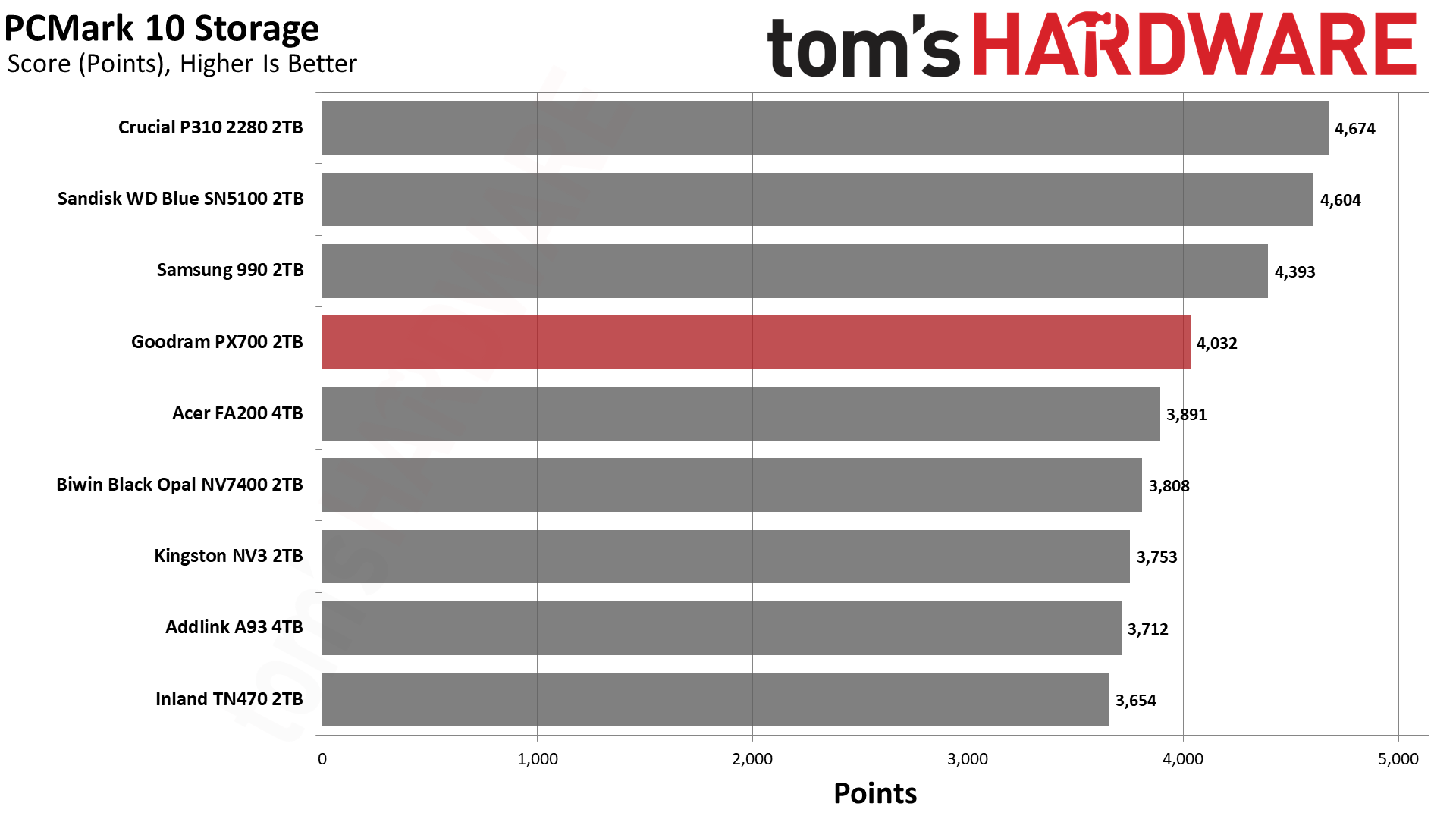
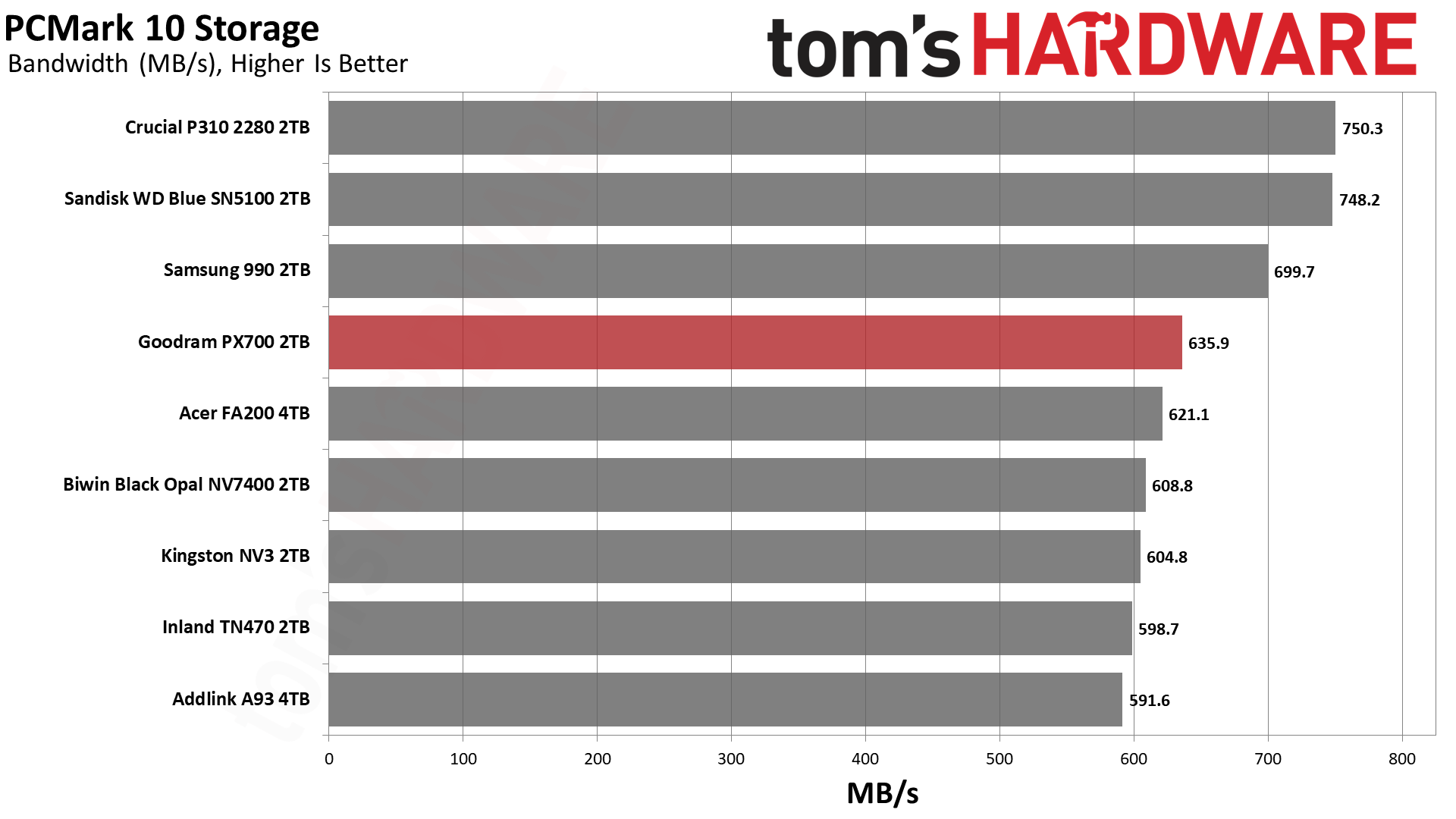
While the PX700 is merely mediocre against the competition in 3DMark – its absolute performance is quite good, though – its showing in PCMark 10 is better. This is again a scenario where the drives with TLC flash, including the TN470 with Phison’s controller, are underwhelming. This can be confusing to buyers who have relied on the mantra that TLC is better than QLC. There are reasons for the surprise here, although the general idea that benchmarking is often looking at ideal scenarios is perhaps the easiest answer.
These drives, whether TLC or QLC, rely on pSLC cache as much as possible to give you the best performance. This pSLC mode is not equivalent to native pSLC and is generally the same speed regardless of the flash type. QLC, however, tends to lead TLC in some ways and follow it in others. For example, QLC gets larger benefits from optimizations, so it may see advanced techniques first. This includes improvements to 4K latency. On the other hand, QLC has four planes when TLC has advanced to six. As we’ve seen with BiCS flash, which is four-plane against six-plane TLC from Micron and YMTC, fewer planes can lead to lower effective latency. The advantage of a higher plane count is in bandwidth but does not come without costs and drawbacks.
The PX700 is also faster than a QLC-based drive with the same controller, like the FA200. In that case, the FA200 uses twice as many dies – thirty-two – which puts more load on the controller. This can increase latency. In general, the idea has been that bigger drives are faster, which is certainly true in many cases. Larger drives will have more bandwidth and can reach higher IOPS due to improved parallelization. However, past four dies for each channel – this is where the PX700 falls, and the FA200 exceeds – you are increasing power consumption and overhead. So, the PX700 is in a sweet spot for how this benchmark tests.
We would go on to say that the P310, WD Blue SN5100, and 990 all beat the PX700. These are all QLC-based drives with a range of controllers. We’ve already explained the BiCS factor. Samsung’s newer QLC is also very good. The P310 has always been a bit of an outlier, as on paper its hardware shouldn’t perform as well as it does. Considering Crucial used to rely at least partially on proprietary controllers, we think this is a situation where they did a lot of optimization. WD and Sandisk also did this with the Black SN8100/Optimus Pro GX 8100 so there’s some “special sauce” at play. The PX700 being the best of the rest is a point in its favor, as those are the drives it’s competing with in the real market.
Console Testing — PlayStation 5 Transfers
The PlayStation 5 is capable of taking one additional PCIe 4.0 or faster SSD for extra game storage. While any 4.0 drive will technically work, Sony recommends drives that can deliver at least 5,500 MB/s of sequential read bandwidth for optimal performance. Based on our extensive testing, PCIe 5.0 SSDs don’t bring much to the table and generally shouldn’t be used in the PS5, especially as they may require additional cooling. Check our Best PS5 SSDs article for more information.
Our testing utilizes the PS5’s internal storage test and manual read/write tests with over 192GB of data both from and to the internal storage. Throttling is prevented where possible to see how each drive operates under ideal conditions. While game load times should not deviate much from drive to drive, our results can indicate which drives may be more responsive in long-term use.
Tom's HardwareTom's HardwareTom's Hardware
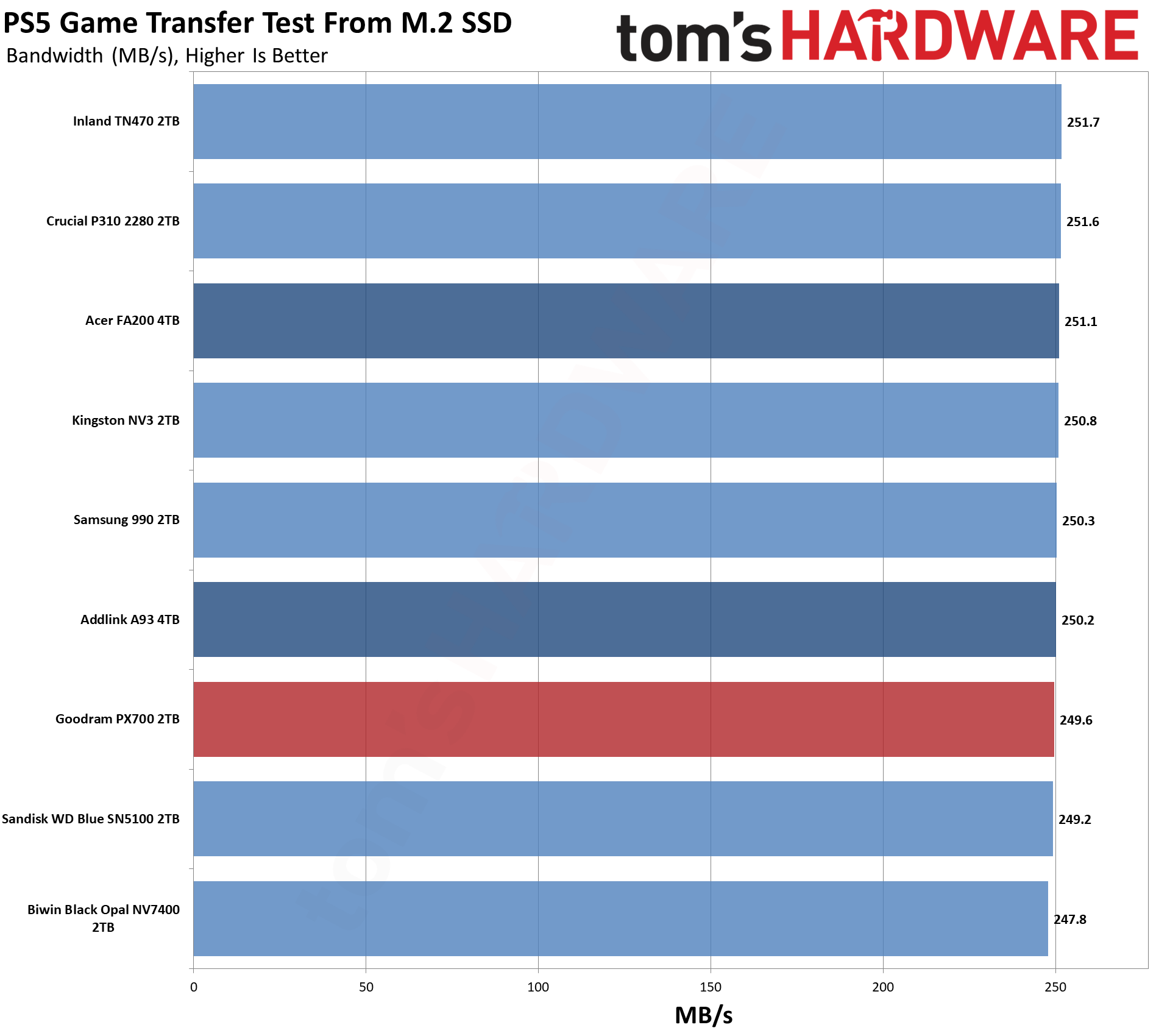
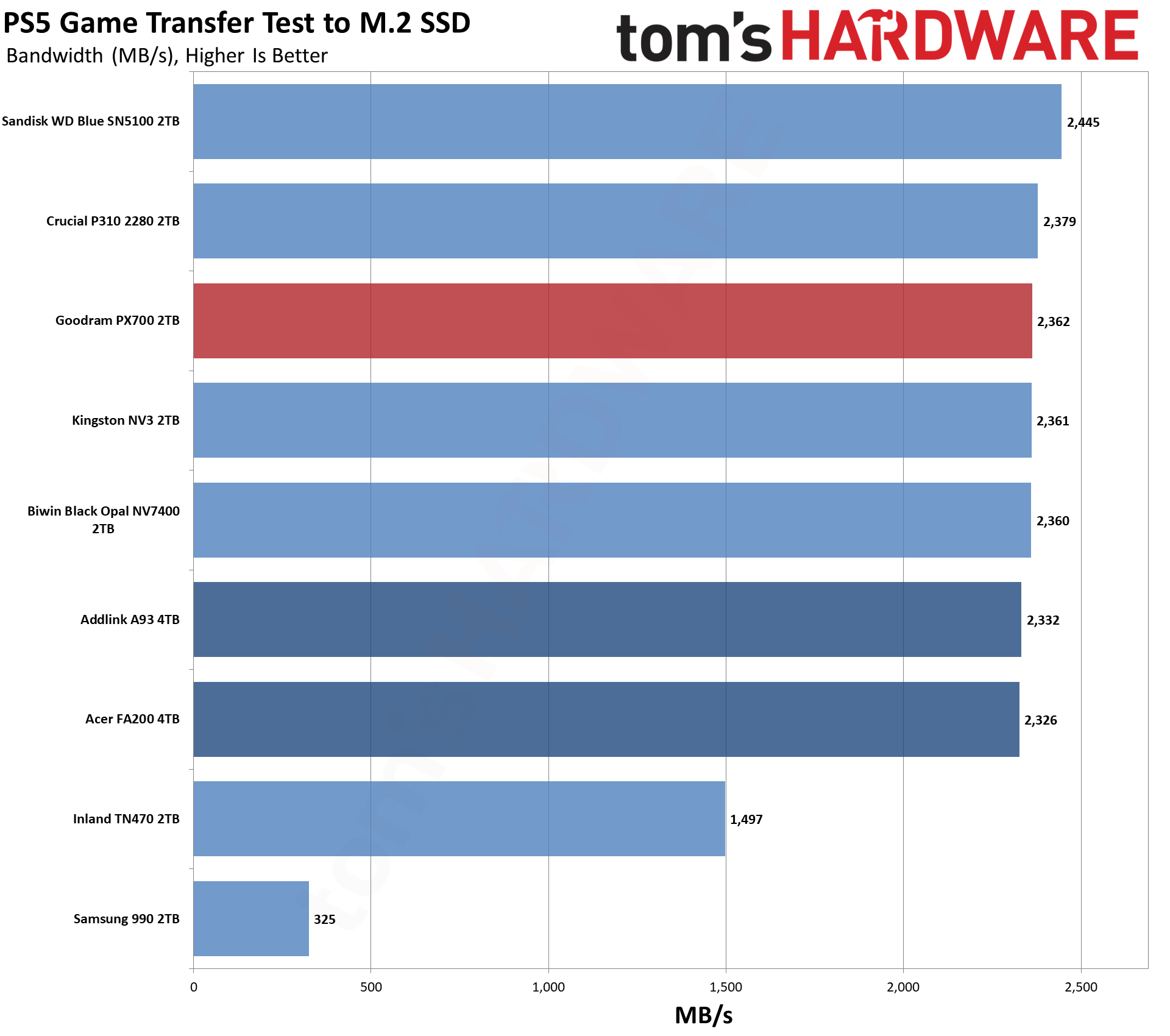
For the PS5, we can recommend almost any drive if it meets the PS5’s minimum requirements in any real way. The PX700 significantly exceeds that, so the question is more about value. What does this drive offer that others don’t? For this category, this often means leaning towards drives with heatsinks and/or higher reliability. Reliability is a difficult quality to measure, although a warranty gives some peace of mind. As for heatsinks, you can always add your own. So drawing lines here becomes more difficult.
We would point to our Power Consumption and Temperature section below for some additional support. The PX700, as we will see, runs coolly, which is a big positive for the PS5. Performance-wise, it’s right up there with the other drives and only really behind the Blue SN5100. You don’t have to go with a big brand to get good results here, and the PX700 will serve you well.
Transfer Rates — DiskBench
We use the DiskBench storage benchmarking tool to test file transfer performance with a custom 50GB dataset. We write 31,227 files of various types, such as pictures, PDFs, and videos to the test drive, then make a copy of that data to a new folder, and follow up with a reading test of a newly written 6.5GB zip file. This is a real-world type workload that fits into the cache of most drives.
Tom's HardwareTom's HardwareTom's Hardware
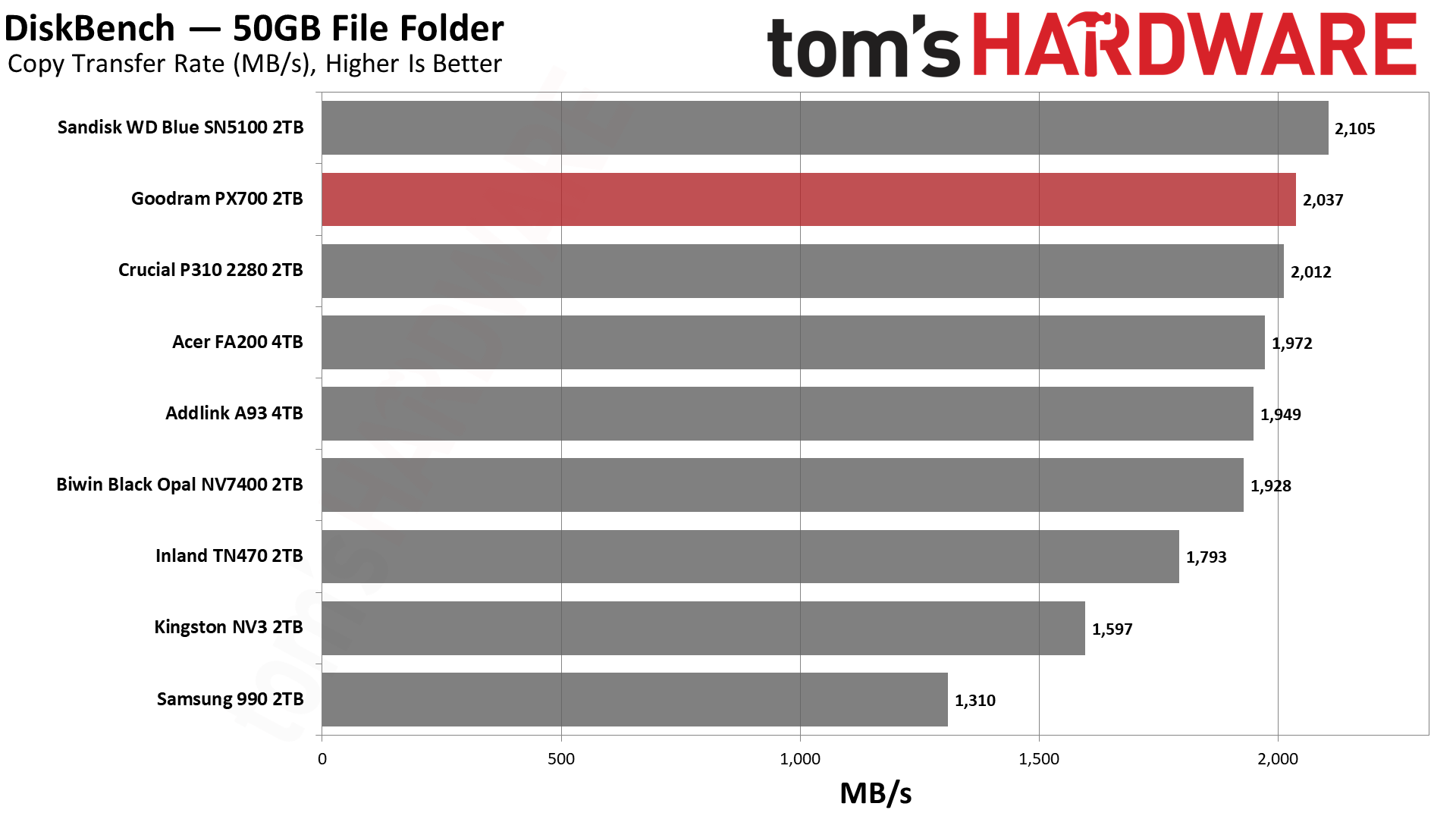
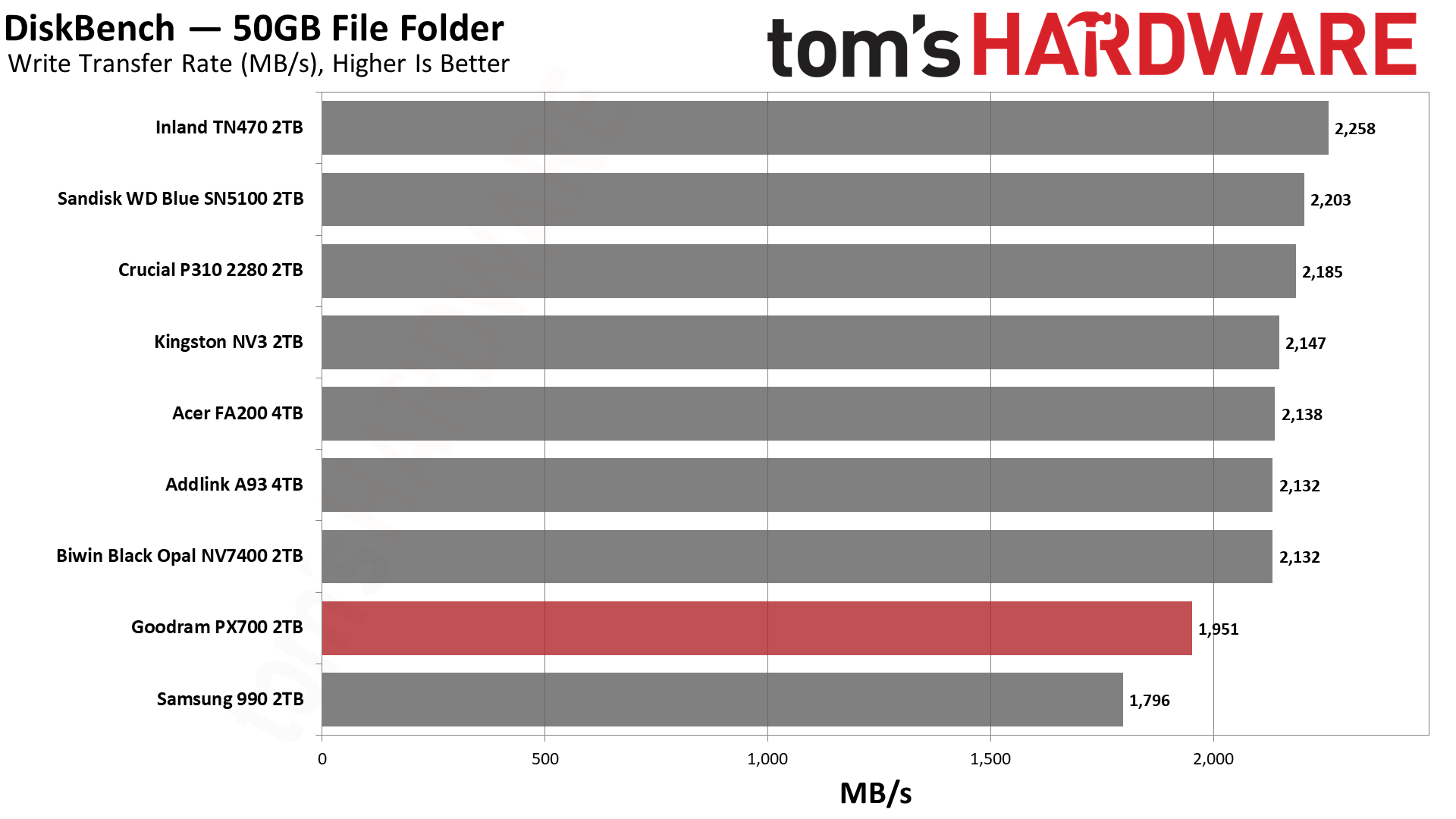
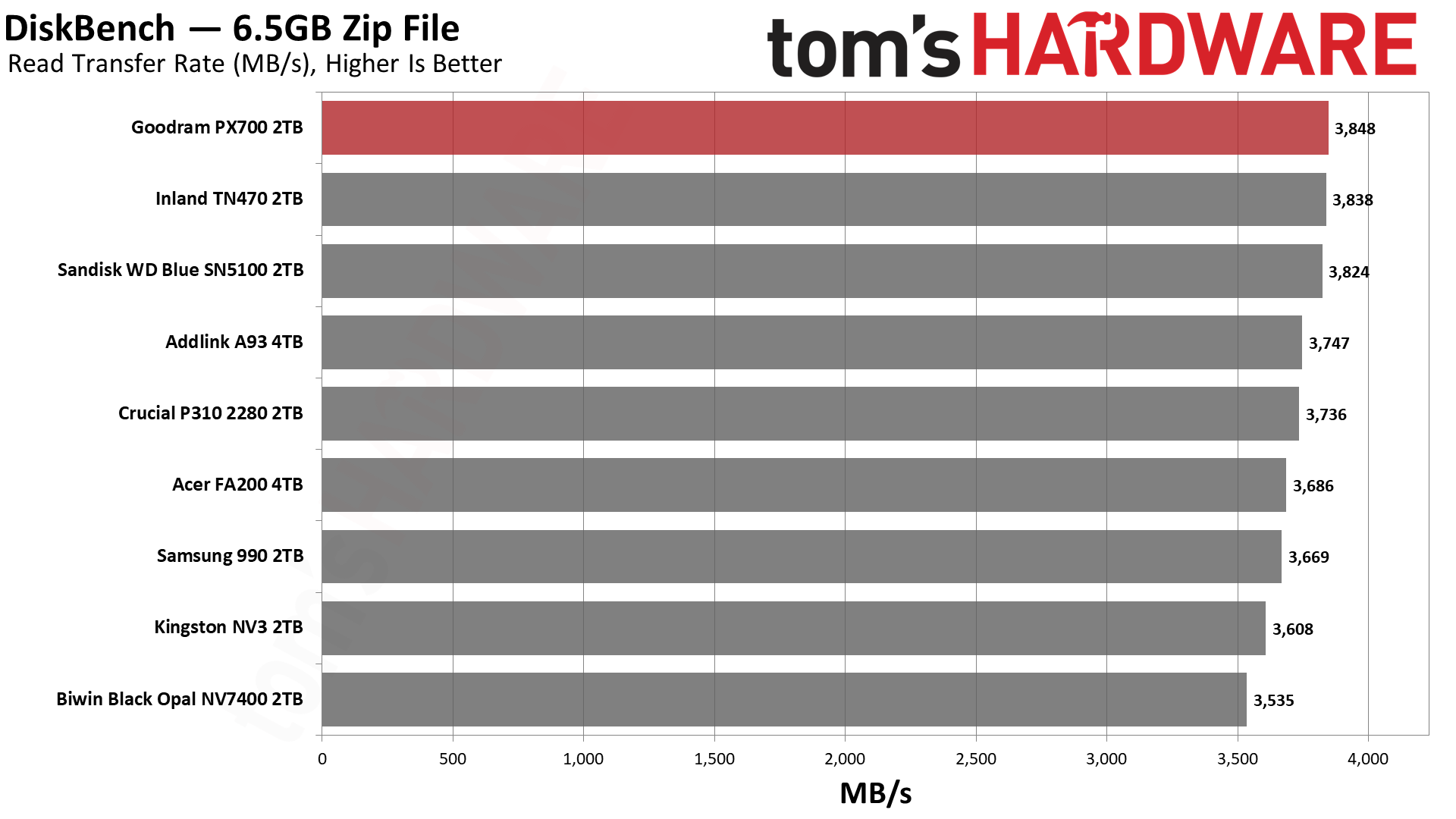
The PX700 does very well here, and we wanted to give some background on this test and what it means to put that into perspective. Whether you’re copying between drives or copying to and from the same drive, there are some universal principles. One is that there will be a bottleneck, and usually this will be on the write side of things, as drives write slower than they read. Flash memory, in particular, has to erase cells before they can be written again, which leads to some curious behavior under certain workloads. More generally, though, a write has higher latency – with flash again, this is due to the technology and how multi-bit cells usually need multiple write passes – and writes must be acknowledged, while reads just come from usually static media.
If you have drives that are of different classes – NVMe and SATA, or PCIe 4.0 and PCIe 3.0 – then you would expect the slower class of drive to be the bottleneck even if it’s on the read side. This is also universal, going back to the days when HDDs got faster as they got bigger. SSDs also generally get faster with capacity, but flash is so fast that these rules are no longer absolute. This is complicated by other facets of the technology like pSLC caching and TLC versus QLC flash, where with sustained writes you can have dramatic changes in performance. This is a problem because many people buy drives thinking mostly about transfer performance, and when they hit a low that’s nowhere near the box-rated speed, they panic.
Our DiskBench testing takes all of this into account as it’s closer to a real-world workload, including using different file sizes. Transferring a bunch of large files is fast. Copying lots of small files – and any veteran of hard drives will know this from backing up Windows or documents manually – can be very slow, even on SSDs. So we do a mix. Moreover, we’re doing an on-drive copy, which helps rule out external factors. Much of what you do on your system can be cached in system memory, which can give misleading metrics depending on what you’re doing.
What we’re leading up to here is that the PX700 is the fastest drive on the list for reads and not far off first place for copying. Considering it’s up against some of the best budget drives out there, that’s no mean feat. This is, again, a real-world workload and probably more meaningful than something like 3DMark is for game load times.
Yes, the difference between the best and the worst drive for reads is under 10%, but nobody wants to buy a drive and feel bad about how fast it feels. The PX700 feels like a premium drive – the weaker write performance here is real, but most of what you’re doing will be read-heavy – and if you’re building a PC for someone with it over, say, the Samsung 990, they won’t know the difference. That is a common refrain regardless, but it helps underline the value of reliability. People buy Samsung and WD/Sandisk for a reason. Given Goodram’s European basis, there is some reason to celebrate the performance here while also acknowledging it’s not a no-name brand from AliExpress.
Synthetic Testing — ATTO / CrystalDiskMark
ATTO and CrystalDiskMark (CDM) are free and easy-to-use storage benchmarking tools that SSD vendors commonly use to assign performance specifications to their products. Both of these tools give us insight into how each device handles different file sizes and at different queue depths for both sequential and random workloads.
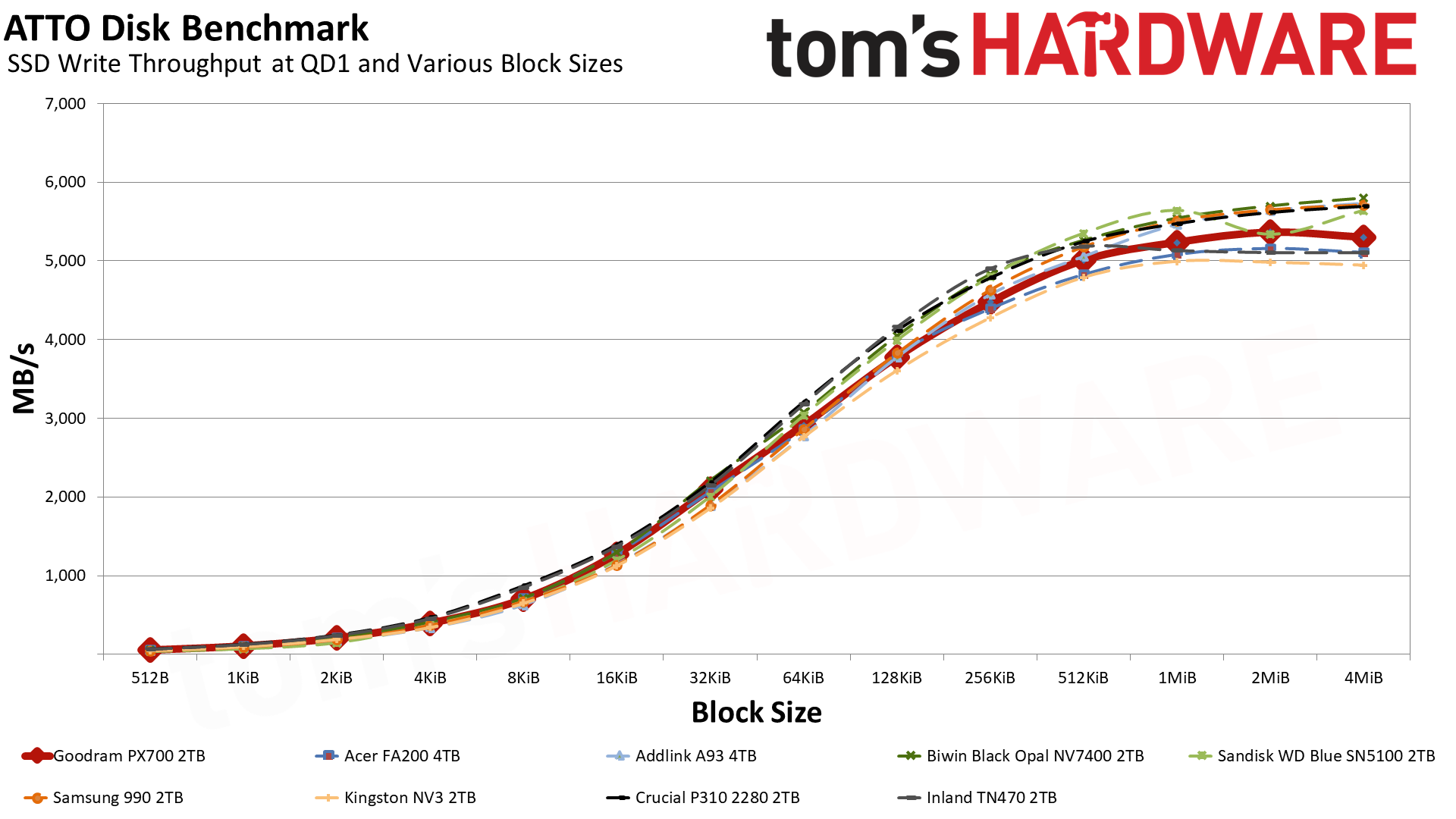
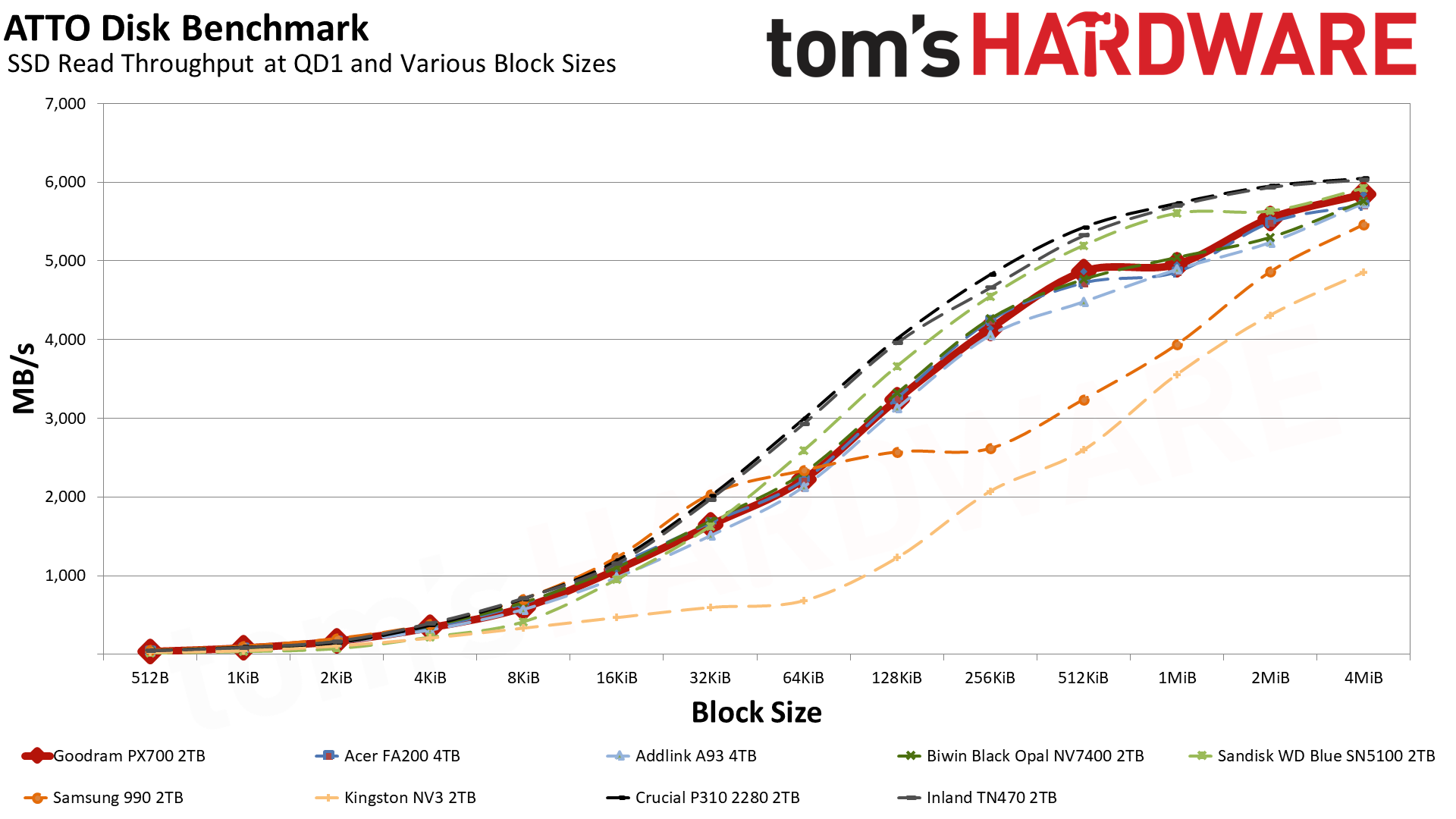
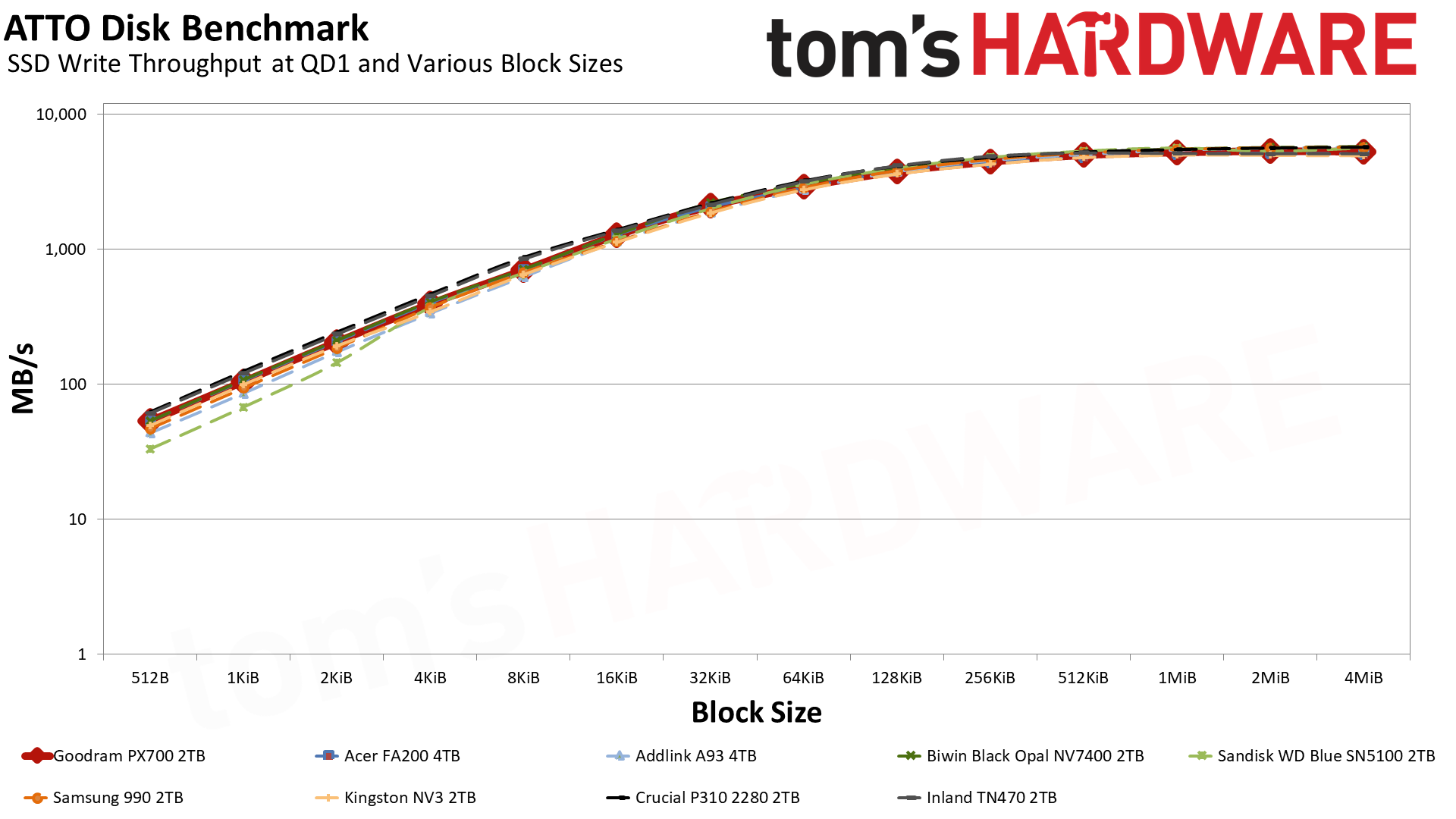
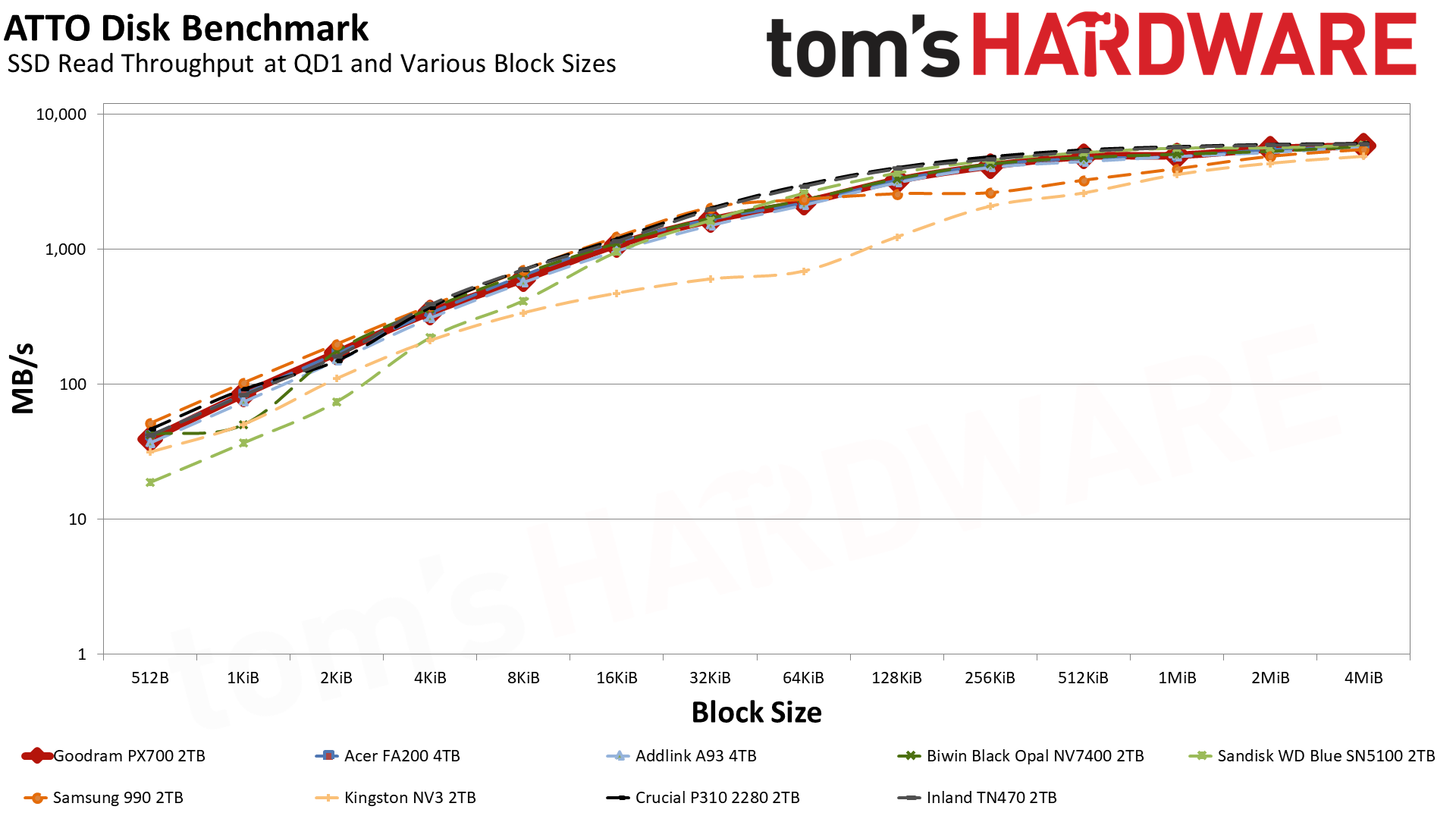
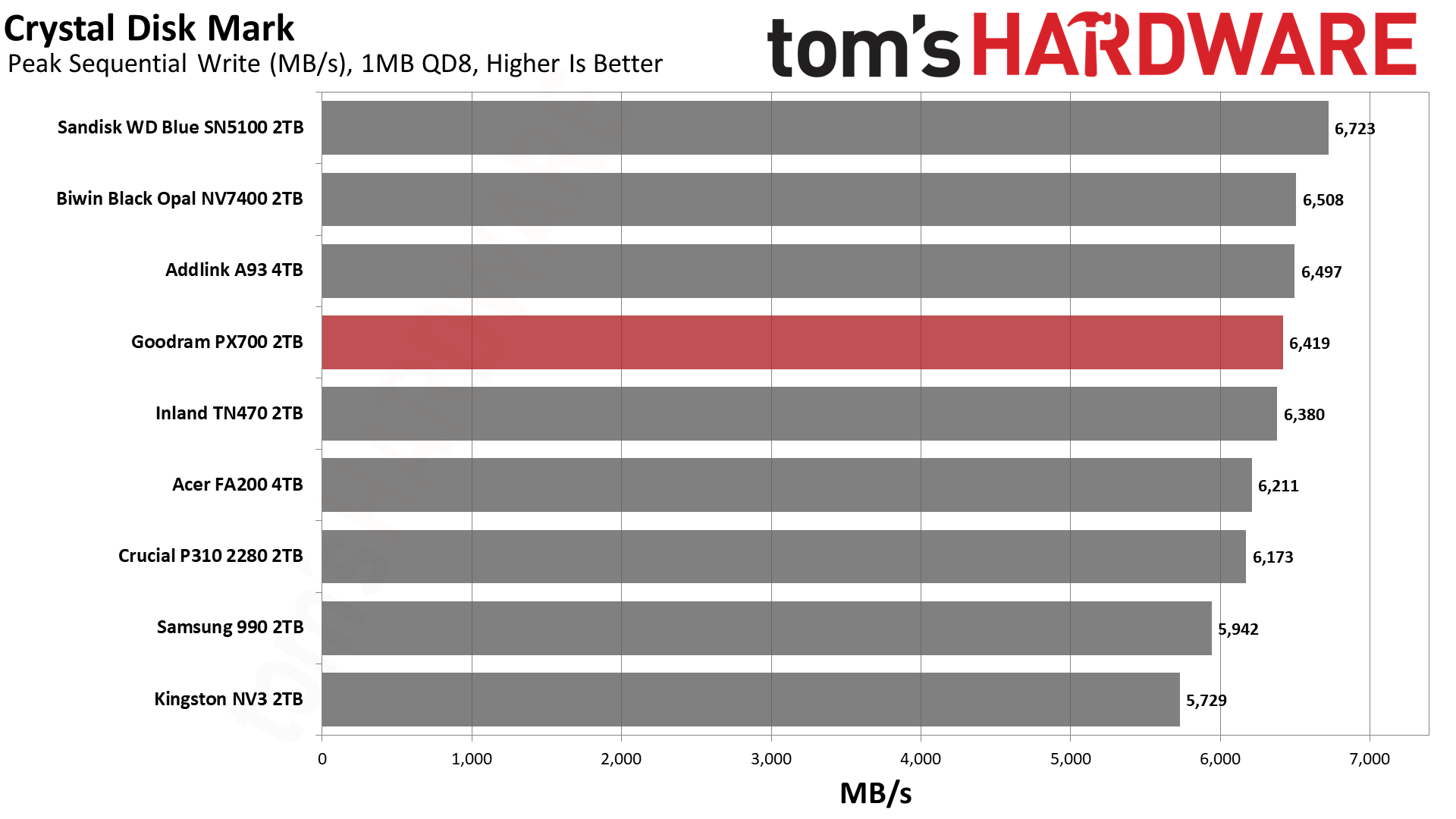
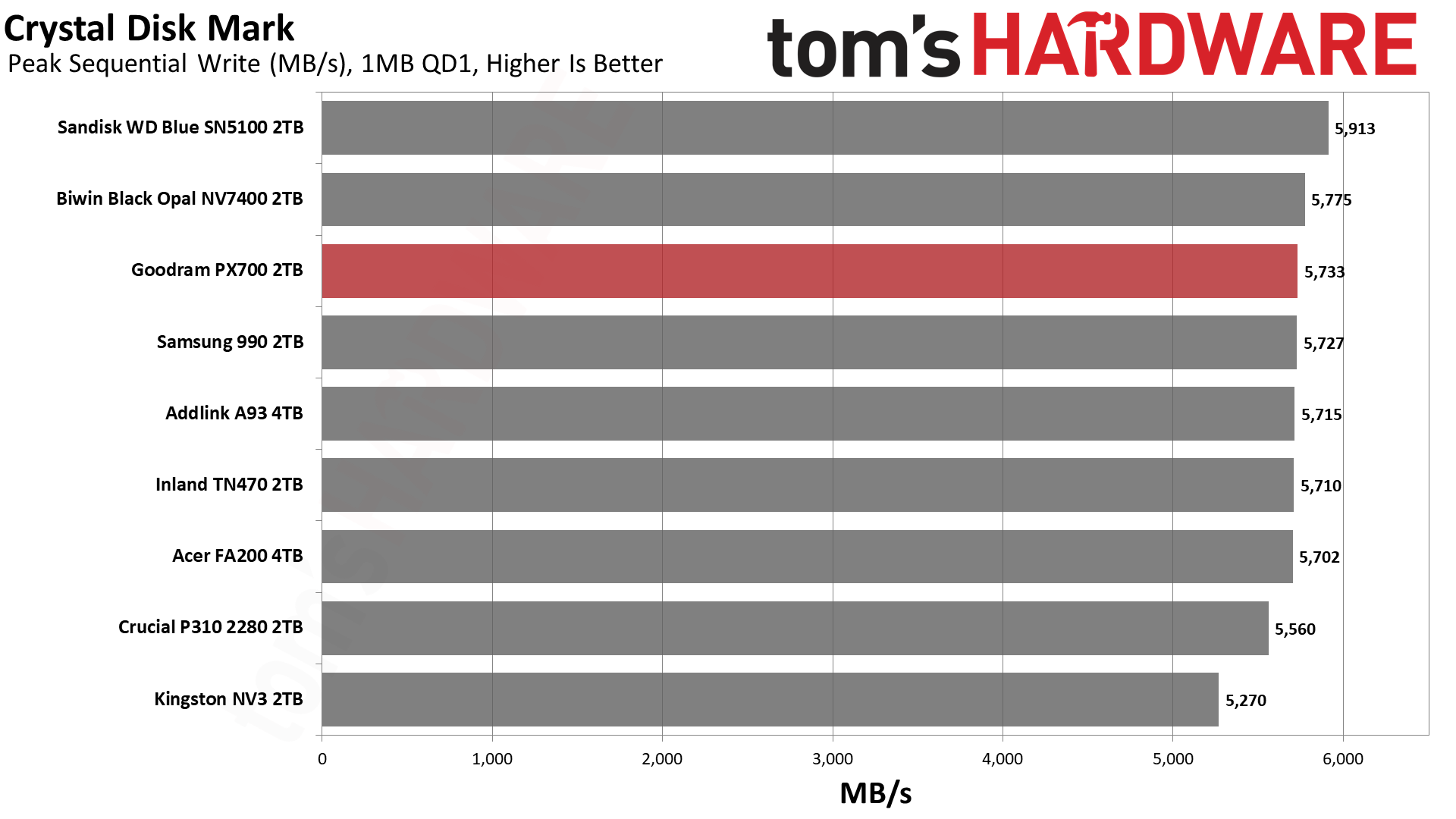
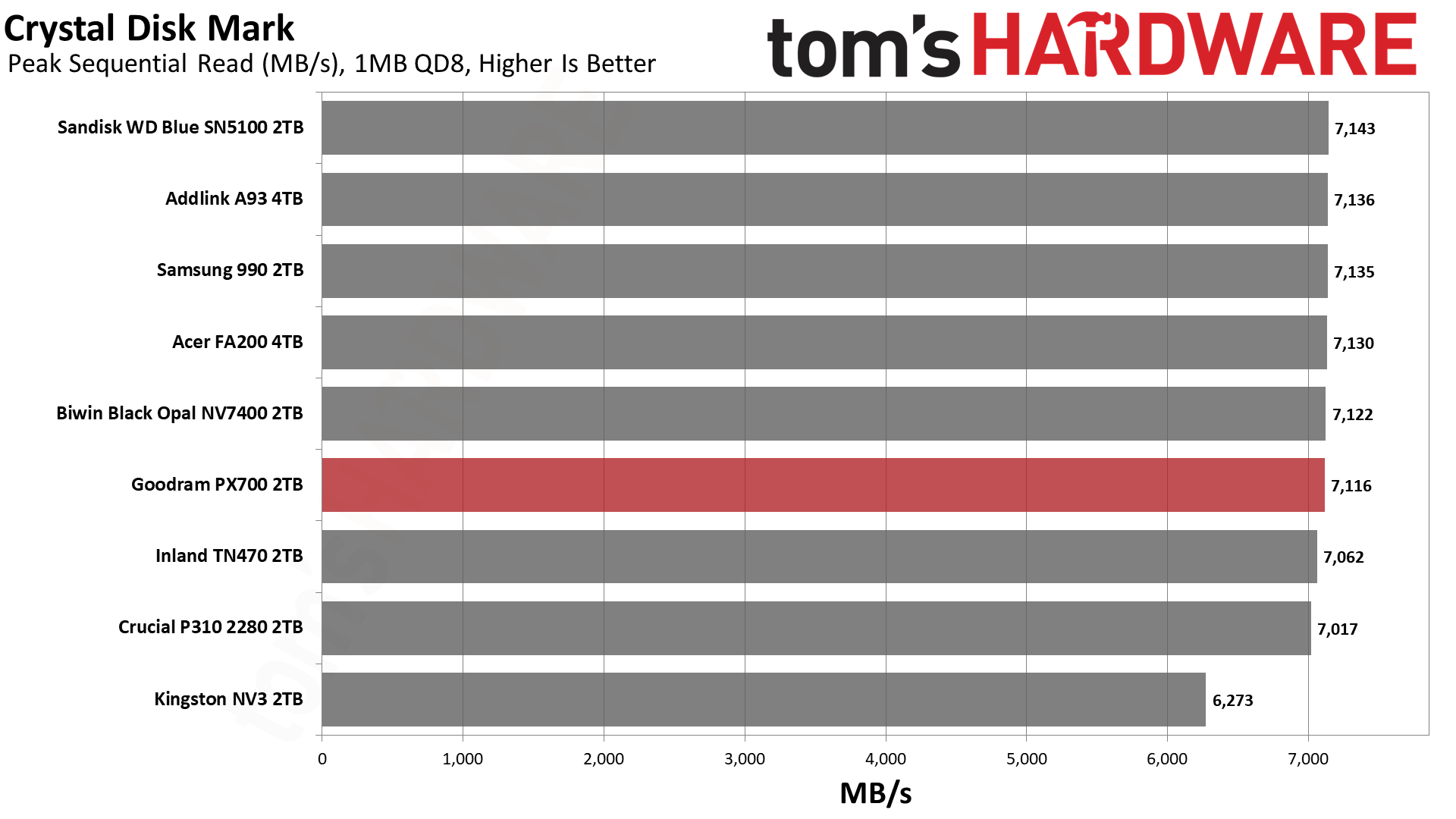
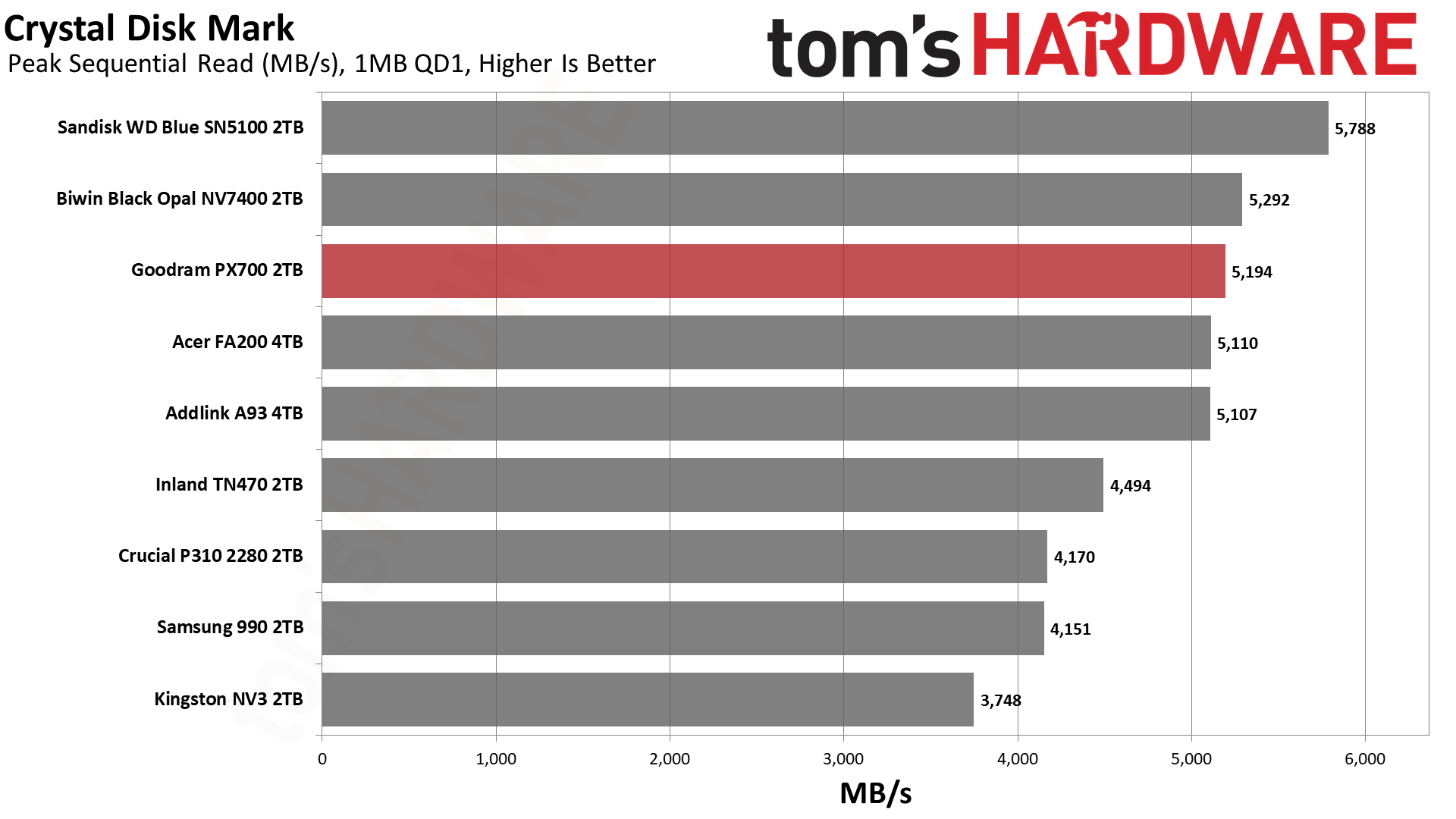
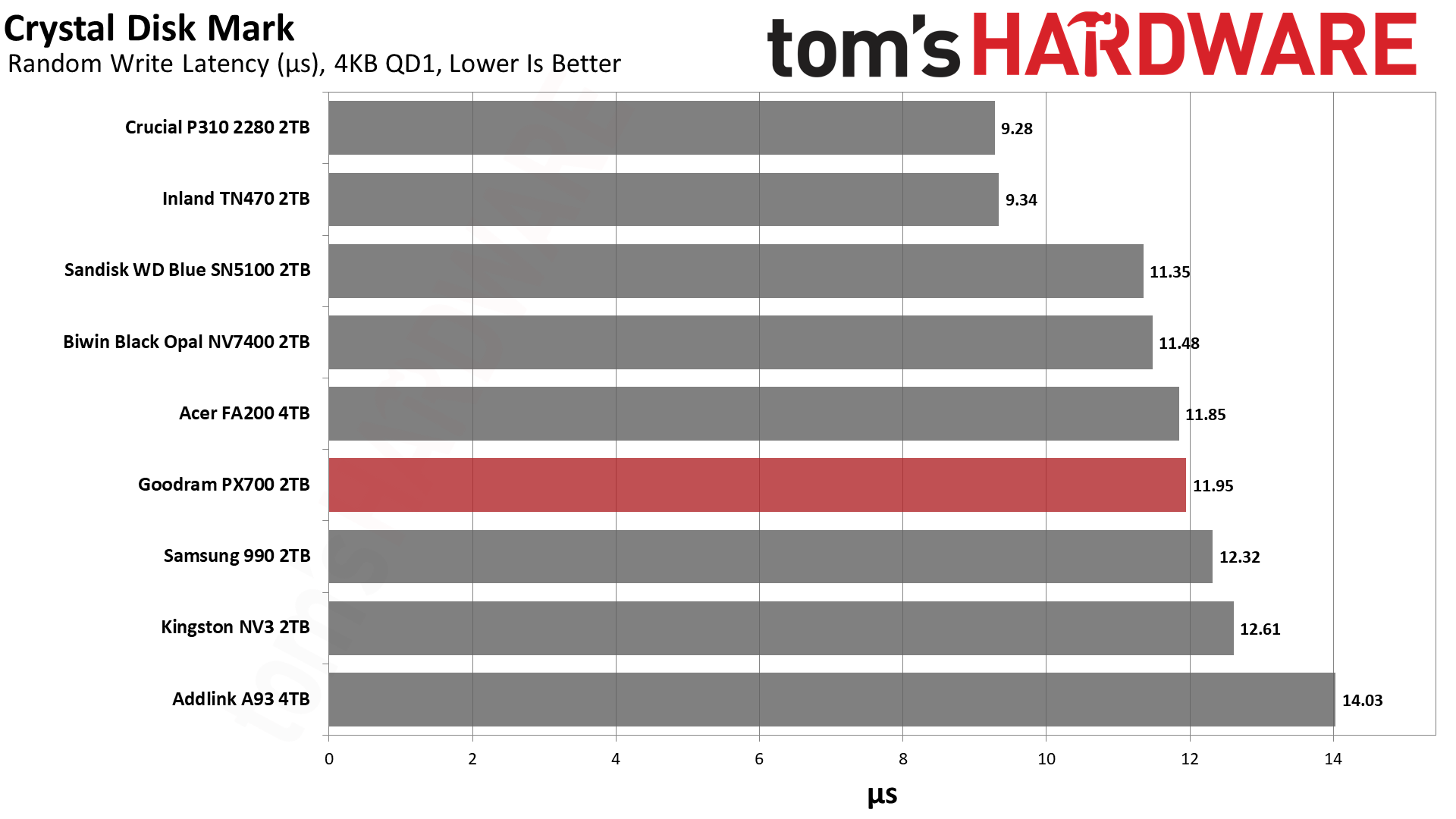
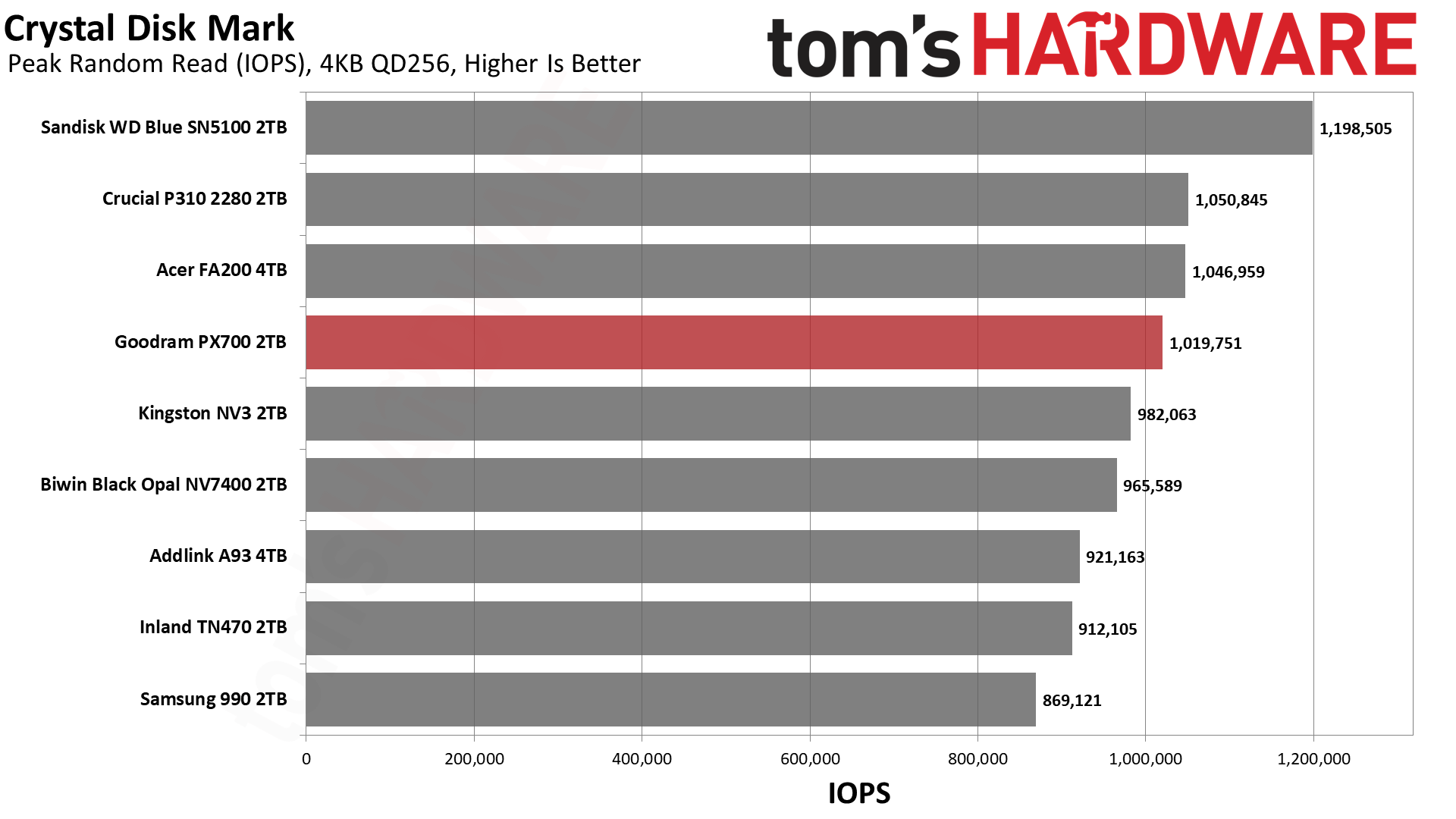
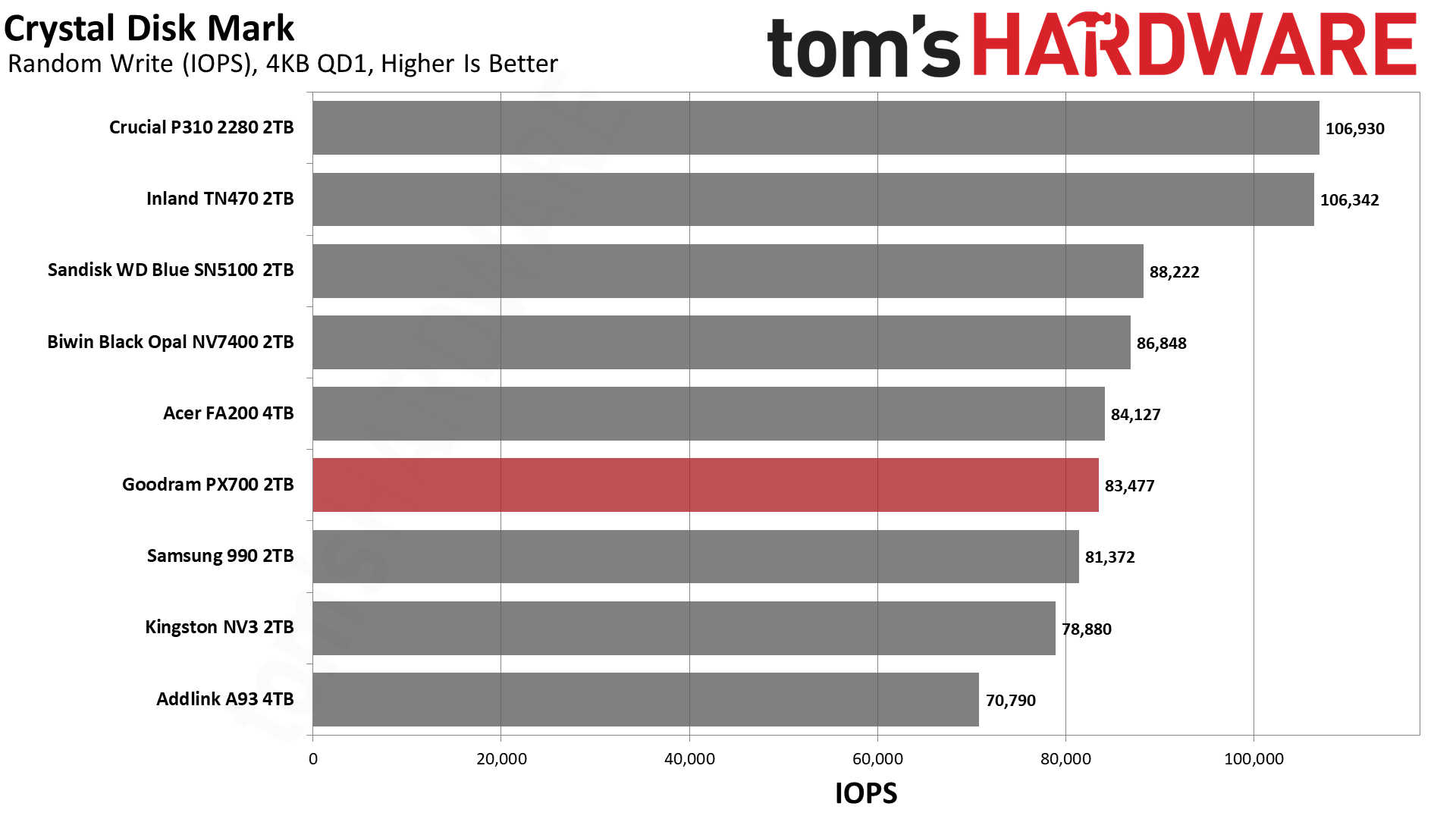
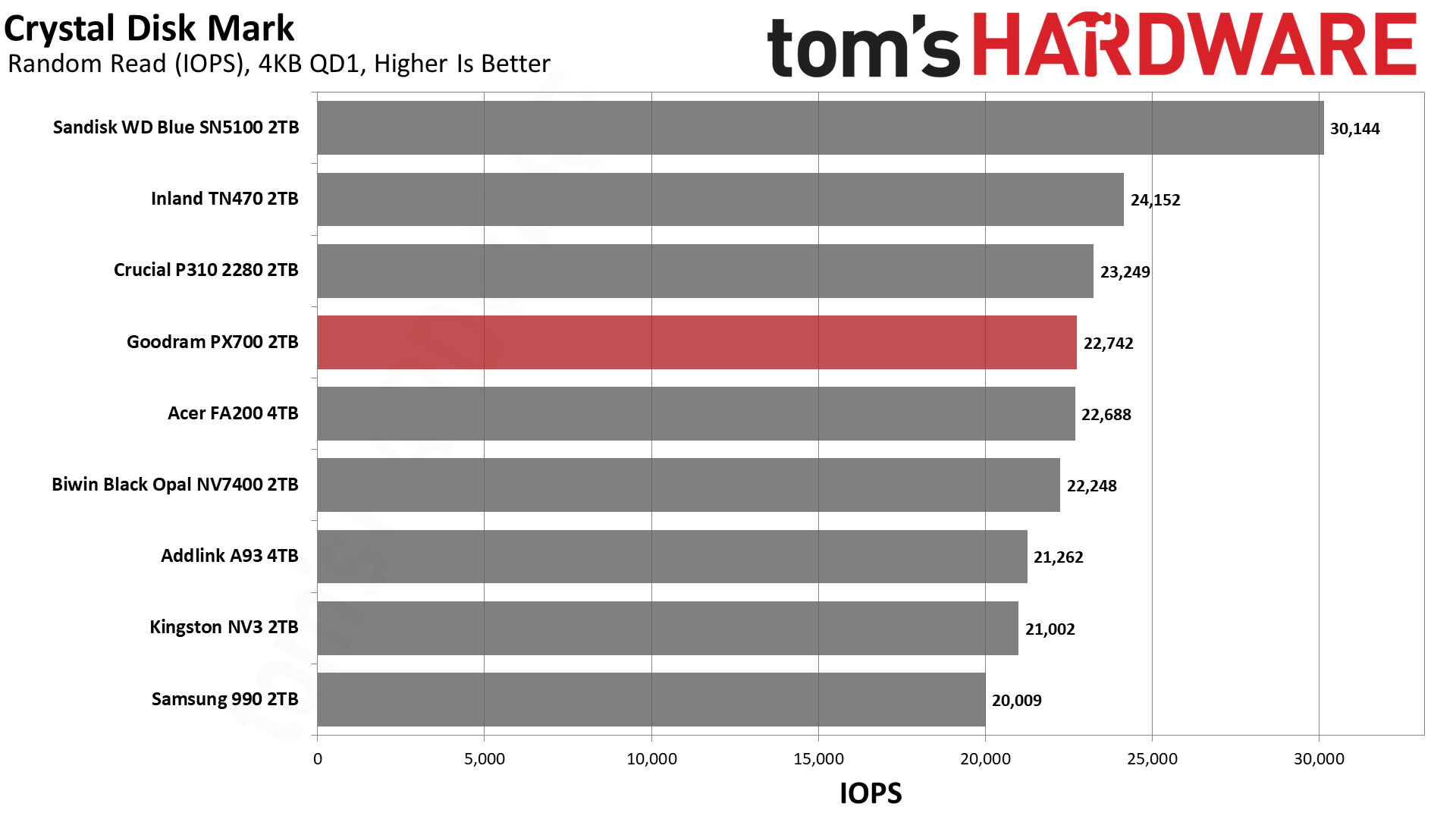
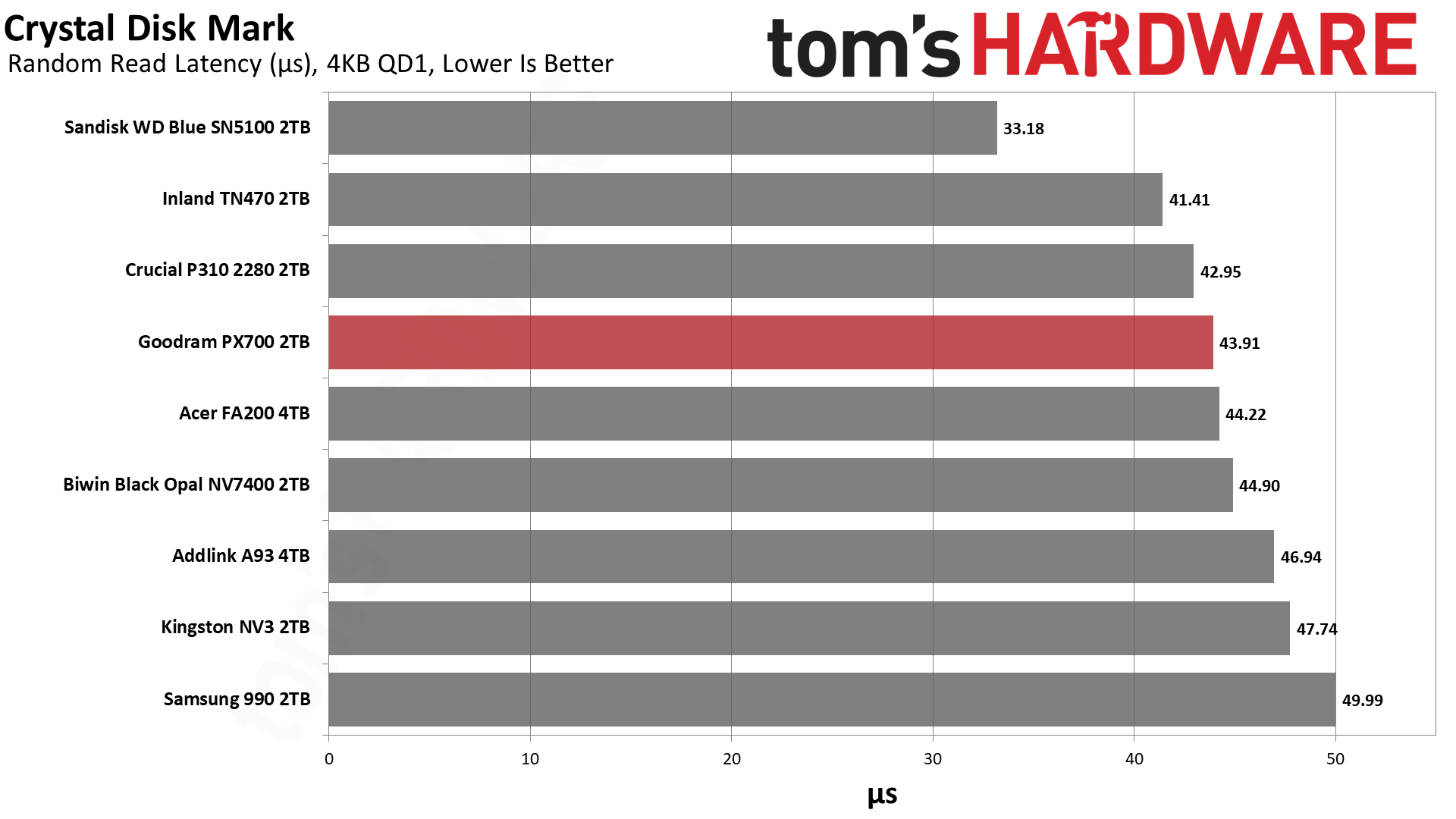
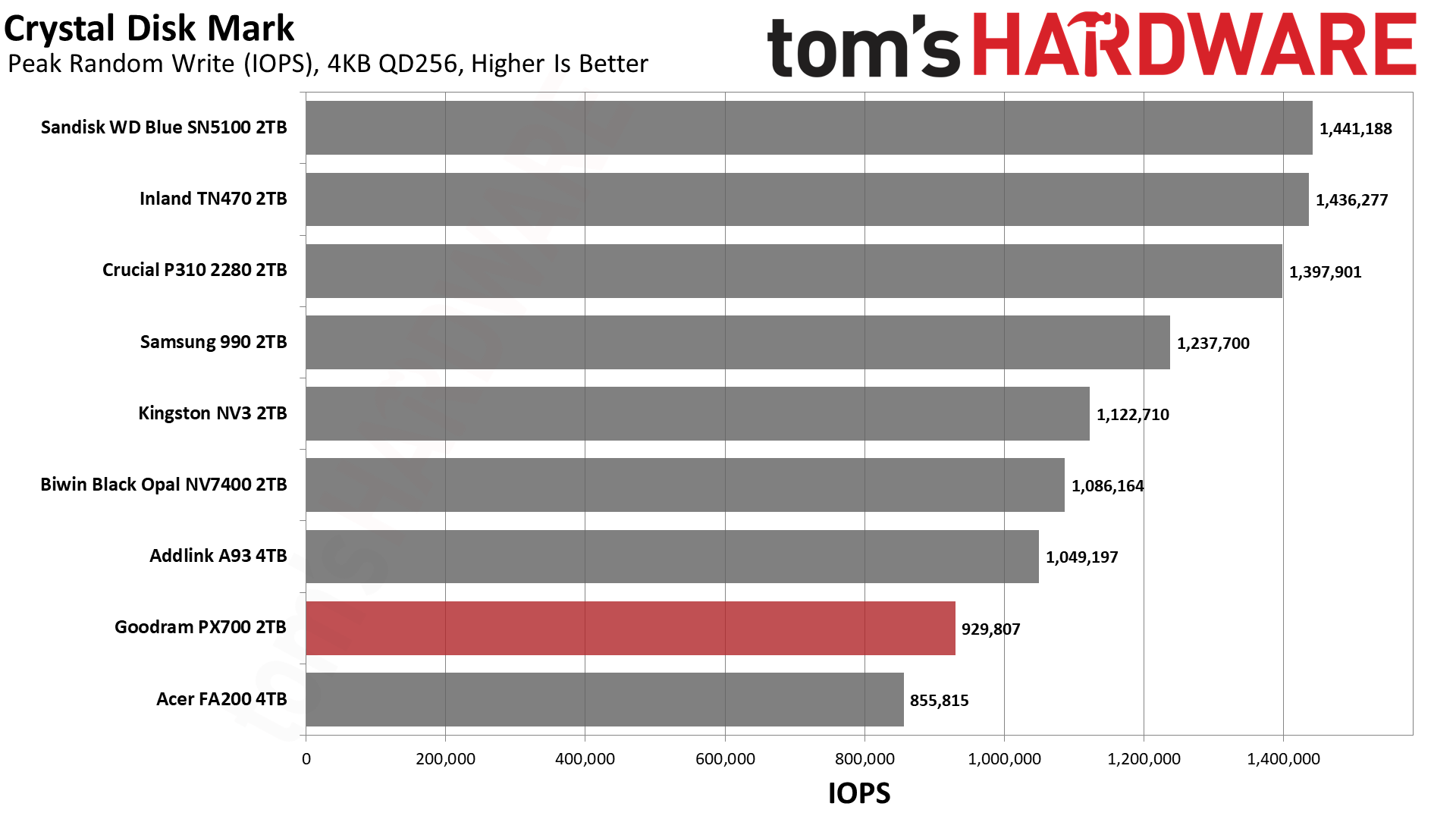
The PX700 has very steady performance in ATTO. We have no real complaints there. If we turn to sequential performance in CDM, we see more of the same. We would mostly look at QD1 reads for that, being a real-world metric, and it’s roughly on par with the NV7400 there. If we turn to random 4KB read performance at QD1, it’s a little bit further down the list but still hangs with excellent drives like the P310. Anything below about 45µs here is solid in our book. This drive should be quite responsive. If we were forced to be critical, we would point out that high QD 4KB write performance is low. Luckily, this is not a real-world workload for a drive of this type.
Sustained Write Performance and Cache Recovery
Official write specifications are only part of the performance picture. Most SSDs implement a write cache, which is a fast area of pseudo-SLC (single-bit) programmed flash that absorbs incoming data. Sustained write speeds can suffer tremendously once the workload spills outside of the cache and into the "native" TLC (three-bit) or QLC (four-bit) flash. Performance can suffer even more if the drive is forced to fold, the process of migrating data out of the cache in order to free up space for further incoming data.
We use Iometer to hammer the SSD with sequential writes for 15 minutes to measure both the size of the write cache and performance after the cache is saturated. We also monitor cache recovery via multiple idle rounds. This process shows the performance of the drive in various states, including the steady-state write performance.
Tom's HardwareTom's HardwareTom's Hardware
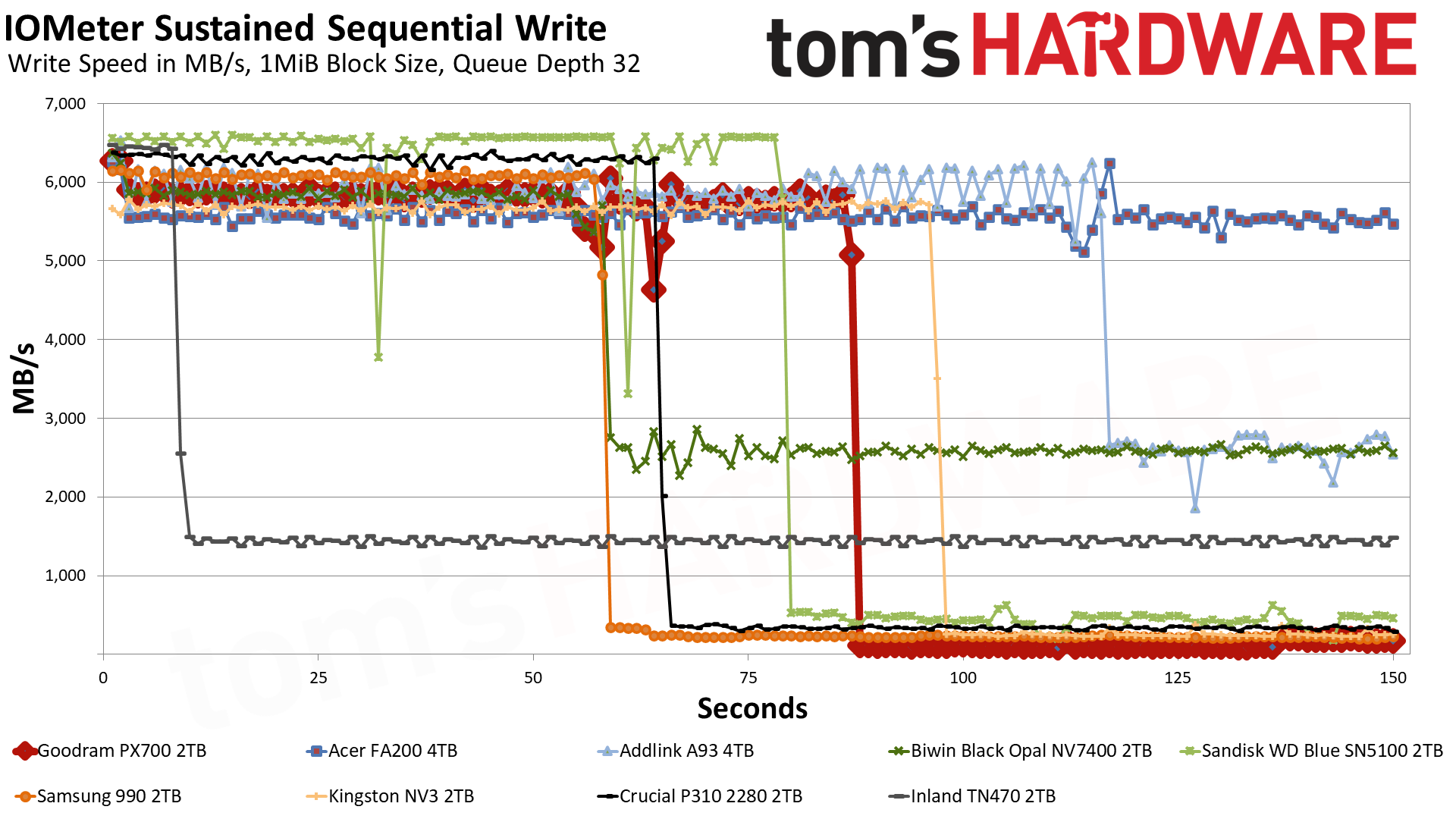
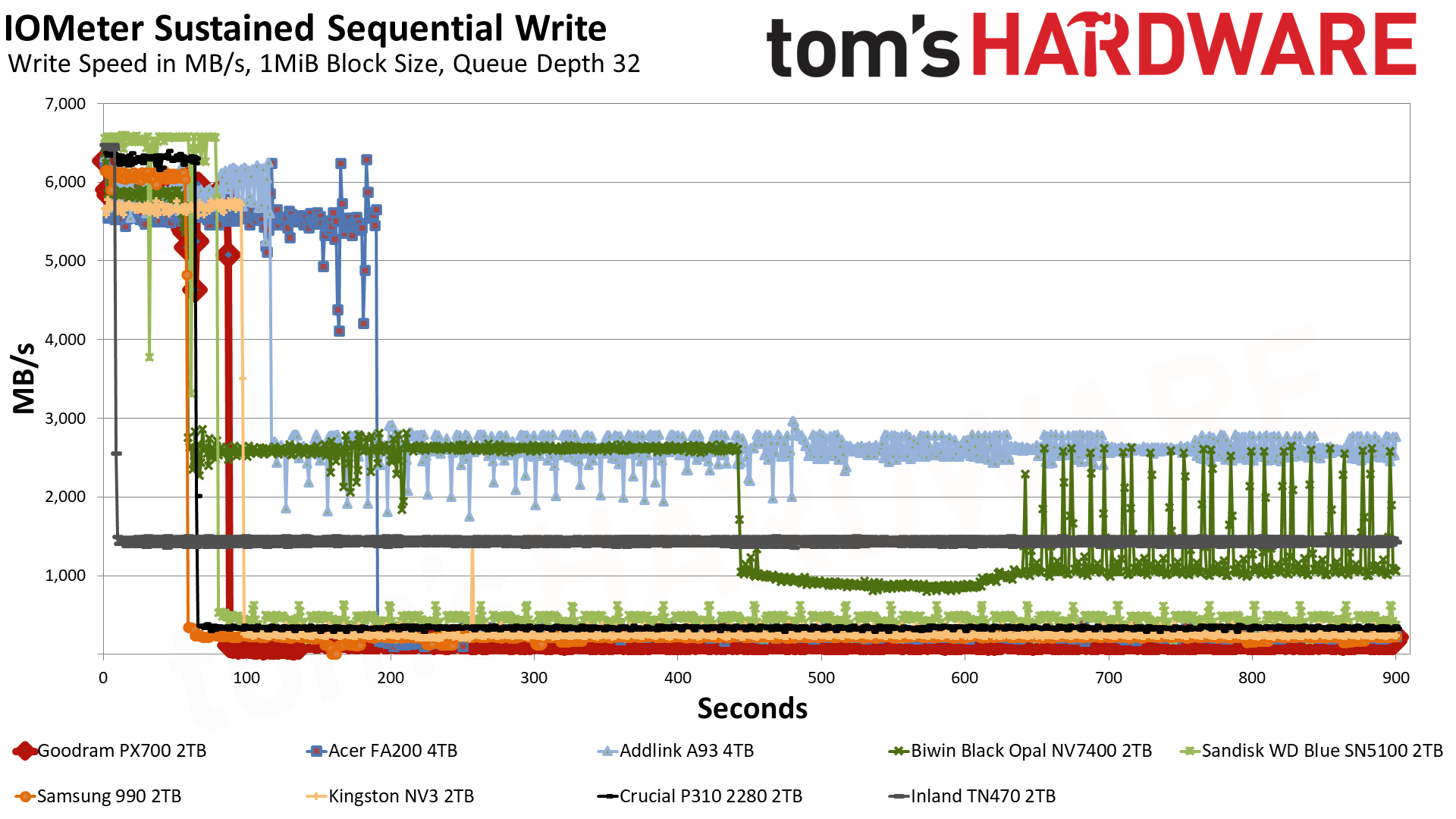
The PX700 starts off in the pSLC cache mode, writing at 5.8 GB/s for over 86 seconds. Speeds are slightly higher for the first two seconds, something we have seen before with this controller, but ultimately we’re looking at a 500GB cache. This is Exhibit A of why we would identify the flash as QLC. 4-bit QLC flash operating in a 1-bit pSLC mode is trading four times the capacity for performance, which means a 2TB drive will generally have a 500GB cache at most. A 3-bit TLC drive could have a larger cache, although there is nothing precluding it from having 500GB, even if this seems hard to be coincidental.
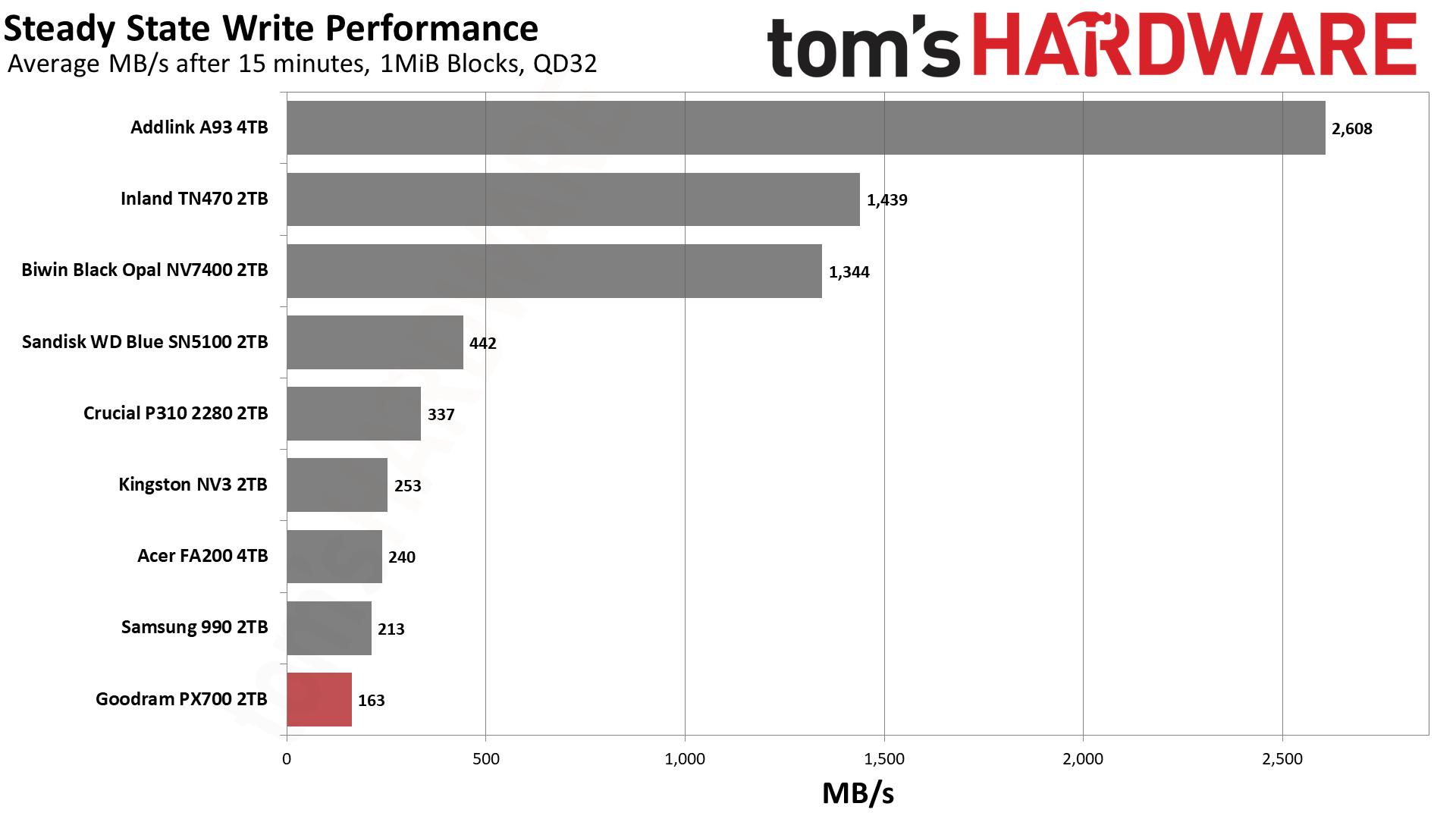
A TLC drive with a smaller-than-maximum-sized cache would probably be able to maintain some speed, though. The PX700 immediately falls into a folding mode – it’s waiting for data to be moved from pSLC to the native flash – with an average speed of 163 MB/s. TLC flash can at times be this slow, but it’s less likely, and especially less likely if it has space to spare. Even the FA200, with the same hardware, is faster. The FA200 does have twice the flash, of course, but the controller is essentially saturated. Rather, the FA200’s cache speed of 5.54 GB/s is slower than the PX700’s – and this could be from having more flash – which means the post-cache speed will be higher. This reinforces the position that the drive is using QLC. Of course, we could have thrown the 2TB HP FX700 into the mix to further prove this point, but we think comparing a 4TB drive is a more valuable approach.
It goes without saying that this is the first real failing of the PX700 in our review. However, it’s expected of a QLC SSD with a massive cache. We don’t consider it disqualifying. You are not buying a budget SSD to hammer it with writes. On the other hand, the 600TBW per TB warranty makes you assume you could do that to some extent. Also, the lower performance here could creep up in a fuller-drive experience. We also can’t exclude the fact that some PX700s come with TLC flash. Which means, taken as a whole, you should assume QLC will perform like the TLC competition 99% of the time.
Power Consumption and Temperature
We use the Quarch HD Programmable Power Module to gain a deeper understanding of power characteristics. Idle power consumption is an important aspect to consider, especially if you're looking for a laptop upgrade as even the best ultrabooks can have mediocre stock storage in terms of capacity and performance. Desktops are often more performance-oriented with less support for power-saving features so we show the worst-case for idle.
Some SSDs can consume watts of power at idle while better-suited ones sip just milliwatts. Average workload power consumption and max consumption are two other aspects of power consumption but performance-per-watt, or efficiency, is more important. A drive might consume more power during any given workload but accomplishing a task faster allows the drive to drop into an idle state more quickly, ultimately saving energy.
For temperature recording we currently poll the drive’s primary composite sensor during testing with a ~22°C ambient. Our testing is rigorous enough to heat the drive to a realistic ceiling temperature but real-world temperatures will vary due to the environment and workload factors.
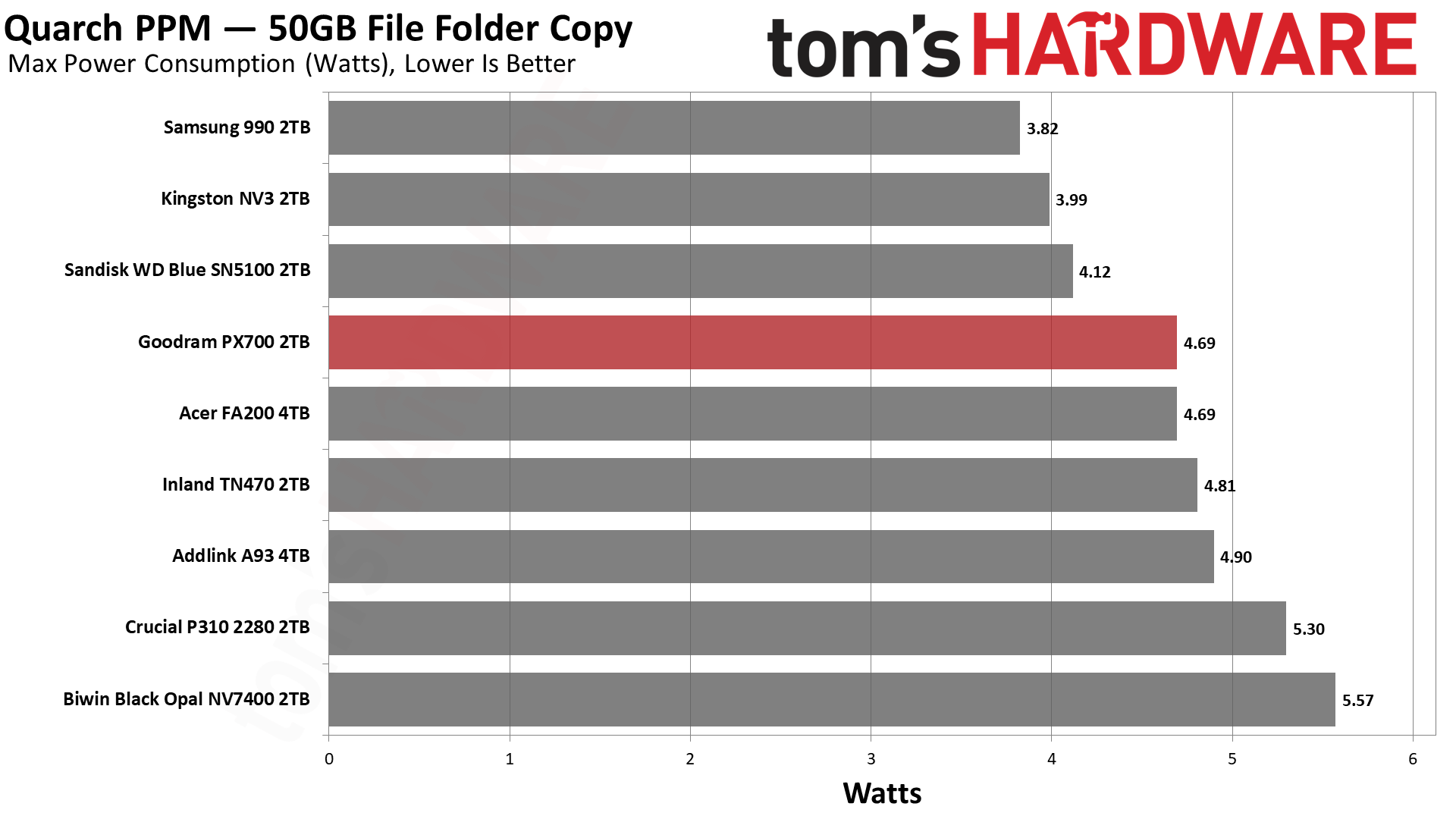
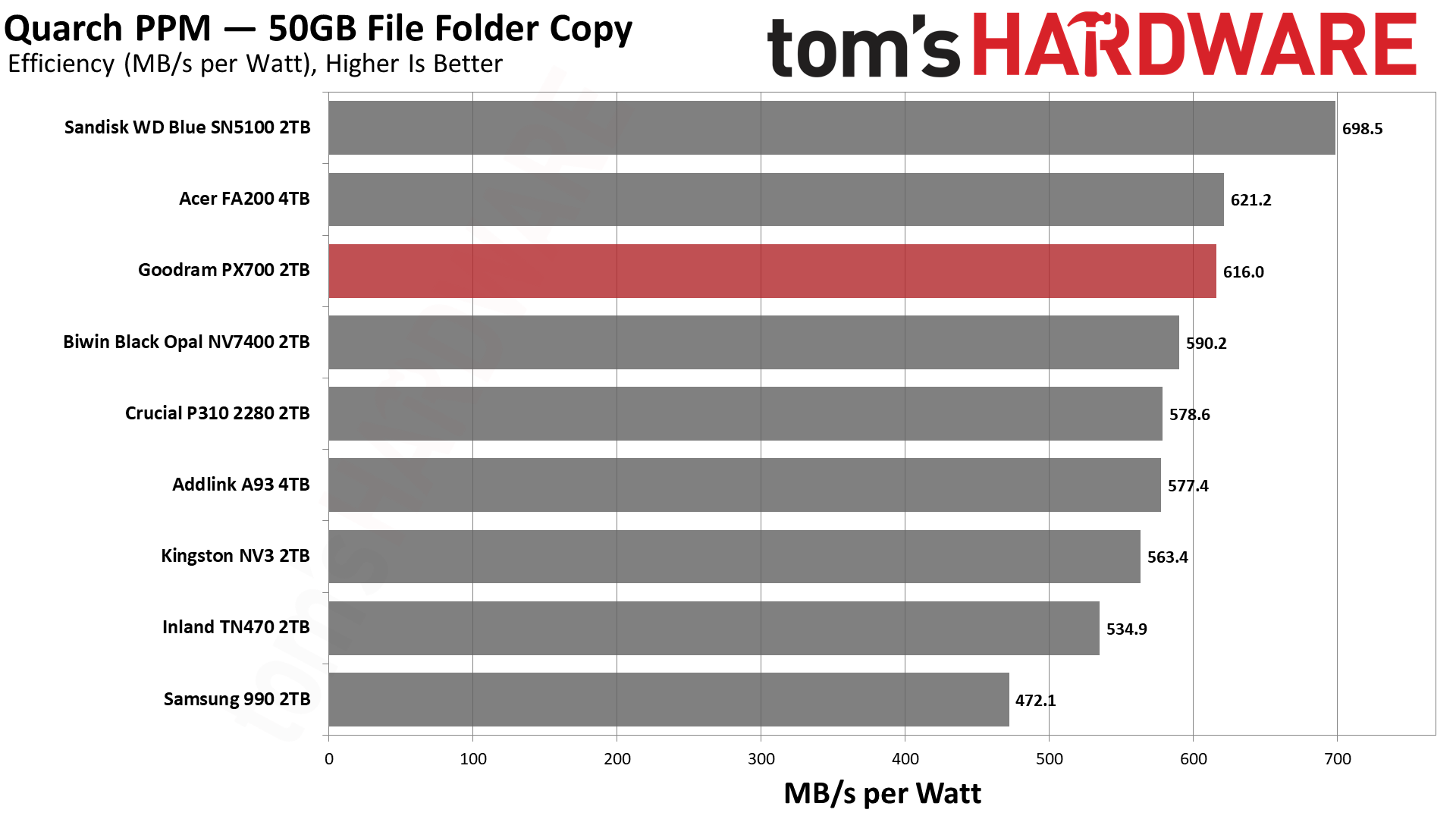
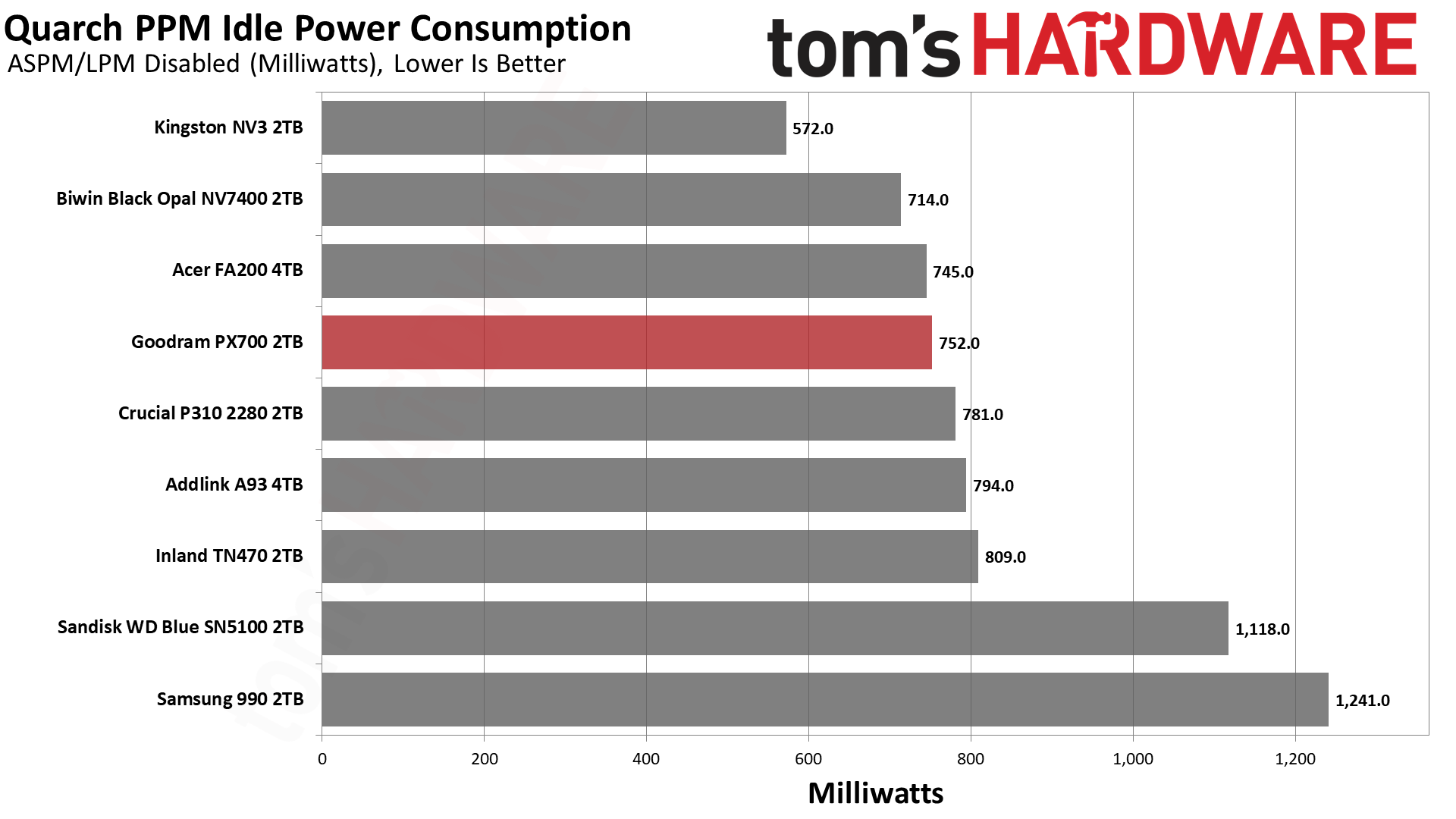
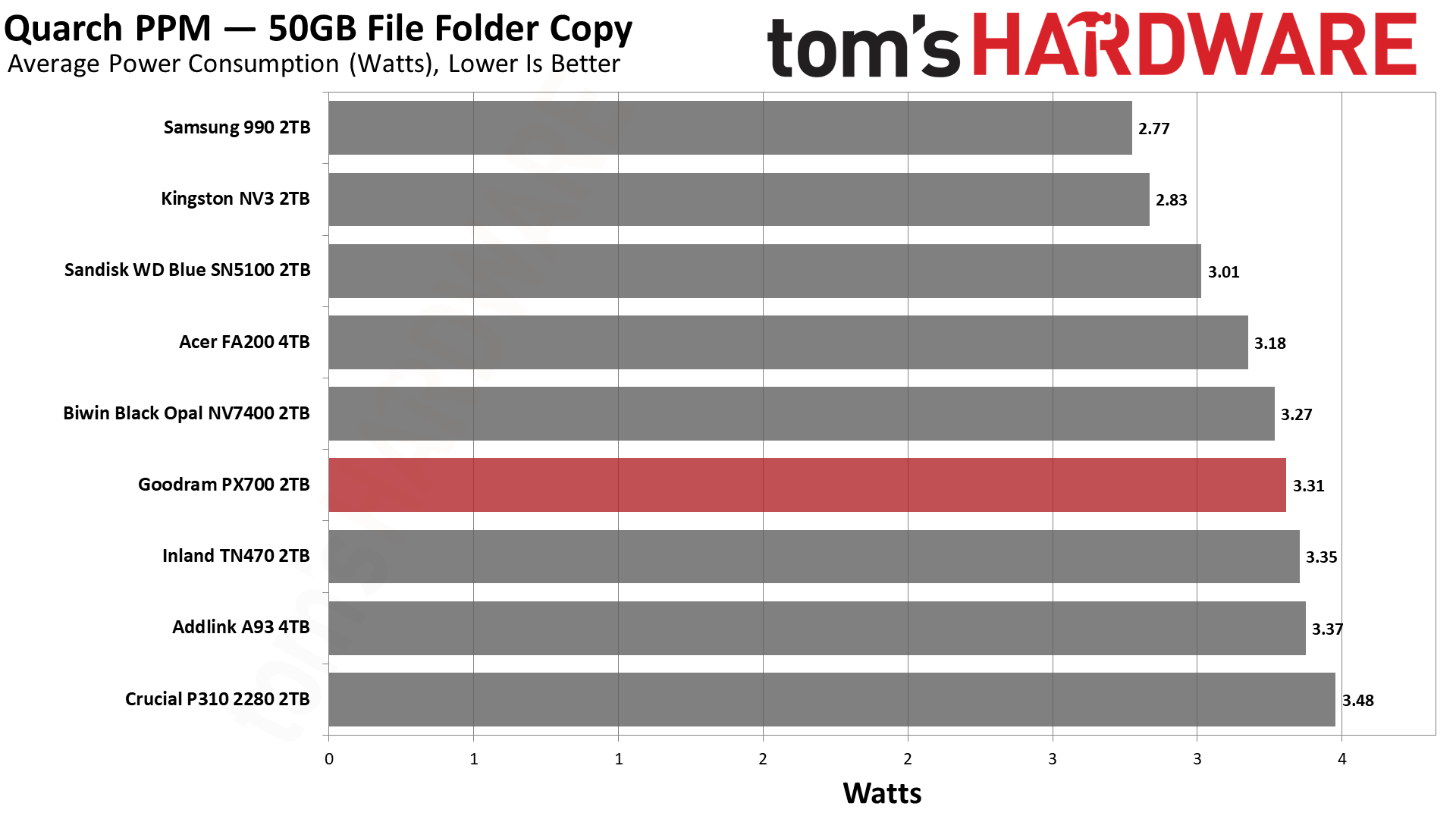
The PX700 comes back into our good graces with very good results in our power testing. It’s essentially tied for second with the FA200, which is hardly surprising given the hardware similarity. Only the BiCS8-based WD Blue SN5100 pulls away from the pack. We would consider every drive on this list to be sufficiently power-efficient for laptop use, although the 990 is closer to the lower end of that range. Certainly 550 MB/s per watt or higher is an excellent result and indicates a drive that can be run without a heatsink most comfortably. As for idle pull – we test under desktop conditions, which can also match poorly-optimized power settings – the PX700 is not unusually power-hungry and, in fact, better than the WD Blue SN5100. That’s a bonus.
Temperature-wise, we have good news. Goodram touts the graphene label on this drive, which, in our experience, does actually help with cooling, especially on a drive with four flash packages. The PX700 in our testing peaked at 61°C, nearly 30°C below the initial throttling point, well beyond the 20°C of headroom we like to see. The MAP1602 does tend to be a hotspot more than alternatives like the Phison E27T on the P310 and TN470, but a heat-spreading label does help. In our estimation, this is a cool-running drive that would be great anywhere.
We use an Alder Lake platform with most background applications such as indexing, Windows updates, and antivirus disabled in the OS to reduce run-to-run variability. Each SSD is prefilled to 50% capacity and tested as a secondary device. Unless noted, we use active cooling for all SSDs.
Goodram PX700 Bottom Line
The Goodram PX700 is a model budget PCIe 4.0 SSD. It matches or exceeds all of the expected performance points; it's power-efficient, and it uses a simple single-sided design without a heatsink. The only problem is that a “budget” drive has to be affordable. Current prices in the U.S. for this drive leave something to be desired. However, if it can match or beat the prices of other drives in this class, it’s probably one of the better choices available. In part, this is because we’d be liable to trust Goodram over non-names – the TBW alone shows it means business – and, on the other hand, the drive actually outperformed our expectations. Aside from the sustained write performance, this drive really feels premium. You don’t need a Samsung, WD, Sandisk, or even Crucial drive to feel like you have next-gen storage.
(Image credit: Tom's Hardware)
Let’s look at what we mean by that for your use. Game and app loading times are heavily reliant on random and sequential reads at low QD. The PX700 does well there. You also may be transferring files a lot, and the DiskBench results are mighty. For your laptop or HTPC, you might want something that’s power-efficient and, if space is a concern, something that stays cool without a heatsink, and this applies to PS5 use as well. The PX700 ran cool in our test with just the graphene label and was very efficient. You’re not getting a shorter warranty with lower TBW, as with Samsung’s 990 or some QLC-based drives, and we know where this drive is assembled. It’s hard to look at this combination and not feel like it’s a stellar drive if you can find it at a normal price.
Aside from price, our only complaint would be sustained write performance. It’s pretty dissapointing, although we should point out that it’s also expected. The drive also has trade-offs here. Namely, its standard pSLC write performance is better than the 4TB FA200, and in the 2TB HP FX700’s ballpark, so you’re not getting nothing for that later drop. The PX700, in fact, is faster folding than the FX700, too. In the grand scheme of things, this isn’t a big deal, as you should never hit that state – this drive should effectively be fast enough for a 1GbE network, if that’s a bottleneck – and having a bit faster peak performance does translate to better marks on some of our benchmarks. The drive could take a hit in some cases, such as when it's very full, in which case getting a drive with DRAM and guaranteed TLC flash could assuage your fears.
For most use cases, though, the PX700 is more than good enough and, in fact, punches above its weight in our opinion. It would be a good option for just about any type of machine. PS5, laptop, HTPC, desktop, you name it. Primary or secondary drive, just fine. You don’t even need a heatsink. The capacity range is solid – you’re not going to find 8TB on a drive like this – and you can bring your own software. Performance is good enough to overlook any QLC flash use, so our main problem remains the price. Get it down to the same ballpark as the other drives in our list, and you have a contender. We hesitate to put an exact dollar amount for that because SSD prices are volatile, to say the least, so compare it to comparable drives such as the ones we matched it against today.
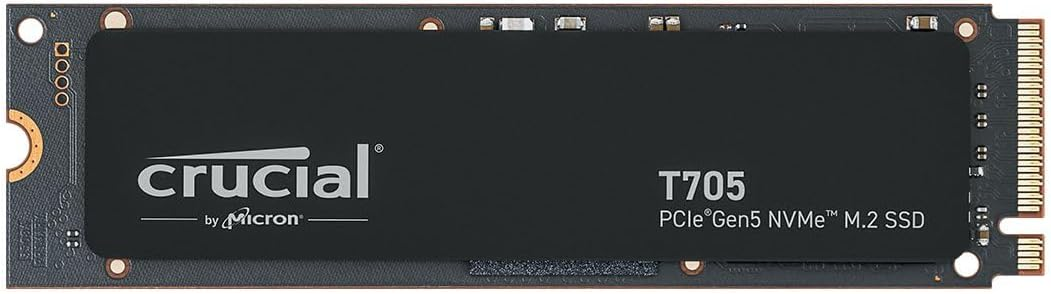
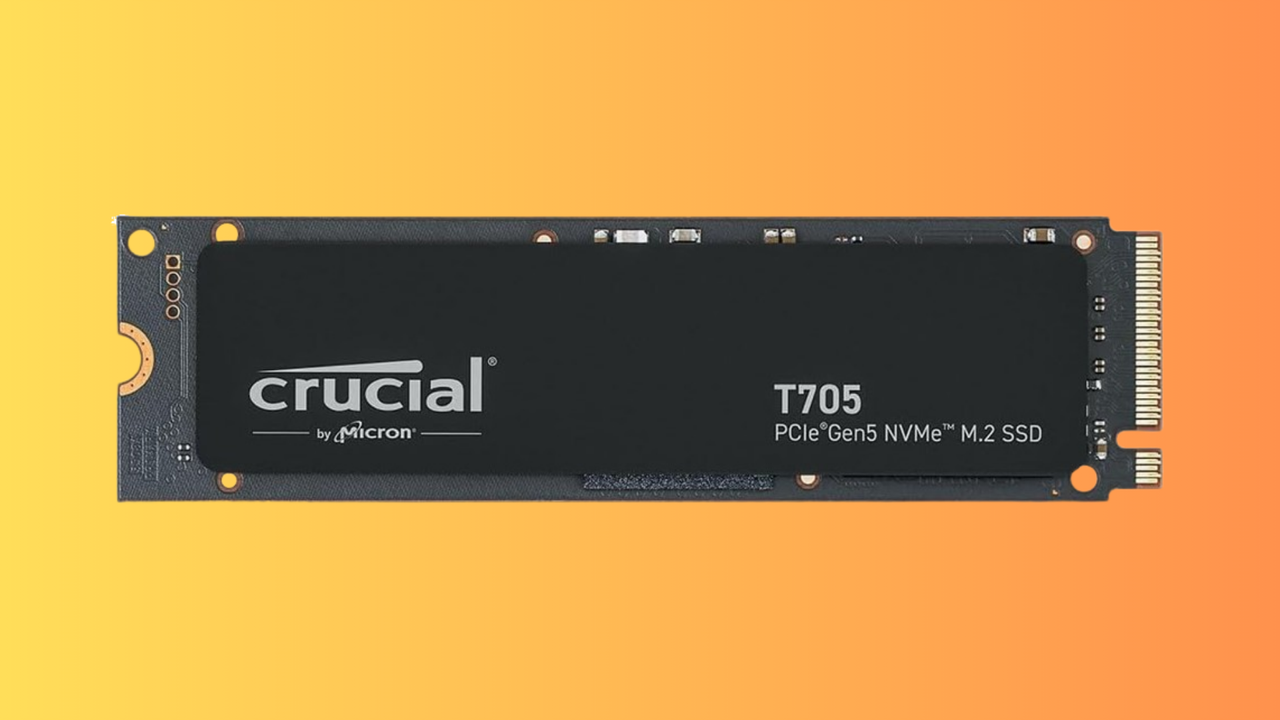
We've seen huge price rises this year for PC hardware, but RAM and SSDs have been especially affected. The global DRAM shortage, mostly caused by AI data center demands hoovering up all of the available stock, has caused prices to skyrocket. That's why this 4TB Crucial T705 SSD, down to $502.51, is a good deal in the current market, especially given its high capacity.
Looking at Camelcamelcamel's price data, we can see that this drive was hitting almost $700 just a few weeks ago. Several price drops since have meant that the 4TB Crucial T705 is now almost below $500 for the first time in February. Along with a decent price drop, this Crucial drive is now the cheapest Gen 5 SSD you can pick up, with the next-cheapest model, the Samsung 990 Evo Plus, $60 more expensive at the moment.
It's not even a fair comparison, too, as the entry-level 990 Evo Plus only supports PCIe 5.0 over two lanes, not four, meaning you're only getting Gen 4-equivalent speeds. The Crucial T705 is a high-performance drive that's much faster, and right now, much cheaper.
This Crucial T705 4TB SSD is the cheapest Gen 5 SSD on the market right now. It offers read and write speeds of up to 14,500 MB/s and 12,700 MB/s apiece.View Deal
SSDs that offer Gen 5 speeds are a real step up over their slower Gen 4 counterparts. The T705 will offer you sequential read and write speeds of 14,500 MB/s and 12,700 MB/s, which is significantly faster than the fastest Gen 4 SSD on the market, the Samsung 990 Pro, which taps out at 7,450 MB/s. The T705 ships with 232-Layer Micro TLC memory modules and uses the Phison E26 controller.
It's also one of the fastest you can buy, period, rivalling the WD_Black SN8100, which hits speeds of 15,000 MB/s. That drive will set you back $659.99 right now, too, a significant increase compared to the deal on offer here. The Crucial T705 drive scored an Editor's Choice award for its sustained read/write performance at high speed, along with 4.5 stars in our review.
While we wished that SSD prices were back down to what we saw 18 months ago, it's good to see that high-performance drives like this one can still drop in price. The $502.51 sale price for this Crucial T705 4TB SSD is a seriously good one in the current market, and you won't be able to beat it for speed or price. Grab it at this price while you can.
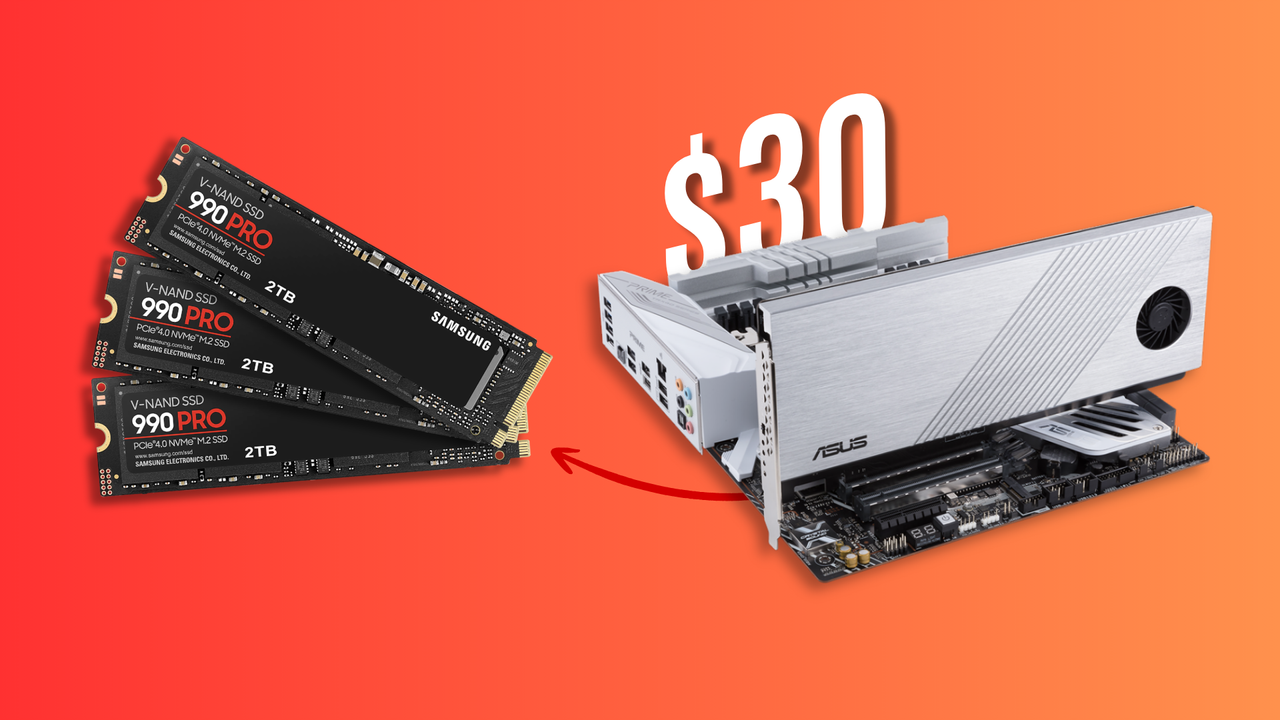
Storage has gotten exponentially more expensive in the past year thanks to the ongoing component crisis. During times like these, scoring a deal feels extra special, especially when it's as bountiful as what @whateversunnyfinds (Sunny) stumbled upon in a local flea market. He hunted down a seemingly menial PCIe expansion card from Asus for $30, only to open it and find three Samsung 980 Pro 2TB SSDs already slotted inside.
Each of those drives is worth at least $400 today, if not more. We found the 980 Pro 2TB listed for $444 on Amazon and $499 on Newegg, which makes three of them worth between $1,300 and $1,500 together. The expansion card holding them is an Asus Hyper M.2 x16 Gen 4 that retails for $79, so even if there were no SSDs inside, this would be a solid find. The card looks worn down but not quite beat up, while the drives honestly appear mint.
An expansion card like this allows you to install extra M.2 drives in your system by using an x16 slot usually meant for GPUs. Just three of the four slots on the card were populated, so there's a chance someone took out one SSD and threw this thing in the trash. If the original owner only ever installed three, they could've forgotten to check since the heatsink covers the drives underneath.
As for the thrifter, Sunny is from Kuwait City, and he frequents the largest flea market in the region called "Souq-al-Juma" — Arabic for "Friday Market." These open-air buildouts are common in Asian and Middle Eastern countries, but not all of them carry electronics. You usually have to visit the biggest venue on a designated day, since multiple flea markets are often propped up on the same day, to get the best, most relevant deals possible.
If you're lucky enough to score something similar, the NANDpocalypse might just feel a little less crushing. We don't know the exact internal condition or health of these 980 Pros, but 6TB for $30 is such an incredible find that you wouldn't even mind if they were roughed up. It's also the exact same capacity as another person found last year while dumpster diving, so technically they got a better deal, but those were 850 Pro SATA SSDs.
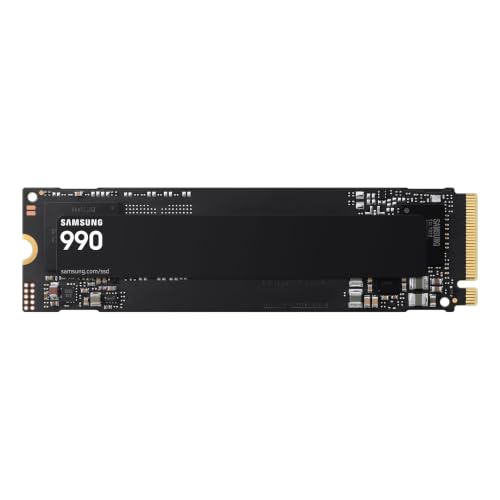
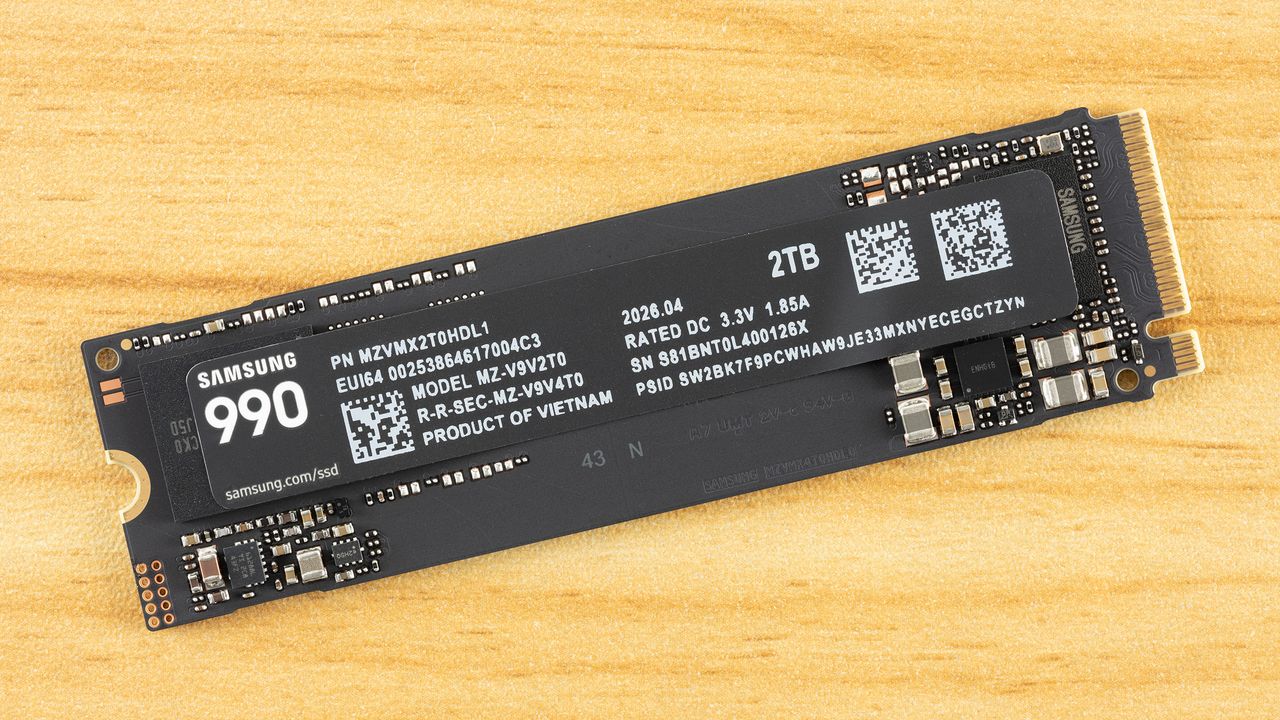
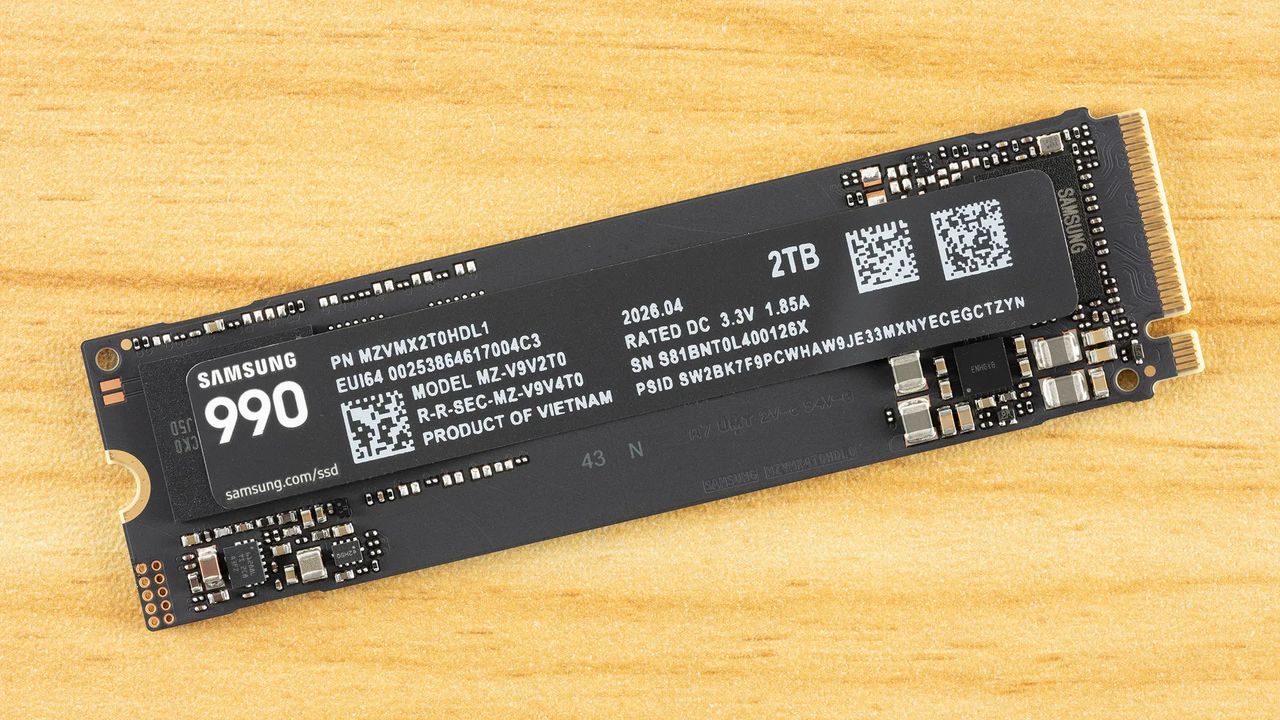
When it comes to high-speed storage, SSD prices have been at an all-time high due to the ongoing turbulence in the memory market. However, if you are looking for a speedy drive with plenty of capacity, Samsung’s freshly launched 990 PCIe Gen 4 SSD with 2TB capacity is already selling at a discount. You can grab the drive at $339.99 at Amazon, down from its usual price of $529.99.
The Samsung 990 series was launched earlier this year, right in the midst of the RAMpocalypse. The SSD is essentially a QLC-based version of the 990 EVO Plus. QLC SSDs can be a good choice for gaming, as it mostly involves reading data rather than writing it. QLC drives are slower than TLC, but frequently used data can stay in the faster pSLC cache if the drive has enough free space. The Samsung 990 also features the company’s PiccoloQ controller with V9 QLC Flash memory and is capable of full PCIe Gen 4 throughput.
In our testing, we found the drive to offer similar results to Samsung’s 990 Evo Plus and the 990 Evo in latency testing, while beating the 990 Evo drive in bandwidth and 3DMark overall score. It also managed to stay competitive with the Crucial P310, which is one of the best QLC-based drives on the market. The Samsung 990 is also a solid option for consoles, delivering bandwidth that puts it ahead of the 990 Evo and on par with or better than most budget PCIe 4.0 drives.
SamsungSamsungSamsung
The Samsung 990 at $339.99 is a compelling option for those who are looking for plenty of fast storage without paying more during the current SSD price surge. The 1TB model is also selling at a discount if you do not require this much storage. Do keep in mind that this sale price is available for a very limited time. If you need a high-capacity PCIe 4.0 SSD, it may be worth grabbing before the discount disappears.
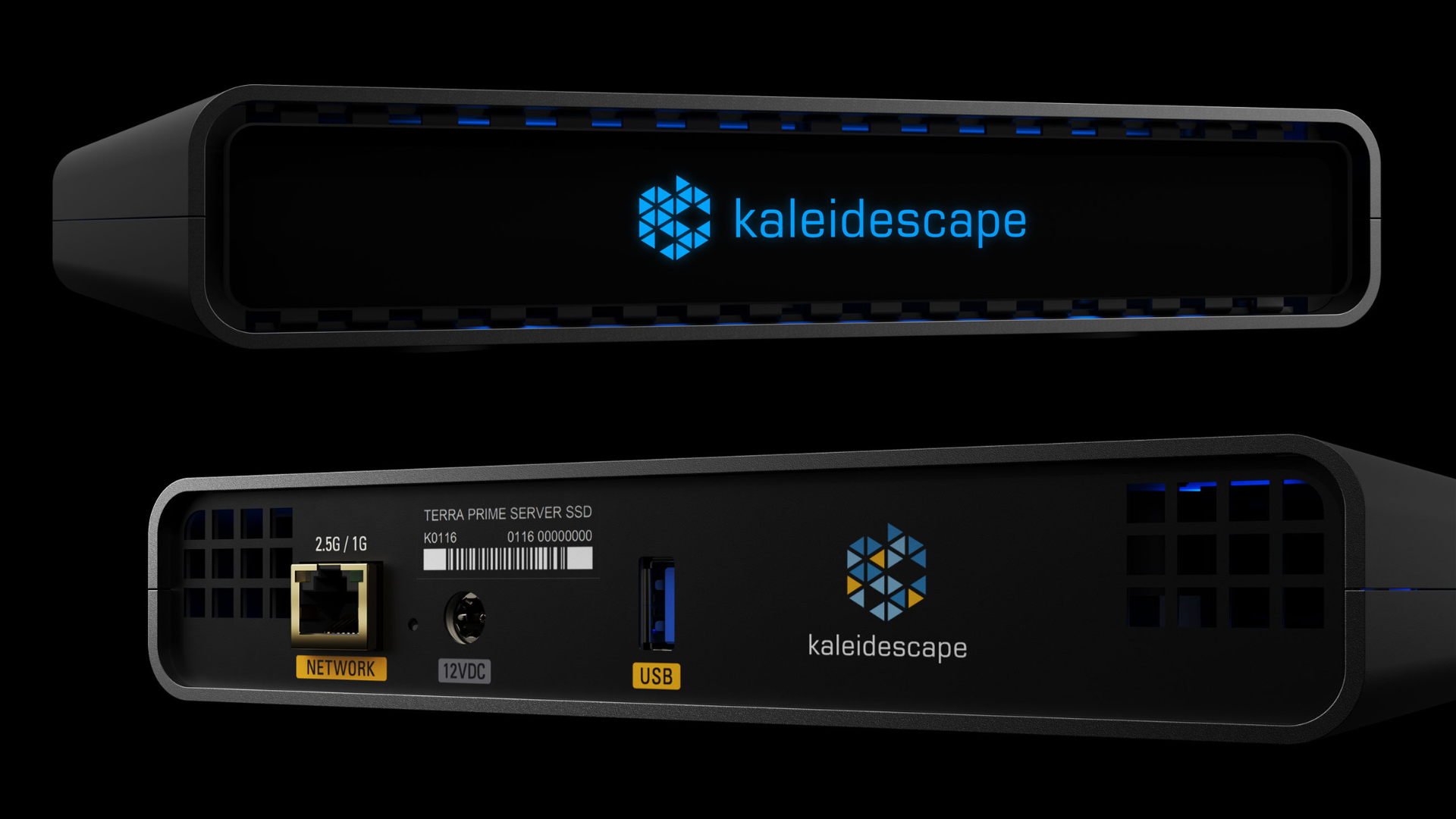
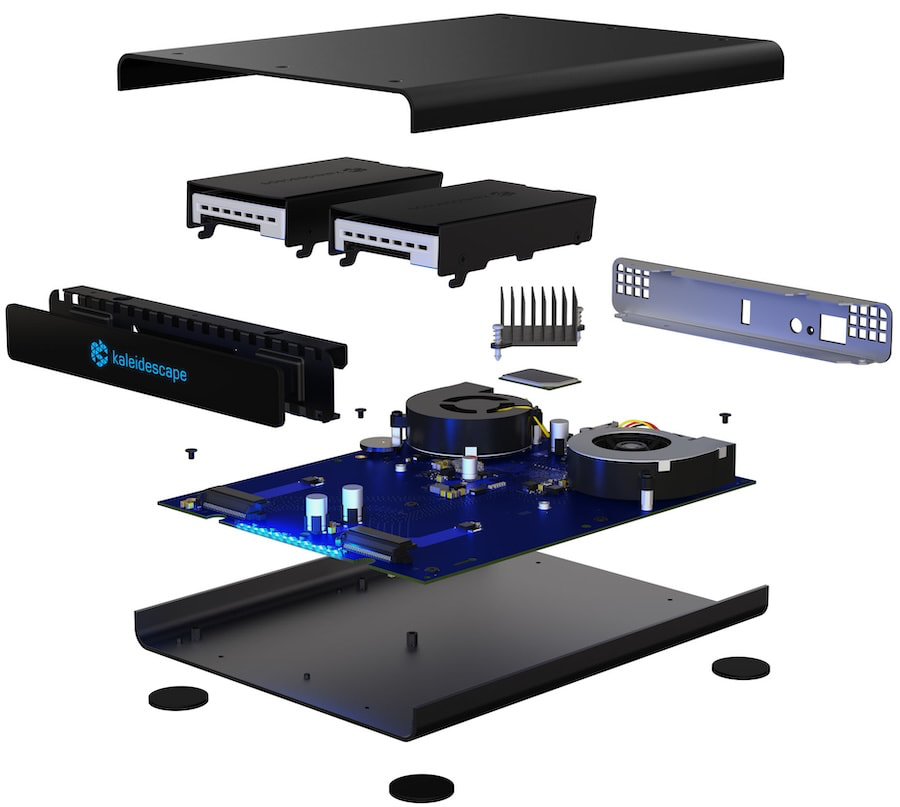
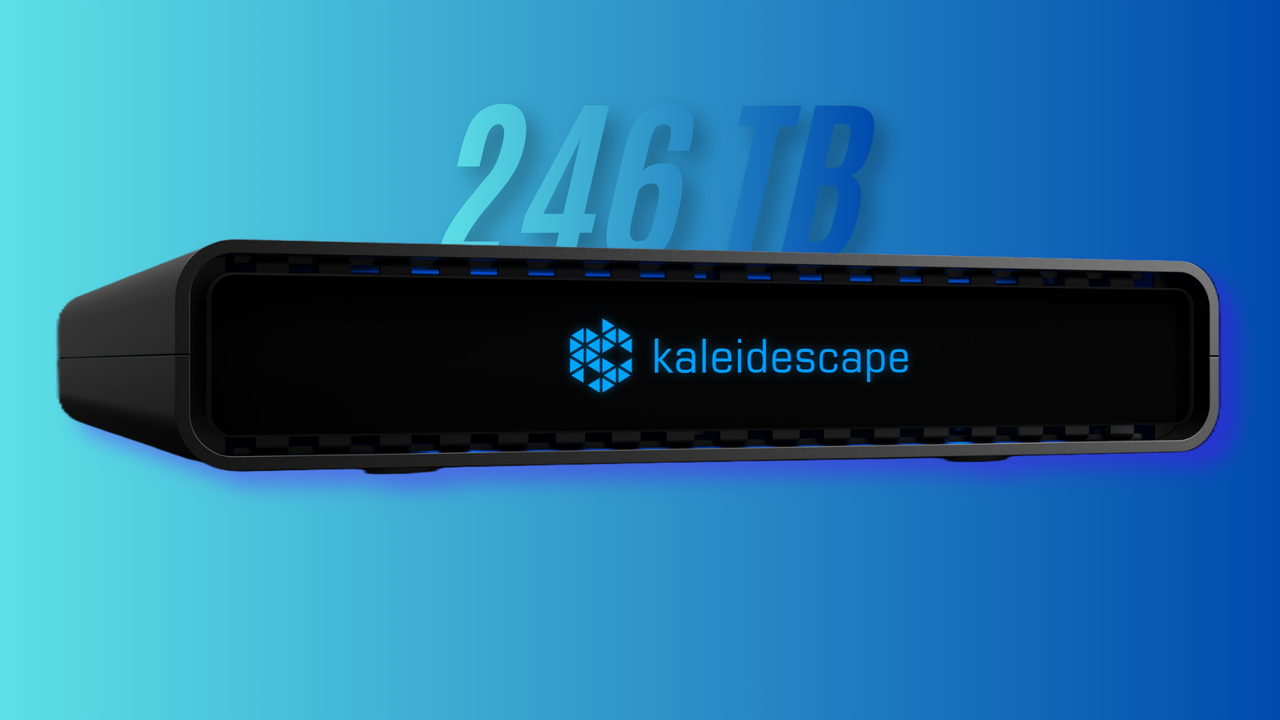
Kaleidescape, a maker of luxury home theater equipment, has revealed its latest media server, the "Compact Terra Prime 246TB SSD." As the descriptive name suggests, it's a compact movie server with 246TB of storage for opulent home theater setups. We didn't get a price, but it's likely to be $150,000+ given what the company's other servers cost. It can be combined with Kaleidescape's $4,000 Strato V media player to form the highest-end movie-watching experience possible outside of actual theaters.
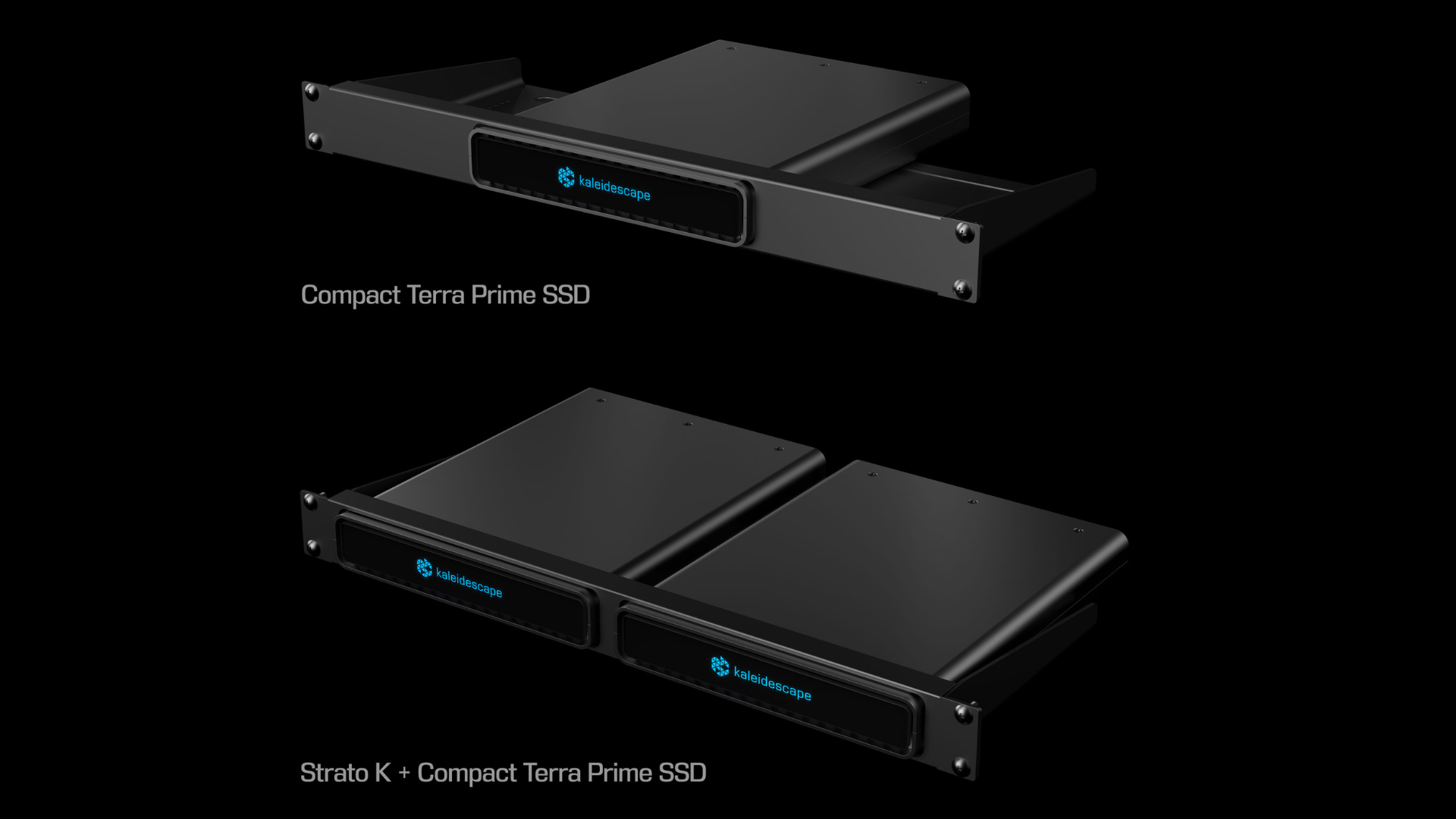
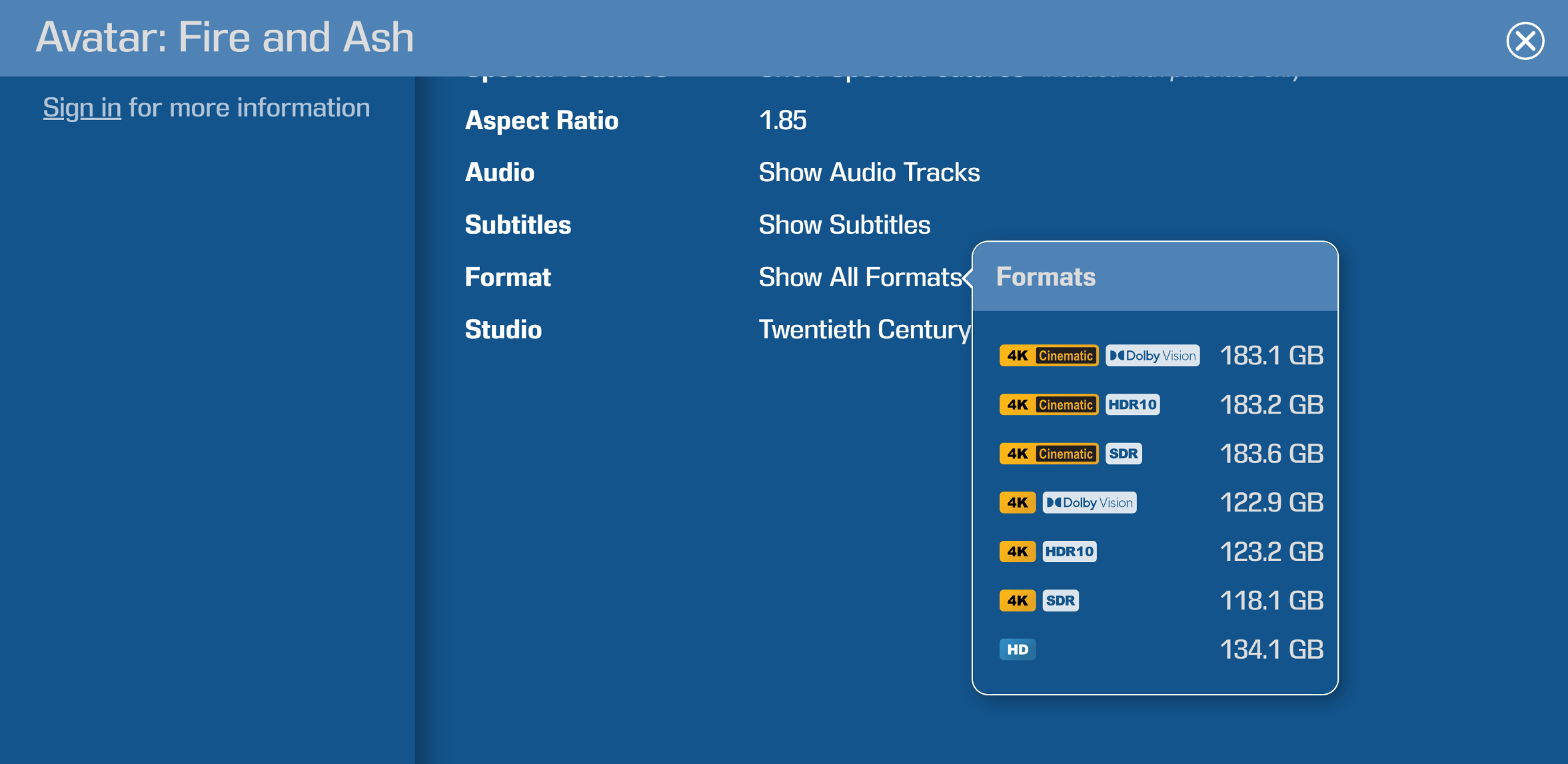
The Compact Terra Prime uses the same chassis as the aforementioned Strato V player and holds 2x enterprise-grade 123TB SSDs inside. We didn't get confirmation on what kind of SSDs these are, but we can infer from the specs that it's a pair of Solidigm D5-P5336 drives. It's the only SKU that makes sense; each of those is a PCIe 4.0 ultra-high-density NVMe SSD using 3D QLC NAND, likely in the U.2 form factor. Anyhow, the combined 246TB capacity can hold up to 4,000 standard 4K movies, or 2,300 "4K Cinematic" / 8K movies, or 6,800 HD movies.
To understand what 4K Cinematic means, you have to know that Kaleidescape is not just a manufacturer. The company also runs an online movie store that directly licenses master copies of films from major studios. The platform hosts extremely high bitrate content for purchase that exceeds most 4K Blu-rays. As such, the 4K Cinematic tier promises 110 Mbps video with 4:4:4 chroma subsampling, with no compression. You also get support for HDR formats such as Dolby Vision and lossless audio formats like Dolby Atmos.
KaleidescapeKaleidescapeFuture
Watching these movies requires a proprietary Kaleidescape media player. The server isn't necessary, since the company's latest Strato V comes with 960 GB of onboard storage to hold up to eight 4K Cinematic movies at a time. When you combine a player, a server, and a movie store, you get the absolute pinnacle of home video: Blu-ray's high fidelity and online streaming's convenience in one place. The Compact Terra Prime 246TB simply represents one enormous piece of the puzzle.
The server weighs just 4 pounds, or less than 2 kilograms, and measures out to 7.87 x 1.52 x 10 inches. It has two fans that cool the NAND at a maximum noise level of 20 dB. The back of the device has a 2.5 Gbps Ethernet port that Kaleidescape promises can download a 4K movie in just 4 minutes if you saturate its throughput. This matters because you cannot stream movies from the company's online store; they must be downloaded locally first as part of the uncompromising experience.
(Image credit: Kaleidescape)
Once available, though, the server supports up to 25 instances of 4K playback simultaneously. That's more than even most full-fledged movie theaters ever do. The Compact Terra Prime 246TB is also constructed entirely out of aluminum. You'd expect that kind of build quality given what it costs. Kaleidescape didn't reveal an MSRP, but its 120TB SSD server currently costs $34,995. Doing simple math, the 246TB version should cost double, if not more. It's available now, but you can only purchase it through select Kaleidescape partners on a made-to-order basis.
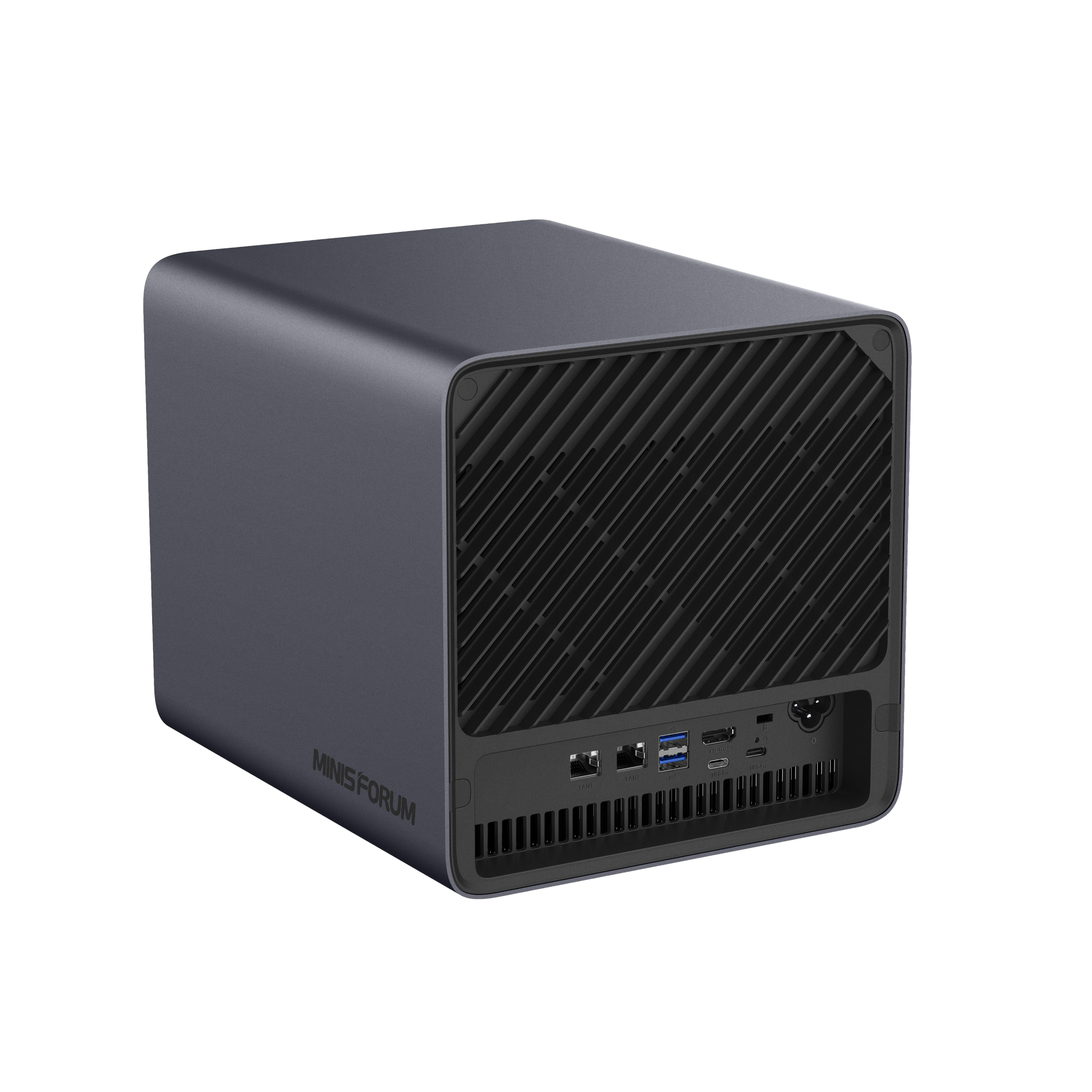
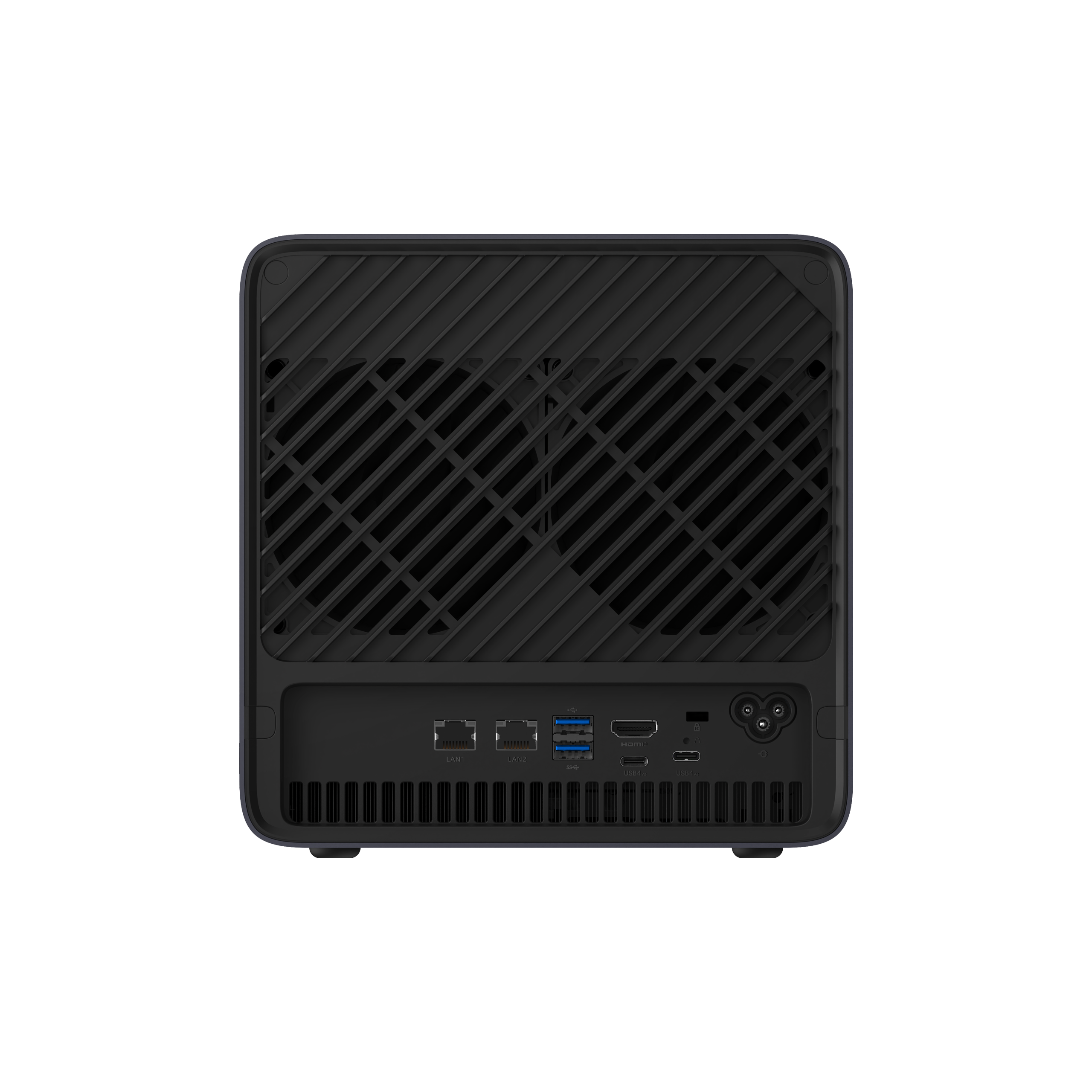
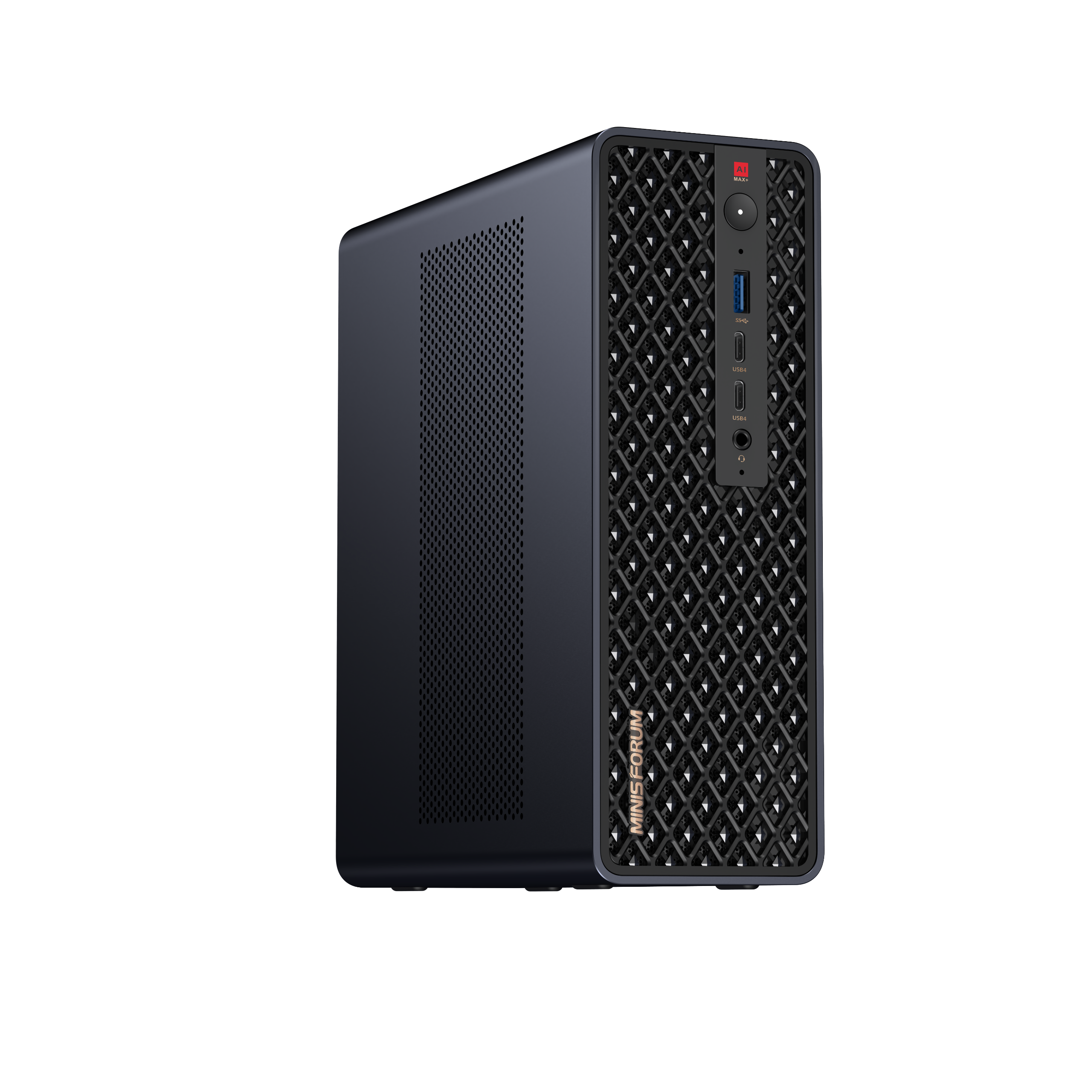
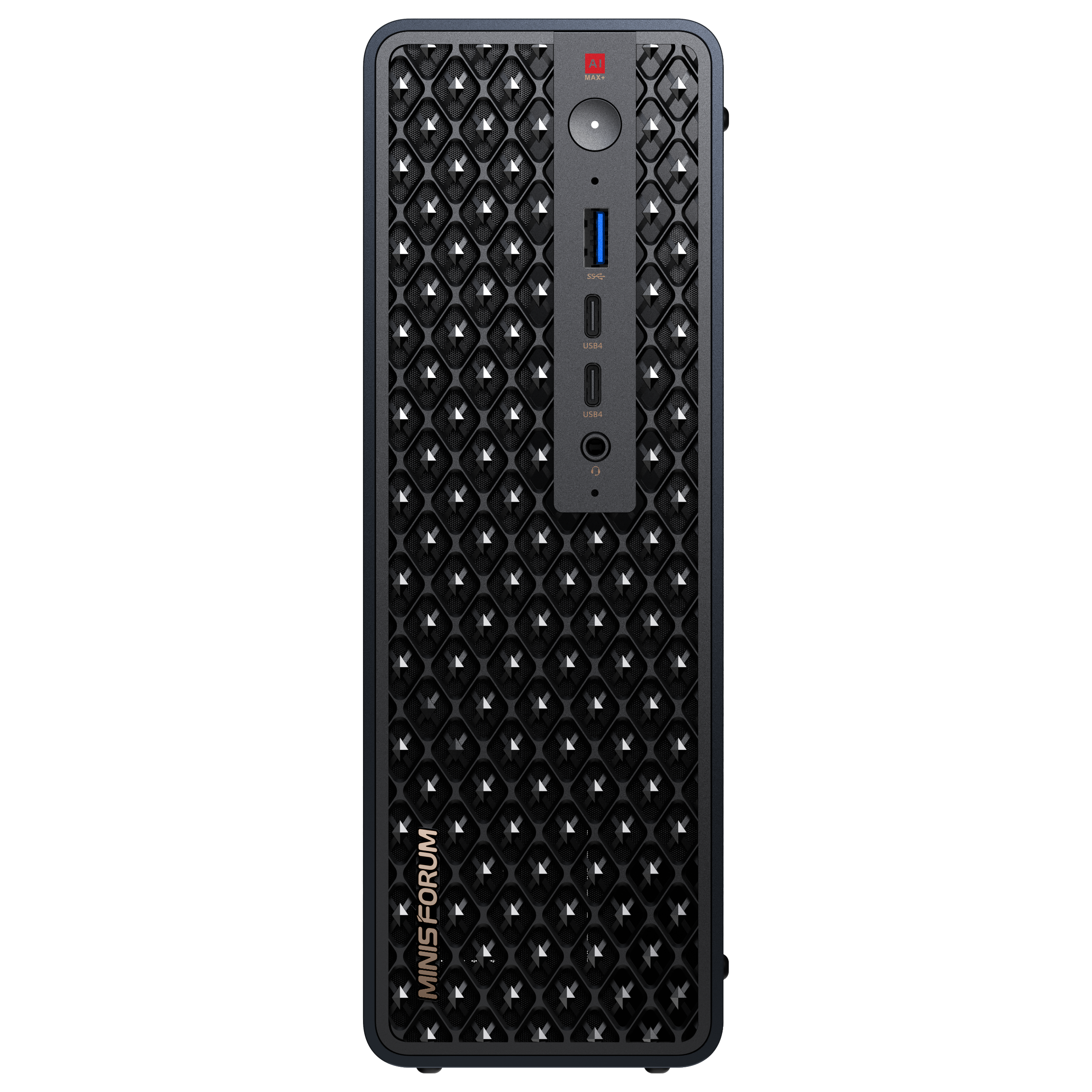
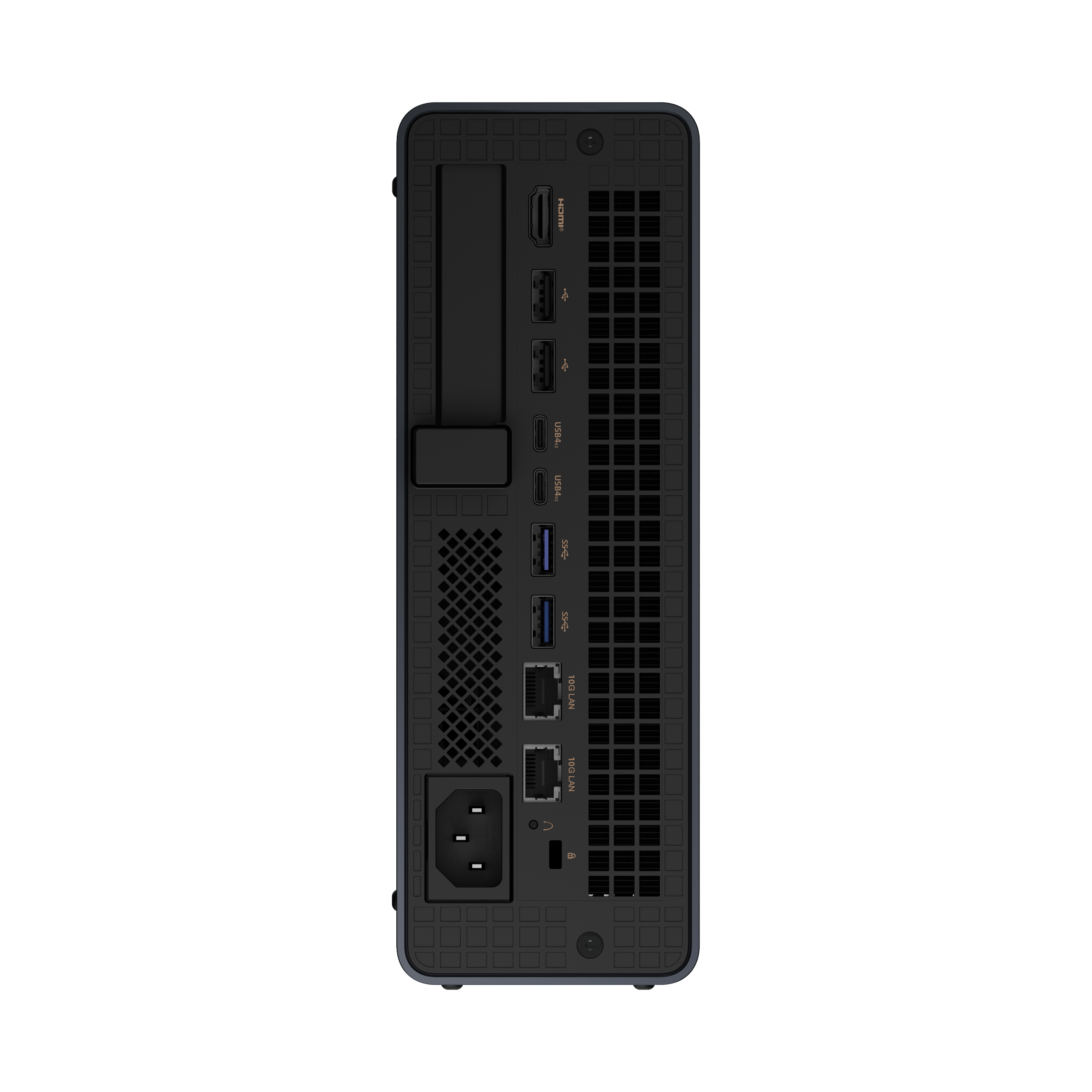
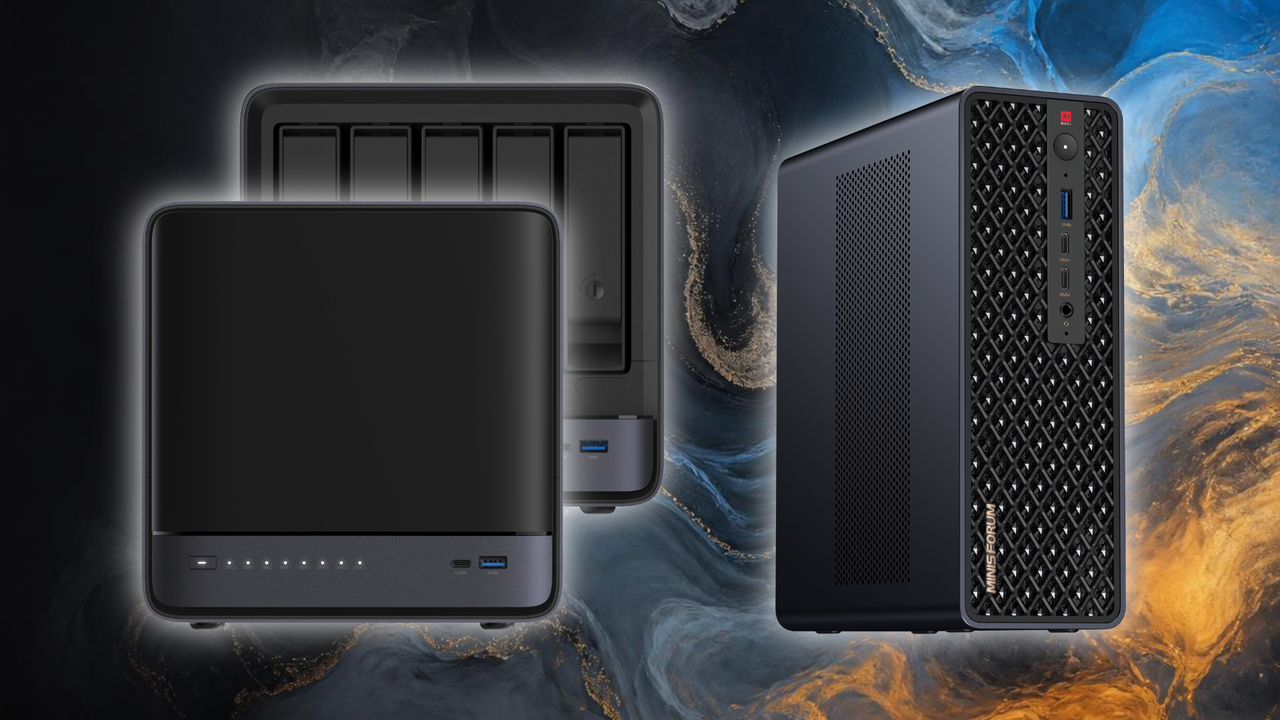
Mini-PC maker Minisforum just launched the latest upgrades to its flagship products at IFA 2026 in Berlin, Germany. The first is the AI Agent NAS N5 Max-P495, an upgrade to the brand’s flagship NAS with pre-installed OpenClaw that was launched earlier this year, and it’s followed by the MS-S1 Max-P495, a mini-PC designed for AI computing. Both devices feature AMD’s latest Ryzen AI Max+ Pro 495 processor with an integrated Radeon 8065S GPU, delivering up to 131 TOPS of AI performance, and can be configured with up to 192GB of unified memory, of which 160GB could be allocated as graphics memory.
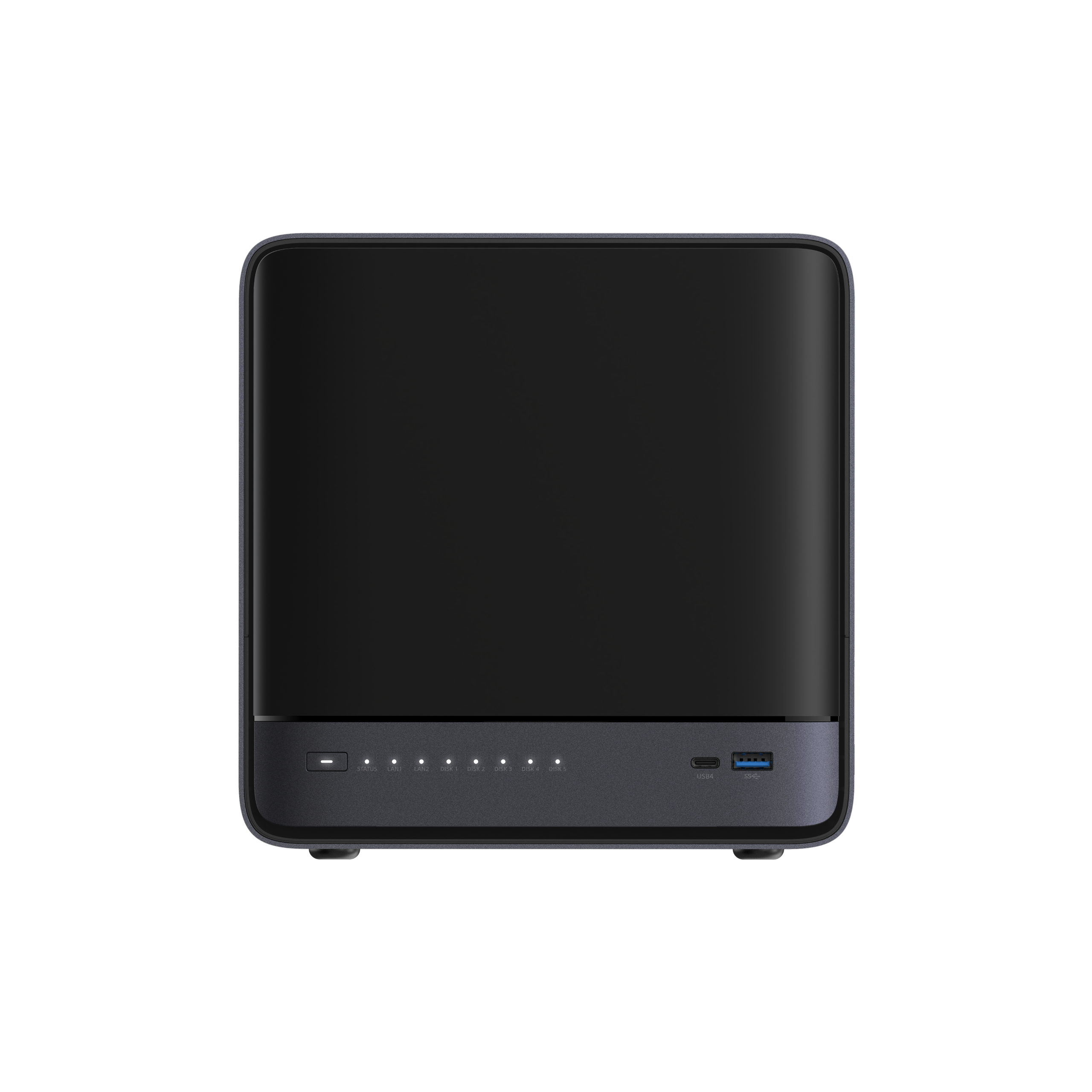
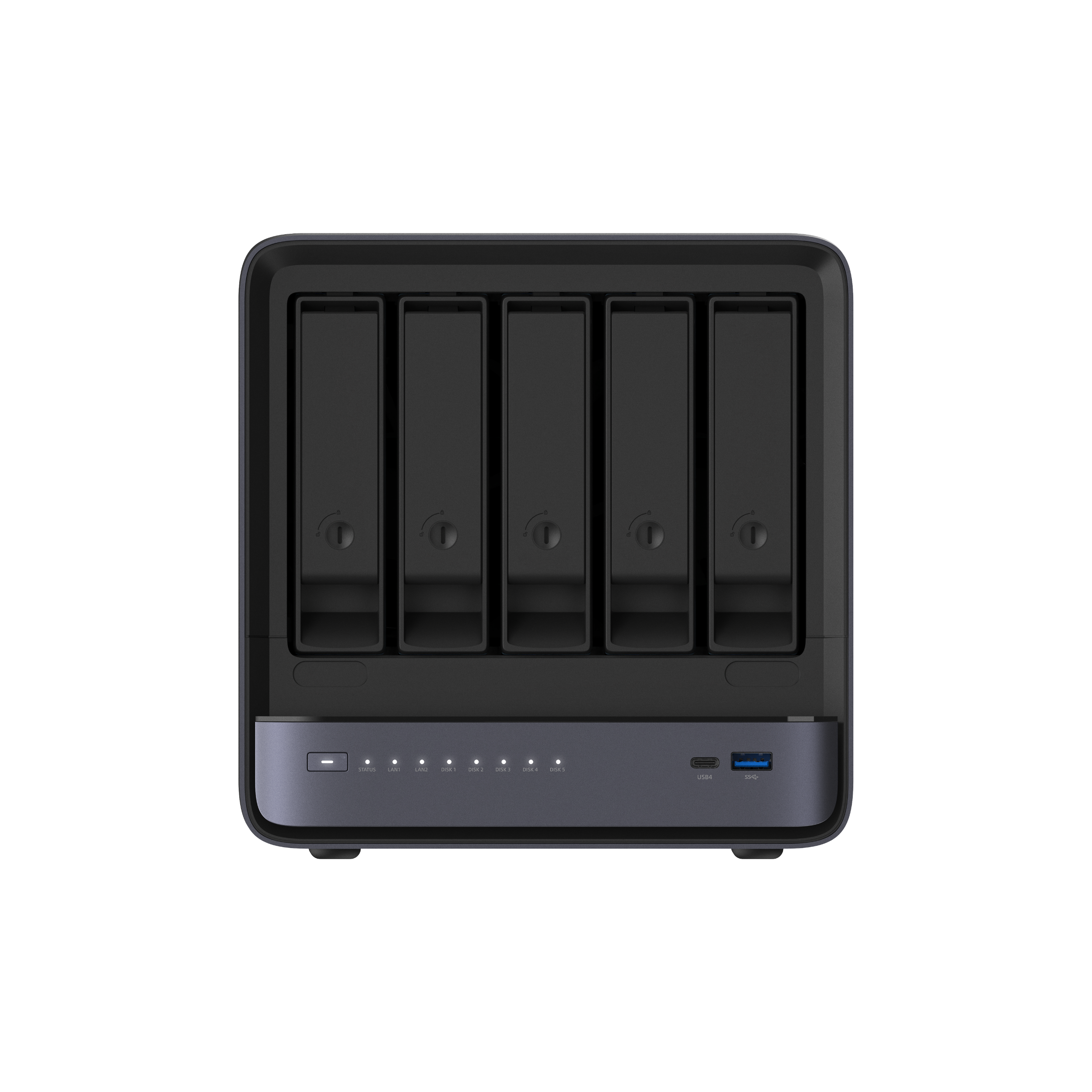
The AI Agent NAS N5 Max-P495 can accommodate up to 200TB of local storage, making it useful for storing large amounts of data locally. When paired with the Ryzen AI Max+ Pro 495, you can use this to run your AI agents like OpenClaw or Hermes Agent directly on your storage solution. This gives you privacy, ensuring that all your data stays on your machines, while the local storage cuts latency and helps you (and your AI) get things done speedily. Minisforum says that the N5 MAX-P495 is designed “as a centralized backed for data, models, knowledge, and long-running AI workloads.” It would also help cut or keep your AI inference costs in control, especially as agentic AI is known to use up 1000x more tokens compared to standard AI.
MinisforumMinisforumMinisforumMinisforum
Now, if you need something powerful for your professional or creative workflow, Minisforum has the MS-S1 Max-P495 for you. Just like the NAS, this is an update of the company’s top-of-the-line MS-S1 mini-PC, which previously featured an AMD Ryzen AI Max 395+ APU. This device, which now uses the Ryzen AI Max+ Pro 495, is optimized for AI compute, with its processor delivering 55 TOPS from a dedicated NPU for a total AI performance of 131 TOPS, and support for various models from labs like Gemma, OpenAI, and Qwen. More importantly, it’s easily scalable, with four units easily deployable in a 2U rack.
This makes it an excellent alternative to the Mac mini and Mac Studio, which are in short supply because of the local AI boom. But even if you’re not into AI but just need something small that doesn’t compromise on performance, the MS-S1 Max-P495 can still deliver. You can order it with as much as 192GB of unified memory to ensure that you do not run out of RAM for 3D rendering, video editing, and even computational fluid dynamics. The 8060S on the older Ryzen AI Max 395+ is also quite capable for 1080p gaming, so we wouldn’t be surprised if you can comfortably play on this new mini-PC, too.
MinisforumMinisforumMinisforum
If you’re experimenting with AI and want something powerful to help run your models, the N5 Max-P495 and the MS-S1 Max-P495 are great devices to consider for your upgrade. Just make sure that your agents have proper safeguards so that it doesn’t end up accidentally deleting your entire home directory. Unfortunately, we don’t have pricing and availability for these two AI devices at the moment, but if you want to see them for yourself and you happen to be in Berlin, drop by IFA from September 4 to 8, 2026.
If you’ve ever snapped a 10,000 mAh magnetic battery or other bulky accessory to the back of your compatible Android or iPhone, you know how cumbersome it can be, especially while you’re trying to use your phone rather than just letting it charge. For those who are shooting video or backing up their files on the go, Lexar wants to make that problem go away with its latest external SSD, the Muse.
(Image credit: Future)
At just 80×48×3.8 mm (3.15x1.89x0.15 inches), with tapered edges that make it feel even slimmer, the company calls it the world’s thinnest portable SSD. And compared to the best external SSDs we’ve tested, it certainly stands out for its tiny size.
(Image credit: Tom's Hardware)
But to get that slim and small, the company is using a proprietary snap-on cable (Lexar calls it SnapLink) that connects to the back of the drive magnetically, via pogo pins. And the pogo pin side looks kind of bulky compared to the drive itself. If you want the drive to magnetically attach to your phone, you’ll need to slide the drive into its sleeve first, which also looks like it could do double duty as a card wallet.
(Image credit: Lexar)
In other words, Lexar made serious functional design sacrifices to achieve its slim storage superlative. Still, there’s no denying that the Muse will take up a lot less space on the back of your phone than alternatives like Orico’s BookDrive P10Plus.
Aside from its unique slimness and requisite accessories, the Muse looks to be a fairly typical 10 Gbps drive, with Lexar promising read speeds up to 1,050 MB/s, and write speeds up to 1,000 MB/s. It’ll be interesting to see what kind of sustained write performance is possible in such a thin shell.
As a USB-C storage device, the drive will of course also work with Macs, Android devices, and PCs (although you may need to format the drive first to support other operating systems). Lexar also notes there is app support for automatically backing up footage from iPhones, specifically.
Lexar says the Muse portable SSD will be available in 512 and 1TB capacities, sometime in the last quarter of 2026. Official pricing is up in the air, but representatives at IFA told us the company was aiming for roughly $230 for the 512GB model and $380 for 1TB. As always, devices that claim things like “world’s thinnest” tend to carry a price premium.
Expanding your PlayStation 5's storage with the best PS5 SSDs in 2026 is no longer a luxury, but a necessity. Modern AAA games are only getting bigger and more demanding, which will saturate your console's internal storage system in no time. With Sony's decision to eliminate physical game discs, the need for a high-speed M.2 PCIe 4.0 NVMe SSD will be even more important in the future. Juggling a large number of games with just the console's internal storage will be a headache.
Investing in a quality M.2 SSD ensures you do not have to constantly go through the frustration of uninstalling games to make space for new ones or subsequently having to redownload hundreds of gigabytes to replay a previous game. Do not let your console's storage limitations hold you back from playing upcoming AAA releases.
Upgrading your PlayStation 5 with an M.2 SSD is a safe and effective way to expand your storage. It will not void the warranty, provided you use a compatible drive and take care not to damage your console physically during the installation process. Rest assured, as long as you proceed carefully and avoid any accidental damage, your warranty will remain intact. If you have already purchased, or are considering purchasing, an M.2 SSD for your PlayStation 5, let our step-by-step guide take you through every part of the installation process.
Tools Needed To Install a PS5 SSD
#1 Phillips screwdriver
PCIe 4.0 x4 NVMe SSD with a minimum sequential read of 5,500 MB/s and a built-in or aftermarket heatsink
WD Black SN850X 2TB: $369.99 The WD Black SN850X is the best SSD for your PlayStation 5. The PCIe 4.0 drive delivers sequential read and write speeds up to 7,300 MB/s and 6,600 MB/s, respectively.View Deal
990 Pro 2TB: was $639.99 now $389.99 The Samsung 990 Pro is a very formidable PCIe 4.0 SSD for your PlayStation 5. The drive flaunts sequential read and write speeds that top out at 7,450 MB/s and 6,900 MB/s, respectively.View Deal
The WD Blue SN5100 is the best budget drive money can buy for your PlayStation 5. The PCIe 4.0 SSD's sequential performance reaches 7,100 MB/s reads and 6,700 MB/s writes.View Deal
1. Prepare your PlayStation 5 for installation.
(Image credit: Tom's Hardware)
Carefully disconnect both the HDMI and power cables from your PlayStation 5. Detach it from the stand if you are using it. Next, place your console horizontally on a flat surface to make the upgrade process easier and prevent accidental damage.
If you are worried about scratching the console, you can put something like an anti-static mat or a simple piece of cardboard or paper under it. Avoid soft fabrics, such as microfiber cloths or towels, that can generate static electricity when they come into contact with plastic.
2. Remove the cover to get inside the PlayStation 5.
(Image credit: Tom's Hardware)
Before you begin working on your PlayStation 5, touch a grounded metal object to discharge any static electricity from your body safely. Then, position your console so the PlayStation logo faces down and the rear ports point directly toward you. Firmly hold the console in place with one hand and, using your other hand, locate the right-bottom corner of the top cover. Gently lift it upward while simultaneously sliding the cover to the left.
For the PlayStation 5 Slim and PlayStation 5 Pro: Similar to the vanilla version, position the console so that the rear ports face toward you, and the larger cover is on your left. Grip the top edge of the smaller cover gently and pull upward until you hear a pop, which signals that the internal clips have released.
3. Remove the metallic cover to access the PlayStation 5's SSD expansion slot.
(Image credit: Tom's Hardware)
Using a #1 Phillips screwdriver, carefully remove the screw securing the expansion slot cover on your PlayStation 5. Lift and remove the expansion slot cover to expose the M.2 SSD expansion slot.
4. Prepare for SSD installation.
(Image credit: Tom's Hardware)
With the same #1 Phillips screwdriver you used earlier, remove the screw and spacer from the expansion slot. Next, check your SSD to determine its form factor. The PlayStation 5 supports the following M.2 SSD form factors: 2230, 2242, 2260, 2280, and 22110. Relocate the spacer to the correct position in the slot that matches the length of your SSD.
5. Install the M.2 SSD into the expansion slot.
Tom's HardwareTom's Hardware
Align the notches on the SSD with the slot in the M.2 connector on your PlayStation 5. Tilt the SSD at a 30-degree angle and gently insert it into the connector. Once the SSD is securely in place, press it down with your thumb. Fasten the drive in place using the screw you previously removed. Do not overtighten the screw as this may damage the drive or the expansion slot.
Sony does not include a heatsink for M.2 SSDs in the PlayStation 5. There are many SSDs with PlayStation 5-compliant heatsinks on the market. Sony specifies a maximum thickness of 0.44 inches (11.25 mm) for the SSD including the heatsink.
However, if you go with a bare M.2 drive, you will have to pick up an aftermarket heatsink, such as the Sabrent M.2 NVMe PS5 Heatsink (SB-PSHS) for $13.99. Before purchasing any heatsink, double-check that it is fully compatible with your PlayStation 5 model.
M.2 NVMe PS5 Heatsink: $13.99 The Sabrent M.2 PS5 heatsink is made of high-quality CNC aluminum that features the company's "sandwich" design for maximum heat dissipation.View Deal
6. Install an aftermarket heatsink, when applicable, on the SSD.
(Image credit: Tom's Hardware)
Tilt the heatsink at a 30-degree angle, just as you did with the SSD, and align the notches on the heatsink with the corresponding space. Insert it into position so that it sits flush over the SSD. Use one finger to apply a little bit of downward pressure to keep the heatsink in contact with the SSD, then tighten the screw. Reinstall the cover, and you are almost home free.
7. Format the SSD.
(Image credit: Tom's Hardware)
Reconnect all the cables and power on your console. Upon startup, your PlayStation 5 will automatically detect the new SSD. A prompt will appear on the screen, instructing you to format the SSD before you can use it for game installations or data storage.
With your brand-new SSD installed and properly formatted, you are now ready to enjoy the latest AAA games on your PlayStation 5 without having to worry about storage constraints ever again.
Tape storage companies continue to celebrate substantial growth. The format might seem archaic in the mid 2020s but on Tuesday, the LTO Program Technology Provider Companies (TPCs), HPE, IBM, and Quantum Corp., boasted of capacity shipment growth of 57% YOY, in Q1 2026. You guessed it: AI data center demands have contributed to bumper tape shipments, but so have the requirements for traditional archive workloads and cyber-resilient backups.
Last year, when we pondered over the LTO shipment numbers, we contrasted the medium’s undeniable success with Elon Musk’s DOGE crusade to wipe it out. It was criticized and dismissed for being “old technology.” But there’s certainly life in this old dog, as there were 176.5 exabytes of compressed LTO tape capacity shipped in 2024. Shipments were thus up 15.4% vs. the prior year and hit new records.
There was a small dip in LTO capacity shipped in 2025, an aberration characterized as "bad weather" by the TPCs on social media. This modest 9% YOY decline meant that 160.3 exabytes of tape storage were shipped last year. However, “shipped capacity was higher than any other year in history save 2024 itself,” wrote an LTO program representative in an email to Tom’s Hardware. The latest figures also show LTO demand is back with a vengeance, with shipped capacity in Q1 2026 a stunning 57% higher than in Q1 2025.
“We are seeing unprecedented data growth combined with increasing cost, energy, and cyber resilience pressures across the industry,” said Hugues Meyrath, CEO, Quantum. “As organizations adapt to this new reality, tape is increasingly viewed as a strategic component of modern data infrastructure, delivering predictable economics and resilient long-term data retention at scale.”
(Image credit: The Linear Tape-Open (LTO) Ultrium Format companies)
Other contributors to growth, evidenced by the latest figures, were the market’s readiness for LTO-9 and LTO-10. The former is still being promoted by TPCs as a very worthwhile upgrade to stickers reliant on older generations. LTO-9 tapes support up to 18TB uncompressed or 45TB of compressed data according to the program companies. 2026 capacity shipment figures have also benefited from the early ramp of LTO-10. With these latest-gen cartridges up to 40TB of data per cartridge natively, or up to 100TB compressed, can be stored. Meanwhile, TPPCs are ensuring tape will continue to be attractive with roadmaps extending to LTO-14, which offers up to a gargantuan 576TB native capacity per cartridge, and can fit up to a touted 1,440TB compressed.
It is difficult to argue with the strong start for LTO shipments in 2026. The TPCs assert this is due to tape belonging “in every storage mix as an anchor against disruption.” LTO is also heralded as the storage medium possessing “the lowest cost per terabyte, provides excellent cyber-resilience, and is highly power-efficient.”
With the ongoing AI boom triggering worldwide memory shortages, getting a good deal on RAM or storage has become increasingly difficult. If you are on the lookout for a snappy SSD, however, we have spotted a solid deal on Newegg that could help you save some money on your next storage upgrade. The Kingston NV3 1TB PCIe Gen 4 SSD is currently selling for $156.99, down from its usual price of $215.99, which is also the lowest price the SSD has seen in the past 30 days.
The Kingston NV3 was introduced back in late 2024 as a budget PCIe 4.0 NVMe SSD, with the 1TB model rated for sequential read speeds of up to 6,000 MB/s and sequential write speeds of up to 4,000 MB/s. That makes it more than capable of handling everyday office workloads, gaming, and even demanding file transfers. It is notably a DRAM-less SSD as it uses Host Memory Buffer (HMB) technology instead, meaning that the performance may vary depending on the workload. It also has a slightly lower than recommended rated endurance of 320TBW along with a five-year limited warranty.
The SSD may not be suitable for heavy workloads or as a primary SSD in a high-end workstation, but in our testing we found that it can still be a sensible choice for secondary storage. In 3DMark's Storage Benchmark, the NV3 delivered respectable results, and it performed well in PCMark 10, where it beat the Corsair MP600 Elite and came reasonably close to several more expensive SSDs. If you're primarily looking for a drive to store games, photos, videos or any other important data, it should be perfectly adequate. It also consumes very little power and runs fairly cool during operations, just 48°C, the maximum recorded temperature on one of its sensors during testing.
Tom's HardwareTom's HardwareTom's Hardware
The 1TB Kingston NV3 at its discounted price of $156.99 is a solid option if you're looking for an affordable way to expand your PC's storage. It might not be the fastest or the most capable SSD on the market, but at that price we can't really complain.
Perhaps as a result of AI hyperscaler demand soaking up all the cutting-edge flash, external storage makers in recent months have seemed to focus less on speed and more on adding unique and helpful features. We saw this with Sharge's Disk Pro and its built-in hub, Orico's Book Drive P10 Plus and its 100W passthrough charging and MagSafe-compatible back. Adata seems to be playing a similar game with its latest drive, the Urban Tapsafe.
The Urban Tapsafe external SSD is quite compact, about the size of a lighter at 2.70 x 1.42 x 0.76 inches, while making space for a built-in clip, NFC support for automatic locking and unlocking of your data with your phone (if you install the requisite app), and even magnetic swappable front plates. Under the hood, it's a fairly typical 20 Gbps drive with performance that's generally fine. But if you need something small and prefer a clip to a magnet for keeping the drive where you need it, it's worth considering. It also ships with a long five-year warranty, compared to the 2-3 years offered by many other drives in this class.
Specifications
Product
1TB
2TB
Pricing
$219
$391
Interface / Protocol
USB 3.2 Gen2 2x2 (20 Gbps)
USB 3.2 Gen2 2x2 (20 Gbps)
Sequential Read
Up to 1,900 MB/s
Up to 1,900 MB/s
Sequential Write
Up to 1,900 MB/s
Up to 1,900 MB/s
Dimensions
2.70 x 1.42 x 0.76 inches / 68.68 x 36.18 x 19.18 mm
2.70 x 1.42 x 0.76 inches / 68.68 x 36.18 x 19.18 mm
Weight
72.61 grams
72.61 grams
Warranty
5 years
5 years
Design and accessories
The Urban Tapsafe stands out in terms of design, in part due to its magnetic face plates that snap onto the frame. The company includes both a black plate and one with a color-shifting surface that looks silver, gray, or a light metallic purple, depending on lighting and the angle you look at it from.
(Image credit: Tom's Hardware)
And it's not just about the pretty faceplates. The silver metal chassis feels extremely solid and sports a clip with a strong grip, aided by ridged silicone pads on both sides of the opening. This makes the drive easy to clip onto a pocket, your bag, or video rigs. The limiting factor here is that the clip only opens about half an inch, so it won't clip on to anything bulky.
(Image credit: Tom's Hardware)
Despite its plethora of design flourishes and features, the Tapsafe is also pretty small, at 2.3 inches long and 0.72 inches thick. Its metal frame means it's not the lightest drive, at 2.56 ounces, but it's obviously not going to weigh you down.
Putting the tap in Tapsafe, with an app
Of course, the Tapsafe drive's main selling point is the ability to unlock the drive via NFC. This is done via the Urban Tapsafe app, which Adata offers for both Android and iOS. And far from just having simple unlock capabilities, it also lets you give access to multiple users, as well as stipulate whether they are limited to read-only or read-and-write access. The app is fairly simple, but everything worked more or less as expected during my time testing the drive.
After installing and launching the app, you'll first need to use your fingerprint or whatever authentication you use to unlock your phone to get access. Once the app is unlocked, you'll need to hit Add Drive, then you'll be asked to name the drive and create and confirm a password. After hitting Submit, you're asked to make sure the drive is plugged in, then tap the back of your phone to the drive.
This didn't work the first time I tried it with the drive plugged into my Samsung S25 Ultra; I got an error saying the drive didn't have power. But when I plugged the drive into my PC and tapped with my phone, the drive registered, and I was able to use my phone to unlock the SSD. Once the drive and app were configured, I went back and tried unlocking the drive when it was plugged into my phone, and it worked as expected. My phone's USB port is a bit fiddly with power connections, so my initial unlocking issue was likely an a problem with my phone, not the drive.
(Image credit: Tom's Hardware)
With the drive set up to use the app and password, it will lock whenever the drive is unplugged. Plug it back in, and the drive won't be recognized by your system. The small drive activity light will glow a steady red until you again open the app on your phone, tap Unlock, and move your phone to the drive. Then the drive should unlock, the activity light will turn blue, and, in Windows, the drive and its content will pop up in an Explorer window.
The app also lets you share access to the drive with up to nine other users, and stipulate whether they will have read and write access to the drive, or just read access. They'll also need to have the app installed, and physical access to the drive, then they scan the QR code supplied by your app to grant access. After this, tapping their phone to the SSD will grant the requisite drive access.
Note that the drive isn't being encrypted or decrypted during this process, and Adata makes no specific claims about hardware security. The drive simply will not function or be recognized over USB without using the app to unlock it (if the NFC/password function is enabled, of course). It's possible that if someone had access to the drive and was able to disassemble it, they could get access to the drive's data without app access or the password. So this drive isn't a good fit for situations that call for hardware encryption or high-level data security.
But for those who just want to keep their files private on a basic level, and / or want a drive that lets them selectively share access with other users, there's a lot to like here. The app is pretty well designed and easy to use. The only issue I had was that my phone would occasionally fail to unlock the drive on my first attempt. But once you get used to where your NFC chip is located on the back of your phone (it's in different places, depending on the make and model), the process quickly becomes easier and fairly intuitive.
Comparison products
(Image credit: Tom's Hardware)
With AI demand gobbling up all the good flash and hiking prices on anything new at the same time, it's a tough climate for drives like the Urban Tapsafe. While the Tapsafe drive sells for slightly less directly from Adata, it's $228 for the 1TB model and $411 for the 2TB option we tested at Amazon, as of this writing. Meanwhile, one of the better 20 Gbps drives we've tested, Crucial's X10 (which launched last year, months before parent company Micron killed the consumer Crucial brand), is still available for $238 (1TB) and $368 (2TB). Even tougher if you mostly care about price in the same drive class, Team Group's also 20 GBps PD20 drive sells for just $235 for the 2TB model at Amazon – so you could get double the capacity with Team Group for $7 more.
To be fair to Adata, those two competitors don't have an NFC chip for access, or a clip for attaching it to other things. But as we'll see, at least one of the above drives performs better than the Tapsafe, too.
Storage Testbed
(Image credit: Tom's Hardware)
In 2025, we updated our external storage testbed to an AMD Ryzen 7600X-based PC with an Asus ROG Crosshair X870E Hero motherboard, installed in Lian Li’s Lancool 217 case. This was done in part because we needed a system with native USB4 support for upcoming drives (like this one).
All the drives in the charts below have been re-tested on the new X870E system, with the exception of the final Iometer sustained sequential test. That benchmark is less about top speed and more about how long a drive can write before depleting any fast cache onboard. We also updated to CrystalDiskMark 8, rather than the older (and non-comparable) version 7 we used on the previous testbed.
A note on testing, before we jump into the benchmarks: Out of the box, our Adata Urban Tapsafe review unit was oddly inconsistent in benchmarks. Most of the time, its read speed topped out below 1,000 Mb/s, while its write speed was nearly double that. At first I thought there might be an issue with our storage testbed, or the cable. I tried changing both and sometimes the drive would read faster, closer to its expected performance. Then it wouldn't, even when plugged into the same machine with the same cable.
After lots of on-and-off testing, getting inconsistent results that usually didn't match Adata's listed read specs by a long shot, I eventually performed a secure erase on the drive via DiskPart, formatted it, and tried again. Surprisingly, that sorted out the issue, and the drive was finally consistent in both its read and write speeds, matching the drive's sequential ratings. Our testing below reflects the drive's capabilities after that secure erase and reformatting cycle.
Trace Testing - PCMark 10 Storage Benchmark
PCMark 10 is a trace-based benchmark that uses a wide-ranging set of real-world traces from popular applications and everyday tasks to measure the performance of storage devices.
(Image credit: Tom's Hardware)
The Adata drive doesn't start out our benchmark run looking its best – in fact, it landed dead last here, bested even by 10 Gbps drives like the Crucial X9 Pro and the Sharge Disk Pro, as well as Samsung's T9. Its performance isn't massively behind the competition, but it's an early indication that this isn't the snappiest of performers.
Transfer Rates – DiskBench
(Image credit: Tom's Hardware)
In this real-world file transfer test, the Adata drive fares significantly better, landing in the middle of our charts in terms of read speeds, at 897 MB/s. And its writes were even more impressive, beating everything in our charts save for the 40 Gbps Corsair external SSD.
Synthetic Testing CrystalDiskMark
CrystalDiskMark (CDM) is a free and easy-to-run storage benchmarking tool that SSD companies commonly use to assign product performance specifications. It gives us insight into how each device handles different file sizes. We run this test at its default settings.
(Image credit: Tom's Hardware)
Moving back to synthetic tests and this sequential benchmark, the competing 20 Gbps Crucial and Team Group drives did better on reads again. But on writes, only the Crucial and Corsair drives did better here.
(Image credit: Tom's Hardware)
In small file performance, we see perhaps an explanation why the drive also didn't do well on PCMark. Its small-file read performance was third-from-last place, while write IOPS trailed everything else by a significant margin. This performance isn't quite damning, but it does mean the Tapsafe isn't the best option if you want to run programs directly from your drive, or use it as a boot drive.
Sustained Write Performance
A drive's rated write specifications are only a piece of the performance picture. Most external SSDs (just like their internal counterparts) implement a write cache, or a fast area of flash, programmed to perform like faster SLC, that absorbs incoming data.
Sustained write speeds often suffer tremendously when the workload saturates the cache and slips into the "native" TLC or QLC flash. We use Iometer to hammer the SSD with sequential writes for 15 minutes to measure the size of the write cache and performance after the cache is saturated.
(Image credit: Tom's Hardware)
On this grueling sustained write test, the Adata Urban Tapsafe managed to deliver between 1,800 and 1,900 MB/s for a solid five minutes, before dropping to about 250 MB/s, and then dropping again near the end of our 15-minute test to below 70 MB/s. While its speed past about the 14-minute mark is abysmally slow (less than a laptop hard drive), the Tapsafe's showing here is easily better than the competing Team Group drive, which started slower and fell faster. Crucial's X10 is a better option on this sustained test, as is Corsair's USB4 drive (which is of course significantly more expensive). But so long as you aren't expecting a 20 Gbps drive with pro-level write performance, the Tapsafe is speedy and consistent enough to keep most users happy.
Bottom Line
(Image credit: Tom's Hardware)
Adata's Urban Tapsafe is a unique drive that's well-suited to those who want basic, convenient control over who has access to the data on their drive, and who want to share that access with a handful of other users who also have physical access to the drive. Its tap-to-unlock, NFC-based access might not be technically as secure as more traditional AES-based encryption, but it worked well during our testing. And the ability to selectively give read or read / write access to up to nine other people via their own phones and apps could make this drive a good fit for collaborative projects or family file storage.
In terms of performance, it's not the fastest 20 Gbps drive, but it's also far from the slowest. For mainstream tasks like video recording or moving large files quickly, its performance is more than speedy enough — just make sure your devices have a 20 Gbps port if you want the fastest possible speeds.
As a niche device for those cases where you need the drive's NFC unlocking and multi-user sharing, the Urban Tapsafe is easy to recommend. But its high price means it's likely to remain a niche, because Team Group's PD20 performs nearly as well (barring sustained writes) while costing much less. And Crucial's X10 drive is a significantly faster 20 Gbps alternative that sells for a little more at the 1TB capacity, and is about $30 cheaper than the Tapsafe at its top 2TB tier.
A homebrew dinner-plate-sized magnetic core memory USB storage device has been used to transfer a text file from one PC to another for the first time. In what is “maybe the world’s first” [machine translation] Japanese researcher @dydt_Nao indicates they successfully used their retro-modern flash drive as a sneakernet device. We covered this space science researcher’s earlier efforts to rekindle this archaic computer memory tech back in February of this year.
多分世界初!?USBフラッシュならぬUSB磁気コアメモリにテキストファイル入れてPC間の移動に成功!これで完成〜 128バイトだから動画の文字数くらいが限界笑 来週9/5-6のMaker Faire Tokyo 2026(有明GYM-EX)で展示・実演します! pic.twitter.com/sptsOYZUMpAugust 29, 2026
Back in February we noted that this USB flash drive had some severe shortcomings, but was nonetheless an effort that we warmly applauded. There were three key drawbacks to this ungainly USB flash drive. Firstly, it is rather massive, and it looks roughly a foot (30cm) square. Secondly, by contrast, its storage is incredibly tiny at just 128 bytes (not GB, MB, or even KB). Lastly, according to our understanding of the technology, the data stored gets erased during the read process.
In the tweet-embedded video we get to see the unnamed USB Type-A gadget work its magic. Interestingly, as data is read to/from @dydt_Nao's device, LEDs in an attached 32 x 32 array glow a vivid red. Every LED corresponds to an individual magnetic core. We see Windows reporting the drive as having a 6.5KB capacity, but that is likely something to do with the Raspberry Pi Pico being used as an onboard controller. Towards the end of the video we get to see that the text has been successfully transferred from the drive to Notepad.
Not content with a mere text demo, @dydt_Nao follows up with a BMP image transfer. Monochrome bitmaps up to 32 x 28 pixels can be stored on this device. Perhaps a little of the limited device memory space (32 x 4) is used up by the image file header.
@dydt_Nao on Twitter@dydt_Nao on Twitter@dydt_Nao on Twitter
You can read more about magnetic core memory in our article commemorating the 75th anniversary of its patent filing by inventor and MIT electrical engineer Jay Forrester. Magnetic core memory earned its place as the dominant form of random-access storage in digital computers for two decades. Today it seems like a bizarre curiosity.
The 990 SSD is an interesting product because it is one of the few SSDs released after the AI pricing crunch sent storage prices into orbit. As such, we know what Samsung thinks this drive is worth in the current climate, namely $529. While 2TB of storage would have been much cheaper a year ago, a 36% discount on a new SSD is not to be sniffed at, especially given all signs point to these drives getting more expensive, not cheaper, in the future.
We reviewed this drive at launch last month and liked its full-fledged Gen 4 throughput, decent power consumption, and good all-around performance. The 990 is essentially a QLC-based 990 EVO Plus, featuring Samsung's PiccoloQ controller and V9 QLC Flash memory.
As you can see from our testing data, it scores very close to the 990 EVO Plus in latency testing, while beating the 990 Evo drive in bandwidth and 3DMark overall score.
As always with storage deals, these prices are tough to stomach, but they aren't going to improve any time soon. In fact, all signs point to the AI pricing crunch continuing to make things worse going forward, meaning leaving it too long could make storage even more expensive in the future.
OXMIQ Labs, a GPU IP company, revealed at Hot Chips 2026 that High Bandwidth Flash (HBF) cannot replace High Bandwidth Memory (HBM) across the vast majority of workloads. For some, HBF could emerge as a specialized memory tier for huge but relatively cold datasets. For others, HBF can do more harm than good.
When SanDisk unveiled its High-Bandwidth Flash (HBF) concept in early 2025, the technology pledged to equip AI accelerators with terabytes of relatively inexpensive memory and reduce the need for traditional High-Bandwidth Memory (HBM), a promise that raised a number of doubts from the very beginning.
The emerging HBF specification includes three performance grades. Grade 1 uses an 8-Hi 256GB NAND stack with an 8 GT/s UCIe interface and 384 GB/s bandwidth. Grade 2 uses a 512GB NAND stack with a 16 GT/s UCIe interface and supports 1.536 TB/s bandwidth. Grade 3 reaches 3.072 TB/s using 32 GT/s UCIe 2.0 while retaining the same 512 GB capacity.
Since HBF relies on 3D NAND, it supports read block sizes between 64 bytes and 4 kilobytes, 4KB writes, and 4KB page sizes. While HBF Grade 1 can barely compete against contemporary HBM, HBF Grade 3 can compete against HBM4E, though we have no idea when such memory will be available. However, the main feature of HBF is not necessarily performance per se, but 8 – 16 times more capacity than HBM at roughly the same cost.
(Image credit: OXMIQ)
Indeed, OXMIQ believes that HBF should be viewed as a high-capacity memory technology rather than inexpensive HBM. Memory economics depend not only on how many gigabytes an application needs to store, but also on how quickly those bytes must be delivered to the processor. As bandwidth demand rises, adding inexpensive but relatively slow HBF eventually becomes less economical than using HBM, according to estimates by OXMIQ.
Cheap memory =/= cheap tokens
OXMIQ demonstrated the trade-off by modeling a 72-GPU rack running the 1-trillion-parameter Kimi-K2 model at FP4. At cost and power parity, an HBM-only configuration provides 20.7 TB of memory and 1,584 TB/s of aggregate bandwidth. Replacing HBM with HBF increases rack capacity by 14 times to a whopping 294.9 TB, but reduces aggregate bandwidth to 922 TB/s. A hybrid configuration with HBM and HBF provides 89.3 TB and between 279 TB/s and 1,418 TB/s, depending on workload conditions. The difference between HBM and HBF bandwidth is the reason why HBF looks excellent when memory capacity limits the system. However, HBF eventually loses when bandwidth/throughput becomes the limiting factor.
(Image credit: OXMIQ)
In OXMIQ's model, an HBF-only configuration enables each GPU to hold its own Kimi-K2 instance and run 72 model instances per rack. Whereas an HBM-only configuration requires eight GPUs to hold each model instance (meaning compute performance gets wasted) and can therefore run only nine instances per rack. This makes HBF particularly attractive when memory capacity determines the number of GPUs required. However, as the number of simultaneous users and their token-generation rate increase, HBF's lower bandwidth becomes the bottleneck, while the HBM-based rack can make better use of its substantially higher memory bandwidth and ultimately deliver lower cost per token, according to OXMIQ's model.
(Image credit: OXMIQ)
As a result, HBF can dramatically reduce the number of GPUs needed simply to accommodate a very large model (i.e., enable one HBF-equipped GPU to do the capacity job of eight HBM-equipped GPUs). Nonetheless, if the objective is maximum inference throughput from a fully utilized rack, HBM may remain the better, more economical choice. At the end of the presentation, OXMIQ concludes: 'HBM for the rack, HBF for the box.'
Niche memory?
Although HBF does not benefit all AI workloads and may even harm the performance of many, there are applications that can benefit from a surplus of local memory.
Mixture-of-experts (MoE) models appear to be particularly suitable for HBF. OXMIQ's Kimi-K3 example has 1.56 TB of weights, of which 1.45 TB, or 93%, consists of MoE expert weights. Since only selected experts are activated for each token, this enormous pool is largely write-once and relatively infrequently read. OXMIQ proposes keeping such experts in HBF while placing the remaining, frequently accessed weights in HBM.
(Image credit: OXMIQ)
Additionally, more local capacity could also reduce communication between accelerators. Conventional expert parallelism distributes experts across GPUs and requires all-to-all communication at every layer. OXMIQ claims that inexpensive HBF capacity could allow considerably more experts to reside locally, reduce the number of expert-parallel shards, and reduce network traffic. In this case, HBF effectively trades memory capacity for interconnect bandwidth and power consumption.
(Image credit: OXMIQ)
Long-context inference is another potential use case. Sparse-attention models access only a small portion of their large KV cache during each decoding step, which allows the rest to remain in slower HBF memory. OXMIQ believes that HBF could store this large KV cache while the accelerator fetches only the data needed for each step from HBF to HBM.
(Image credit: OXMIQ)
The HBM-as-cache idea has a serious limitation. Intuitively, one would put popular experts in HBM and cold experts in HBF. Such a strategy works mainly at low batch sizes or when similar queries can be deliberately batched. As batch size rises and queries become more heterogeneous, however, expert popularity flattens, and the workload accesses a broader range of experts, according to OXMIQ. The working set can then outgrow the relatively small HBM cache, which results in more frequent expert transfers from HBF and reduces the performance benefit provided by HBM caching.
(Image credit: OXMIQ)
The hardest part
OXMIQ does not expect HBF to work simply as slower GPU memory. Instead, it proposes using HBF in place of host DRAM to store large amounts of less frequently accessed data, such as MoE experts and KV cache. Frequently used data would remain in HBM, while even colder data could still be kept in remote memory or SSDs. This certainly contradicts SanDisk's original vision for HBF: sitting next to AI accelerators. Furthermore, adding HBF support will be complicated on many levels.
The software side of HBF is particularly complicated. To achieve maximum bandwidth, HBF requires large transfers — 64 KB reads and 1 MB writes — and data is moved through DMA rather than the CPU/GPU cache hierarchy. When HBF and HBM are used together, software must also decide which data goes into each memory type and manage HBF's limited write endurance.
Meanwhile, current inference software is not ready for such a configuration. OXMIQ says vLLM would need dedicated HBF support to manage memory allocation and data placement, prefetch data before it is needed, and monitor flash endurance, which requires a major software overhaul. An effort like this has to be a joint effort between the HBF hardware vendors, AI accelerator vendors, and inference-framework developers.
At the lowest level, AMD, Nvidia, and other accelerator vendors would need to provide the hardware/driver/runtime mechanisms for efficiently moving data between HBF and HBM. Then vLLM developers, who work with vendors, would implement the higher-level memory allocator and policies that decide which experts/KV blocks live in HBM and which reside in HBF, when they should move, and how to hide HBF latency.
On the one hand, if AMD or Nvidia adopt HBF, they will provide its partners with everything needed to use it, and while this would take time before everything works as intended, this is a straightforward way to add HBF support to AI platforms. On the other hand, the biggest question is whether hardware vendors like AMD or Nvidia need HBF. As per OXMIQ, HBF's advantage is limited to select use cases, so it may not make sense for AMD or Nvidia to support it universally, especially keeping in mind that managing multi-tier memory hierarchy is hard.
SambaNova is perhaps the most obvious candidate to support HBF. Its SN40L already uses a three-tier hierarchy: SRAM => HBM => DDR, with up to 520MB of SRAM, 64GB HBM, and 1.5 TB of DDR. Conceptually, HBF could become another tier or replace some of that DDR capacity. Then again, this is merely speculation.
HBF remains a nascent technology
While we still have a lot to learn about how HBF works, OXMIQ's model suggests that HBF has a much weaker general-purpose value proposition than the original claim made in early 2025 suggested. It is not useless: it is a specialized solution whose strongest applications depend on particular workload characteristics.
(Image credit: OXMIQ)
The fundamental problem is that HBF solves memory capacity, while modern AI accelerators are frequently constrained by memory bandwidth. OXMIQ's simulation makes this rather obvious: HBF provides about 14X more memory capacity but only 0.6X the aggregate bandwidth of HBM. Once the workload becomes sufficiently bandwidth-intensive, the enormous capacity stops offsetting the bandwidth deficit.
While the hybrid HBM+HBF solution makes sense for some use cases, it is not a magic fix. When HBM is used as an expert cache, heterogeneous requests at larger batch sizes flatten expert popularity, cause the workload to touch more experts, and reduce cache efficiency dramatically.
For now, HBF has three particularly compelling use cases: reduce the number of GPUs required simply to fit huge models, store massive but infrequently accessed MoE expert pools, and keep large KV caches for sparse long-context inference. For MoE models, its large local capacity could also reduce expert parallelism and expensive all-to-all communication between GPUs. In all three cases, HBF makes sense because capacity requirements are enormous while bandwidth demand remains relatively low.
Memory and data storage manufacturer Micron announced its exit from the consumer market earlier this year and pledged to honor warranties for existing products. However, according to a recent RMA case on Reddit, the company seems to be struggling to stick to that promise. Instead of replacing a faulty portable SSD, the company offered the customer a refund that was significantly lower than the product’s current retail price.
Explaining their frustrating RMA experience, u/CarefulMeasurement99 said that their Crucial X9 4TB portable SSD stopped working, after which they contacted support, followed the troubleshooting process, and had their RMA approved. Unfortunately, they were later informed that the company did not have any units available for the particular product because the replacement inventory was exhausted. Therefore, instead of providing a 1:1 replacement SSD, the company would issue a refund of $199.99, the same as the original invoice price from last year.
Due to the ongoing NAND and DRAM crisis, almost every memory and storage product has significantly gone up in price. The Crucial X9 4TB is currently priced at over $500 on Amazon, which basically left the customer facing a loss of nearly $300. The customer explicitly refused to accept the offer and told Micron support that they did not want a refund and requested a 1:1 replacement under warranty. They also offered to accept an alternative 4TB SSD model or wait indefinitely until the RMA inventory was restocked.
After a long ordeal, pushing back eventually paid off for the customer. They sent Micron a firm final email rejecting the refund and demanding a 4TB equivalent replacement or alternative. The customer also mentioned that the case was gaining traction on Reddit and pointed out potential action under the FTC and Magnuson-Moss Warranty Act. Within a few hours, the case was escalated to a different representative, who informed them that a “recent inventory update” had revealed limited replacement stock and approved a direct 1:1 replacement.
While the case raises questions about Micron’s initial claim of no replacement units being available, there is no way to independently verify that. That said, this does not appear to be an isolated case. Earlier this month, we reported a similar RMA horror story in which Micron offered a customer a refund instead of replacing their product due to a lack of inventory. Only after further communication did Micron provide an acceptable solution.
Disk Union announced a special edition cassette tape on August 21. The new UD-60U tapes are the result of a Disk Union and Maxell brand collaboration in Japan. According to the press release, one of the major reasons for the release of the new UD-60U tapes is to appeal to nostalgic customers.
“Before the era when hobbies could be easily shared digitally, exchanging cassette tapes was an important way to share our favorite music and culture,” recalls the Disk Union press release. It goes on to ponder how this product release will “evoke a sense of nostalgia” for those who grew up with the original UD series. Perhaps naughtily, it even seems to encourage folks to indulge in making home recordings from vinyl. “Dub your treasured music purchased at a record shop, and enjoy it together with the unique texture and character that only cassette tapes can provide,” suggests the Disk Union marketing department.
Creating mix tapes is hinted at as a possible use of a pack of UD-60Us. Normal-position tapes (Type I ferric) like these are not the best for high-fidelity audio recordings. I always liked to use Chrome (Type II) or even Metal (Type IV) tapes for my own hi-fi mixes and recordings. Nevertheless, ferric tapes are ideal for 8-bit home computer tape storage. They would be perfect partners to a C64 Datassette, or for any tape interface you may have used with a VIC-20, Plus/4, ZX Spectrum, Amstrad CPC, MSX, BBC Micro, and so on. The square-ish digital pulses used to encode data to audio (and read it back) are actually in the sweet spot for ferric tape on low-end mechanisms.
Maxell UD tapes were originally launched in 1970 as a high-output, low-noise mass-market cassette line. Later in the decade, they moved to PX gamma‑hematite iron oxide, a purer and more advanced ferric formulation for higher output, lower noise, and pleasing frequency response. Sources suggest UD tapes were often chosen by major music labels for commercial pre-recorded cassette releases. Maxell UD tapes earned a place in cassette music lore alongside TDK SD and Sony HF rivals.
A wave of UD revivals began in 2016, with tapes marketed by Maxell in retro packaging. Last year, Maxell collaborated with Disk Union on the release of the first batch of UD-60U tapes to “a great response.” Now they’re back on sale, and they are priced at 990 yen ($6.25) each, or 2,900 yen ($18.28) for a triple pack. Denkyosha Co. is listed as the distributor.
 登录
登录