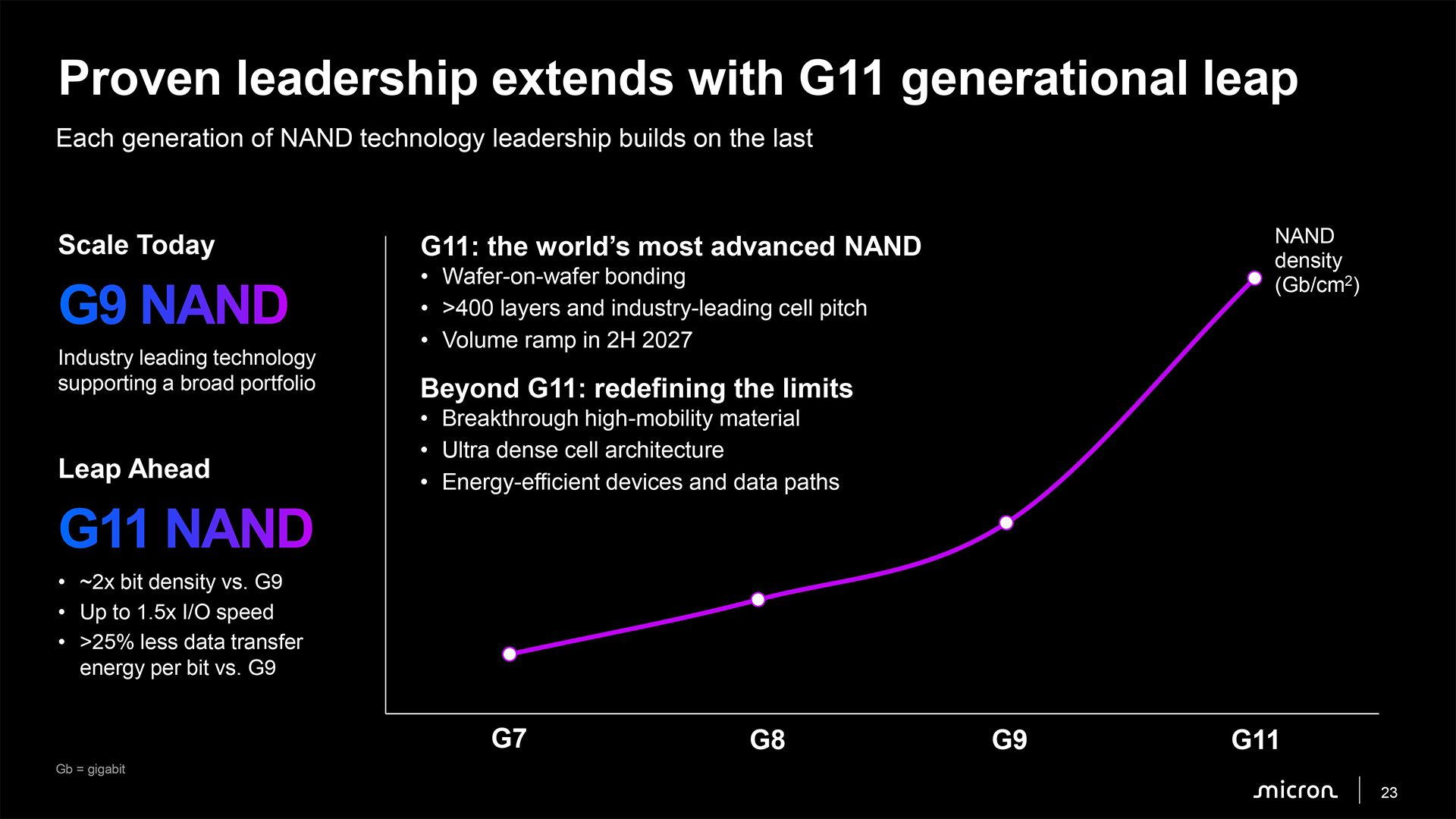
Micron's next-generation 3D NAND, which will enter mass production in 2H 2027, is set to offer three significant advantages: it will double storage density, increase I/O performance by 50% compared to the company's current-generation NAND memory, and decrease power consumption, the company revealed at an event this week. To achieve these aggressive goals, Micron plans to take a page from YMTC's book and adopt wafer-on-wafer bonding. Meanwhile, Micron is also developing new materials and denser memory cell architectures to extend 3D NAND scaling beyond G11.
"We had mentioned we will bring in wafer-on-wafer bonding technology at the right time when it’s cost-effective, and it brings in capability that is important for the product specs at the time, and this is the right timing for that technology," said Scott DeBoer, president and chief technology and products officer at Micron, during the company's event this week. "So this G11 technology is the world's most advanced NAND. It will ramp in the second half of next year, [and] it is based on wafer-on-wafer bonding technology."
G11: Over 400 layers and wafer bonding
Micron's G11 3D NAND represents a substantial advancement over its current G9 (N160) generation. The company expects the new memory to achieve approximately twice the bit density of G9 (3D TLC 21 Gb/mm2 => 3D TLC 42 Gb/mm2?), which means a dramatic increase compared to Kioxia's BiCS10 or Samsung's V10; increase I/O speeds by up to 50% (3,600 MT/s => 5,400 MT/s?); and reduce data transfer energy consumption per bit by more than 25%.
These improvements should benefit both conventional high-capacity SSDs for client and data center applications and emerging AI-oriented storage devices, which require greater bandwidth and energy efficiency.
(Image credit: Micron)
One of the key changes introduced with G11 is wafer-on-wafer bonding, which enables Micron to manufacture different parts of its NAND device on separate wafers using different process technologies — a new 3D NAND node to build a NAND array and a logic fabrication process to make peripheral circuits and I/O — and subsequently bond them together. The company has used CMOS-under-array architectures for several generations. Still, wafer bonding provides additional flexibility to optimize memory arrays and peripheral logic independently, which means more capacity and performance if all goes as planned.
Another important innovation is the transition to more than 400 NAND layers. Micron has not disclosed the exact number of active wordline layers or the number of memory decks used by G11, but the company says the technology will feature an industry-leading memory cell pitch, which suggests that its density improvements will come from both additional layers and smaller cell dimensions.
Micron expects to disclose more technical details about G11 in 2027, closer to the start of high-volume manufacturing in the second half of next year.
Beyond G11: New materials and denser memory cells
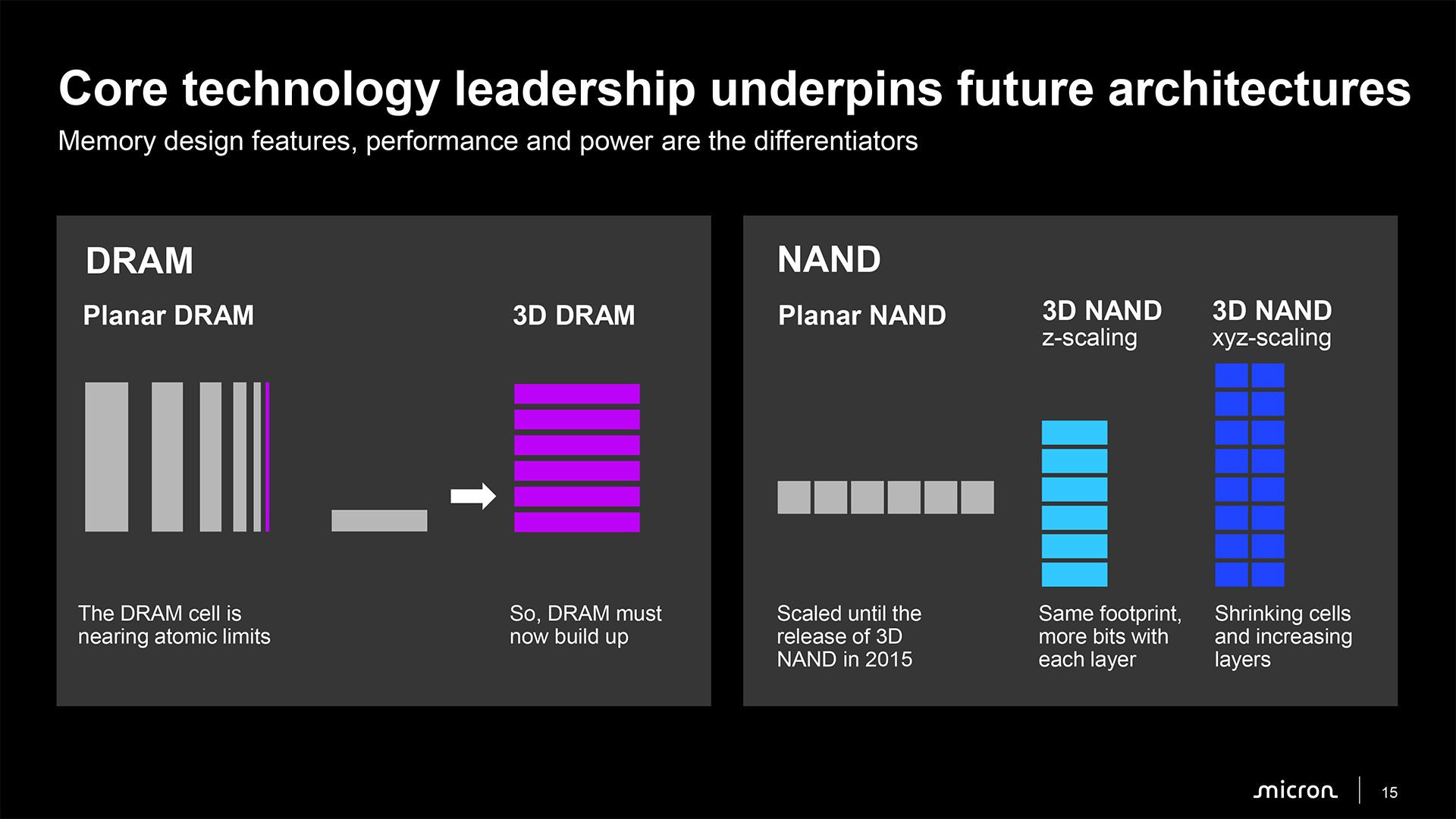
Without any doubt, Micron will continue scaling 3D NAND along all three dimensions rather than simply increasing the number of layers going forward. While conventional 3D NAND scaling initially relied primarily on adding more memory layers, future generations will also require reductions in cell dimensions along the X and Y axes to improve bit density while keeping manufacturing complexity in check.
(Image credit: Micron)
To achieve this, Micron is developing what it describes as breakthrough high-mobility materials, ultra-dense cell architectures, and more energy-efficient devices and data paths. These technologies could improve transistor characteristics, enable further reductions in memory cell dimensions, and reduce the energy required to move data within NAND devices.
"Beyond G11, we have a strong roadmap, not going to go into great detail on it today, but really focused on new materials densifying the cell architecture, and continuing to focus on that XYZ scaling going forward," said DeBoer. "[…] The current industry direction and Micron’s direction is scaling both by adding layers [and] also by shrinking the cell dimensions."
The company has not disclosed specific architectural details, density targets, or production schedules for its post-G11 generations, though its roadmap suggests that future NAND scaling will increasingly depend on innovations in materials, cell architecture, and peripheral circuitry rather than layer-count increases alone. Meanwhile, since the number of active layers is arguably the easiest way to increase storage density, we would not expect the race towards the highest layer count to slow down substantially in the coming years, especially given strong demand for 3D NAND-based storage.
SK hynix early on Friday announced that it had decided to abandon plans for a potential initial public offering (IPO) of Solidigm, its U.S.-based enterprise SSD subsidiary, citing unfavorable stock market conditions and semiconductor share price trends. At the same time, SK hynix confirmed it plans to build a new fab for Solidigm in the U.S. to address growing demand for enterprise SSDs. Although an IPO could have helped finance a new fab in the U.S., SK hynix claims that its subsidiary’s expansion remains a priority.
Solidigm specializes in high-capacity data center SSDs based on floating gate 3D QLC NAND memory. As AI infrastructure deployments accelerate, demand for high-capacity storage increases, whereas Solidigm's existing manufacturing capacity is barely sufficient to address its projected needs. Consequently, SK hynix believes that Solidigm requires additional production facilities in the U.S., although it has yet to disclose the planned fab's capacity, investment requirements, or construction schedule. Such a facility could also strengthen SK hynix's American manufacturing footprint, which is important, given the current environment and on-shoring trends.
SK hynix had considered multiple options — including direct investment, a pre-IPO funding round, and IPO of Solidigm — to finance capacity expansion. An IPO would have enabled SK hynix to raise capital from outside investors without taking on more debt. Furthermore, it could have revealed the true value of the subsidiary, which SK hynix believes is not properly reflected in its own market capitalization. In addition to financing the expansion, the proceeds could have been used for dividends, share repurchases, and share cancellations.
However, SK hynix says that increased market volatility and the ongoing correction in semiconductor stocks have made an IPO less attractive. As a result, the company believes that current market conditions would prevent Solidigm from achieving a valuation that adequately reflects its growth prospects. Consequently, it has discontinued its review of both pre-IPO financing and an IPO, even though it will continue to evaluate alternative funding mechanisms.
The cancellation of the IPO raises an obvious question: why would SK hynix abandon a financing mechanism that could provide billions of dollars for Solidigm's expansion just as demand for enterprise SSDs is at a record high and set to increase further over the next couple of years? After all, constructing a modern 3D NAND fab requires tens of billions of dollars, and external financing could reduce the burden on SK hynix's balance sheet and preserve capital for other projects (e.g., new capacity elsewhere).
One possible explanation is Solidigm's exceptionally strong profitability. Micron's enterprise storage division recently reported a non-GAAP gross margin of 90%, and given Solidigm's unique position in the market (it controls 21.1% of the enterprise SSD market together with its parent company), its margins may well be higher as it sells exclusive products. If extraordinary margins are sustainable over the next two or three years, its operations could substantially boost SK hynix’s consolidated profitability and generate considerable cash for future investments. Given these circumstances, SK hynix could potentially finance Solidigm's U.S. manufacturing expansion through a combination of internally generated cash and debt even without diluting its ownership. Financing the entire project with cash alone may also be possible, even though such an approach would be less likely given the massive capital requirements of advanced semiconductor production facilities nowadays. In any case, it is natural for SK hynix to prefer retaining full ownership of a highly profitable subsidiary to selling part of it at a valuation it considers inadequate.
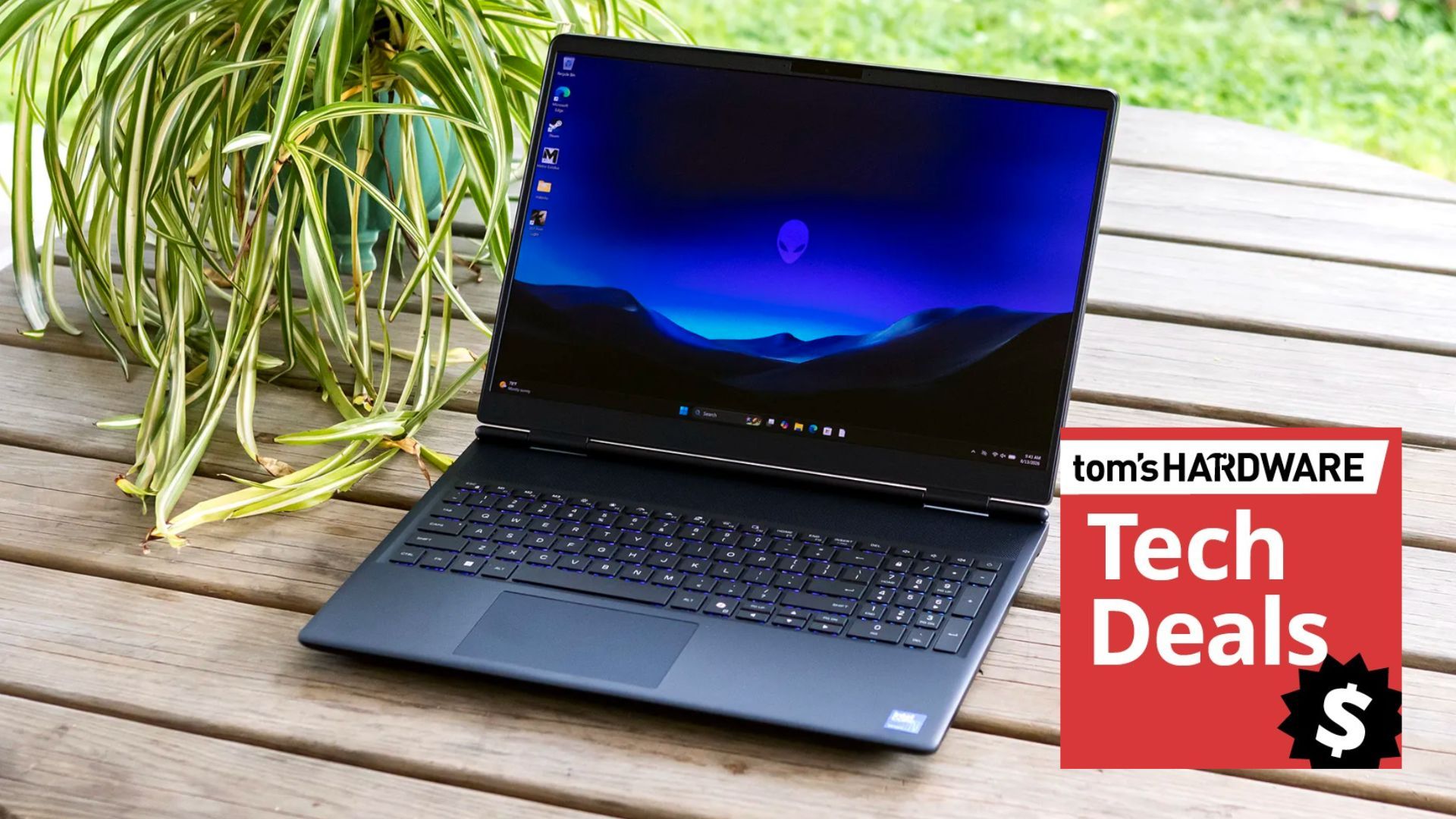
There are a host of great laptop deals at Best Buy at the moment, but one of my favorites today is this fantastic $950 saving on an RTX 5070-powered Alienware 16X Aurora gaming laptop with OLED display for $1,949.99. A significant drop in price from the original $2,899.99 list price. A great choice for a gaming laptop that also doubles as a competent computer for work and studying. The combination of powerful graphics, CPU, and gorgeous display will bring your games and media to life.
The Alienware 16X Aurora is a premium gaming laptop with a Core Ultra 9 290HX processor, a high-performance CPU featuring 24 cores and a boost clock speed of up to 5.5GHz. This is one of Intel's top laptop processors and an excellent gaming CPU. For the graphics, this model of the 16X Aurora uses Nvidia's GeForce RTX 5070 Laptop GPU, which is an excellent choice not only for powering your games to life, but also for getting the most out of the Aurora’s crisp 16-inch OLED 2560x1600-pixel display.
Having an OLED screen means the 16X Aurora will have an insanely low gray-to-gray response time of just 0.03ms, excellent for super smooth motion when gaming, plus the display sports a rapid refresh rate of 240Hz and a maximum screen brightness of 500 nits. Oh, and of course, amazing contrast, inky blacks, and eye-popping color representation.
Finishing up on what major components are inside this model of the Alienware 16X Aurora, we have 16GB of DDR5-5600 MT/s memory and a spacious 1TB SSD for storage, ample room for your favorite games.
The Alienware 16X Aurora is a formidable laptop with a high-end 24-core Core Ultra 9 290HX processor that runs alongside a GeForce RTX 5070. It also flaunts 16GB of DDR5-5600 memory and a 1TB M.2 NVMe SSD.View Deal
We reviewed the Alienware 16X Aurora gaming laptop back in September of this year, praising the excellent 16-inch OLED display, solid gaming and productivity performance, sturdy, understated design, broad port selection, and good upgrade prospects. Making it an easy decision to award the laptop 4 out of 5 stars.
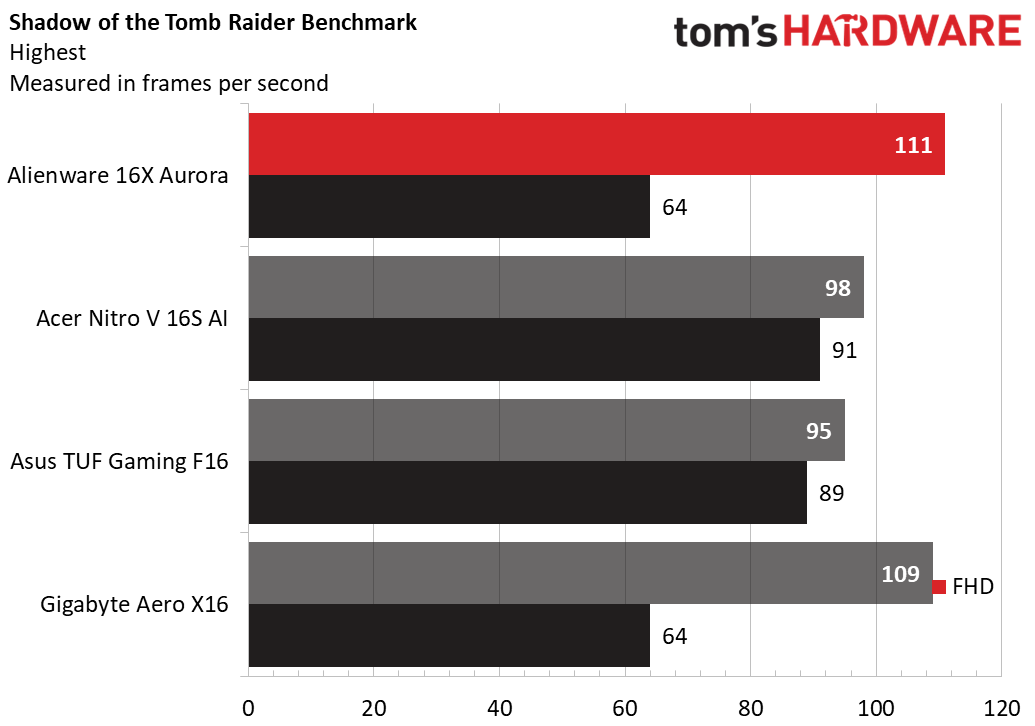
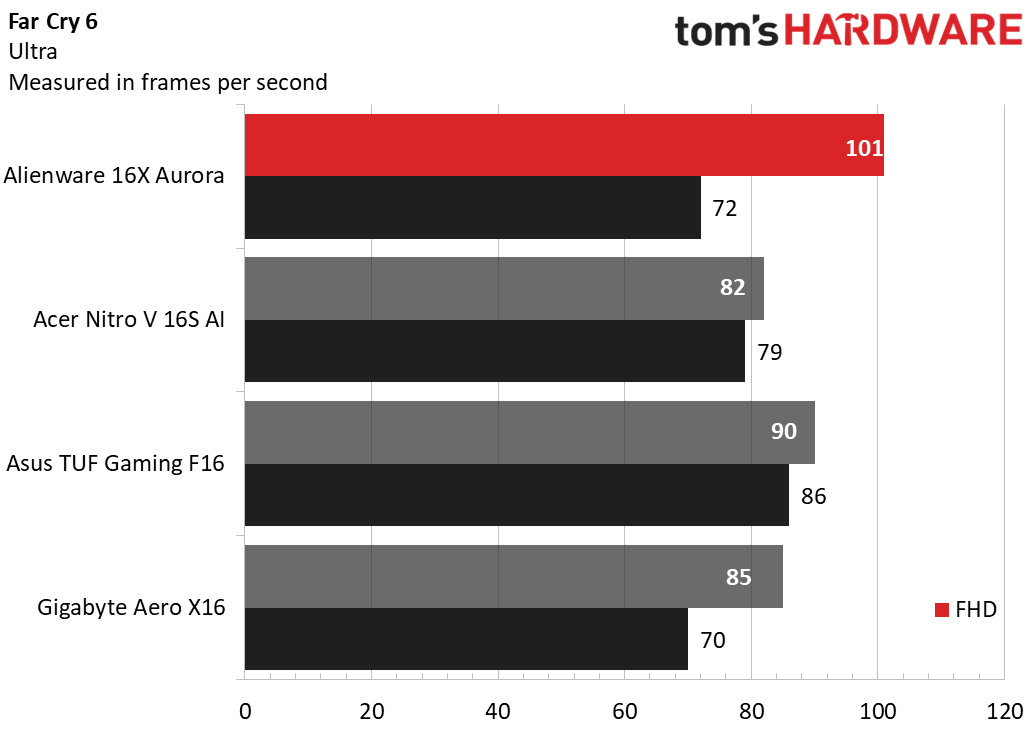
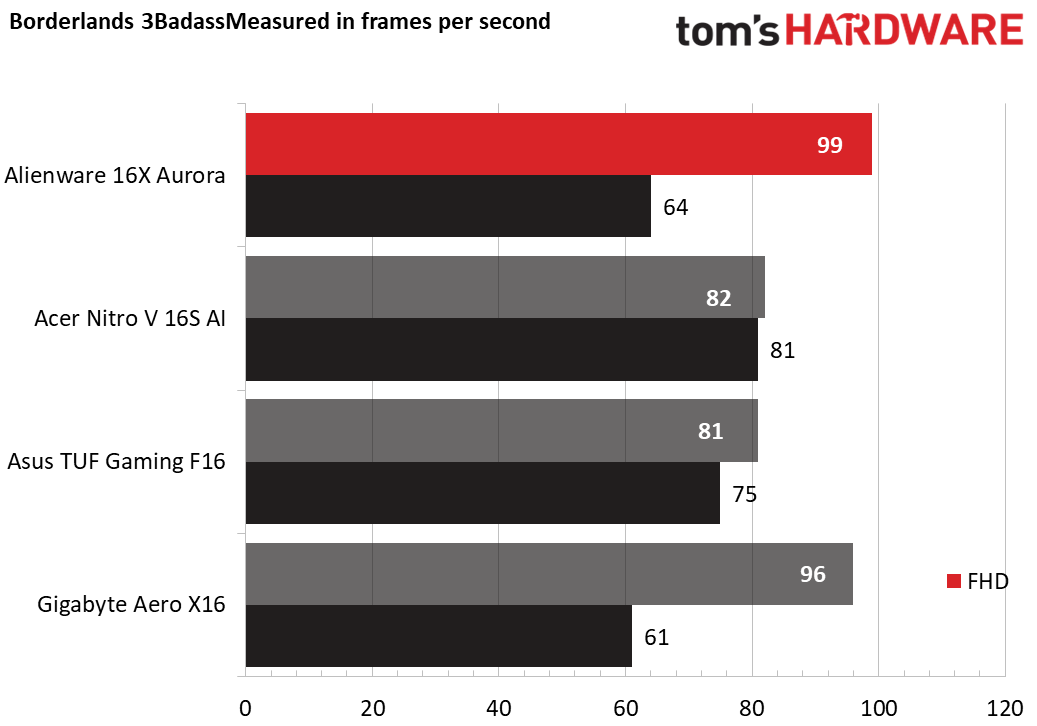
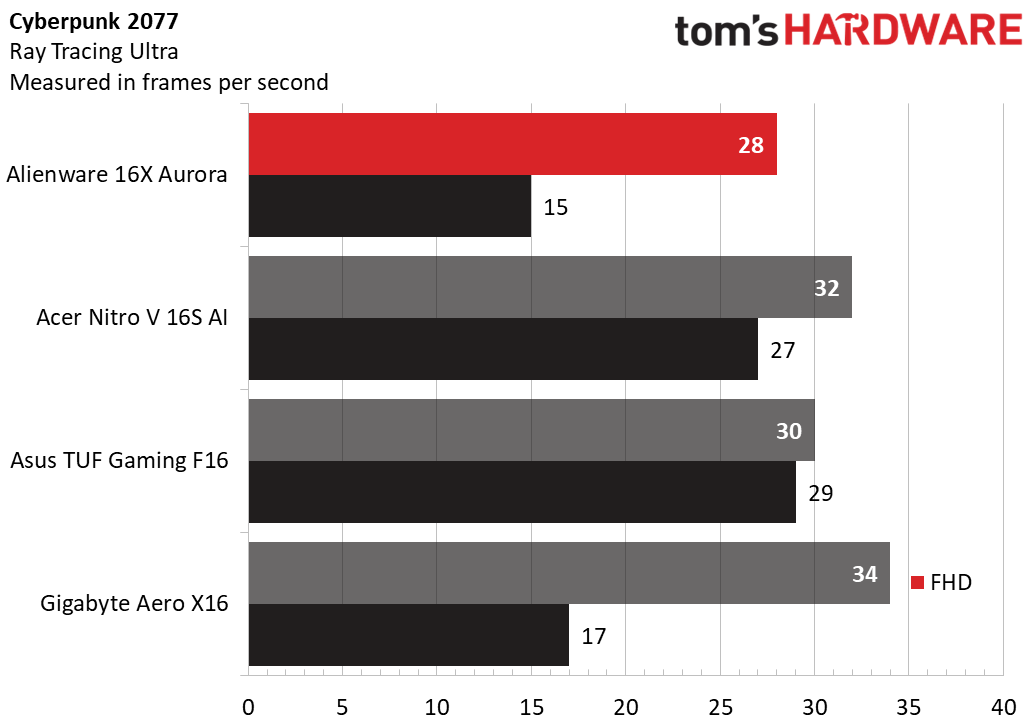
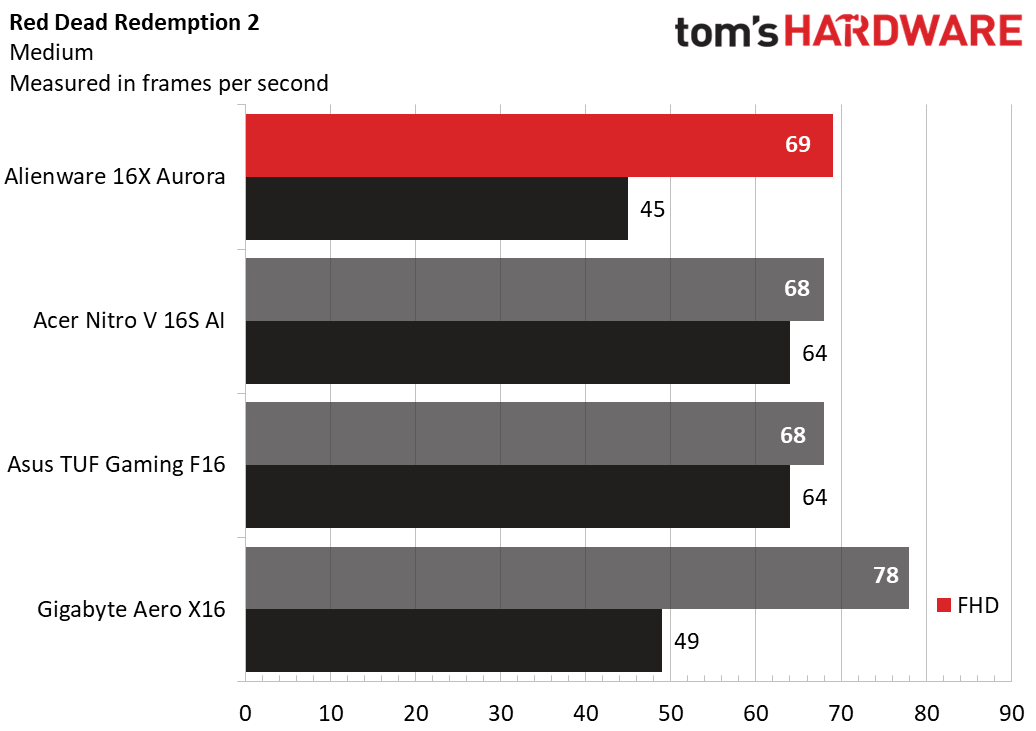
We tested the less powerful variant of the 16X Aurora, in its entry-level configuration, featuring a Core Ultra 7 270HX Plus processor, a GeForce RTX 5060 GPU, and 16GB of dual-channel DDR5-5600 RAM. It performed well against its peers, as you can see from the chart below, but bear in mind that the performance of this model will be higher due to the more powerful CPU and GPU combination.
So if you're looking for a powerful and well-built gaming laptop that also comes with a gorgeous 16-inch OLED display, this could be the option for you. With a price drop of $950, this is a great moment to snag a deal on a new gaming laptop.
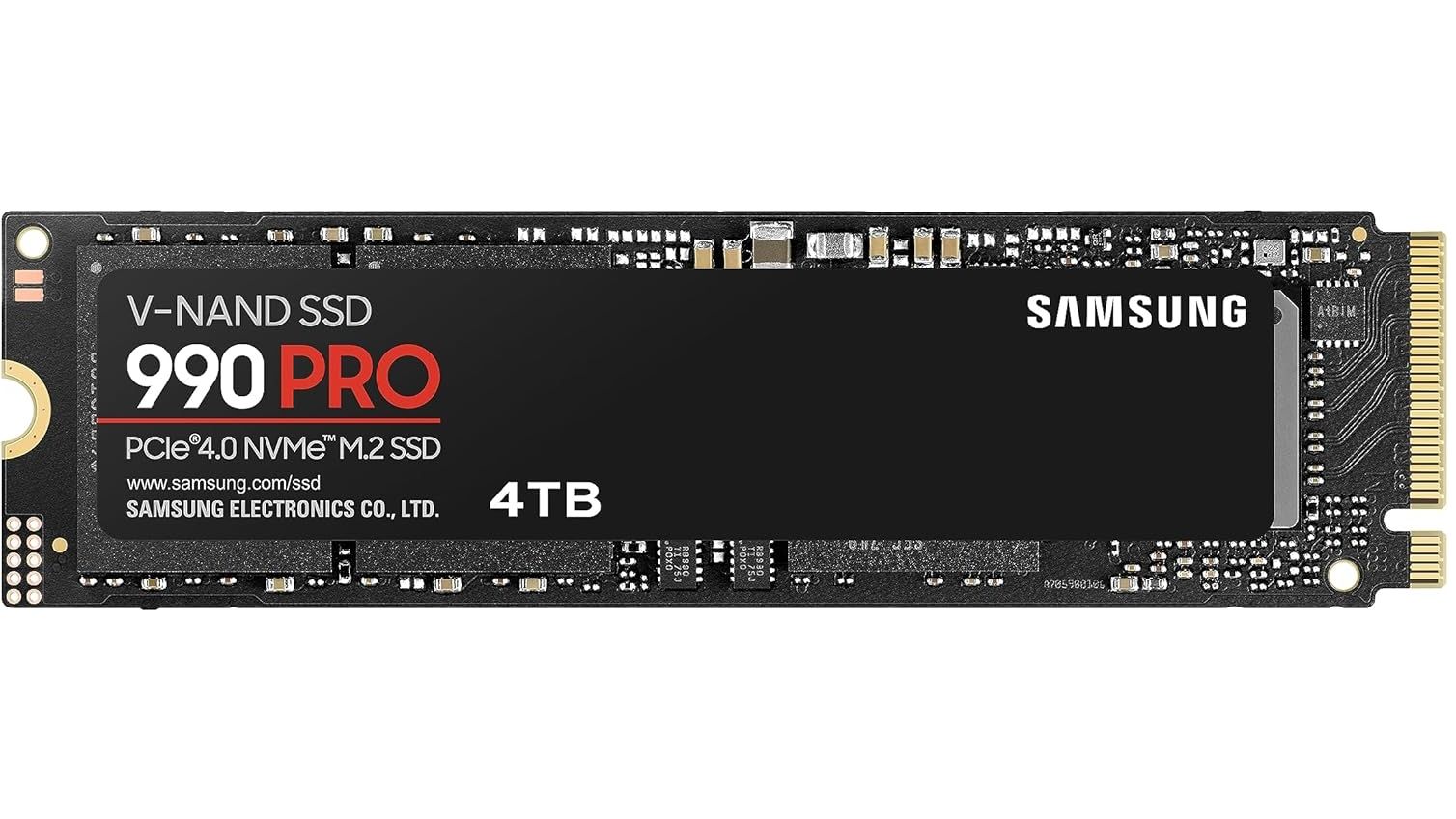
At one point in time, it was the fastest PCIe Gen 4 drive you could buy. Now, the next generation of PCIe 5.0 drives is available, but the 4TB Samsung 990 Pro still offers extremely fast performance and whopping amounts of capacity in a single-sided M.2 2280 form factor. The main issue at the moment is price. Thanks to the AI boom driving up the prices of memory and storage, SSDs have reached insane highs, so to be able to take advantage of a large 27% discount in these times is nothing to be sniffed at. The 4TB Samsung 990 Pro has fallen from $1,099 to this new price of $799.90, a saving of over $300. This works out as roughly 20 cents per Gigabyte of storage capacity.
Having reviewed the Samsung 990 Pro 4TB when it was released, we found it to be one of the best 4TB SSDs on the market and among the best SSDs overall. The 990 Pro boasts maximum sequential reads of 7,450 MB/s and sequential writes of 6,900 MB/s, with random reads/writes coming in at 1.6 million and 1.55 million IOPS, respectively, while endurance is rated for 2,400 TBW.
990 Pro 4TB SSD: was $1099.99 now $799.90 The Samsung 990 Pro 4TB is among the fastest Gen 4 SSDs available thanks to read and write speeds of up to 7450/6900 MB/s, almost maxing out the Gen 4 bandwidth. This M.2 NVMe drive comes in the 2280 form factor and holds enough capacity to store a large selection of your favorite games or files.
Random reads/writes come in at 1.6 million and 1.55 million IOPS, respectively, while endurance is rated for a respectable 2,400 TBW.View Deal
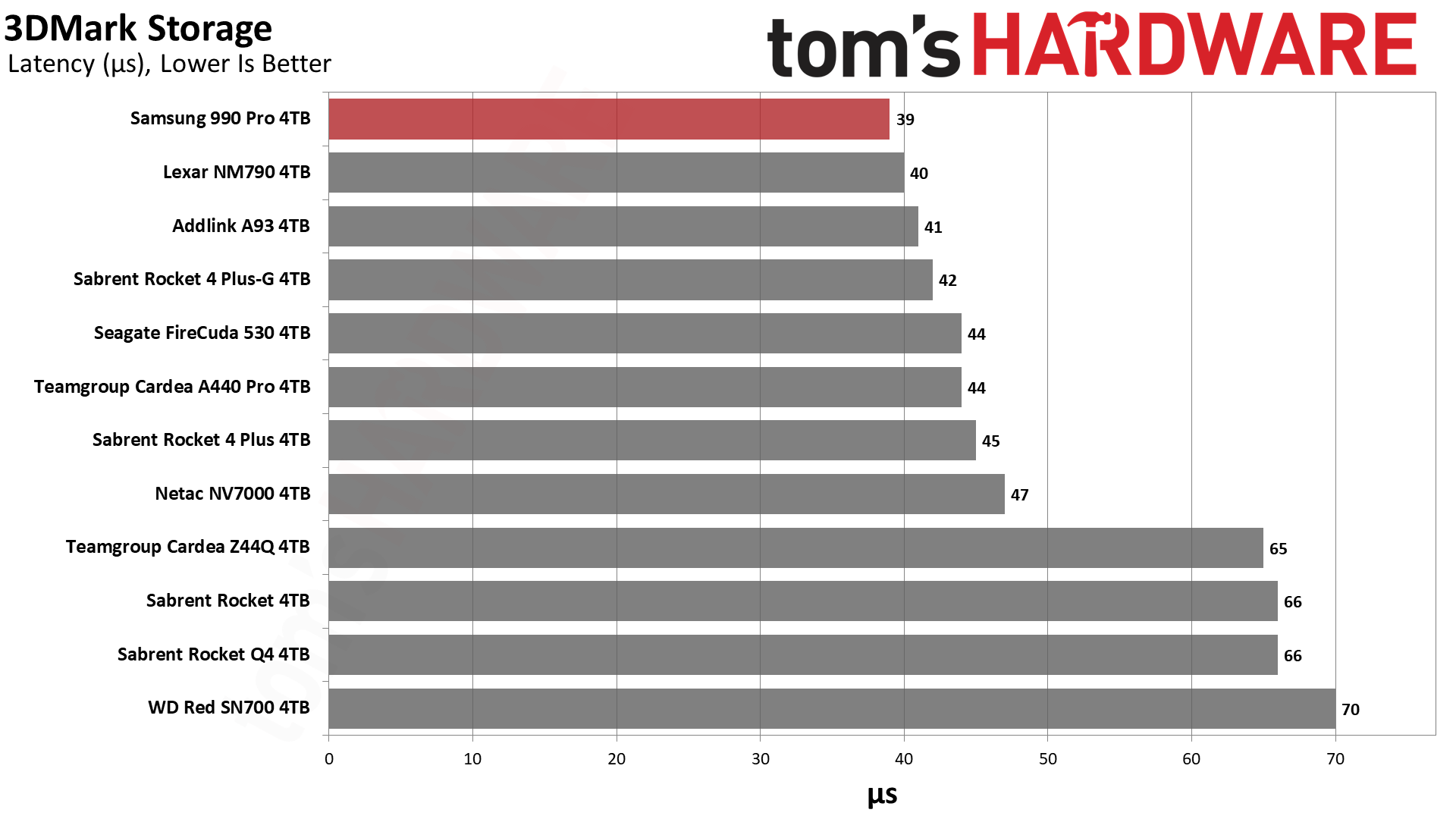
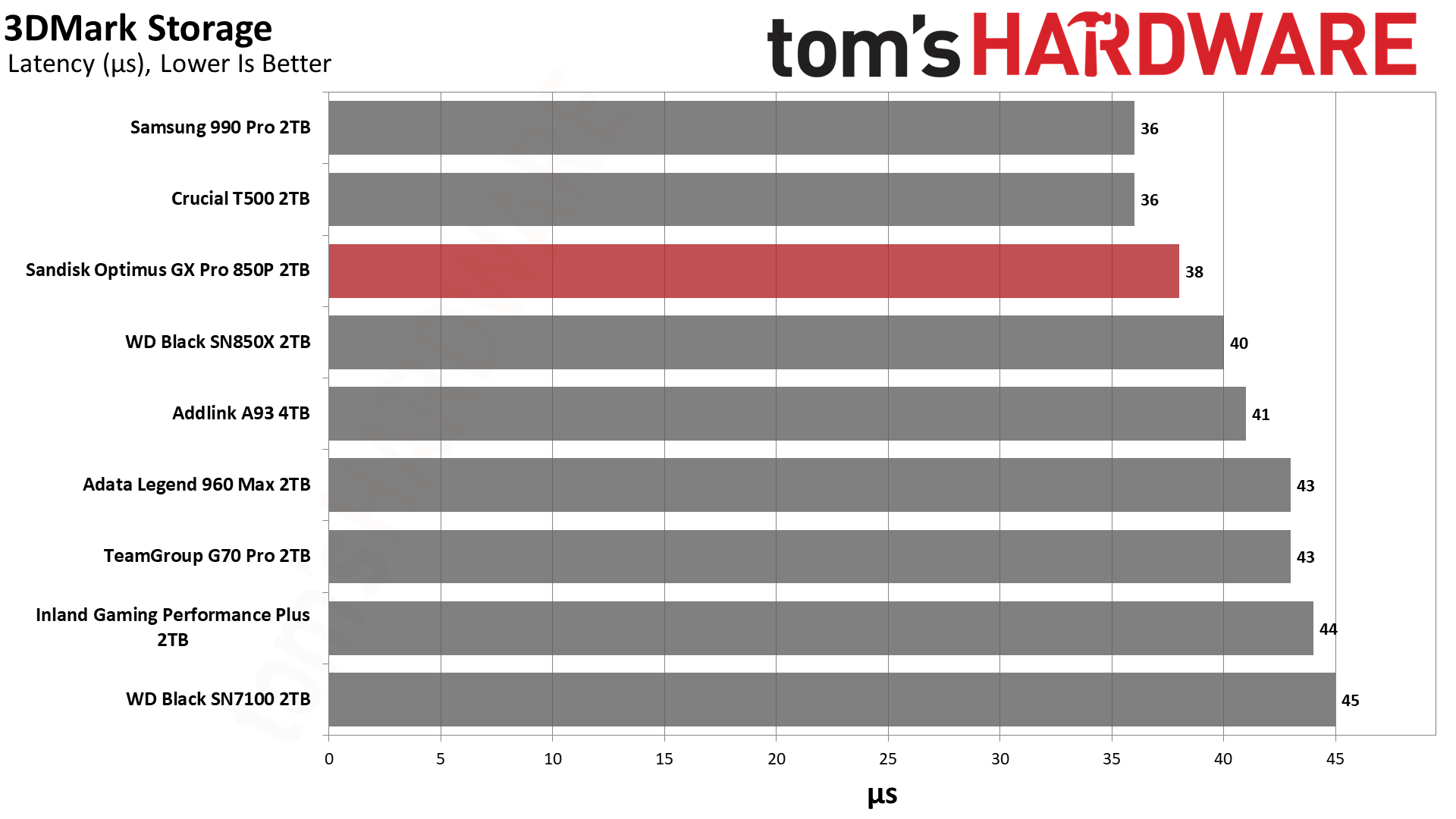
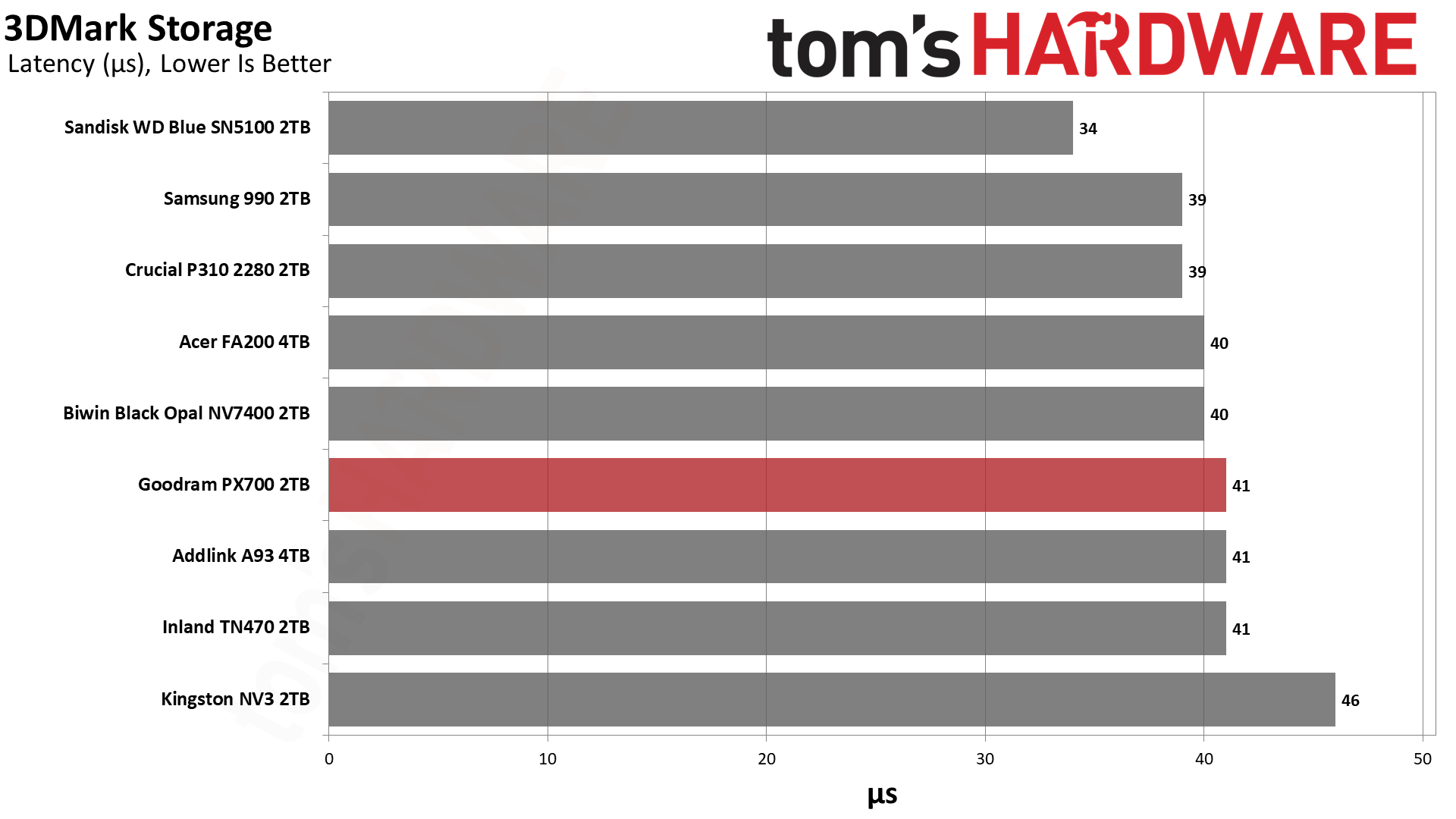
Samsung uses 236-layer TLC V-NAND to achieve its 4TB capacity, while also using a single-sided design, making the 990 Pro ideal for use in computers where space is a finite resource. When we tested the Samsung 990 Pro 4TB, we found it scored above the competition on almost every test. On 3DMark's storage test, it had the lowest latency result, a big plus for responsive load times in gaming.
(Image credit: Tom's Hardware)
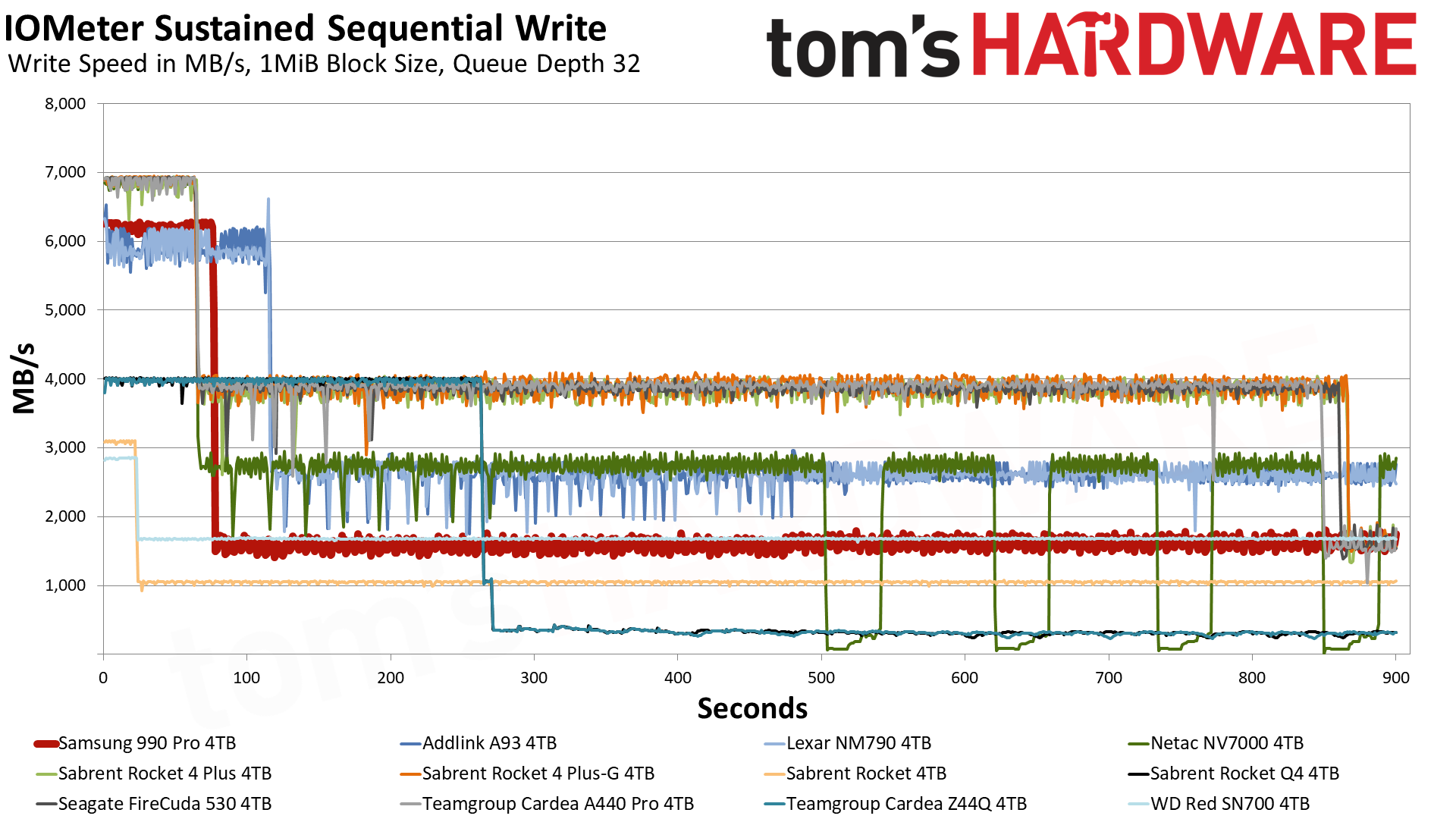
The Samsung 990 Pro is also excellent at sustaining strong write performance. In our IOMeter sustained sequential write tests, the 4TB 990 Pro was able to maintain a speed of 6.2 GB/s for 75 seconds thanks to its generous 10GB of pSLC cache. Once the data spills over into the TLC, it operates at 1.6 GB/s. The Samsung 990 Pro is also a leader in power efficiency, delivering 421.1 MB/s per watt. That number puts it ahead of all competitors but the Addlink A93 4TB and Lexar NM790 4TB.
(Image credit: Tom's Hardware)
The Samsung 990 Pro is certainly nowhere near the all-time low prices of years gone by, and I'm not sure at the moment when, if at all, we'll ever see those low prices again on storage, certainly not for some considerable time. If you want 4TB of storage now, then the Samsung 990 Pro is a formidable choice; just try to grab it when there's as much of a discount as possible.
SSD controller designer FADU’s new File-Semantic SSD (FS-SSD) was announced at the 2026 OCP Global Summit. The new device promises to move the file system into the SSD itself. As detailed in a white paper, this enables GPUs, DPUs, and NICs to open and read files with “no host filesystem, no block layer, and no storage-server CPU in the path.” FADU told Tom’s Hardware Premium it expects partner samples by Q3 2027.
FADU is a Seoul, South Korea-based fabless SSD controller designer. Its FS-SSD technology is designed to handle and improve the control path, as the data path side moved to accelerators years ago. FADU’s measurements show that the file system, plus block layers, can consume about 30% of CPU cycles in a GPUDirect Storage (GDS) random-read workload. It notes that bypass options give up the files, and the company claims its solution promises the best of both worlds.
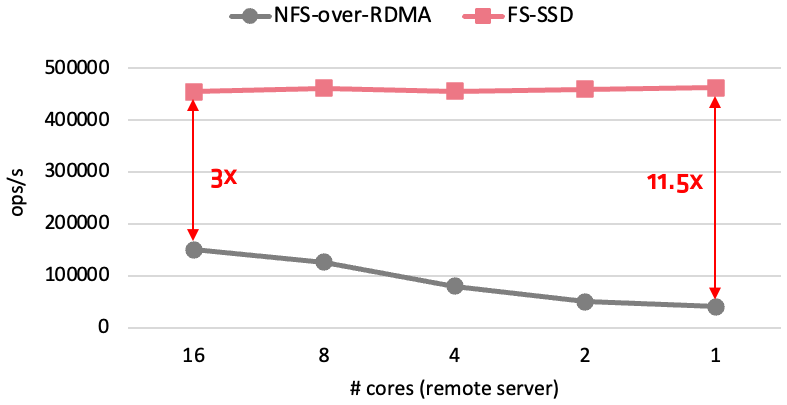
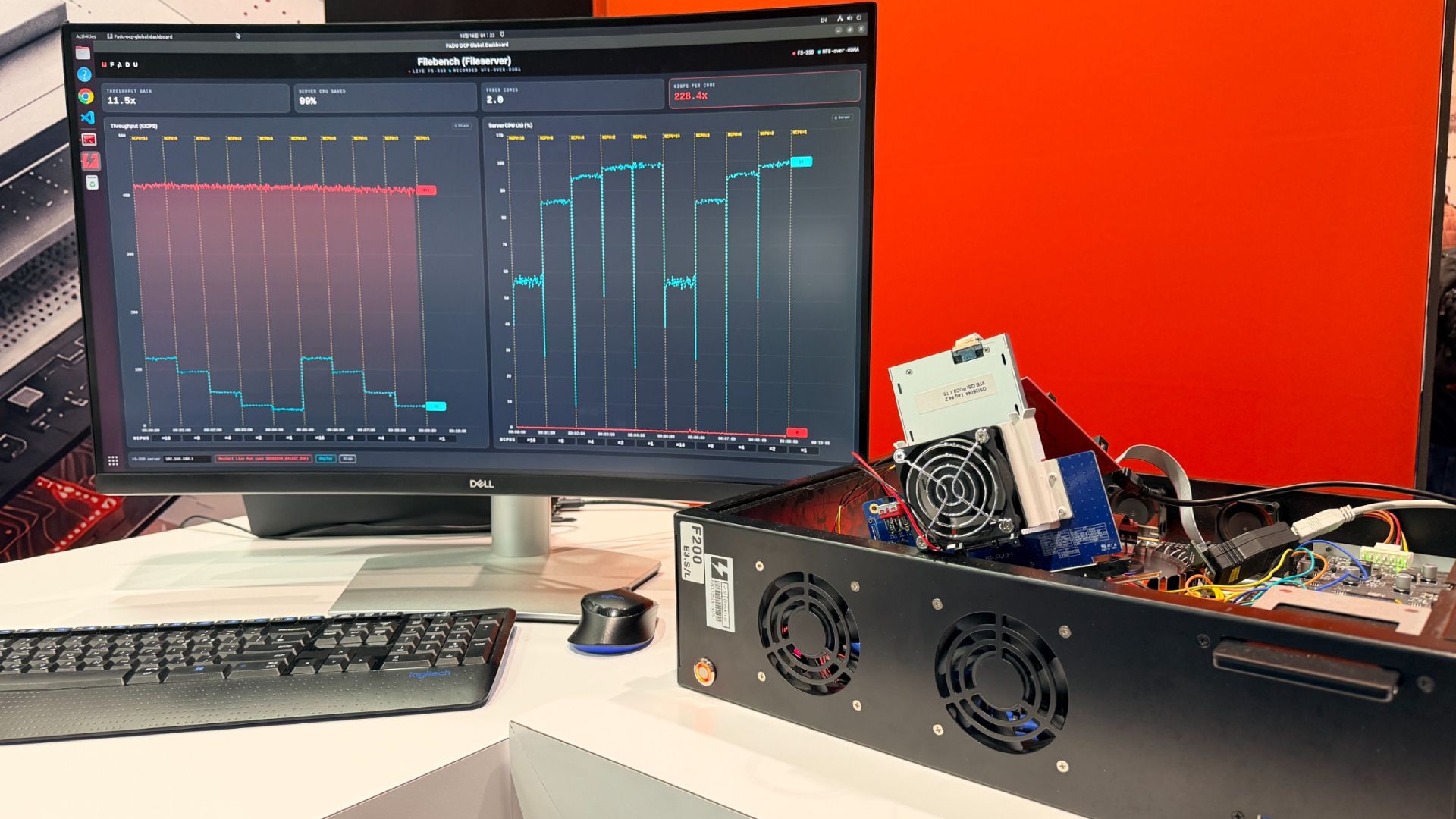
In FADU’s own preliminary Network File System (NFS) over NVMe test, on a drive built on its FC6161 Gen6 controller in a PCIe 5.0 host, remote file throughput held steady as the server downshifted from what FADU labels 16 cores to just one, maintaining about 460,000 ops/s.
The NFSv3 operations are carried inside standard NVMe commands, and the drive handles path lookup, access control, and file-to-flash mapping. FS-SSD’s performance is remarkable when compared to Linux NFS-over-RDMA, which achieved a third of the ops/s with 16 cores and only 40K ops/s with one core. The technology remains “under active development,” and FADU told Tom’s Hardware Premium it expects Gen6-host results by Q1 2027, with partner samples in Q3 2027.
FS-SSD holds about 460,000 ops/s from 16 server cores down to one, while NFS over RDMA falls from approximately 150,000 to 40,000 ops/s (Image credit: FADU)
FADU chooses to use NFSv3 because it’s “small (21 operations), OS- and filesystem-agnostic, and stateless” with low firmware overhead. FS-SSD supports PCIe today, with NVMe-oF over RDMA and TCP working without any new transport needed. Reusing an existing protocol is a smart move, in our view. Under the hood, the file system and flash translation layer are merged with a file layer derived from F2FS. Node and data blocks are aligned with the natural flash pages, sections at corresponding erase units, so that the F2FS node table becomes a “File Map” pointing the node IDs at physical flash addresses.
One big advantage is that the DRAM mapping metadata overhead is considerably smaller: it uses the same amount of DRAM as a standard SSD, ~0.1% of NAND capacity (about 1 GB per TB), which a standard SSD fills almost entirely with its mapping table. Here, most of that DRAM, ~95%, can act as a hot-path node cache.
One garbage collector also replaces two, avoiding what FADU calls the “double GC” of host F2FS, where file-system cleanup and the drive’s own garbage collection amplify each other. Write amplification is also 63% lower versus a host F2FS solution on a mixed sequential and random workload with FADU’s research prototype, the company said. FADU told Tom's Hardware Premium that the prototype runs synthetic fio workloads on NVMeVirt, an open-source software SSD emulator from Seoul National University, so it is not a hardware result.
Most importantly for this method, it ensures host-free access. The GPU builds NFS-over-NVMe commands in queues in its own memory, which could include HBM. Alternatively, a remote SmartNIC or DPU with NVMe-oF target offload can drop commands in the drive’s submission queue. The data goes from SSD to NIC via PCIe peer-to-peer DMA, coming out as RDMA writes. FADU’s explicitly named use cases for this include GPU file reads and checkpoints, DPU-served HTTP content delivery, and a JBoF (just a bunch of flash) file server.
FADU’s numbers for its internal test come from a client and server Intel Core i5-13600K, a CPU with 20 threads that clocks up to 5.1 GHz with 128GB of DDR5, and a Mellanox ConnectX-6 100 Gbps NIC. Synthetic testing is compared using fio with the baseline F2FS and Ext4 on block firmware versus the FS-SSD via a kernel client and an SPDK user-space client. The sequential test is 1 thread, queue depth (QD) 128, with 128KB blocks, while random is at 4 threads, the same QD128, but with 4KB blocks.
These block sizes are typical for client workloads in our experience, so they are a fair measure, with detailed preliminary results in the table below. Against SPDK on the raw drive, figures FADU provided to us, FS-SSD’s SPDK client keeps about 93% on 4K random read and 53% on 4K random write, via fio, with around a 7% and 47% cost for the in-drive file layer. Though the raw drive’s 13,240 MB/s random write is above the ~12 GB/s FADU gives as the NAND’s program bandwidth, those runs likely weren’t at steady state. The Filebench result is particularly interesting, as the SPDK random gains apply to a plain block device too.
This should be the workload most favorable for the technology, as the Filebench file server is metadata-heavy with relatively high host overhead: FADU says it uses 10,000 files in a multi-level tree, mean directory width 20, and a mean file size of 128KB with 50 client threads.
FADU’s preliminary fio results: Gen6 controller in a PCIe 5.0 host, direct I/O
Setup
Sequential read (MB/s)
Sequential write (MB/s)
4KB random read (MB/s)
4KB random write (MB/s)
F2FS
14,120
4,510
7,850
3,980
Ext4
14,130
7,050
9,120
4,560
FS-SSD (kernel client)
14,140
11,940
8,070
4,320
FS-SSD (SPDK client)
Not reported
Not reported
13,000
7,030
Raw block (SPDK)
Not reported
Not reported
13,990
13,240
One important thing to recall is that although this test is on a Gen6 drive, the test results are on a PCIe 5.0 host. Therefore, every sequential read config tops out at around 14.1 GB/s, which is roughly the link limit. The testbed also uses a consumer-class desktop CPU, while the one-core NFS server is a showcase example. The kernel client ends up 11.5% behind Ext4 on random read and 5.3% behind on random write, again by our math.
One example of a tough question more generally is: how do concurrent GPU, DPU, and host writers coordinate? How does a kernel mount’s page cache stay coherent with GPU access? NFSv3 storage devices, by the pNFS Flexible File Layout spec (RFC 8435), are “always treated as loosely coupled,” which means “Mandatory byte-range locking cannot be supported.”
Credentials riding in the NVMe command may also face security issues, as loosely coupled devices get only “a level of security equivalent to AUTH_SYS,” NFS’s basic scheme, in which the server trusts whatever user and group IDs the client sends. FADU’s published material also does not describe features such as snapshots, encryption handling, quotas, ACLs, crash handling, and so forth, related to this. Statelessness is what makes it work, but it doesn’t solve all problems, so the trust factor moves elsewhere.
In reply to our questioning, FADU said that there is no cross-host locking, as NFS’s lock manager isn’t implemented. The drive applies each write whole, in order. If two writes hit the same spot, the second one wins; this is “last-writer-wins.” Coordination depends on the clients: kernel-mounted ones get the usual advisory locks among themselves, GPU and SPDK clients coordinate in the application, and at scale a pNFS metadata server handles the coordination. Caching is also handled like ordinary NFS, with kernel clients, or is not done at all, for GPU and SPDK clients. This is stock NFSv3 behavior.
The drive has to check user/group IDs against the file permissions itself. Because those IDs ride inside the command, a client could fake them, but FADU says it closes that issue with capability-based authentication. Each command carries a capability issued by an outside authentication server, plus a code computed with a key shared only between that server and the drive. This is not detailed in its published material. FADU adds that support for the Kerberos authentication protocol is planned. For networked drives, the standard NVMe-oF protections are used, with only pre-approved hosts admitted. A drive trusts a single host’s kernel like any NVMe drive.
However, as FADU described to us, ACLs and other features are missing in the current release, aside from encryption, which in this case is handled by the FC6161’s standard TCG Opal self-encrypting drive support. Power loss is also typically handled with capacitors flushing metadata, the write buffer, and a log of in-flight operations. On restart, the drive replays the unfinished operations, and every write is durable if the drive acknowledges it.
FADU’s longer sights are on producing a JBoF storage solution with no server in front: FS-SSDs, a PCIe switch, and a DPU or NIC for handling NVMe-oF in hardware. FADU’s model puts this at about 42% lower power, about 57% lower cost per 16-drive server, and higher rack density with significantly lower five-year total cost of ownership. The drives would slot in behind existing pNFS metadata servers and could scale. FADU’s controllers already ship with drives such as the SN861, which Western Digital launched and SanDisk now sells, but this would expand the options and solutions it can provide.
FADU’s FS-SSD roadmap
Milestone
Timing (per FADU)
Details
Gen6-host results
By Q1 2027
FS-SSD tested in a PCIe 6.0 host; hardware write-amplification figures to come with them
Partner samples
Q3 2027
OEM/ODM talks are at an early stage; active collaboration expected once samples ship
Hostless JBoF
By end of 2027
Reference design built on Xsight Labs E1 DPUs, delivered to OEM/ODM partners
GPU access
Now, via GPUDirect Storage
Works with GDS through the kernel client; FADU intends to join the Accelerated IO SIG (xio-sig), where Nvidia open-sourced cuFile; no direct engagement with Nvidia
Standards
Nothing submitted yet
FADU plans to start a file-semantic command set discussion at NVM Express and OCP Storage; samples and client code come first
Next year should bring real numbers and samples, with the JBoF reference design also expected. There may be an NVM Express or OCP Storage proposal down the line for a file-semantic command set to further cement and mature the approach. FADU has a good idea, is building it on an existing framework, and has a testbed with results and a hardware path forward on its Gen6 controller, with a trust model in mind. A Gen6-host run is now needed to support the company’s claims.
Reports that Solidigm was considering building a 3D NAND fab in the U.S. came as a surprise last month, as no company has manufactured NAND flash memory in America for years. However, the potential investment now appears to be part of a calculated move by Solidigm's parent, SK hynix, which is reportedly asking the U.S. government to authorize additional semiconductor manufacturing equipment shipments to its Dalian facility in China in exchange for a commitment to build a new NAND fab in the U.S., according toReuters.
The Dalian fab is the world's only facility to produce 192-layer floating gate 3D NAND for Solidigm's data center-grade SSDs for AI, enterprise, and hyperscale data centers. Its manufacturing operations rely on equipment from major American suppliers, including Applied Materials, KLA, and Lam Research, whose exports to China require a license from the U.S. government. Although the U.S. authorities tend to authorize shipments of some tools to semiconductor facilities in the People's Republic that are operated by multinational companies like Samsung or SK hynix, they only want to keep the fabs running, as they are against expansions of capacity of fabs in China or introducing new manufacturing technologies to these facilities.
Solidigm has requested U.S. export licenses for additional tools, but the U.S. government has yet to authorize the shipments. Last December, the U.S. Commerce Department granted SK hynix a limited authorization for equipment deliveries to Dalian for 2026, but it has not issued a similar equipment export authorization for 2027, according to Reuters. In a bid to persuade the U.S. government to authorize shipments of necessary tools to its Dalian facility, SK hynix proposes to build a 3D NAND facility in America. This would fill an important gap in the Trump administration’s efforts to bring semiconductor manufacturing back to the U.S.
SK hynix's Solidigm subsidiary wants to install additional manufacturing equipment in the unused portions of its Dalian Mod B facility, which was completed in 2023. The company never fully equipped the building because of the memory market downturn at the time, so while some production tools are installed, substantial space remains unused and is available for additional tools. Given that Solidigm sells every single SSD it produces, unused capacity means lost revenue. Meanwhile, because the building was completed in 2023, installation of tools into that facility does not constitute a capacity expansion.
Additional NAND production in China could generate profits that Solidigm could use to finance its proposed American fab and support its operations until domestic manufacturing capacity becomes available. The company is also considering an initial public offering as early as 2027 to raise additional capital.
Solidigm has previously confirmed its commitment to further development of floating-gate 3D NAND technology. In aninterview with Tom's Hardware at Computex 2026, Avi Shetty, who leads Solidigm's AI solutions and ecosystem business, said that the company intended to develop 5th and 6th Generation floating-gate NAND beyond its existing 192-layer technology. He also emphasized the importance of maximizing factory utilization and profitability. However, he did not disclose plans to expand manufacturing output at the company's Dalian facility, not to mention a new fab in the U.S.
Nonetheless, the new reports about SK hynix's intentions clearly indicate that the company not only intends to keep developing new generations of Solidigm's floating-gate NAND, but also to expand its production in China and the U.S.
SK hynix has detailed plans to reduce reliance on power-hungry CPU cores with an in-house core named a Hynix Transaction Processing Unit (H-TPU). Not to be confused with an AI accelerator, an H-TPU would assist with repetitive work handled by an SSD, which usually demands more cores on a controller as drives get faster. These new cores are placed in clusters and would handle routine I/O with a four-stage, in-order pipeline, while management is left to the traditional Arm CPU. The new, tiny cores are claimed to draw only about 2.5% of a general-purpose CPU core’s power, with just around 4% of its area. Now, the company plans to apply H-TPU across its portfolio of products, TheElec reports.
The company’s VP of system-on-chip (SoC) design, Koo In-jae, spoke at ISOCC 2026, the International SoC Design Conference, earlier this week, saying that SSD controller CPUs are at their limit on power and area. In the talk, titled “From SSD Controllers to AI Memory SoCs,” he said that PCIe bandwidth doubles every generation, and controller CPU clocks and control capability reportedly can’t keep up. SK hynix reportedly plans to apply H-TPU across its NAND products, including next-gen enterprise SSD controllers. That’s where the unending chase for IOPS makes the problem most evident.
Koo’s comments underline the issue of scaling, which is evident in the “more cores” solutions found in competitor products. Marvell’s PCIe 6.0 Bravera SC6 uses 12 Cortex-R82 cores in two six-core clusters with three Cortex-M7 cores and a secure Cortex-M3. Compare this to its PCIe 5.0 predecessor, the Bravera SC5, which lists 10 Cortex-R8 and Cortex-M7 cores plus a Cortex-M3 for security. Core counts have climbed with PCIe speeds out of necessity.
SK hynix’s answer is a core of its own design: the H-TPU, kept small and programmable. It comes with a dedicated compiler and other development tools for specialized code. It’s stated to use a four-stage pipeline with in-order, or sequential, execution. It is not superscalar, does not use out-of-order units, and should not be confused with a tensor processor for AI. It is designed to handle read and write command processing, manage metadata, and handle buffer control, all repetitive tasks.
Storage control requires more than 100 detailed functions, which is not ideal for a monolithic CPU. Instead, SK hynix broke those functions up and spread them across “dozens of small TPU clusters,” according to ZDNet Korea (translated). Each H-TPU therefore has a specialized job. The total number of H-TPUs is more than 100; the function count above is a separate figure. However we currently have no details on how many cores each cluster holds.
The main CPU still handles error recovery and exception handling, plus storage-policy management, so the H-TPU complements the CPU: offloading, not replacement. The design idles the cores a given I/O doesn’t need, which reportedly drop into a minimum-power mode. Neither report names the CPU core behind SK hynix’s 2.5% power and 4% area figures.
Splitting the workload this way is not a new idea. Phison’s CoXProcessor, which pairs Cortex-R5 cores with hardened macros to offload repetitive firmware at wire speed, has been in products for some time. The company’s E18 SSD controller uses two lower-clocked Cortex-R5 cores to supplement the three main ones. On the enterprise side, Phison’s X1 used two Cortex-R5 cores plus up to 32 “micro cores,” each dedicated to one or two tasks. H-TPU takes this approach to a larger scale.
While the talk itself is light on detail, we discovered multiple SK hynix patents that describe a similar split between small cores and a CPU. U.S. patent 11,675,537, first filed in Korea in November 2020, details a CPU-run control plane and an I/O plane of many small processors, sorted into four groups by job. A command passes through all four in order: host for ingestion, cache, map, and NVM to the NAND. The processors “configure a pipeline for the data I/O operation” this way, letting the CPU handle any exceptions. That pipeline runs across many cores and is unrelated to the four-stage pipeline inside each H-TPU.
In the patent’s example, each small core is around “200,000 logic gates” rather than the “seven million logic gates” of the CPU, or about 2.9% of the CPU’s gate count. These are not fixed elements, as “firmware may be driven in each of the TPUs,” making them more adaptable than the hardware circuits the patent calls “difficult to modify.” The patent spells out TPU as “Tensor Processing Units,” but, again, this should not be confused with AI accelerators. H-TPU shares that programmable approach, but the next step SK hynix described moves some routine jobs into fixed hardware.
This next step is hardware automation (HWA), with command processing, address lookup, and buffer copies moved to dedicated circuits. The CPU and H-TPUs still handle exceptions and key policy decisions. Moving to this framework is meant to keep completion times predictable, which is necessary with I/O, especially for today’s high-IOPS enterprise SSDs.
SK hynix has filed on fixed-hardware paths before, with a 2014 filing by its San Jose-based unit and, later, with U.S. patent 12,216,914, first filed in Korea in 2022. The latter describes a “write automation circuit” and says “a task without intelligent control can be handled or processed through the hardware layer,” while firmware keeps jobs such as garbage collection. The former went further, sending basic I/O commands down a path “completely implemented in hardware,” with anything it couldn’t handle being sent upstream.
The H-TPU itself is reportedly being used in “Storage Next,” Nvidia’s name for the joint AIN P project with SK hynix. Storage Next targets 512-byte or more limited access with NAND, which traditionally aims at higher operating sizes. SK hynix also plans to apply it to high-bandwidth flash (HBF), which the outlet said is due next year. HBF stacks NAND dies for AI inference, targeting high-bandwidth memory (HBM) levels of bandwidth but with far more capacity, with up to 512GB per stack versus 64GB for HBM4.
For HBF, AI inference reads outnumber writes around 300,000 to 1, with the AI compiler and runtime passing pre-analyzed dataflow to the HBF SoC. Proper buffer management and prefetching based on that dataflow are meant to hide the slow NAND latency behind compute. Size is important in HBF stacks, so a traditional multi-core Arm design is likely less practical.
H-TPU has yet to be proven in an actual enterprise SSD controller product, and no date has been given. The move from general-purpose CPU cores to specialized single-job cores and circuits matches the type of workload SSDs handle, and the demands on storage are only increasing as AI servers become memory-constrained.
SK hynix’s statements and patents support an evolution to H-TPU and beyond to HWA, with H-TPU itself headed for traditional NAND and next year’s HBF. SSD controller manufacturers must be willing to adapt, as simple scaling is suboptimal even at current PCIe levels, let alone the speeds promised for PCIe 7.0 and 8.0, the latter headed for final ratification in 2028.
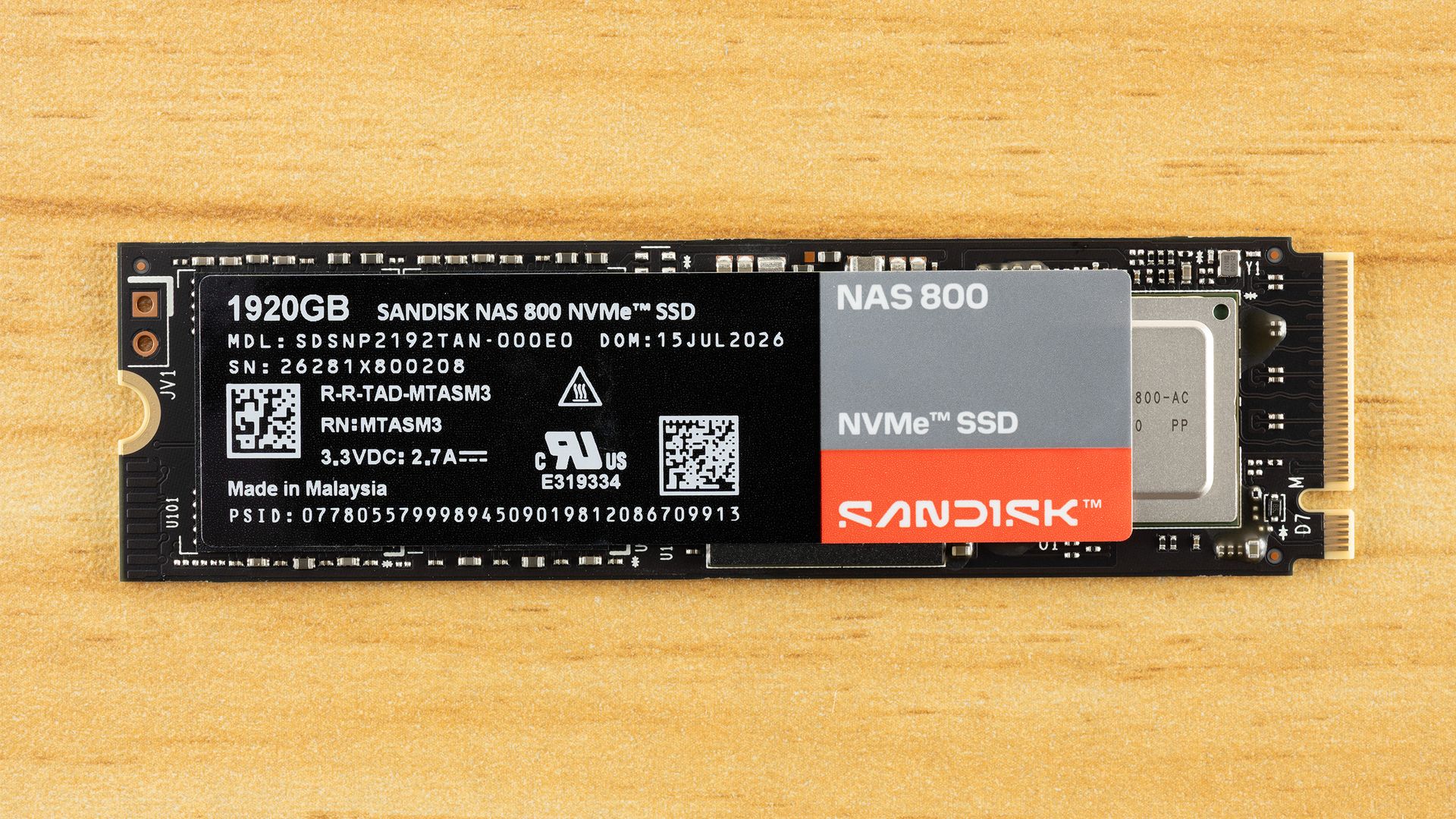
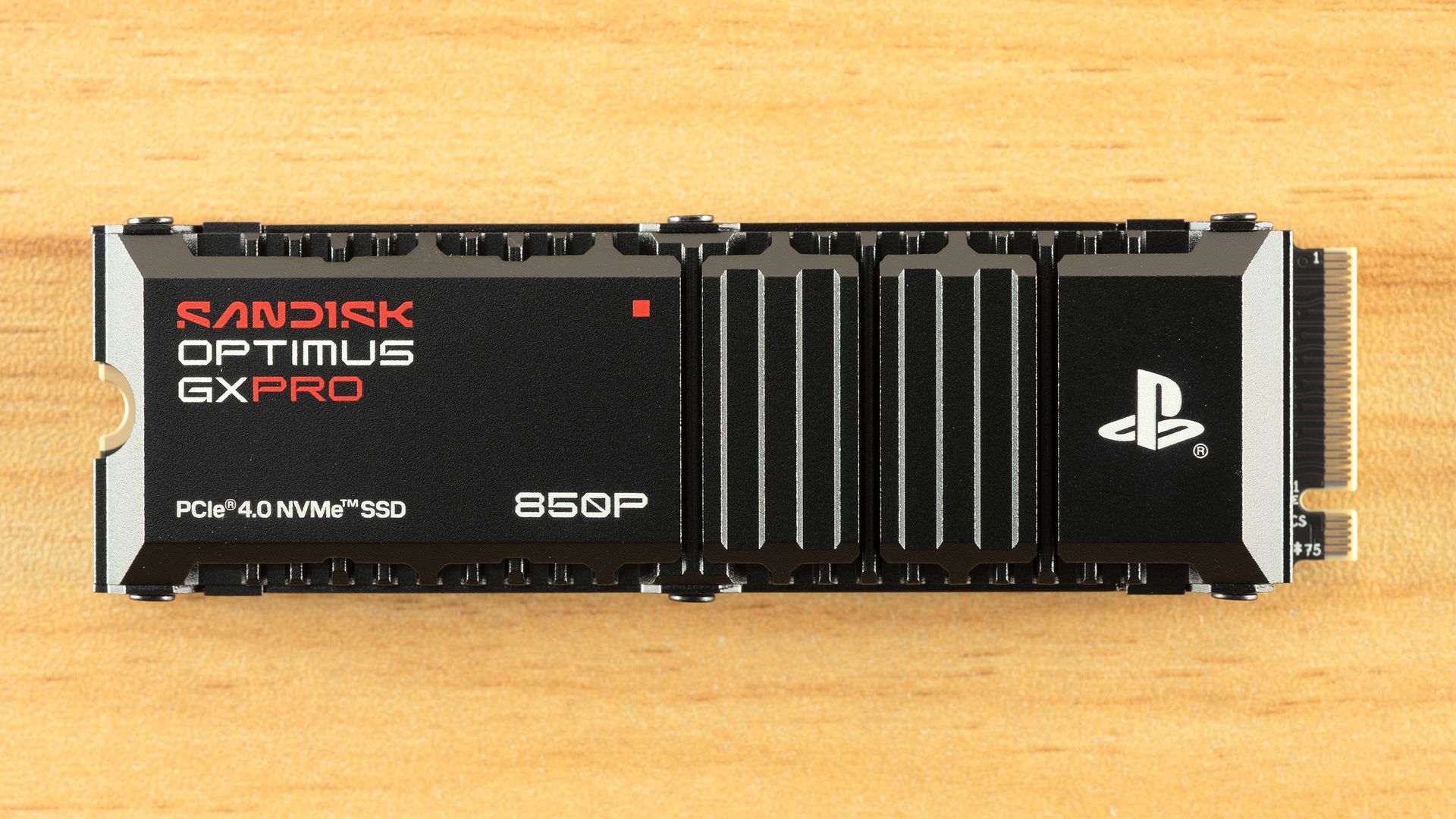
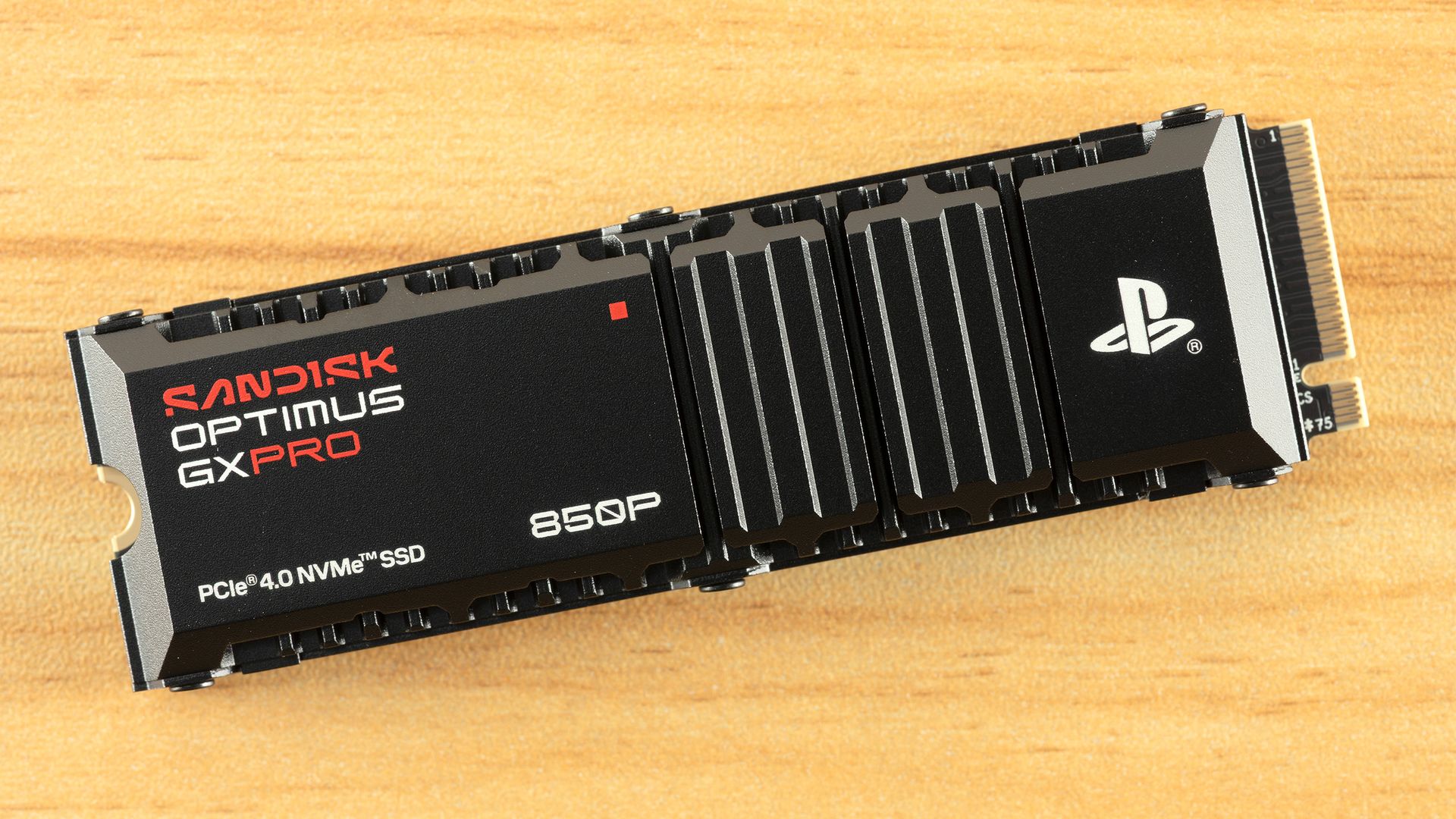
Sandisk is back with another welcome SSD, the NAS 800. As the name implies, this drive is designed for NAS appliances, but could also be a good choice for high-end desktop and enthusiast workstations. We recently reviewed the Optimus GX Pro 850P, a consumer drive for the PS5, so SanDisk is on a roll. The company has made it clear it wants to support the broader consumer market, as it’s even bringing back SATA SSDs in the form of the 320 and 520 series. The NAS 800 is closer in theme to the WD Red series of drives, like the WD Red SN700, which are optimized for home and small-business servers.
At its heart, the NAS 800 is a specialized, optimized Sandisk Optimus GX Pro 8100 (formerly the WD Black SN8100). That progenitor is one of the best drives on the market. It has a stellar controller and excellent all-around flash with good power efficiency and low latency. This makes a great base for a NAS drive, although some changes are necessary. The bones are good, though, and this drive could be used in any system. The only real issue is that you’re paying a premium for the NAS optimizations, and that’s where our focus is.
The Sandisk NAS 800 has some strange capacities, at least compared to consumer offerings, because the drives reserve more spare flash as overprovisioning, which improves endurance. The drive comes in 960GB, 1.92TB, 3.84TB, and 7.68TB flavors. The final one is the most welcome, as it’s been difficult to find larger drives outside of enterprise. Performance is excellent, at up to 14,900 / 13,200 MB/s for sequential reads and writes and up to 2,300K / 2,100K random read and write IOPS. Peak overall performance should be achieved at 3.84TB.
Write endurance is where this drive really stands out. It’s rated for up to 14PBW at its maximum capacity. Proportional to size, this puts it at almost three times the normal for consumer drives. The drive also supports TCG Opal self-encryption for data at rest, as would be expected for a drive in this class. Things are capped off with a standard five-year warranty.
You pay for this performance and endurance. At the time of writing,SanDisk’ss store lists the four capacities at $387.99, $699.99, $1,374.99, and $2,749.99. That’s roughly 45% to 65% more than the WD Black SN8100’s current street prices. Against the same drive under its new Optimus GX Pro 8100 name, the premium is between 27% and 29% at the time of review. The extra cost comes partly from the drive’s optimization but mostly from its TBW rating. You’re getting about one drive write per day over the five-year warranty, which is all but required for a drive of this type, and worthy of the price tag if you’re focused on endurance.
Sandisk NAS 800 Software and Accessories
If you own a Sandisk drive, or a WD drive for that matter, then you should be no stranger to the NAS 800’s software offerings. Sandisk has its own dashboard, aptly named Sandisk Dashboard, which follows the popular WD Dashboard. This SSD toolbox has all the information you need for your drive, including important SMART and health information. It also lets you enable optional features, find firmware updates, and more. Sandisk also provides a download for its OEM version of Acronis True Image, useful for backing up your files or cloning your drive.
Sandisk NAS 800: A Closer Look
Tom's HardwareTom's Hardware
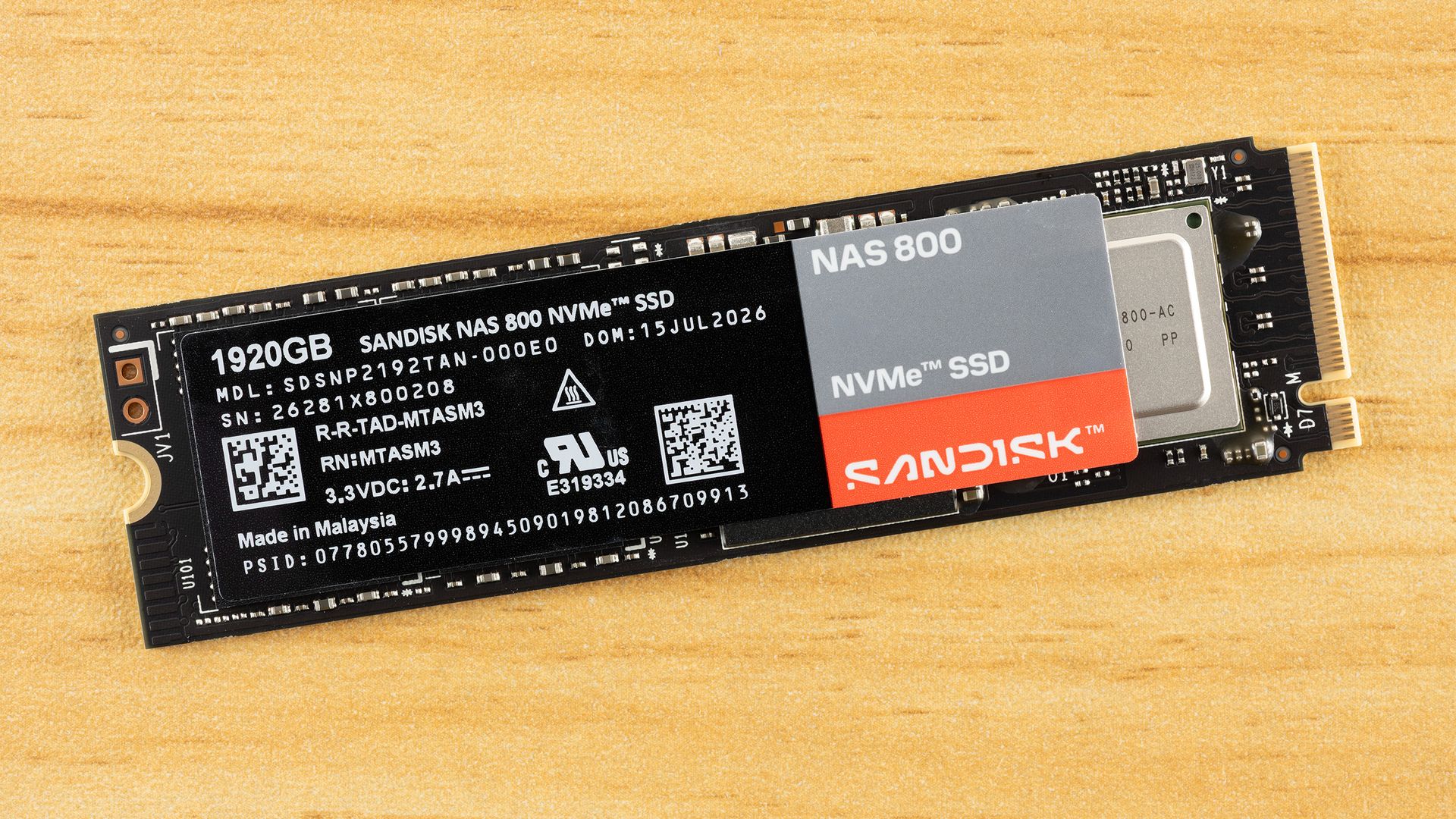
The 1,920GB, or 1.92TB, version of the NAS 800 is single-sided. That also applies to the 960GB and 3.84TB versions. Only the 7.68TB version is double-sided, although that shouldn’t generally preclude you from using it in devices that would benefit from the drive. It could make a difference for certain cooling arrangements. The drive’s rating of 3.3V / 2.7A puts it at around 9W, which is between the drive’s maximum power state of 9.50W and its 6.5W / 6.4W average draw for this capacity. The reported active draw of 7.52W is higher than this average, but given that this drive is NAS-optimized with a small pseudo-SLC (pSLC) cache, it will likely be lower in practice. The drive should run cooler as a result.
Tom's HardwareTom's Hardware
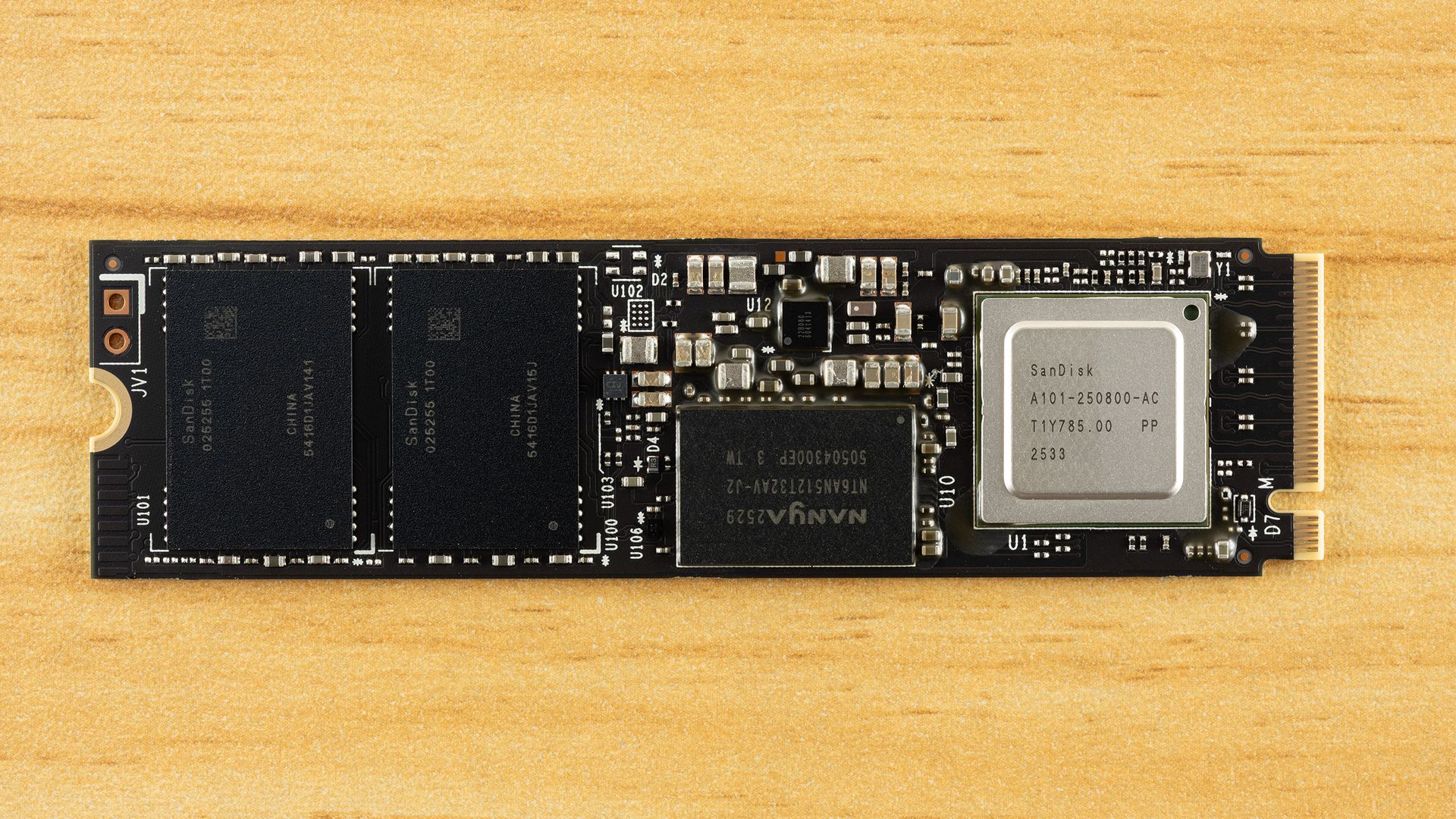
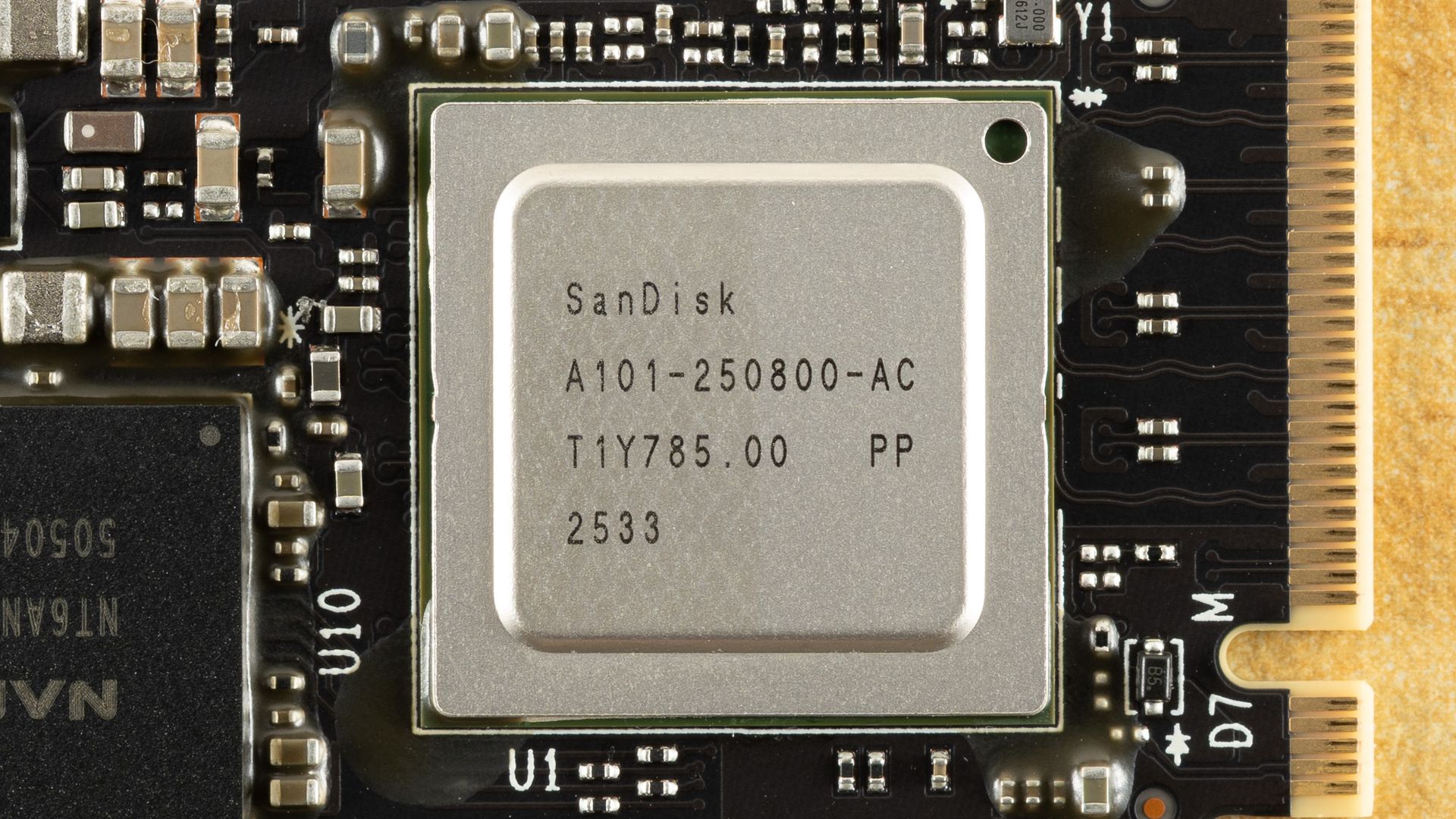
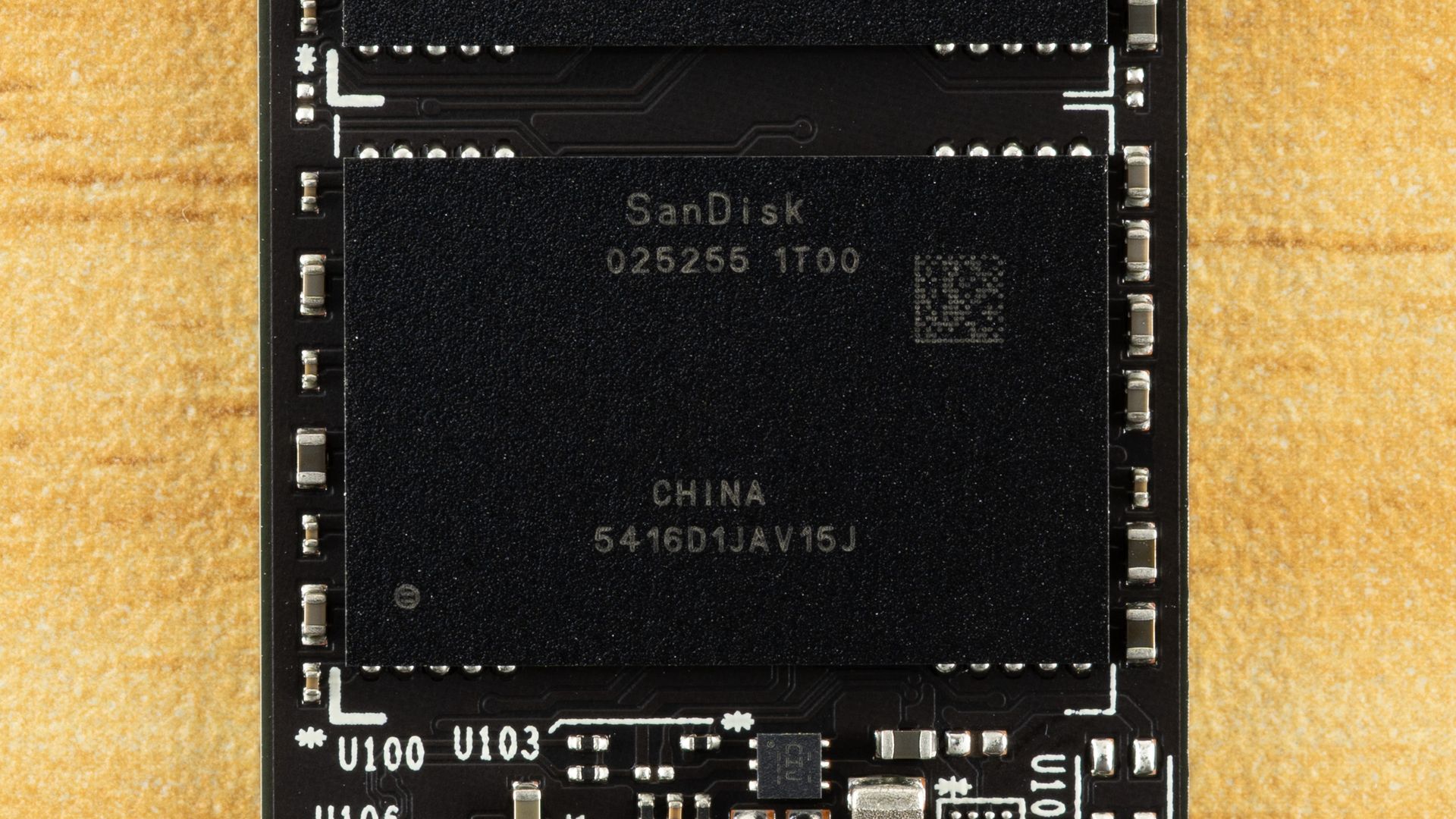
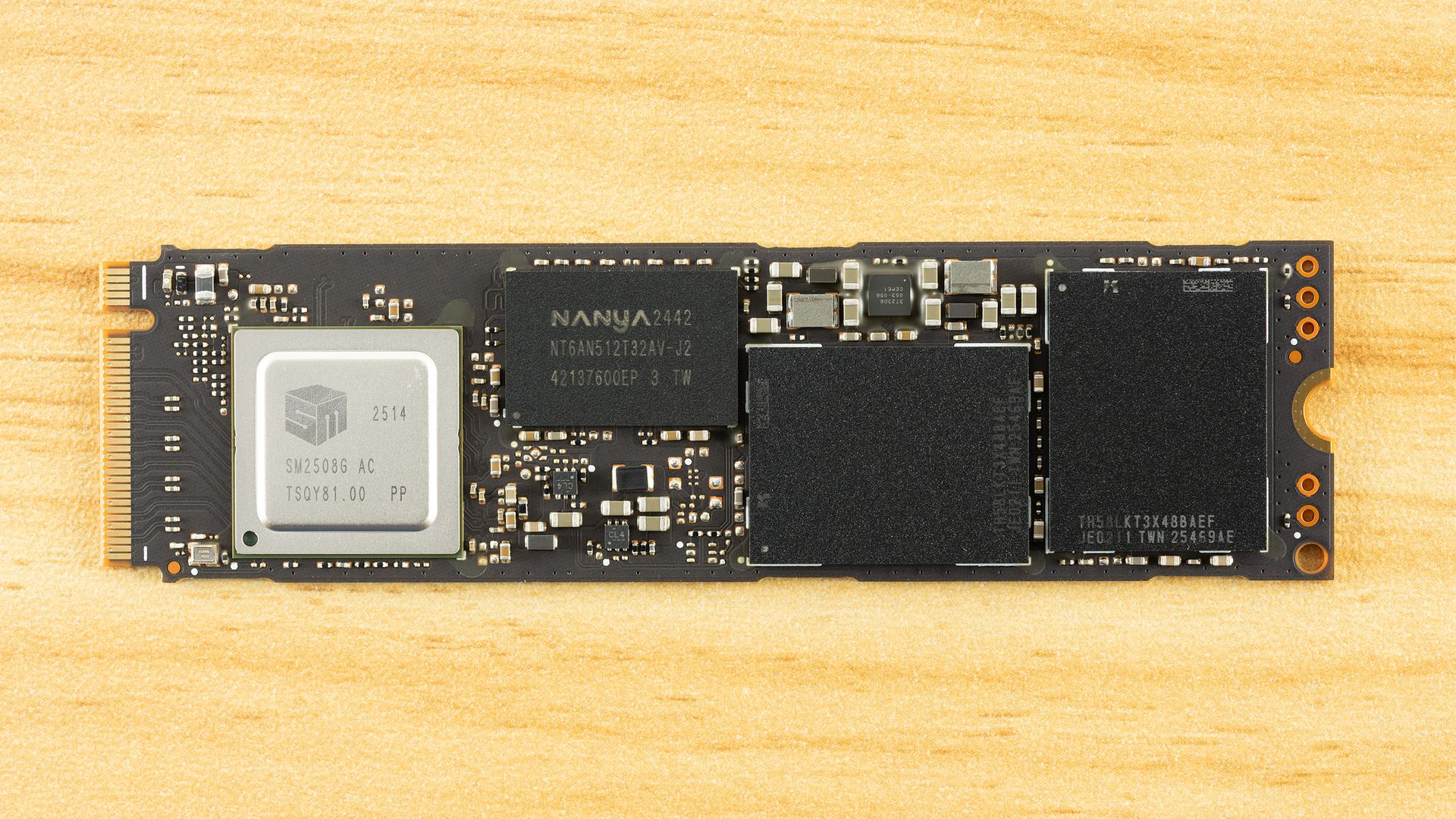
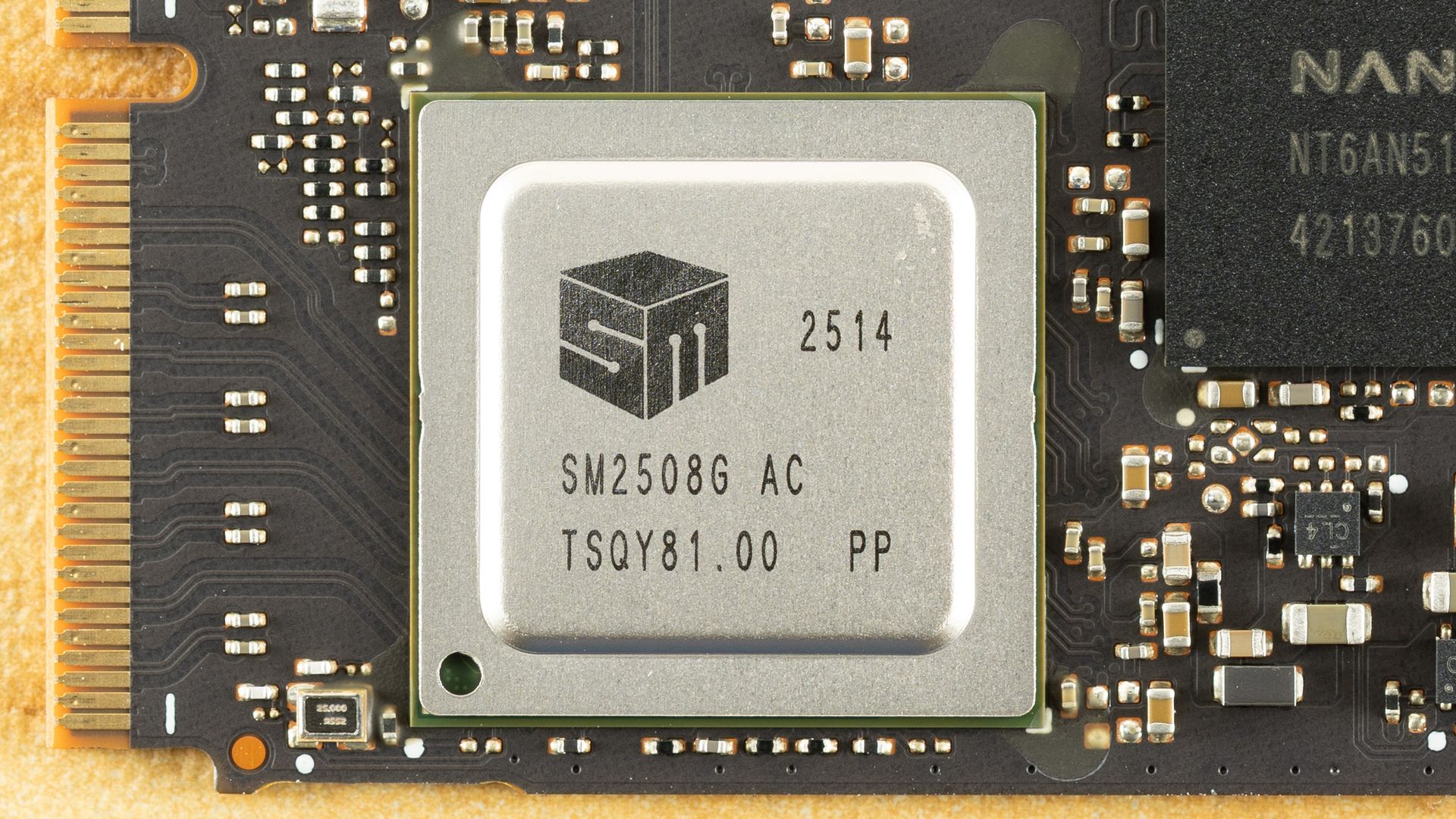
The drive layout includes the SSD controller, a DRAM package, and two NAND flash packages. The 7.68TB version will need more packages on the rear, for a total of four flash packages. The controller is labeled in a way similar to SanDisk’s proprietary parts, but the “250800” spells out that this is a Silicon Motion, or SMI, SM2508. This is an eight-channel, high-end PCIe 5.0 SSD controller with generally excellent performance and power efficiency.
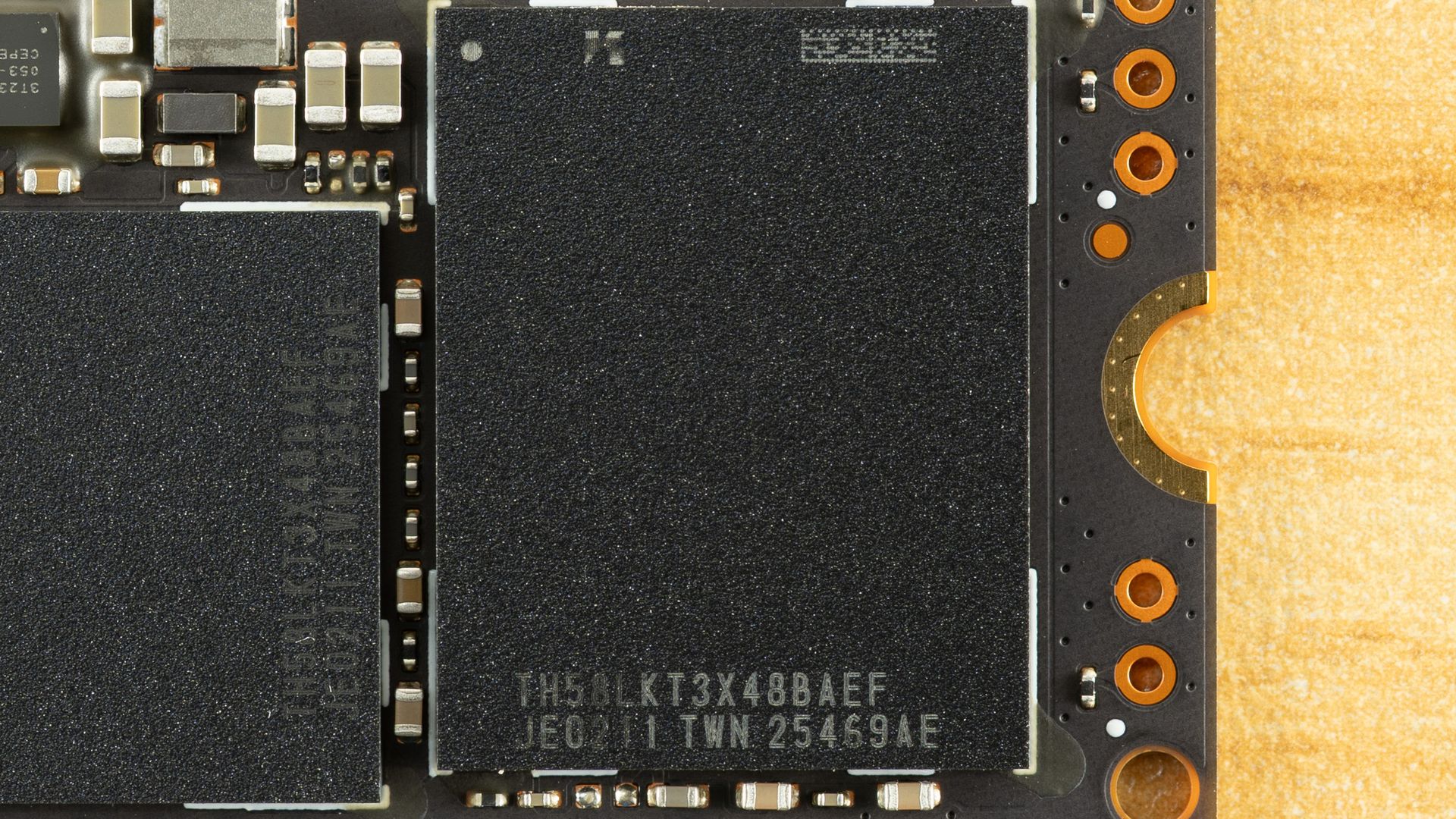
The DRAM package is LPDDR4 and is therefore a more power-efficient choice. It’s also 2GB, which follows the normal 1:1,000 ratio of DRAM to NAND. Our recent Optimus GX Pro 850P review had a 2TB drive from Sandisk with only 1GB of RAM. That’s perfectly suitable for gaming use. For this NAS drive, 2GB is very much preferred. The controller and DRAM are paired with SanDisk’s 218-layer BiCS8 TLC flash. This is some of the best flash on the market, with good all-around performance, very good latency, and very good power efficiency. This is world-class hardware, and the price reflects that.
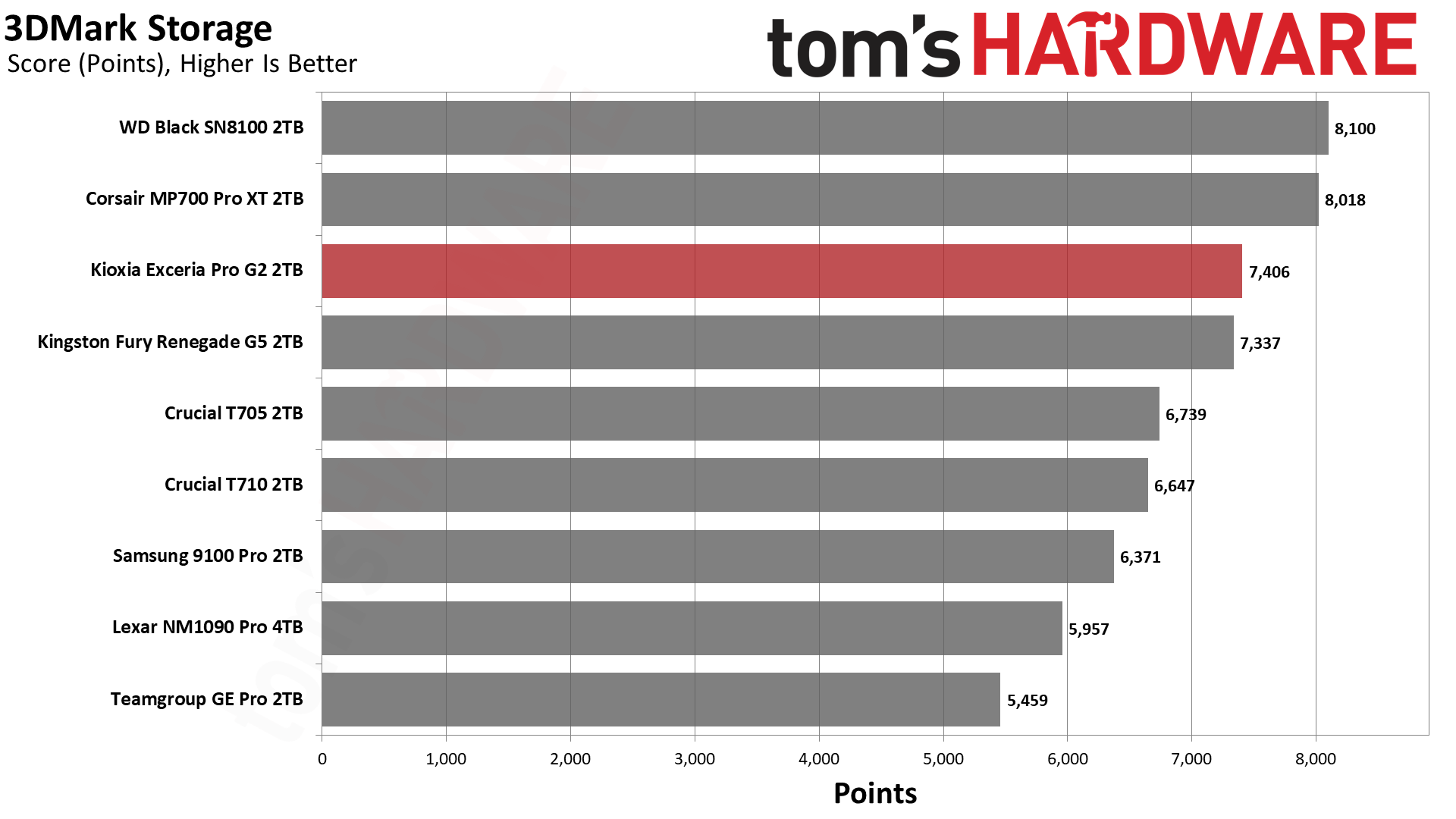
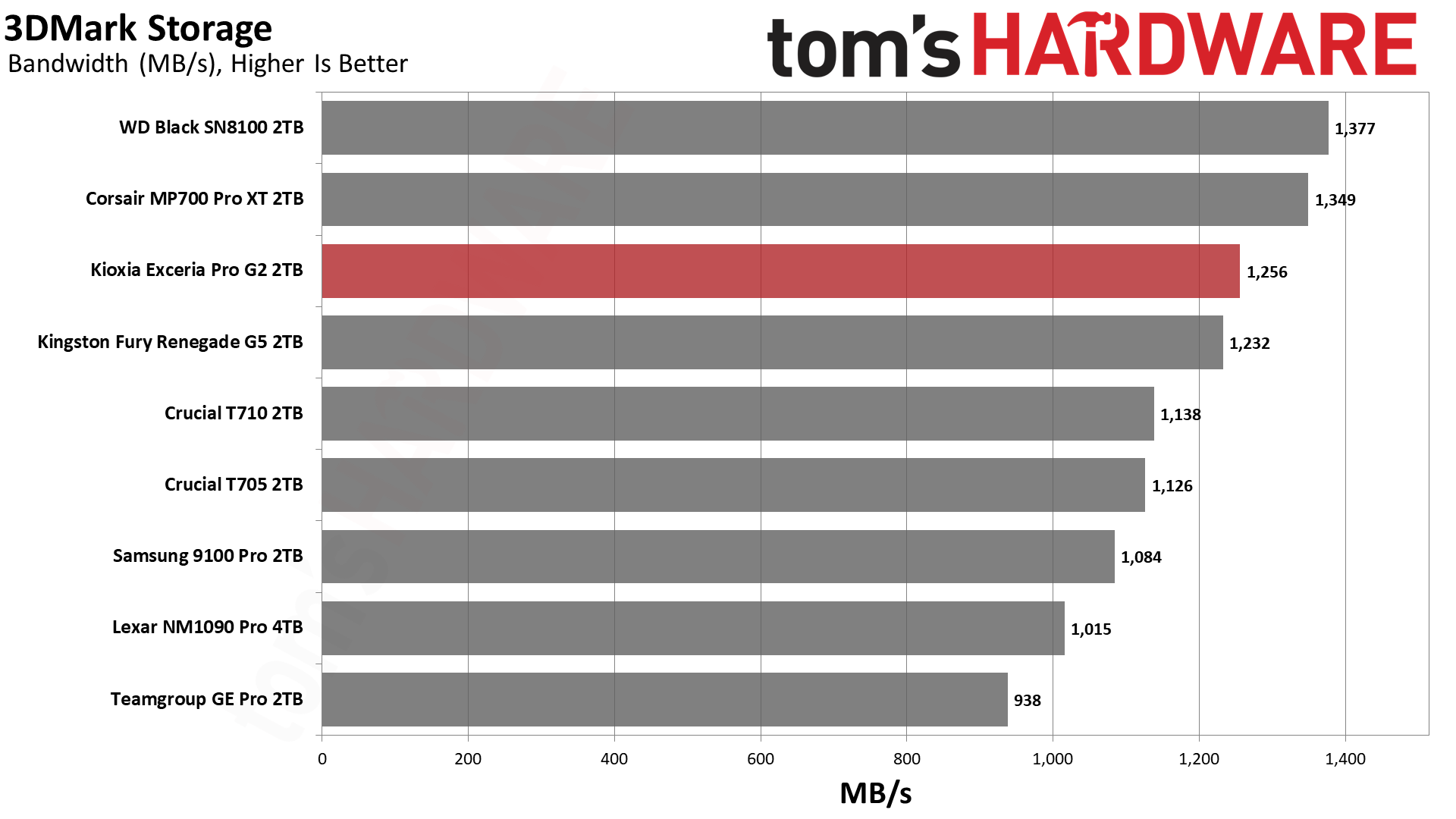
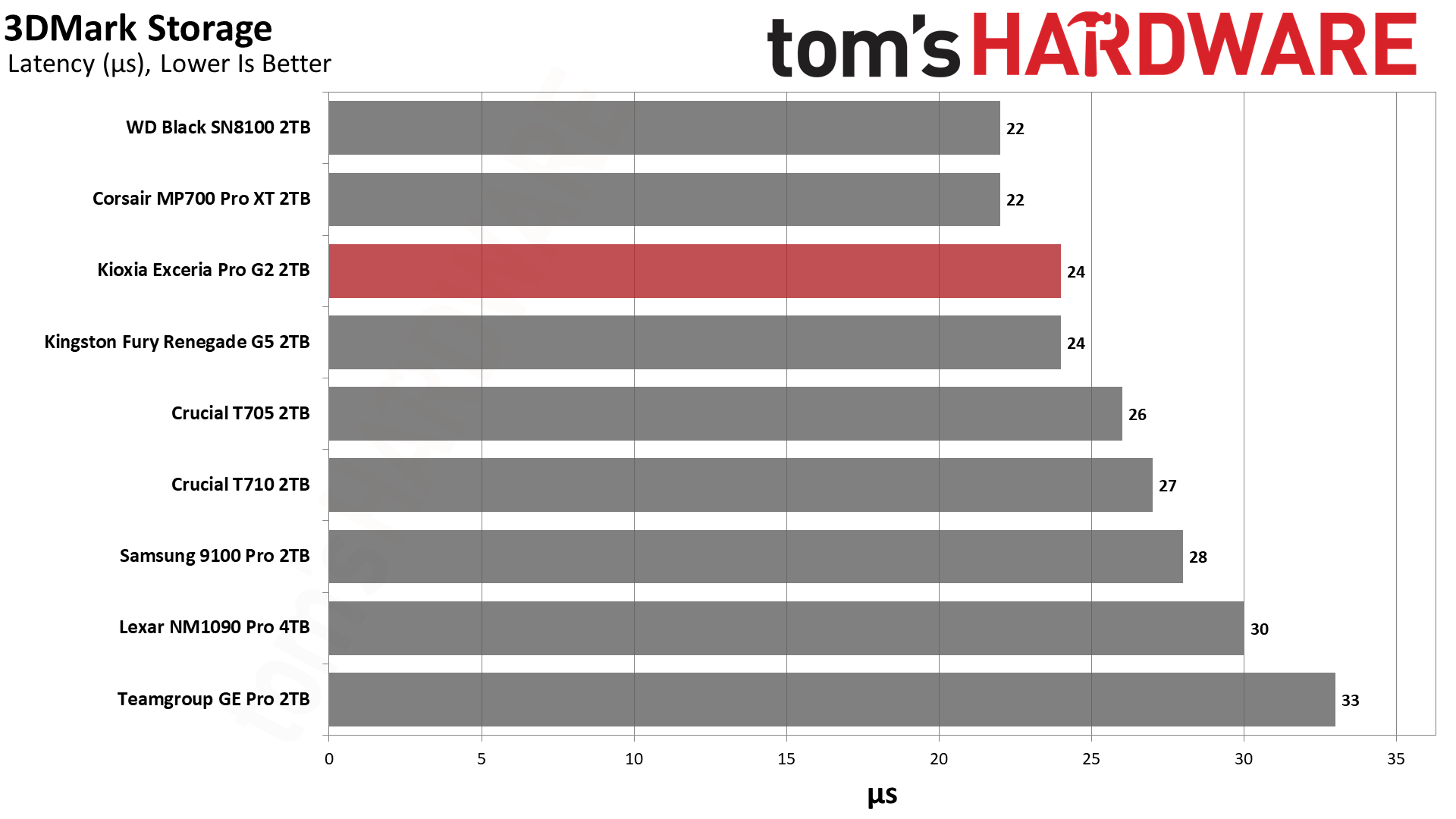
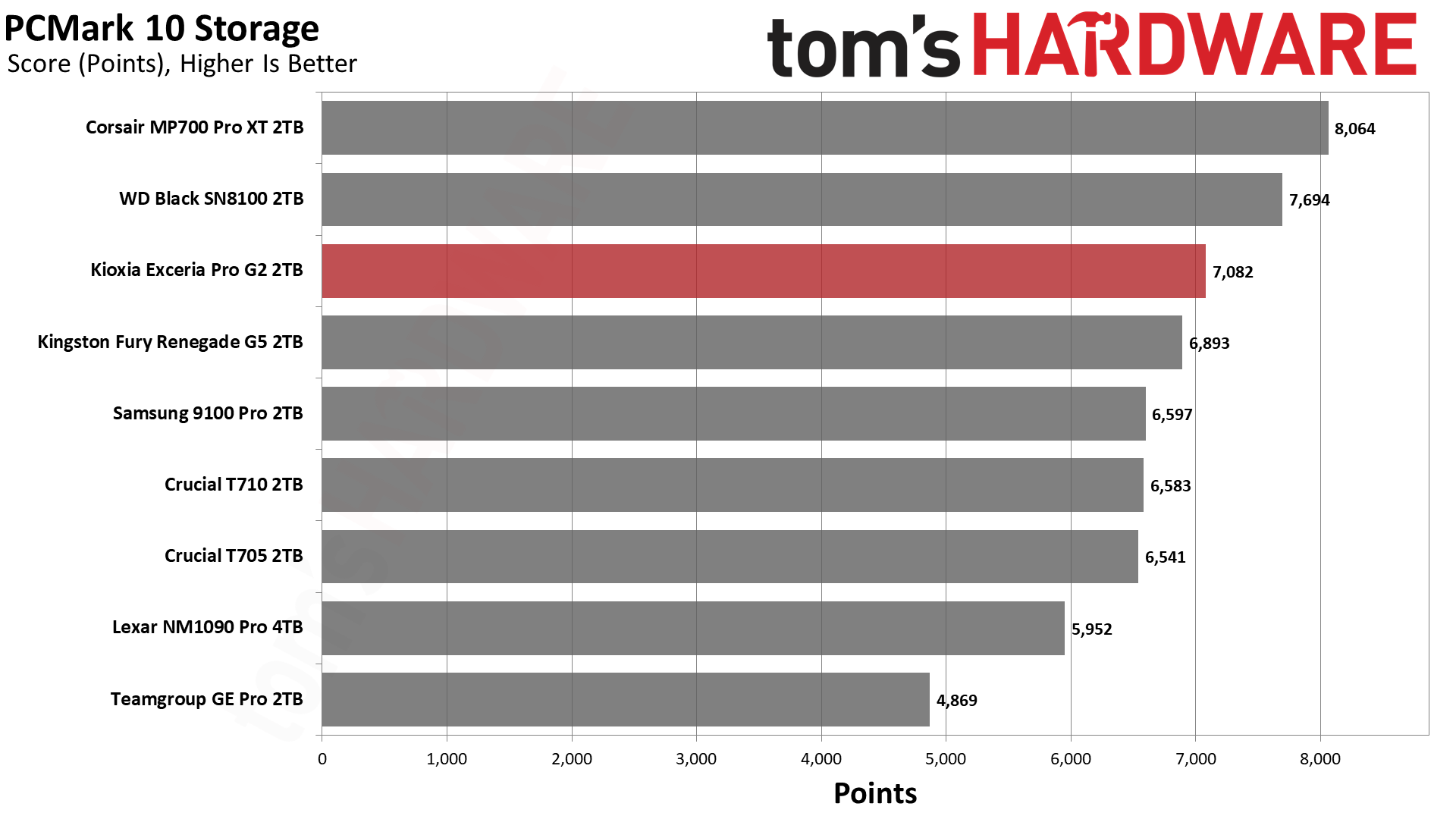
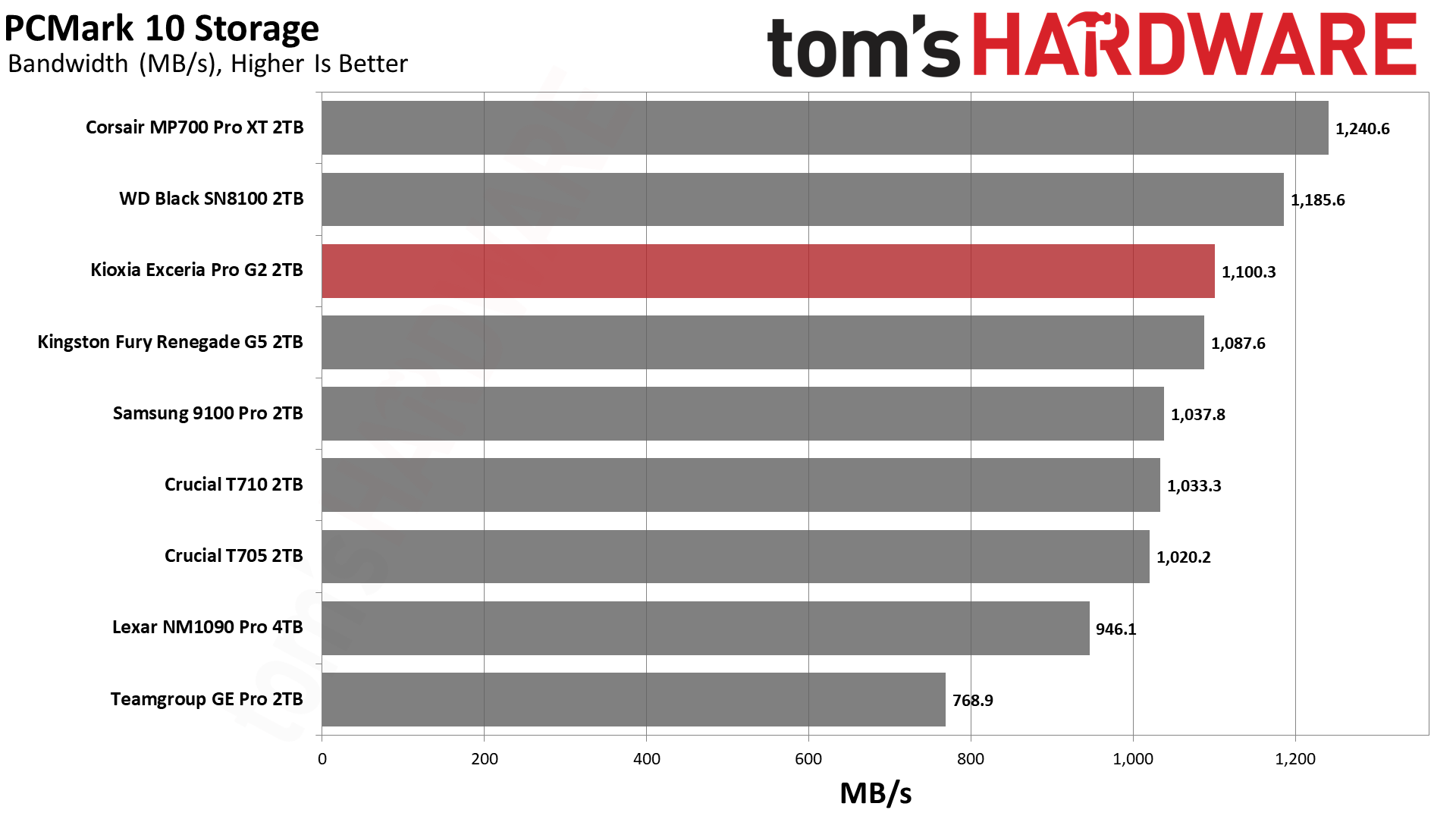
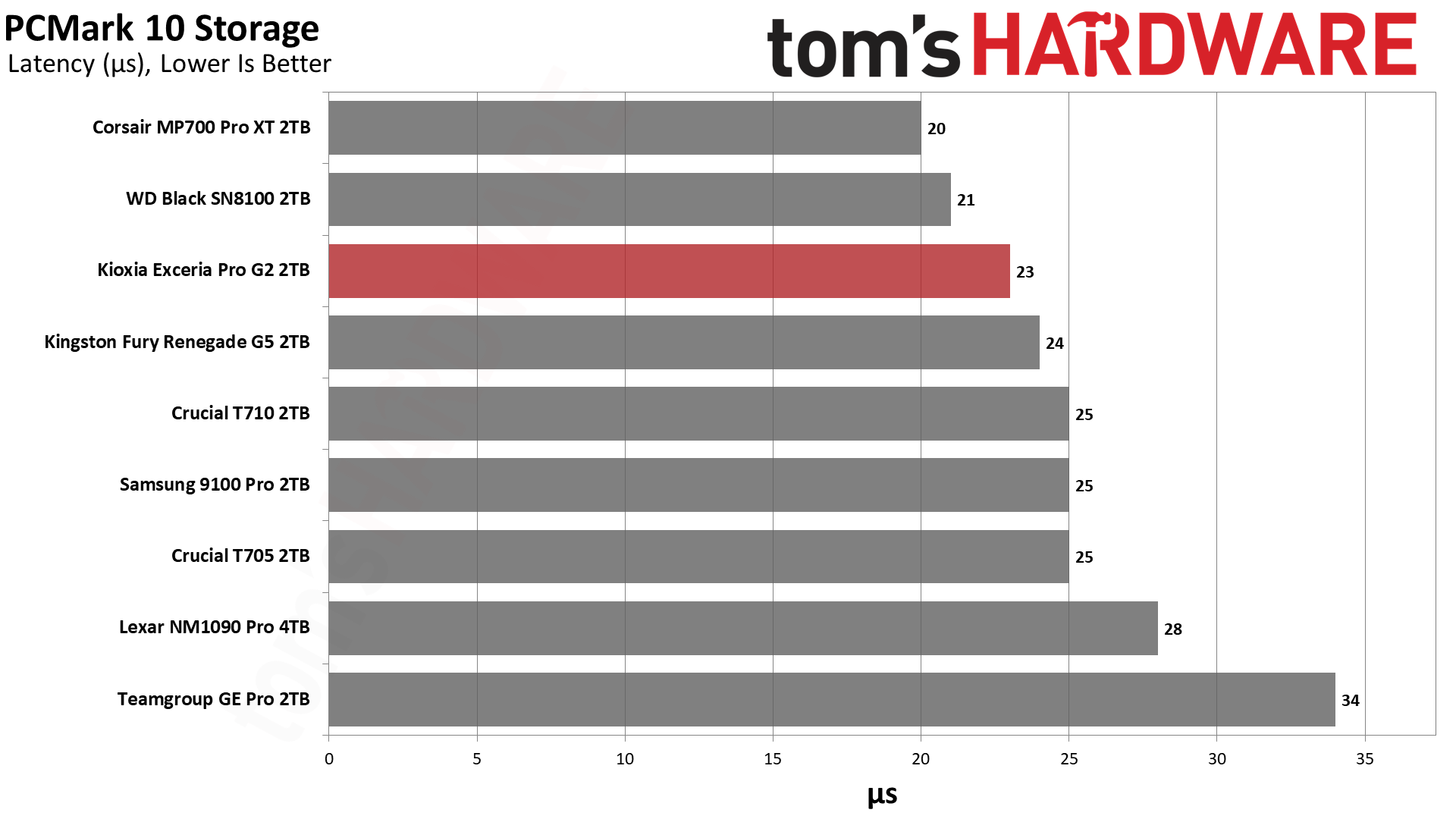
The Sandisk NAS 800 technically has little competition in this market. We do have the Gen 4 Addlink NAS D60 with power-loss protection, but it’s otherwise pretty thin, particularly for Gen 5. The closest non-NAS retail drive in Gen 4 is the WD Black SN850X. For Gen 5, we have the WD Black SN8100, which has the same hardware as the NAS 800, and the same goes for the Kingston Fury Renegade G5. The Crucial T710 and Lexar NM1090 Pro use the same controller but two different generations of Micron flash rather than Kioxia or Sandisk flash. Phison is represented by the Corsair MP700 Pro XT, while the main proprietary option here is Samsung’s 9100 Pro.
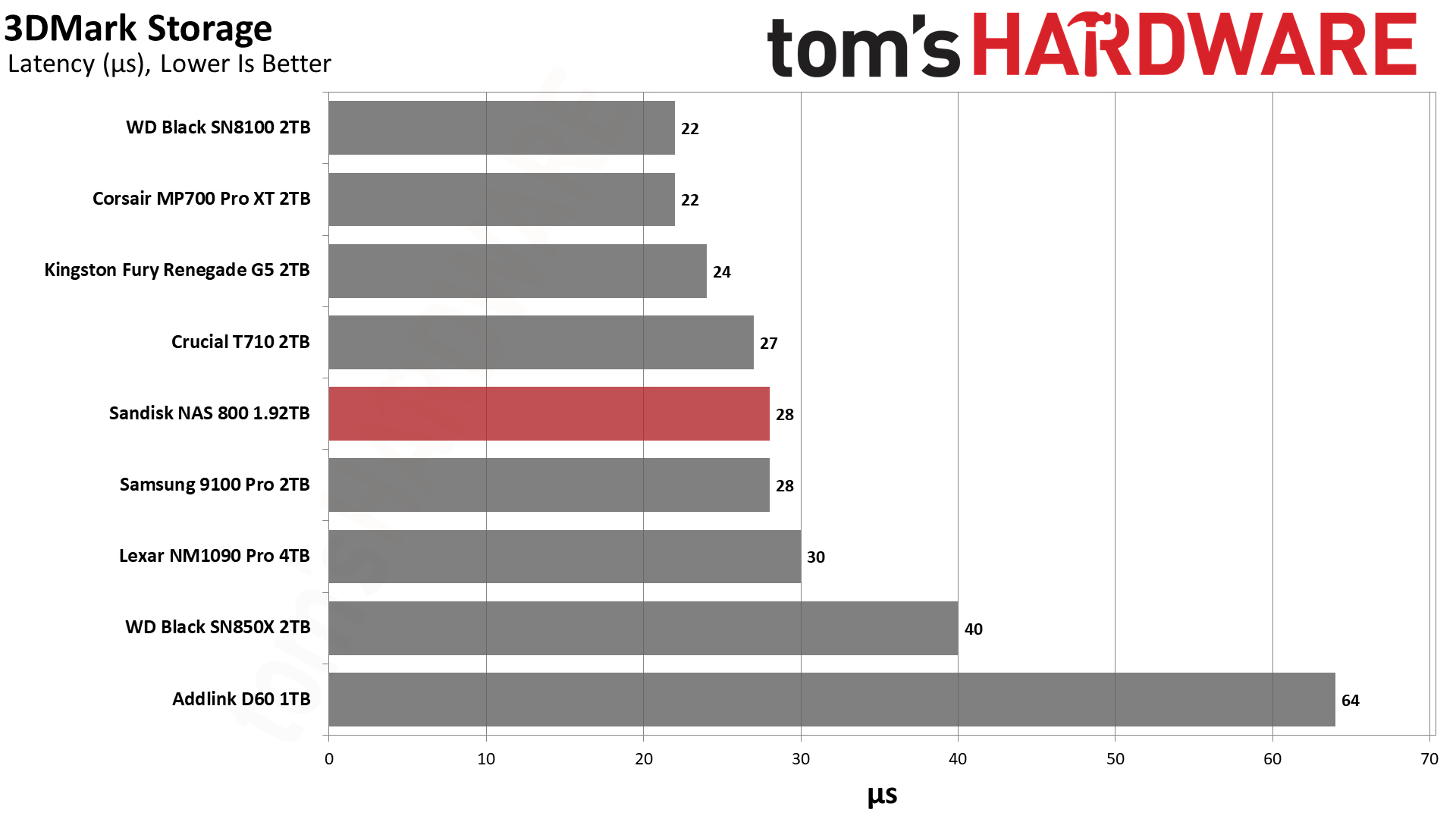
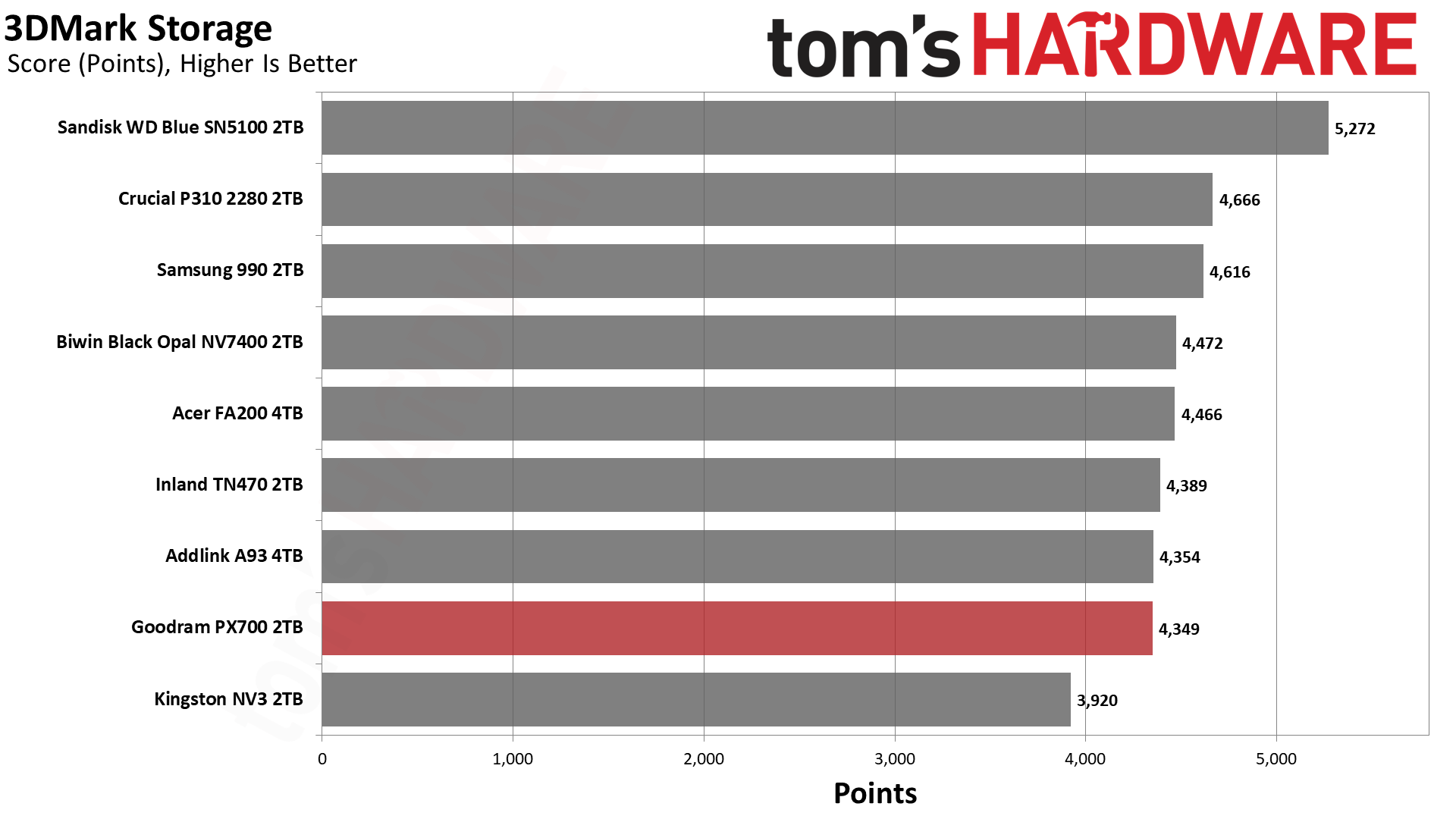
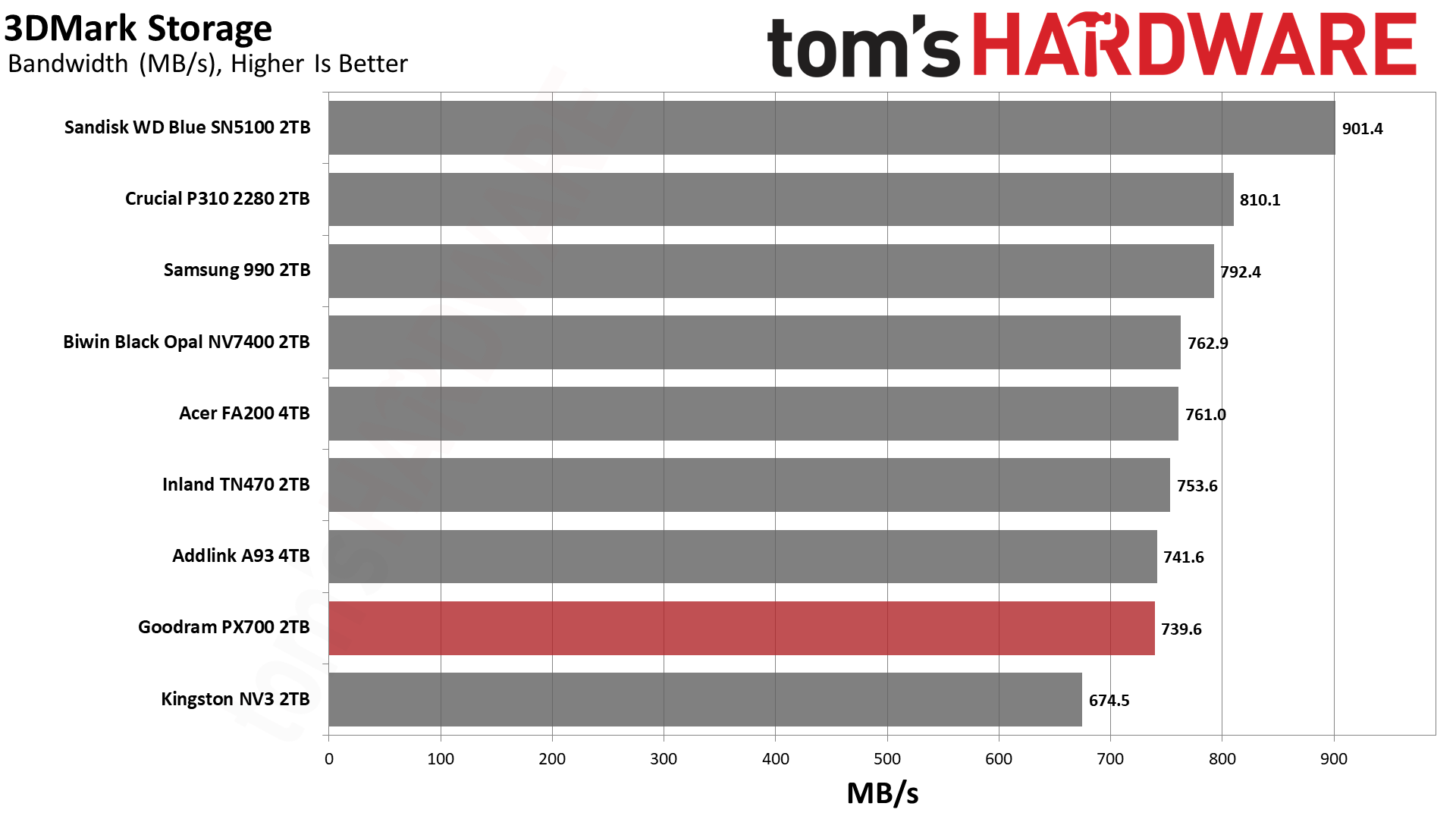
Trace Testing — 3DMark Storage Benchmark
Built for gamers, 3DMark’s Storage Benchmark focuses on real-world gaming performance. Each round in this benchmark stresses storage based on gaming activities including loading games, saving progress, installing game files, and recording gameplay video streams. Future gaming benchmarks will be DirectStorage-inclusive and an evaluation for future-proofing is included where applicable.
Tom's HardwareTom's HardwareTom's Hardware
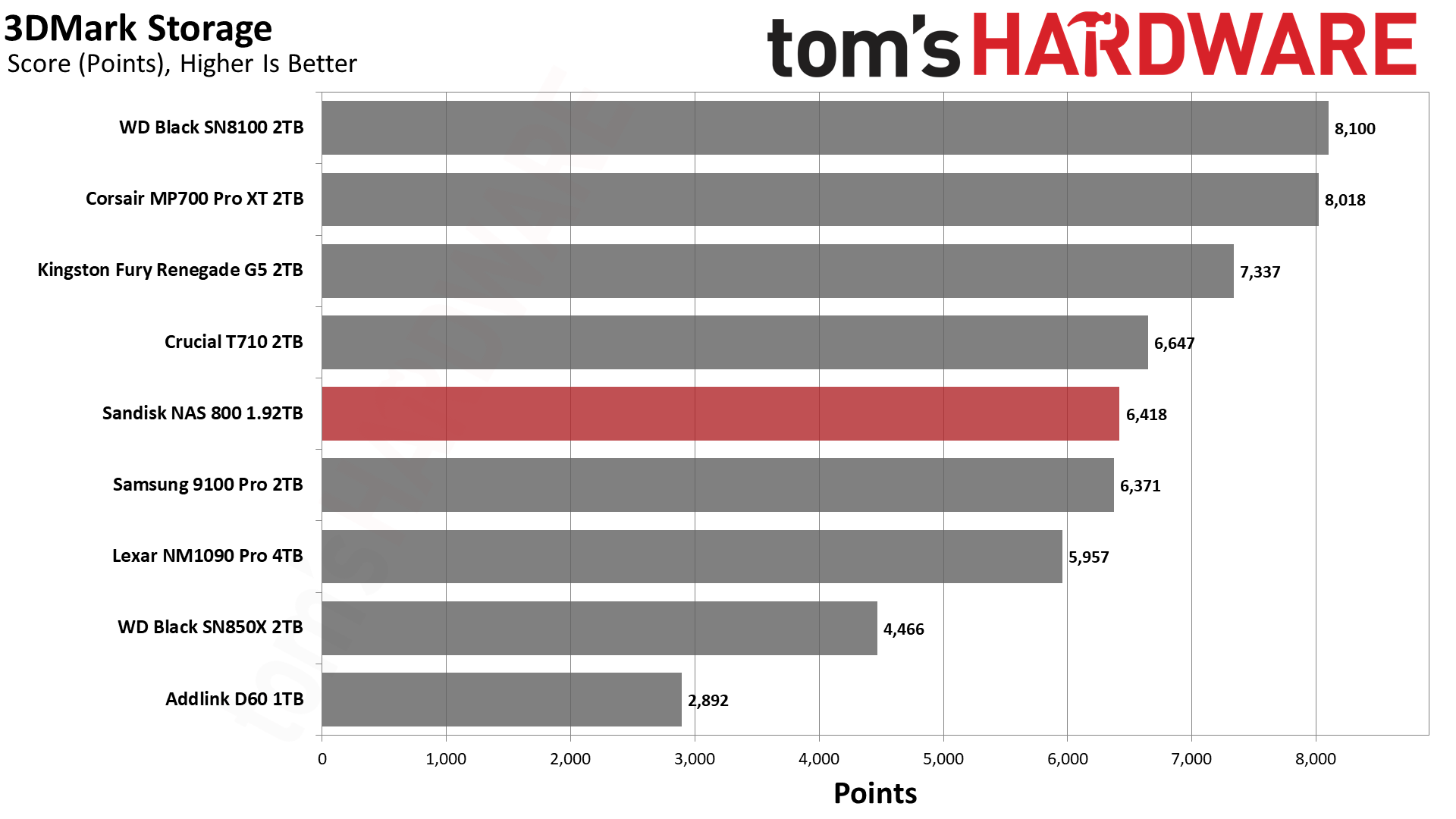
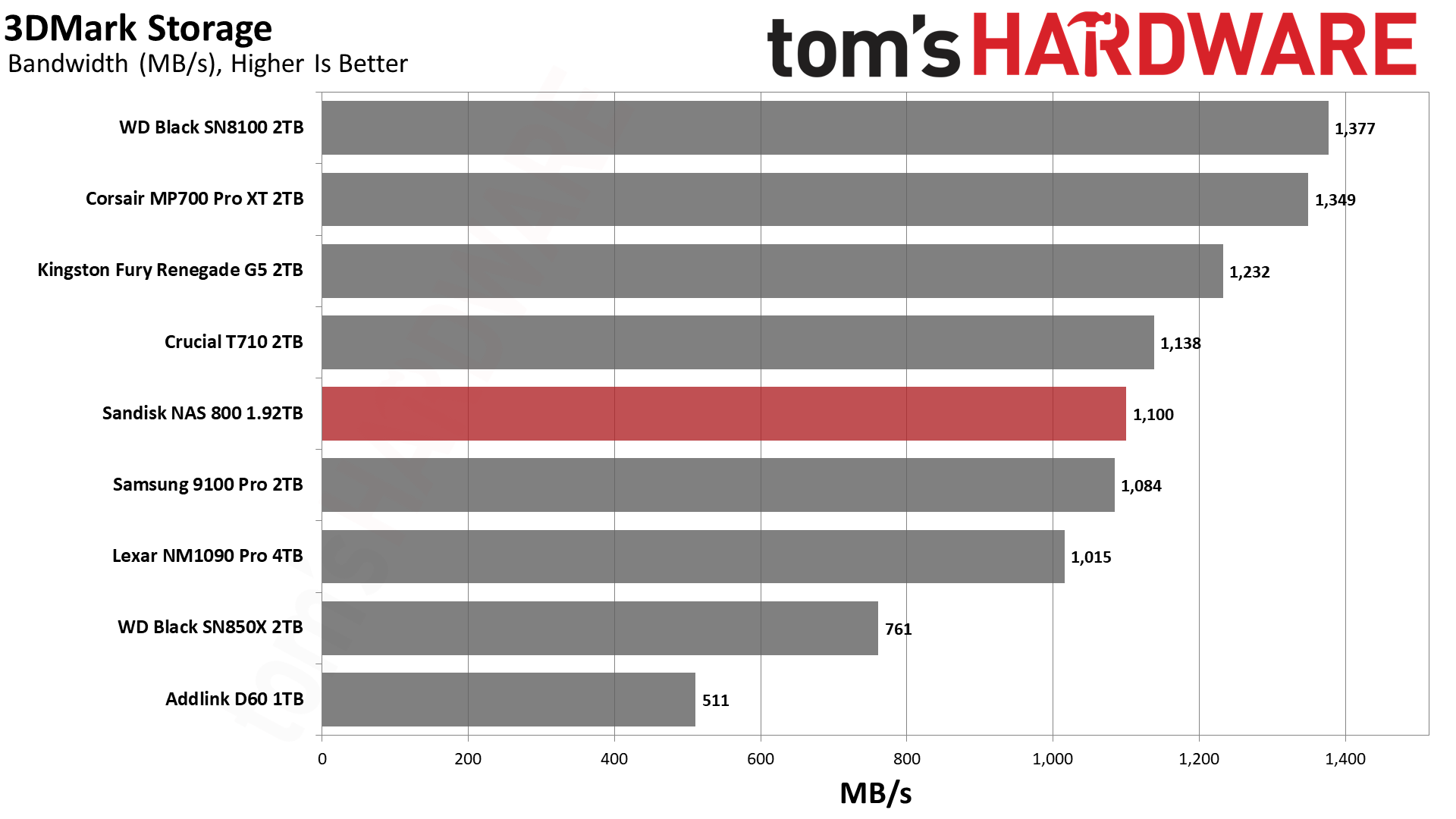
We wouldn’t normally recommend a NAS drive for gaming, but if you happen to use this drive, you would be good to go. The NAS 800’s flash is known for being low-latency, and while it doesn’t perform up to the Black SN8100’s level, it’s in the same ballpark as the T710 and 9100 Pro. The drive does not seem optimized for it, though, as it does lose quite a bit of performance against the Black SN8100, which has the same hardware. This is still more than fast enough for games. You would be plenty happy with just the Black SN850X.
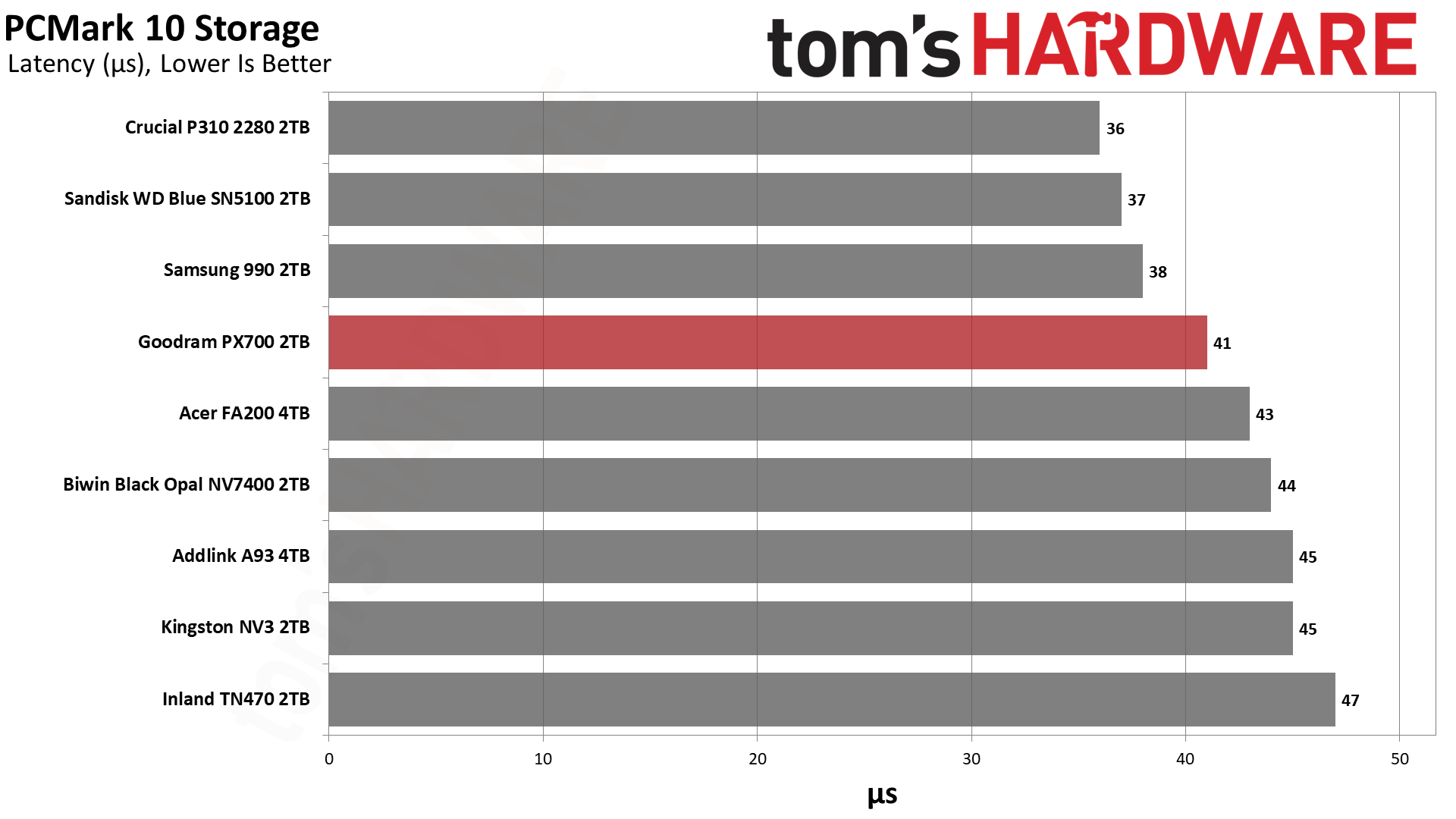
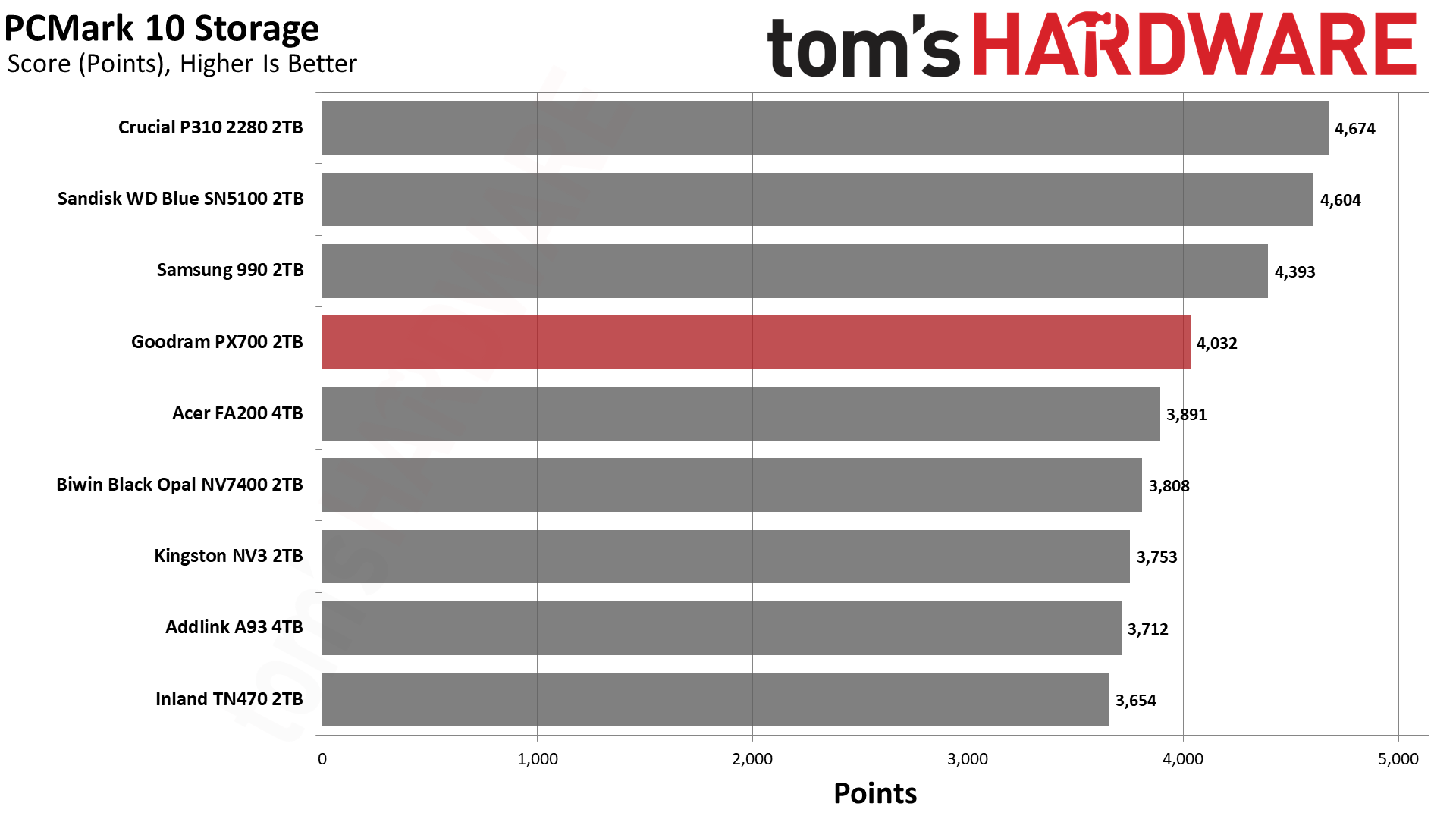
Trace Testing — PCMark 10 Storage Benchmark
PCMark 10 is an industry standard trace-based benchmark that uses a wide-ranging set of real-world traces from popular applications and everyday tasks to measure the performance of storage devices. The results are particularly useful when analyzing drives for their use as primary/boot storage devices and in work environments.
Tom's HardwareTom's HardwareTom's Hardware
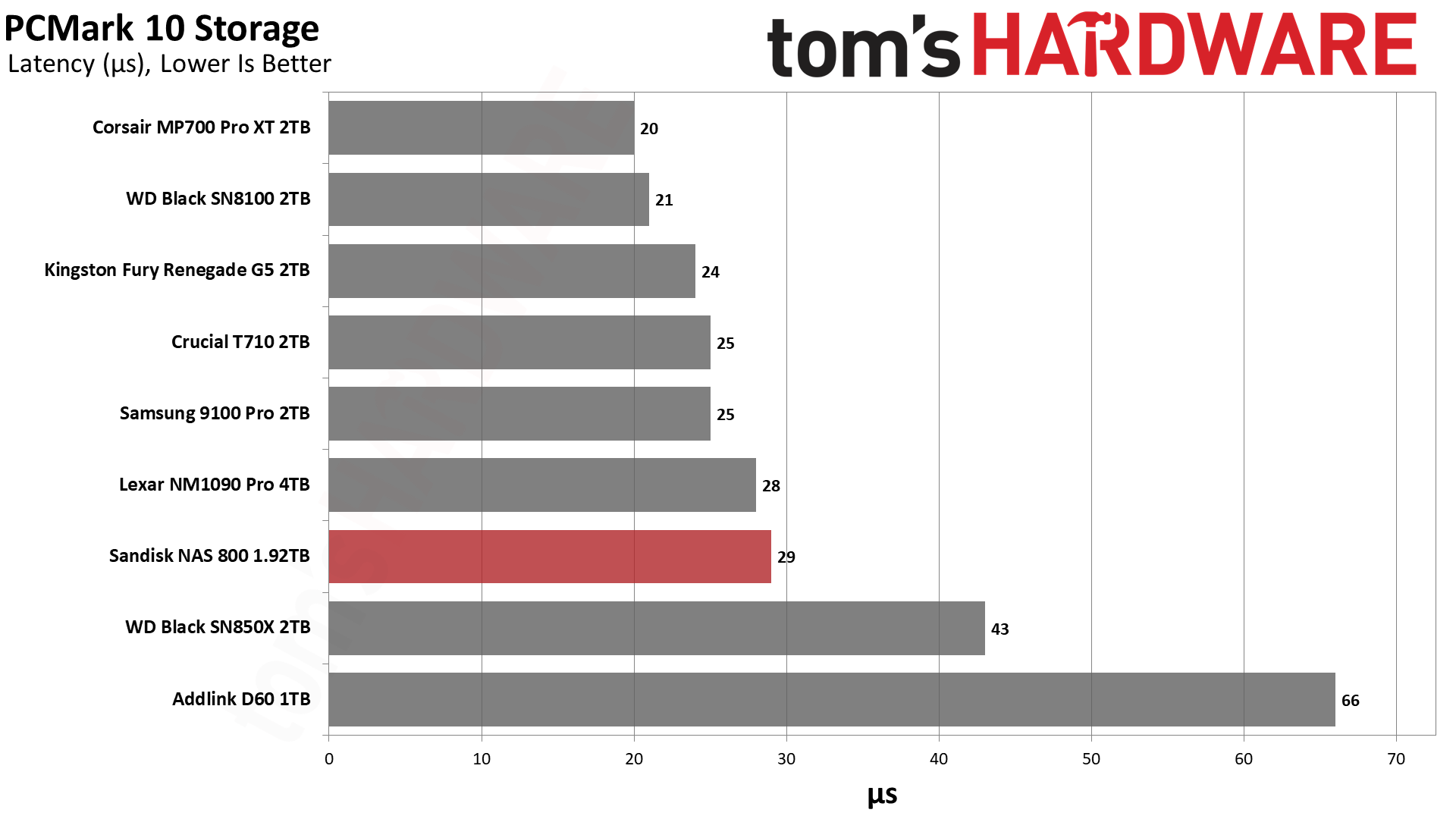
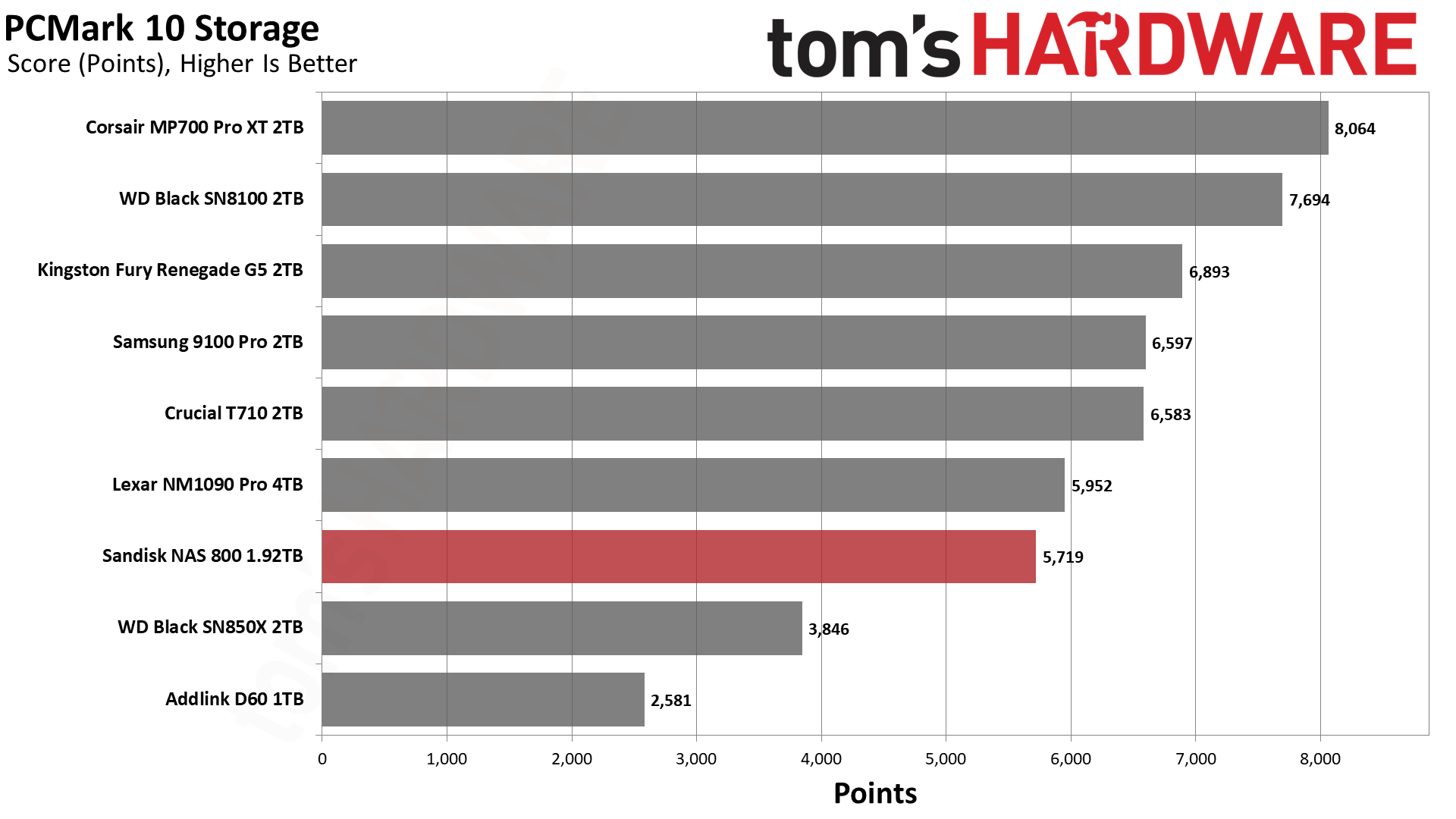
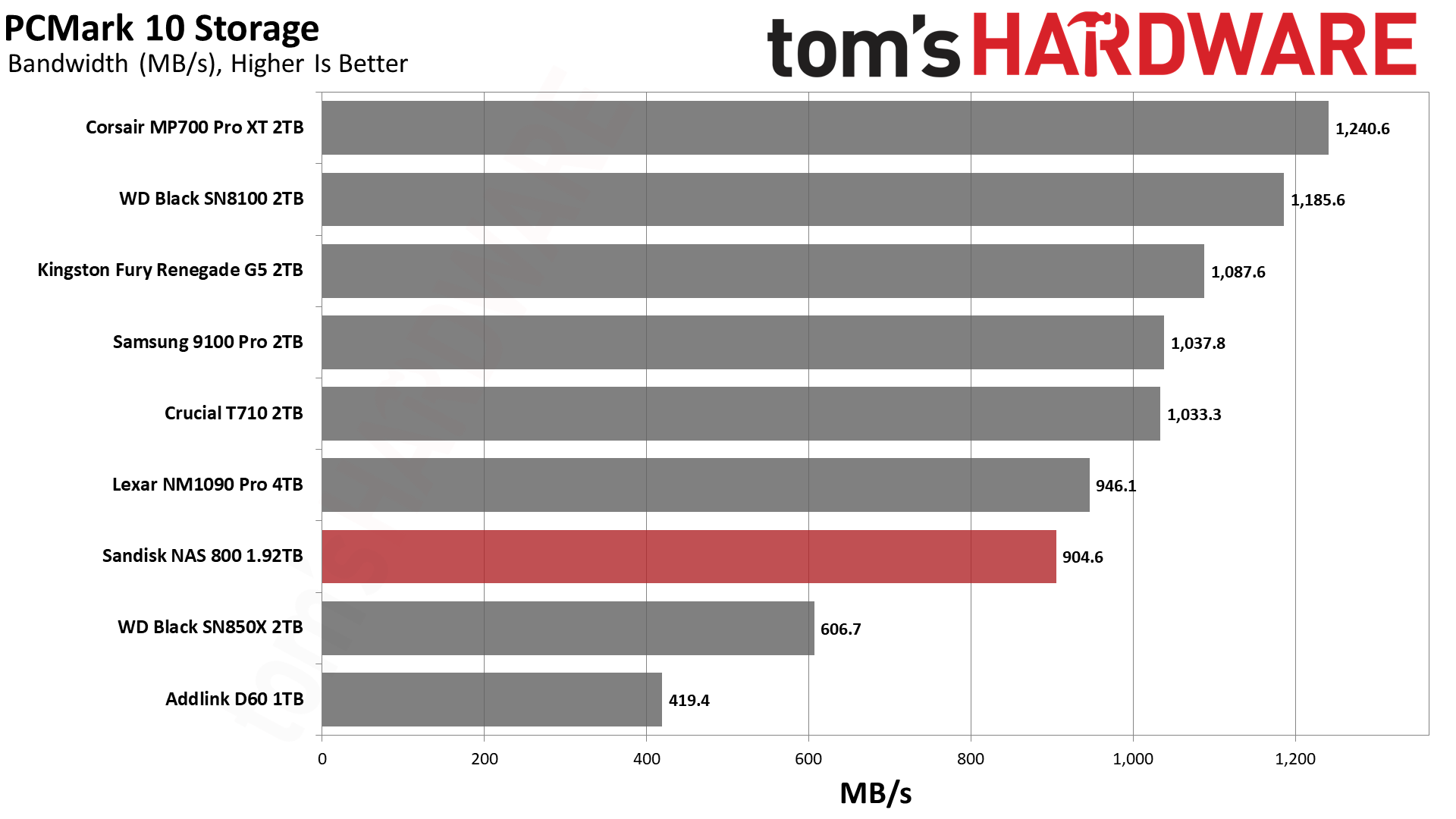
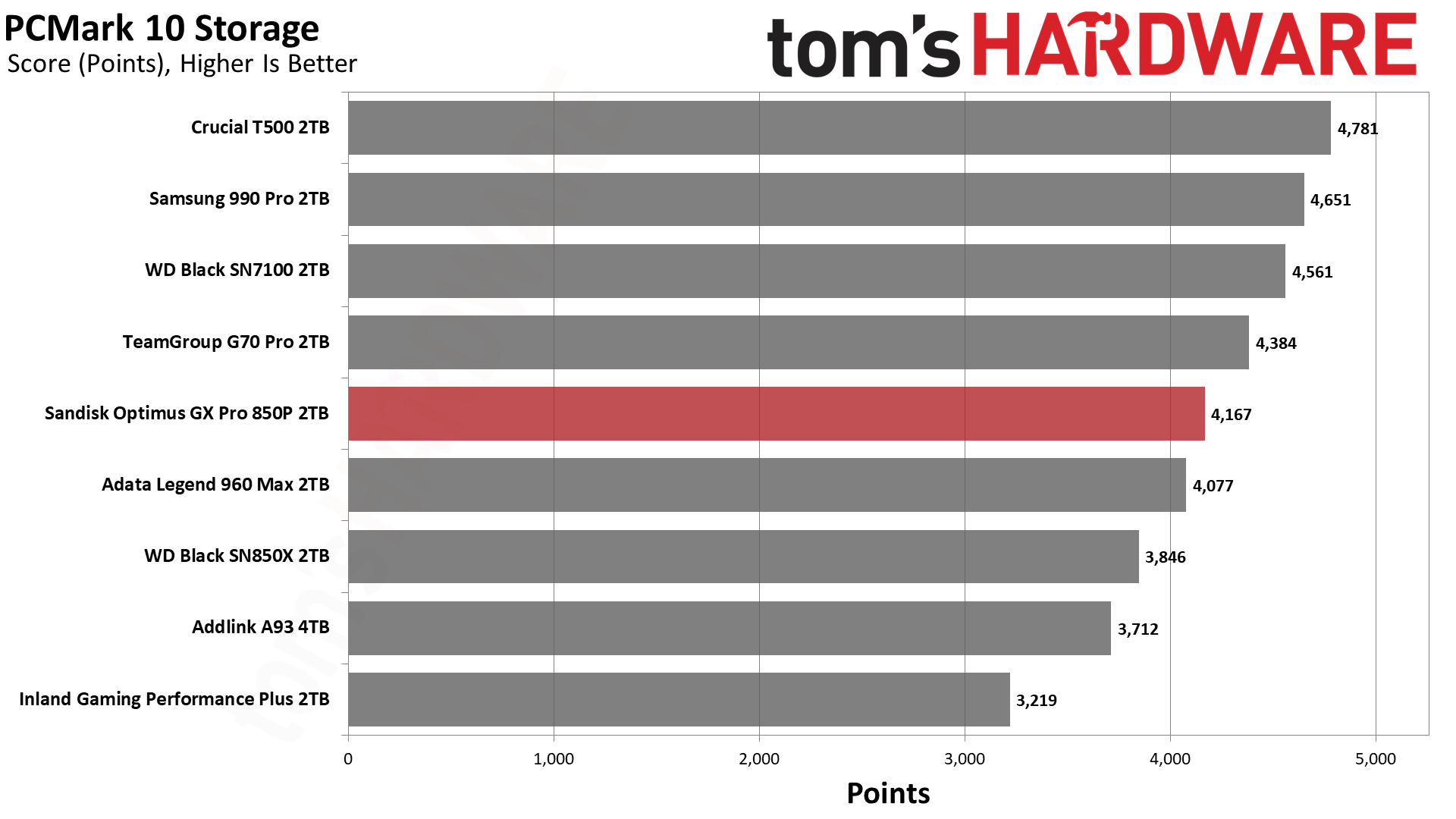
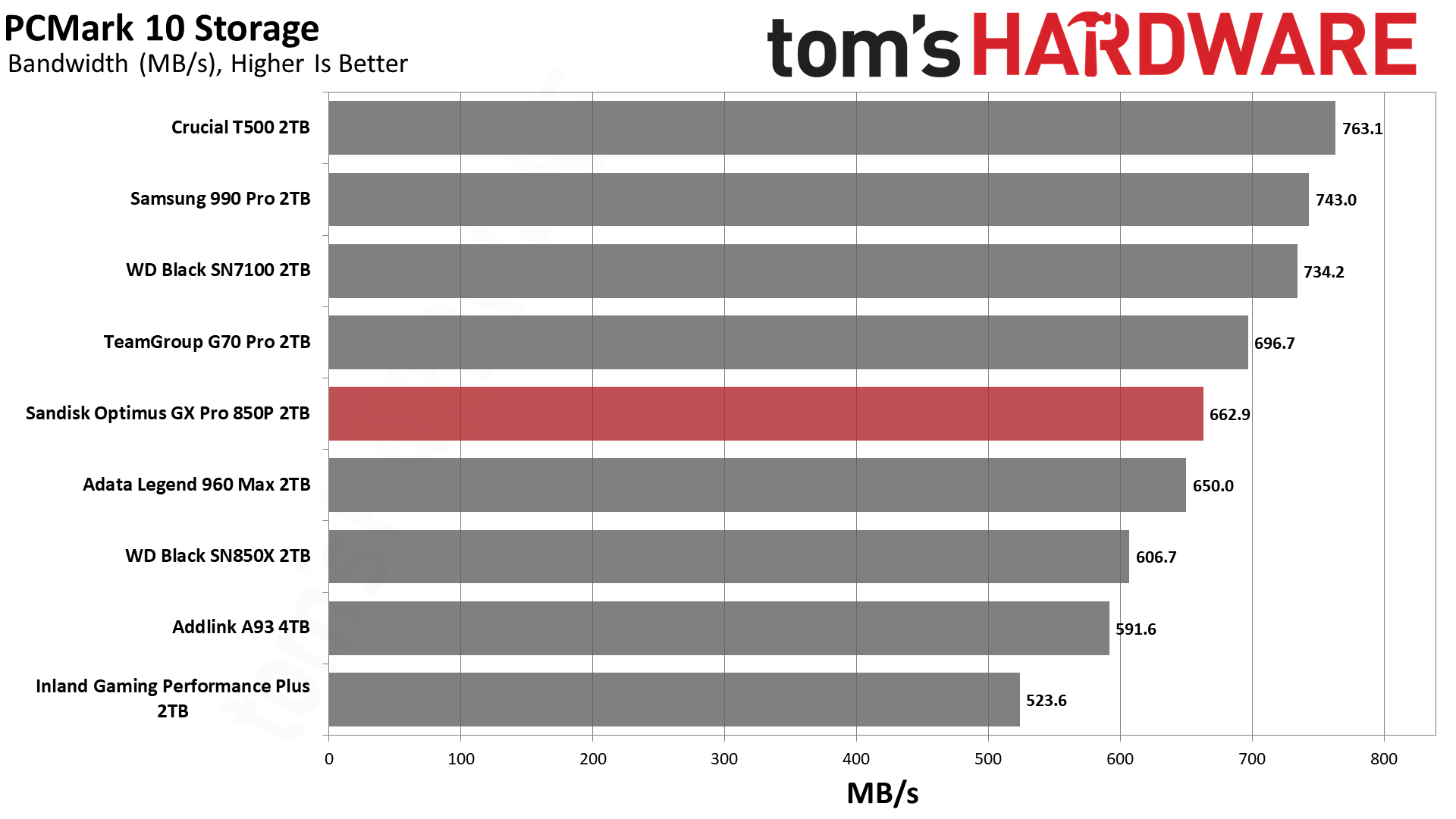
Performance is a bit weaker in PCMark 10 than in 3DMark. The NAS 800 finishes closer to the Lexar NM1090 Pro, which is not a bad drive but also not fully within the same class. We would expect it to be closer to the T710 and 9100 Pro. The Black SN8100 doesn’t shine quite as much here, either, but the NAS 800 trails it by 26%, a wider gap than the 21% in 3DMark.
This points to firmware tuning and other optimizations on the NAS 800, rather than a limitation of the shared hardware. The Phison-based MP700 Pro XT leads the pack and seems better optimized for PCMark. The NAS 800’s performance is still excellent in the grand scheme of things, though, well above Gen 4 drives. It’s just not our first choice for applications.
Console Testing — PlayStation 5 Transfers
The PlayStation 5 is capable of taking one additional PCIe 4.0 or faster SSD for extra game storage. While any 4.0 drive will technically work, Sony recommends drives that can deliver at least 5,500 MB/s of sequential read bandwidth for optimal performance. Based on our extensive testing, PCIe 5.0 SSDs don’t bring much to the table and generally shouldn’t be used in the PS5, especially as they may require additional cooling. Check our Best PS5 SSDs article for more information.
Our testing utilizes the PS5’s internal storage test and manual read/write tests with over 192GB of data both from and to the internal storage. Throttling is prevented where possible to see how each drive operates under ideal conditions. While game load times should not deviate much from drive to drive, our results can indicate which drives may be more responsive in long-term use.
Tom's HardwareTom's HardwareTom's Hardware
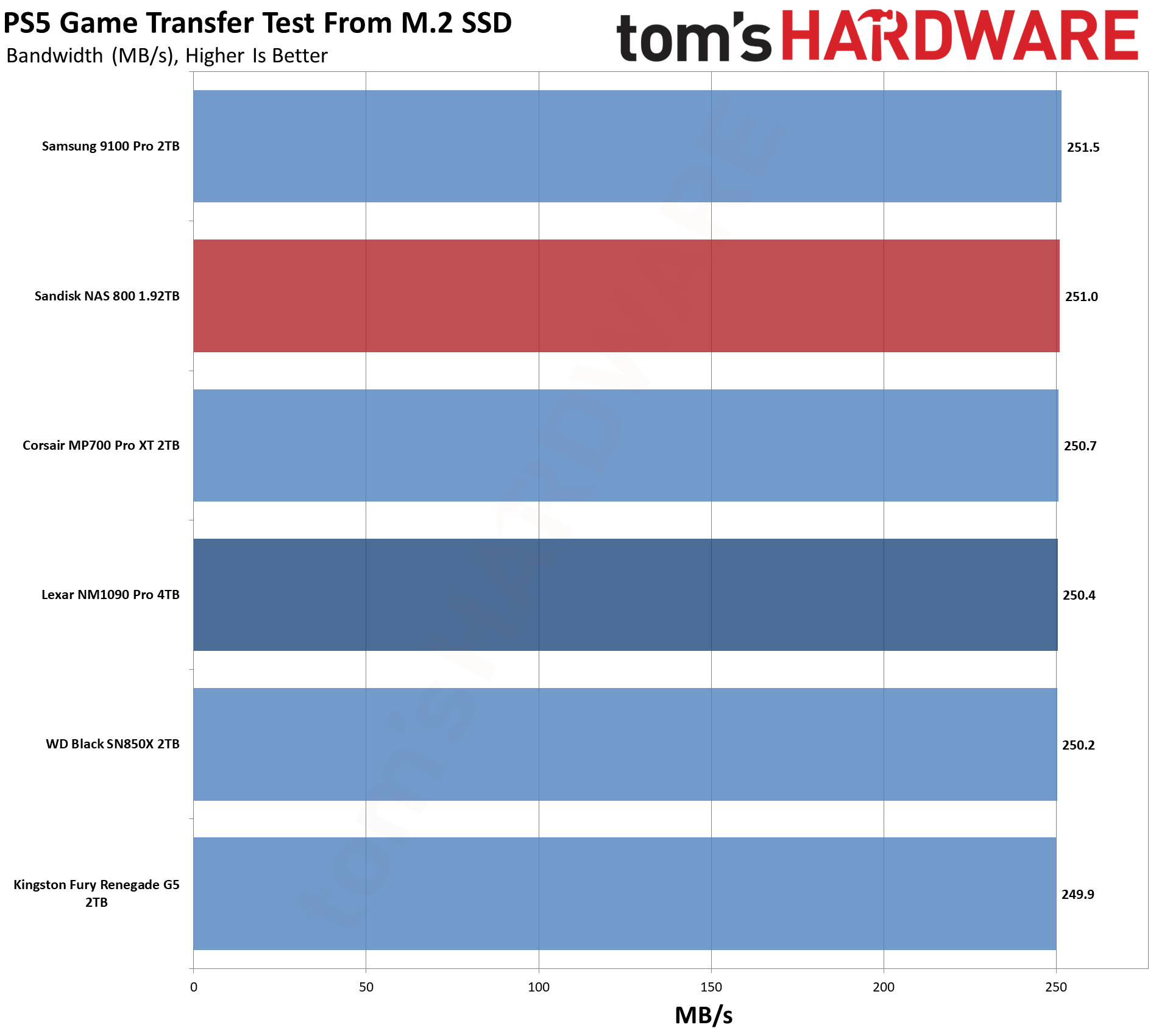
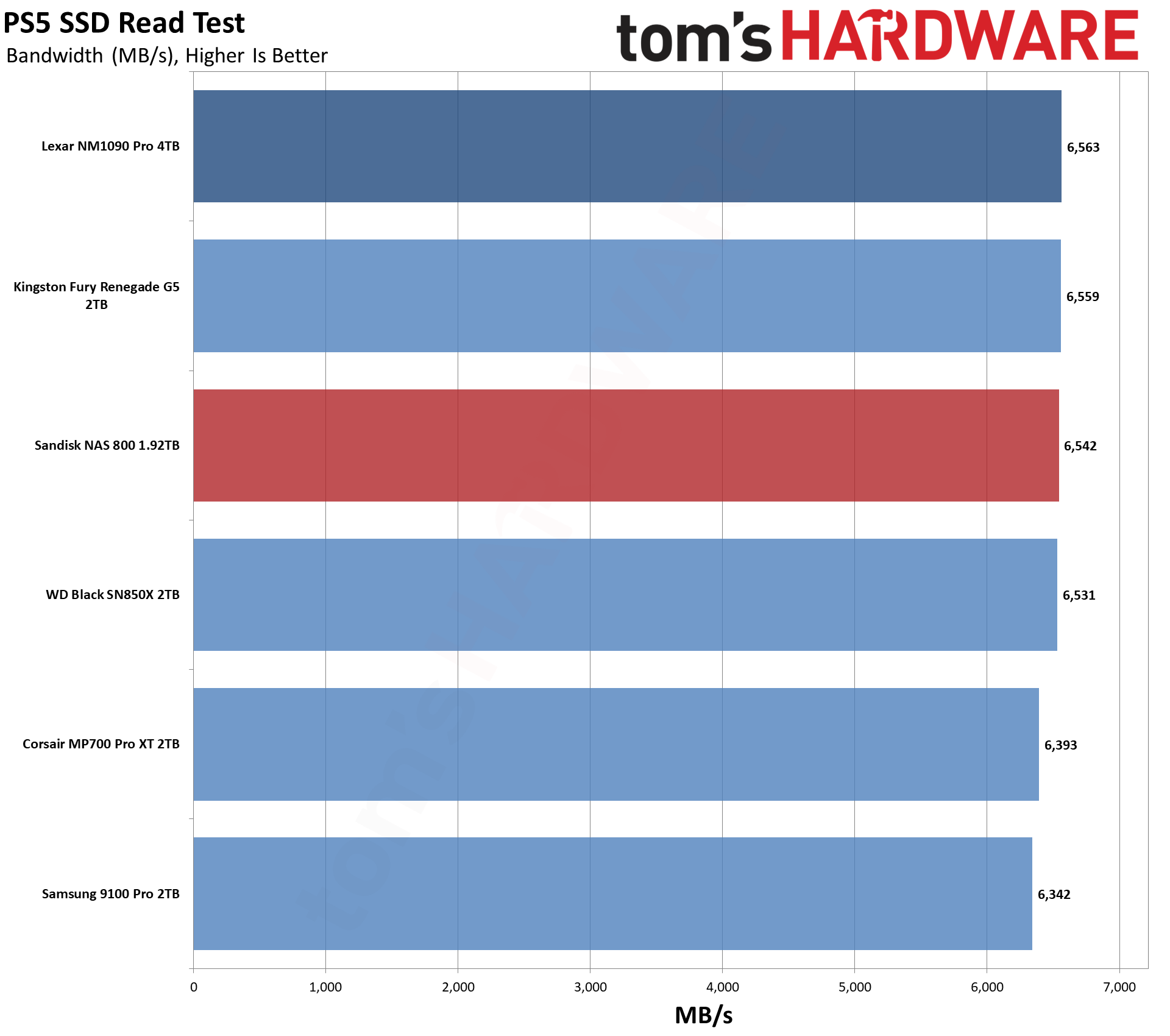
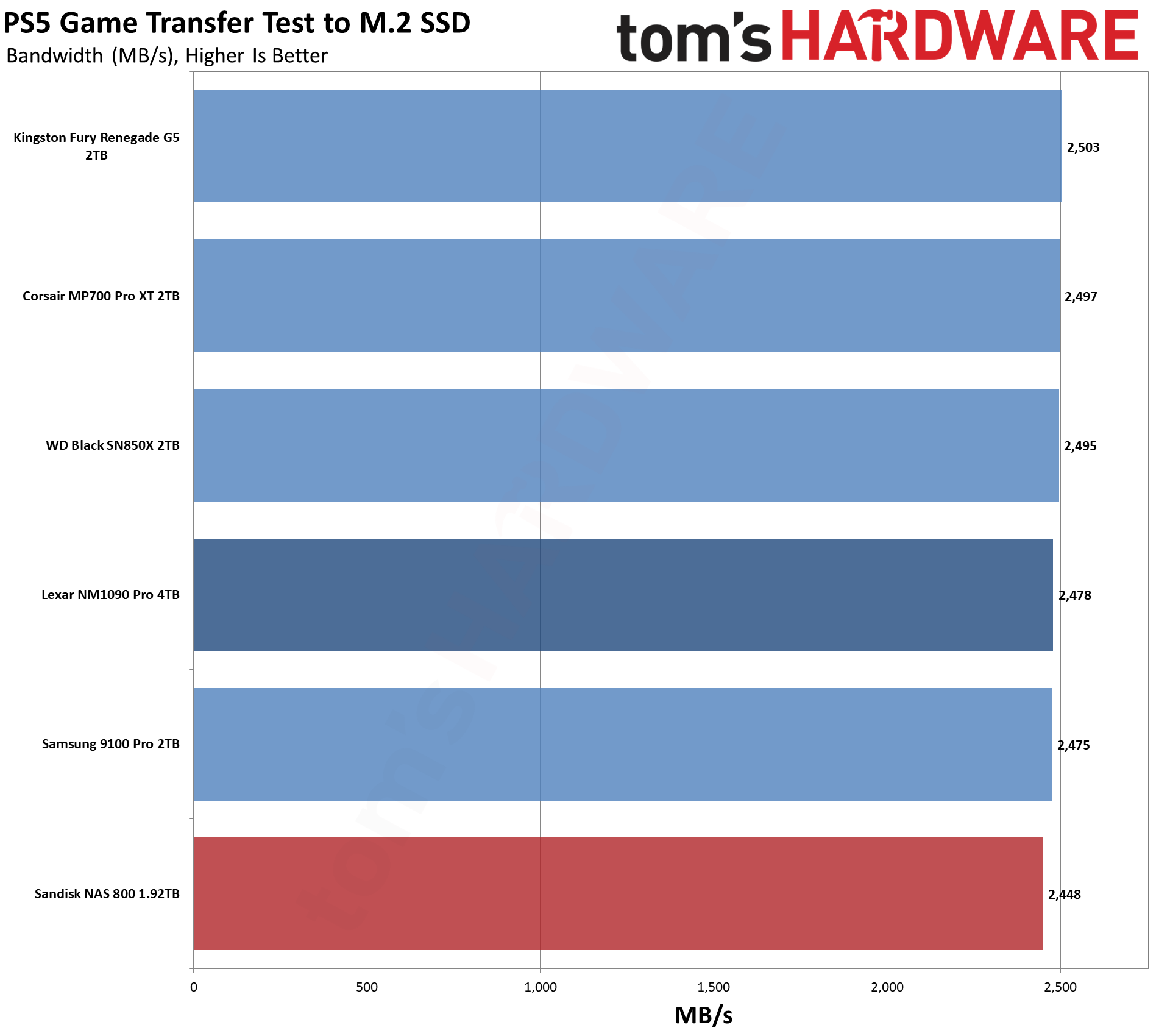
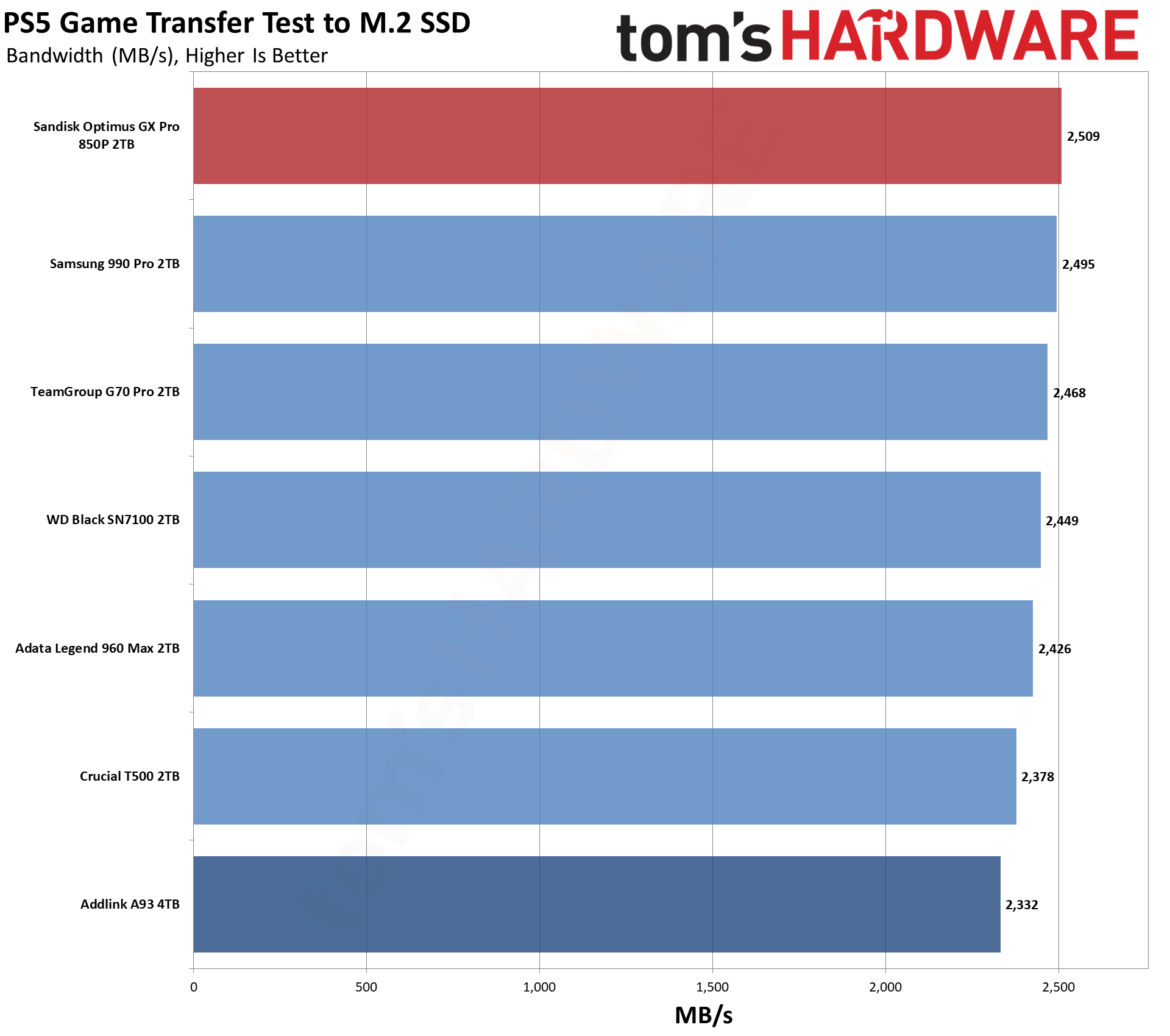
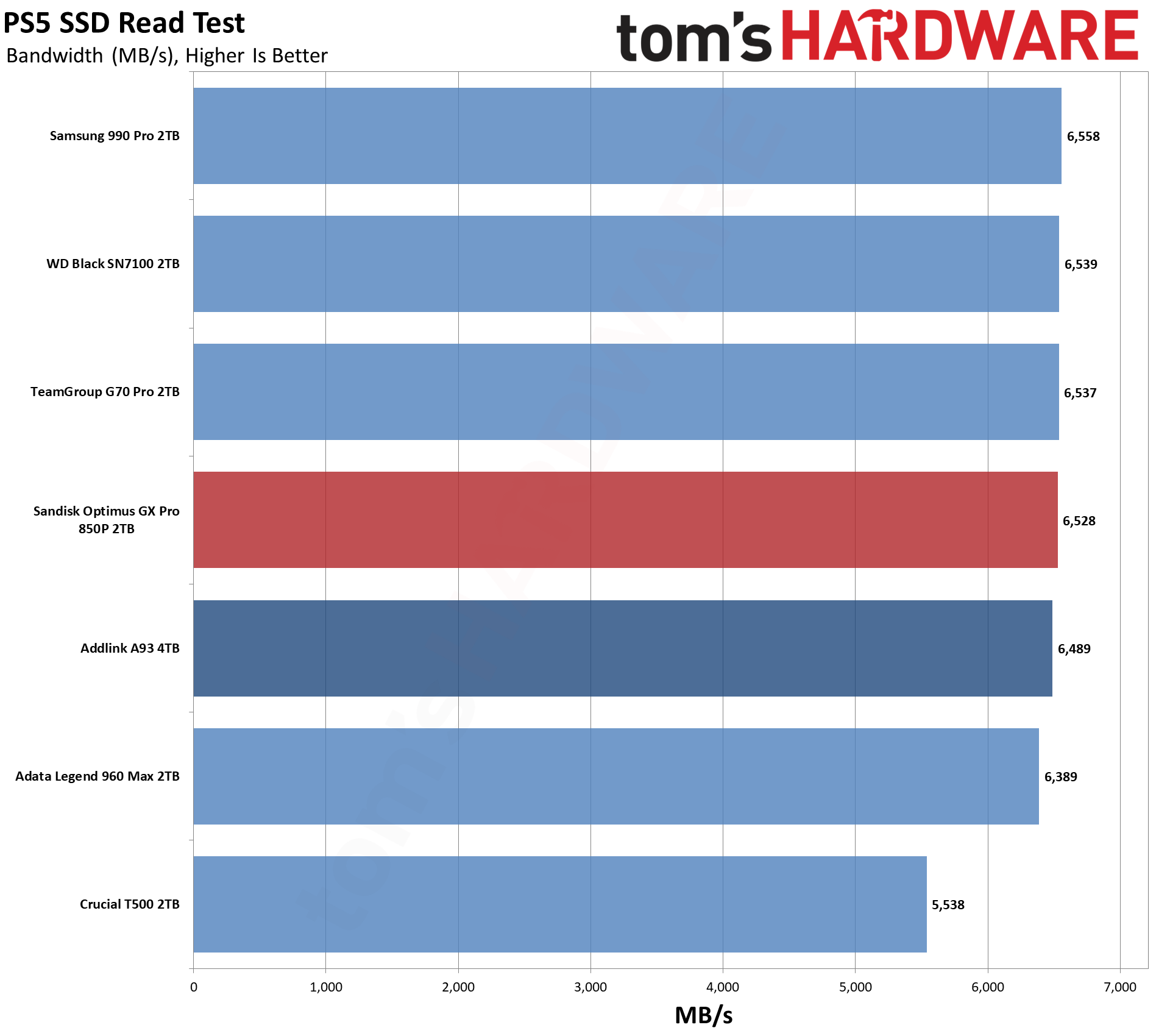
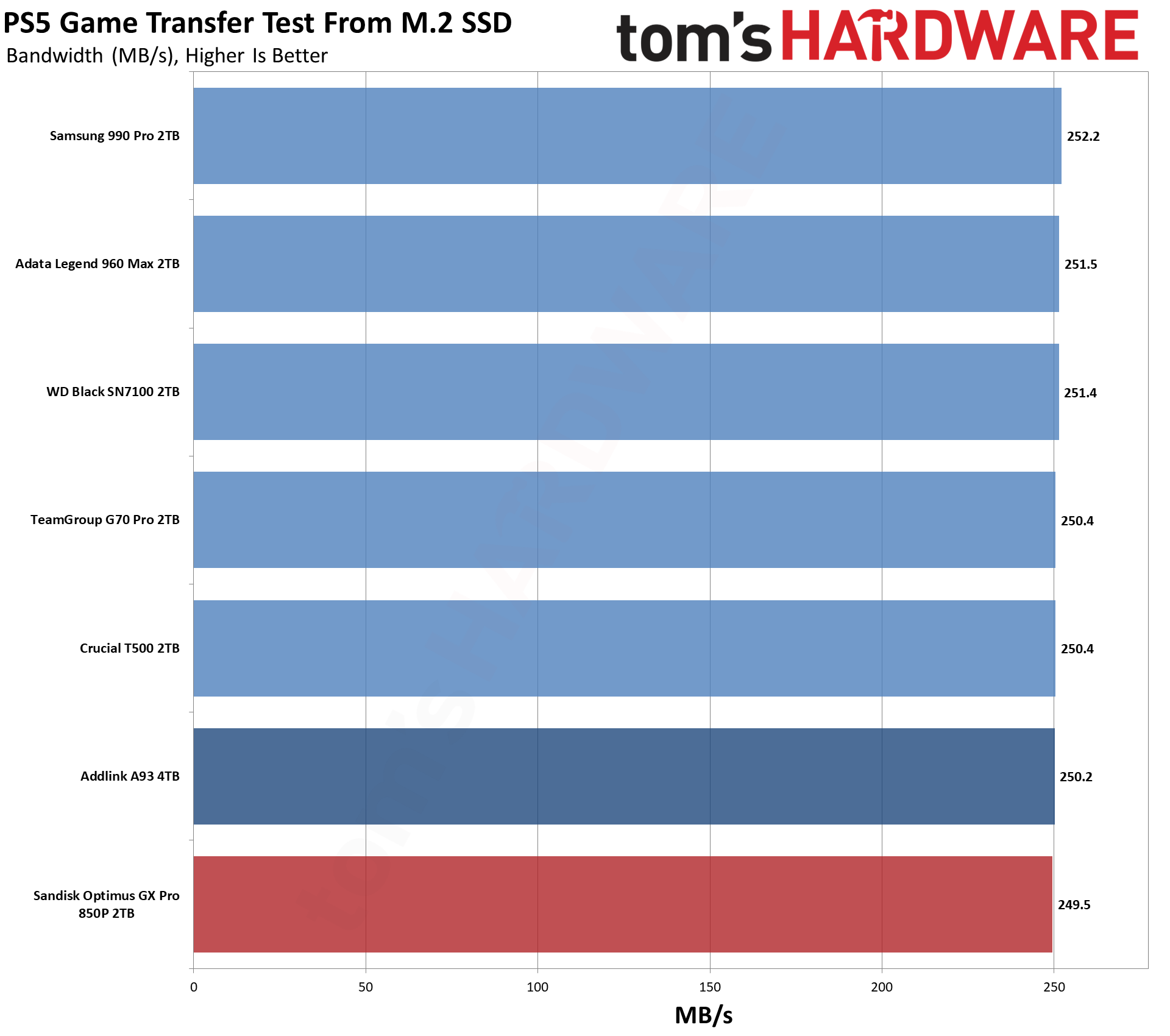
If the NAS 800 is overkill for PC gaming, it’s really overkill for PS5 gaming. Performance is pretty good, as expected, but you’re leaving a lot of its bandwidth potential on the table. The drive is also not optimized for this type of workload. However, it could work if you do a lot of writes on your PS5 and want something with extreme endurance.
Transfer Rates — DiskBench
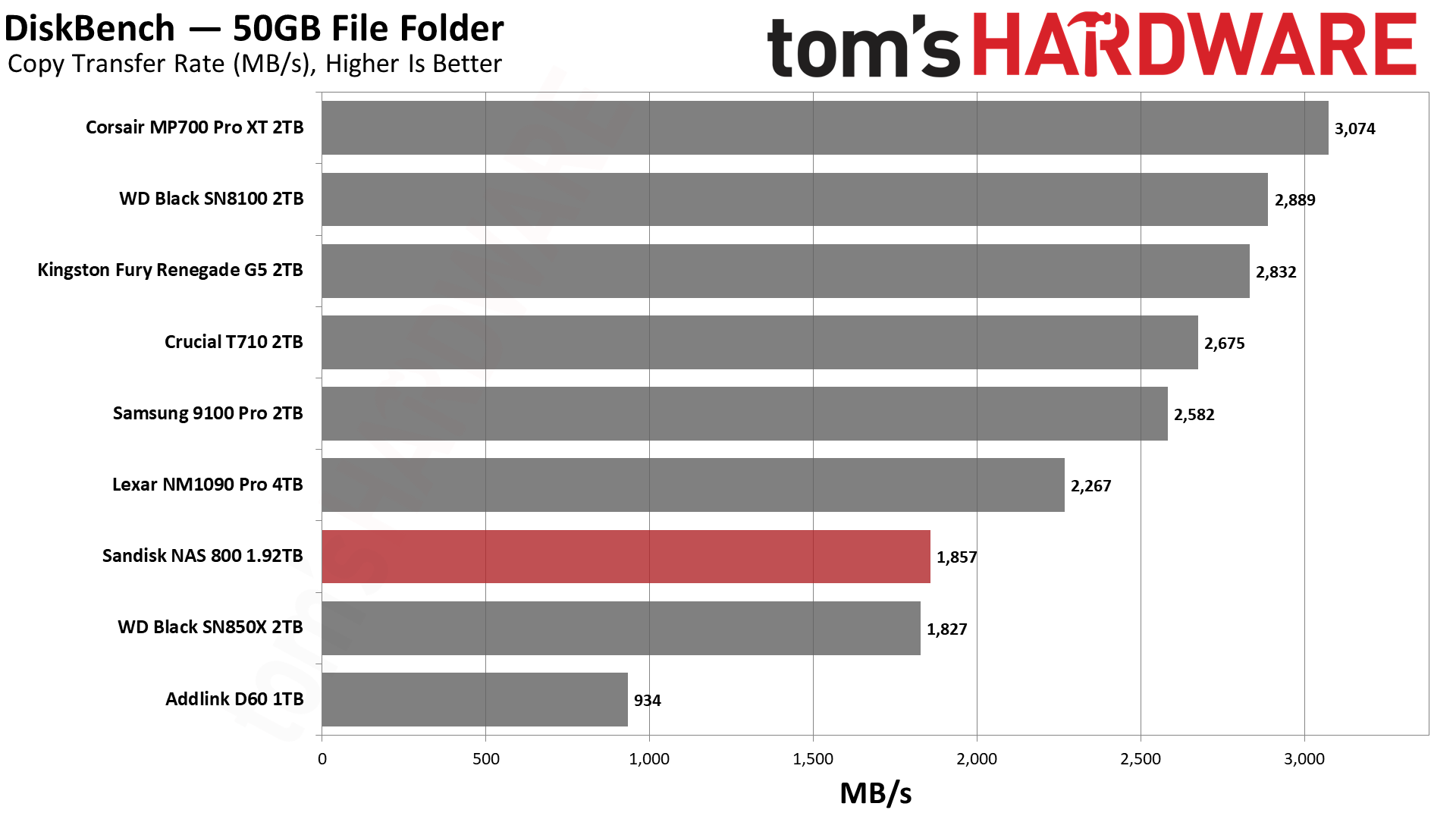
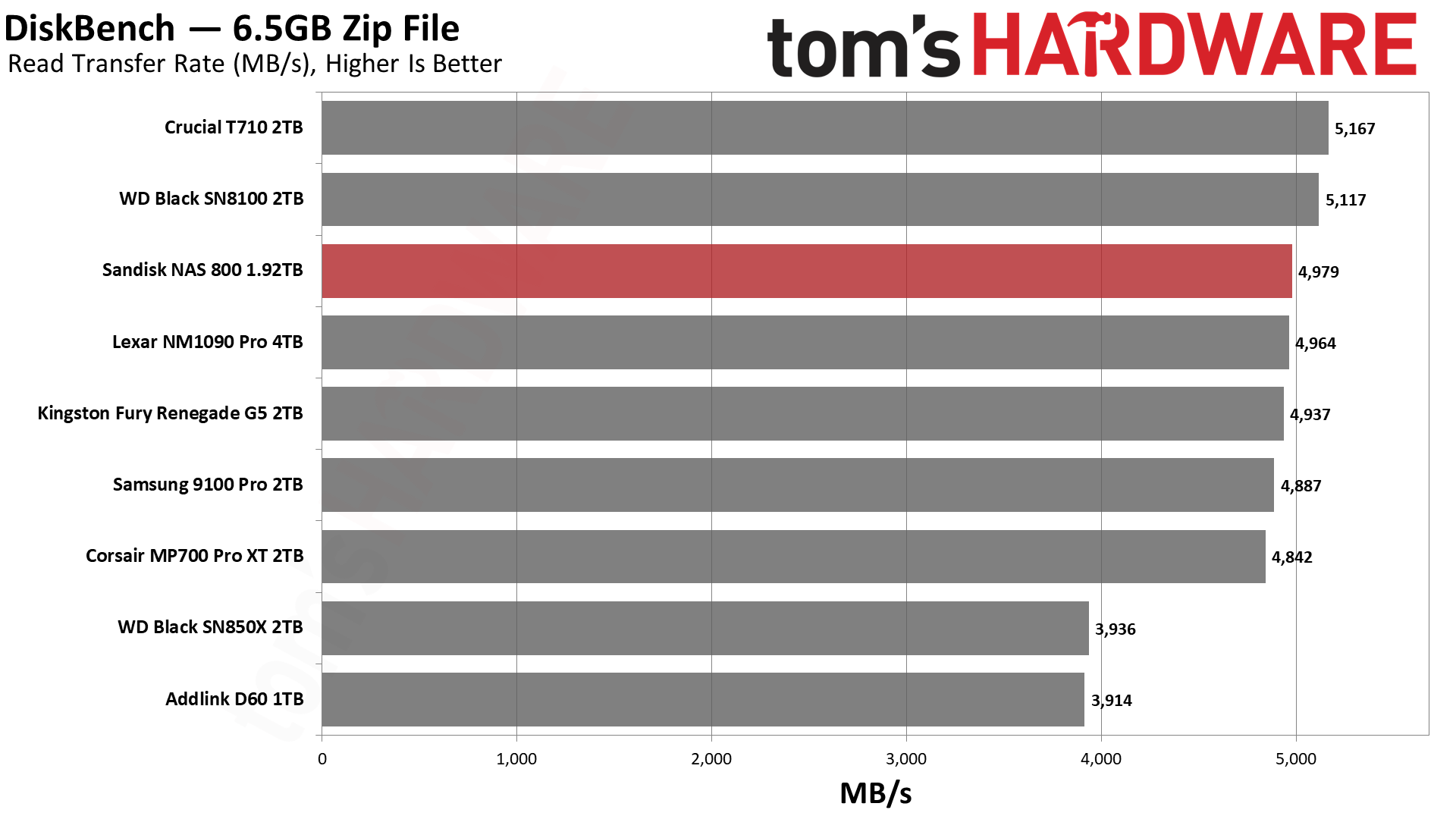
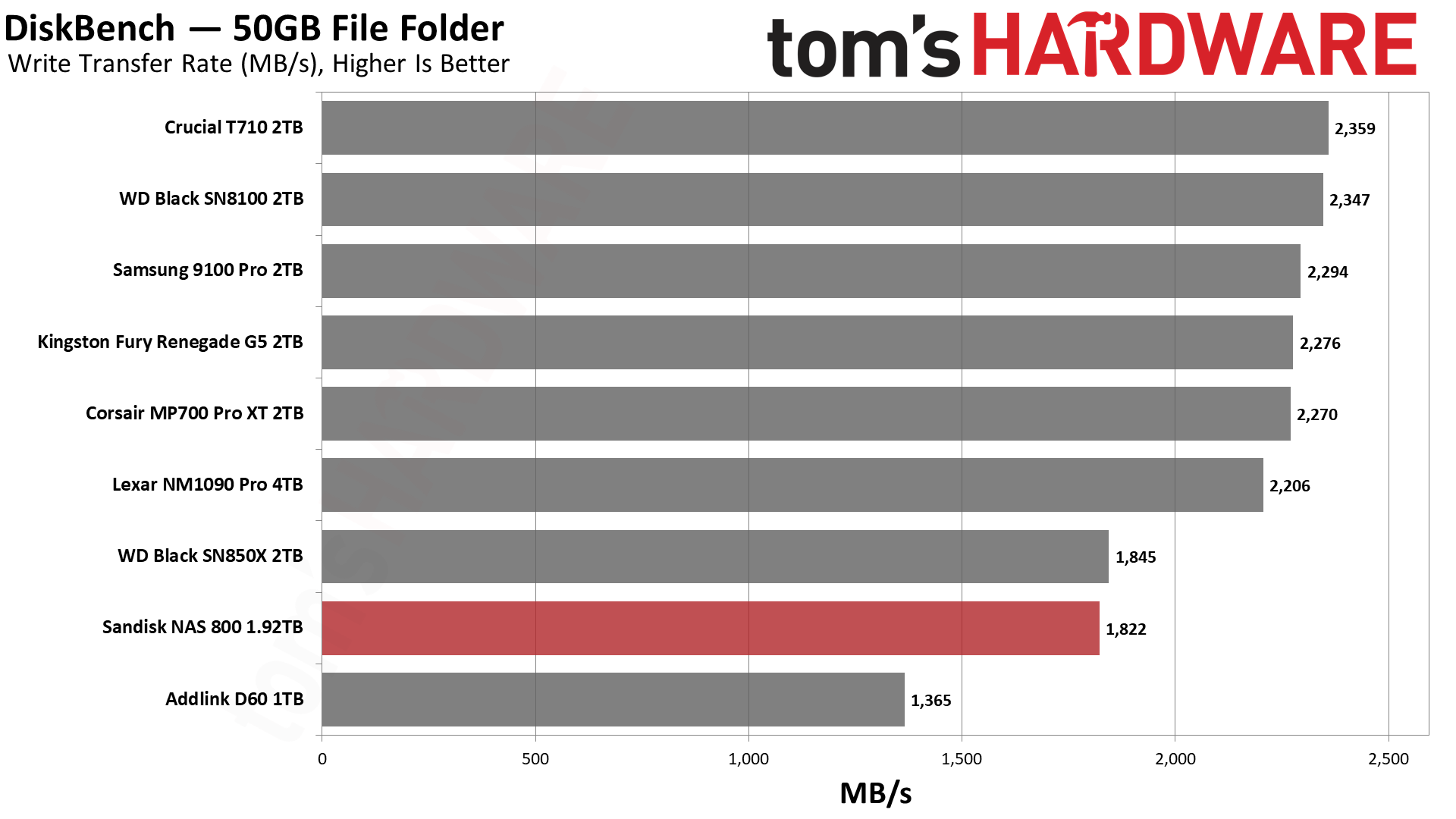
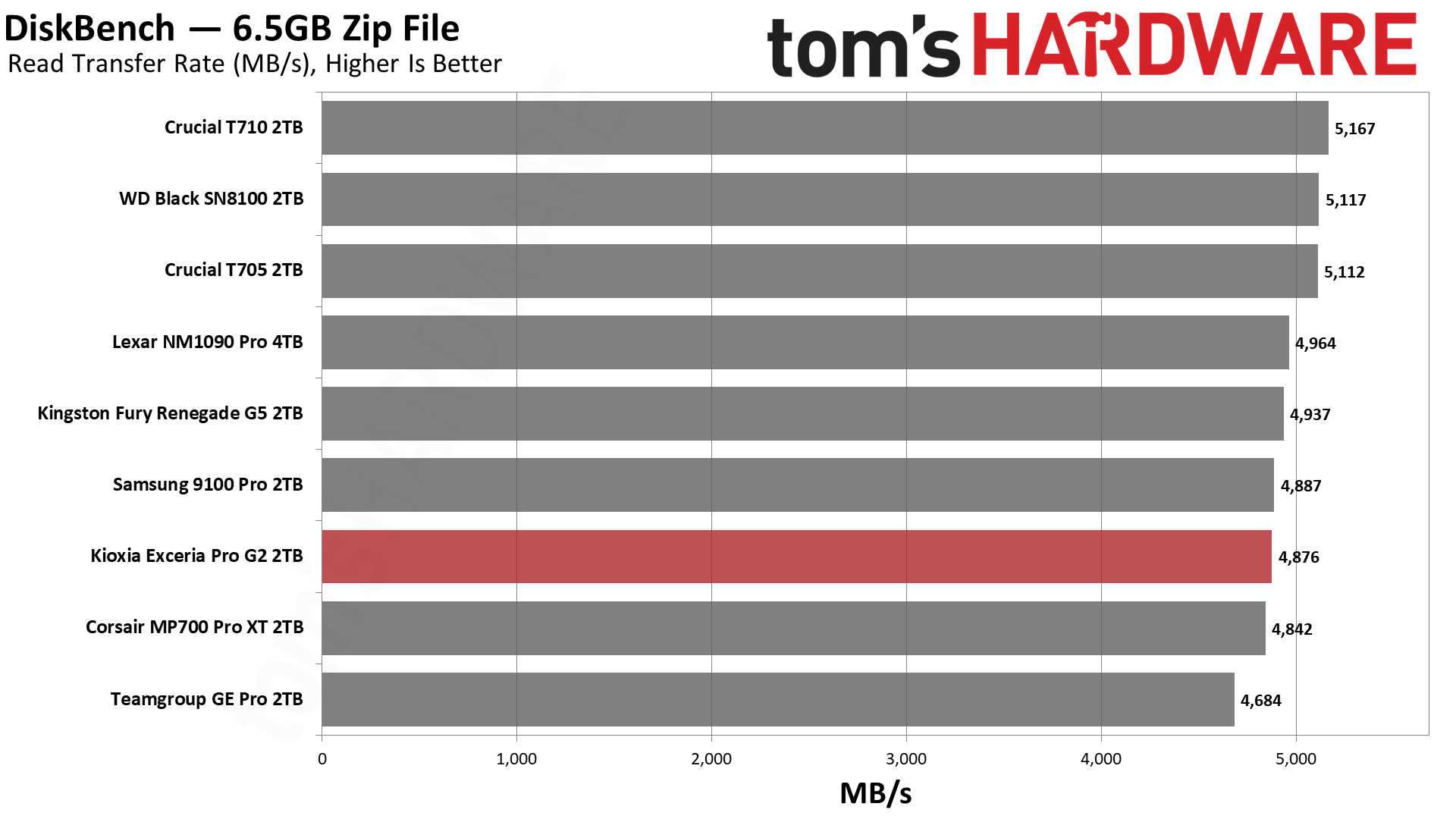
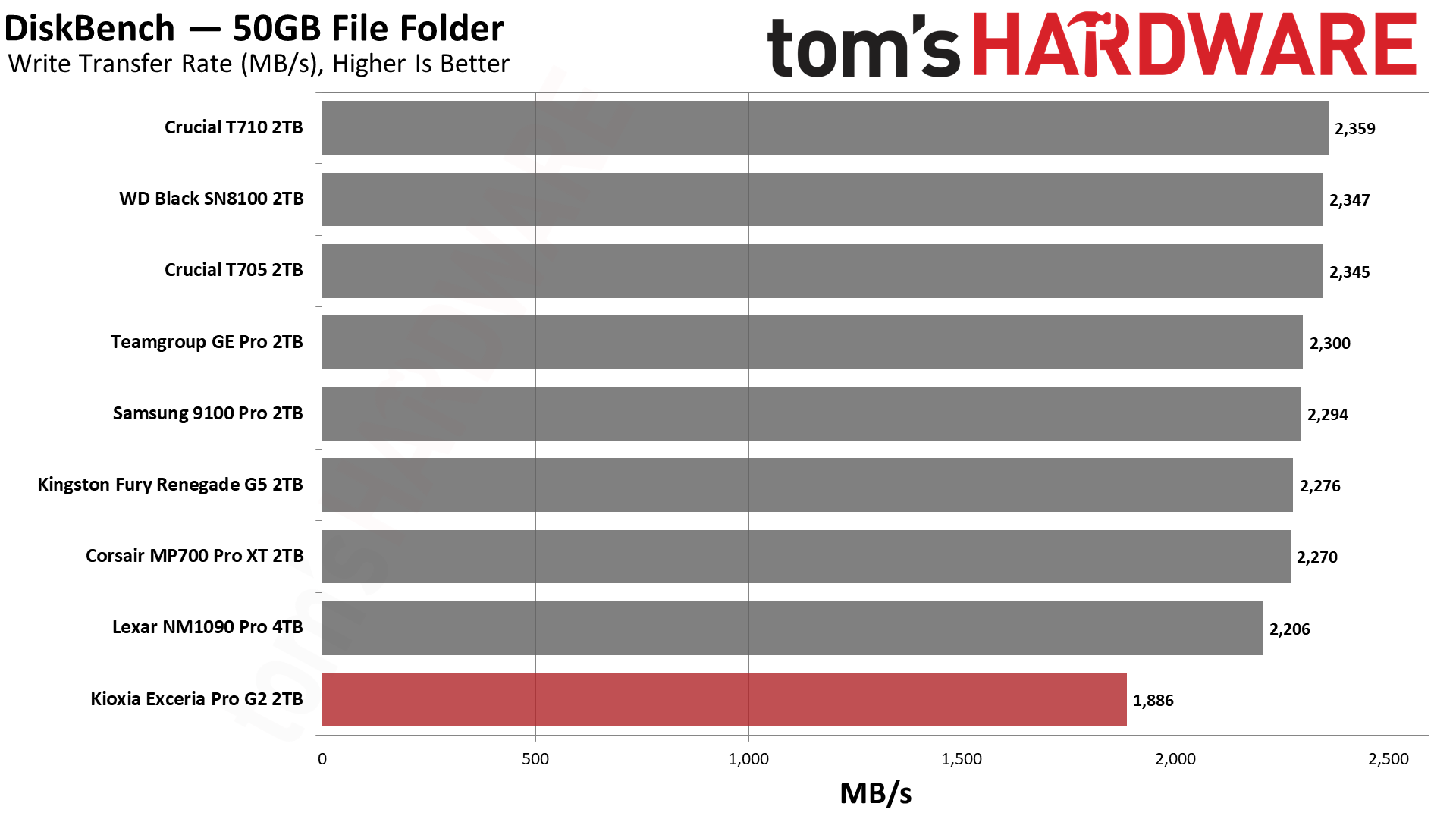
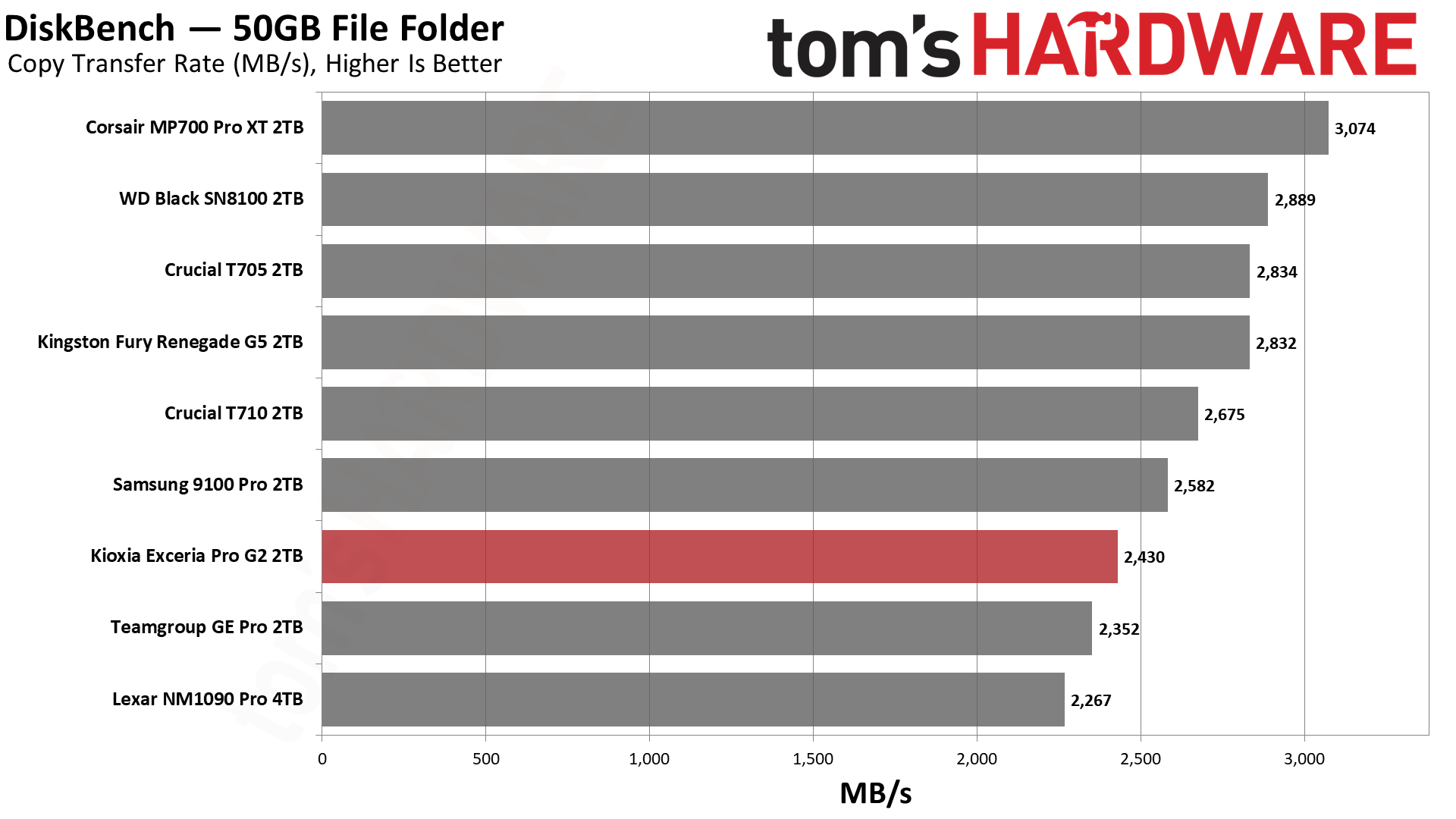
We use the DiskBench storage benchmarking tool to test file transfer performance with a custom 50GB dataset. We write 31,227 files of various types, such as pictures, PDFs, and videos to the test drive, then make a copy of that data to a new folder, and follow up with a reading test of a newly written 6.5GB zip file. This is a real-world type workload that fits into the cache of most drives.
Tom's HardwareTom's HardwareTom's Hardware
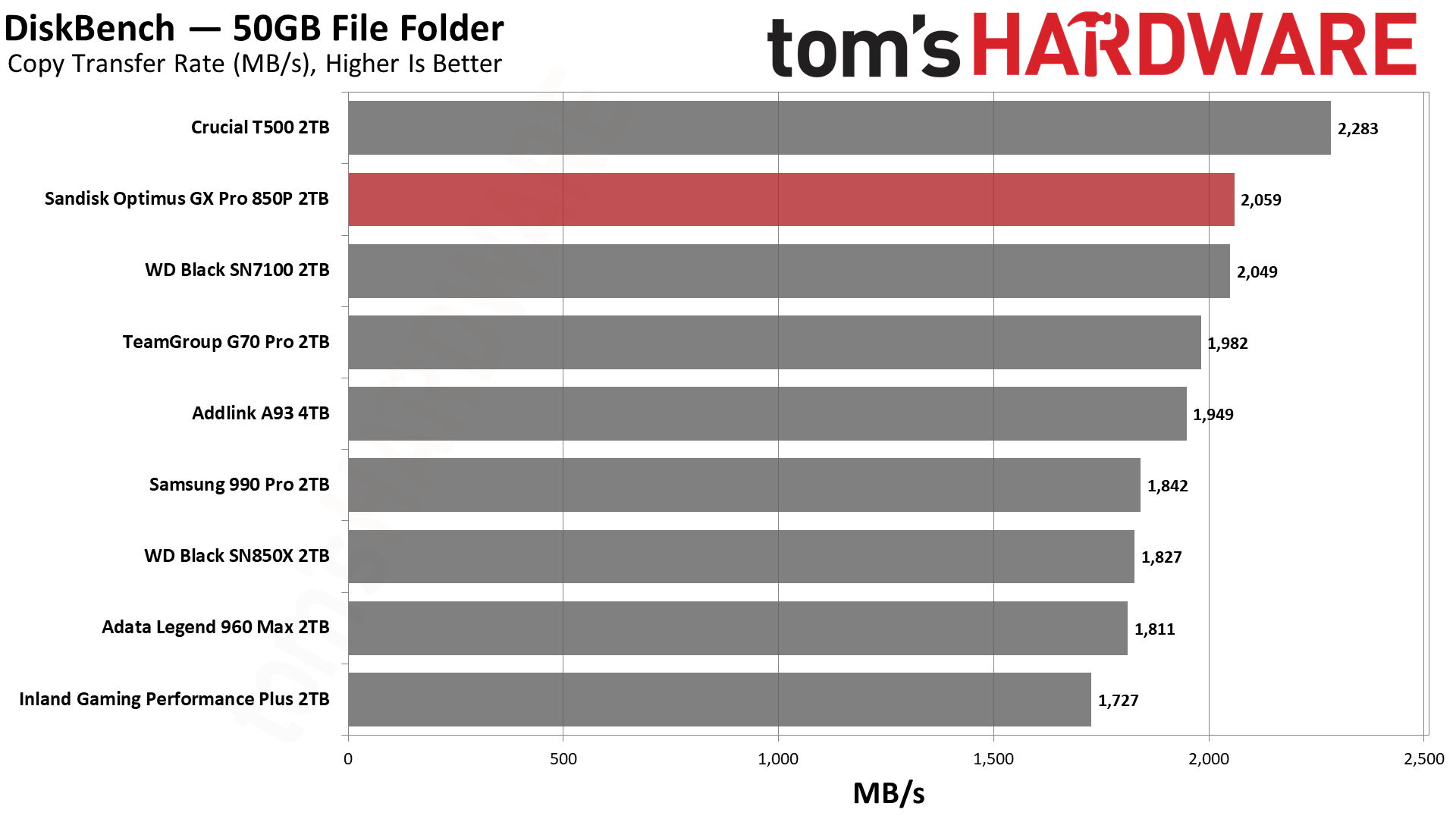
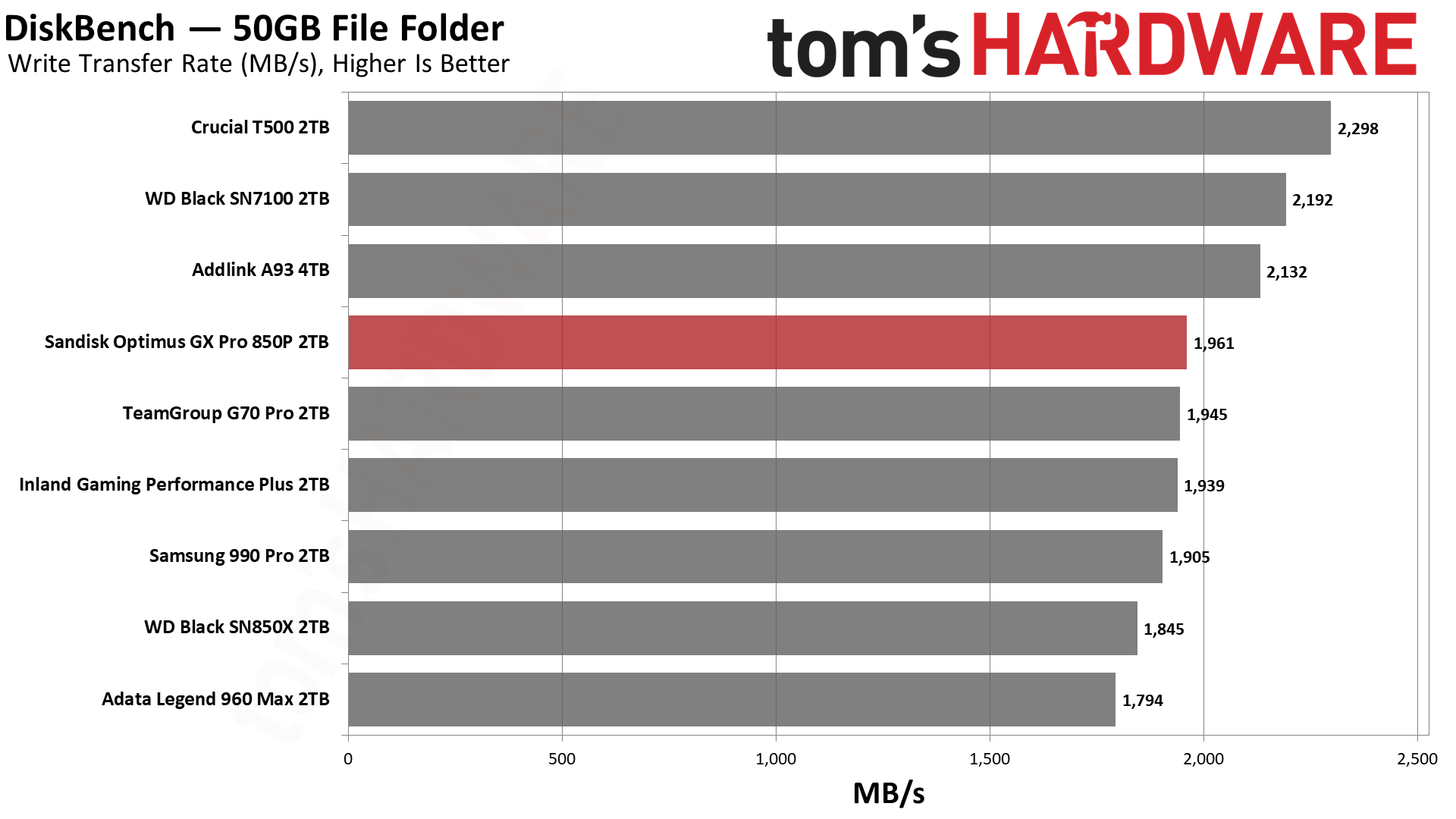
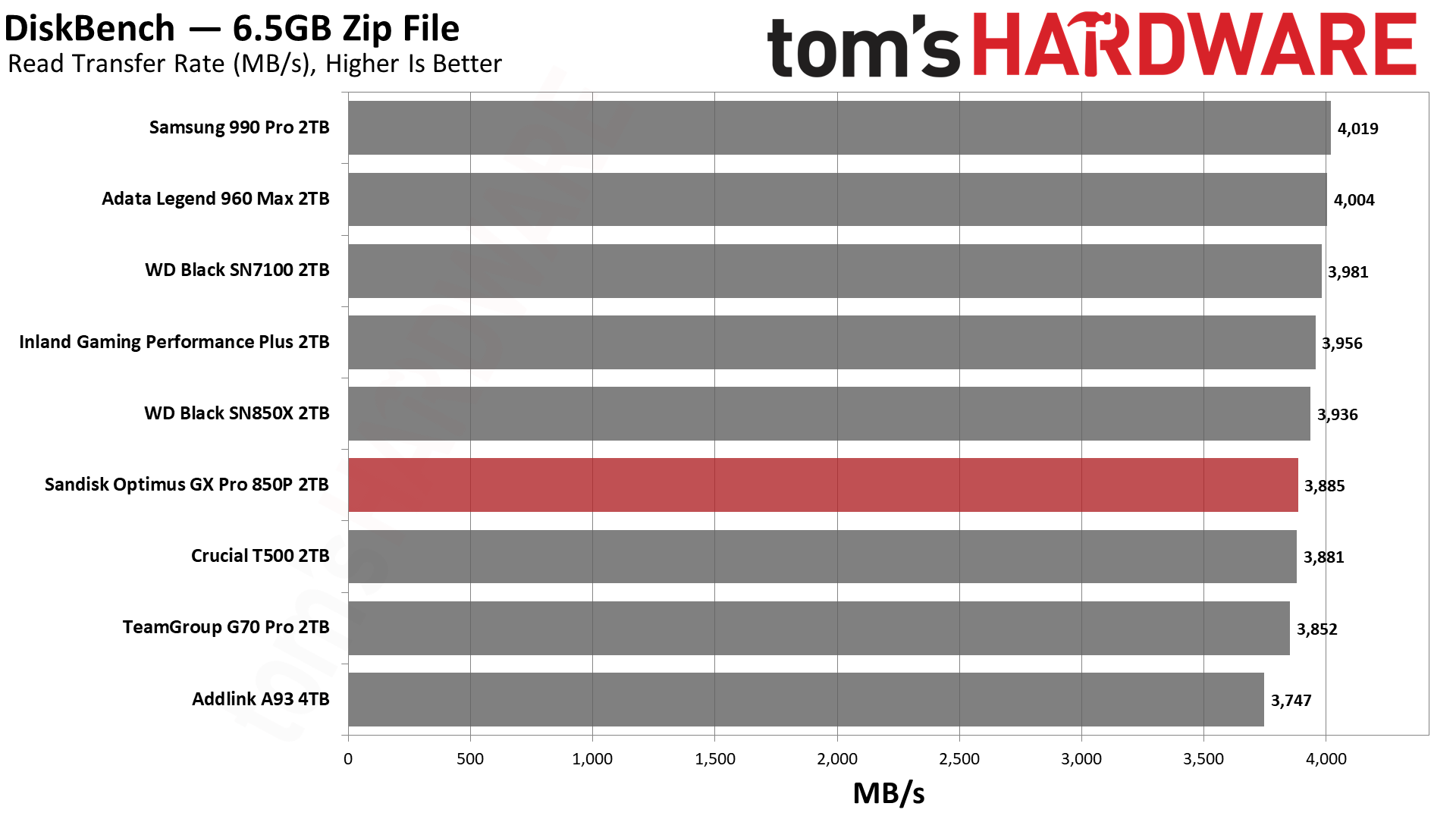
At a quick glance, the NAS 800 does well with reads but not so well with writes and copying in our DiskBench test. Obviously, having slower writes will impact copy performance. That’s the reason the drive lags here, as the test works against the NAS 800’s design. Its roughly 12GB pSLC cache can only absorb the first quarter of the 50GB write, with the rest going straight to TLC. For that reason, its write score lands about 20% below the other Gen 5 drives, with a drop of 36% for copying against the same-hardware SN8100.
Admittedly, a NAS drive should be able to tackle file copying like this. A better test to show its value would be an extremely large transfer, where its steady-state performance would win out. Also, for smaller transfers, particularly random writes, its small cache would perform well. Know your workload before picking your drive.
Synthetic Testing — ATTO / CrystalDiskMark
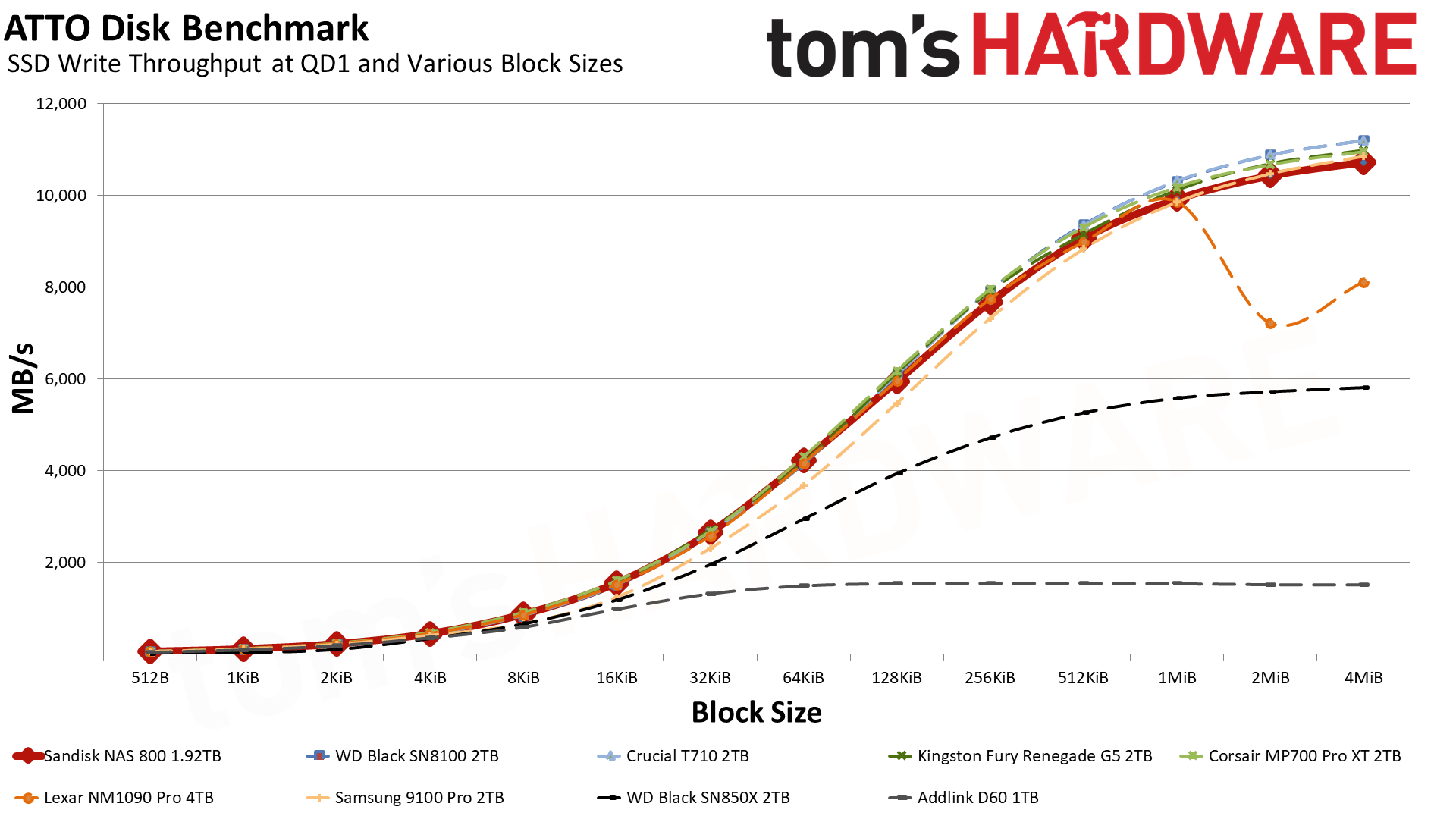
ATTO and CrystalDiskMark (CDM) are free and easy-to-use storage benchmarking tools that SSD vendors commonly use to assign performance specifications to their products. Both of these tools give us insight into how each device handles different file sizes and at different queue depths for both sequential and random workloads.
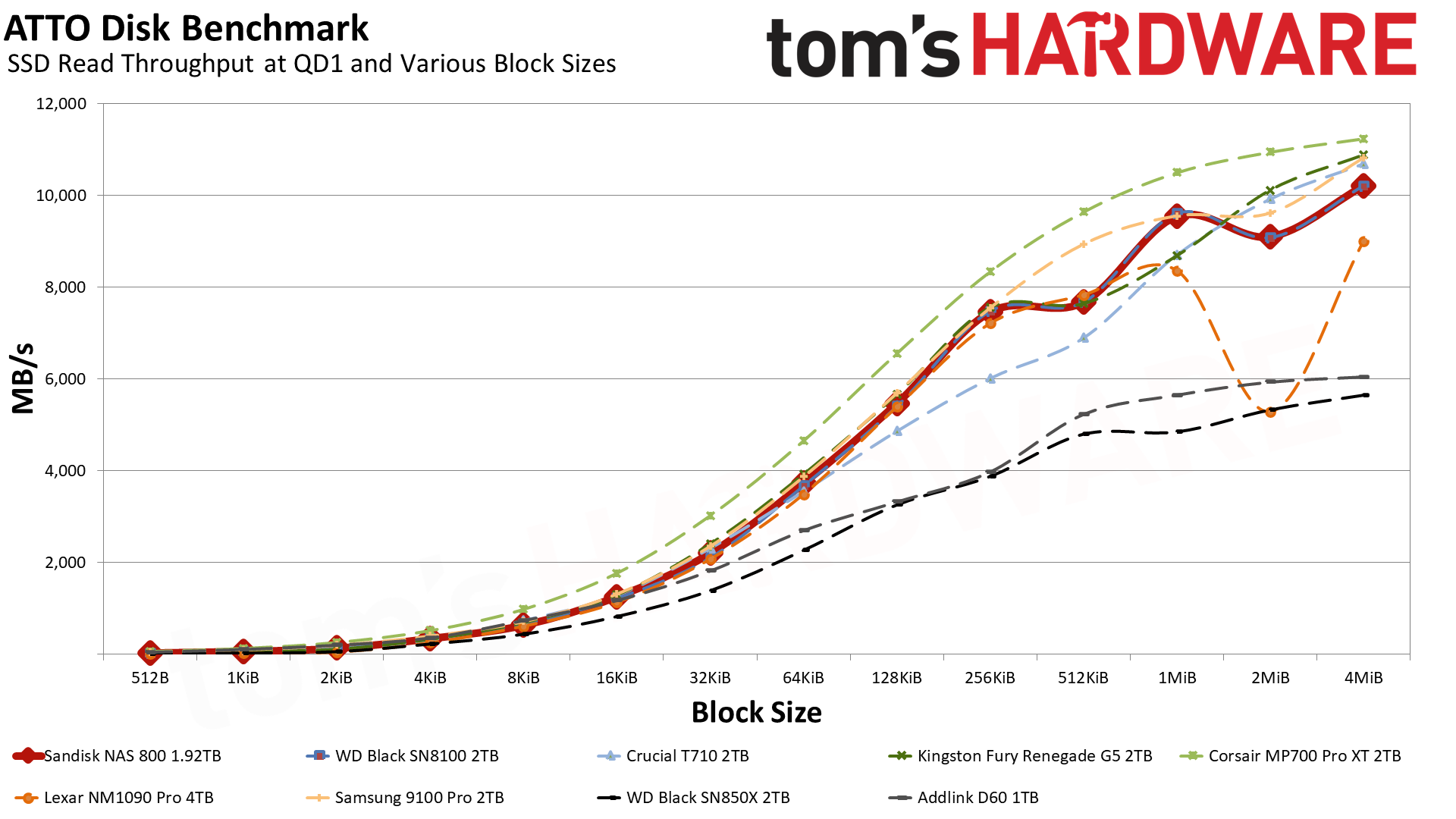
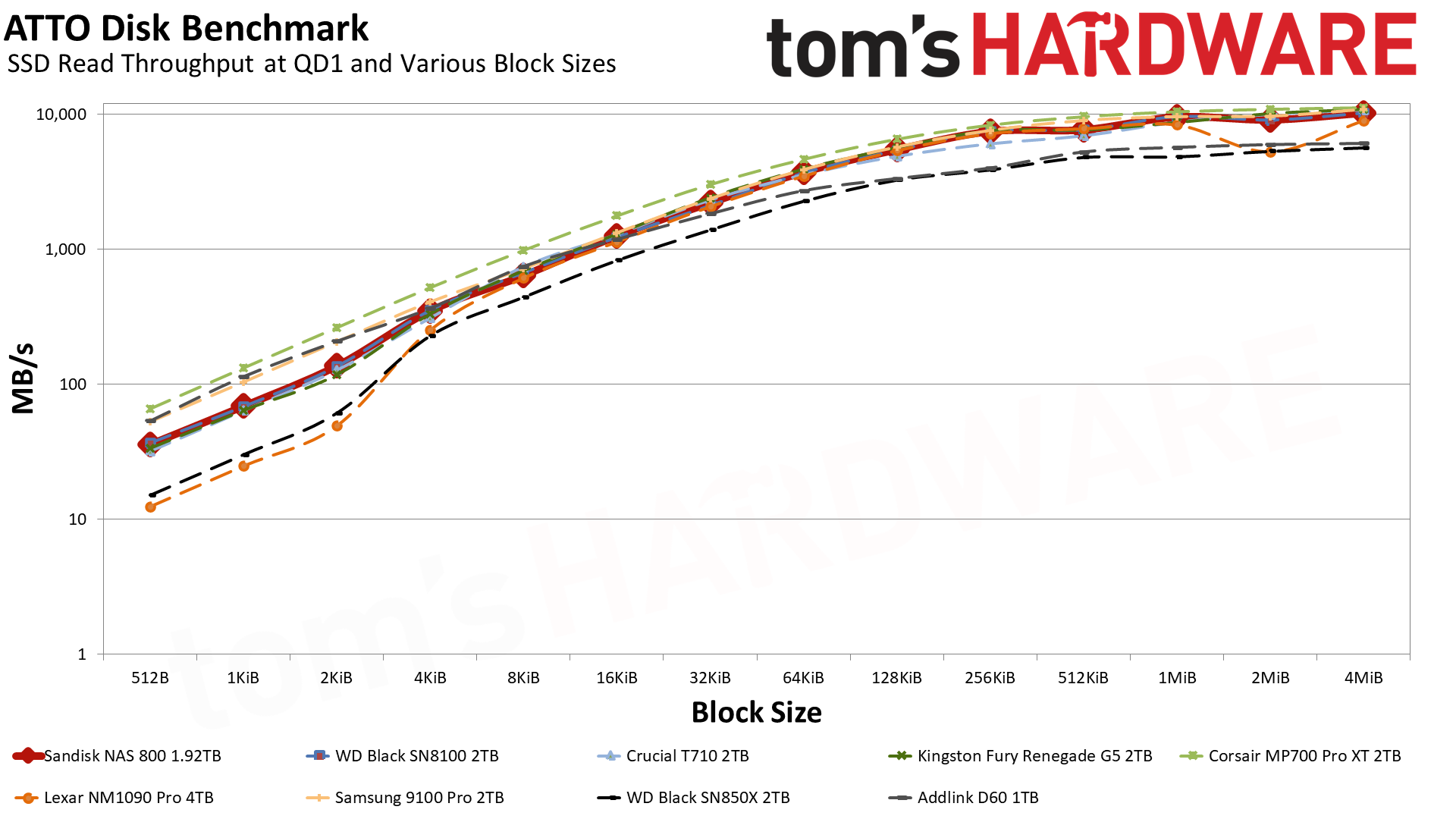
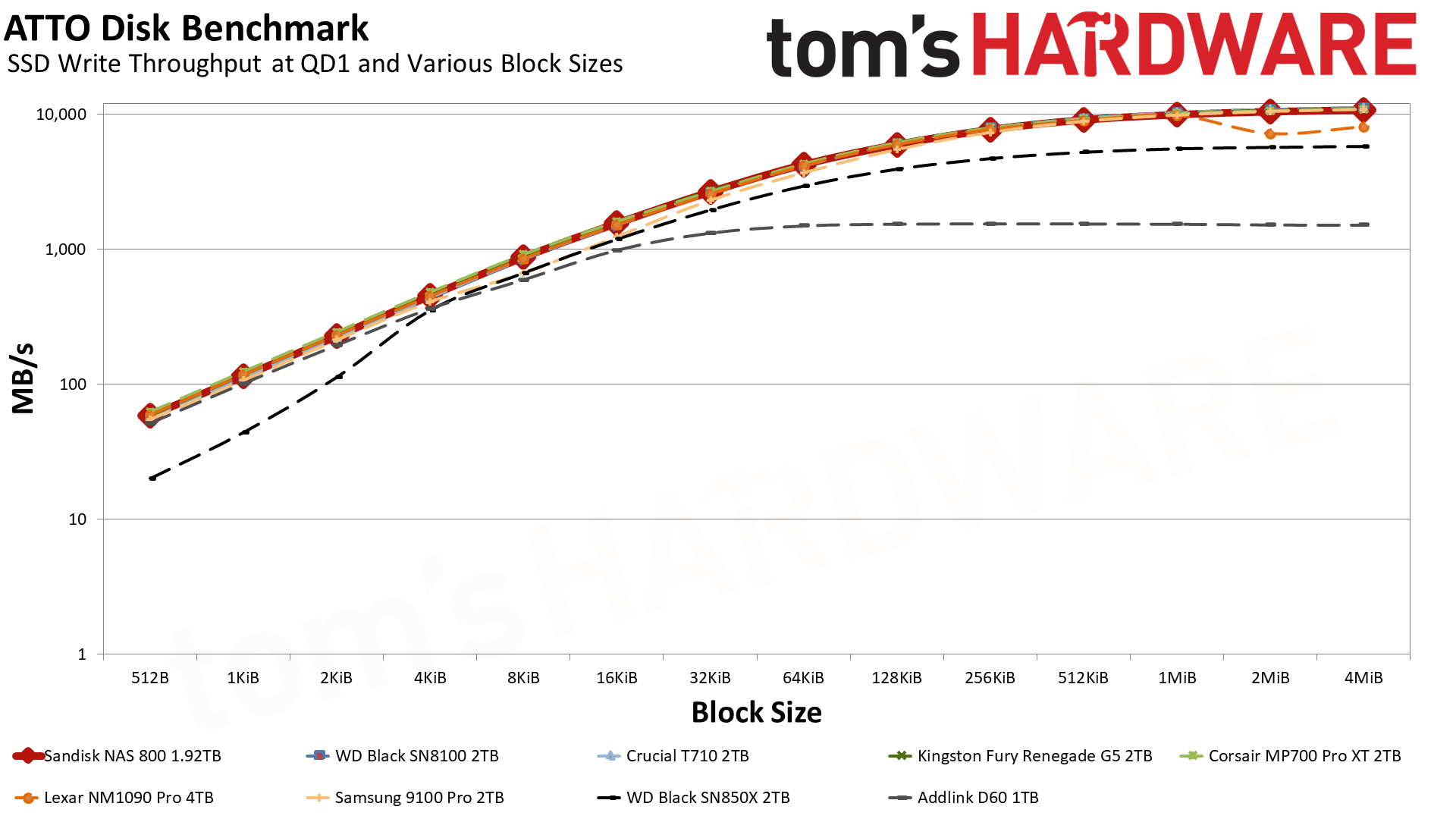
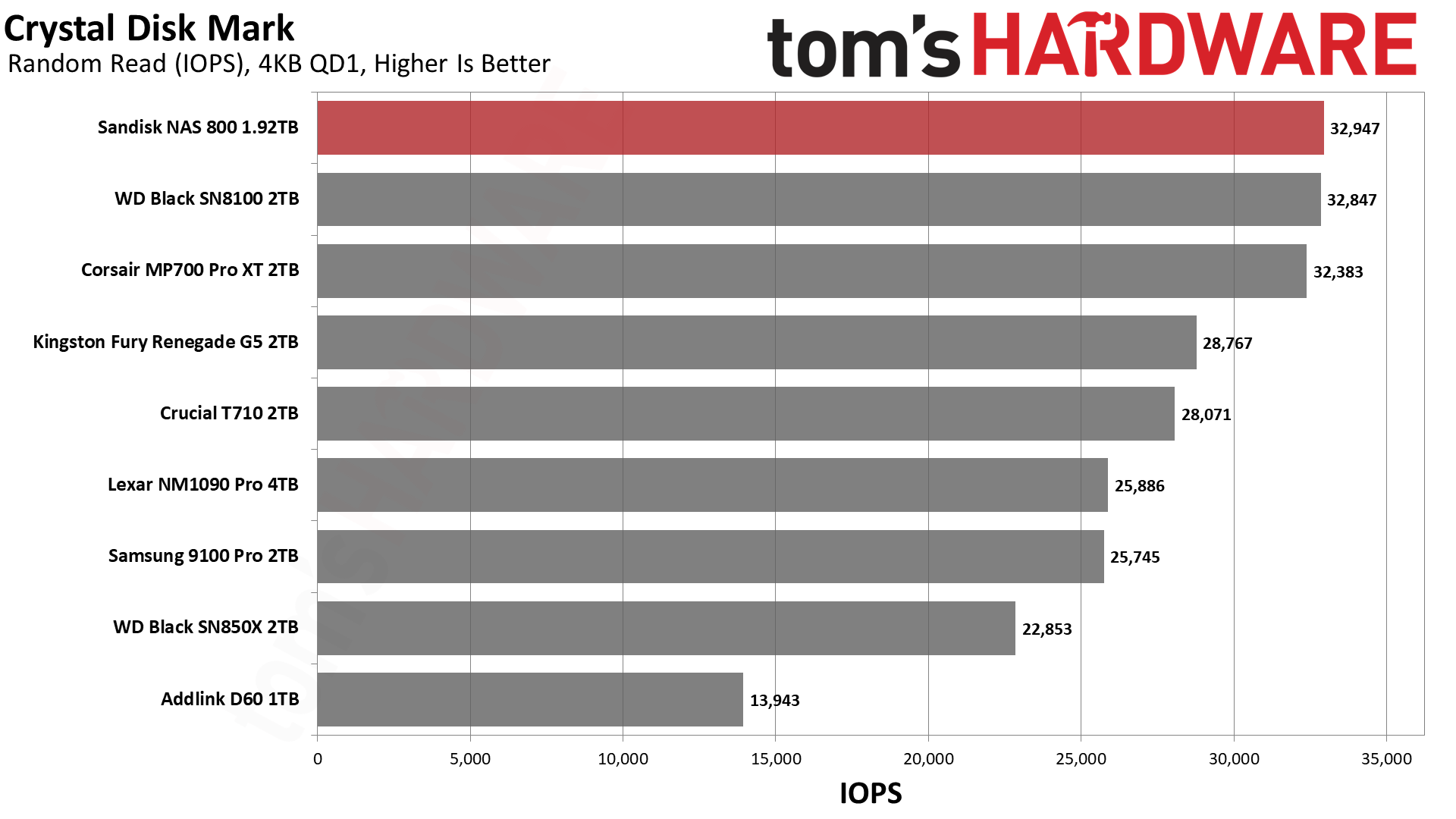
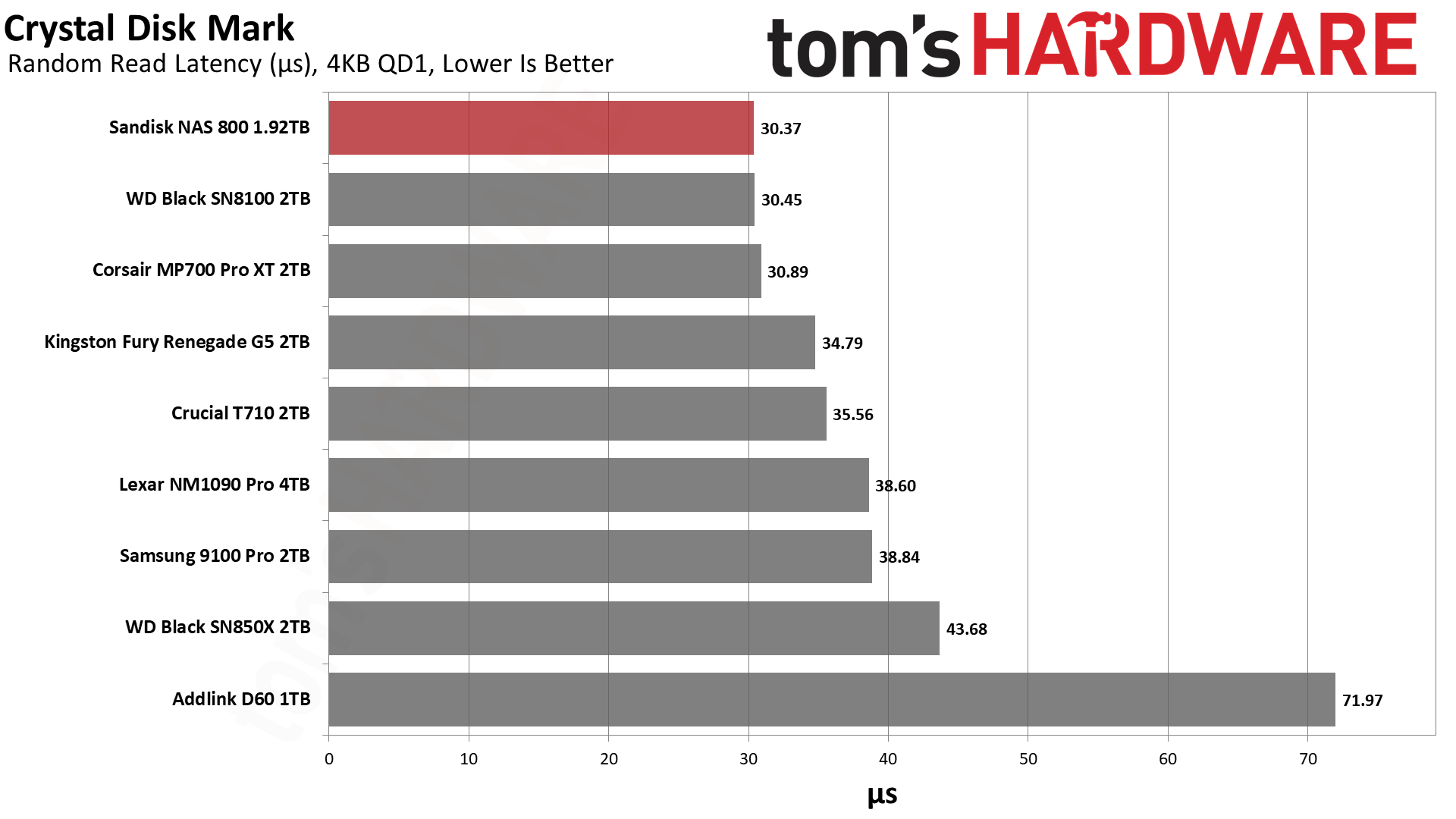
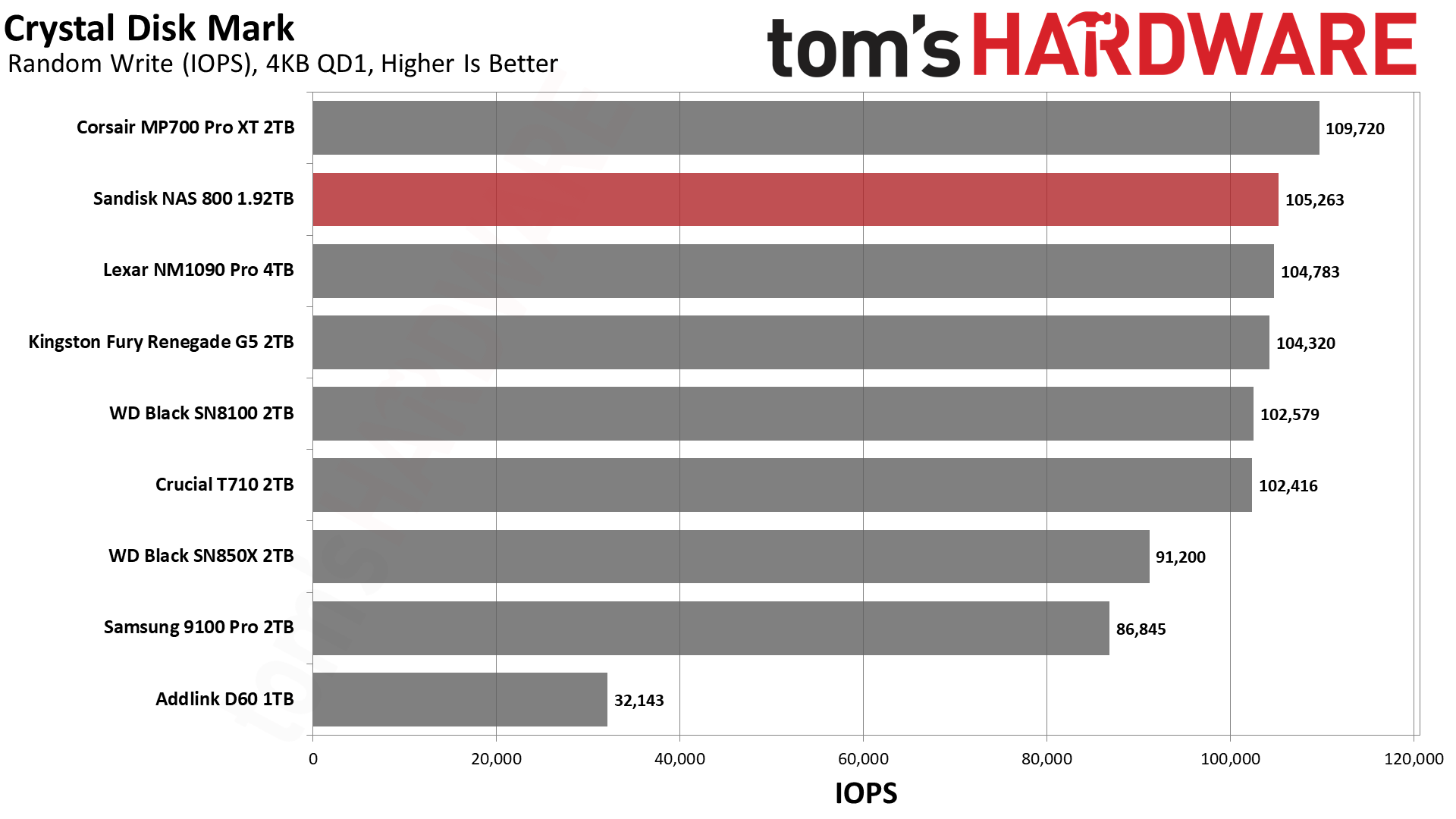
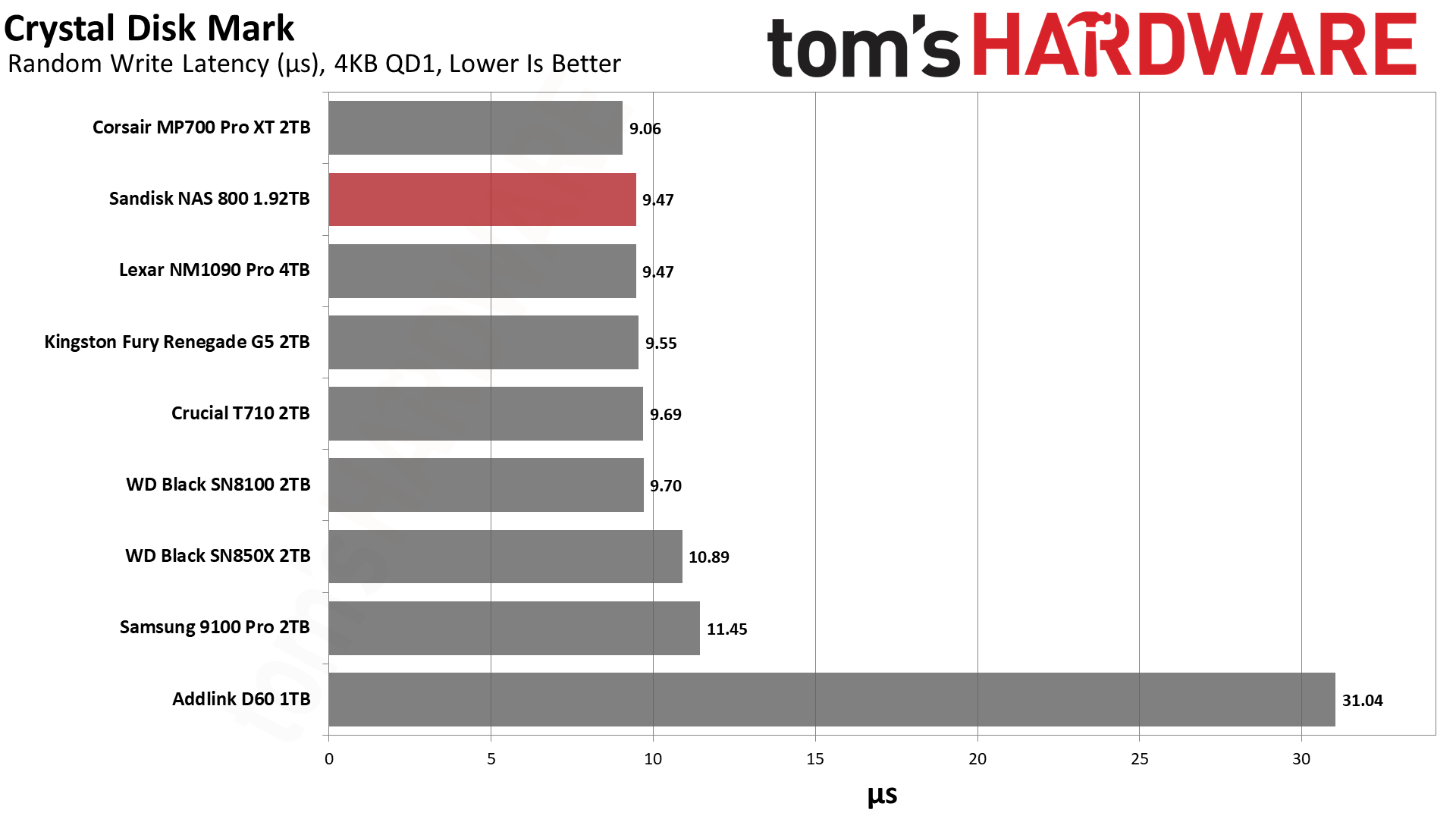
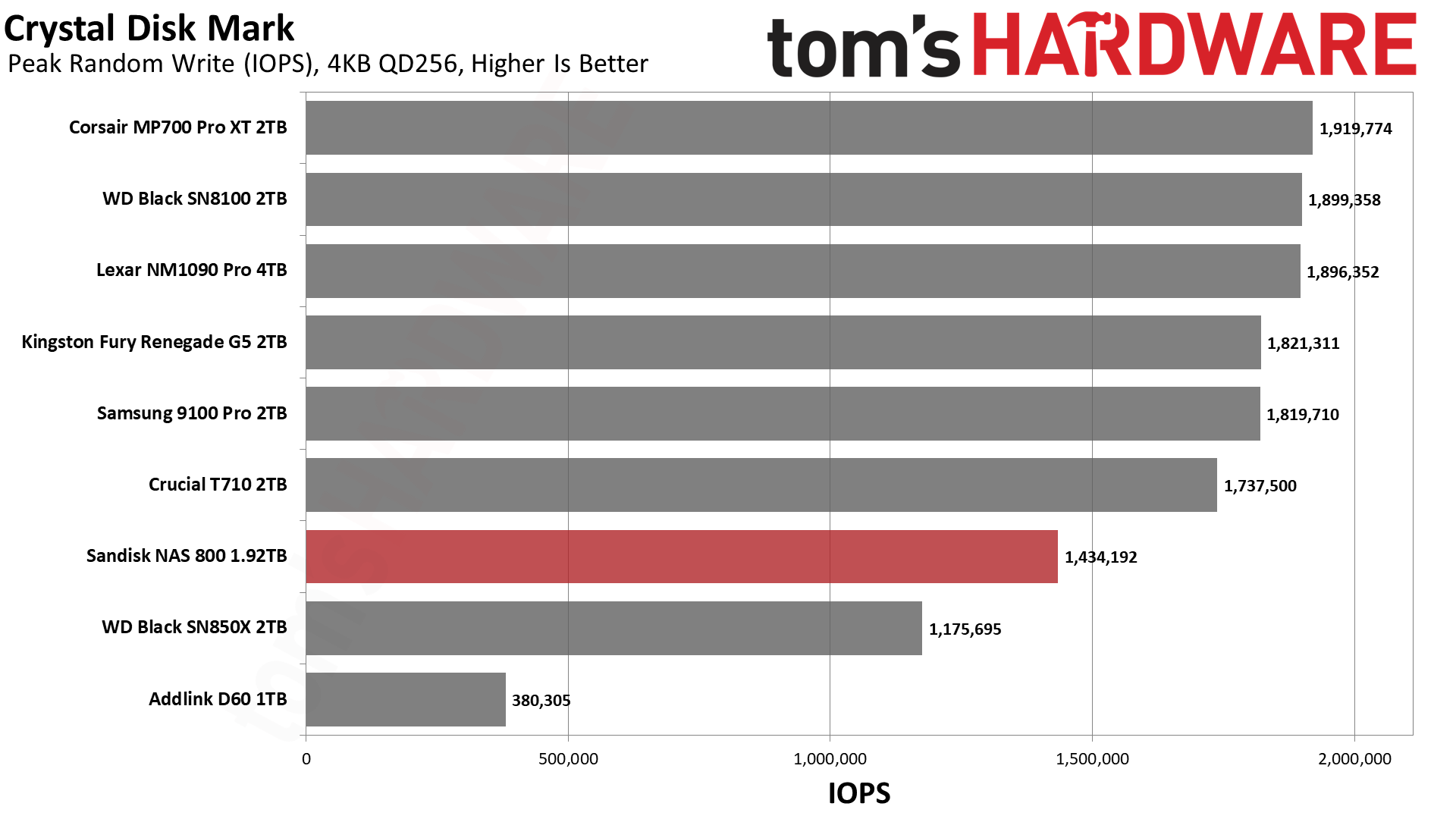
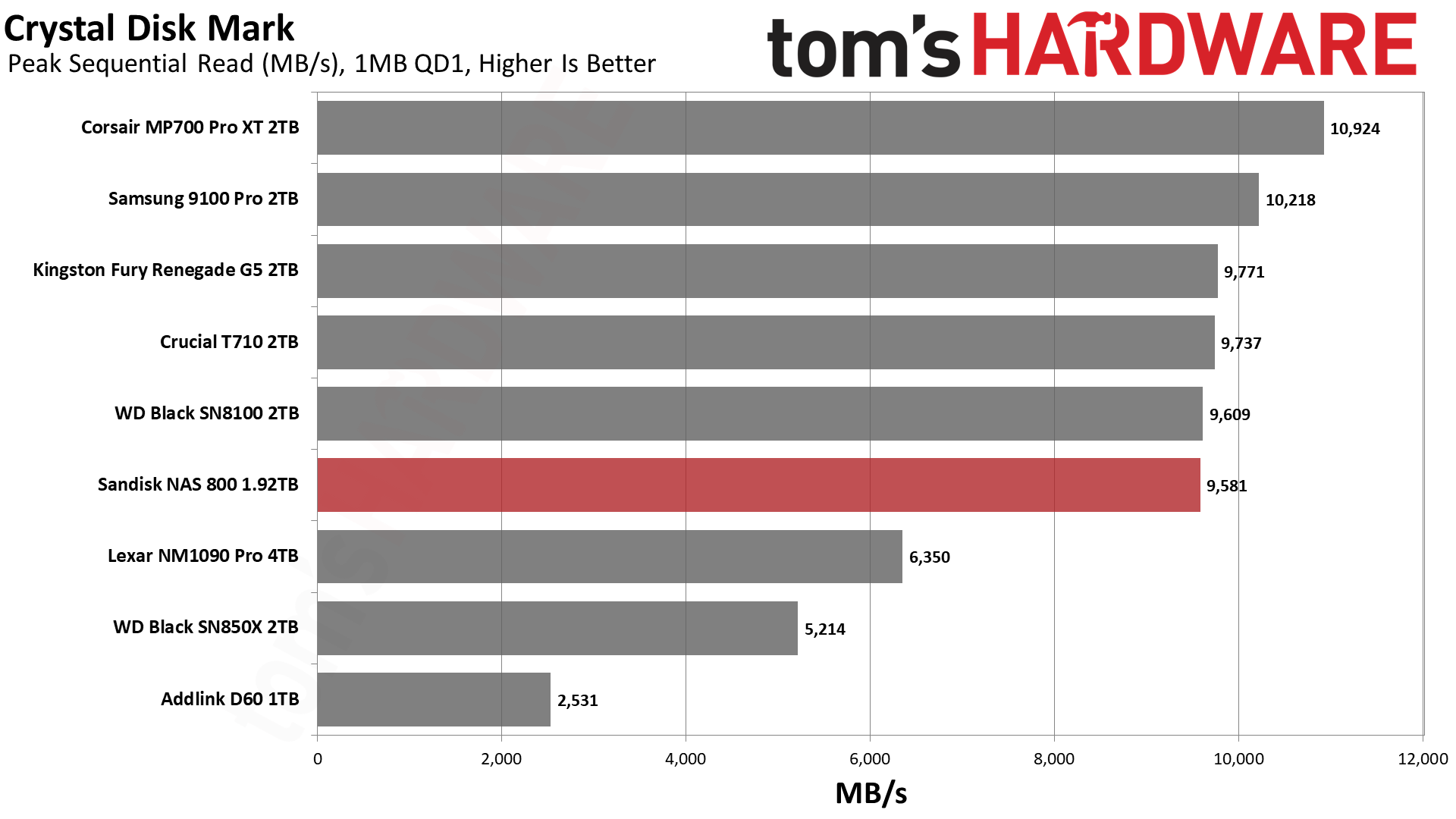
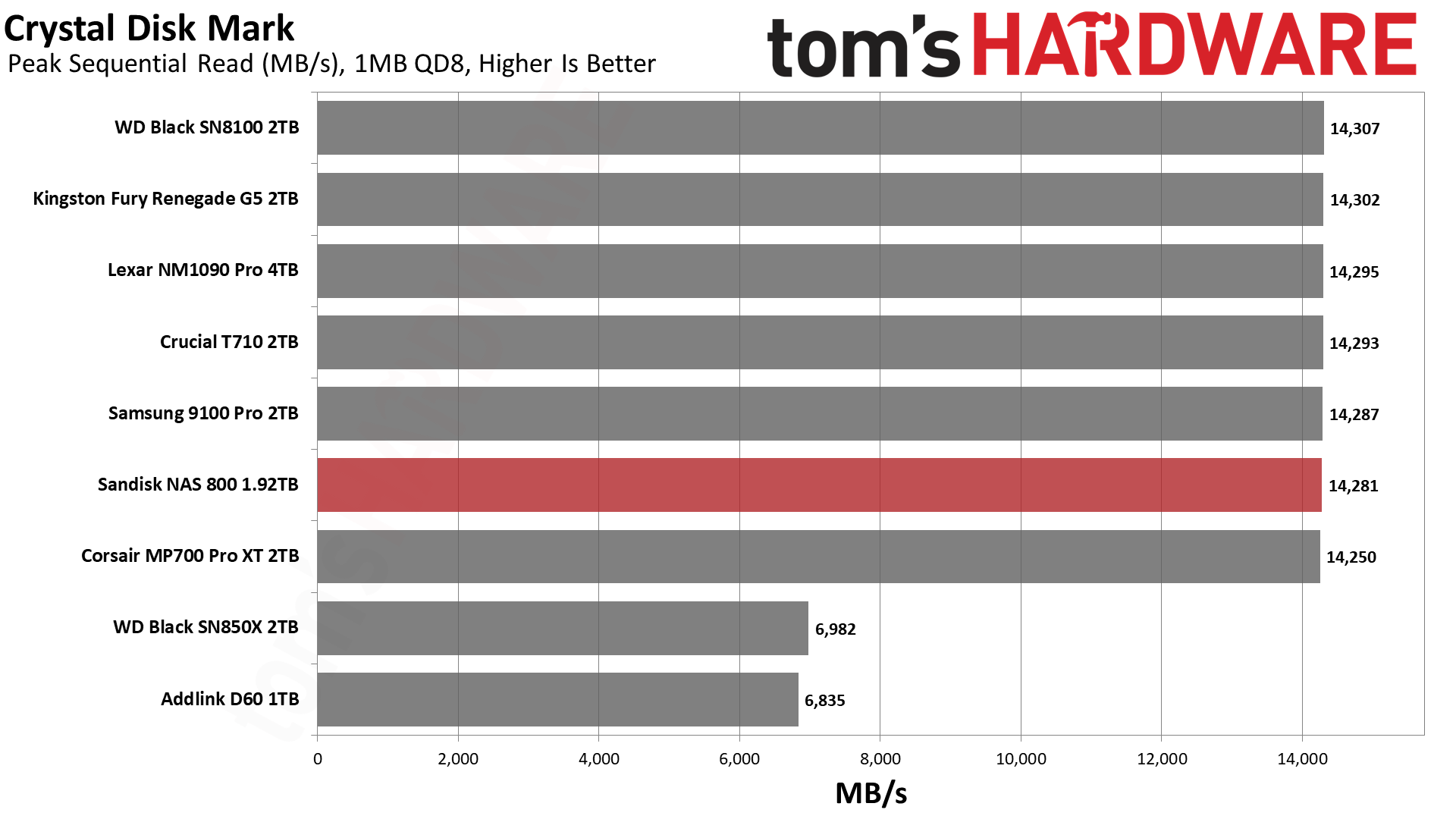
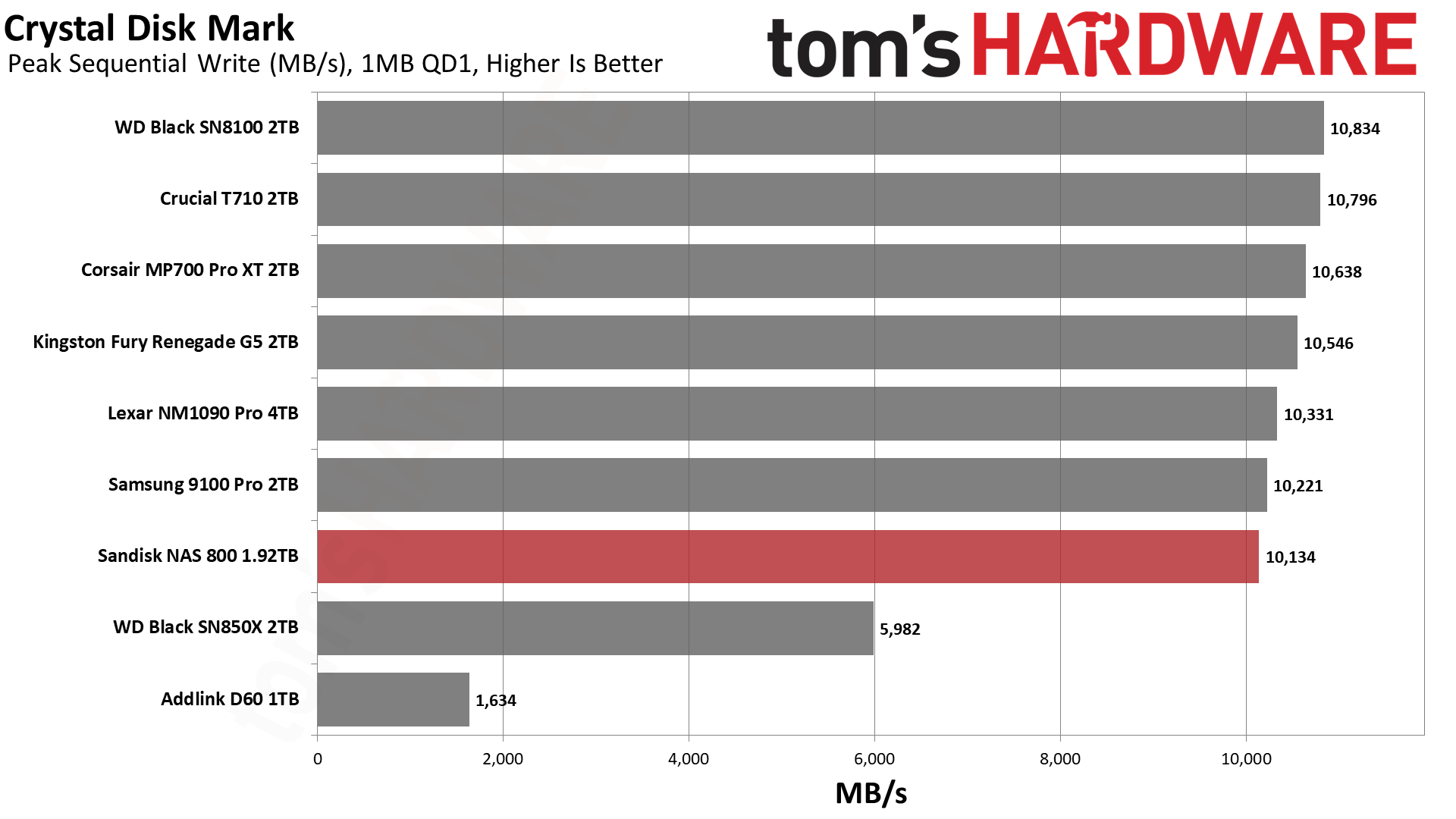
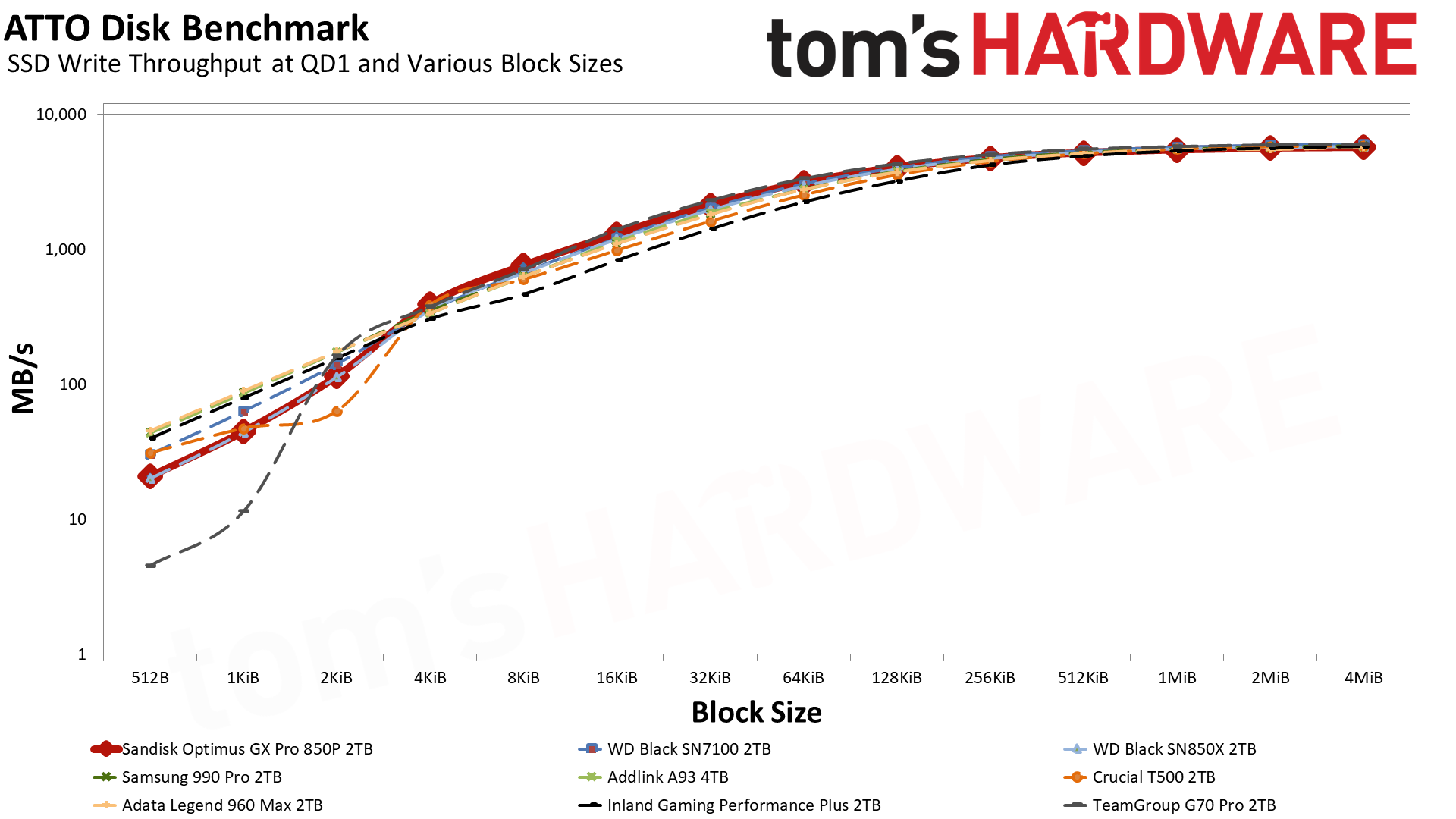
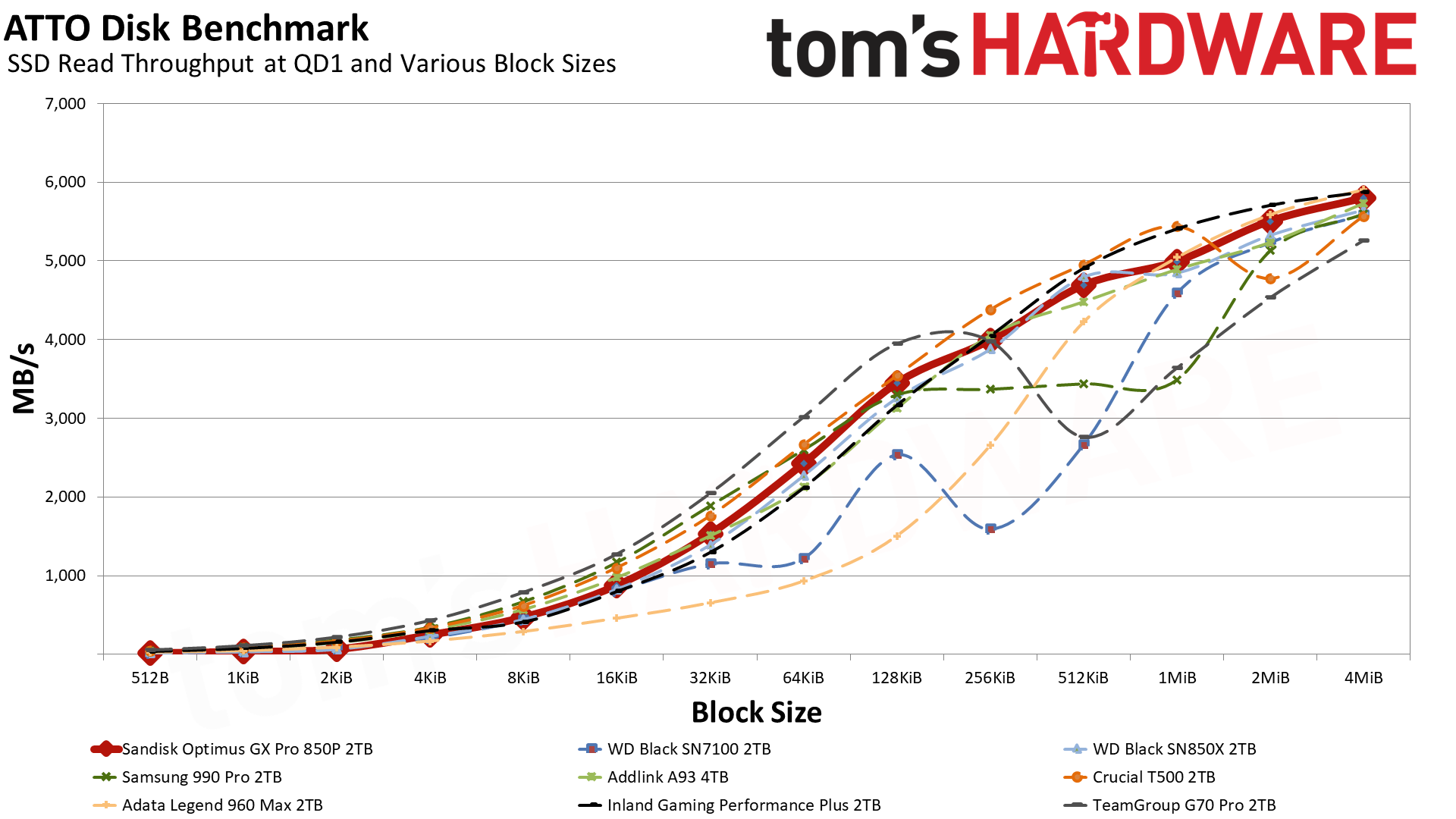
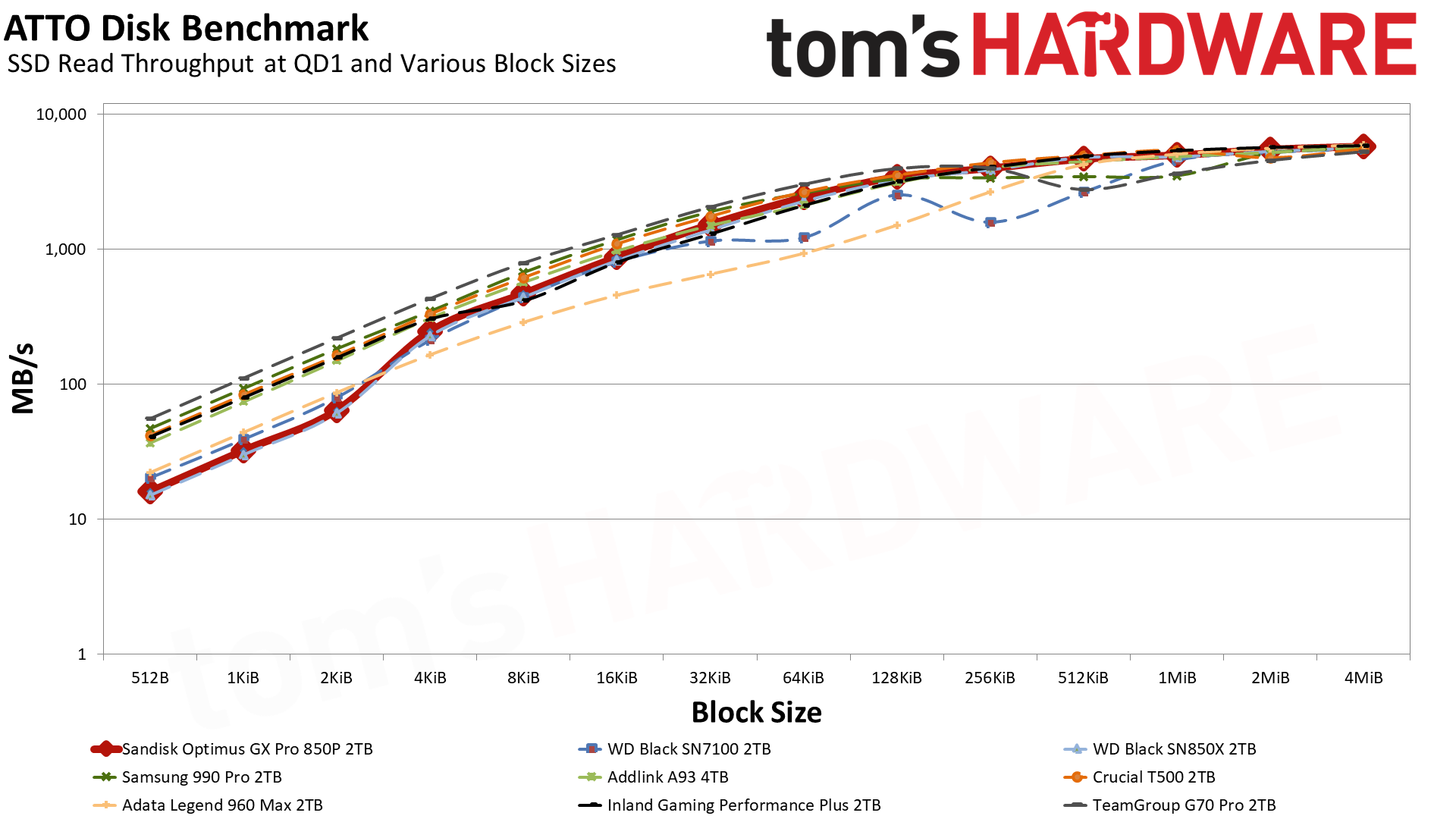
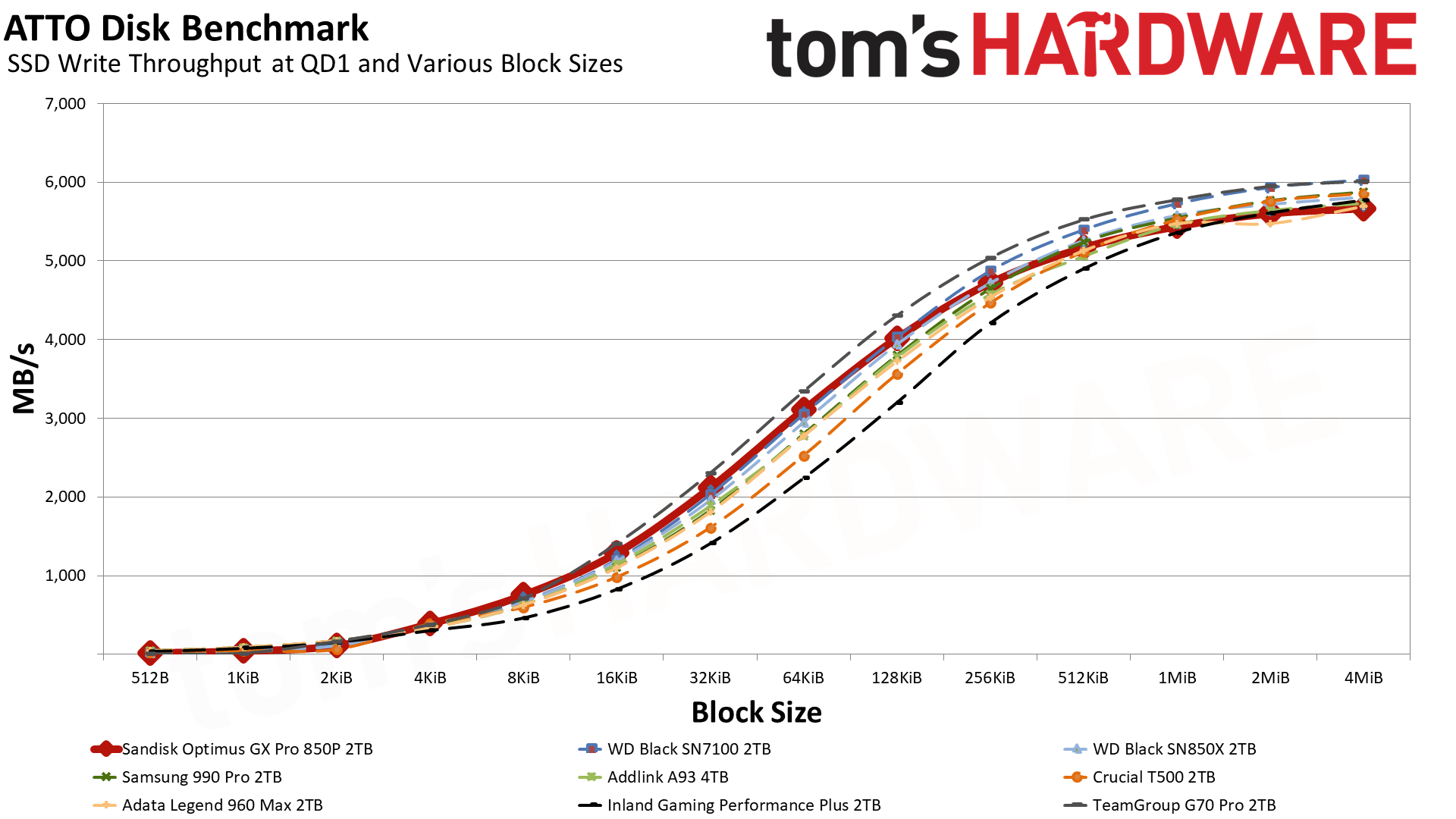
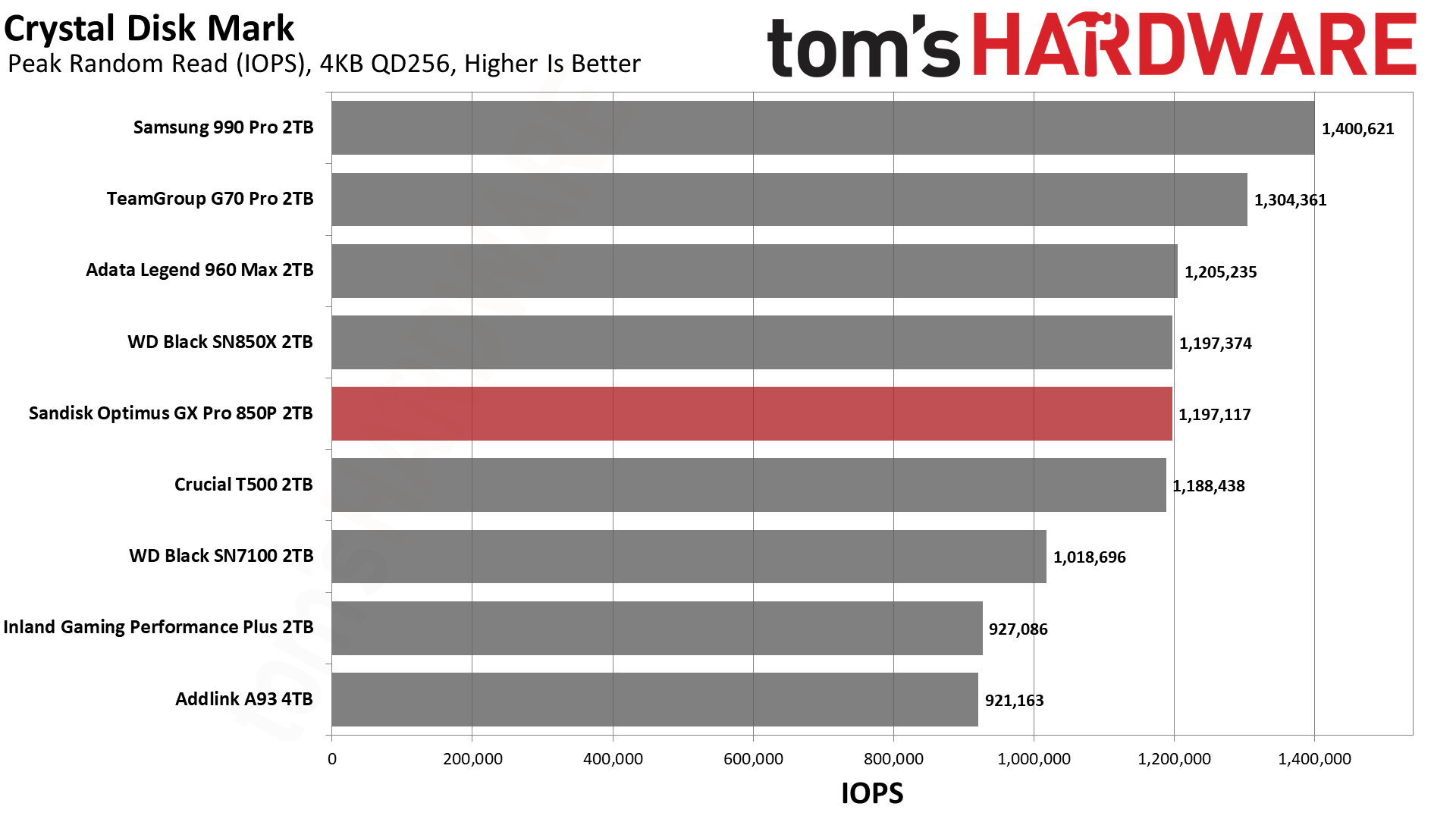
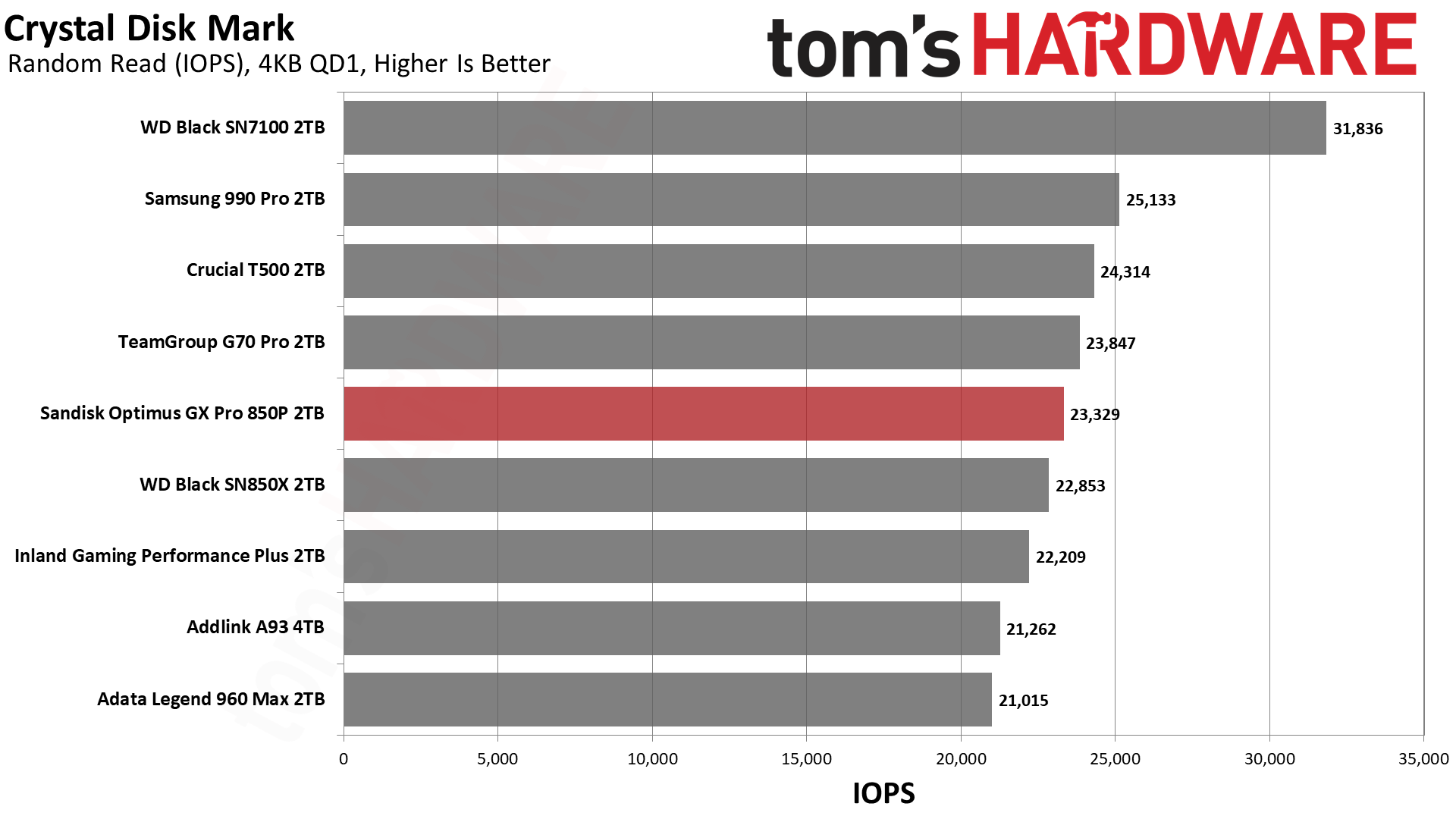
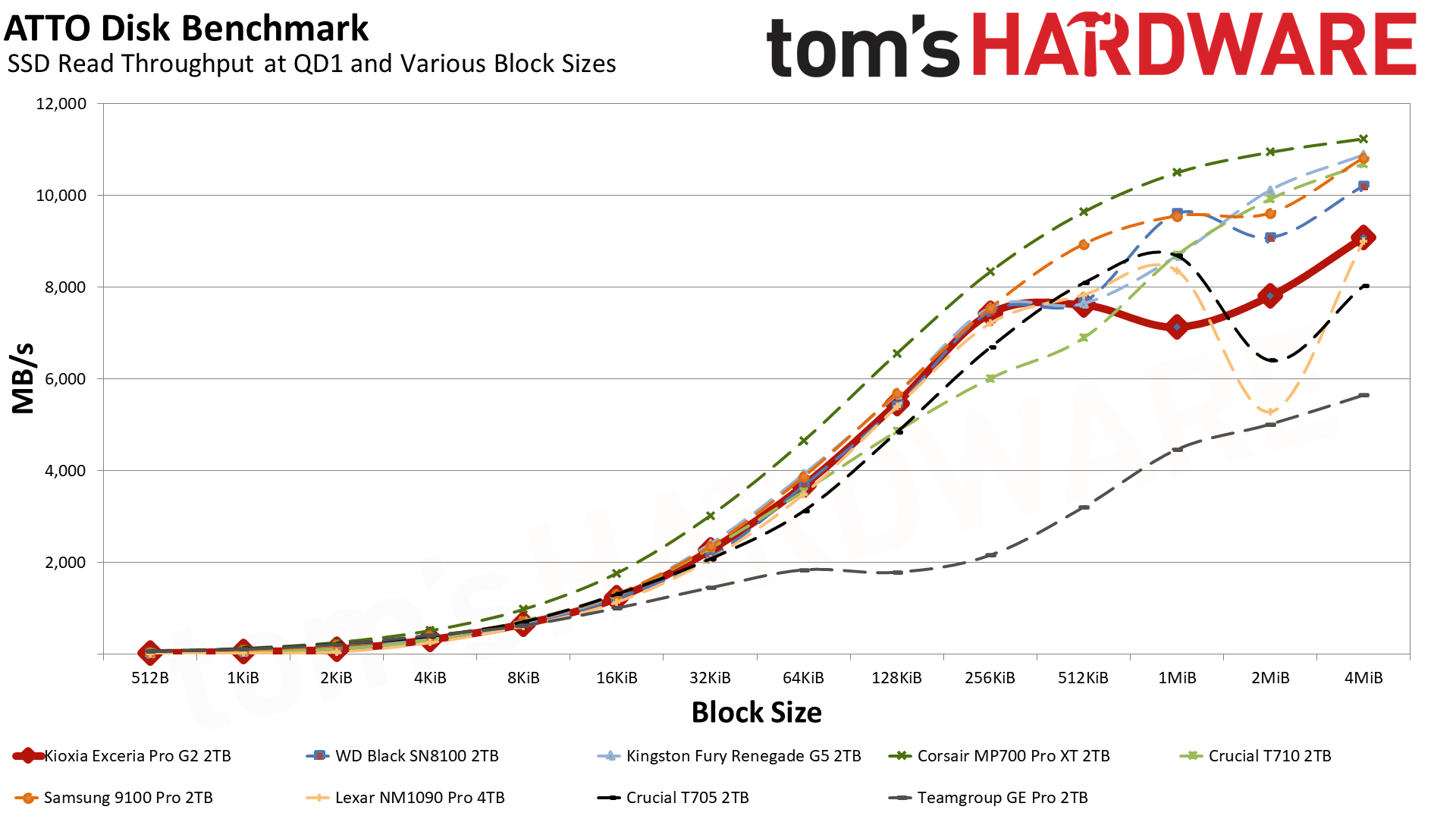
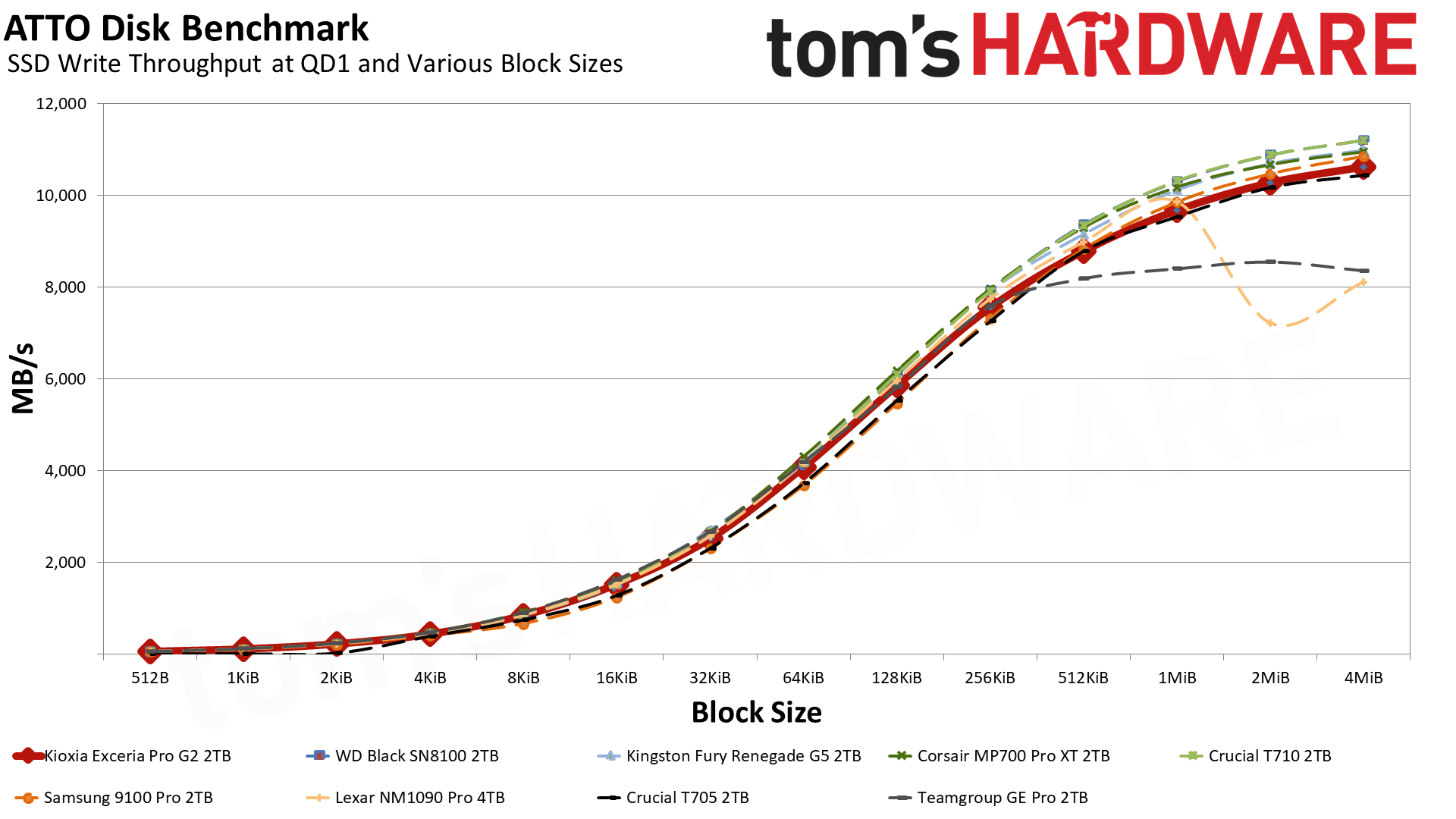
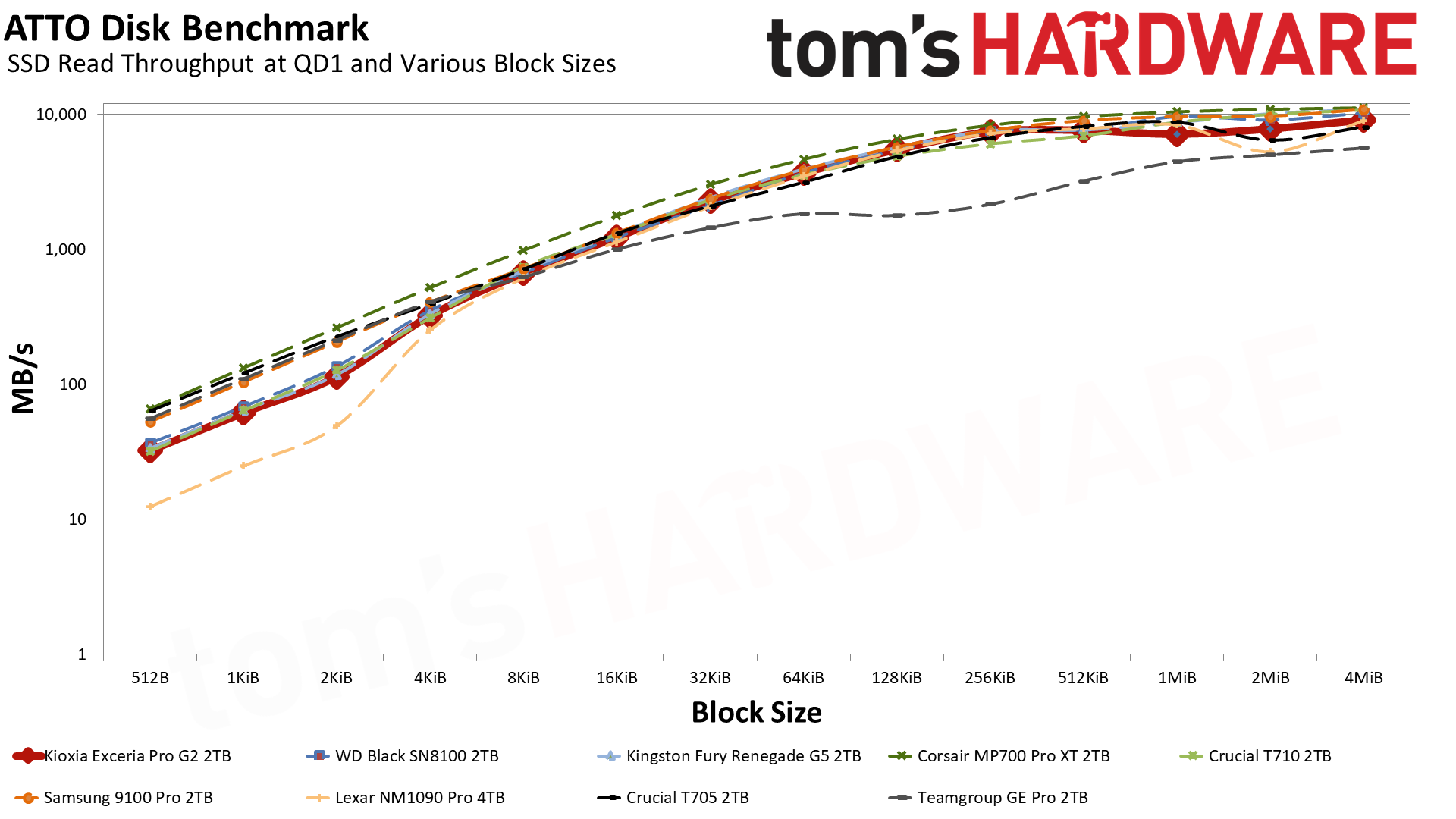
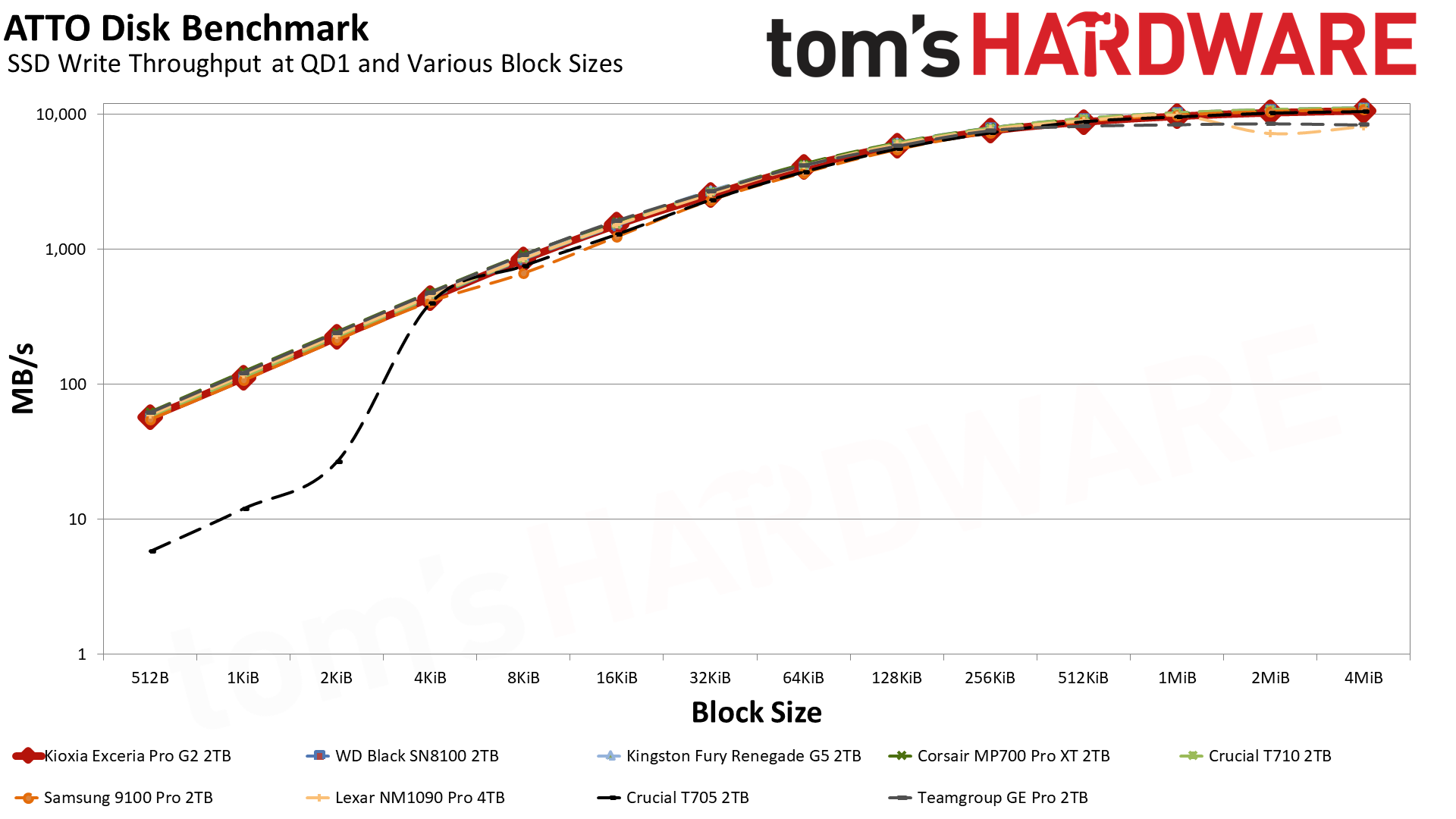
The NAS 800 does quite well in ATTO and CDM where it matters. Its performance in ATTO is as expected, tracking the curve of the similar Black SN8100, and quite good on the whole. Write performance in particular is consistent.
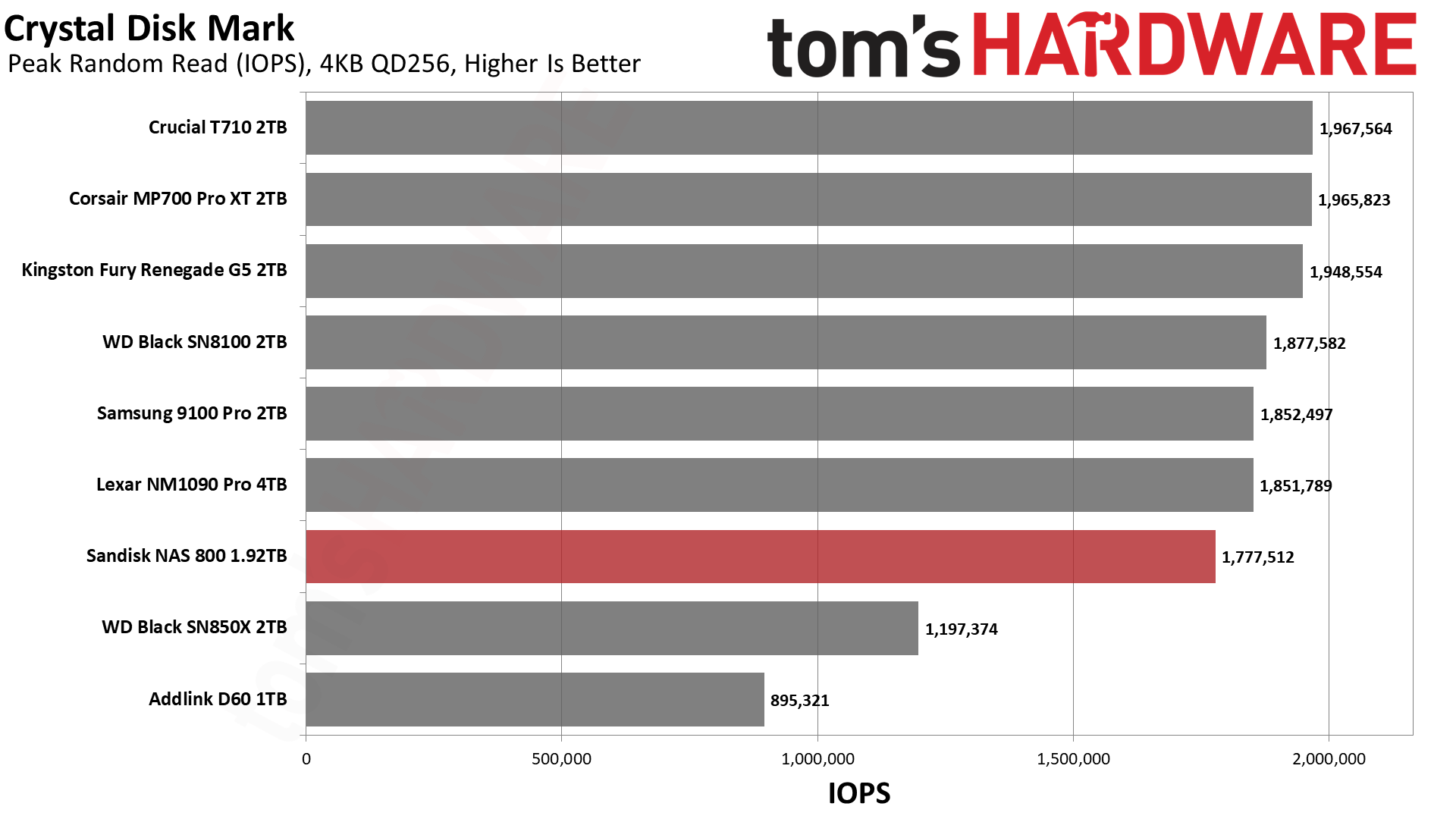
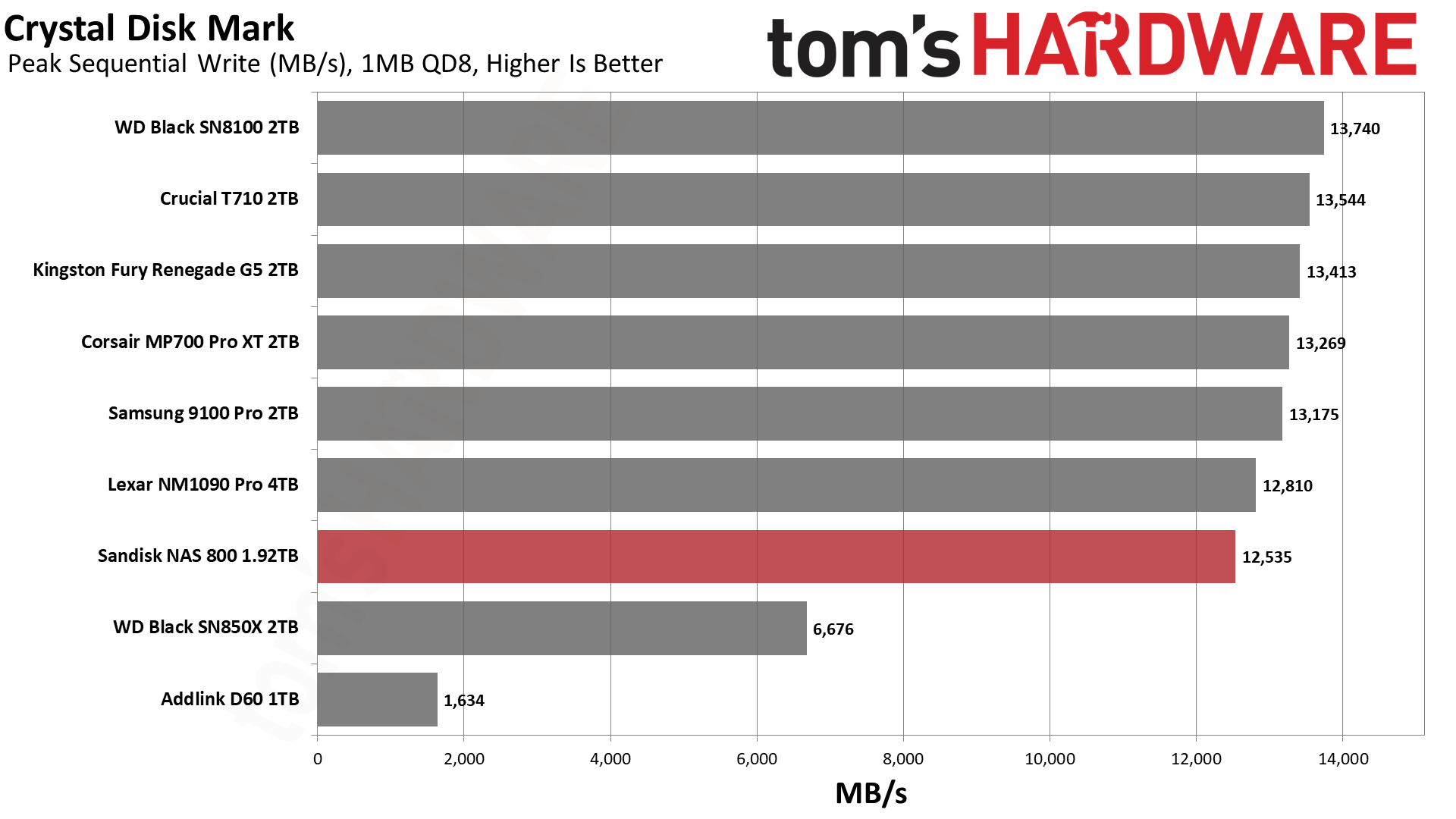
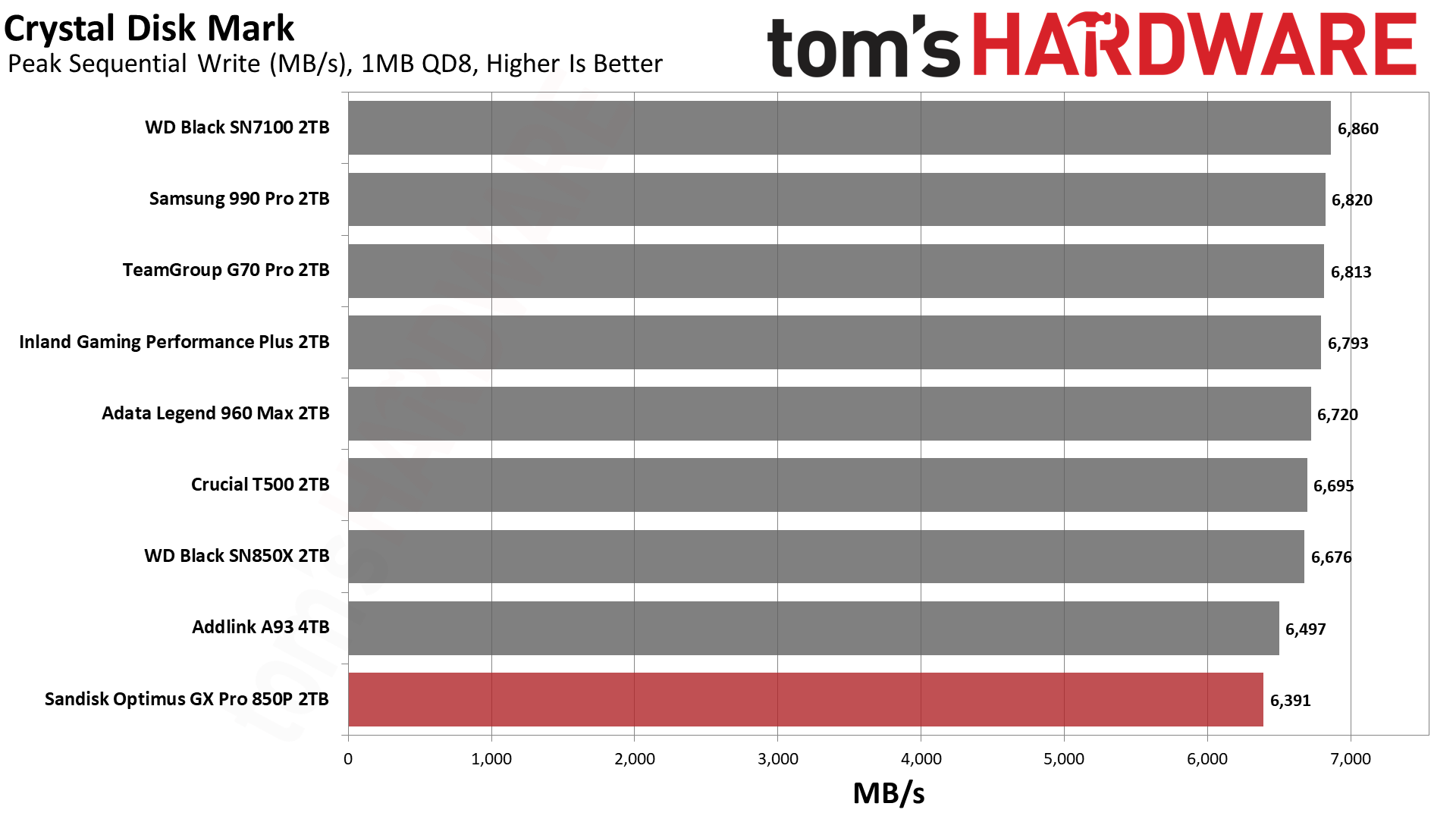
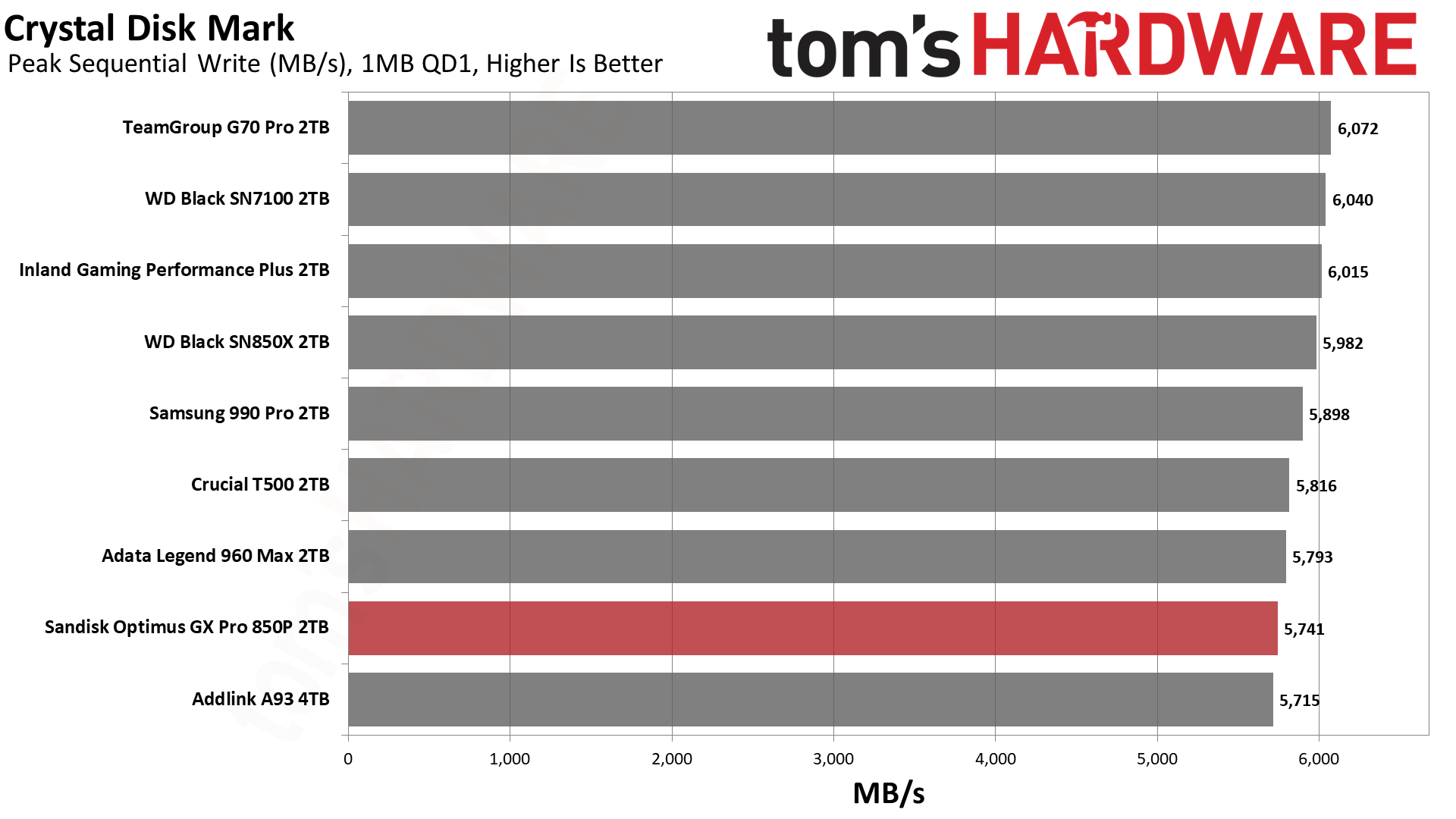
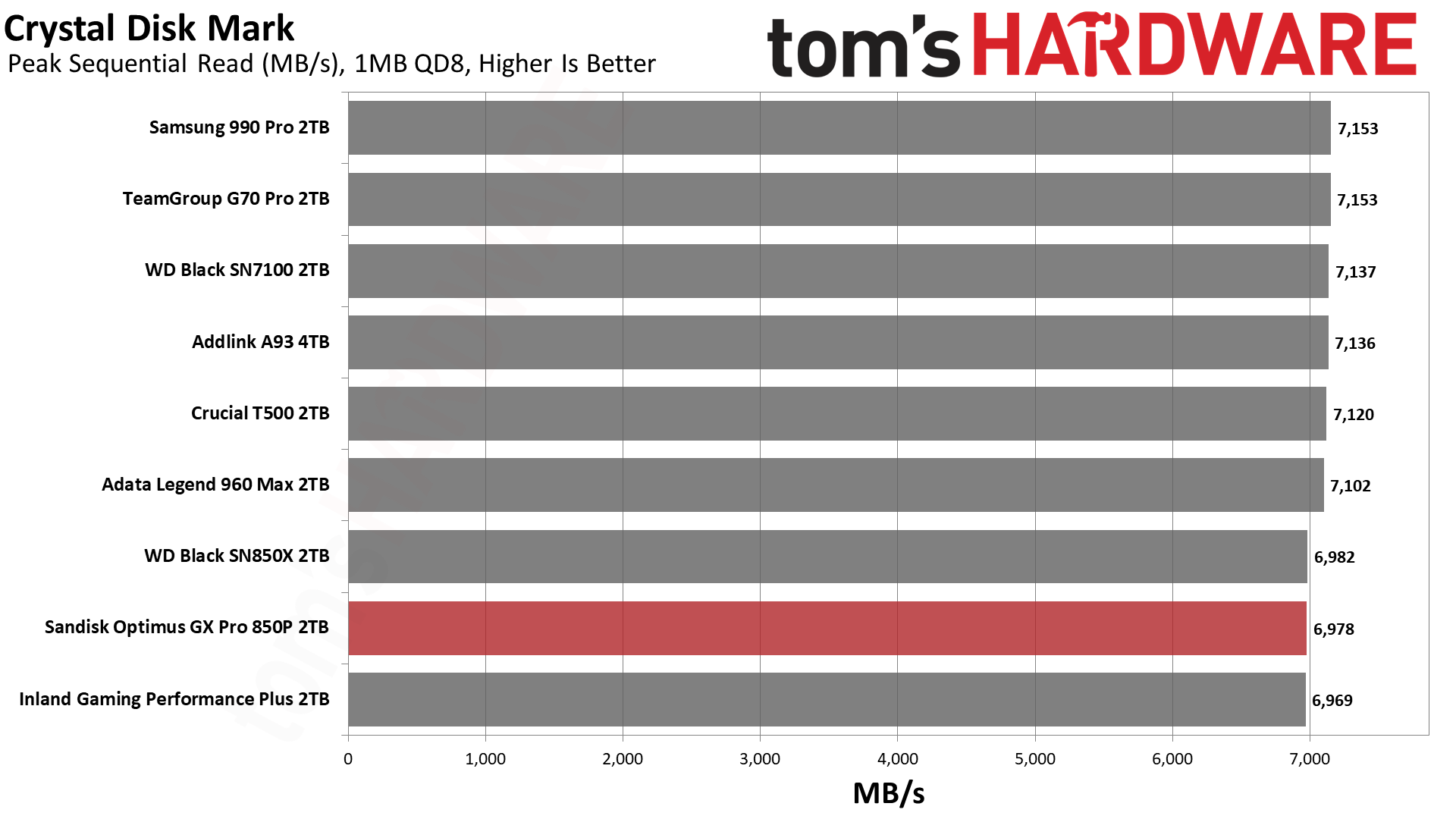
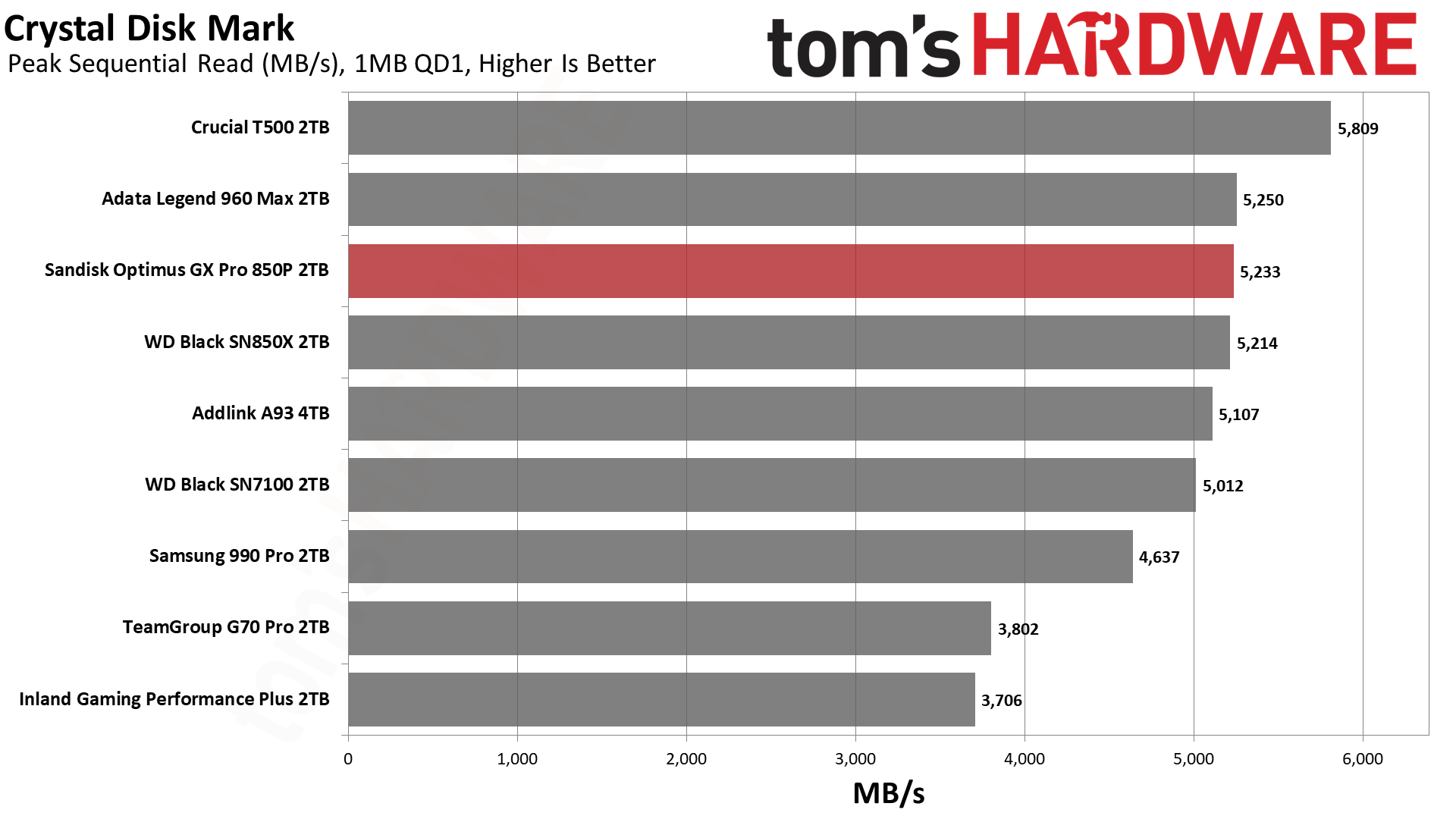
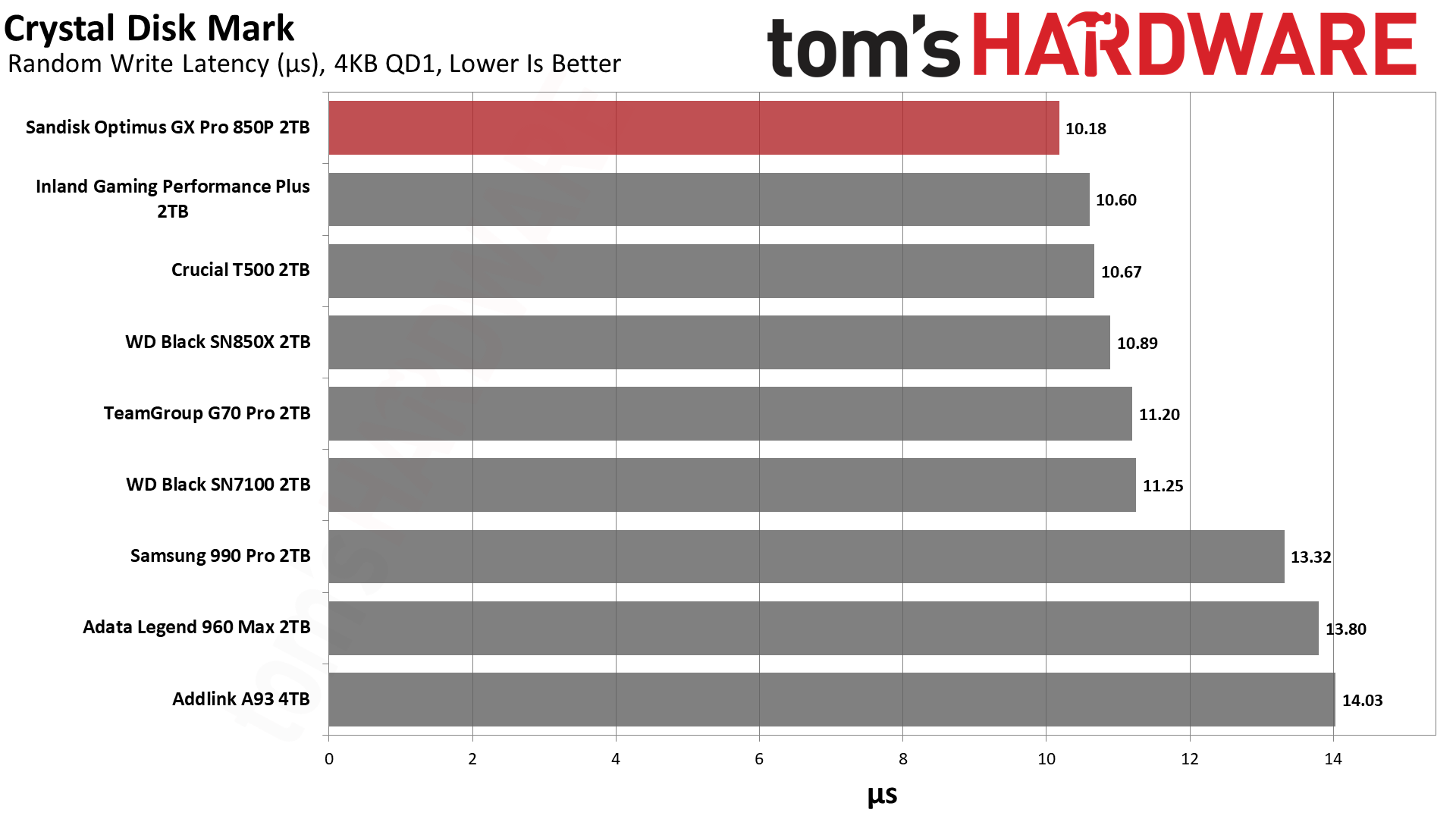
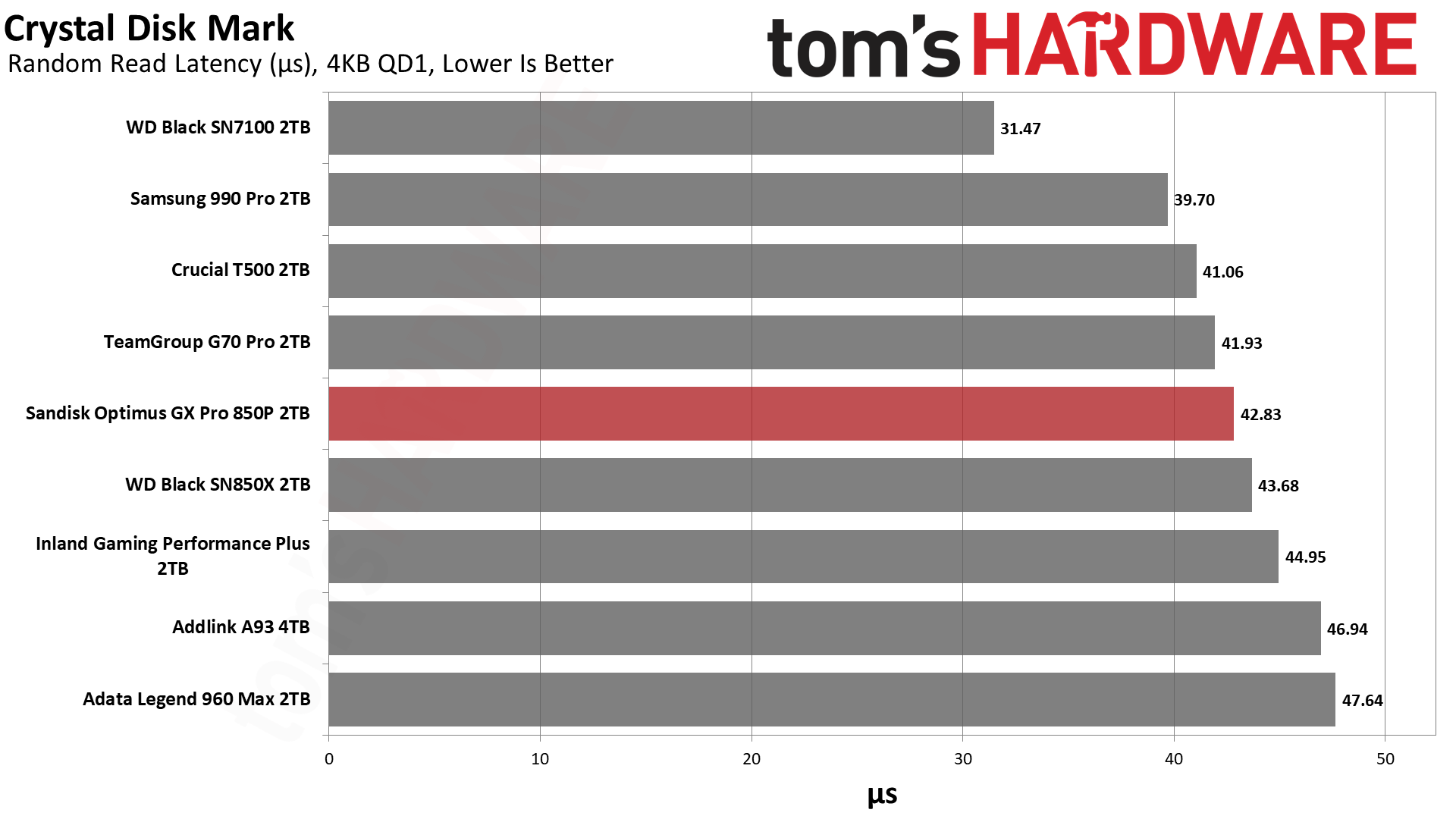
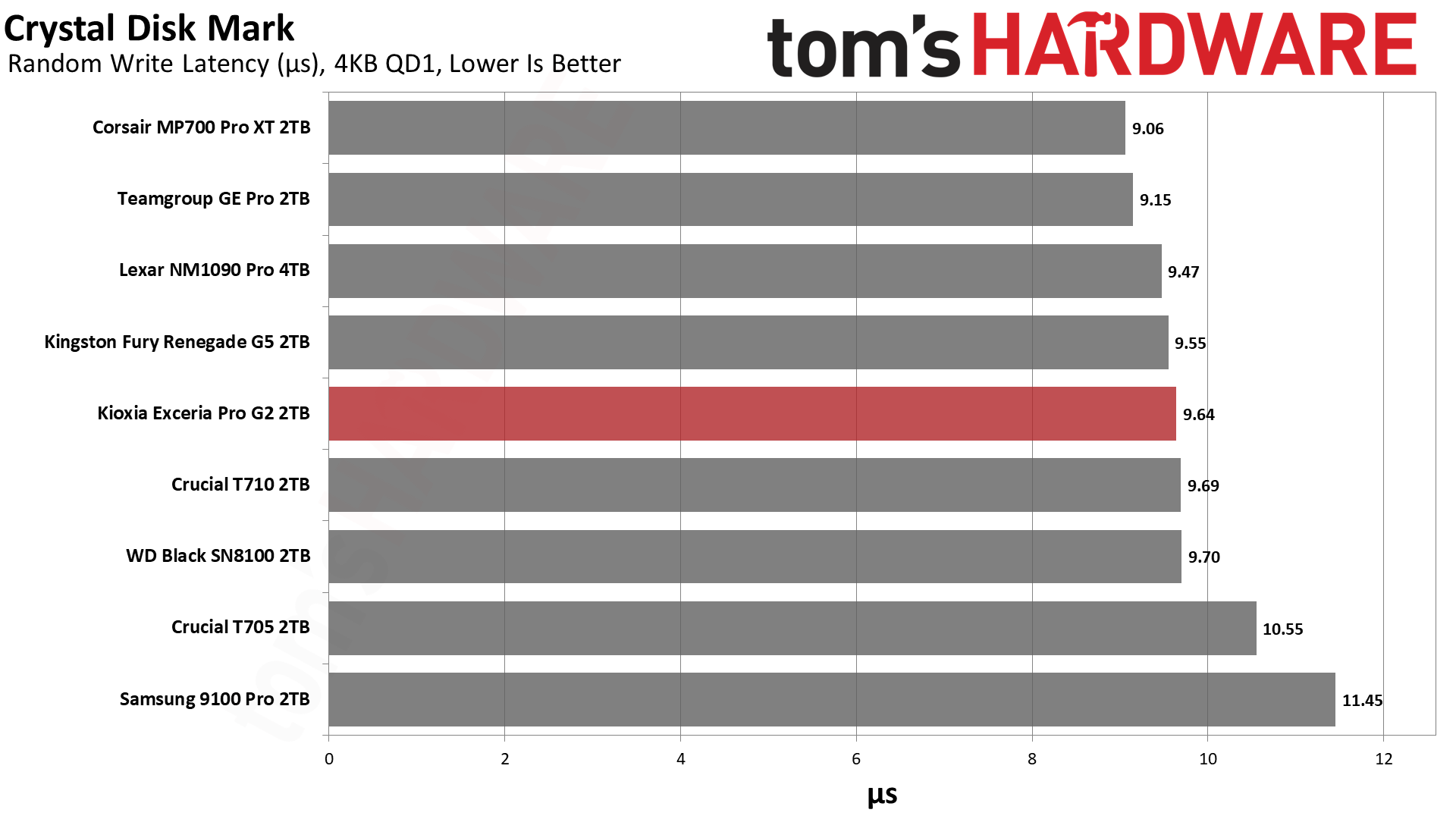
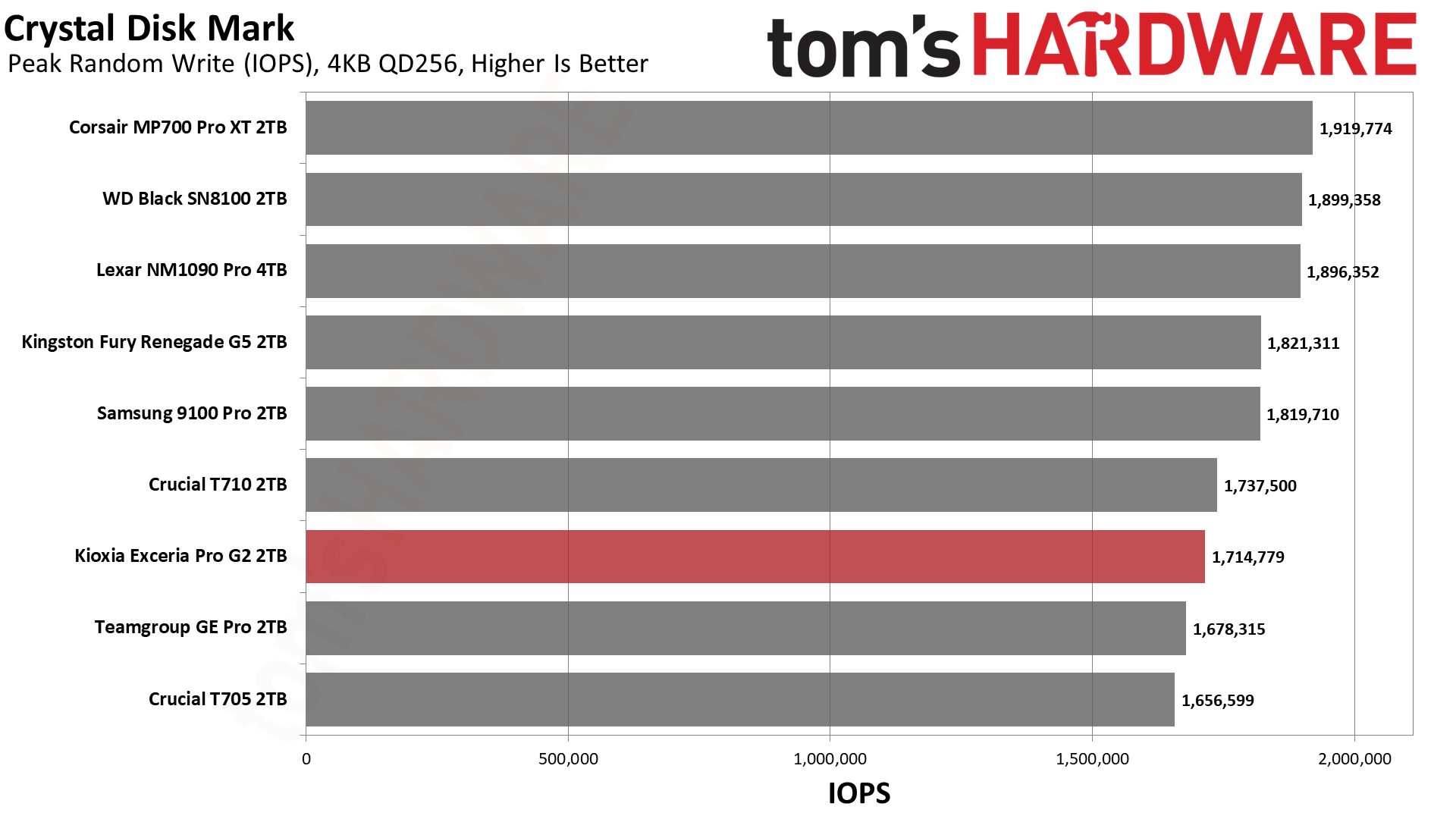
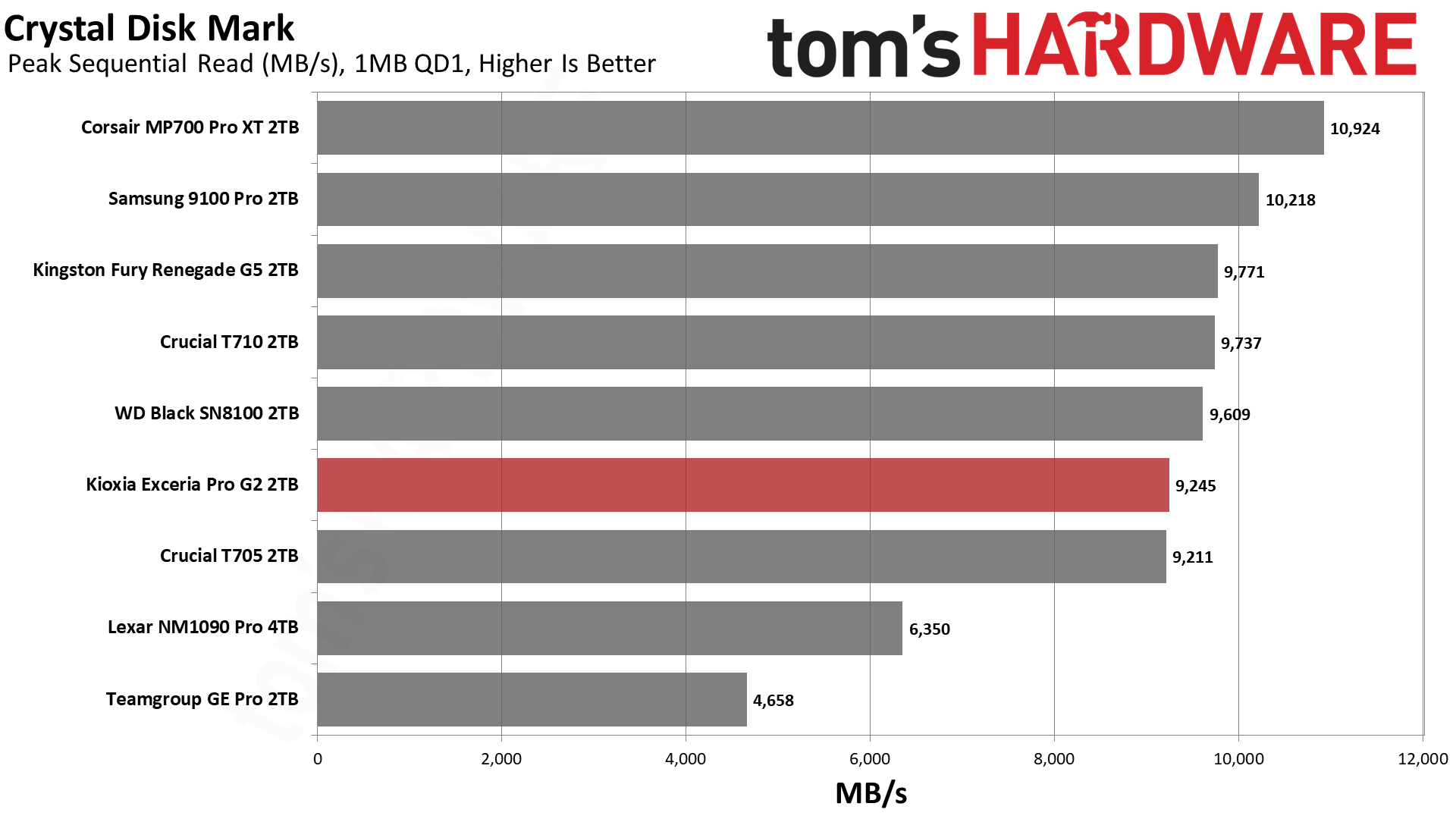
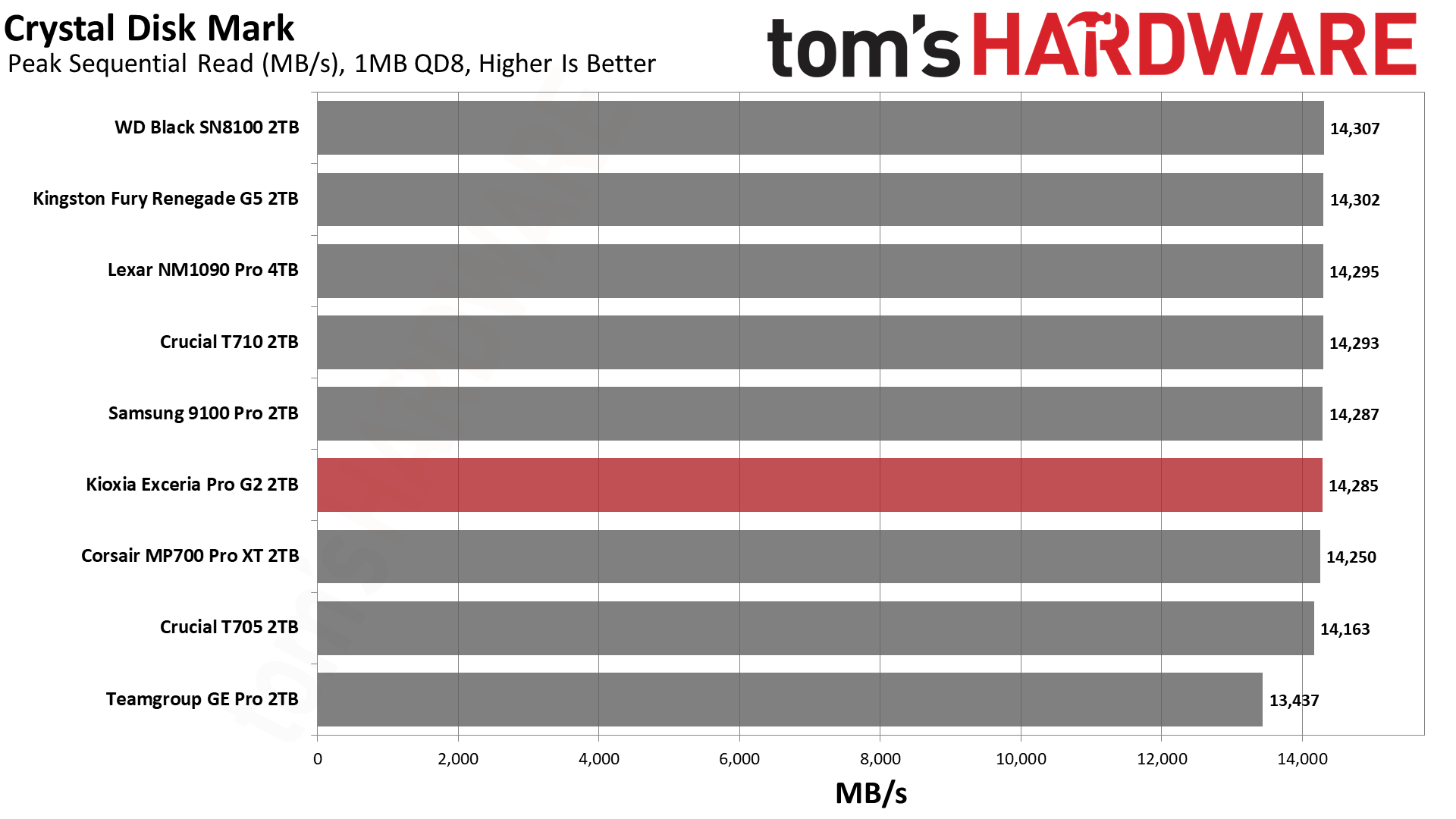
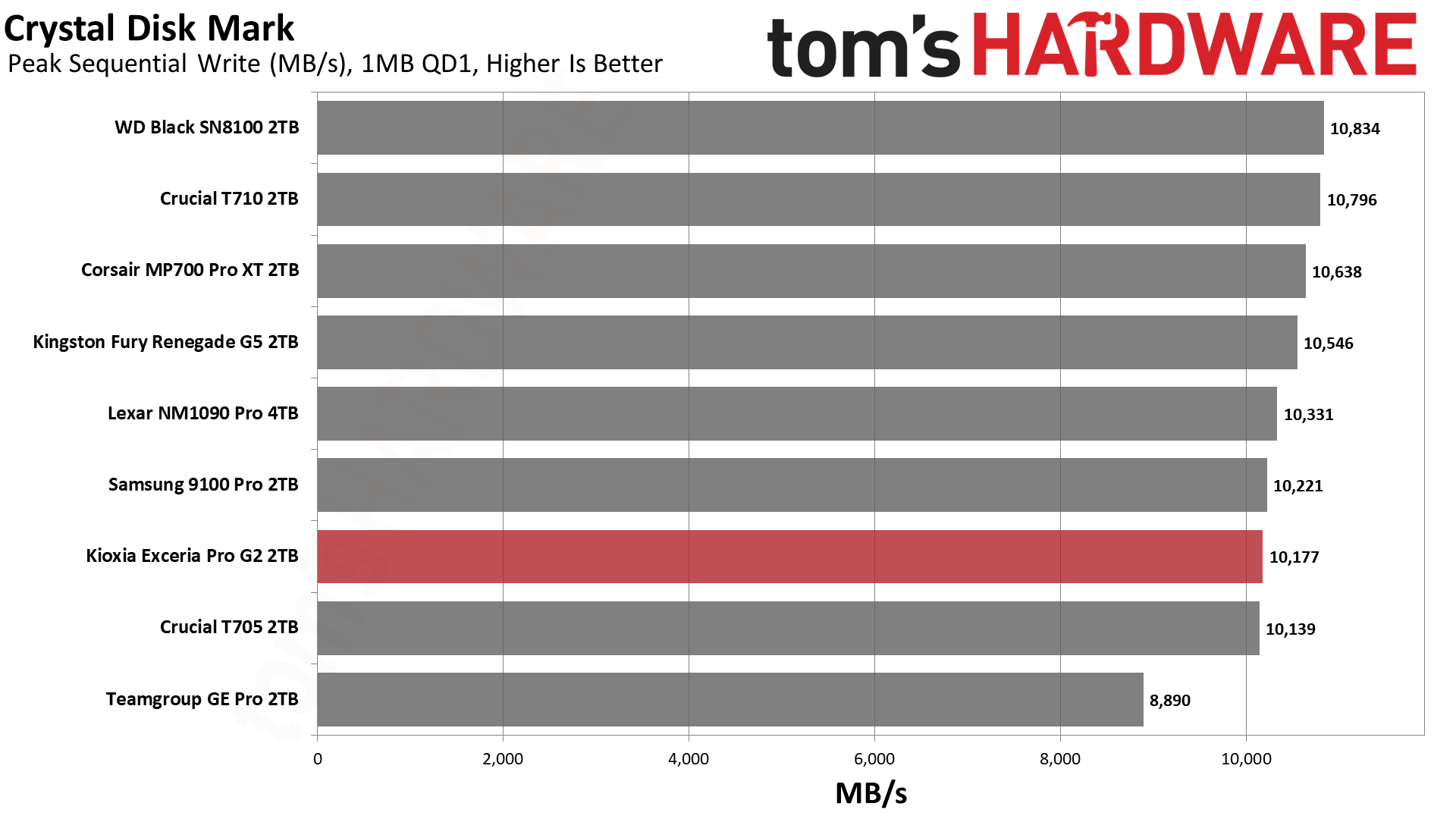
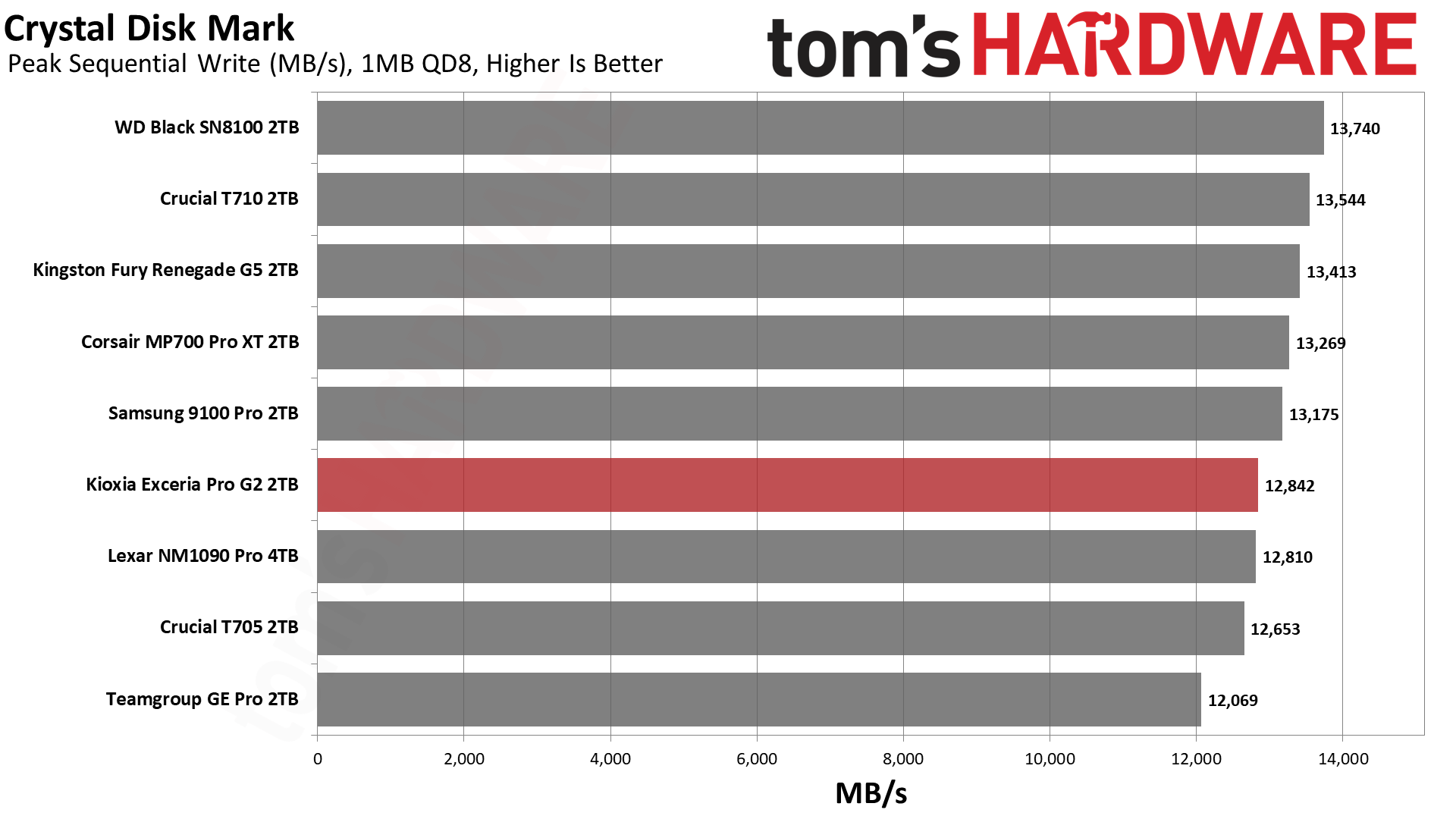
In CDM, the drive is top in random read latency and nearly the top in random write latency. These are great numbers, and the drive is exceptionally responsive with 4KB low-queue-depth operations. Sequential performance is rougher but not terrible. Once queue depth gets up there (QD8), sequential read performance is effectively identical to the very fastest drives available. Sequential write performance is weaker, although we expect that to some degree on a drive optimized more for sustained writes. For internal transfers between very fast drives, this can be a factor, but the extra write endurance is a solid trade-off.
Sustained Write Performance and Cache Recovery
Official write specifications are only part of the performance picture. Most SSDs implement a write cache, which is a fast area of pseudo-SLC (single-bit) programmed flash that absorbs incoming data. Sustained write speeds can suffer tremendously once the workload spills outside of the cache and into the "native" TLC (three-bit) or QLC (four-bit) flash. Performance can suffer even more if the drive is forced to fold, the process of migrating data out of the cache in order to free up space for further incoming data.
We use Iometer to hammer the SSD with sequential writes for 15 minutes to measure both the size of the write cache and performance after the cache is saturated. We also monitor cache recovery via multiple idle rounds. This process shows the performance of the drive in various states including the steady state write performance.
Tom's HardwareTom's HardwareTom's Hardware
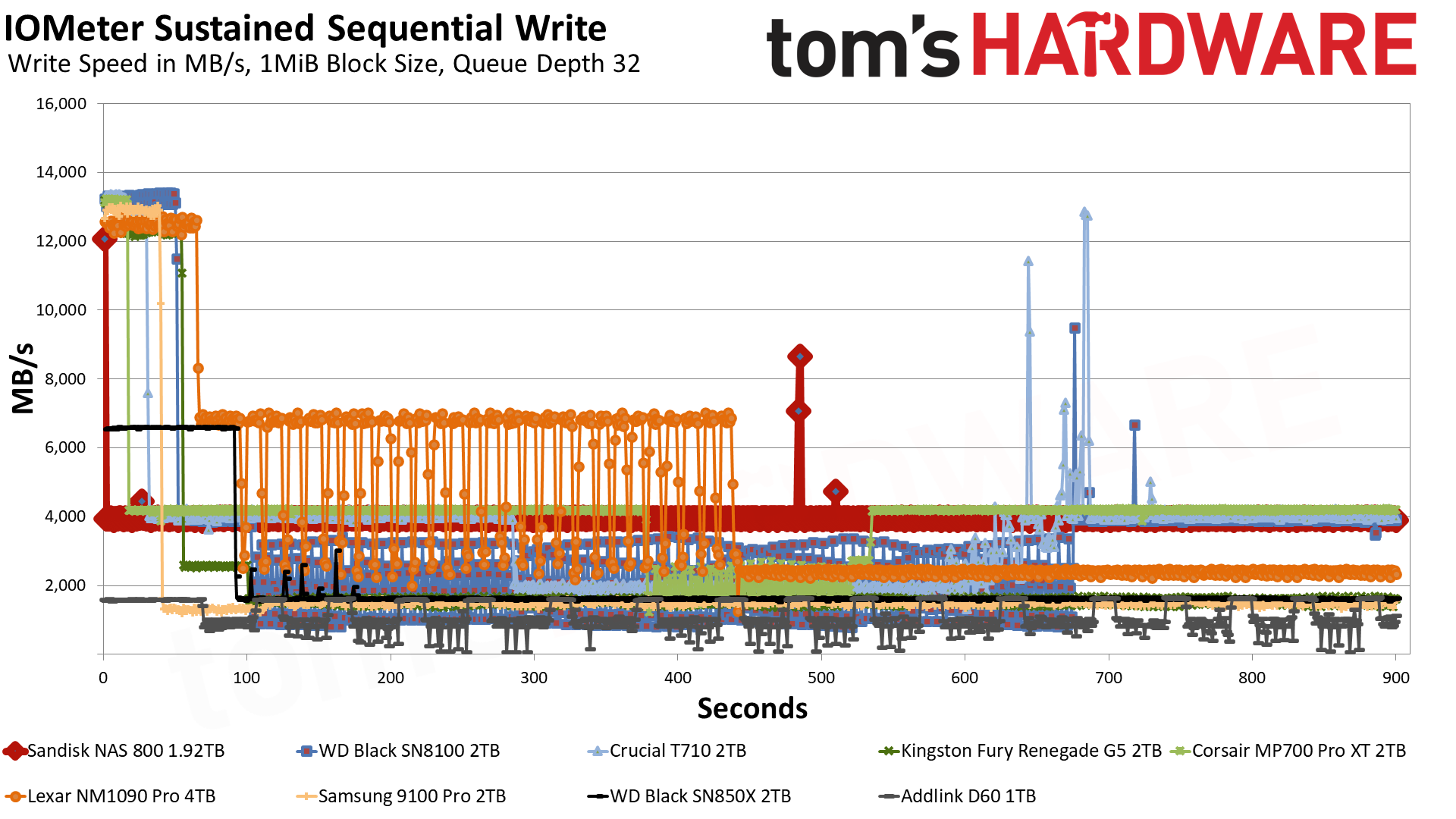
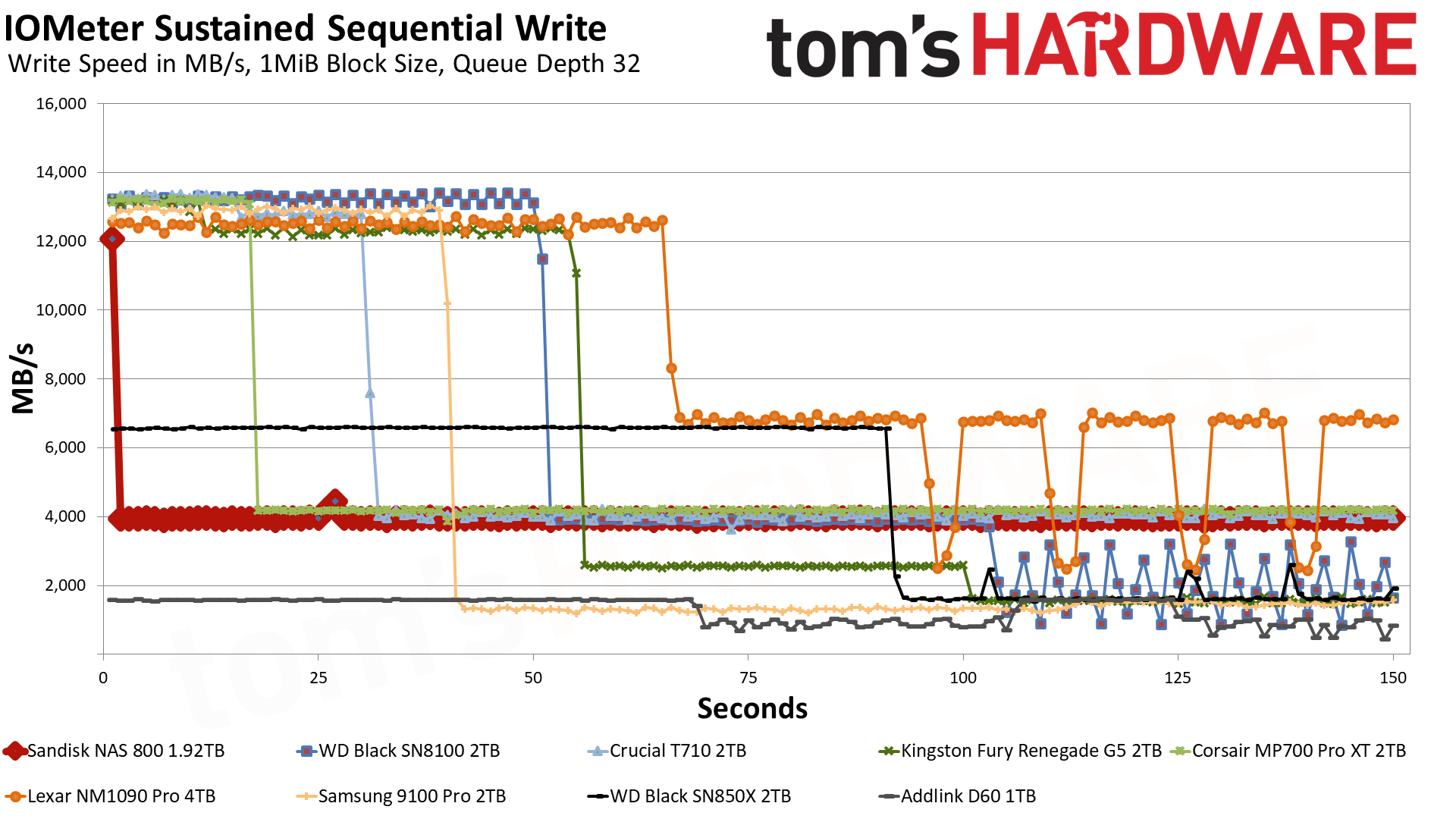
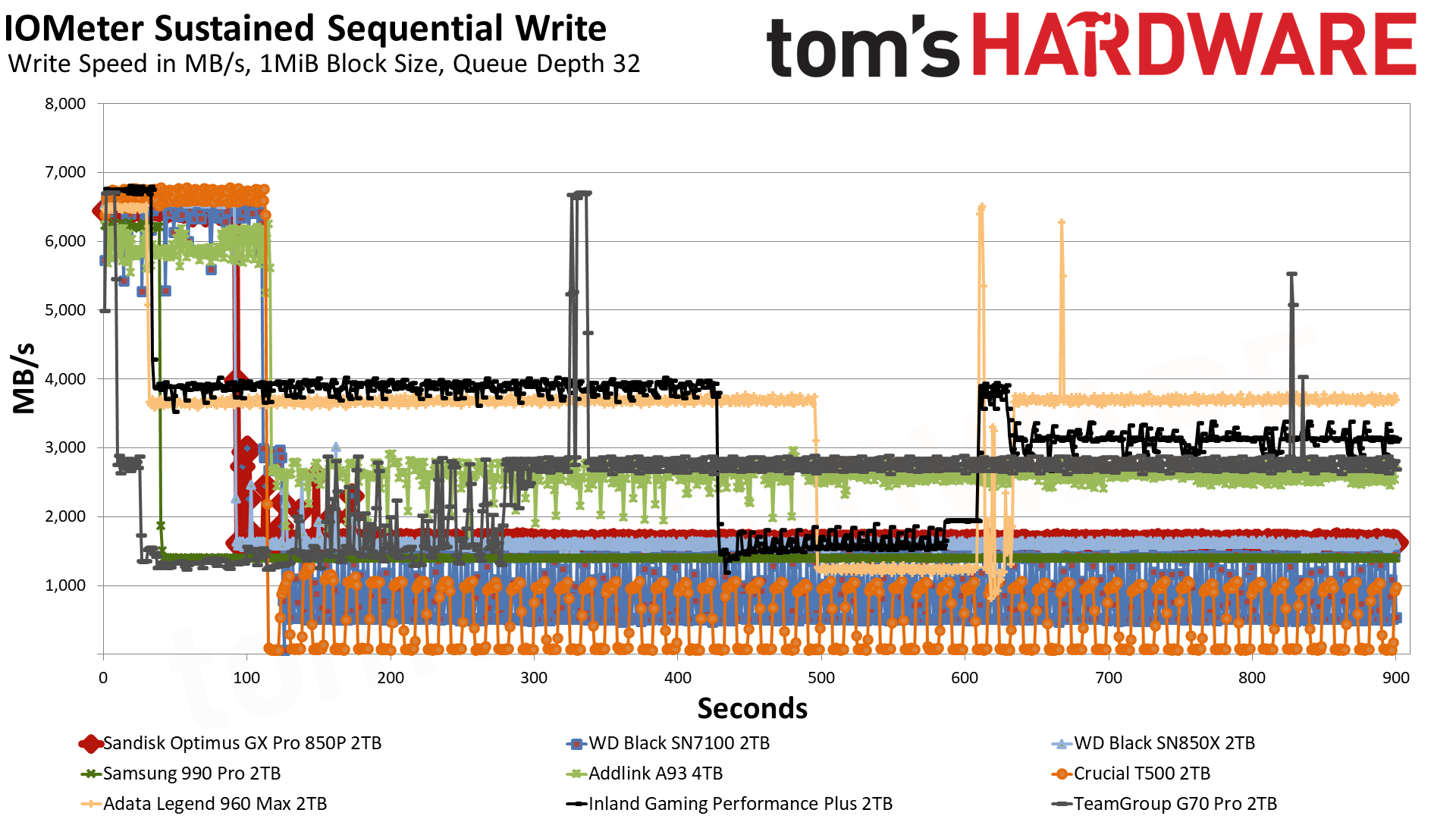
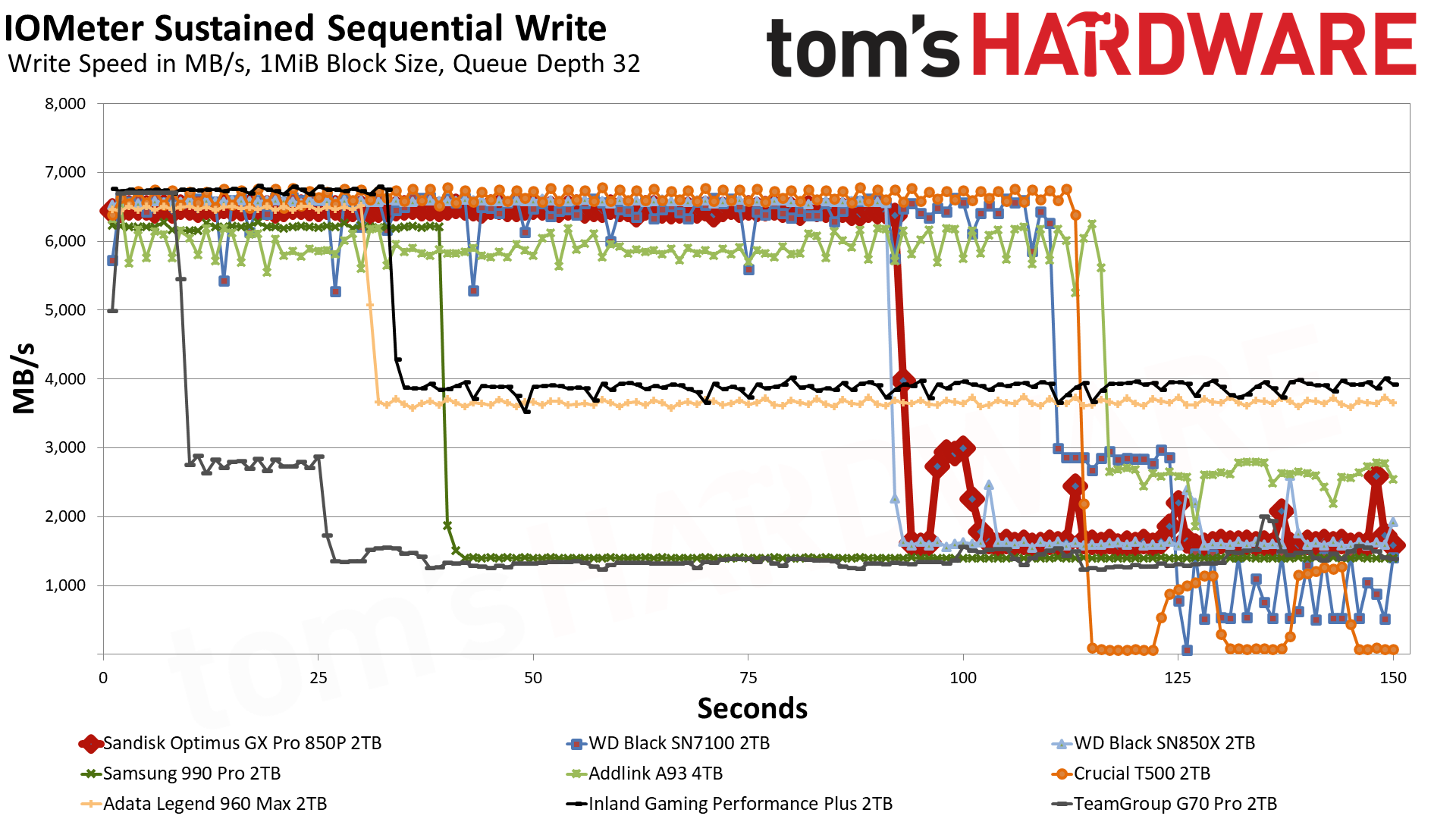
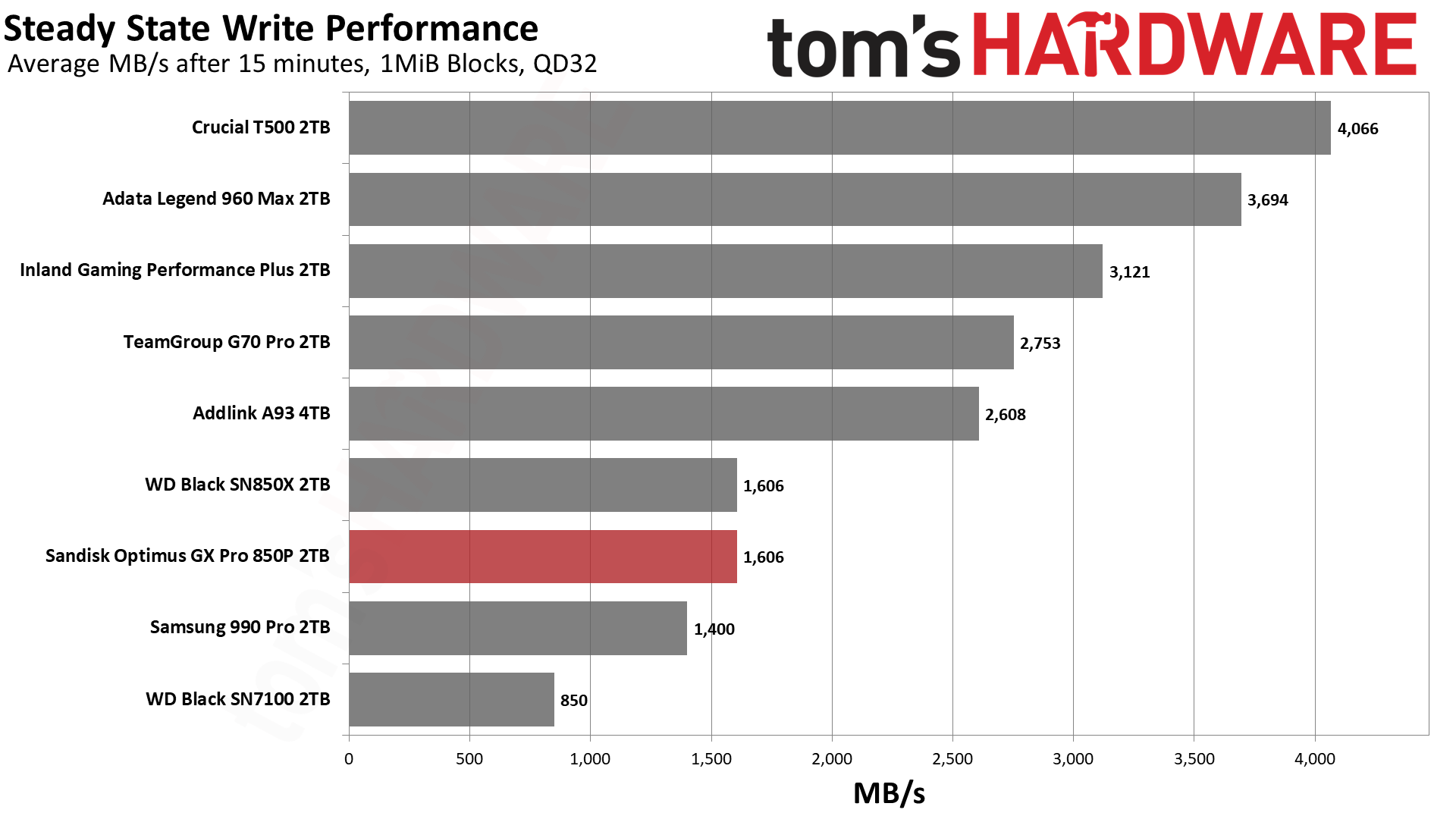
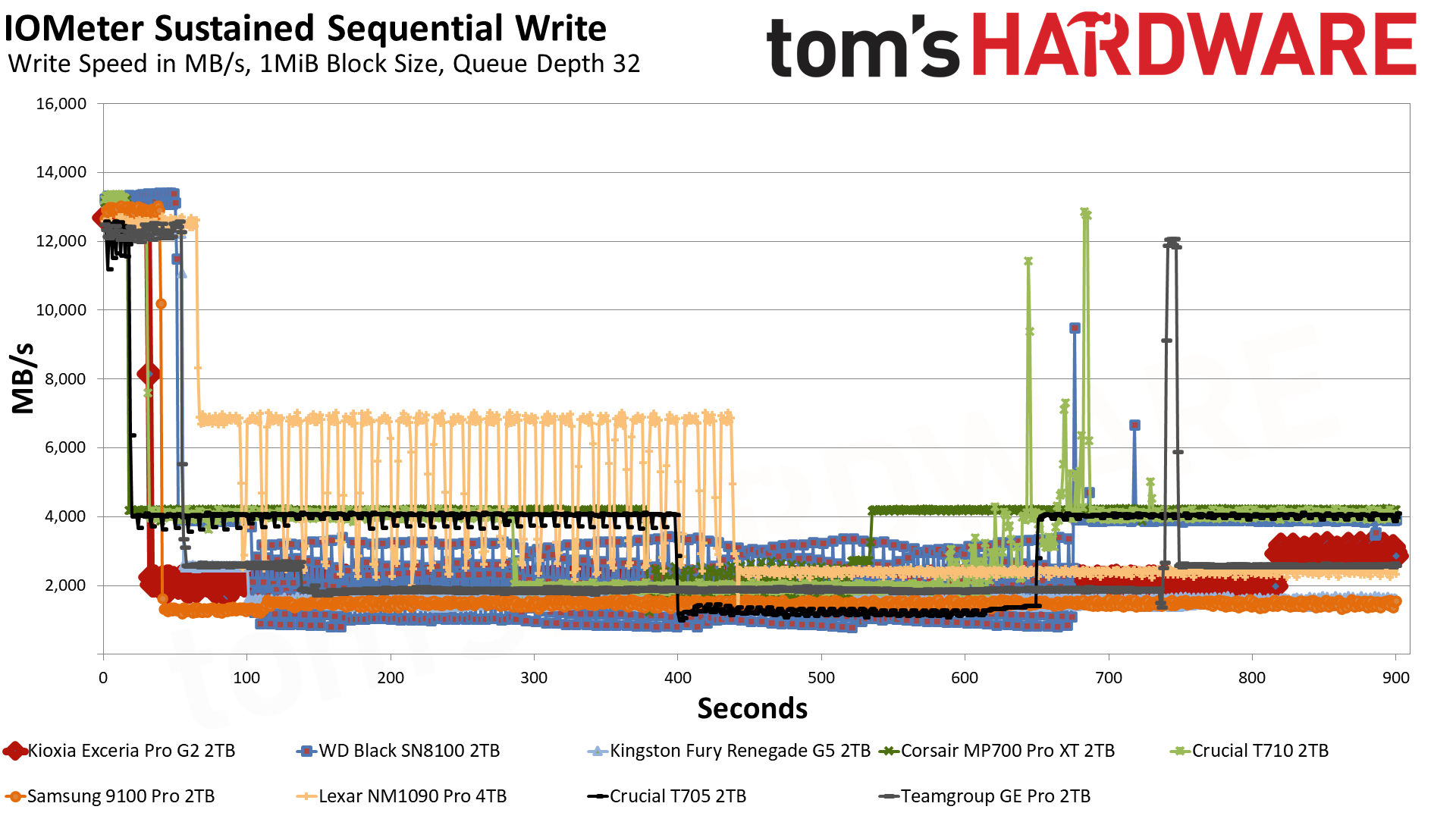
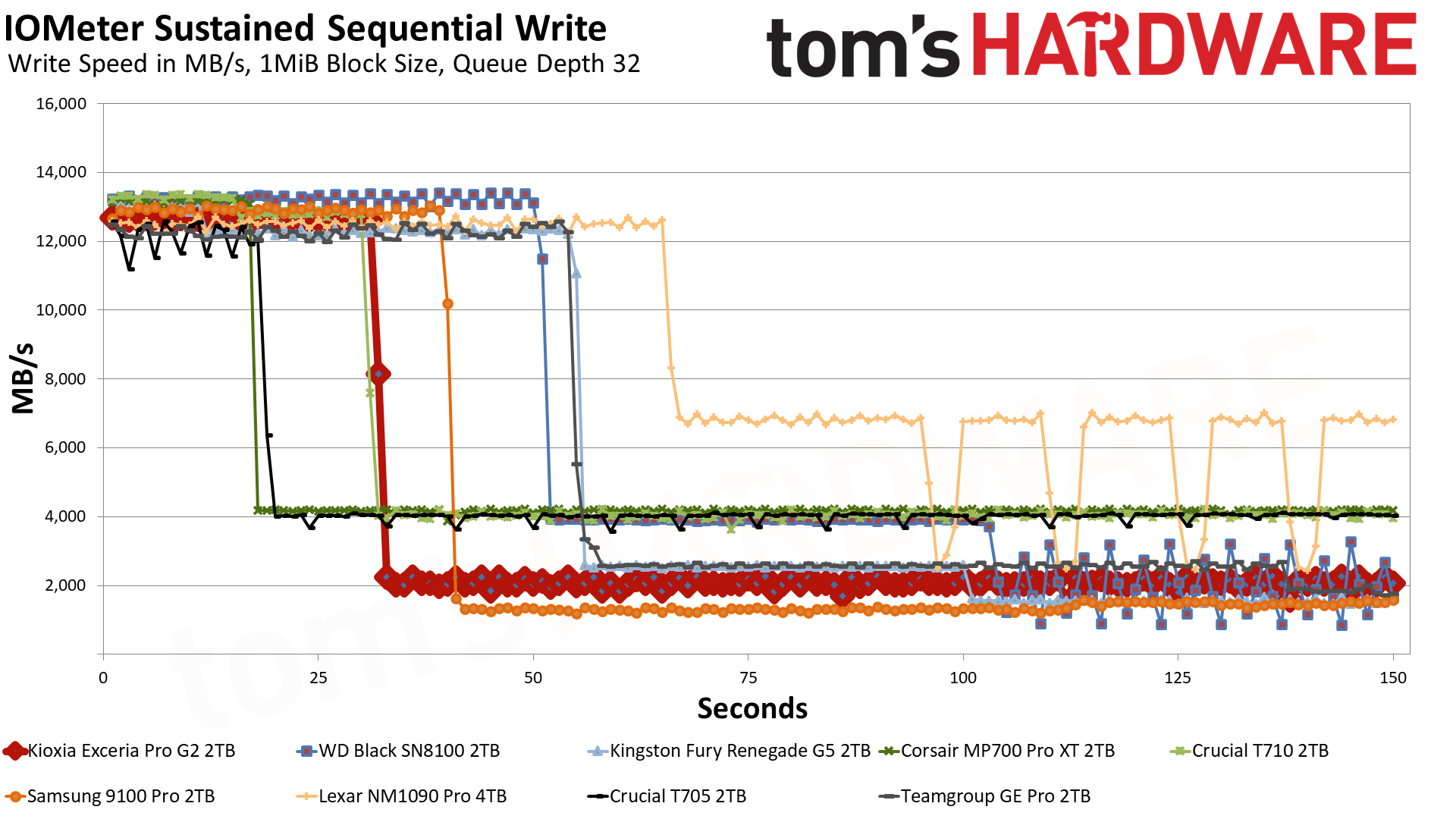
The NAS 800 writes a bit differently than most other drives we’ve tested. It’s only pushing 12 GB/s for about a second in the pSLC mode, and then it drops to just below 4 GB/s for the direct-to-TLC mode. This indicates that the cache is likely static, that is, always available and in a usually high-endurance region. We’ve tested consumer drives with this setup in the past, like the original WD Black and the WD Black SN750. These drives were actually great for NAS. However, over time, it became clear that consumer workloads are bursty and prefer large, dynamic caches. Sandisk and Samsung use hybrid caches these days for the best of both worlds.
While small, a static cache can be useful for higher endurance, and it still handles many random writes just fine. As the cache comes from the base flash, its size is limited. The NAS 800 already has extra overprovisioning to increase its endurance, just as many enterprise drives have, which potentially limits the size of this cache even more. Typically, you would have about 24GB of static cache for 2TB and about 12GB for 1TB, give or take, so our guess is Sandisk is balancing all of this for endurance with the extra overprovisioning.
We find this to be a good trade-off, as 12GB is still quite a lot if you’re juggling smaller random writes. Those get handled by the pSLC cache, which likely has very high endurance, and then they are combined for low write amplification to the native TLC flash, or discarded if the writes aren’t kept. The static cache and native flash may have separate wear zones, which, in summary, means the cache arrangement can help support higher overall drive endurance.
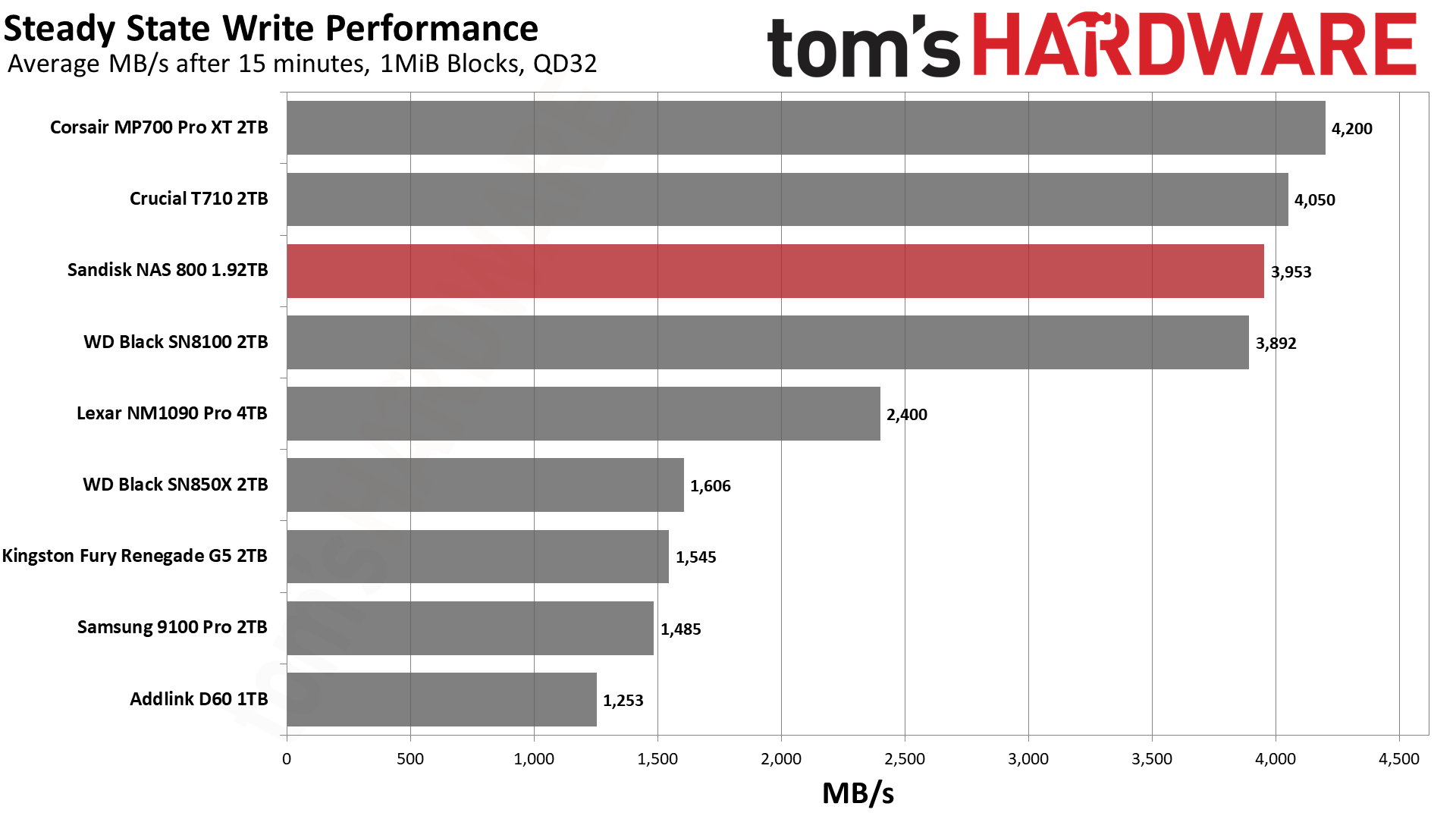
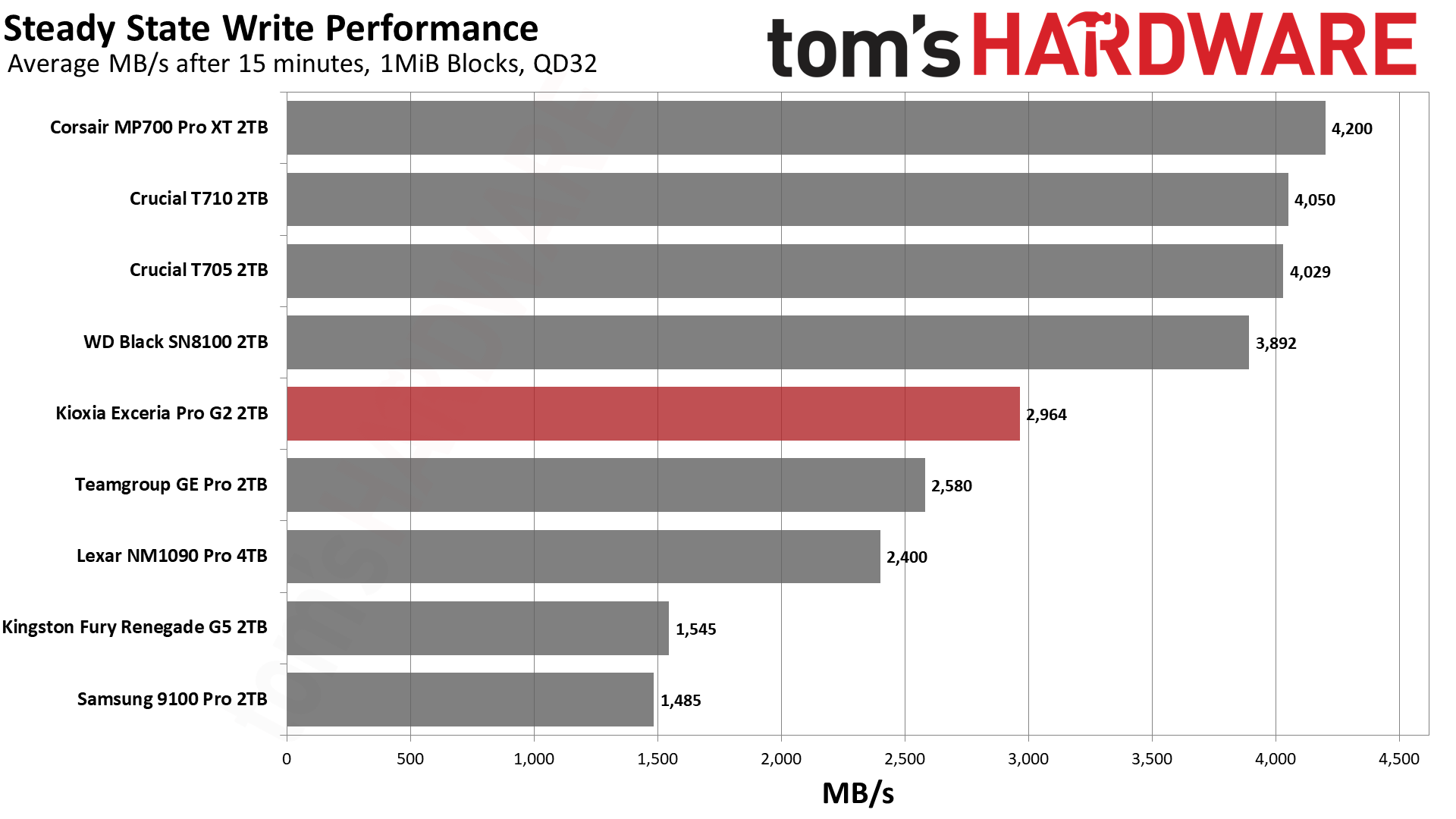
Another big bonus of the small cache is that post-cache performance is high and consistent. At about 4 GB/s, it’s very fast for consumer-grade hardware, and this drive held that pace for a full hour in our testing. That’s a big selling point, and 4 GB/s is more than enough for 10GbE links. Internally, this can keep up with pretty much any Gen 4 drive in the long term. If arranged in an array, this level of performance is high enough for workstation and even some enterprise-level workloads. The T710 and MP700 Pro XT look faster on paper but are not as consistent.
Power Consumption and Temperature
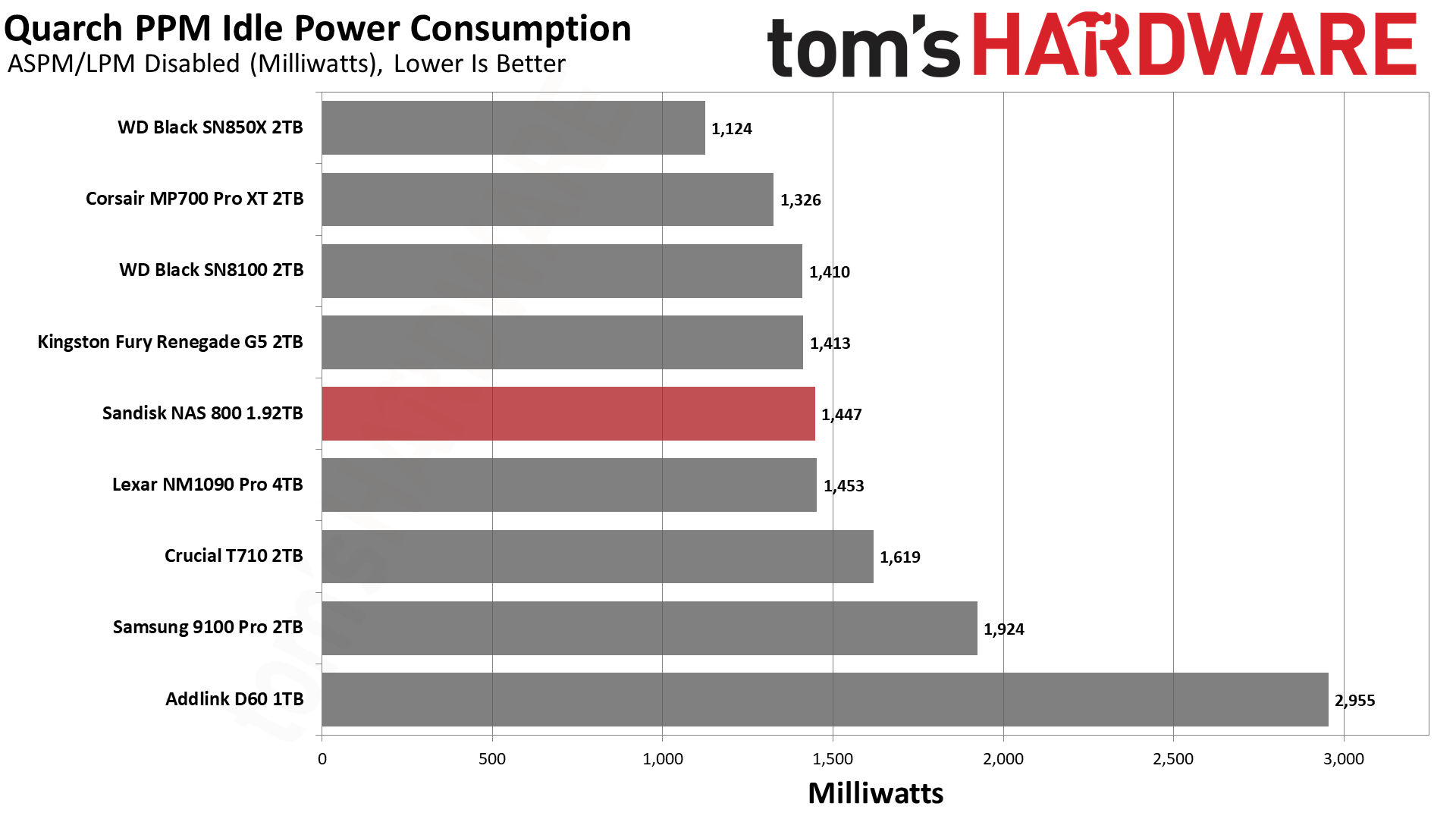
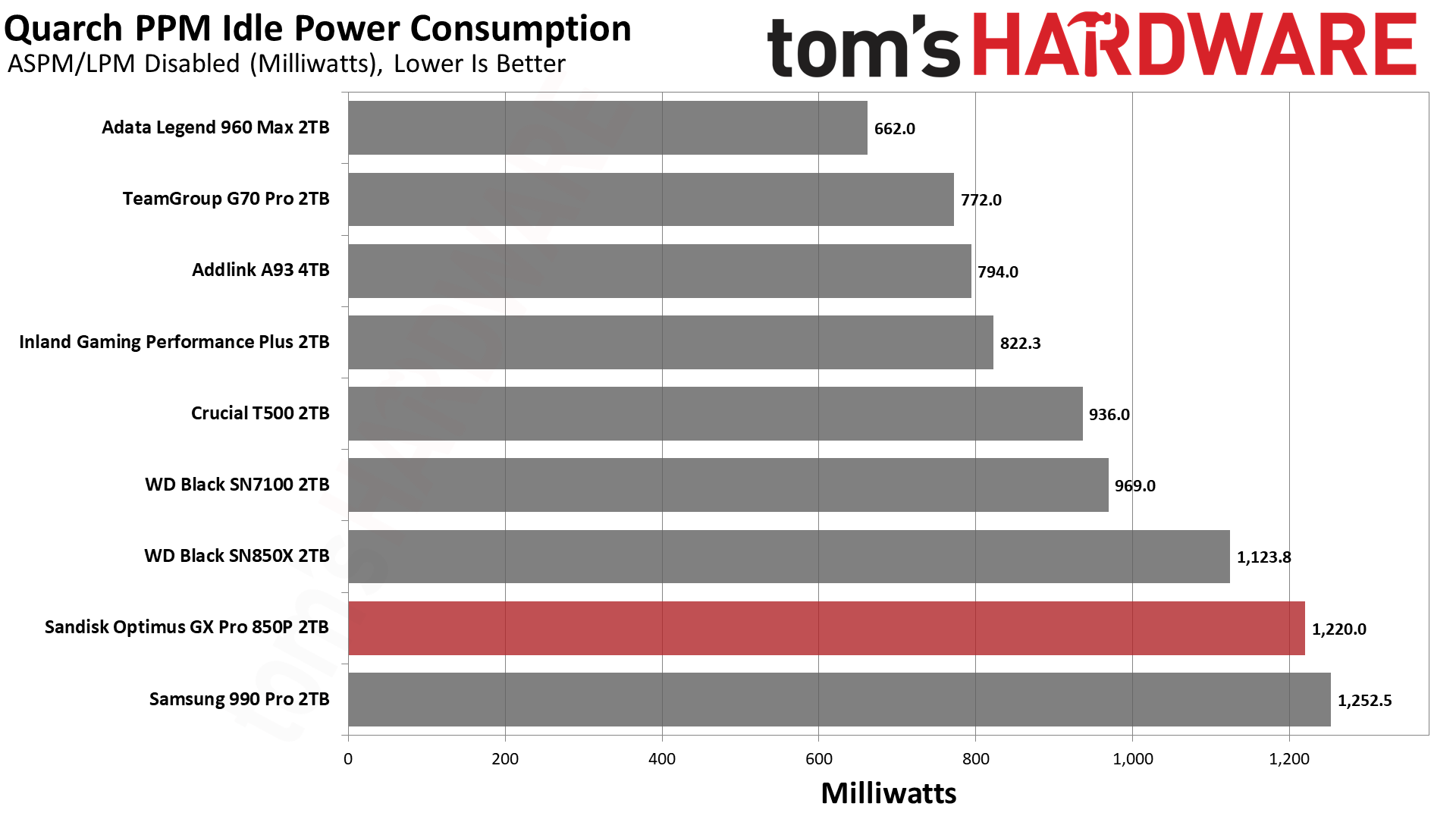
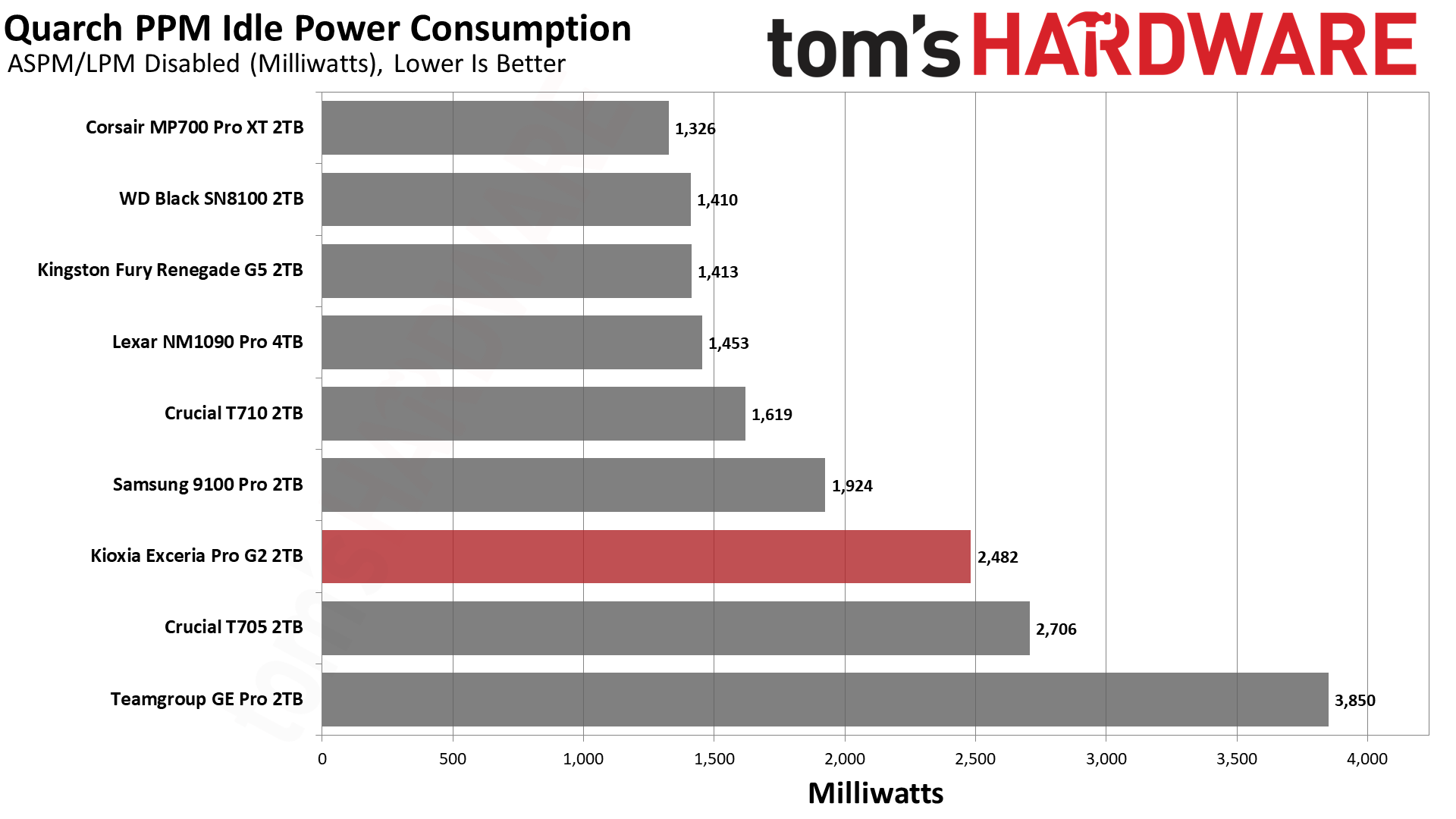
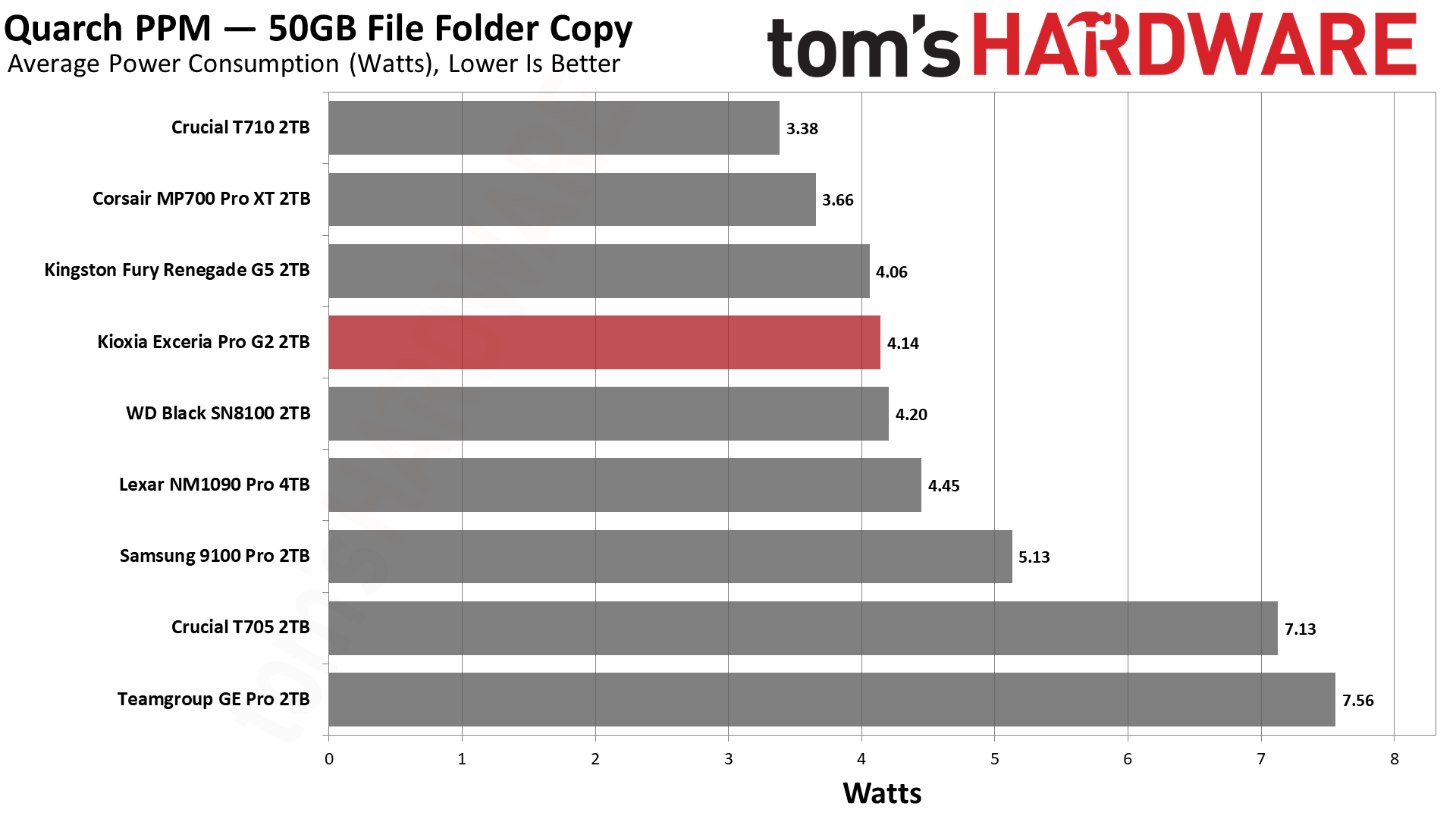
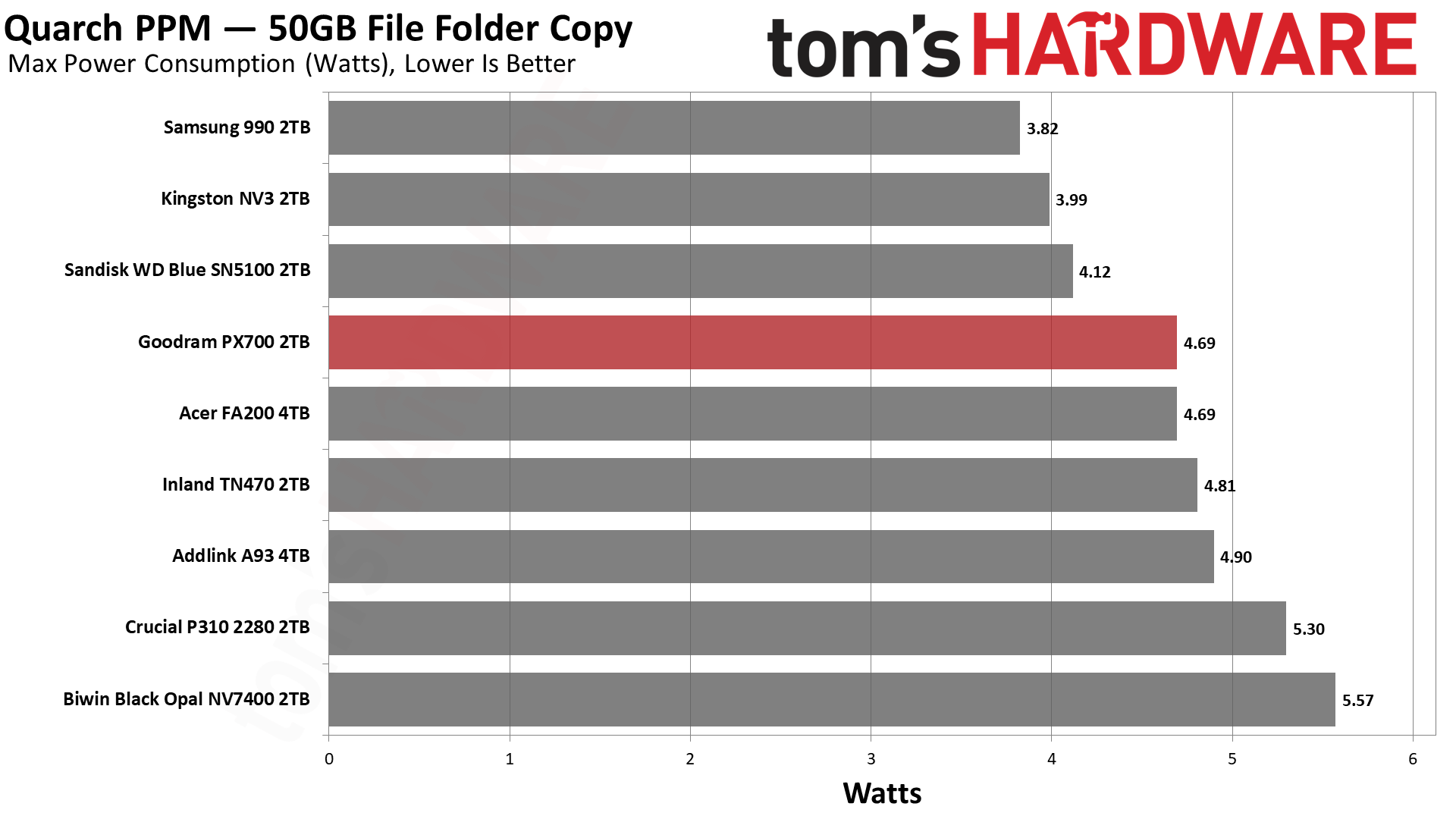
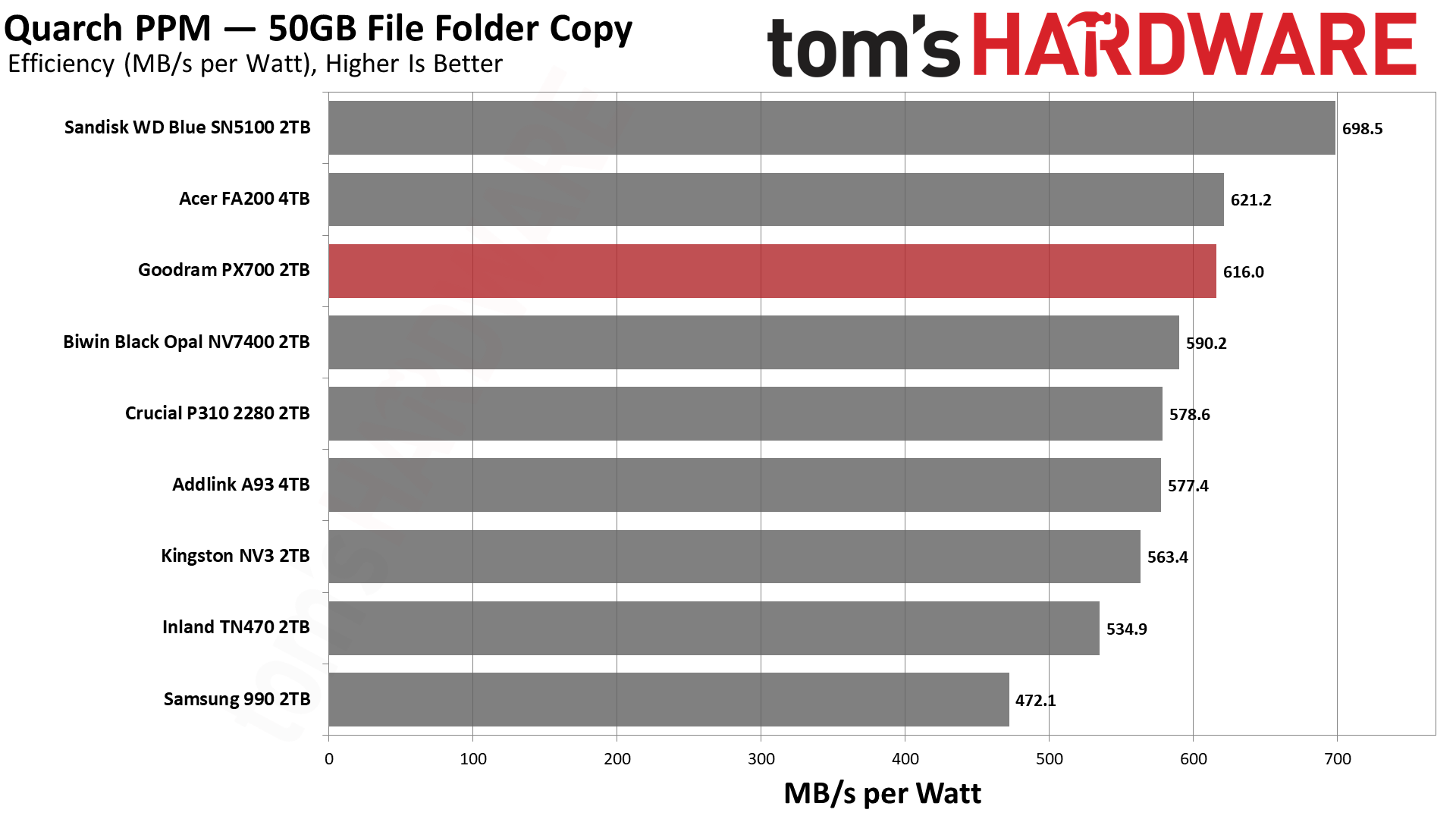
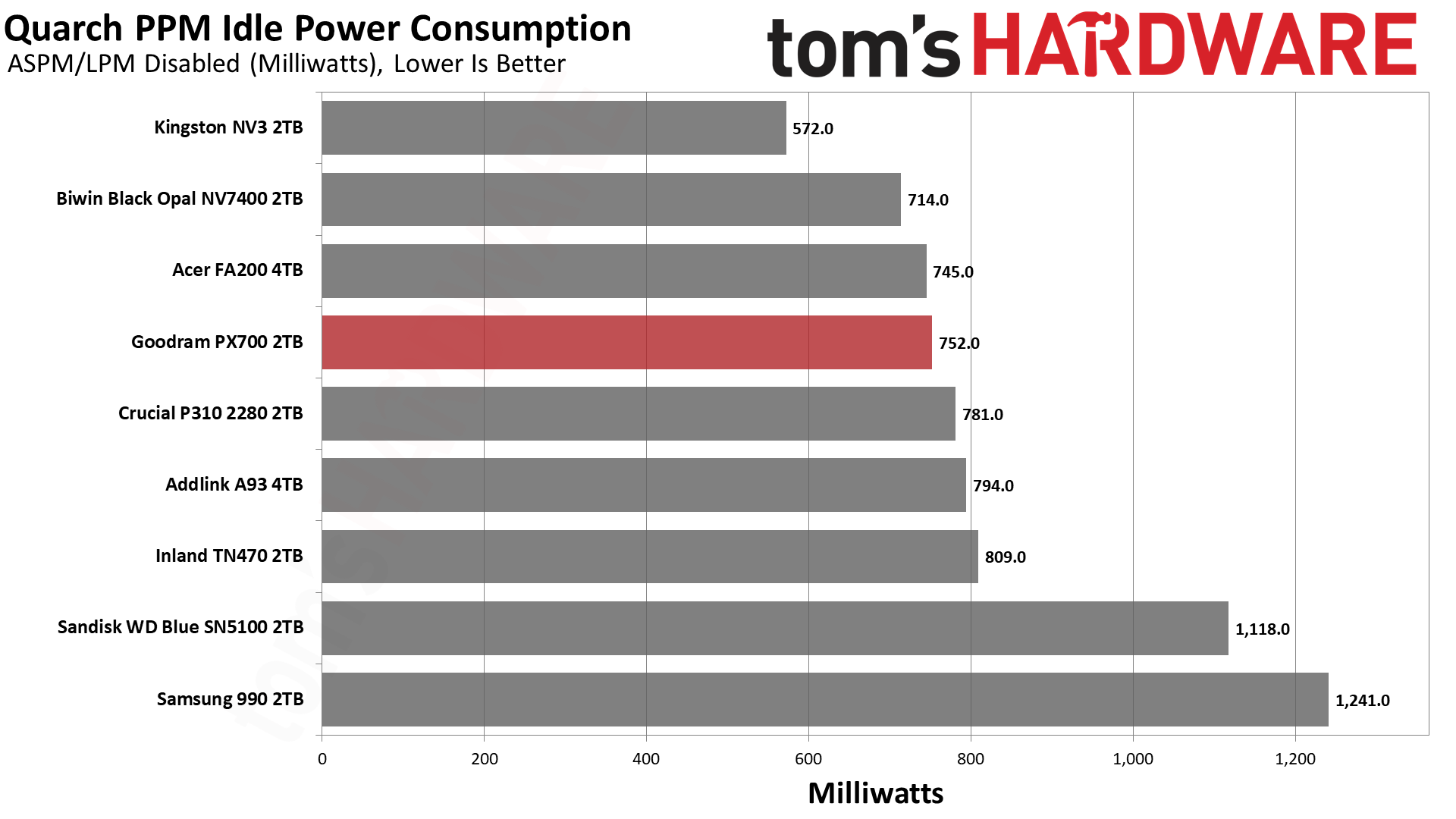
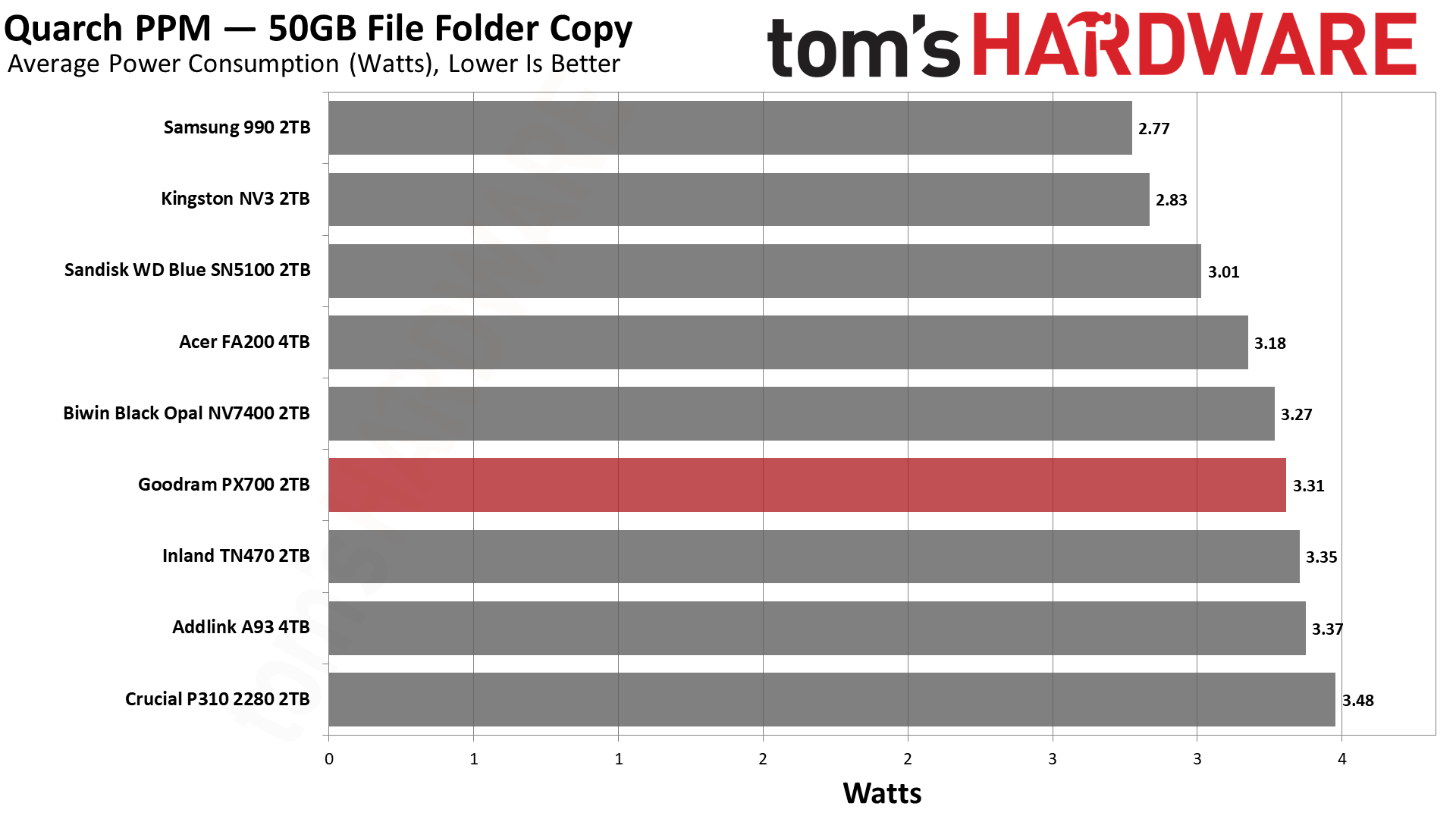
We use the Quarch HD Programmable Power Module to gain a deeper understanding of power characteristics. Idle power consumption is an important aspect to consider, especially if you're looking for a laptop upgrade as even the best ultrabooks can have mediocre stock storage in terms of capacity and performance. Desktops are often more performance-oriented with less support for power-saving features so we show the worst-case for idle.
Some SSDs can consume watts of power at idle while better-suited ones sip just milliwatts. Average workload power consumption and max consumption are two other aspects of power consumption but performance-per-watt, or efficiency, is more important. A drive might consume more power during any given workload but accomplishing a task faster allows the drive to drop into an idle state more quickly, ultimately saving energy.
For temperature recording we currently poll the drive’s primary composite sensor during testing with a ~22°C ambient. Our testing is rigorous enough to heat the drive to a realistic ceiling temperature but real-world temperatures will vary due to the environment and workload factors.
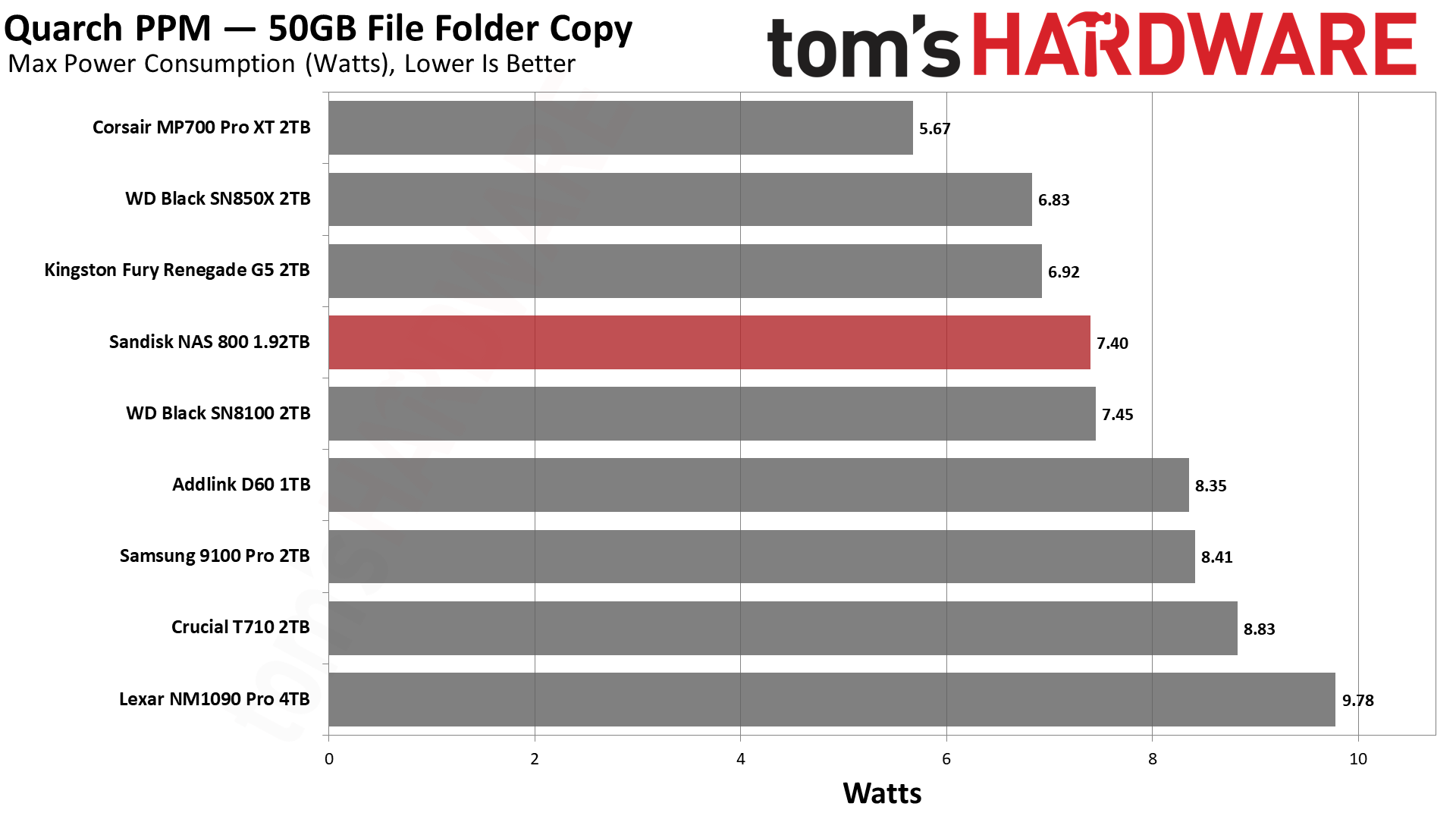
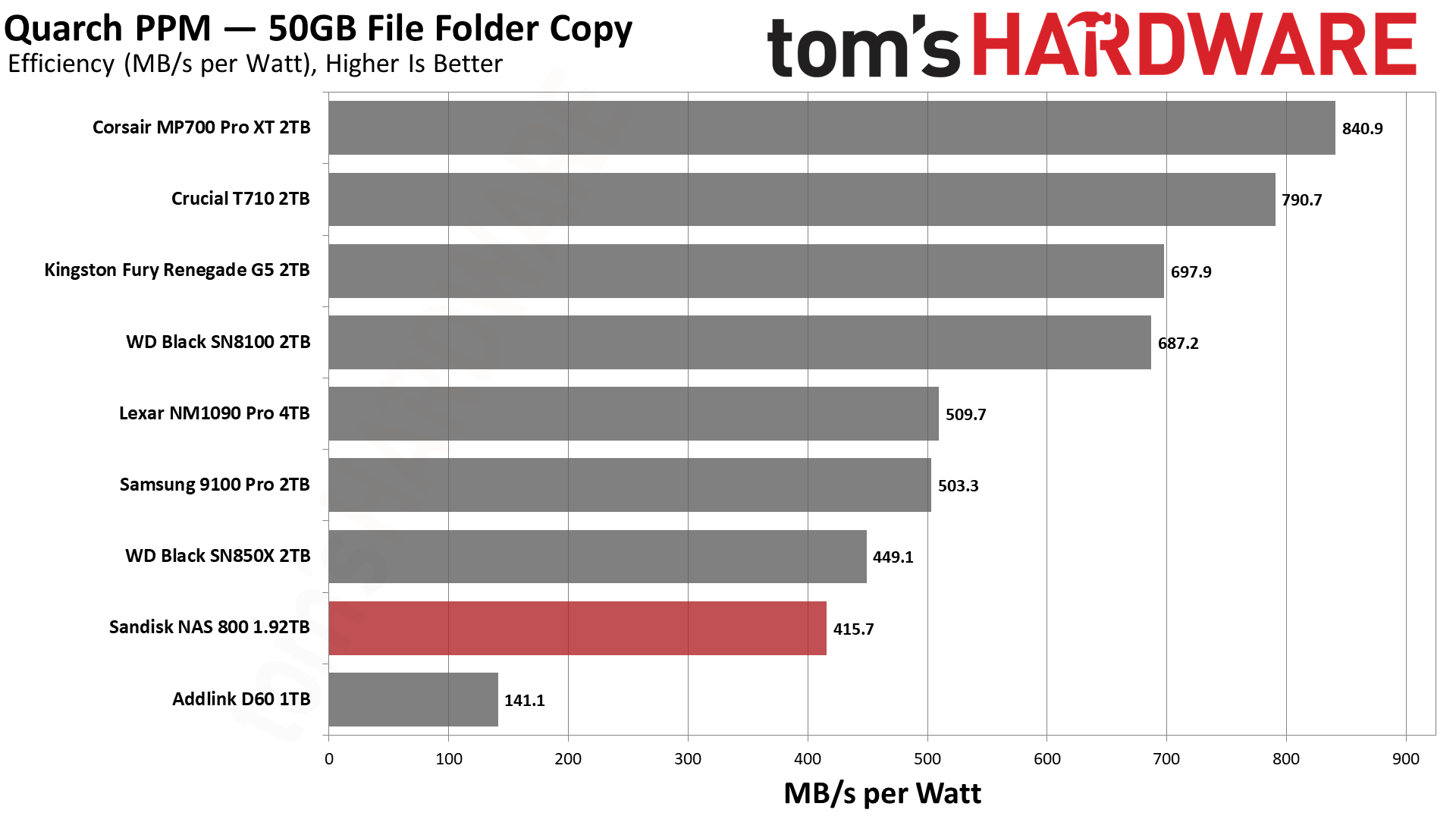
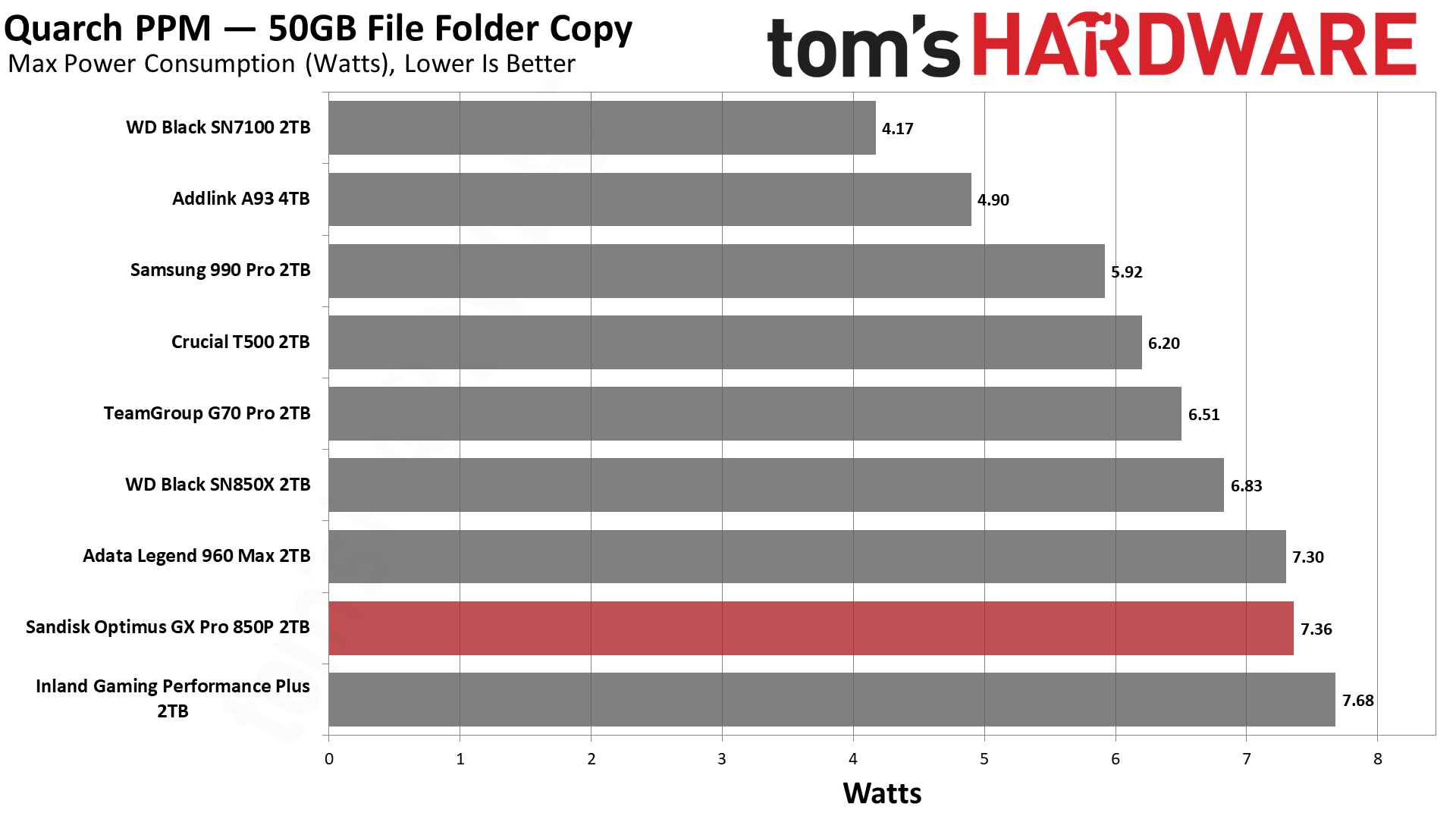
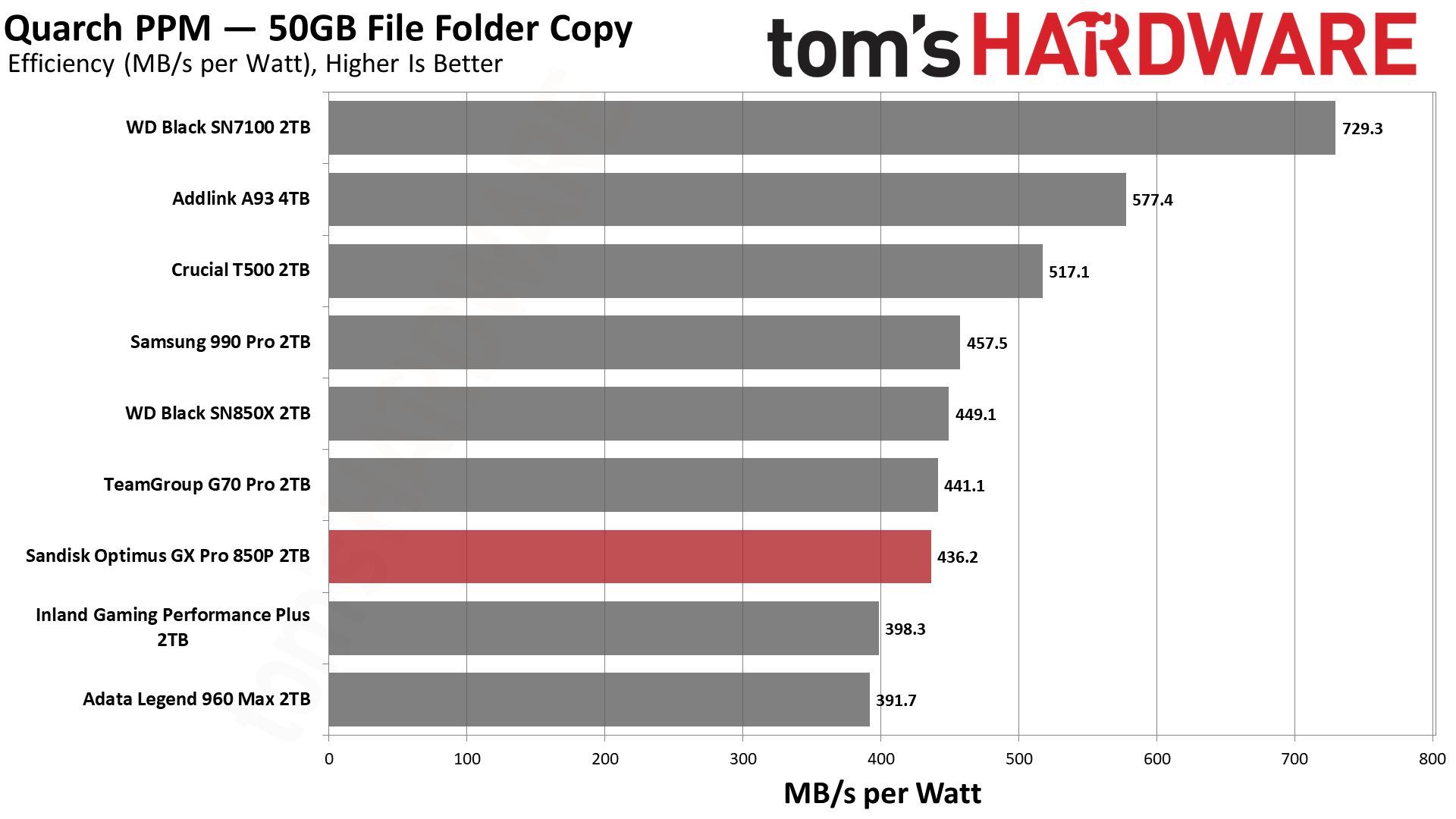
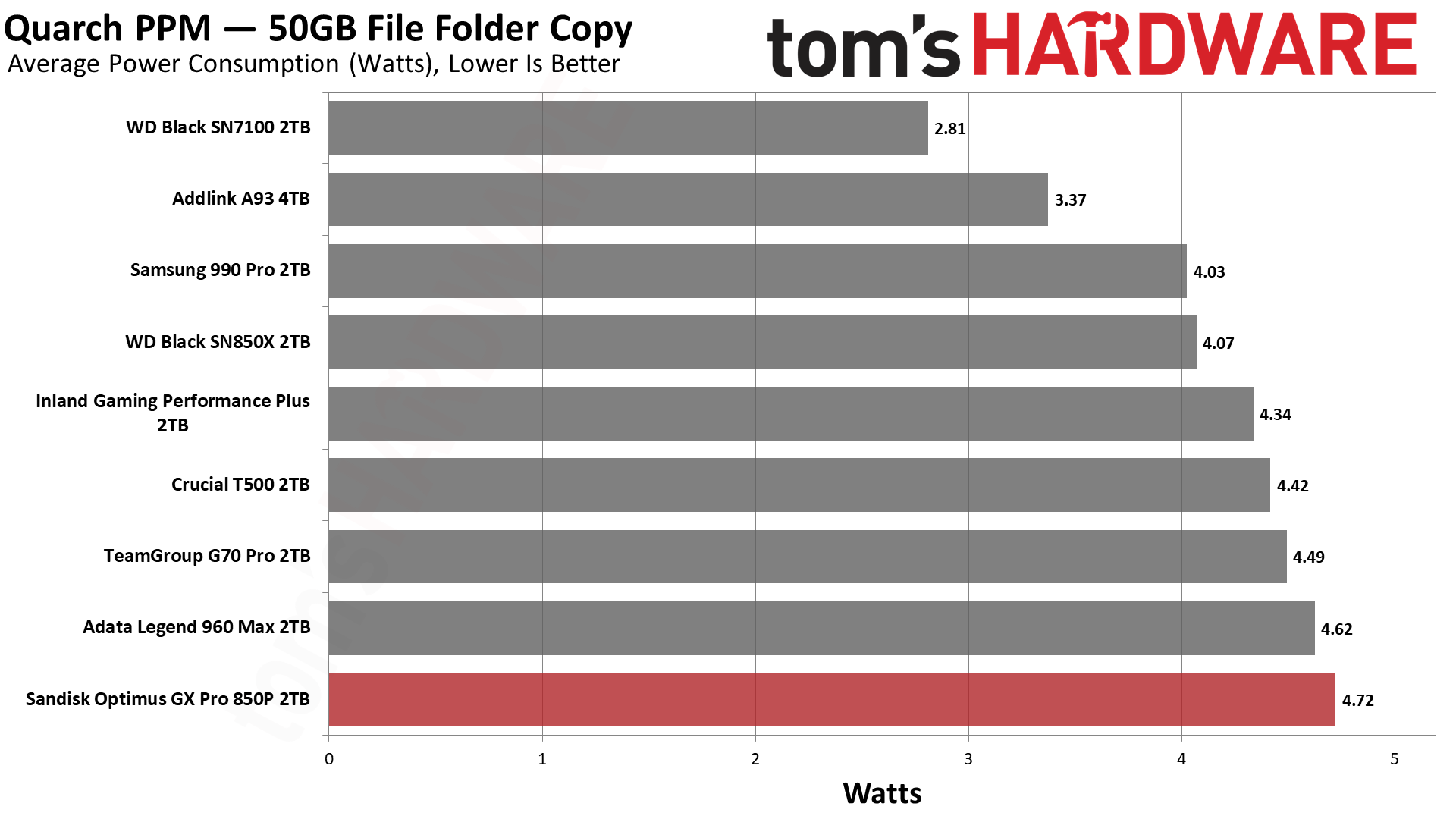
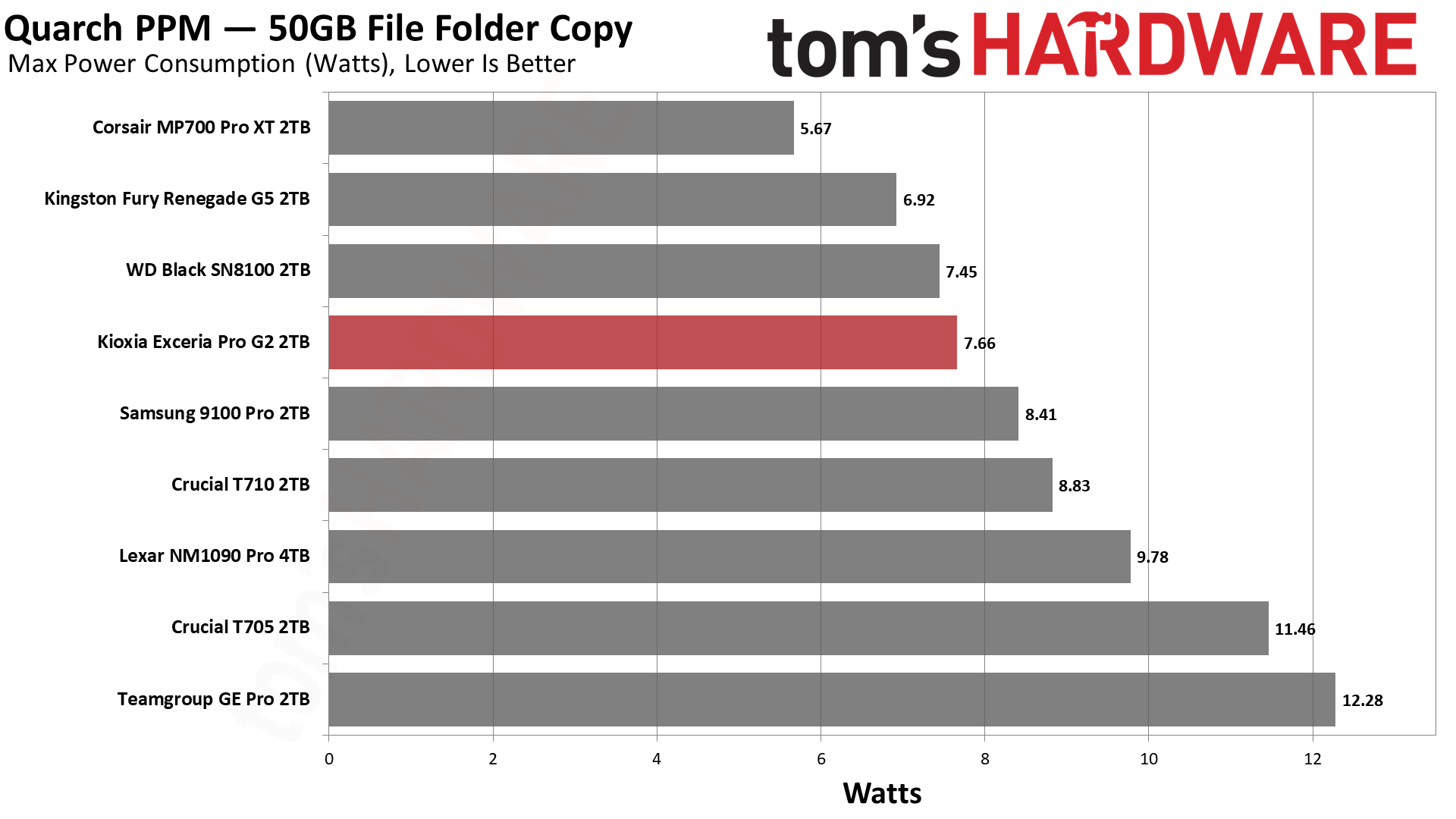
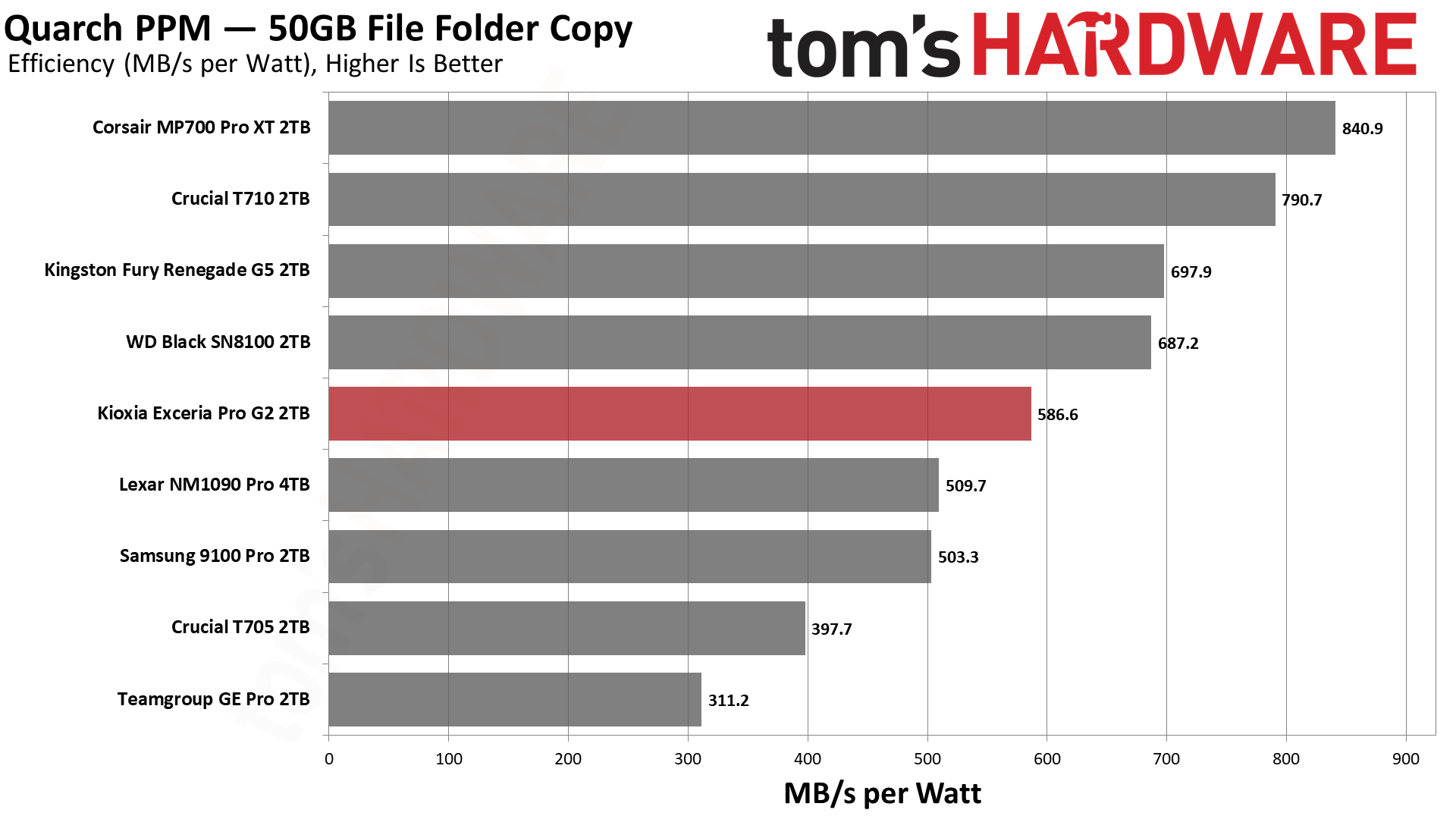
The NAS 800 is not terribly efficient by Gen 5 standards, or even Gen 4, coming in under the Black SN850X. This is OK and explained by the fact that the drive has a very small pSLC cache. TLC flash is not as performant, so it does less work. Less power is used, but multi-bit programming is less efficient. When placed next to the D60, it becomes clear that the NAS 800’s results aren’t so bad, although the D60 has power-loss protection hardware, which can affect power consumption.
As we said, TLC can mean less power, so this lower level of efficiency does not translate to higher heat production. The drive hit a peak reading below 70 degrees Celsius in our testing, and as the drive is optimized for sustained writes, our type of testing is more relevant than usual. The drive has about 15 degrees of headroom if this reading correlates to the throttling temperature, which is acceptable to us, although certainly a heatsink is not unwelcome.
We use an Alder Lake platform with most background applications such as indexing, Windows updates, and antivirus disabled in the OS to reduce run-to-run variability. Each SSD is prefilled to 50% capacity and tested as a secondary device. Unless noted, we use active cooling for all SSDs.
Sandisk NAS 800 Bottom Line
The Sandisk NAS 800 is not a drive for everyone. It’s priced too high for that, and its performance distinctly prefers certain workloads. Due to its optimization, it’s also not very power-efficient, so you might not want this in your laptop, either. This is all OK, though, because this drive is great at what it’s made for: NAS workloads.
Its sustained write performance, in particular, is high and consistent. It can also handle all of those writes with its exceptionally high TBW. The base hardware is fantastic in its own right, and there remain hints of that with the drive’s top-tier 4KB QD1 latencies, too. If you have a place for this drive and can afford it, it’s the best retail option out there for NAS.
(Image credit: Tom's Hardware)
There are some things the NAS 800 can’t do, though. It lacks power-loss protection hardware, like an array of capacitors. The D60 has these, and it’s one of the few retail options avialable with that feature. The NAS 800 is also not an ultra-low-latency option on par with a pSLC drive, or one with extreme endurance like the PNY LX3030, but that’s moot with no real products like that currently on the market.
We would instead look at two other possibilities: One, you go with a Gen 4 drive, or two, you grab an equivalent Gen 5 drive with a standard caching scheme. One downside for either is that you’re not getting the NAS 800’s high TBW. We also think the caching scheme works well for write-heavy workloads. Performance-wise, a Gen 4 drive could work as an alternative for many NAS applications, but we would highlight the NAS 800’s excellent latency as a counterpoint. If you need bandwidth, then there is not much of a substitute, either.
On the power-efficiency front, the NAS 800’s results are underwhelming, but expected. It would be wrong to take our numbers at face value for a drive that writes mostly in TLC mode. It’s plenty efficient for its intended workload, and the drive did not overheat in our testing.
As such, our biggest gripe is the price. We know what this hardware is, and we can account for the firmware optimization and the pSLC cache. That means you’re paying for the endurance rating. Frankly, we’re OK with that because this is one place you want that level of security. Standard drives often have comically high TBW for what users actually do with them, but this drive might actually see some serious writes over years of regular use. If that sounds like you, then you should definitely give the NAS 800 a serious look.
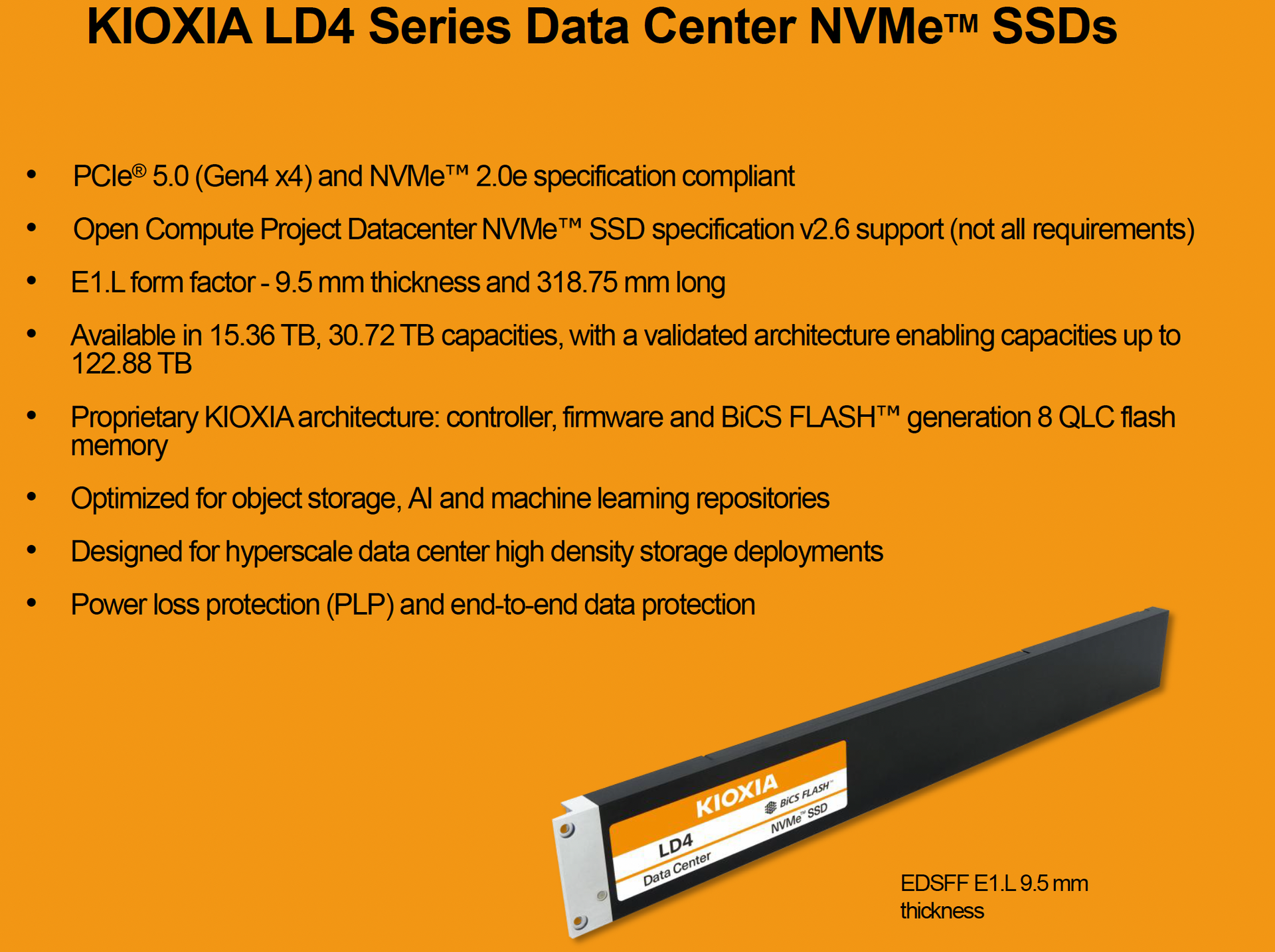
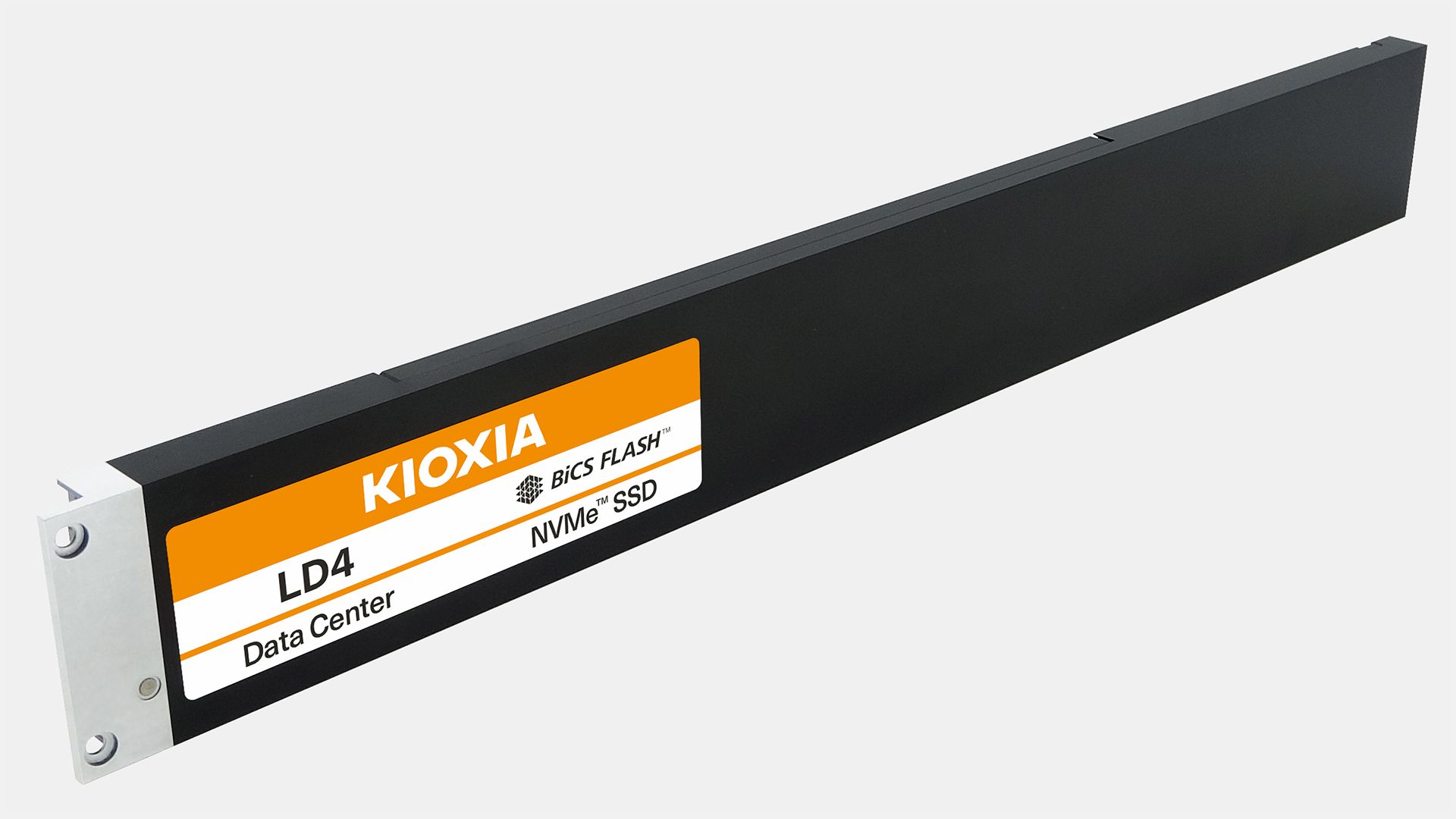
Kioxia introduced its LD4-series solid-state drives (SSDs) in an E1.L form factor with capacities up to 122.88TB designed for high-density storage deployments in hyperscale data centers on Friday. The new drives use proven BiCS8 3D QLC NAND and are aimed at read-intensive workloads like AI data repositories and object storage, according to the manufacturer.
Kioxia's LD4-series SSDs rely on the company's proprietary platform complying with the NVMe 2.0e specification and featuring a single-port configuration along with select requirements of the Open Compute Project Datacenter NVMe SSD specification 2.6. Although Kioxia lists PCIe 5.0 compliance, the drives operate at PCIe 4.0 x4 speeds of up to 16 GT/s per lane, which provides a theoretical maximum bandwidth of approximately 7.88 GB/s in each direction. While the company currently offers capacities of up to 30.72 TB, it has validated an architecture capable of supporting 122.88 TB drives, though it never revealed when such drives are set to be available, something not surprising in a world where 3D NAND memory is sold in advance.
Interestingly, Kioxia did not disclose any actual performance characteristics of its LD4-series SSDs, including sequential read and write speeds, random read and write IOPS, or latency. The company also did not reveal their endurance ratings in drive writes per day (DWPD) or total bytes written (TBW), nor did it specify their power consumption. These characteristics are particularly important for hyperscale operators evaluating the cost, performance, and longevity of storage infrastructure.
(Image credit: Kioxia)
The key selling point of Kioxia's LD4-series and its E1.L form factor — 318.75 mm length × 38.4 mm height × 9.5 mm thick — is its ability to house numerous 3D NAND flash packages on an elongated printed circuit board, thus enabling multiple drives to be installed in a thin 1U server, offering vast capacities. This enables system manufacturers among those who build OCP-compliant servers to maximize storage capacity without increasing rack space requirements, which is particularly important for large-scale storage deployments.
Kioxia is currently sampling 15.36 TB and 30.72 TB LD4 drives to select customers. The company has not disclosed when 122.88 TB configurations will become available or when the series will enter mass production. The drives will be demonstrated at the OCP Global Summit in San Jose in mid-October.
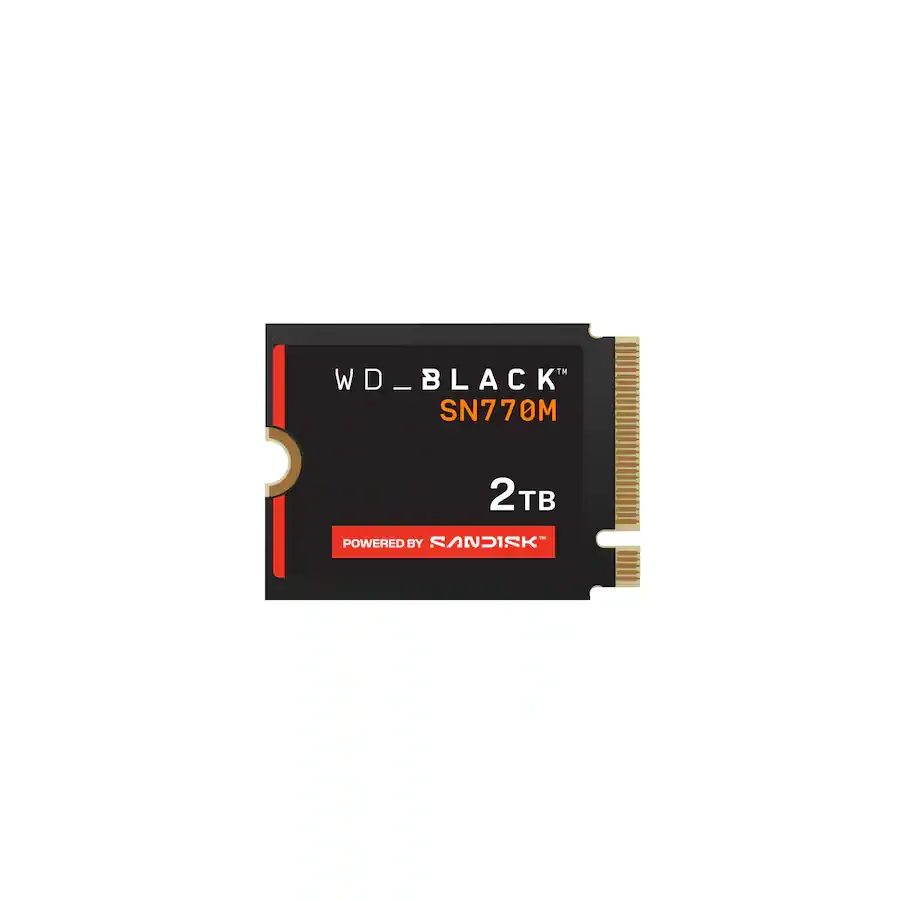
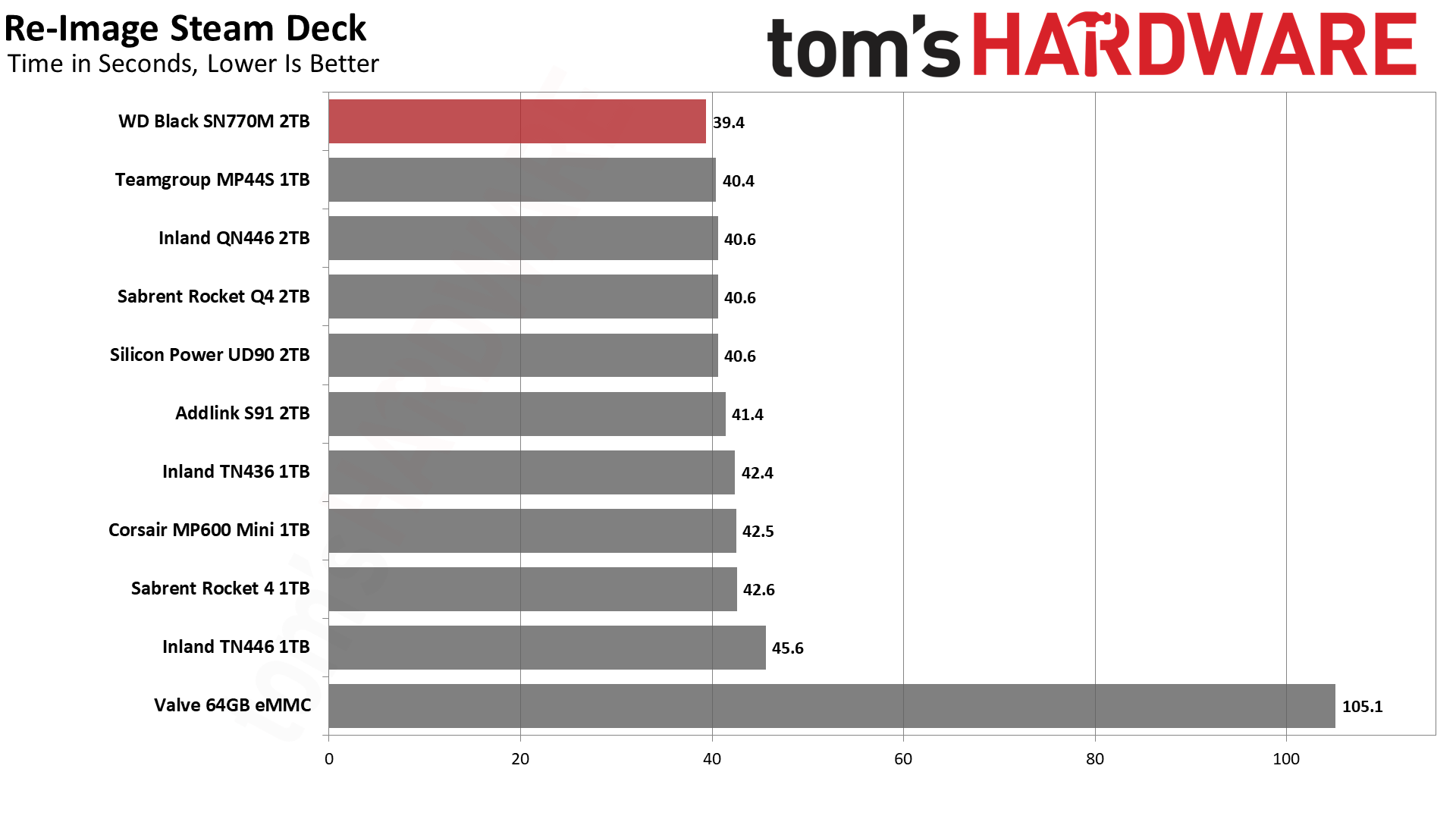
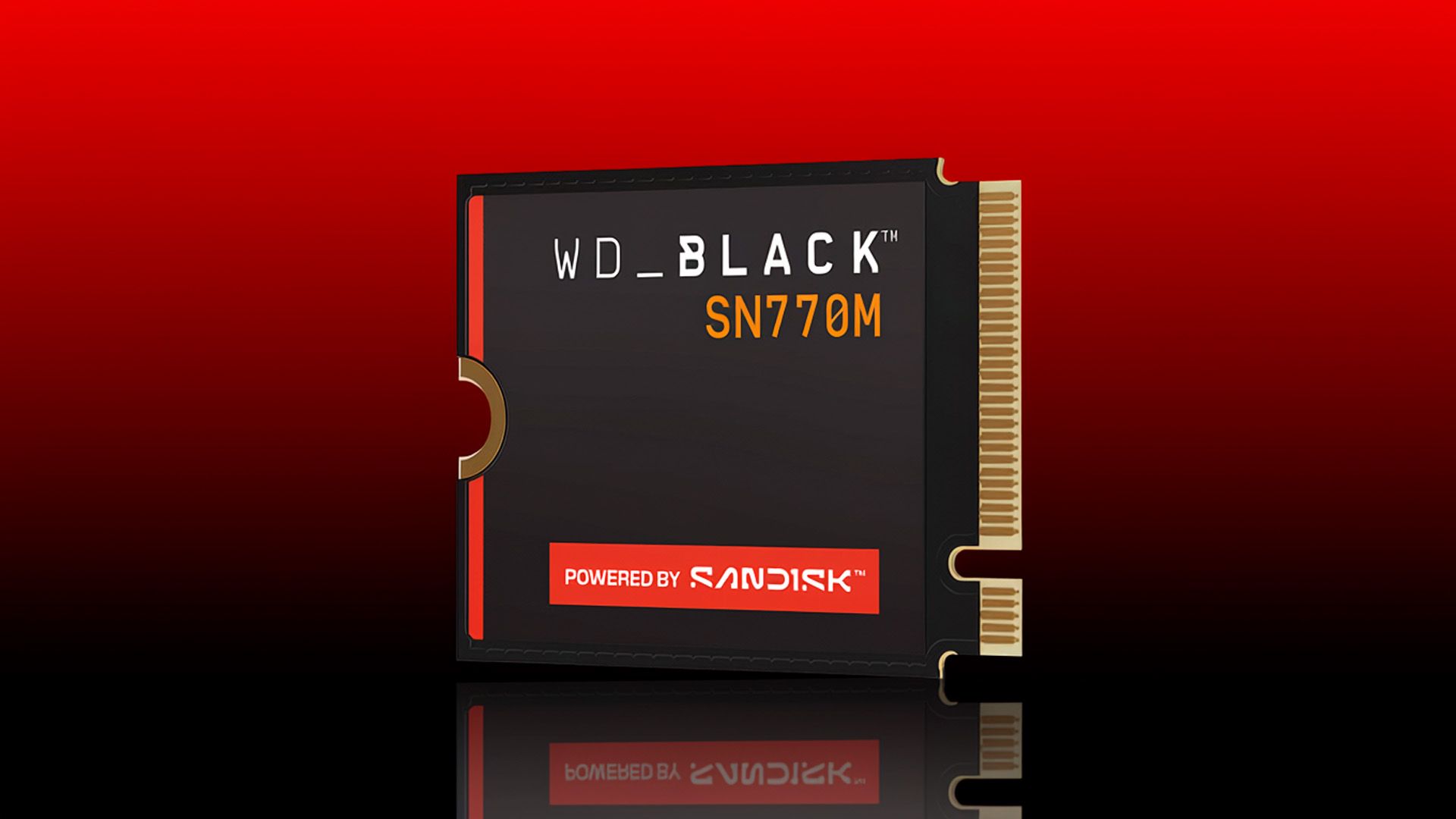
Normally, only a madman would even attempt to buy an SSD during a storage shortage. However, the WD Black SN770M 2TB has fallen to $259.99, just 8% above its original launch price. At this price, it is worth considering if your gaming handheld is running out of internal storage.
The WD Black SN770M, once one of the best SSDs, is an M.2 2230 drive, making it a perfect fit for popular handhelds like the Steam Deck, ROG Ally, Legion Go, and Claw. Currently, 2TB is the highest capacity available to consumers. Micron announced a 4TB M.2 2230 SSD not long ago, but it is limited to OEM models, so gamers will have to settle for 2TB for now.
The PCIe 4.0 SSD delivers sequential read and write speeds up to 5,150 MB/s and 4,850 MB/s, respectively. It is a perfect fit for modern handhelds that take advantage of the PCIe 4.0 interface. For the Steam Deck, however, which uses PCIe 3.0, the WD Black SN770M is a bit of overkill.
WD Black SN770M 2TB: was $531.99 now $259.99 The WD Black SN770M is an M.2 2230 SSD that delivers sequential read and write speeds of up to 5,150 MB/s and 4,850 MB/s, respectively, over a PCIe 4.0 interface.View Deal
The WD Black SN770M remains a good option for gaming handhelds, even after the introduction of newer models like the Optimus GX 7100M. The SSD strikes a balance between price and performance, especially for the Steam Deck, which is limited by PCIe 3.0.
The WD Black SN770M came out three years ago with an MSRP of $219.99, but it typically hovered around $239.99. During the recent storage shortage, prices surged to between $349.99 and $399.99, so Best Buy's comparison value of $531.99 is heavily exaggerated.
For $0.13 per GB, the WD Black SN770M offers very good value, being only 8% above its pre-shortage retail price. The SSD is among the best deals available if you need a high-performance M.2 2230 SSD for your gaming handheld right now.
Micron this month filed a lawsuit against China's 3D NAND champion YMTC, accusing it of poaching its leading engineers, illegally obtaining its NAND memory know-how from them, and then using that information to build its own non-volatile memory as well as its patent portfolio. The Boise, Idaho-based company further alleges that YMTC uses patents granted to its former employees to accuse Micron of patent infringements in various jurisdictions.
To assemble a comprehensive IP portfolio that would cover everything from essential technologies to sophisticated manufacturing methods quickly, as well as to ensure that its patents overlapped with those of other 3D NAND manufacturers to enable it to attack Micron, the firm asserts YMTC opted for a rather simple, yet effective strategy: It poached engineers from Micron, then made them patent either standard essential inventions or inventions that closely resembled those they worked on while at Micron.
To leave Micron without being asked questions, its former employees cited a broad range of personal or family reasons for their resignations and even did not update their LinkedIn profiles to reflect their new roles at YMTC. These employees had confidentiality obligations that continued after termination of their employment and proscribed them from using, disclosing, or possessing Micron’s confidential information. Meanwhile, Micron did not really investigate the whereabouts of its former employees and "had no reason to suspect YMTC itself" of planning to use its confidential information because "YMTC did not have any material market share in the industry.”
We are all used to cut-throat competition on the memory market as leading producers of DRAM and NAND try to win market share from each other and maintain profitability at the same time. These companies have broad cross-licensing agreements to neutralize direct patent wars that can result in devastating injunctions that could paralyze fab operations and eventually lead to assured mutual destruction. However, this does not seem to be the case for emerging competitors from China, ChangXin Memory Technologies (CXMT) and Yangtze Memory Technologies Co. (YMTC), both established in 2016, which are increasingly attacking Micron in various courts, perhaps making pre-emptive strikes to avoid the destiny of their Chinese counterpart, Fujian Jinhua.
Using Micron's 3D NAND know-how against Micron
In its lawsuit against YMTC, Micron asserts that Yangtze Memory's patent campaign against Micron largely relies on patents that were granted to former Micron employees. Furthermore, Micron alleges that former employees brought its 3D NAND know-how to YMTC and subsequently developed patents covering related or overlapping technologies, which essentially means that Yangtze Memory has built its patent portfolio using Micron's intellectual property, which is why Micron claims that YMTC patents belong to Micron and therefore cannot be used against it.
"For example, these individuals include Daesik Song, Wenxi Zhou, and Hua Tan," Micron's lawsuit reads. "Each of these employees owed Micron contractual obligations to keep trade secrets confidential, had access to certain of the Micron Trade Secrets further described below while employed at Micron, and on information and belief, each joined YMTC shortly after leaving Micron. Each of these employees also regularly accessed one or more of the Trade Secrets that were located on servers in Boise by accessing Micron's highly confidential technical materials relating to its test and/or production nodes."
Micron's allegations in the new complaint go well beyond simple claims that its former employees brought manufacturing expertise to YMTC, something that happens often. The company alleges that YMTC systematically obtained confidential 3D NAND and memory technology from former Micron engineers and incorporated that knowledge into its manufacturing processes starting from its 64-layer 3D NAND, memory products, and, most importantly, its patent portfolio. Micron says it began to uncover the alleged scheme after YMTC sued it for patent infringement in California in November 2023, when it noticed that several patents asserted against it named former Micron engineers as inventors.
In its complaint, Micron identifies a number of its former employees who subsequently became inventors on YMTC patents, including Hongbin Zhu, Jun Liu, Yushi Hu, Qian Tao, Changhyun Lee, Daesik Song, Wenxi Zhou, and Hua Tan. According to Micron, these engineers had access to different classes of confidential technology that covered a broad range of 3D NAND-related know-how, including high-aspect-ratio etching, replacement gate processing, multi-deck connections, pillar shaping and cleaning, and memory I/O circuitry, among others.
Patent records independently confirm an important part of Micron's allegations: several former Micron engineers later became inventors in YMTC patents that YMTC eventually used against Micron. In general, this does not prove any misappropriation: engineers routinely change employers and continue to invent in their areas of expertise, but Micron alleges that some of these patents cover inventions conceived or developed while their inventors still worked for Micron, which is why it is asking courts to transfer ownership of these patents from YMTC to Micron.
Engineer
YMTC patent
Patent family/ relationship
Micron’s ownership allegation
YMTC litigation against Micron
Hongbin Zhu
US 11,049,866
PCT/CN2018/101482
Micron claims ownership
Same family as patents asserted in California
Hongbin Zhu
US 11,532,636
PCT/CN2018/101482
Micron claims ownership
Same family as patents asserted in California
Hongbin Zhu
US 10,566,336
PCT/CN2018/101482
Micron claims ownership
Same family as patents asserted in California
Hongbin Zhu
US 10,879,254
PCT/CN2018/101482
Micron claimed ownership in California litigation
California — asserted by YMTC
Hongbin Zhu
US 11,581,322
PCT/CN2018/101482
Micron claimed ownership in California litigation
California — asserted by YMTC
Daesik Song
US 10,707,851
PCT/CN2019/085451
Micron claims ownership
Texas — asserted by YMTC
Daesik Song
EP 3 909 047
European member of PCT/CN2019/085451
Micron’s Idaho complaint expressly seeks ownership of US ’851, not EP ’047
UPC + UK — asserted by YMTC
One of the clearest examples involves Hongbin Zhu, who left Micron in September 2017 and subsequently became an inventor in numerous YMTC patent applications. One family originates from the international patent application PCT/CN2018/101482, filed on August 21, 2018, and includes three patents. Micron's complaint alleges that these patents relate to technology Zhu 'learned of, worked on, and/or conceived while at Micron' and asks the court to transfer their ownership from YMTC to Micron. The same family also includes two additional patents that YMTC asserted against Micron in its California infringement lawsuit. Micron has already challenged ownership of these two patents in that litigation and claimed that Zhu invented the underlying technology while employed by Micron and had assigned his rights to the company.
Daesik Song provides another connection between Micron's allegations and YMTC's patent enforcement campaign. Song previously worked at Micron on memory I/O technology and later became an inventor on a patent titled 'Double Data Rate Circuit and Data Generation Method Implementing Precise Duty Cycle Control.' YMTC asserted the '851 patent against Micron in the Eastern District of Texas, yet Micron now alleges that it is actually the rightful owner of the patent because Song's invention-assignment agreement transferred inventions conceived during his Micron employment to Micron. The company is therefore asking the Idaho court to transfer legal title to the '851 patent from YMTC to Micron.
The Song connection also extends beyond the United States. In Europe, YMTC owns European patent EP 3 909 047, which covers the same invention as the '851 patent, and uses it against Micron in its UPC in Düsseldorf and U.K. litigations. Thus, YMTC is enforcing different members of the same invention family against Micron in Texas, the UPC, and the U.K. while Micron alleges that the U.S. patent from that family actually belongs to Micron. That does not automatically mean Micron owns the EP '047 since the U.S. and Europe are different jurisdictions, but it demonstrates how Micron's ownership allegations intersect with YMTC's international patent campaign.
There are additional connections. Former Micron engineers Yushi Hu and Qian Tao are named as inventors on two patents that YMTC asserted in California, while Jun Liu, Qian Tao, and Yushi Hu are all inventors on another patent asserted against Micron there. Changhyun Lee is an inventor on US 11,468,957, also part of YMTC's California case. Meanwhile, Wenxi Zhou appears on a YMTC patent family that covers barrier layers for word-line contacts, including US 12,094,767.
Engineer
Micron patent
YMTC patent
Litigation
Hongbin Zhu
US 10,658,382 — 3D NAND/integrated structures; vertical memory strings and fabrication
US 10,879,254 — 3D memory with through-array contacts (TACs)
California — YMTC asserted US 10,879,254
Hongbin Zhu
US 10,943,920 — 3D NAND/integrated structures; vertical memory strings and fabrication
US 10,879,254 — 3D memory with TACs
California — YMTC asserted US 10,879,254
Yushi Hu
US 10,943,920 — 3D NAND/integrated structures; vertical memory strings and fabrication
US 10,658,378 — TAC for 3D memory
California — YMTC asserted US 10,658,378
Yushi Hu
US 10,943,920 — 3D NAND/integrated structures; vertical memory strings and fabrication
US 10,937,806 — TAC for 3D memory
California — YMTC asserted US 10,937,806
Yushi Hu
US 10,943,920 — 3D NAND/integrated structures; vertical memory strings and fabrication
US 10,707,851 — DDR circuit with precise duty-cycle control
Texas — YMTC asserted US 10,707,851
The European cases provide a somewhat narrower connection. Of the three European patents YMTC is asserting through the UPC and UK proceedings, EP 3 909 047 is directly relevant because it names former Micron engineer Daesik Song. The other two — EP 3 850 660, which names Qinxiang Wei, Jianhua Sun, and Ji Xia, and EP 4 236 650, which names Zilong Chen and Xiang Fu — do not name any of the former Micron engineers identified in Micron's complaint. Meanwhile, YMTC has also filed eight patent cases against Micron in China, three in Beijing and five in Shanghai, although we have not found a reliable public list of the eight Chinese patents involved, so it is not yet possible to determine whether they include Chinese patents of YMTC's inventions in the U.S. and Europe.
To sum up, the list of patents and YMTC engineers reveal a much more complicated dispute than an ordinary patent fight between two memory manufacturers. In less than a decade, YMTC has built an international patent portfolio and is attempting to enforce it against Micron across the United States, China, Germany, the UPC, and the U.K. Several of the patents used in that campaign are assigned to engineers who previously worked for Micron. Furthermore, Micron now alleges that at least some of those inventions were conceived while at Micron or using its trade secrets, so at least in some cases these patents belong to Micron, according to the company's complaint.
In short, Micron's main allegation is not that YMTC obtained its manufacturing know-how through former employees, but that some of this know-how was ultimately converted into YMTC intellectual property that YMTC later used to sue Micron itself. Hence, if Micron proves to the courts that YMTC's inventions are in fact Micron's inventions, then the whole Yangtze Memory campaign falls apart. However, the decision by the Munich I Regional Court looks rather alarming for Micron, as the company has so far failed to persuade the court that it not only did not infringe any YMTC patents, but that the very patents in question were obtained illegally.
All-out war
YMTC sued Micron in the Northern District of California in early November 2023, alleging that Micron's 3D NAND infringed eight U.S. patents. In early 2024, YMTC brought three additional patent cases against Micron in Beijing, then followed up with another California lawsuit in July that asserted another 11 U.S. patents against Micron’s 3D NAND and DDR5 products. In September 2024, YMTC expanded its Chinese campaign with five more patent cases in Shanghai. The dispute became global on October 6, 2025, when YMTC simultaneously launched another wave of litigation, asserting eight patents in the Eastern District of Texas, three patents in the U.K., three European patents before the Unified Patent Court in Düsseldorf, and five patents before the Munich Regional Court.
By then, what had begun as an eight-patent U.S. dispute had evolved into a multi-jurisdictional patent war covering dozens of patents and some of Micron's most important NAND products. Hence, Micron had to start responding. On October 18, 2024, the company filed a counterclaim alleging that it is the true owner of the US 10,879,254 and US 11,581,322 patents (more on this later). Then, almost two years after YMTC first sued Micron, the company filed the case on October 7, 2025, asking the U.S. District Court for the Northern District of California to issue a declaratory judgment of non-infringement concerning YMTC patents, which essentially means that Micron asked the court to rule that its patents did not infringe certain YMTC patents. These actions were barely a defense from YMTC's all-out patent war.
However, having spent nearly three years primarily defending itself and challenging YMTC's patents, Micron decided to respond more vigorously, which it did in its lawsuit filed with the Boise, Idaho, court on September 15. In the new lawsuit, Micron alleges that YMTC systematically obtained Micron's 3D NAND manufacturing know-how through former Micron engineers and then incorporated that information into both YMTC's manufacturing processes (64-layer, 128-layer, 232-layer, and subsequent nodes) and its patent portfolio. The alleged trade secrets cover multiple aspects of contemporary 3D NAND production, including high-aspect-ratio etching, replacement gate processing, multi-deck connections, pillar formation, and other manufacturing techniques.
Micron claims that its former employees who had access to this information later worked on similar technologies at YMTC and became inventors in YMTC patent applications. More importantly, some of these patents or their family members were subsequently used by YMTC against Micron, which essentially means that YMTC used patents granted to Micron's former employees against Micron itself. In many cases, YMTC allegedly poached Micron engineers who had previously developed and patented certain technologies at Micron, then tasked them with working on similar technologies and filing new YMTC patents covering essentially the same technical solutions. As a result, Micron now claims that several of the underlying inventions actually belong to it.
Back in Europe, Micron launched its own patent offensive against YMTC and companies that sell products which allegedly use the disputed technologies. In July, Micron sued YMTC in the Munich Regional Court, where it named Apacer, Lexar, and Ultron as co-defendants. In addition, it took a separate U.K. High Court action targeting YMTC alongside its partners Apacer, Lexar, and TeamGroup (note that TeamGroup is one of the SSD makers that from time to time uses different memory and even controllers on the same SSD models).
The German ruling
Before we proceed with a rather unprecedented decision of the Munich I Regional court, let us explain the difference between the patent and utility model as neither the U.S. nor the U.K., nor Canada, support the utility model system.
A patent protects major technical inventions across process technologies, tools, and materials for up to 20 years, but it requires a rigorous step-by-step patent office examination that typically takes years and significant expense to obtain. By contrast, a utility model protects incremental, practical mechanical or structural improvements to physical products for a shorter duration (usually 5 to 10 years). It is granted rapidly within months and at a fraction of the cost because it involves a lower inventive threshold and skips substantive examination prior to registration. While most patent offices register utility models without checking whether the idea is actually new, the validity of a utility model remains uncertain until enforcement. This is where YMTC prevailed to a degree that nobody expected.
In fact, YMTC has so far failed to gain any substantial court victory in the U.S., but it scored its first major victories in its German litigation against Micron in September, when the Munich I Regional Court ruled that Micron infringed two YMTC German utility models and granted injunctions against the company. The two utility models — DE 20 2020 006 166 U1 and DE 20 2021 004 551 U1 — cover 3D NAND-related to staircase structures and barrier layers for word-line contacts, respectively. The injunctions prohibit Micron from offering and selling products that infringe the two utility models in Germany. Meanwhile, the court has adjourned decisions on three infringement actions: it did not reject the other three, but simply has not resolved them.
Former Micron engineer
U.S. YMTC patent
German YMTC utility model
Outcome
Wenxi Zhou
US 12,232,313
DE 20 2020 006 166 U1
Texas litigation/ Munich injunction
Wenxi Zhou
US 12,094,767
DE 20 2021 004 551 U1
Texas litigation/ Munich injunction
Normally, this would not be a problem for Micron's clients, as unlike injunctions by the U.S. ITC, these rulings in the European Union typically have no effect on downstream entities, so Dell, Lenovo, and other PC OEMs can continue selling PCs containing violating hardware. However, it is possible that this particular decision could affect Micron's downstream partners, effectively prohibiting them from selling systems with Micron's 3D NAND inside. As a result, the injunctions could disrupt sales of PCs, SSDs, servers, and other products containing the affected Micron NAND in Germany.
Micron has appealed the decisions and is challenging the validity of the rights, so the September rulings represent first-instance victories for YMTC rather than the end of the dispute. Three other Munich cases brought by YMTC — including one that involves a European patent — have not yet produced infringement decisions. Yet, the existing decision shows that courts can side with Yangtze Memory and rule that Micron uses YMTC's intellectual property illegally.
Normally, this would be a 'local' problem for Micron. However, it is important to mention that some of the technologies and patent families involved in the European litigation overlap with those asserted in the United States. Several of them name former Micron engineers as inventors.
In fact, both German utility models on which YMTC just won injunctions appear to belong to patent families that involve former Micron engineer Wenxi Zhou, with corresponding U.S. patents being used by YMTC against Micron in Texas. This becomes particularly important in light of Micron's new allegations that former employees brought its 3D NAND know-how to YMTC and subsequently developed patents covering related technologies. If YMTC can win a litigation in Germany, can it also prevail elsewhere using the same patent families?
Summary
The conflict between Micron and YMTC emerged amid the escalating U.S. – China semiconductor confrontation. In October 2022, the U.S. imposed sweeping restrictions on exports of advanced semiconductor manufacturing equipment and technology to China, and in December 2022, the U.S. Department of Commerce added YMTC to its Entity List, which severely restricted the company's access to American fab tools. China responded with pressure on Micron: in May 2023, the Cyberspace Administration of China concluded that Micron had failed a cybersecurity review and prohibited operators of critical information infrastructure from purchasing affected Micron products.
The commercial conflict between the two memory makers eventually moved into the courts, with YMTC accusing Micron of patent infringement and Micron largely defending itself rather than launching a comparable patent offensive of its own. Micron’s new complaint in Boise, Idaho, may explain this strategy: the American memory maker not only seeks to defend itself against YMTC's infringement claims, but also alleges that some of the patents YMTC is using against it incorporate Micron’s confidential technology or actually belong to Micron itself. But while Micron can potentially prevail in the U.S. and perhaps in Europe and the U.K., China represents a different challenge, as the legal battle between the two memory makers may well be considered a part of the broader geopolitical confrontation between the U.S. and China.
The good news is that Sandisk is still putting out SSDs for consumers, and these are not just cheap replacements. The Optimus GX Pro 850P is a bona fide high-end Gen 4 SSD that puts Sandisk’s name on theWD Black SN850X’s legendary design. This means DRAM, TLC flash, and good performance for any role.
Like theBlack SN850P, which is a Black SN850X made with a heatsink and for the PS5, the 850P is made for the console. Its heatsink is excellent, and it would fit right into your desktop PC, too. We wouldn’t recommend shucking it for use in a laptop, but theoretically it could work there as well. Our main concern would be the pricing, which is a bit steep – this is a nice drive, but you’ll pay a premium for it.
The Sandisk Optimus GX Pro 850P is available at the same capacities as itsWD Black SN850P forebear: 1TB, 2TB, 4TB, and 8TB. This also matches the originalWD Black SN850X and its later8TB SKU. Prices at the time of review for the Optimus GX Pro 850P are $309.99, $609.99, $1,139.99, and $2,249.99. These prices are well above the $234.99, $494.99, and $1,019.00 that the Black SN850P is currently demanding. We think the prices will come down on the Sandisk drive, but be aware of the comparable alternatives when making a purchase.
The drive can reach up to 7,300 / 6,600 MB/s for sequential reads and writes and up to 1.2 million random read/write IOPS. This performance is at the top for a Gen 4 drive and, frankly, is capable of delivering an excellent experience even for heavier workloads. The drive’s warranty is standard at five years with 600TB of writes for every TB of capacity. The Optimus GX Pro 850P supports data-at-rest encryption through TCG Opal v2.01, but this is not explicitly listed for the SN850P, likely as this model is designed for use in the PS5.
Sandisk Optimus GX Pro 850P Software and Accessories
Sandiskfully supports its drives with downloadable software. For the Optimus GX Pro 850P this includes the Sandisk Dashboard, which is Sandisk’s version of WD’s Dashboard, and Acronis True Image for Sandisk. The former is an SSD toolbox with all of the expected features: drive health and SMART monitoring, firmware updating, performance testing, etc. Acronis True Image is OEM-licensed software used for backing up files and imaging drives.
Sandisk Optimus GX Pro 850P: A Closer Look
Tom's HardwareTom's Hardware
The Optimus GX Pro 850P is designed to specifically fit into the PS5 with an effective heatsink. The bare drive underneath is single-sided at 1TB and 2TB but double-sided at 4TB and 8TB. For that reason, the rated height is larger for the latter two SKUs. In general, this should not be an issue for fit in desktop PCs. The heatsink itself is finned for extra surface area for better heat dissipation and should keep the drive cool even under harsh conditions. It does not have RGB, unlike the WD Black SN850’s heatsinked SKU.
The drive label gives some additional information, such as a rating for 3.3V / 2.8A. This is ~9W, which matches the drive’s highest reported power state. This is certainly higher than the ~5W we see for many DRAM-less drives, which have half the flash channels on top of not having DRAM to worry about, but it is not enough to be a problem with this heatsink.
Tom's HardwareTom's HardwareTom's Hardware
The Optimus GX Pro 850P has a relatively standard SSD layout with an SSD controller, a DRAM module, power management circuitry, and two NAND flash packages. The larger, double-sided versions of the drive will have more NAND flash packages, with two additional packages on the back. We’ve covered the controller and its iterations in the past. The DRAM, for what it’s worth, is DDR4, which is serviceable for the role volatile memory plays on an SSD: mostly as a metadata cache. The one caveat here is that our 2TB drive only has 1GB of DRAM, which is one-half the usual and likewise one-half of what we had on our 2TB WD Black SN850X sample. In practice, this should have no impact on intended workload performance and could potentially reduce cost a small amount.
The flash is potentially more interesting, as it could be the expected BiCS5, or it could have been updated. The8TB WD Black SN850X uses BiCS6, and it can make sense to cycle in newer flash later on in a product’s lifetime. The Optimus GX Pro 850P is essentially in that line. What we can say for sure is that the flash on here was manufactured more recently than the flash on the Black SN850X samples we’ve reviewed at both capacities – newer in production date, not necessarily in generation – but the performance is close enough that there would be little perceptible difference even if it were generationally different. This drive is at the edge of what you can get out of this controller technology and Sandisk could also choose to tune it specifically for this performance range, so at the end of the day one could say this is, effectively, equivalent to the WD Black SN850X with BiCS5 TLC flash.
We believe our sample is still using BiCS5 anyway – the coding’s sixth character “C” implies that – but that statement applies to any potential BiCS6 swap. In this case, moving to newer BiCS5 means a higher I/O rate, 1,200 MT/s to 1,600 MT/s. The former is plenty to saturate a PCIe 4.0 link with an eight-channel controller like the 850P’s, but putting in newer flash makes sense from a supply perspective. Higher MT/s flash can have lower latency and potentially better power efficiency when run at a lower MT/s, but we don’t believe either is a motivation here. Real-world impacts are, again, minimal, with minor exceptions that might not exist if we were comparing to a current Black SN850X.
The Sandisk Optimus GX Pro 850P is Sandisk’s take on theWD Black SN850P, which in turn is a PS5 version of theBlack SN850X, so we have to compare it to that latter drive. The stiffest proprietary competition is from Samsung with the990 Pro. Alternatives with DRAM but different hardware include theCrucial T500, theAdata Legend 960 Max, theTeamGroup G70 Pro, and theInland Gaming Performance Plus. To keep things honest, we also want to compare faster DRAM-less drives that have historically been great for the PS5. These include theAddlink A93 (4TB) and theWD Black SN7100.
Trace Testing — 3DMark Storage Benchmark
Built for gamers, 3DMark’s Storage Benchmark focuses on real-world gaming performance. Each round in this benchmark stresses storage based on gaming activities including loading games, saving progress, installing game files, and recording gameplay video streams. Future gaming benchmarks will be DirectStorage-inclusive and an evaluation for future-proofing is included where applicable.
Tom's HardwareTom's HardwareTom's Hardware
Is the 850P a good game drive? In our estimation, yes. It beats the original Black SN850X, due in part to firmware maturity and/or the newer BiCS5 – we would expect these two to be comparable if the Black is or has been updated – and it is also faster than popular DRAM-less options like the A93. In general, we think going with something DRAM-less, like the A93, is a good way to save some money if you’re buying an SSD just to host games. This approach extends even to the Black SN7100, which struggles on this list against the largely DRAM-equipped competition, as it still scores pretty well. We consider 45µs or better to be excellent for load times.
Trace Testing — PCMark 10 Storage Benchmark
PCMark 10 is an industry standard trace-based benchmark that uses a wide-ranging set of real-world traces from popular applications and everyday tasks to measure the performance of storage devices. The results are particularly useful when analyzing drives for their use as primary/boot storage devices and in work environments.
Tom's HardwareTom's HardwareTom's Hardware
For general application use, we are a little more disappointed. The 850P ends up in the middle of the pack, although its results are still quite good. This will beat most DRAM-less drives, although it falls behind the Black SN7100, as that drive uses very responsive BiCS8 flash. This makes it clear that the 850P is using older BiCS flash, which doesn’t have the same latency edge. This isn’t the worst trade-off if you’re looking for a full-fledged SSD with eight flash channels and DRAM – this drive will sustain better over time and through heavier workloads. Again, anything at or below 45µs for latency is good in our book, so this would be perfectly suitable as an OS drive.
Console Testing — PlayStation 5 Transfers
The PlayStation 5 is capable of taking one additional PCIe 4.0 or faster SSD for extra game storage. While any 4.0 drive will technically work, Sony recommends drives that can deliver at least 5,500 MB/s of sequential read bandwidth for optimal performance. Based on our extensive testing, PCIe 5.0 SSDs don’t bring much to the table and generally shouldn’t be used in the PS5, especially as they may require additional cooling. Check our Best PS5 SSDs article for more information.
Our testing utilizes the PS5’s internal storage test and manual read/write tests with over 192GB of data both from and to the internal storage. Throttling is prevented where possible to see how each drive operates under ideal conditions. While game load times should not deviate much from drive to drive, our results can indicate which drives may be more responsive in long-term use.
Tom's HardwareTom's HardwareTom's Hardware
The 850P should be, by most accounts, the definitive PS5 SSD. We’ve had the Black SN850X as ourbest SSD for the PS5 for quite a long time, although the SN850P is the PS5-specific model. The Black SN850X simply delivers a similar experience to the SN850P at a lower price point. Why is this the best SSD for the platform? Well, you get top-tier Gen 4 performance with reliability and an excellent heatsink. All of this still applies to Sandisk’s 850P.
Now, a DRAM-less alternative with half the flash channels – which means it runs cooler – like the A93 seems to be more sensible. It’s less expensive, and the PS5 doesn’t benefit from more performance than it provides. The argument here is therefore more on reliability and, possibly, consistency. The 850P can manage more flash at once – which actually is ideal for larger capacities, including 2TB for this generation – and it also has DRAM.
Many enthusiasts still want DRAM as it can improve performance and endurance. Keep in mind that our A93 sample is the 4TB model, which its controller can address thanks to a revision made for that purpose. A four-channel drive is still at its best with up to four dies per channel, or 16 in total, which works out to 2TB with 1Tb dies. Going past that doesn’t really deliver more performance, and having an eight-channel controller is preferable at higher capacities. A stronger argument would be this: the 850P is a quality, mature product that could act as an investment. Considering that a 2TB Black SN850X bought at its lowest price beats the stock market right now, that’s not as crazy as it once sounded.
Our take is that, for a PS5, you really can get anything. If you’re set on a quality drive, though, this one is basically as good as it gets. You’re here for the numbers, though, and it only wins in transfers to the drive, and not by much. That’s valid, but with more wear and a fuller drive, it is more likely to maintain peak performance for longer. So, don’t buy this drive for faster game load times or FPS, because you won’t get that here.
Transfer Rates — DiskBench
We use the DiskBench storage benchmarking tool to test file transfer performance with a custom 50GB dataset. We write 31,227 files of various types, such as pictures, PDFs, and videos to the test drive, then make a copy of that data to a new folder, and follow up with a reading test of a newly written 6.5GB zip file. This is a real-world type workload that fits into the cache of most drives.
Tom's HardwareTom's HardwareTom's Hardware
Our DiskBench test gives a good measure of real-world performance with a mixed file load, with Gen 4 expectations around 2 GB/s for copies and writes and 4 GB/s for reads. Writes are going to be slower than reads and can help cap copy performance. The 850P does nothing unusual here, coming in at numbers close to these. We tend to put the most weight on copy performance and, here, the 850P manages to come in second behind only the T500. This makes sense as the T500 has newer flash with more planes, which helps it eke out more bandwidth. The Black SN7100 also has newer flash, specifically a newer form of BiCS, which keeps it competitive. Still, the 850P impressively beats the Black SN850X by a significant amount – perhaps due to firmware maturity and/or newer BiCS5 – and the 990 Pro as well.
This is an important result because most of what people use storage for ultimately comes down to transfers like these. Files between drives. Backups. Updating software. You’re not going to have a lot of transfers going on at once with a high queue depth, and if you’re working with smaller files, you are not going to get near the theoretical throughput. So, the 850P certainly earns the mantle of being a high-end Gen 4 drive. On the other hand, even the DRAM-less A93 is not that much slower. If you’re someone who does a lot of transfers, the added time could add up, though.
Synthetic Testing — ATTO / CrystalDiskMark
ATTO and CrystalDiskMark (CDM) are free and easy-to-use storage benchmarking tools that SSD vendors commonly use to assign performance specifications to their products. Both of these tools give us insight into how each device handles different file sizes and at different queue depths for both sequential and random workloads.
The 850P performs very closely to the Black SN850X in ATTO, as expected. We see no real anomalies here. The drive is very consistent, which makes for a reliable user experience regardless of workload type. It is easy to notice, however, that the 850P and Black SN850X have weaker performance between the 512B and 2KiB block sizes, closer to the Legend 960 Max and WD Black SN7100. We would chalk this up to the controller technology for the WD and Sandisk drives – they all use proprietary ones with the same foundation – with the Legend 960 Max being the singular SMI-based drive.
We’ve found historically that drives may show up weaker here in ATTO as indicative of a trade-off. This is because, generally, we think in terms of 4KiB – a typical cluster and sector size that is used for performance metrics everywhere – which is a logical page downstream from the 16KiB physical pages that modern flash uses. Handling smaller reads/writes could increase memory load and can increase latency. However, focusing on 4KiB and larger block sizes makes more sense for a variety of workloads, and performance is not the only factor. A manufacturer also has to consider power consumption and wear, for example. So there may be good design reasons for this behavior.
If we move on to CDM to see performance at 4KiB, at a typical queue depth of 1, the 850P is average with reads and on top with writes. Anything at or below 45µs for reads is pretty good, and the drive competes well. The SN7100 is in a class of its own with its BiCS8 flash. For writes, which are often less important, we see strong numbers from most drives. The DRAM-less A93, the SMI-based Legend 960 Max, and the proprietary 990 Pro are on the weaker end. Generally speaking, this does not indicate a problem with the drive at this level and could be a facet of the controller, the flash, or both, often also as a trade-off. What we can say is that the 850P is stellar here, which certainly makes it more attractive for use in a NAS, for caching, and for workloads that are not found in the PS5. That’s not a knock – it simply illustrates the drive’s heritage and underlines that this drive could be good anywhere.
Sustained Write Performance and Cache Recovery
Official write specifications are only part of the performance picture. Most SSDs implement a write cache, which is a fast area of pseudo-SLC (single-bit) programmed flash that absorbs incoming data. Sustained write speeds can suffer tremendously once the workload spills outside of the cache and into the "native" TLC (three-bit) or QLC (four-bit) flash. Performance can suffer even more if the drive is forced to fold, the process of migrating data out of the cache in order to free up space for further incoming data.
We use Iometer to hammer the SSD with sequential writes for 15 minutes to measure both the size of the write cache and performance after the cache is saturated. We also monitor cache recovery via multiple idle rounds. This process shows the performance of the drive in various states including the steady state write performance.
Tom's HardwareTom's HardwareTom's Hardware
We’ll start with the 850P’s fastest mode in the cache: over 6.46 GB/s for just over 92 seconds. This is a 595GB cache, more or less exactly matching the Black SN850X. A drive with 3-bit TLC cache can handle up to one-third its actual size, so this is smaller than what’s possible but still large in the grand scheme of things. It’s more than suitably large to cache even large file writes, which means it can be used for things outside of gaming. This is reinforced by the post-cache speed, where it’s writing to the native TLC flash at a respectable 1.6 GB/s. This doesn’t sound like much given the speed of drives today, but it would be at or above the best Gen 3 drives in this mode while generally having a larger and faster cache.
Samsung’s 990 Pro is in the same boat, providing consistent performance outside the cache but looking slow compared to the steady state speeds we see with other drives. In part, this is due to the flash being used on it, as well as the WD/Sandisk drives. Newer flash has more planes and lower latency, both of which can boost throughput. Some drives, like the Inland Gaming Performance Plus, alternatively have smaller caches, which allow the drive to maintain higher sustained speeds. The same goes for the Legend 960 Max. Speed is also not everything, as not all drives write as smoothly in their post-cache modes. Maintaining responsiveness can help a drive feel spunkier when it hits this slower state.
If we take all of this into consideration, the 850P actually has some interesting applications. You could use this as a NAS drive, for example. Generally, we think the Inland Gaming Performance Plus – or the updated Performance Plus – would be better, as a super large cache leans more towards everyday consumer workloads. However, the 850P is steady enough with still sufficient speed. It would probably provide a better experience than the T500, especially as it has twice the flash channels, so it can manage better at high capacity. So, yes, this is a PS5 drive, but its heatsink and performance profile are such that you could use it as a workhorse drive as well.
Power Consumption and Temperature
We use the Quarch HD Programmable Power Module to gain a deeper understanding of power characteristics. Idle power consumption is an important aspect to consider, especially if you're looking for a laptop upgrade, as even the best ultrabooks can have mediocre stock storage in terms of capacity and performance. Desktops are often more performance-oriented with less support for power-saving features, so we show the worst-case for idle.
Some SSDs can consume watts of power at idle while better-suited ones sip just milliwatts. Average workload power consumption and max consumption are two other aspects of power consumption, but performance-per-watt, or efficiency, is more important. A drive might consume more power during any given workload, but accomplishing a task faster allows the drive to drop into an idle state more quickly, ultimately saving energy.
For temperature recording, we currently poll the drive’s primary composite sensor during testing with a ~22°C ambient. Our testing is rigorous enough to heat the drive to a realistic ceiling temperature, but real-world temperatures will vary due to the environment and workload factors.
The 850P has a heatsink, so it’s not going into a laptop, and concerns about power consumption are a little less important. The presence of the heatsink also helps keep the drive cool, so throttling is also not a big concern. Still, you could choose to remove the heatsink, and maybe you want to toss this into a small form factor media machine. In those cases, the 850P’s efficiency – which lands in the lower half of the pack – is sufficient but not great. It’s better than the SM2264-based Legend 960 Max and E18-based Gaming Performance Plus, which are good baselines, but falls behind newer drives and technology.
Our feeling here is that a high-end Gen 4 drive should get at least 400 MB/s per watt, which is generally the case. DRAM-less options can target much higher and are often a better choice if you’re worried about heat or power consumption. If you are going for a high-end drive, ideally you have a heatsink. The one the 850P comes with is very effective, with us measuring a maximum temperature of 54 degrees Celsius. This is very far off from throttling and, frankly, it is a fantastic result.
We use an Alder Lake platform with most background applications such as indexing, Windows updates, and antivirus disabled in the OS to reduce run-to-run variability. Each SSD is prefilled to 50% capacity and tested as a secondary device. Unless noted, we use active cooling for all SSDs.
Sandisk Optimus GX Pro 850P Bottom Line
The Sandisk Optimus GX Pro 850P brings no real surprises. If you were expecting it to be a WD Black SN850P – which itself is just a Black SN850X with a PS5-compliant heatsink – with a Sandisk badge, then you won’t be disappointed. Technically, there are some firmware optimizations possible for a drive destined to be used in PS5s, but we’ve found that any such changes have little impact on overall performance. The 850P is a drive with mature hardware and firmware, and that’s the main story here. It’s a reliable, consistent, well-performing drive that will rock the PS5 but is also good in regular computers.
(Image credit: Tom's Hardware)
Our biggest complaint is probably that the 850P can be bested by other drives in any given category. There are less expensive drives with similar performance in the PS5. There are drives that will be better in a laptop, even assuming the 850P’s heatsink is removed. There are even drives that beat it on the desktop in some areas, or are less expensive. Frankly, it feels like a premium drive, and that’s long been the case for theBlack SN850X and its progeny. This is also true of theSamsung 990 Pro, its direct competitor, and there’s nothing wrong with that. If you want a rock-solid drive that can do anything, look no further. If you have a specific application in mind or want to save some money, there are other options.
Considering how much people value their data and worry about storage stability, we think the Optimus GX Pro 850P does have a place. It’s a no-nonsense drive that gets the job done with a proven track record. The heatsink is very effective, and the drive itself doesn’t really struggle with any one workload. While it is designed for the PS5, it would be plenty happy in an enthusiast’s desktop. Not everybody needs a Gen 5 powerhouse. We recommend it for the discerning buyer who wants something fast and reliable without having to guess what hardware is inside some generic brand’s drive.
Enterprise SSD brand DapuStor revealed a new dual-mode configuration for its J5060 enterprise drive that combines SLC (single-level cell) and QLC (quad-level cell) flash on a single drive. The drive’s new firmware runs “selected QLC cells” in a faster pseudo-SLC (pSLC) mode, trading capacity for speed.
As an example, the 30.72TB model trades around 4TB of QLC for 800GB of pSLC, a ratio closer to 5:1 than 4:1. The other two configurations put aside 400GB or 1.2TB with a cost between 6% and 20% of the QLC capacity. “No dedicated SLC NAND is required,” as this uses a “software-defined media configuration,” DapuStor said. Announced last month during FMS 2026, the drive still lacks pricing, a named customer, and a general availability date.
Typical consumer QLC drives have a pSLC cache that fills with super-fast performance, with the data later transferring over to QLC. However, this pSLC mode is dynamic and variable in size. DapuStor’s implementation uses a fixed region sized by the operator, and the regions are exposed as individual block devices to the host. The J5060 is also higher capacity, from 15.36 to 122.88TB, and in the U.2 form factor for PCIe 4.0 x4. Endurance is rated at 0.5 DWPD (Drive Writes Per Day) over five years. The stock 30.72TB model is rated at 30,000 random-write IOPS at 16KB. Its write latency is 35 microseconds.
(Image credit: DapuStor)
The capacity trade-off improves what QLC is worse at, random writes, by more than seven times, DapuStor said. It also says average 4K random-write latency is below 8 microseconds. The pSLC has over 25 times the program/erase cycles of the QLC region, although without region-specific DWPD or TBW numbers. DapuStor achieves this with three firmware changes: die-level isolation, optimized SLC reserve allocation, and region-aware I/O scheduling. The high-performance region targets workloads that benefit, namely “database journals, write-ahead logs (WALs), and metadata caches.” The idea is that this drive configuration precludes the need for specialized SLC drives where failure could be an issue; however, you still end up with a dead dual-mode drive on a failure.
The NVMe specification has defined this arrangement since 2019, with an NVM Express presentation at FMS 2019 claiming the goal was to “enable one SKU to be configured by customer for their use case.” An FMS 2019 example showed that some media units run as a small fast region, while the rest run at full density. A prior drive with the same idea, via a Phison firmware split and a host driver, was the consumer Enmotus/Phison FuzeDrive P200 with our 2021 verdict stating that “excessive pricing isn’t for everyone.” Enmotus wound down the same year. It’s also possible to mod a QLC drive to SLC, as we covered in 2024. The difference here is that DapuStor hands the host a second and separate block device with storage software control.
Competitors have other solutions. Sandisk’s bet is on Direct Write QLC on its UltraQLC platform, “which eliminates SLC buffering by enabling power-loss safe writes on the first pass,” Sandisk said, but there are still performance differences, according to our own reporting. Alternatively, Micron’s solution offers a separate cache drive in its XTR. The drive uses 176-layer TLC entirely in SLC mode and is rated at up to 35 DWPD. The drive acts as an optional write buffer for arrays of Micron’s 6000-series SSDs. For reference, Micron rates the XTR at 15 microseconds for QD1 writes.
Product promises are valuable, but any full comparison requires seeing the drives in actual use. Questions remain specifically regarding DapuStor’s drive, as pSLC region specifications are lacking. It is uncertain what commands the drive employs and whether the region split is modifiable live; usability depends much on the undemonstrated storage software. More details for the QLC-based, PCIe 5.0 sibling R6060 would be nice, too. Utilizing multi-bit flash in a single-bit, SLC mode for performance or endurance reasons is not a new idea, but balancing those with the increasing need for capacity remains a challenge.
Apple’s latest iPhone 18 Pro series went on sale last week, and the company’s decision to use QLC-based NAND for higher-capacity storage variants appears to come with a trade-off. Bilibili channel Homolab recently tested a 1TB iPhone 18 Pro Max and found that its storage performance can drop significantly under sustained heavy workloads. Since QLC stores four bits of data per memory cell when compared to three bits with TLC, it allows manufacturers to offer higher capacities using the same physical space. However, this higher storage density comes at the cost of slower performance, particularly when handling large amounts of data.
Homolab compared the 1TB QLC-based iPhone 18 Pro Max with a 512GB TLC-based iPhone 18 Pro. While both storage types perform fairly similarly in 4K read tests, the QLC model falls behind by 38% in a low-queue-depth mixed workload, scoring 8,168 compared to 11,285 for the TLC model. Under heavier workloads, the gap narrows, although the TLC storage model still maintains a 12% advantage.
The drop in performance is even more apparent when it comes to sustained write tests. The iPhone 18 Pro Max uses a fast SLC cache that can deliver speeds of up to 3,000 MB/s. Once that cache is exhausted, a secondary TLC-based buffer takes over, averaging around 578 MB/s. When both cache buffers are exhausted, the phone has to write directly to the underlying QLC NAND. At that point, sustained write performance can fall to 79.4 MB/s, with speeds occasionally dropping as low as 25.6 MB/s.
That is significantly slow and comparable to the performance of many budget microSD cards (microSD Express cards are much faster). Things look even worse once the storage starts filling up. At 60% capacity, the available SLC cache drops from 250GB to just 58GB. This also causes the secondary buffer to slow down to 396 MB/s, while direct QLC writes average just 45 MB/s and occasionally fall to as low as 1.1 MB/s.
It’s important to note that these are synthetic benchmarks and are meant to represent a worse case scenario. Users should not experience any performance issues during typical tasks such as web browsing, messaging, gaming, or taking photos. Any slowdown is likely to be noticeable only during specific workloads, such as 4K or ProRes recording, large file transfers, or data backup restores. Having said that, testing by Homolab does point to the trade-off involved in using QLC NAND for a high-capacity flagship smartphone, particularly for users who regularly deal with storage-intensive tasks.
A new report claims Chinese DRAM champion CXMT is eyeing production of 3D NAND memory. Reuters reports, citing three people familiar with the company's plans, that CXMT intends to build a 3D NAND R&D production line at its second manufacturing facility near Beijing. There is no information on when the experimental production line will become operational, though, given that CXMT's second Beijing fab has not even broken ground yet, the line is at least two or three years away. In addition, the memory maker has established a research institute in Beijing that has NAND flash development among its projects, according to one source. CXMT has not formally confirmed any 3D NAND initiatives, so the information should be taken with a grain of salt.
For now, there are no details on CXMT's 3D NAND architecture, number of active layers, process technology, expected performance, or production capacity. Nevertheless, the report claims that CXMT has already discussed its NAND ambitions with prospective customers. One of them is said to be a recently established company that plans to use CXMT-made NAND devices in storage products aimed at AI and supercomputing applications.
It remains to be seen whether CXMT's 3D NAND project will eventually progress to high-volume manufacturing, but if it does, the initiative will take CXMT beyond its traditional DRAM specialization and directly into YMTC's territory. Until recently, China's two major memory producers had focused exclusively on their 3D NAND and DRAM realms where they have achieved quite a success. Yet, it looks like both companies want to become one-stop shops for DRAM and NAND — just like their bigger rivals Micron, Samsung, and SK hynix — as YMTC is reportedly exploring DRAM production.
While CXMT's alleged plan to build 3D NAND may look somewhat logical from business diversification point of view, it does not make a lot of commercial sense for now.
Or China's industrial policy?
CXMT is China's dominant DRAM producer and posted $22.41 billion in revenue and $11.57 billion in net profit in the first half of the year after years of bleeding money. Despite obvious success, the company is still considerably smaller than the Big Three memory suppliers, which means it has plenty of room to expand in the industry where it already has experience, process technology, fabs, and customers. Furthermore, AI gives CXMT an obvious reason to focus resources on advanced DRAM as well as HBM3E, which are arguably much more strategically valuable products than commodity 3D NAND.
That said, for CXMT, allocating resources to 3D NAND, which requires completely different process technologies, manufacturing expertise, and equipment, does not make much economic sense. However, from the Chinese government's perspective, turning CXMT into the country's second major 3D NAND producer fits almost perfectly within its semiconductor self-sufficiency plans.
CXMT was created with Hefei government money (which held a 37% stake in the company during its IPO) and received support from China's Big Fund, which means that federal and local governments retain control over the company and may shape its strategic decisions, which is exactly what they do. Whether or not CXMT can indeed become a decent 3D NAND maker is an entirely different question.
We always like to review Kioxia drives because they usually provide the perfect marriage of performance and reliability. We certainly wish they were more readily available in retail in the U.S., but we can still appreciate a good design when we see it. The Exceria Pro G2 continues in that lineage with all-new levels of performance you can only get with the newest hardware and a PCIe 5.0 interface. It’s like a Kingston Fury Renegade G5 made for OEMs, providing most of the performance you expect from this class of drive with reliability-minded firmware built in.
The important bit is that this drive still delivers what you’d expect. That means high performance, including sustained write performance, good power efficiency, and very low random read latency. These are the hallmarks of a drive that offers an excellent user experience. This is a very fast drive, just not the very fastest, but we make the argument that this is a deliberate trade-off for a drive with roots in an area where reliability is a bigger priority. For some, that might otherwise tip things in its favor. Regardless of your stance, though, its price in areas where it is available is competitive, and we can judge it by that.
The Kioxia Exceria Pro G2 is available in 1TB, 2TB, and 4TB capacities. These are the most popular capacities, with 8TB yet again out of reach due to rising prices. The drive can reach up to 14,900 / 13,700 MB/s and 2,300K / 1,950K random read and write IOPS at the highest capacity. Most of this performance is achievable at 2TB, which is likely the sweet spot.
The drive has the usual five-year warranty with up to 600TB written per terabyte. Encryption support is not explicitly mentioned, and for a model in this line, we would expect TCG Pyrite and software encryption support only.
For pricing, we are making estimates based on pre-tax listings in the EU. Kioxia does not officially distribute the drive at U.S. retail, and the Amazon.com listings you find may be imports. These come in at ~$190, ~$340, and ~$650. These estimates make it look downright affordable, with the 1TB and 2TB models well under the WD Black SN8100, and the 4TB is roughly at parity at the time of review. It would be more expensive to import the drive, of course. One reason Kioxia can keep the price of the drive down is that it manufactures the flash it’s using, and its competition there – Crucial dropped out of the market, for one – is reduced.
Kioxia Exceria Pro G2 Software and Accessories
Kioxia supports its SSDs with SSD Utility Management Software, or SSD Utility for short. This SSD toolbox includes a summary of the drive and system, a firmware update feature, drive health monitoring, a secure erase function, password protection, and a section for troubleshooting. For data backup, we recommend MultiDrive for Windows – there is a portable version available, as well as a bootable WinPE image – or Clonezilla for other operating systems.
Kioxia Exceria Pro G2: A Closer Look
Tom's HardwareTom's Hardware
This is a single-sided drive in the M.2 2280 form factor. Specifically, the 1TB and 2TB conform to 2280-S3-M, while the 4TB is 2280-S4-M. These are all single-sided, but the 4TB is slightly thicker at 2.63mm versus 2.38mm. This is because it needs 16-die, rather than 8-die, NAND flash packages to achieve 2TB per package. The resulting extra height should not be an issue in most cases but is worth noting for devices with specific limitations.
The rear label has the Physical Presence Security ID (PSID), which allows a security reset to the factory state with an unlocked drive. This fits in with our expectation above that this drive is TCG Pyrite 2.01 compliant. The drive reports support for commands that TCG relies on, but Kioxia does not explicitly advertise hardware encryption.
Tom's HardwareTom's HardwareTom's Hardware
On the top of the drive, we see the Silicon Motion SM2508 SSD controller, a single DRAM package, and two NAND flash packages. We have covered the controller multiple times, and it has been paired with a range of flash, although the best-known model to use it is probably the WD Black SN8100. Both the Black SN8100 and Exceria Pro G2 are using 218-Layer BiCS8 TLC flash, but the former uses Sandisk BiCS while the latter uses Kioxia’s instead.
When we reviewed the Corsair MP700 Pro XT with Phison’s E28 controller, we noted that the E28 was supplied at one time or another with both types of BiCS. Our understanding is that there is at least one subtle difference between the two – in packaging, or so we’ve heard – and Sandisk has made it a point to emphasize its own flash on its drives. The launch E28 was faster than the prototype we previewed, but we expect firmware maturation was the most significant element. We would rather more carefully say that while Sandisk and Kioxia co-develop and share wafer output, downstream elements – die sorting, binning, package design, and possibly also how I/O speed is maintained – can differ. We wouldn’t lean towards one drive or another based on something like this, but must also point out that WD, Sandisk, and Kioxia all have their own firmware optimizations at play, which are generally more influential.
As for the DRAM, our sample has 2GB of LPDDR4X, but the exact memory will vary from drive to drive. This is not a huge consideration, but we do prefer LPDDR4/4X over DDR4 for even small power savings. The drive does have the correct 1GB-per-TB ratio of DRAM to NAND.
The Kioxia Exceria Pro G2, as a high-end drive, faces the stiffest competition we have on hand. This includes the fastest drives we’ve ever tested, the Corsair MP700 Pro XT and WD Black SN8100. We also have drives with the same hardware as the Exceria Pro G2, namely the Kingston Fury Renegade G5. The Crucial T710 uses the same controller but with Micron-made flash rather than BiCS. The T705 slots in as an example of an older high-end Gen 5 design. We also have the proprietary Samsung 9100 Pro, the more budget-oriented Lexar NM1090 Pro with older flash, and an InnoGrit-based offering from TeamGroup in the GE Pro. We are not comparing any DRAM-less drives like the Biwin Black Opal X570, as they are not in this class of drive.
Trace Testing — 3DMark Storage Benchmark
Built for gamers, 3DMark’s Storage Benchmark focuses on real-world gaming performance. Each round in this benchmark stresses storage based on gaming activities including loading games, saving progress, installing game files, and recording gameplay video streams. Future gaming benchmarks will be DirectStorage-inclusive and an evaluation for future-proofing is included where applicable.
Tom's HardwareTom's HardwareTom's Hardware
The Exceria Pro G2, being a high-end PCIe 5.0 SSD, is bound to be an excellent gaming drive. High bandwidth paired with the newest hardware is a win-win. Still, we like to qualify this with a 3DMark pass. Our finding is that the Exceria Pro G2 scores exactly where we would expect it to – right next to the Fury Renegade G5. These two drives have the same hardware, so no surprise there. The WD Black SN8100, which also has the same hardware, remains tied at the top with the Phison-controlled MP700 Pro XT. As we explained in the Black SN8100 review, this is because WD/Sandisk put some special magic in the firmware. Phison no doubt wanted to match that performance level, and actually did, but we have more than one SM2508-controlled drive to compare, which makes the SMI side of things more interesting.
Let’s look at the T710, for example. Same SM2508 controller but with Micron rather than Sandisk or Kioxia BiCS TLC flash. It’s a good performer, but clearly not as fast in 3DMark. The BiCS8 flash used on all of the fastest drives here has very low latency, which brings excellent results in many of our tests. Latency is, in fact, probably the number one thing enthusiasts look at with SSDs, with dreams of Optane-like performance. Consumer NAND flash, however, is simply not designed with that kind of ultra-low latency in mind. You are also usually bottlenecked elsewhere, to the point that improvements here lead to very little real-world value. Games load faster, sure, but there will be no improvement in FPS. That said, the Exceria Pro G2 will deliver a very good experience even in suboptimal circumstances, such as when the drive is very full.
Trace Testing — PCMark 10 Storage Benchmark
PCMark 10 is an industry standard trace-based benchmark that uses a wide-ranging set of real-world traces from popular applications and everyday tasks to measure the performance of storage devices. The results are particularly useful when analyzing drives for their use as primary/boot storage devices and in work environments.
Tom's HardwareTom's HardwareTom's Hardware
In PCMark 10, the Exceria Pro G2 lands a little bit above the Fury Renegade G5 – a good showing, considering they use the same hardware – but behind the MP700 Pro XT and Black SN8100. Performance is excellent in general, particularly for a drive that’s relatively affordable in its target regions. These numbers dwarf decent last-gen drives, with the Exceria Pro G2 scoring about 75% higher than something like the Crucial P5 Plus, for instance. That’s to be expected to some extent, as you have about twice the bandwidth with PCIe 5.0, but this drive also has significant improvements in latency.
Console Testing — PlayStation 5 Transfers
The PlayStation 5 is capable of taking one additional PCIe 4.0 or faster SSD for extra game storage. While any 4.0 drive will technically work, Sony recommends drives that can deliver at least 5,500 MB/s of sequential read bandwidth for optimal performance. Based on our extensive testing, PCIe 5.0 SSDs don’t bring much to the table and generally shouldn’t be used in the PS5, especially as they may require additional cooling. Check our Best PS5 SSDs article for more information.
Our testing utilizes the PS5’s internal storage test and manual read/write tests with over 192GB of data both from and to the internal storage. Throttling is prevented where possible to see how each drive operates under ideal conditions. While game load times should not deviate much from drive to drive, our results can indicate which drives may be more responsive in long-term use.
Tom's HardwareTom's HardwareTom's Hardware
A PCIe 5.0 drive for the PS5 is overkill, but it’s still important to test to make sure there are no anomalies with the drive. It’s within 1% of the fastest drive in the PS5’s internal read test, so no concerns there. Depending on the price, it can also be beneficial to use a PCIe 5.0 drive in the console. Such a drive will be running at a lower link speed and will be more efficient and cooler-running. Newer drives will use new technology and hardware, which means improved operation even in older host devices.
We generally recommend using less expensive drives for the PS5, but something like the Exceria Pro G2 remains an acceptable option. Kioxia has also validated the drive against Sony’s requirements with its own PS5 testing, relevant if you are someone who prefers to trust a drive so thoroughly tested. It’s also an acceptable use of the drive if you’re buying it ahead of a future build, whether you catch a sale or are trying to avoid future higher prices.
Transfer Rates — DiskBench
We use the DiskBench storage benchmarking tool to test file transfer performance with a custom 50GB dataset. We write 31,227 files of various types, such as pictures, PDFs, and videos to the test drive, then make a copy of that data to a new folder, and follow up with a reading test of a newly written 6.5GB zip file. This is a real-world type workload that fits into the cache of most drives.
Tom's HardwareTom's HardwareTom's Hardware
DiskBench is the Exceria Pro G2’s first misstep and worthy of further discussion since we know this hardware can do more. Read performance is reasonable – beating the MP700 Pro XT, matching the 9100 Pro, and coming close to the Fury Renegade G5 – but write performance is very weak. This also reduces the copy performance below even the 9100 Pro. This is almost certainly by design, in the sense that being conservative with writes is a trade-off. That can reduce wear and also keep thermal output to a minimum. For a retail drive with OEM/client origins, this makes a lot of sense. Obviously, you, as the user, don’t want slower writes, but we think most people would take reliability over burst write performance when push comes to shove.
This means the Exceria Pro G2 is not the drive to get if you want maximum performance, but it’s still very fast. It’s easier to put this into perspective when looking at the benchmark results as a whole. This requires you to look at write performance in our write saturation testing and also at heat output. To close out this section, though, we would point out that the drive still beats the GE Pro and NM1090 Pro in copy performance. We weigh copy performance most heavily for DiskBench as it’s a mixed workload. Those two are more budget-leaning high-end drives that may sometimes end up within a similar price range as the review drive, making any decision between them and the Exceria Pro G2 much easier.
Synthetic Testing — ATTO / CrystalDiskMark
ATTO and CrystalDiskMark (CDM) are free and easy-to-use storage benchmarking tools that SSD vendors commonly use to assign performance specifications to their products. Both of these tools give us insight into how each device handles different file sizes and at different queue depths for both sequential and random workloads.
We start by looking at ATTO, which gives an idea of how the drive performs at different block sizes. We include the results on logarithmic graphs because that often puts things into perspective. For example, on the standard graph, the Exceria Pro G2 looks fine until it flattens at 512KiB and dips at 1MiB, while on the logarithmic graph it lags the MP700 Pro XT at small I/O, and the gap at larger block sizes is minimized. This lag at small I/O isn’t unusual, as drives with the same hardware, like the Black SN8100, show the same pattern. Both that drive and the Fury Renegade G5 are a little bumpy at larger block sizes, but the MP700 Pro XT is not. Likewise, the T710 is also pretty consistent. This means that the SMI controller and BiCS8 flash combination is less consistent with bigger I/O sizes, but this is only looking at a queue depth of 1.
If we turn to CDM’s sequential results, we find agreement that the Exceria Pro G2 is a bit weak with QD1 reads at 1MB. This is a fairly realistic workload, as transferring files around this size is common and would usually be at QD1. You can see that the MP700 Pro XT, with the same flash but Phison’s controller, leads everything else here, with only the 9100 Pro coming close. It’s able to get more out of the flash and reduce the overhead – it is simply better at extracting bandwidth, even at low queue depths. To some extent, this is a function of firmware and not hardware, by which we mean the Exceria Pro G2 is not likely physically deficient in any way. It may instead be optimized to provide a slower but reliable experience, perhaps in the interest of inducing less wear on the drive. Reads don’t directly wear flash, but you’re also reducing heat output with this sort of optimization. It’s often said that flash prefers heat, but that only applies to writes. You generally want a lower temperature during reads.
The one place the drive clearly trails its Fury Renegade G5 twin is with high QD random reads. This feels like the firmware may be holding something in reserve rather than being a strict hardware limit. The Exceria Pro G2 still has the excellent BiCS latency, though, coming in under 35µs for 4KB QD1 random reads. This is a fantastic result. It trails what WD and Phison can deliver, but it’s still exceptionally fast even by PCIe 5.0 standards. App and game load times are snappy, and there is a noticeable improvement over last-gen drives. We think this is a good trade-off as you’re more likely to be dealing with low QD random reads.
Sustained Write Performance and Cache Recovery
Official write specifications are only part of the performance picture. Most SSDs implement a write cache, which is a fast area of pseudo-SLC (single-bit) programmed flash that absorbs incoming data. Sustained write speeds can suffer tremendously once the workload spills outside of the cache and into the "native" TLC (three-bit) or QLC (four-bit) flash. Performance can suffer even more if the drive is forced to fold, the process of migrating data out of the cache in order to free up space for further incoming data.
We use Iometer to hammer the SSD with sequential writes for 15 minutes to measure both the size of the write cache and performance after the cache is saturated. We also monitor cache recovery via multiple idle rounds. This process shows the performance of the drive in various states including the steady state write performance.
Tom's HardwareTom's HardwareTom's Hardware
The Exceria Pro G2 hits over 12.6 GB/s in its fastest state, writing for over 31 seconds with a ~400 GB cache. On a 2TB TLC-based drive, this is only a moderately sized cache, not the largest it could be, but certainly larger than what was common a generation or two ago. The cache is smaller than what the Black SN8100 and Fury Renegade G5 use and more in line with the T710. It’s also larger than the MP700 Pro XT’s, unsurprisingly the fastest steady state drive on the list. Once the cache is exhausted, the drive settles down to 2.0 GB/s or so, engaging a mixed state where it’s writing to TLC and also copying data over from the cache. It holds there for roughly 13 minutes before recovering to a steady 2.96 GB/s for the remainder of the run. While this is slower than other drives in its class like the Black SN8100 and T710, it needs to be taken in context. It’s almost double what the Fury Renegade G5 manages after 15 minutes, despite the shared hardware, and well ahead of the 9100 Pro. This leaves the Exceria Pro G2 in the middle of the pack but far from slow.
It may sound like we’re making excuses for the drive here, but in reality we’re trying to ram home the point that not all drives are designed equally. There are very good reasons to have a drive behave this way. Having a large pSLC cache, as some of the other drives do, has its downsides. It’s not always the best design from a wear perspective and can leave the drive more vulnerable in certain edge cases. Your drive might run faster for longer, but that’s under an unrealistic workload that’s potentially inducing unnecessary wear.
The Exceria Pro G2 is designed for performance, yes, but also to keep on working in potentially more hostile environments. It needs to be reliable, and that comes with some trade-offs. From the buyer’s perspective, we would say that a drive like this – if you’re weighing it against something like the Black SN8100 – is still a worthy buy if you’re throwing it into an always-on Linux box that needs to be responsive but not always blazing fast. Or, as is becoming more common, in an always-on laptop where you are developing or running routines with AI and don’t really care about WD’s Dashboard or Game Mode. Just be aware of the power caveats, which we cover next.
Power Consumption and Temperature
We use the Quarch HD Programmable Power Module to gain a deeper understanding of power characteristics. Idle power consumption is an important aspect to consider, especially if you're looking for a laptop upgrade as even the best ultrabooks can have mediocre stock storage in terms of capacity and performance. Desktops are often more performance-oriented with less support for power-saving features so we show the worst-case for idle.
Some SSDs can consume watts of power at idle while better-suited ones sip just milliwatts. Average workload power consumption and max consumption are two other aspects of power consumption but performance-per-watt, or efficiency, is more important. A drive might consume more power during any given workload but accomplishing a task faster allows the drive to drop into an idle state more quickly, ultimately saving energy.
For temperature recording we currently poll the drive’s primary composite sensor during testing with a ~22°C ambient. Our testing is rigorous enough to heat the drive to a realistic ceiling temperature but real-world temperatures will vary due to the environment and workload factors.
One question the spec sheet raises: why is the 1TB Exceria Pro G2 rated for more active power than the 2TB and 4TB? Our DiskBench power test fits within the pSLC cache at any capacity, so it is not hitting a slower mode, and therefore the likeliest answer is duty cycle. The SM2508 controller has eight flash channels, and with sixteen dies at 2TB it can switch between dies on each channel, giving every die time to rest. The eight dies at 1TB get no such break yet are still capable of reaching most of the drive’s peak performance, so each one works harder. This should not be taken to mean the 1TB will run hotter, not least because it will run out of pSLC cache faster and hit the slower and lower-power TLC mode. It’s just a peculiarity of having a drive this fast with dense flash.
Power efficiency, in our testing, is a measure of work per watt, but it only tells part of the story. For that part of the story, the Exceria Pro G2 is average among all drives and below expectations for a drive of its class – see the Kingston Fury Renegade G5, which has the same hardware. Yet the drive proved to run as cool as a cucumber – 52C max, more than 30C below the drive’s 83C warning threshold. There are two reasons for this. The first is that, indeed, the Exceria Pro G2 has a heat-spreading label, which can be surprisingly effective. The second is that the drive is providing less bandwidth in the DiskBench test but also not pulling more power on average. This suggests that Kioxia designed this drive for OEMs, where you tend to have tighter thermal requirements. Kioxia’s own materials list the drive’s applications simply as “client desktop and laptop,” which supports our conclusion. Trading a little performance for reliability – with the assumption that running a high-end drive hotter in general is less than ideal – is reasonable here. The secret third reason is that our temperature logging comes from the Iometer-based write saturation run, which is sequential with a larger 1MiB block size. Historically we’ve found that mixed workloads, especially with smaller and random I/O, can push a drive a few degrees hotter than that.
The drive’s high idle power consumption supports this conclusion. We test idle in the worst case, that is, for enthusiast desktops where there is no power saving. OEM systems and especially laptops are more likely to have these features enabled. That’s part of the explanation. The other side is in the drive’s advertised power states. The non-operational states have enter and exit latencies that, in comparison to drives with similar hardware, are consistent with a drive that prefers to stay in a ready state, somewhat like WD’s Game Mode. Our speculation is that it may be tuned that way for OEM machines. If we had results from a workstation-oriented drive like Kioxia’s own XG10, which is a client OEM model, we might find more clarity here. Our guess is that having a drive that can potentially wake faster is desirable.
Nevertheless, we would expect the Exceria Pro G2’s idle result to be more in line with the Black SN8100’s. It’s possible this is platform-specific – the drive might react differently on, say, an AMD system – or simply that it was more reluctant to go to a lower power state for us.
We use an Alder Lake platform with most background applications such as indexing, Windows updates, and antivirus disabled in the OS to reduce run-to-run variability. Each SSD is prefilled to 50% capacity and tested as a secondary device. Unless noted, we use active cooling for all SSDs.
Kioxia Exceria Pro G2 Bottom Line
This is a solid drive that hits all the right notes for us. It has high-end PCIe 5.0 bandwidth, excellent BiCS flash latency, good power efficiency, and good all-around performance, including reasonable sustained write speeds. While it’s not really available in the U.S., its pricing in other regions makes it extremely competitive. We also like the fact that it runs pretty cool and appears to have firmware optimization geared toward reliability, which is always welcome if you intend to run a drive like this in a laptop, an always-on system, or another challenging environment. The drive also advertises the usual NVMe low-power states, so users who want a drive that stays available should be well served, provided power management is properly enabled on their platform.
(Image credit: Tom's Hardware)
Where the drive falls flat is in comparison to some of the other fastest drives around, like the Black SN8100, which shares its hardware. Some of these drives are just plain faster and even consistently so, matching or beating it in an array of tests. The Exceria Pro G2 does out-write its hardware twin, the Fury Renegade G5, in steady state, but other contenders offer better efficiency numbers and higher sustained write speeds. It sometimes looks like the Exceria Pro G2 is being held back, which, to be fair, is probably true. The design philosophy behind this drive is closer to what you’d find in an OEM or client drive, where reliability is a big concern. In our opinion, this makes the drive a great addition and alternative in the market. Many users would value this over raw performance, especially if it’s more affordable. If you’re in a position to get this drive at a competitive price, it’s worth weighing your priorities.
Personally, we’re fond of the drive for what it does differently while still delivering an excellent user experience. A PCIe 5.0 drive is still overkill for most things, and SSDs are rather expensive at the moment. However, if you want to invest in something that will carry you for a long time, the Exceria Pro G2 is a reasonable choice. We think a lot of users will have a better time with the Black SN8100 – it may be more readily available and beats the Exceria Pro G2 in some areas – but at this performance level it’s kind of hard to go wrong. We’d lean towards the Kioxia if you want something more focused on a reliable experience with a drive that just works without ever being slow.
With its built-in USB / HDMI hub and a small fan to keep temperatures in check, Sharge's Disk Pro SSD is one of the more interesting (and generally useful) external storage drives in recent memory, easily earning a spot on our Best External SSD list. And the company is following that success up with a more DIY-focused Disk Pro 2, which lets you install your own M.2 drive (supporting 2230, 2242, and 2280 sizes and capacities up to 8TB), while adding greater fan flexibility, media card slots, and an HDMI port that's capable of more bandwidth – depending on the model you choose.
Sharge is offering the Disk Pro 2 in two varieties. There's the Lite model, with HDMI 2.0 (4K@60 Hz) and a 5W minimum operating power, and the Disk Pro Ultra (which we have in for testing) with HDMI 2.1 (4K@144 Hz or 8K@30 Hz), a lower 1.5W minimum power draw, and a faster card reader. Below is the full list of differences, according to the product page. The company even lists the internal chips, some of which you can see through its transparent top.
Disk Pro Ultra
Disk Pro Lite
HDMI
HDMI 2.1, 4K@144 Hz, 8K@30 Hz
HDMI 2.0, 4K@60 Hz
Minimum Operating power
1.5W
5W
Chips
VL822, VL605, RTL9210, SM2705
GVS2201S, VL822, GL3231, RTL9201
SD speed
Read 180 MB/s, Write 120 MB/s
Read 100 MB/s, Write 90 MB/s
(Image credit: Tom's Hardware)
The Ultra model is likely to appeal more to professionals and gamers, offering faster card transfers and higher monitor refresh rates. But the main limitation here is the overall bandwidth, as both models are capped at a 10 Gbps interface, just like the original Disk Pro. That makes either model better as kind of a travel-friendly Swiss Army hub than something you'd want to use as your primary hub / dock all the time. Because any modern M.2 drive can saturate all available throughput by itself, before you connect any video or USB devices. But there's no denying the utility of carrying around a pocket-friendly SSD that also lets you connect to a monitor or TV, plug in a couple extra peripherals, and empty your SD cards without an extra hub, adapters, or cables.
(Image credit: Tom's Hardware)
At 3.65 x 2.33 x 0.531 inches (92.6 × 59.2 × 13.5 mm) without the cable, the Disk Pro 2 is slightly thicker and longer than the original Disk Pro, but still smaller than some standalone drives. Again, with its size and transparent top, it reminds me of an old-school cassette tape.
(Image credit: Tom's Hardware)
One thing that has definitely improved over the original Disk Pro is that Sharge has made the USB-C cable removable. This is good in part because you don't have to worry about the cable breaking over years of use. But also, particularly if you're going to use the drive's hub capabilities, you might want something longer than the included cable's sub-nine-inch length. And when necessary, you might want to plug the drive into a USB-A port. So having the option of using different cables is a big plus.
The cable is also designed to function as a lanyard, which can be handy. But it's held in place solely by the USB-C connection, so I wouldn't trust it for much more than hanging the hub up somewhere at home, so you know where it is when you need it.
(Image credit: Tom's Hardware)
In terms of ports, starting from the bottom edge, you get the main USB-C port, capable of passing through up to 80W of power, a full-size HDMI port (2.1 on the Ultra model we're testing or 2.0 on the lite model), a USB 3.0 Type-A port, and a 10 Gbps USB-C port that can handle up to 100W of power input (and pass through up to 80W for charging a laptop or other device). The previous Disk Pro included a second USB-A 2.0 port here as well, but it's been ditched in favor of the removable USB-C cable, which I think is well worth the sacrifice.
(Image credit: Tom's Hardware)
On the opposite (top) edge, Sharge has added an SD card slot and a microSD card slot. These are capabilities the original Disk Pro didn't have, which make the newer model a lot more versatile for content creators. Just remember the Ultra model offers up faster read and write speeds for the card slots.
(Image credit: Tom's Hardware)
Around back, there's not a lot to see save for the fan intake, but the back is also magnetic, letting you snap the drive onto smartphones that support MagSafe devices or Qi2 magnetic peripherals — it's just a physical mount, though, not receiving power. I've also found this feature handy for sticking the drive to a refrigerator or other iron surface so I always know where it is when I need it.
(Image credit: Tom's Hardware)
It's also worth pointing out that the fan in the Disk Pro 2 is smaller than on the Disk Pro. But there are larger cutouts for air intake on the sides for when the hub is lying on a table or desk, and the Pro offers a three-mode switch (off, on, and turbo), whereas the original's switch had two settings (auto and on). I appreciate the active cooling, and it will certainly be helpful if you're using most of the hub's ports and the SSD at the same time. But if you're mostly using the Disk Pro 2 solely for basic, bursty storage tasks, the 10 Gbps interface and an efficient SSD aren't likely to get warm enough to require active cooling. Of course, that will heavily depend on which drive you install in the enclosure, as well.
Testing with Lexar's 710 SSD
Sharge sent along its Disk Pro 2 Ultra with a Lexar 710 M.2 SSD (a PCIe 4.0 drive that's capable of about 5x the bandwidth of the hub itself), and installing it is about as straightforward as you'd expect. Use the small included screwdriver to remove a tiny screw on the side, and the SSD cover lifts off. Loosen the drive anchor post, install the SSD, tighten the post, put the cover back on, and reinstall the cover anchor screw on the side.
You can, of course, install your SSD of choice, and below the 10 Gbps interface cap, your performance will vary by drive. Still, since the company sent along the Lexar drive, we ran a couple of our external storage benchmarks, and the Disk Pro 2 Ultra performed well for an SSD in this class, just like the original Disk Pro.
Trace Testing - PCMark 10 Storage Benchmark
PCMark 10 is a trace-based benchmark that uses a wide-ranging set of real-world traces from popular applications and everyday tasks to measure the performance of storage devices.
(Image credit: Tom's Hardware)
The Sharge Disk Pro 2 Ultra does exceptionally well here, beating everything save for Corsair's USB4-based EX400U. Impressively, the 10 Gbps drive even beat the 10 Gbps X10 Pro on this test, proving available bandwidth isn't everything when it comes to drive responsiveness.
(Image credit: Tom's Hardware)
In this real-world bulk transfer test, Sharge's Disk Pro 2 Ultra lands in a comfortable fourth place, behind 40 Gbps and 20 Gbps drives, and one spot behind the 10 Gbps Crucial X9 Pro drive on reads. But on writes, Sharge's enclosure, running the Lexar SSD, again beats everything in this chart save for Corsair's USB4 drive.
Synthetic Testing CrystalDiskMark
CrystalDiskMark (CDM) is a free and easy-to-run storage benchmarking tool that SSD companies commonly use to assign product performance specifications. It gives us insight into how each device handles different file sizes. We run this test at its default settings
(Image credit: Tom's Hardware)
Lastly, in this best-case-scenario synthetic test, the Disk Pro 2 lands in fifth place when it comes to reads, but fourth place on writes.
Again, the Disk Pro 2's performance on benchmarks will depend largely on what drive you put inside it. But it's clear that the SSD enclosure is capable of performing well, despite its 10 Gbps bandwidth limitations.
Pricing and Bottom Line
(Image credit: Tom's Hardware)
If all you really care about is dropping in a drive and moving some files around, there are plenty of cheap 10 Gbps enclosures, often on sale for $20 or less. But if you travel a lot with tech and like the idea of a drive enclosure that includes a data and video hub with PD power passthrough, the Disk Pro 2 offers a lot to like, with the Ultra version we tested capable of handling video output bandwidth as high as 8K at 30 Hz (or 4K at 144 Hz). And the inclusion of card reader slots makes the enclosure even more useful for creators on the go.
It's far from cheap, at $109 for the Ultra version we tested or $79 for the Lite version, which is still capable of 4K video at 60 Hz, but won't play as well with phones, due to a higher minimum power draw. But Sharge's devices often go on sale, and when this was written, the Late model was selling for $66.51 and $80.91, directly from the company. This is technically a pre-order price, as the enclosures are expected to start shipping on October 15th.
There are also enclosure / hub combos on Amazon and Newegg that promise similar functionality for less. But the ones I saw have generally poor reviews, are larger than the Disk Pro 2, and none of them look as pleasing or are as feature-packed as Sharge's design, with its transparent cover, active cooling, and MagSafe-compatible back. For those looking for portable connectivity and up to 8TB of storage in one device on the go, the Sharge Disk Pro 2 is in a class of its own, and easily earns a spot on our best SSD and hard drive enclosure list.
The Goodram PX700 is a budget PCIe 4.0 drive that delivers everything you need: good performance, great power efficiency, and all in a single-sided package that runs cool. Sometimes it really is as simple as picking one drive to meet whatever your storage needs are at the moment. It’s not the first model that comes to mind for this segment, but in our testing it performed better than expected as a good drive that may otherwise run under the radar.
Goodram is not a new or no-name company, even if the “good RAM” moniker seems a little too on the nose. Instead, it’s a memory assembler in the EU with quite some history. This, in fact, makes it more approachable in comparison to a lot of the new names we have seen on AliExpress and increasingly on Amazon. We expect reliability or at least good support from the company, and the TBW on this one seems to reflect that this isn’t an ultra-budget drive.
On the contrary, performance was not just what we expected – considering we’ve reviewed many drives in this segment, many with the same or comparable hardware – but above. Sometimes only by a small amount, but the gaps are real. Anywhere performance mattered, it delivered. One expects trade-offs for that, but in fact the PX700 is very power-efficient, and the drive provides an excellent storage experience. The only downsides are sustained write performance – which is of little importance in most cases – and, unfortunately, the price. At the right price point, this would be a great pick for any device.
The Goodram PX700 covers the most popular capacities of 1TB, 2TB, and 4TB. Smaller drives can be popular for upgrades and basic boot usage, especially with how prices are now, but modern flash scales best at 1TB and up. 8TB drives are great as a larger storage solution but require a significant investment. The PX700 sticks to what will sell, predominantly 1TB and 2TB. At the time of review, these are priced at $346 and $418, respectively. These prices are high and probably point to a lack of stock more than anything else. While the 1TB price is double what it should be, at 2TB a drive of this type should be closer to $300. Naturally, one has to take into account the pricing volatility in an SSD market besieged by a NAND shortage, but we recommend looking in that range for this drive or one comparable to it with similar or the same hardware.
The drive is full-fledged Gen 4 with performance up to 7,400 / 6,500 MB/s for sequential reads and writes and up to 1 million random read and write IOPS at 4TB with only 820K write at 1TB/2TB. This is standard for the class and is more than enough performance for everyday tasks, gaming, productivity workflows, and more. The drive has the standard five-year warranty with up to 600TB of writes for every TB. The last part of that is worth a second glance because it indicates this drive can come with TLC rather than QLC flash, since TLC, aside from being faster, has better endurance than QLC. However, we have reasons to believe our sample has QLC, which we will point out where the evidence supports that reasoning. We want to emphasize that you should not assume what flash a drive uses based on TBW alone.
Goodram PX700 Software and Accessories
Goodram does not offer any specialized or custom software for its SSDs. You will have to rely on third-party solutions. Software for SSDs essentially falls into three categories: health management, performance, and data backup. SSD toolbox applications from manufacturers will usually cover the first two, with, typically, an OEM version of Acronis True Image for the last. For free alternatives, we recommend CrystalDiskInfo for health information, CrystalDiskMark for basic benchmarking, and MultiDrive for data backup and imaging. MultiDrive is made for Windows and has a bootable WinPE image, so for other operating systems you can opt to use Clonezilla instead.
Goodram PX700: A Closer Look
Tom's HardwareTom's Hardware
The PX700 is a single-sided drive at all capacity points. This makes it compatible with a wider range of systems and, if you need to cool the drive, it’s easier to tackle just one side of components. As it turns out, the drive runs cool enough that you probably don’t have to worry about this – check the Power Consumption and Temperature section below – but it’s still worth pointing out. The data on the rear label is standard, but we do want to say a little bit more about the listed manufacturer.
Wilk Elektronik is a Poland-based memory company, which makes this interesting, as that means the PX700 is a European-assembled SSD. Goodram covers the mainstream parts and IRDM enthusiast, although this is the first SSD from them that we’ve reviewed. As we are going to dig into the hardware in this section, we will say that the drive's silicon is sourced from Asia, as with virtually every SSD. If we say a drive is made in Poland, this means the drive is assembled, tested, and covered by warranty in Poland with an EU anchor. For some, that might be a positive factor in any purchasing decision.
Tom's HardwareTom's HardwareTom's Hardware
Identifying the hardware here is half simple and half challenging. The controller is clearly the Maxio MAP1602, a four-channel, DRAM-less part that’s been a budget champion for quite some time. There is not much mystery there aside from maybe this being a later revision, typically used for higher capacities.
The flash is more difficult. We can ascertain that these are 512GB NAND flash packages from the “512G” – given modern flash is 1Tb or 128GB, four dies per package for a total of sixteen dies. That’s perfect for maximizing performance out of this controller. The “W2533” is likely the manufacture date of week 33, year 2025. All this indicates is that this is, at least, not older flash, although we already know it has to be 2,400 MT/s at a minimum to hit the specified performance.
It makes a lot of sense for the PX700 to use TLC flash, though, given the TBW and the fact that we’ve been seeing this controller with 232-Layer Micron TLC more frequently lately. The Biwin Black Opal NV7400 comes to mind. However, Goodram has access to YMTC flash, and that includes QLC. YMTC rather than Micron QLC is more likely, given the latter is in high demand in enterprise. Normally, you could use certain utilities to identify the flash, but firmware for this controller is often encrypted to avoid revealing the flash ID. It’s still possible to get around this with leaked MP tools, but otherwise the best way to identify it is simply to look at the performance. We’ll be doing that in this review with comparison drives to help back up the investigation.
The Goodram PX700 is in a tight spot with ample competition in today’s market. This has been true for some years now, but some more recent releases have turned up the heat. These would include the Sandisk WD Blue SN5100 with its fantastic random read latency, the Crucial P310 with surprisingly good all-around performance, and even the Samsung 990, which was a very late arrival. Existing drives with comparable hardware to the PX700 include the Acer FA200 with QLC flash plus the Biwin Black Opal NV7400, Addlink A93, and Inland TN470 with TLC. The last of these also uses a Phison controller rather than the more common Maxio MAP1602. Lastly, we have the budget-minded Kingston NV3, which is always looming in the background.
Trace Testing — 3DMark Storage Benchmark
Built for gamers, 3DMark’s Storage Benchmark focuses on real-world gaming performance. Each round in this benchmark stresses storage based on gaming activities including loading games, saving progress, installing game files, and recording gameplay video streams. Future gaming benchmarks will be DirectStorage-inclusive and an evaluation for future-proofing is included where applicable.
Tom's HardwareTom's HardwareTom's Hardware
The PX700’s 3DMark results are spot-on for a drive of this caliber, hanging out at around 40µs for latency with bandwidth over 700 MB/s. This level of performance is excellent for gaming, and the only drive that wouldn’t fall into that category is the NV3. The NV3 is still fast enough for a games drive and remains a good budget choice, but there are faster options like the PX700. We want to emphasize that the PX700 is better than it looks in this lineup because it’s effectively within range of all drives but one, the WD Blue SN5100.
Among the QLC-based drives, the WD Blue SN5100, 990, and P310 all notably score near the top. The BiCS flash in the first drive is known for its responsiveness and, yes, it will give you a small edge with game load times. However, the 990 is right up there with the P310, which means there is no shortage of viable options. Most slower drives, from a gamer’s perspective, will be last-generation or slower PCIe 4.0, which means it’s not hard to find drives that are very fast for games. This means that the deciding factor might lie outside of 3DMark performance, such as drive reliability.
Trace Testing — PCMark 10 Storage Benchmark
PCMark 10 is an industry standard trace-based benchmark that uses a wide-ranging set of real-world traces from popular applications and everyday tasks to measure the performance of storage devices. The results are particularly useful when analyzing drives for their use as primary/boot storage devices and in work environments.
Tom's HardwareTom's HardwareTom's Hardware
While the PX700 is merely mediocre against the competition in 3DMark – its absolute performance is quite good, though – its showing in PCMark 10 is better. This is again a scenario where the drives with TLC flash, including the TN470 with Phison’s controller, are underwhelming. This can be confusing to buyers who have relied on the mantra that TLC is better than QLC. There are reasons for the surprise here, although the general idea that benchmarking is often looking at ideal scenarios is perhaps the easiest answer.
These drives, whether TLC or QLC, rely on pSLC cache as much as possible to give you the best performance. This pSLC mode is not equivalent to native pSLC and is generally the same speed regardless of the flash type. QLC, however, tends to lead TLC in some ways and follow it in others. For example, QLC gets larger benefits from optimizations, so it may see advanced techniques first. This includes improvements to 4K latency. On the other hand, QLC has four planes when TLC has advanced to six. As we’ve seen with BiCS flash, which is four-plane against six-plane TLC from Micron and YMTC, fewer planes can lead to lower effective latency. The advantage of a higher plane count is in bandwidth but does not come without costs and drawbacks.
The PX700 is also faster than a QLC-based drive with the same controller, like the FA200. In that case, the FA200 uses twice as many dies – thirty-two – which puts more load on the controller. This can increase latency. In general, the idea has been that bigger drives are faster, which is certainly true in many cases. Larger drives will have more bandwidth and can reach higher IOPS due to improved parallelization. However, past four dies for each channel – this is where the PX700 falls, and the FA200 exceeds – you are increasing power consumption and overhead. So, the PX700 is in a sweet spot for how this benchmark tests.
We would go on to say that the P310, WD Blue SN5100, and 990 all beat the PX700. These are all QLC-based drives with a range of controllers. We’ve already explained the BiCS factor. Samsung’s newer QLC is also very good. The P310 has always been a bit of an outlier, as on paper its hardware shouldn’t perform as well as it does. Considering Crucial used to rely at least partially on proprietary controllers, we think this is a situation where they did a lot of optimization. WD and Sandisk also did this with the Black SN8100/Optimus Pro GX 8100 so there’s some “special sauce” at play. The PX700 being the best of the rest is a point in its favor, as those are the drives it’s competing with in the real market.
Console Testing — PlayStation 5 Transfers
The PlayStation 5 is capable of taking one additional PCIe 4.0 or faster SSD for extra game storage. While any 4.0 drive will technically work, Sony recommends drives that can deliver at least 5,500 MB/s of sequential read bandwidth for optimal performance. Based on our extensive testing, PCIe 5.0 SSDs don’t bring much to the table and generally shouldn’t be used in the PS5, especially as they may require additional cooling. Check our Best PS5 SSDs article for more information.
Our testing utilizes the PS5’s internal storage test and manual read/write tests with over 192GB of data both from and to the internal storage. Throttling is prevented where possible to see how each drive operates under ideal conditions. While game load times should not deviate much from drive to drive, our results can indicate which drives may be more responsive in long-term use.
Tom's HardwareTom's HardwareTom's Hardware
For the PS5, we can recommend almost any drive if it meets the PS5’s minimum requirements in any real way. The PX700 significantly exceeds that, so the question is more about value. What does this drive offer that others don’t? For this category, this often means leaning towards drives with heatsinks and/or higher reliability. Reliability is a difficult quality to measure, although a warranty gives some peace of mind. As for heatsinks, you can always add your own. So drawing lines here becomes more difficult.
We would point to our Power Consumption and Temperature section below for some additional support. The PX700, as we will see, runs coolly, which is a big positive for the PS5. Performance-wise, it’s right up there with the other drives and only really behind the Blue SN5100. You don’t have to go with a big brand to get good results here, and the PX700 will serve you well.
Transfer Rates — DiskBench
We use the DiskBench storage benchmarking tool to test file transfer performance with a custom 50GB dataset. We write 31,227 files of various types, such as pictures, PDFs, and videos to the test drive, then make a copy of that data to a new folder, and follow up with a reading test of a newly written 6.5GB zip file. This is a real-world type workload that fits into the cache of most drives.
Tom's HardwareTom's HardwareTom's Hardware
The PX700 does very well here, and we wanted to give some background on this test and what it means to put that into perspective. Whether you’re copying between drives or copying to and from the same drive, there are some universal principles. One is that there will be a bottleneck, and usually this will be on the write side of things, as drives write slower than they read. Flash memory, in particular, has to erase cells before they can be written again, which leads to some curious behavior under certain workloads. More generally, though, a write has higher latency – with flash again, this is due to the technology and how multi-bit cells usually need multiple write passes – and writes must be acknowledged, while reads just come from usually static media.
If you have drives that are of different classes – NVMe and SATA, or PCIe 4.0 and PCIe 3.0 – then you would expect the slower class of drive to be the bottleneck even if it’s on the read side. This is also universal, going back to the days when HDDs got faster as they got bigger. SSDs also generally get faster with capacity, but flash is so fast that these rules are no longer absolute. This is complicated by other facets of the technology like pSLC caching and TLC versus QLC flash, where with sustained writes you can have dramatic changes in performance. This is a problem because many people buy drives thinking mostly about transfer performance, and when they hit a low that’s nowhere near the box-rated speed, they panic.
Our DiskBench testing takes all of this into account as it’s closer to a real-world workload, including using different file sizes. Transferring a bunch of large files is fast. Copying lots of small files – and any veteran of hard drives will know this from backing up Windows or documents manually – can be very slow, even on SSDs. So we do a mix. Moreover, we’re doing an on-drive copy, which helps rule out external factors. Much of what you do on your system can be cached in system memory, which can give misleading metrics depending on what you’re doing.
What we’re leading up to here is that the PX700 is the fastest drive on the list for reads and not far off first place for copying. Considering it’s up against some of the best budget drives out there, that’s no mean feat. This is, again, a real-world workload and probably more meaningful than something like 3DMark is for game load times.
Yes, the difference between the best and the worst drive for reads is under 10%, but nobody wants to buy a drive and feel bad about how fast it feels. The PX700 feels like a premium drive – the weaker write performance here is real, but most of what you’re doing will be read-heavy – and if you’re building a PC for someone with it over, say, the Samsung 990, they won’t know the difference. That is a common refrain regardless, but it helps underline the value of reliability. People buy Samsung and WD/Sandisk for a reason. Given Goodram’s European basis, there is some reason to celebrate the performance here while also acknowledging it’s not a no-name brand from AliExpress.
Synthetic Testing — ATTO / CrystalDiskMark
ATTO and CrystalDiskMark (CDM) are free and easy-to-use storage benchmarking tools that SSD vendors commonly use to assign performance specifications to their products. Both of these tools give us insight into how each device handles different file sizes and at different queue depths for both sequential and random workloads.
The PX700 has very steady performance in ATTO. We have no real complaints there. If we turn to sequential performance in CDM, we see more of the same. We would mostly look at QD1 reads for that, being a real-world metric, and it’s roughly on par with the NV7400 there. If we turn to random 4KB read performance at QD1, it’s a little bit further down the list but still hangs with excellent drives like the P310. Anything below about 45µs here is solid in our book. This drive should be quite responsive. If we were forced to be critical, we would point out that high QD 4KB write performance is low. Luckily, this is not a real-world workload for a drive of this type.
Sustained Write Performance and Cache Recovery
Official write specifications are only part of the performance picture. Most SSDs implement a write cache, which is a fast area of pseudo-SLC (single-bit) programmed flash that absorbs incoming data. Sustained write speeds can suffer tremendously once the workload spills outside of the cache and into the "native" TLC (three-bit) or QLC (four-bit) flash. Performance can suffer even more if the drive is forced to fold, the process of migrating data out of the cache in order to free up space for further incoming data.
We use Iometer to hammer the SSD with sequential writes for 15 minutes to measure both the size of the write cache and performance after the cache is saturated. We also monitor cache recovery via multiple idle rounds. This process shows the performance of the drive in various states, including the steady-state write performance.
Tom's HardwareTom's HardwareTom's Hardware
The PX700 starts off in the pSLC cache mode, writing at 5.8 GB/s for over 86 seconds. Speeds are slightly higher for the first two seconds, something we have seen before with this controller, but ultimately we’re looking at a 500GB cache. This is Exhibit A of why we would identify the flash as QLC. 4-bit QLC flash operating in a 1-bit pSLC mode is trading four times the capacity for performance, which means a 2TB drive will generally have a 500GB cache at most. A 3-bit TLC drive could have a larger cache, although there is nothing precluding it from having 500GB, even if this seems hard to be coincidental.
A TLC drive with a smaller-than-maximum-sized cache would probably be able to maintain some speed, though. The PX700 immediately falls into a folding mode – it’s waiting for data to be moved from pSLC to the native flash – with an average speed of 163 MB/s. TLC flash can at times be this slow, but it’s less likely, and especially less likely if it has space to spare. Even the FA200, with the same hardware, is faster. The FA200 does have twice the flash, of course, but the controller is essentially saturated. Rather, the FA200’s cache speed of 5.54 GB/s is slower than the PX700’s – and this could be from having more flash – which means the post-cache speed will be higher. This reinforces the position that the drive is using QLC. Of course, we could have thrown the 2TB HP FX700 into the mix to further prove this point, but we think comparing a 4TB drive is a more valuable approach.
It goes without saying that this is the first real failing of the PX700 in our review. However, it’s expected of a QLC SSD with a massive cache. We don’t consider it disqualifying. You are not buying a budget SSD to hammer it with writes. On the other hand, the 600TBW per TB warranty makes you assume you could do that to some extent. Also, the lower performance here could creep up in a fuller-drive experience. We also can’t exclude the fact that some PX700s come with TLC flash. Which means, taken as a whole, you should assume QLC will perform like the TLC competition 99% of the time.
Power Consumption and Temperature
We use the Quarch HD Programmable Power Module to gain a deeper understanding of power characteristics. Idle power consumption is an important aspect to consider, especially if you're looking for a laptop upgrade as even the best ultrabooks can have mediocre stock storage in terms of capacity and performance. Desktops are often more performance-oriented with less support for power-saving features so we show the worst-case for idle.
Some SSDs can consume watts of power at idle while better-suited ones sip just milliwatts. Average workload power consumption and max consumption are two other aspects of power consumption but performance-per-watt, or efficiency, is more important. A drive might consume more power during any given workload but accomplishing a task faster allows the drive to drop into an idle state more quickly, ultimately saving energy.
For temperature recording we currently poll the drive’s primary composite sensor during testing with a ~22°C ambient. Our testing is rigorous enough to heat the drive to a realistic ceiling temperature but real-world temperatures will vary due to the environment and workload factors.
The PX700 comes back into our good graces with very good results in our power testing. It’s essentially tied for second with the FA200, which is hardly surprising given the hardware similarity. Only the BiCS8-based WD Blue SN5100 pulls away from the pack. We would consider every drive on this list to be sufficiently power-efficient for laptop use, although the 990 is closer to the lower end of that range. Certainly 550 MB/s per watt or higher is an excellent result and indicates a drive that can be run without a heatsink most comfortably. As for idle pull – we test under desktop conditions, which can also match poorly-optimized power settings – the PX700 is not unusually power-hungry and, in fact, better than the WD Blue SN5100. That’s a bonus.
Temperature-wise, we have good news. Goodram touts the graphene label on this drive, which, in our experience, does actually help with cooling, especially on a drive with four flash packages. The PX700 in our testing peaked at 61°C, nearly 30°C below the initial throttling point, well beyond the 20°C of headroom we like to see. The MAP1602 does tend to be a hotspot more than alternatives like the Phison E27T on the P310 and TN470, but a heat-spreading label does help. In our estimation, this is a cool-running drive that would be great anywhere.
We use an Alder Lake platform with most background applications such as indexing, Windows updates, and antivirus disabled in the OS to reduce run-to-run variability. Each SSD is prefilled to 50% capacity and tested as a secondary device. Unless noted, we use active cooling for all SSDs.
Goodram PX700 Bottom Line
The Goodram PX700 is a model budget PCIe 4.0 SSD. It matches or exceeds all of the expected performance points; it's power-efficient, and it uses a simple single-sided design without a heatsink. The only problem is that a “budget” drive has to be affordable. Current prices in the U.S. for this drive leave something to be desired. However, if it can match or beat the prices of other drives in this class, it’s probably one of the better choices available. In part, this is because we’d be liable to trust Goodram over non-names – the TBW alone shows it means business – and, on the other hand, the drive actually outperformed our expectations. Aside from the sustained write performance, this drive really feels premium. You don’t need a Samsung, WD, Sandisk, or even Crucial drive to feel like you have next-gen storage.
(Image credit: Tom's Hardware)
Let’s look at what we mean by that for your use. Game and app loading times are heavily reliant on random and sequential reads at low QD. The PX700 does well there. You also may be transferring files a lot, and the DiskBench results are mighty. For your laptop or HTPC, you might want something that’s power-efficient and, if space is a concern, something that stays cool without a heatsink, and this applies to PS5 use as well. The PX700 ran cool in our test with just the graphene label and was very efficient. You’re not getting a shorter warranty with lower TBW, as with Samsung’s 990 or some QLC-based drives, and we know where this drive is assembled. It’s hard to look at this combination and not feel like it’s a stellar drive if you can find it at a normal price.
Aside from price, our only complaint would be sustained write performance. It’s pretty dissapointing, although we should point out that it’s also expected. The drive also has trade-offs here. Namely, its standard pSLC write performance is better than the 4TB FA200, and in the 2TB HP FX700’s ballpark, so you’re not getting nothing for that later drop. The PX700, in fact, is faster folding than the FX700, too. In the grand scheme of things, this isn’t a big deal, as you should never hit that state – this drive should effectively be fast enough for a 1GbE network, if that’s a bottleneck – and having a bit faster peak performance does translate to better marks on some of our benchmarks. The drive could take a hit in some cases, such as when it's very full, in which case getting a drive with DRAM and guaranteed TLC flash could assuage your fears.
For most use cases, though, the PX700 is more than good enough and, in fact, punches above its weight in our opinion. It would be a good option for just about any type of machine. PS5, laptop, HTPC, desktop, you name it. Primary or secondary drive, just fine. You don’t even need a heatsink. The capacity range is solid – you’re not going to find 8TB on a drive like this – and you can bring your own software. Performance is good enough to overlook any QLC flash use, so our main problem remains the price. Get it down to the same ballpark as the other drives in our list, and you have a contender. We hesitate to put an exact dollar amount for that because SSD prices are volatile, to say the least, so compare it to comparable drives such as the ones we matched it against today.
We've seen huge price rises this year for PC hardware, but RAM and SSDs have been especially affected. The global DRAM shortage, mostly caused by AI data center demands hoovering up all of the available stock, has caused prices to skyrocket. That's why this 4TB Crucial T705 SSD, down to $502.51, is a good deal in the current market, especially given its high capacity.
Looking at Camelcamelcamel's price data, we can see that this drive was hitting almost $700 just a few weeks ago. Several price drops since have meant that the 4TB Crucial T705 is now almost below $500 for the first time in February. Along with a decent price drop, this Crucial drive is now the cheapest Gen 5 SSD you can pick up, with the next-cheapest model, the Samsung 990 Evo Plus, $60 more expensive at the moment.
It's not even a fair comparison, too, as the entry-level 990 Evo Plus only supports PCIe 5.0 over two lanes, not four, meaning you're only getting Gen 4-equivalent speeds. The Crucial T705 is a high-performance drive that's much faster, and right now, much cheaper.
This Crucial T705 4TB SSD is the cheapest Gen 5 SSD on the market right now. It offers read and write speeds of up to 14,500 MB/s and 12,700 MB/s apiece.View Deal
SSDs that offer Gen 5 speeds are a real step up over their slower Gen 4 counterparts. The T705 will offer you sequential read and write speeds of 14,500 MB/s and 12,700 MB/s, which is significantly faster than the fastest Gen 4 SSD on the market, the Samsung 990 Pro, which taps out at 7,450 MB/s. The T705 ships with 232-Layer Micro TLC memory modules and uses the Phison E26 controller.
It's also one of the fastest you can buy, period, rivalling the WD_Black SN8100, which hits speeds of 15,000 MB/s. That drive will set you back $659.99 right now, too, a significant increase compared to the deal on offer here. The Crucial T705 drive scored an Editor's Choice award for its sustained read/write performance at high speed, along with 4.5 stars in our review.
While we wished that SSD prices were back down to what we saw 18 months ago, it's good to see that high-performance drives like this one can still drop in price. The $502.51 sale price for this Crucial T705 4TB SSD is a seriously good one in the current market, and you won't be able to beat it for speed or price. Grab it at this price while you can.
Storage has gotten exponentially more expensive in the past year thanks to the ongoing component crisis. During times like these, scoring a deal feels extra special, especially when it's as bountiful as what @whateversunnyfinds (Sunny) stumbled upon in a local flea market. He hunted down a seemingly menial PCIe expansion card from Asus for $30, only to open it and find three Samsung 980 Pro 2TB SSDs already slotted inside.
Each of those drives is worth at least $400 today, if not more. We found the 980 Pro 2TB listed for $444 on Amazon and $499 on Newegg, which makes three of them worth between $1,300 and $1,500 together. The expansion card holding them is an Asus Hyper M.2 x16 Gen 4 that retails for $79, so even if there were no SSDs inside, this would be a solid find. The card looks worn down but not quite beat up, while the drives honestly appear mint.
An expansion card like this allows you to install extra M.2 drives in your system by using an x16 slot usually meant for GPUs. Just three of the four slots on the card were populated, so there's a chance someone took out one SSD and threw this thing in the trash. If the original owner only ever installed three, they could've forgotten to check since the heatsink covers the drives underneath.
As for the thrifter, Sunny is from Kuwait City, and he frequents the largest flea market in the region called "Souq-al-Juma" — Arabic for "Friday Market." These open-air buildouts are common in Asian and Middle Eastern countries, but not all of them carry electronics. You usually have to visit the biggest venue on a designated day, since multiple flea markets are often propped up on the same day, to get the best, most relevant deals possible.
If you're lucky enough to score something similar, the NANDpocalypse might just feel a little less crushing. We don't know the exact internal condition or health of these 980 Pros, but 6TB for $30 is such an incredible find that you wouldn't even mind if they were roughed up. It's also the exact same capacity as another person found last year while dumpster diving, so technically they got a better deal, but those were 850 Pro SATA SSDs.
 登录
登录