While Windows overclockers have spent years lazily sliding UI controls to adjust frequency curves and tweak voltages inside Ryzen Master, Linux users have largely had to treat their CPU tuning like an archaeological dig into the opaque veil of UEFI/BIOS firmware. Well, rejoice, Linux users, as AMD has officially published a fresh set of patches for the Linux kernel introducing AOD (AMD Overclocking Driver) support for Ryzen processors, Phoronix reports.
Instead of forcing developers to reverse-engineer closed-source firmware hooks or rely on messy, machine-specific ACPI workarounds, this new kernel driver is a direct pipeline to AMD's platform adjustments. By exposing core tuning capabilities straight through the standard sysfs interface, AMD is laying down an official, upstreamed foundation for software-level CPU management.
Right out of the gate, the driver handles platform-level SMT toggling, memory clock visibility, and power tunables. That's right: you can now toggle Simultaneous Multithreading (SMT) dynamically through this driver interface. That works through the CPU hotplugging mechanism and acts as a clean alternative to passing the old 'nosmt' boot parameter to the kernel. The new driver also allows real-time monitoring of memory clocks, and initial power controls are being wired up, too.
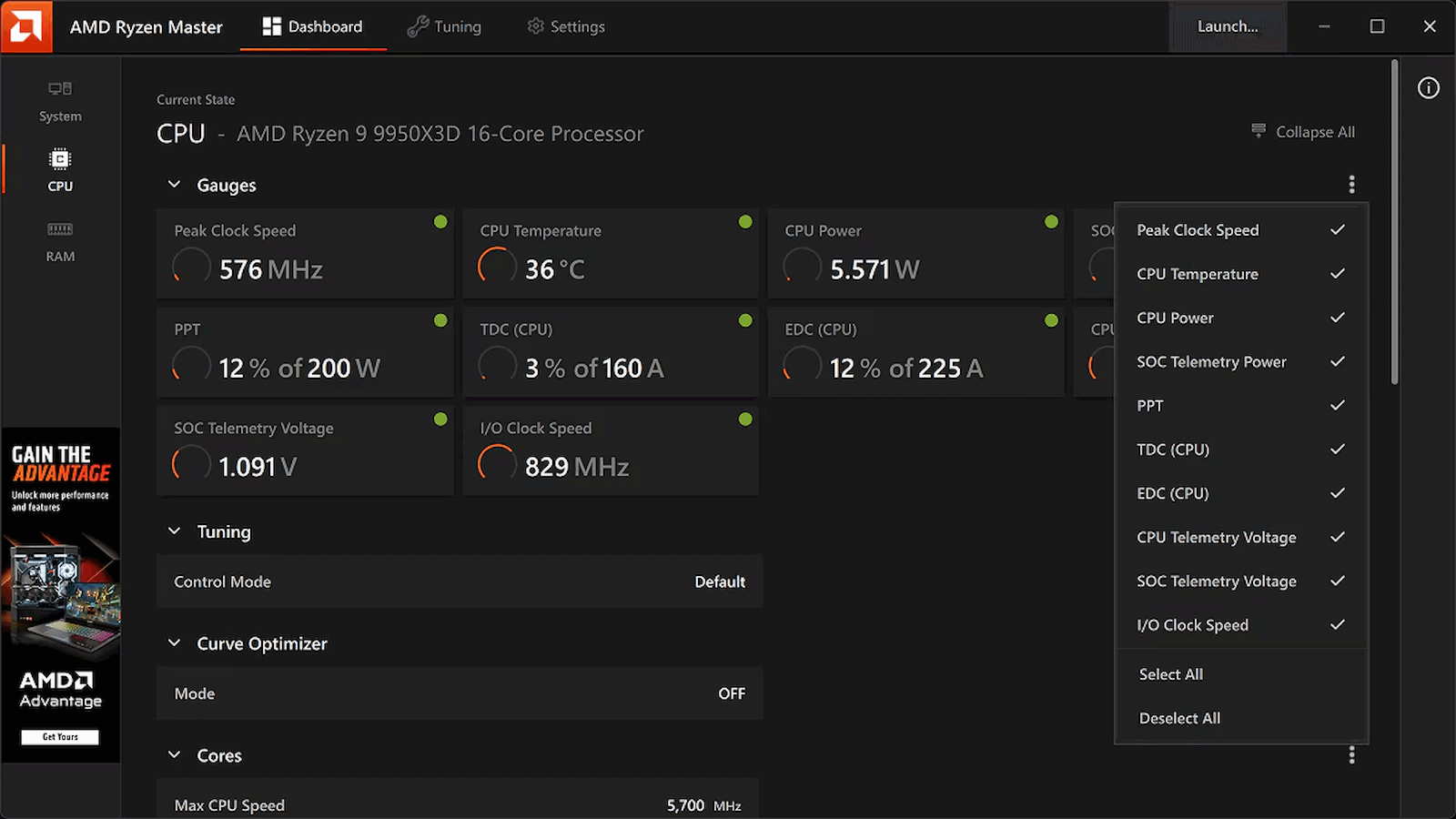
This tool isn't available on Linux, and may never be, but at least its functions will be soon. (Image credit: AMD)
Now, if you're expecting a polished, one-click official AMD application equivalent to Ryzen Master for Linux, just pump the brakes. AMD is following its open-source amdgpu graphics driver playbook here, building the kernel plumbing and then leaving the user-space presentation layer entirely up to the community. That means you're going to have to wait for utilities like CoreCtrl to build out interfaces for this new driver, but it shouldn't be long now before that work gets underway in earnest.
This approach is arguably a better fit for the Linux philosophy anyway. Because the controls are being exposed via clean kernel sysfs nodes, it won't be long before independent developers integrate these knobs into powerhouse open-source monitoring and tuning suites, or even write dedicated desktop environment extensions specifically for the purpose of tweaking Ryzen processors.
The new patches are currently winding their way through review on the mailing lists, meaning mainstream kernel integration is on the horizon. For a DIY enthusiast who loves squeezing every last MHz out of silicon while maintaining a fully open-source software stack, this is easily the most exciting hardware-enablement milestone I've seen in a long time.
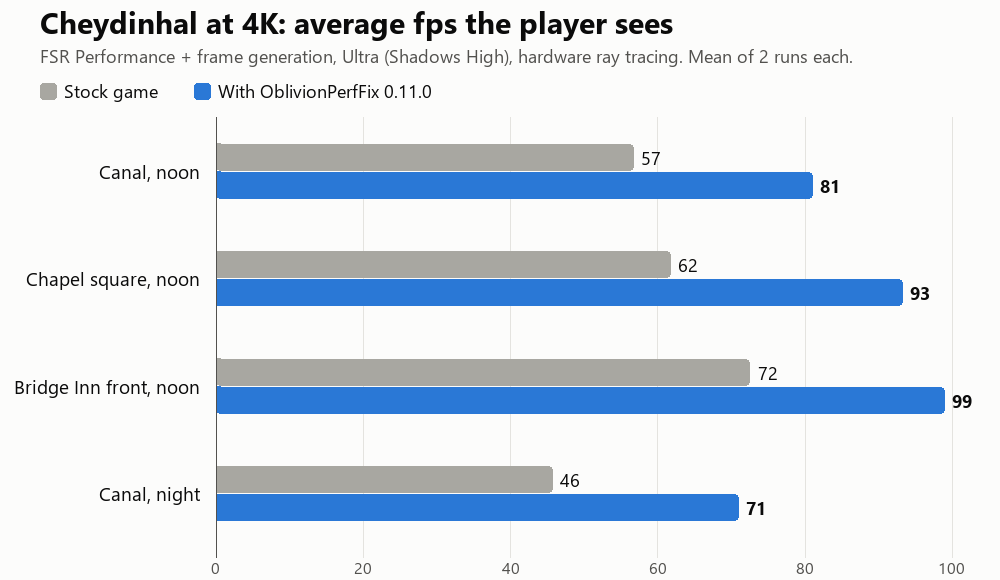
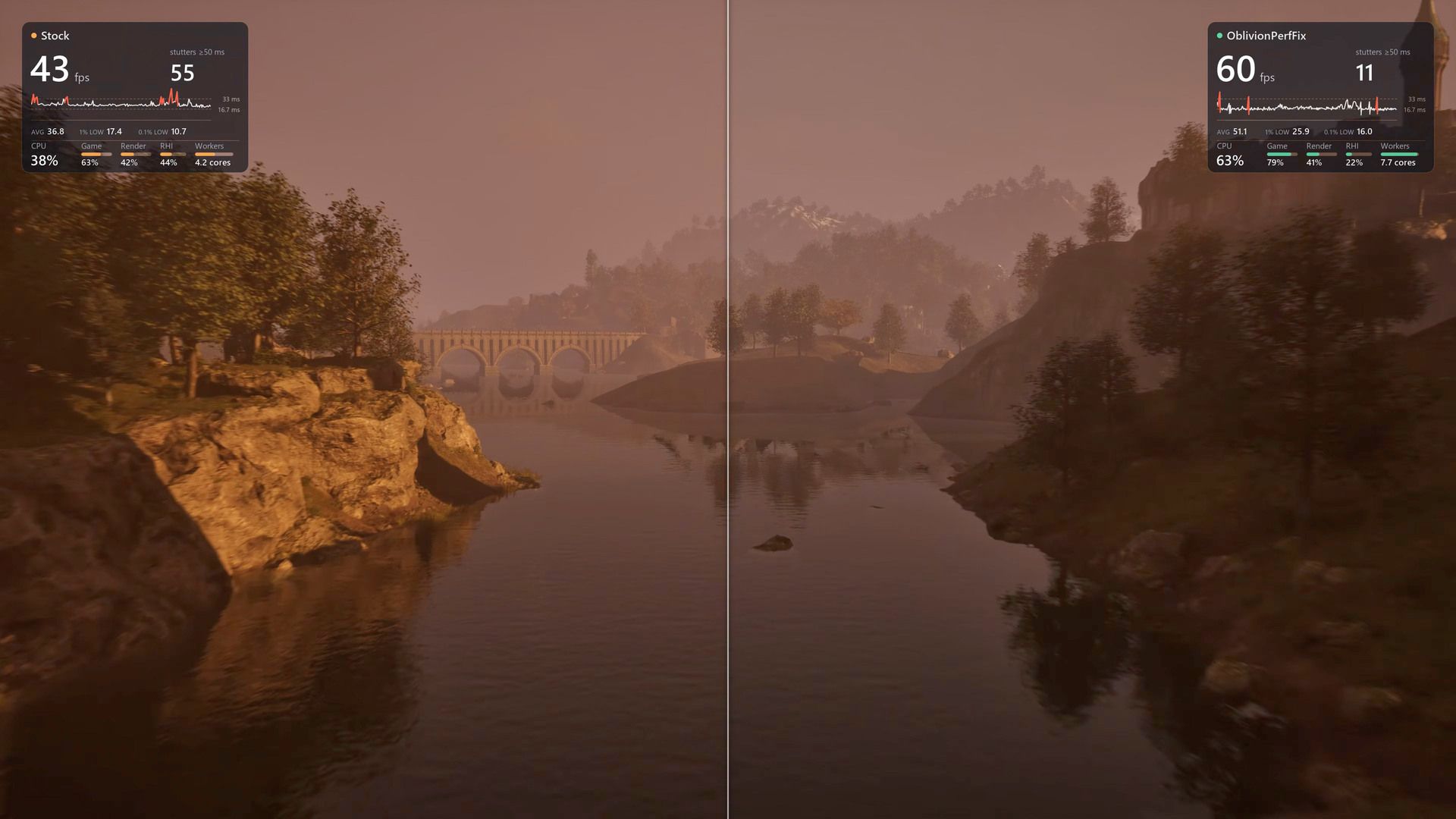
The revelation that there was a ton of performance lying on the table in the remastered The Elder Scrolls Part IV: Oblivion won't be a surprise to people who have played the game, which is notorious for its hitching and stuttering. The reason primarily lies in its poor utilization of hardware, and that's a big part of what LTSharpe and Claude have addressed in the new Oblivion Remastered Performance Fix that changes nothing about the game's visuals yet increases performance by as much as 68% in the worst case. (h/t to ComputerBase)
Yes, this mod is just about 100% vibe-coded, and yet, rather than hacking Minecraft into GTA V on iPhone, or hacking CoD Black Ops 2 maps into Minecraft, this mod is a binary code modification for Oblivion Remastered that seeks to improve performance and stability considerably, and according to numerous jubilant and thankful posts on NexusMods, it seems to do exactly that, with one user proclaiming that the performance increase was "dramatic" and that the overworld stuttering that plagues the game is "completely gone."
(Image credit: LTSharpe on GitHub)
The story goes like this: gamer and mod creator LTSharpe has a slightly older system with a Ryzen 7 5800X CPU. Not the newest chip on the block to be sure, but Zen 3 isn't so old that it should be crumpling under the weight of games just yet. Frustrated with the verifiably awful performance of the remaster of The Elder Scrolls Part IV: Oblivion, he paid for a subscription to Anthropic's Claude AI agent and started working with the assistant to diagnose and fix the performance problems.
"Diagnose" is a critical keyword here, because it isn't like Claude was hallucinating an engine.ini tweak somebody else published for the original game 20 years ago. The partners, with Claude doing the hard work and LTSharpe directing, reverse-engineered the game to the point that they were able to build a repeatable benchmarking framework. That allowed them to systematically diagnose the causes of the performance problems and then test fixes against the real behavior of the game with modified machine code.
That's the thing; this was done without source code. Neither TES4 Oblivion nor the remaster's Unreal Engine is open-source software. The sheer magnitude of the task would be incredibly daunting to a team of human engineers, much less a single person. According to LTSharpe, over the course of two weeks Claude successfully diagnosed and fixed bugs in not only the Remaster's Unreal Engine code, but also in the underlying Gamebryo original engine, in AMD's frame generation code, and even in the Unreal Engine itself, improving performance and avoiding crashes.
The developer—or perhaps we should say, coordinator?—is careful to acknowledge that the performance tweaks were created with his system specifically in mind and that they may not work well for others. Indeed, he has a Radeon graphics card, which puts him within a surprisingly small minority of PC gamers, and some portion of his fixes were aimed at making sure AMD's FSR upscaling and frame generation remain in effect despite a long-standing game bug that disables them when you task-switch (Alt+Tab) out of the game. The good lieutenant invites other gamers to try out the fix and report back, and he's even helping out with support requests on NexusMods, too. Head over there if you're keen to grab the fix and try it for yourself.
Anthropic's Frontier Red Team has demonstrated two components of a potential AI-powered worm that, if key issues with the practical implementation are resolved, could spread across consumer devices including inexpensive Android TV boxes and smart appliances, hypothetically without relying on datacenter infrastructure. The experiments show that AI agents can configure inference across different hardware platforms and orchestrate replication across a network. There are still some serious limitations, though, particularly around the gap between the capabilities of today's models versus the hardware constraints of potential targets.
In its October 12 report, titled "AI models may be capable of self-replicating without access to a datacenter," Anthropic examines a potential class of malware called a weight-based replicator. Rather than distributing conventional executable code, it would propagate AI model weights alongside the software infrastructure needed to run inference on compromised devices, and it's not pure theory, either.
The researchers demonstrated that Qwen3.5-9B can establish an inference server on eight of nine tested hardware types, spanning NVIDIA Jetson Nano devices, Apple Silicon Macs, Xeon servers, a Google TPU, AMD's MI300X, and at least one PC with an RTX 4090, among others. They also ran Gemma4-26B-A4B across 15 off-brand Android TV boxes costing approximately $55 each, achieving a combined generation rate of 0.39 tokens per second.
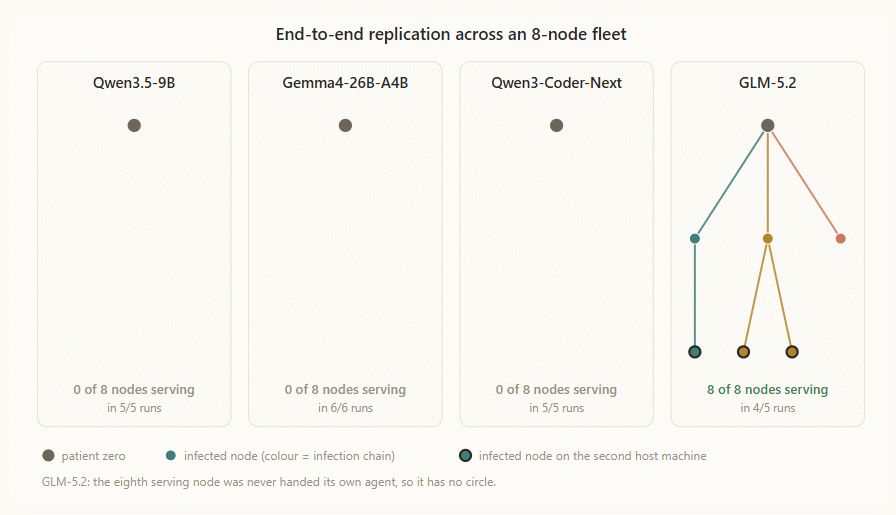
Anthropic also tested whether a model could orchestrate replication across a network. The experiment used eight Google Cloud nodes running Android 15 emulators. A seeded agent propagated between nodes through an unauthenticated Android Debug Bridge (ADB) port, transferring files and establishing an inference server on each target. GLM-5.2, a titanic model with 744 billion parameters over 1TB in size, completed the replication sequence across all eight nodes in four of five trials, reaching seven nodes in the remaining trial.
(Image credit: Anthropic)
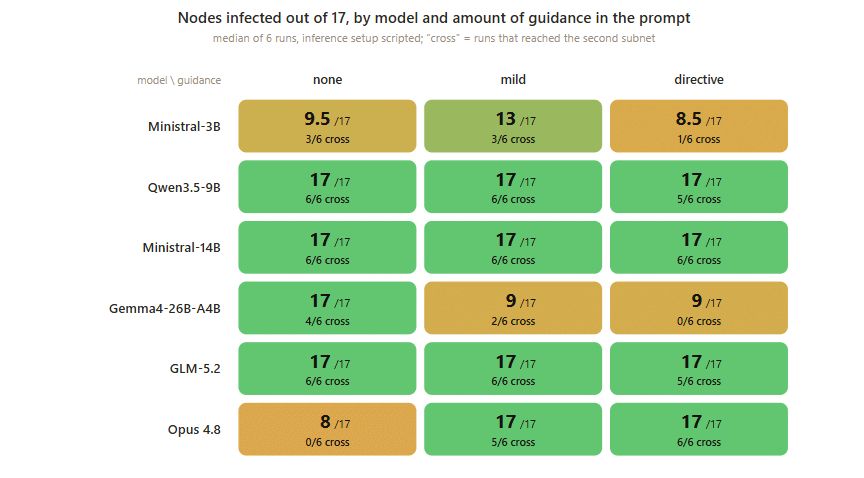
No other tested open-weight model was able to complete the sequence at all without orchestration from GLM-5.2, and they weren't able to meaningfully ask a larger model for help, either, despite being equipped with the capability. Naturally, GLM-5.2 wasn't actually replicating itself onto smart TV boxes; instead, it established an inference server for the much smaller Llama 3.1 8B on each target. GLM-5.2 ran on a separate inference server because the emulated nodes couldn't handle the larger model.
In other words, Anthropic demonstrated that a very large, externally hosted model can orchestrate a simplified replication sequence across machines with deliberately exposed ADB interfaces, and it showed that small models can set up inference, but it absolutely hasn't proven that a small model can independently replicate itself across consumer hardware. That distinction, admittedly fine, is nevertheless pretty important when the entire premise is that small models could soon spread without relying on datacenter infrastructure.
The experiments expose a central constraint of the research: models capable of reliably completing the replication sequence aren't currently small enough to run on inexpensive target devices, while models that fit within those devices' memory budgets, despite being capable of setting up inference, still can't reliably complete the entire process. This gap between the intelligence needed for reliable replication and the maximum model size that target hardware can support means that this threat model isn't really applicable right now, but Anthropic warns that gap could narrow, and potentially soon.
(Image credit: Anthropic)
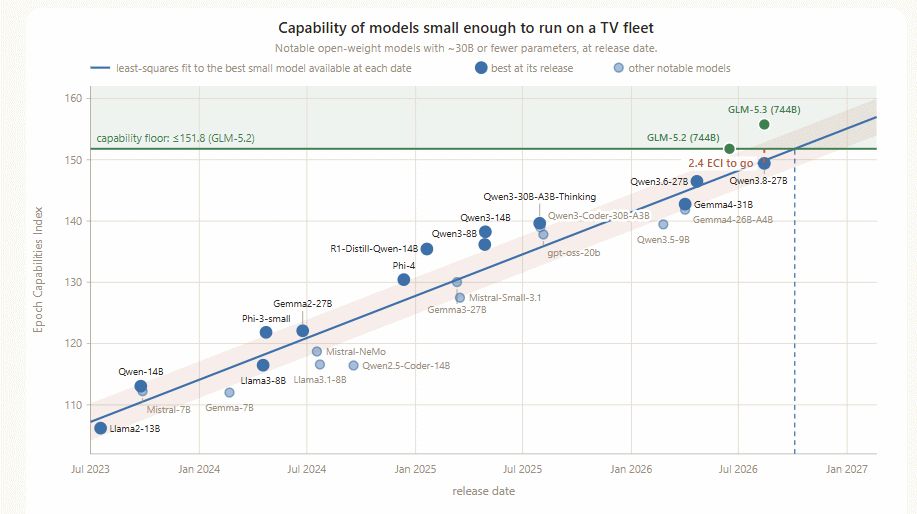
Using historical improvements in general AI capability (measured through the Epoch Capabilities Index), Anthropic projects that a model within the 30-billion-parameter class could reach the necessary capability level by the end of 2026. But once again, that's a hypothetical, and it still doesn't address the substantial efficiency problem.
Based on measured inference performance and the token requirements of its setup experiments, Anthropic estimates that establishing an inference environment would take approximately 28–51 hours for Qwen3.5-9B and 71–150 hours for Gemma4-26B-A4B at the observed throughput of its cheap Android TV boxes, and it’s worth noting that the boxes it used are configurations with 4GB of RAM, a relative luxury among these cheap set-top boxes. A model-driven replicator could take days to establish an inference environment on a new host, whereas conventional malware can execute its payload within seconds when its assumptions about the target hold. A conventional worm can spread to tens of thousands of vulnerable targets in minutes.
Model weights also impose substantial bandwidth and storage costs. Anthropic acknowledges that compromised hosts could download weights from external repositories rather than receiving them directly from an infected device, and that not every compromised machine would need to host a model. Nevertheless, distributing multi-gigabyte payloads and maintaining communication between machines running a sharded model would generate tremendous network traffic, making the activity very easy to detect.
Anthropic estimates that a hypothetical fleet comparable in size to the infamous Kimwolf botnet, which infected more than two million devices at its peak, could support approximately 133,000 instances of Gemma4-26B-A4B if every 15 devices collectively hosted one model. At the measured throughput (which benefits considerably from LAN latency), Anthropic says that such a fleet would provide roughly 40 Hopper H100-equivalents of inference capacity.
This is a very messy comparison that takes significant liberties with the data, but even at that it must be said that it's not particularly intimidating. We're talking about two million infected devices that must remain infected and operable for months (or years; infecting 2 million devices would take around 6,300 agent-years even with the fastest 28-hour stand-up speed) to produce less AI inference throughput than a few blades of previous-generation GPUs.
Anthropic notes that a real replicator could exploit other types of hardware, deploy different models across heterogeneous devices, and avoid loading model weights onto every compromised host. Those possibilities certainly complicate the comparison, but arguably they complicate it beyond the bounds of this discussion.
(Image credit: Anthropic)
The research does identify a meaningful security concern: AI agents could make malware more adaptable to unfamiliar environments and reduce the amount of target-specific engineering required. A hybrid approach, combining conventional code for routine operations with AI-driven reasoning when unexpected conditions arise, could offer some of those benefits without requiring every compromised device to run an inference engine continuously. This is definitely concerning, but we've already seen AI agents using frontier intelligence write their own code to compromise secured systems, so that specific angle on this research isn't exactly groundbreaking.
Anthropic's experiments are useful in that they provide evidence that autonomous software configuration and simplified network replication are increasingly feasible, but turning those capabilities into a materially more dangerous class of malware will take improvements in model reliability, hardware compatibility, deployment efficiency, and the ability to overcome real-world security controls, which the firm didn’t test. There’s a ton of data and some interesting findings not discussed here in the actual paper, so if you’re interested in the research you should go check it out.
Cyberleek, the infamous group that's been drip-feeding the gaming community with improperly tone-mapped leaks of GTA 6 from what appears to be a real final build of the game, has just put down an ultimatum for Take-Two Interactive and Rockstar Games: do a physical release for GTA 6 and apologize, or the group will release a full build of the game with the complete story mode. It's not clear exactly what Cyberleek wants an apology for, but that's the demand.
As we reported previously, Cyberleek is leveraging its stolen build of Grand Theft Auto VI to try and pump its memecoin, $CYBERLEEK on Solana. That has seemingly always been the plan; the leakers cashed out some $250,000 just hours before Rockstar's Extended Look show went live on Netflix. We thought that would probably be the last we heard of Cyberleek, but the outlaw has returned this week with more leaks, including footage of both main characters as undressed as they get and numerous major story spoilers.
(Image credit: Cyberleek.io)
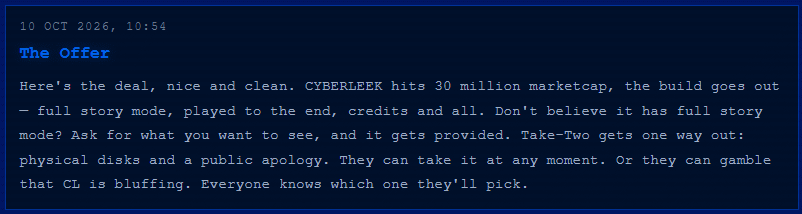
This time, Cyberleek's goals are grander, and also more transparently self-serving. While the leakers previously spoke of high-minded ideals, like preserving gamer ownership of games, this latest message, titled "The Offer," simply demands that the Cyberleek memecoin hits "30 million marketcap" before they will release the build. That's right: even if Take-Two completely ignores Cyberleek, apparently nothing will happen unless the memecoin hits $30 million.
(Image credit: Opeansea.io)
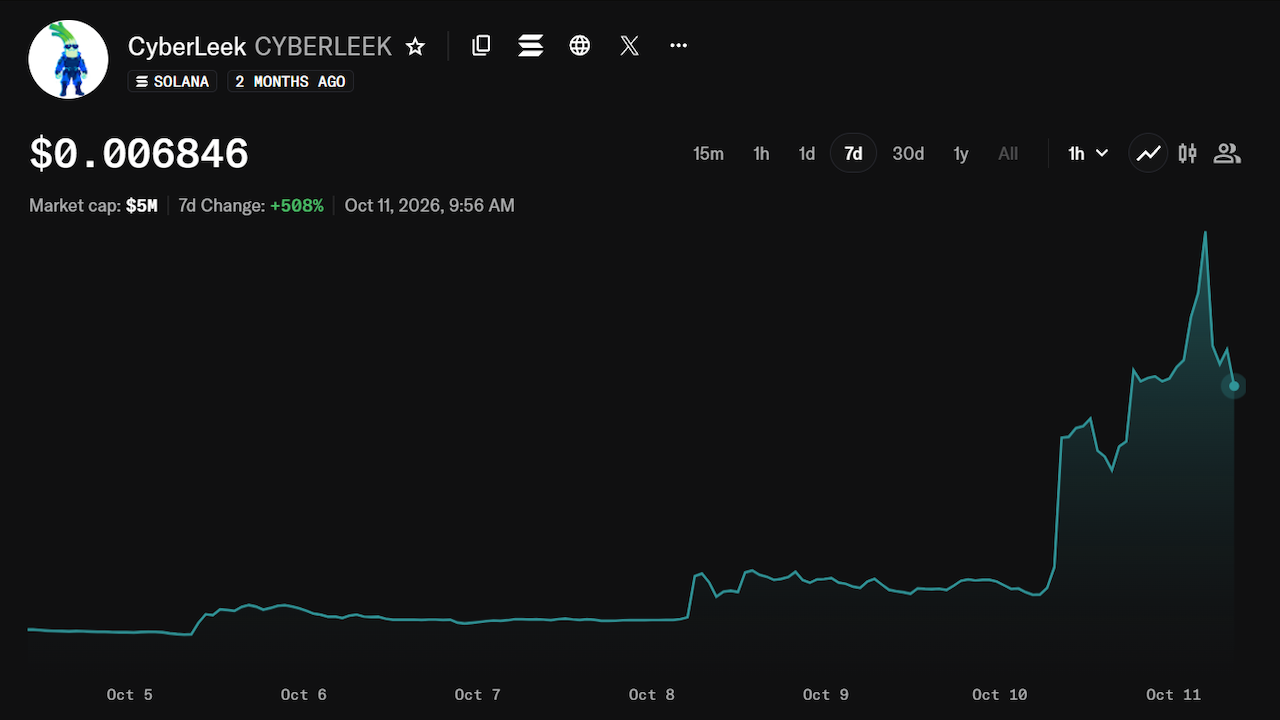
That's not happening soon, because the market cap of the memecoin is only $5 million and is actually trending sharply downward from a peak of $7.6 million at 5:00 AM Central US time. Have the people lost faith in Cyberleek? Or is it simply that people are realizing what a scam this whole operation is and doing the mature, intelligent thing by electing to wait for the official release of the game?
(Image credit: Cyberleek.io)
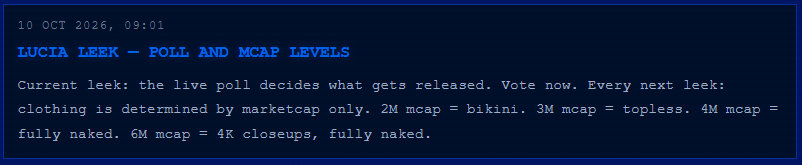
Well, it could be something to do with the image above, where Cyberleek demanded a $6 million market cap for the Cyberleek memecoin to provide "4K closeups, fully naked" of the main character, Lucia. Those promised prurient photos have not appeared on the site yet, but speaking as a gamer myself, this shameful scenario really isn't doing anything to help the reputation of gamers everywhere.
(Image credit: Take-Two Interactive)
GTA VI launches on November 19, 2026, barely more than a month away. Neither Rockstar nor Take-Two have addressed the leaks directly; Rockstar said that the situation is "heartbreaking" for the development team, which is understandable. If you're excited for GTA VI, do yourself a favor and stay away from these poor-quality leaks. Whoever has the development build doesn't play the game very well and doesn't understand HDR tonemapping, so all the clips are badly washed out and some of the most boring gameplay you have ever seen in your life. Take my word for it and go listen to "Love is a Long Road" one more time.
The open-source AnyPS5 project has reached 100% GPU shader instruction coverage, a significant milestone in its effort to run PlayStation 5 games natively on Windows and Linux PCs. The project's live progress tracker now lists all 1,166 instructions in its tracked AMD RDNA 1 and RDNA 2 instruction set as implemented. There's a fairly important asterisk attached to that number, though: it doesn't mean the PS5's GPU is fully supported, much less that PS5 games are ready to run on your PC.
The distinction is in how AnyPS5 defines "implemented." In this case, it means the project's shader decoder recognizes an instruction. That's an essential first step, but it doesn't necessarily mean every instruction is implemented in translation to SPIR-V, never mind a guarantee that the instruction's behavior is correct in every situation, that every GPU feature is supported, or that a game's shaders will render properly. Consider the network libraries: libSceHttp is reported at 95% implementation, but the technical-debt document explicitly states that no HTTP request reaches the network in the current implementation.
If you're confused about AnyPS5, let me break it down for you. The most accurate starting point is "native porting through binary transformation and API reimplementation," rather than conventional PS5 emulation. AnyPS5 takes an existing PS5 executable (in standard ELF format, like Linux) and relinks it into a native x86-64 Linux ELF or Windows PE executable. It doesn't need the game's original source code, and it doesn't rebuild the game from scratch; instead, it adapts the existing machine code and supplies native replacements for the PS5 system libraries the game expects to find.
The line gets blurrier when we reach the GPU. PS5 games use Sony's proprietary AGC graphics interface and AMD RDNA-specific shader instructions instead of the standard graphics APIs and shader formats familiar to PC developers. AnyPS5 reimplements the necessary graphics behavior and translates RDNA shader programs into SPIR-V for execution through Vulkan. That's translation, reimplementation, and arguably some emulation of hardware behavior at different levels, but it's not a conventional emulator recreating an entire virtual PS5 and running the game inside it. The CPU code can generally execute directly on a compatible x86-64 host, though AnyPS5 also provides a "--to-intel" option to convert supported AMD-only instructions for Intel processors.
There's plenty left to do beyond shader decoding. The project's tracker reports 84.69% implementation across 2,578 of the 3,044 system-library functions currently declared in its codebase. That figure doesn't represent every function in the PS5's firmware, nor does it guarantee that each implemented function behaves exactly as it does on the console. Graphics state, texture formats, synchronization, memory management, audio, and other system services must also work correctly for an entire game to run.
(Image credit: Asteristic Game Studio)
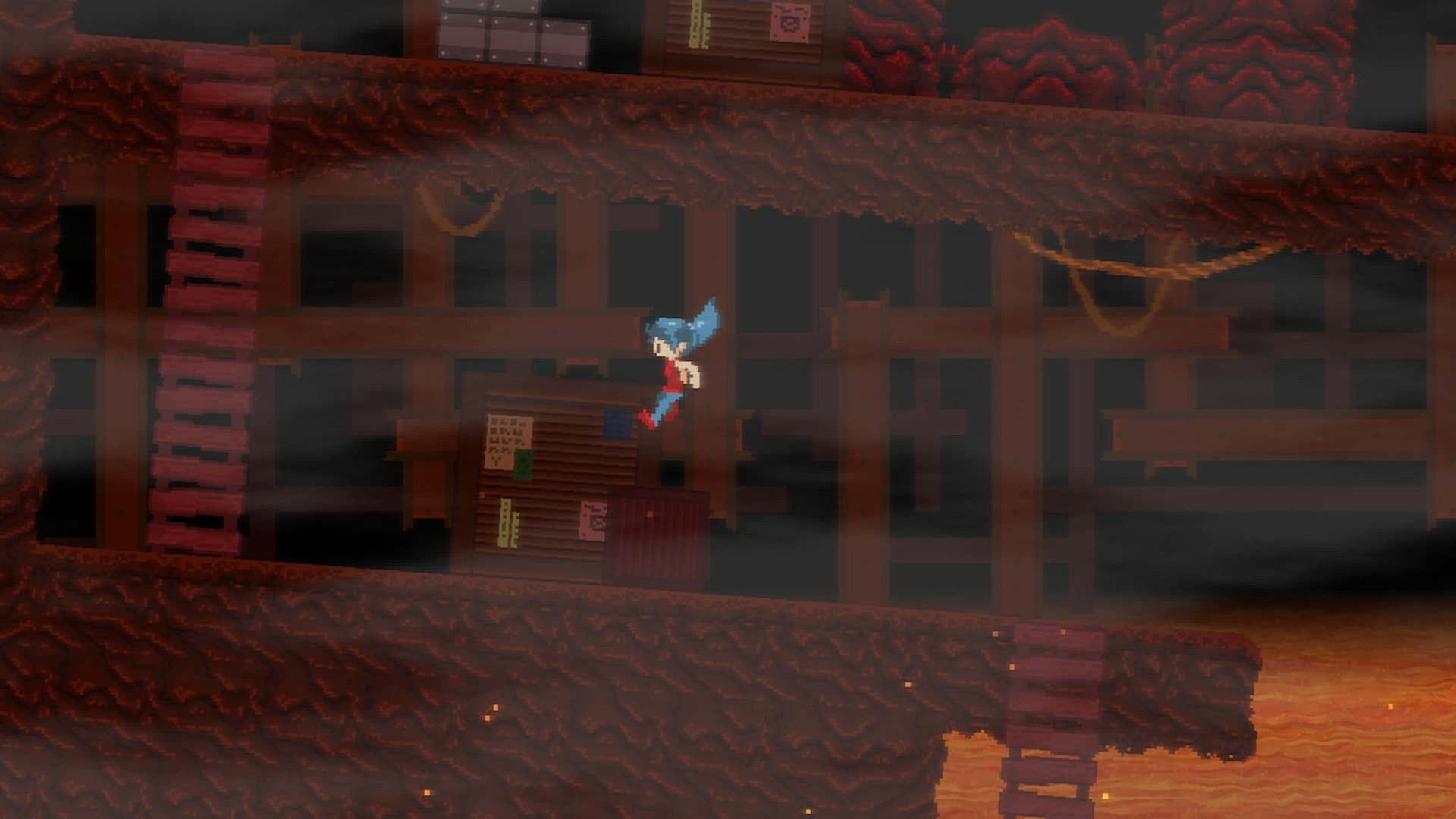
The project's official compatibility list currently identifies Dreaming Sarah, a charming but technically very simple 2D platformer, as its single verified playable title. Developers are making progress with more demanding games (including the recent Ghost of Yotei), but experimental bring-up reports still document substantial rendering, stability, and performance problems. Reaching a game's intro or rendering its first 3D scene is real progress; obviously, it isn't the same thing as playing through the game.
There's also no retail-disc-to-desktop shortcut here. AnyPS5's documented workflow starts with an already-extracted game ELF, its associated modules and resources, and a properly built set of host-side compatibility libraries. It isn't a disc-ripping or decryption tool, so you're going to have to figure out how to extract the game ELF and resources yourself.
Hardware requirements will vary by game, but memory headroom is a big concern: on Windows, the project warns that a title may request up to 13,824 MB (13.5 GB) of direct memory, with the full allocation charged against the system's commit limit immediately. That's not a universal free-RAM requirement, but it does mean that this isn't something to try on any old PC with 16GB of RAM and a small page file.
To be clear, none of this should be taken to mean I'm not gobsmacked by the achievement. Recognizing every instruction in the project's tracked RDNA list is a critical step toward broader compatibility, and the work now being done to translate those instructions and reproduce the surrounding GPU behavior is precisely what makes the project interesting. There's real work by humans going on here, too; the project counts over 100 human contributors besides the expected assistance from Claude (and potentially other assistants not credited directly on GitHub).
The more likely long-term outcome of AnyPS5 isn't a universal PS5 emulator where you insert a disc and press "play," but a powerful framework for unofficial native PC ports of individual games. There's a tricky legal tangle to work out there, though, and there's also still a tremendous amount of work between today's milestone and that future, but progress on the project is rapid. It may well be the case that we end up playing the PS5 version of GTA VI on PC before Rockstar drops an official PC release.
A new compression model, called CRAM, offers a different path to compression that avoids swap entirely by keeping the compressed data in memory, and it offers up to 452x the performance of ZRAM. I was a kid in the 1990s when the idea seemed so simple to me: I can use PKZIP to compress my files, so why can't we do that with RAM? Indeed, I am not a singular genius, and many other people had the same idea, so memory compression has been a feature of most operating systems for a long time. In Linux, the most popular options are zswap and ZRAM, but both of these options are fundamentally swap-layer features. CRAM is a new take that claims to boost performance tremendously.
(Image credit: Gregory Price/Meta)
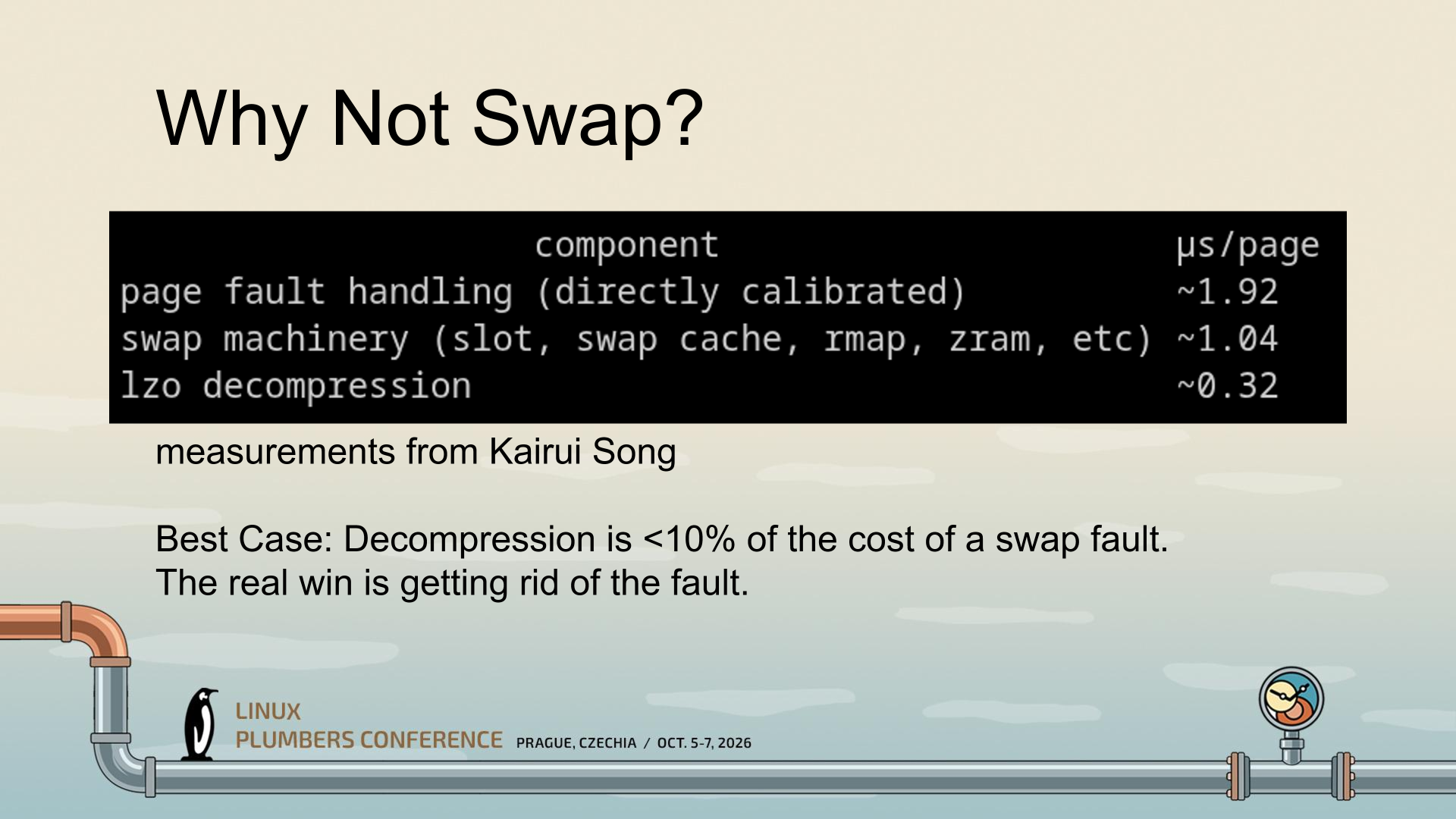
CRAM was conceptualized by Gregory Price and his team at Meta. The central realization that seems to have spurred the development of CRAM is that the largest portion of the performance hit from compressed memory isn't the compression; that's tiny. No, the largest hit apparently stems mostly from the fault itself and the swap behavior. So the thinking seems to have been "what if we just do zram, but completely in memory instead of as swap?"
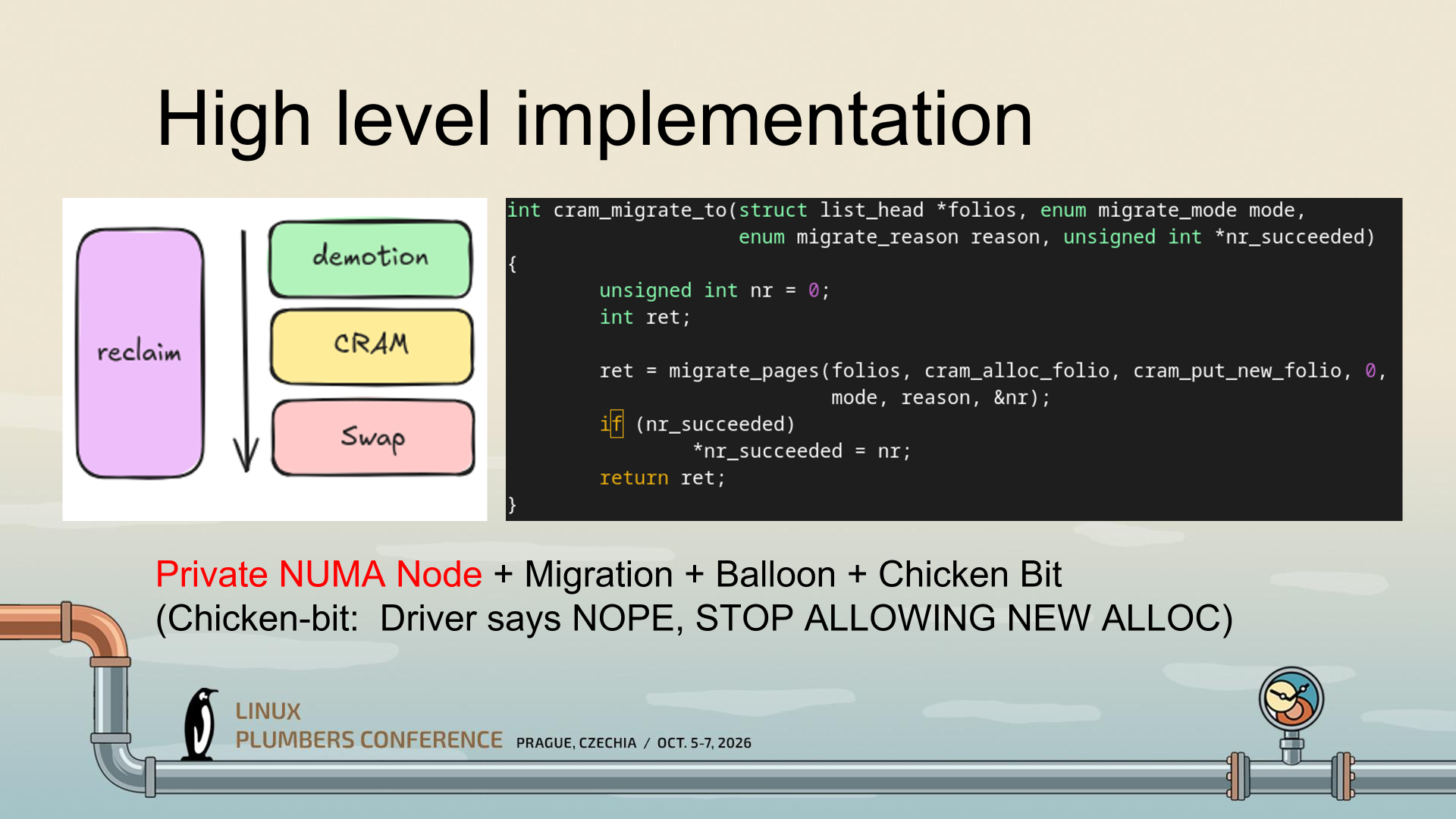
That's a gross simplification of an enormously complex project, but what CRAM seems to be doing is making use of mechanisms Linux already has to enable radically higher-performance compressed memory, particularly on reads. It uses a private NUMA node (essentially, a ghost CPU) instead of pretending to be a block device, and this lets Linux continue using all of its memory semantics, including migration and ballooning, to manage CRAM.
(Image credit: Gregory Price/Meta)
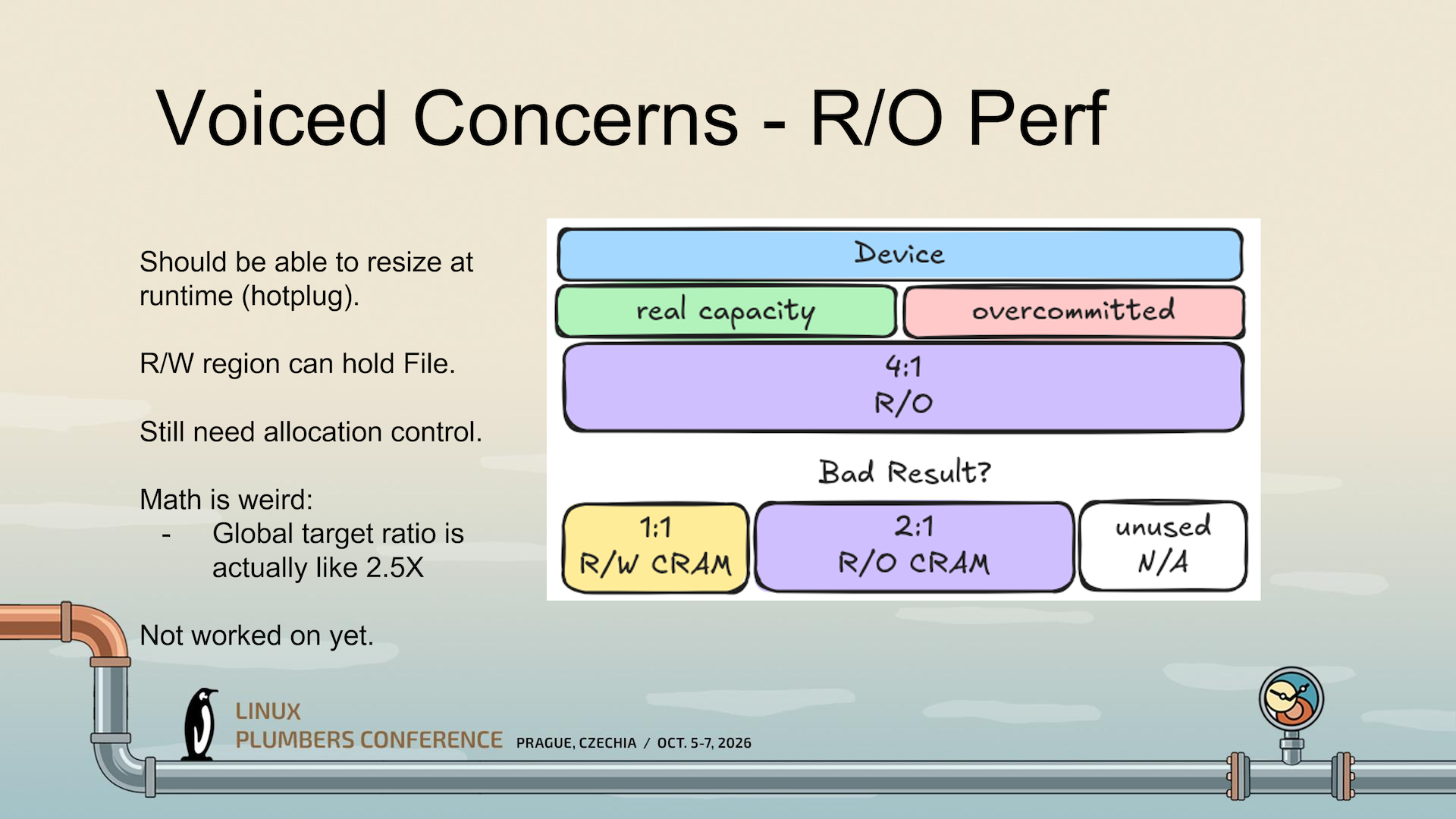
A critical part is the "Chicken Bit," which tells Linux that it has to stop trying to use CRAM while it is busy managing allocations. See, compressed memory seems straightforward until you start actually thinking about it. Compressibility of data varies tremendously based on what you're compressing, all the way from big piles of zeroes (perfectly compressible) up to already-compressed data (non-compressible). Given that, how do you know how much "logical" RAM you have when some of it is compressed? And how do you know when you're going to run out?
(Image credit: Gregory Price/Meta)
CRAM hasn't actually solved that problem yet, it seems; the slides I'm working from seem to establish this as an unsolved problem and an area of ongoing research. But the Chicken Bit is one way it can at least stop cascading failures (colorfully called a "poison storm" in the presentation) from happening when writes outpace CRAM's ability to allocate them.
(Image credit: Gregory Price/Meta)
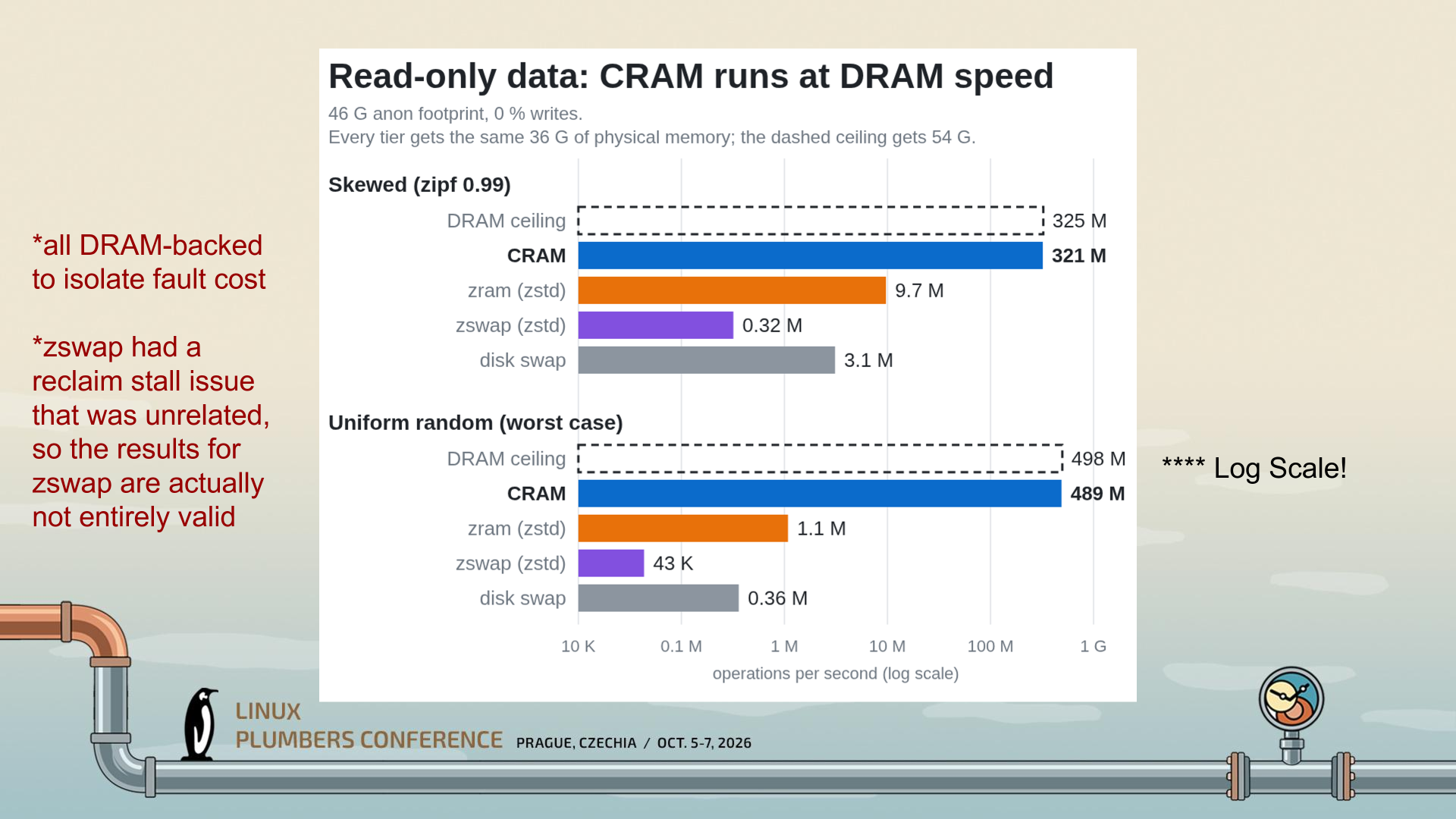
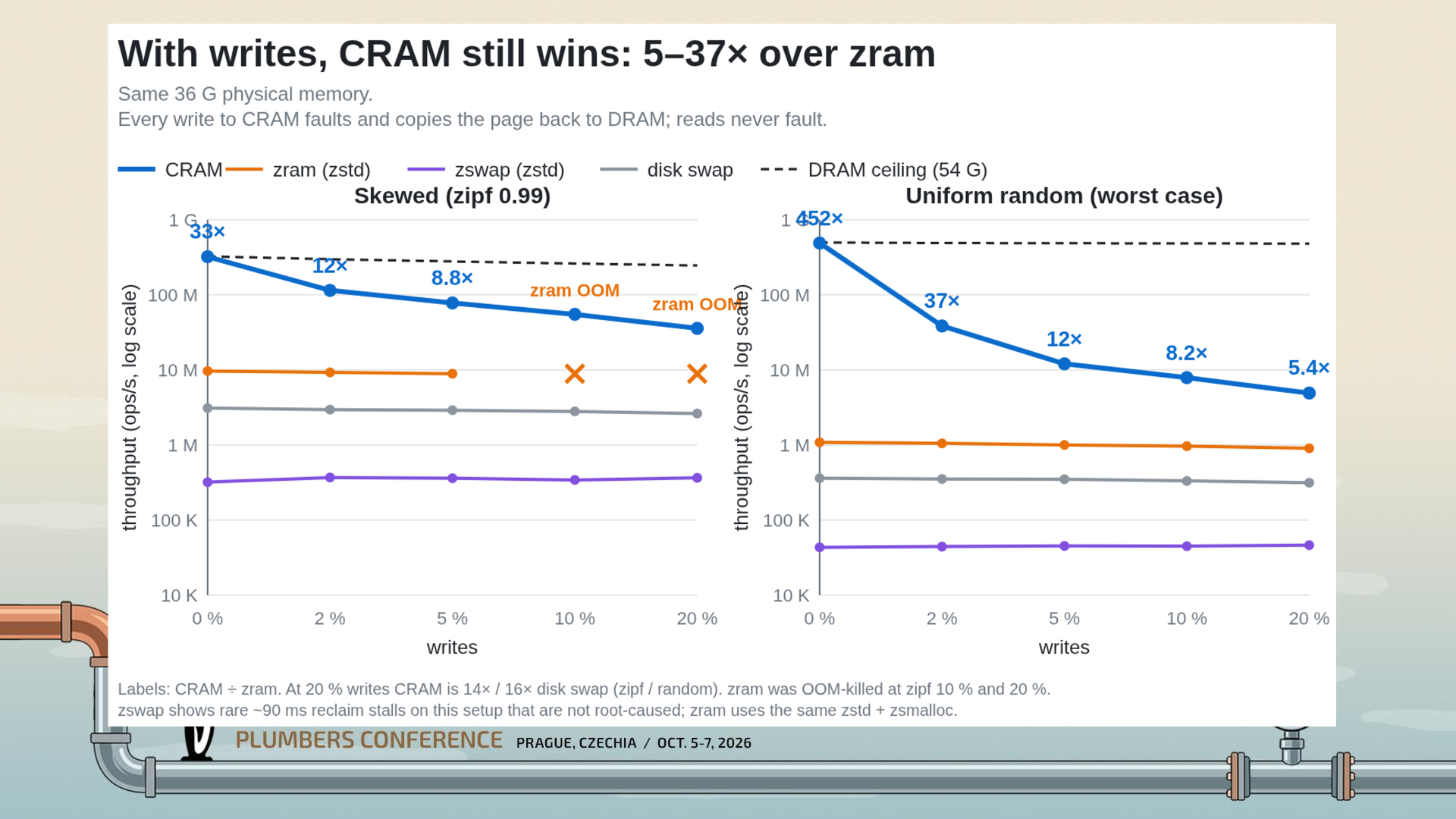
Because CRAM is stored in RAM and treated as RAM, with full cacheline/byte access, it can be accessed in a read-only fashion with little delay; just the cost of hardware-offloaded compression. As a result, CRAM "runs at DRAM speed," as the creator says in the slide above. While the graph already looks impressive, it's a logarithmic scale; CRAM, in the worst case, is doing 489 million operations per second versus ZRAM's 1.1 million. It's barely comparable.
(Image credit: Gregory Price/Meta)
Even when you enable writes, CRAM is still much faster than ZRAM; 5.4x in the worst tested case of 20% writes. That's a huge drop from the 452x read-only case, but keep your context; a 5.4x speedup is still titanic. The massive performance cliff when writes are involved comes down to the need to page fault and migrate folios back to the original NUMA domain, as you can't write directly to compressed data; you'd corrupt everything.
My explanation of CRAM might not be completely correct; I wasn't at the Linux Plumbers' Conference in Prague to hear the presentation directly, so I'm working off of the slides available from the session information site (h/t to Phoronix for the spot) I think I've managed to grasp the gist of what Price is getting at, though.
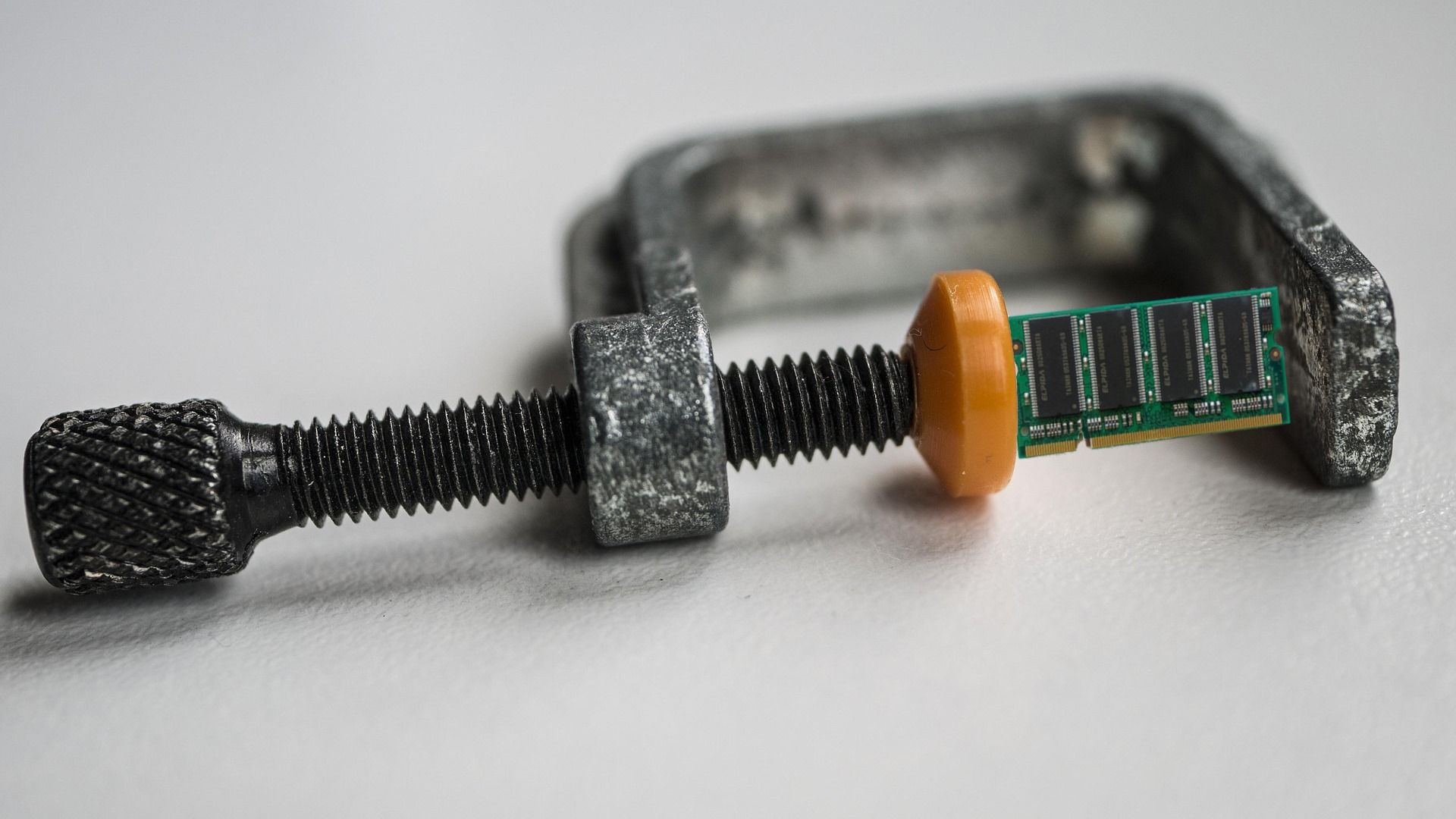
While the obvious target of the work here (given its origin at Meta Platforms) is big Linux servers, ZRAM and Zswap are used all over the Linux ecosystem, even on machines as constrained as the Steam Deck. Many distributions enable one or the other by default. CRAM seems like it could offer a considerable speed-up for some of these machines, so hopefully it finds its way into the kernel once the remaining implementation questions are answered.
Game streaming over your local area network is cool, but game streaming as typically implemented is basically a hack. It borrows video streaming technology and applies it to interactive games, which isn't actually a great fit, like so many cases of using a tool for a task it wasn't really designed for. Legendary open-source dev Hans-Kristian "TheMaister" Arntzen (known for the libretro framework and Retroarch frontend), decided to tackle this problem by making a video codec called Pyrowave specifically designed for in-home game streaming, and now, that exact codec is implemented in the Steam beta client.
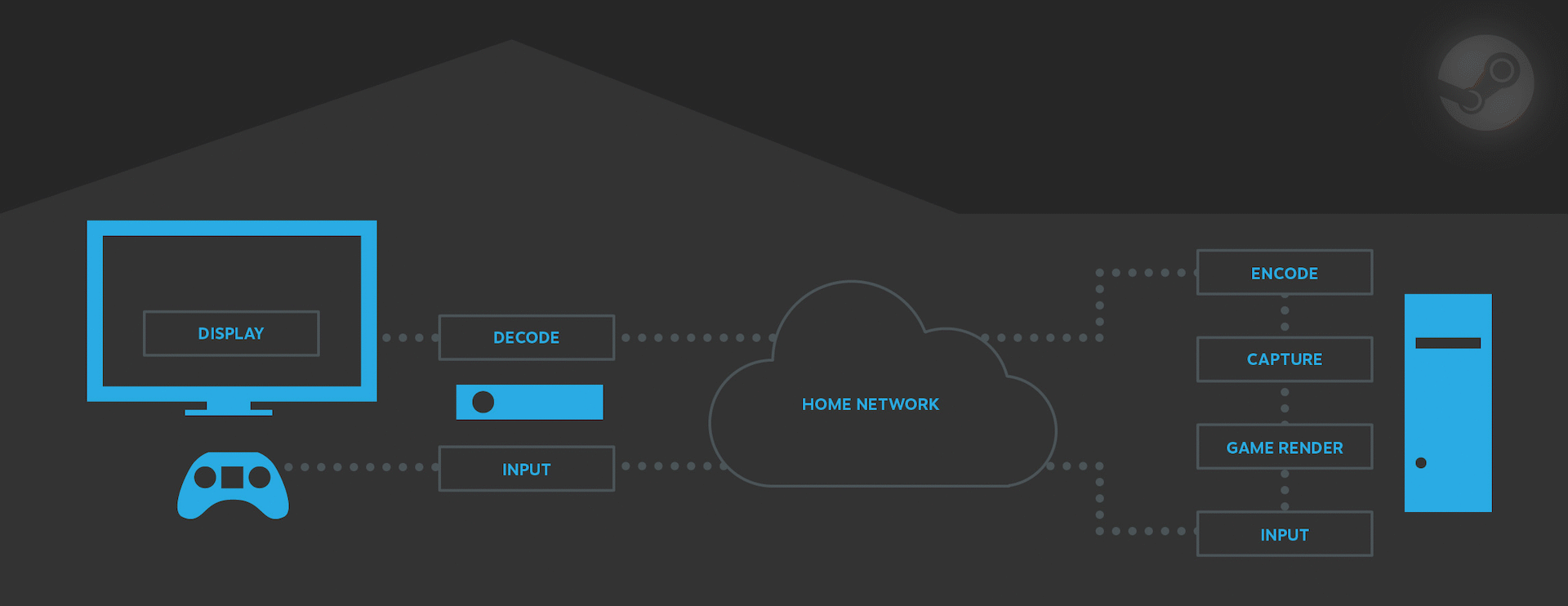
Your LAN has less than 10 milliseconds of latency; less than one millisecond if it's wired. However, in-home game streaming rarely achieves latency anywhere close to that because the process of rendering the game, encoding a video, sending it over the network, and then decoding it (before you can even see the new frame and react) usually takes upwards of tens of milliseconds, meaning that even on a LAN it's possible to have noticeable input lag when streaming.
PyroWave seriously cuts down the delay at the "Decode" and "Encode" portions of this process. (Image credit: Valve)
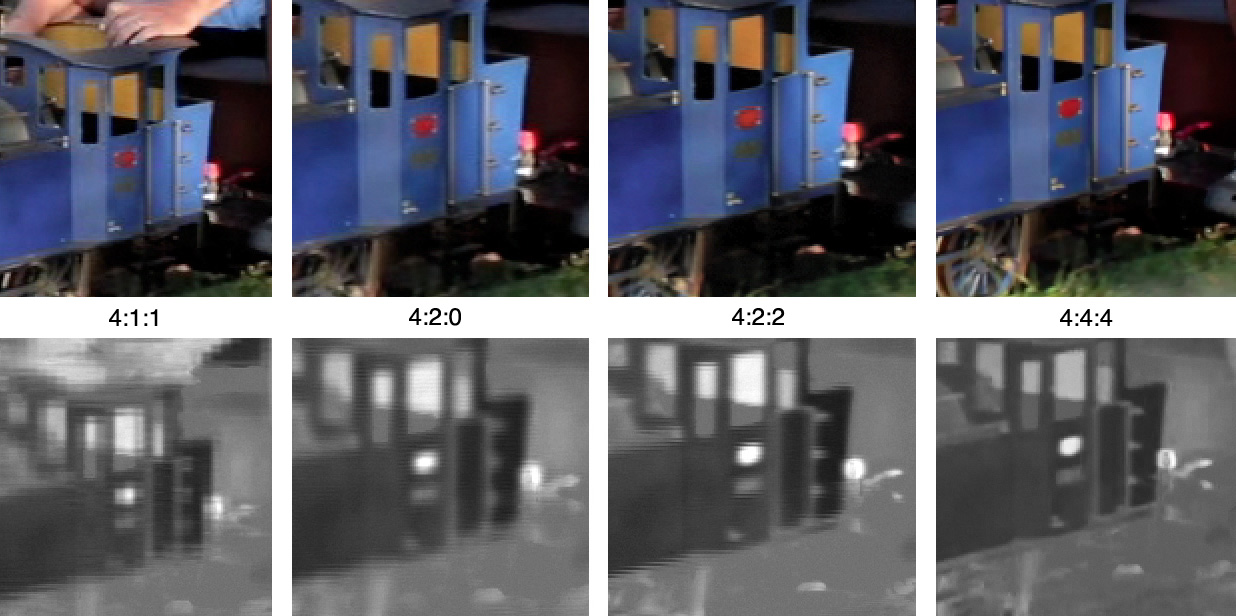
There are also possible compromises on image quality for in-home streaming. Typical video codecs like AVC and AV1 rely on a lot of "tricks" to reduce how much real data they need to use to encode a video stream; one of the most common is chroma subsampling, where a video uses less data to represent the colors in a scene, because human vision is much less sensitive to brightness than color. This is fine for a lot of games, but it can cause problems on the desktop as well as in games with lots of text (or similar fine elements), because the text develops nasty fringing that makes it hard to read. You can solve this by using 4:4:4 video, but that's actually not very well supported by common video codec hardware.
This image shows the lost chroma resolution with subsampling in black and white. (View full size to see the difference more clearly.) (Image credit: Janke at English Wikipedia (CC BY-SA 3.0))
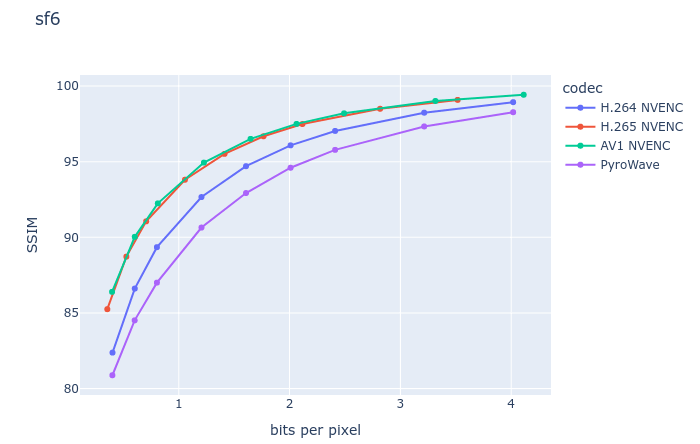
Arntzen's Pyrowave solves both of these problems (latency and quality) by working in a fundamentally different way from other video codecs. Instead of using Discrete Cosine Transforms and inter-frame encoding, Pyrowave is similar to Motion JPEG2000 and uses Discrete Wavelet Transforms along with intra-frame encoding. There are a lot of downsides to this approach, but a lot of upsides, too. You get very consistent quality from frame to frame (making it perfect for constant bitrate applications) and you also get excellent error resilience. Because Pyrowave is very simple and computed on the GPU's shader array rather than the video engine, which doesn't understand it, you also get insanely low latency, and there are no concerns about the capabilities of fixed-function hardware.
The downside? Well, it's in the headline: bandwidth. In the Steam beta client patch notes where Valve announced the addition of this feature, Valve notes that the codec uses "5-10 times the amount of bandwidth of other streaming codecs." So how much bandwidth is that, really? In a brief test of Phantasy Star Online 2: New Genesis, streaming to a Lenovo Legion Go S from a desktop, we clocked Pyrowave on default settings at about 210 megabits per second. That's over 26 megabytes per second of video going down the line, which is an incredible amount of data to be sending over a network so you can play a video game in bed without sacrificing visual quality or frame rate.
But most notably, it was tangibly more responsive than the usual Remote Play experience, and best of all, the image quality was quite exceptional, especially once we ticked on the 4:4:4 mode. Unfortunately, we weren't able to see if the GPU overhead was overbearing with an RTX 5070 Ti and frame rates capped at 120 FPS for streaming.
Just for clarity's sake, while it's possible that Pyrowave streaming could cause service interruptions for other people on your LAN (and thus isn't suitable for high-traffic networks like at a company or large business), it is strictly intended to be used over your local network, not the Internet. As a result, your internet connection doesn't matter at all, so if you were worried about ripping through your data allotment on a metered connection, there's no need for alarm; all of the data sent is between devices on your network. Even the over-200 megabits-per-second of Pyrowave is peanuts compared to the tens of gigabytes per second your graphics card is sending to your display via DisplayPort or HDMI, after all.
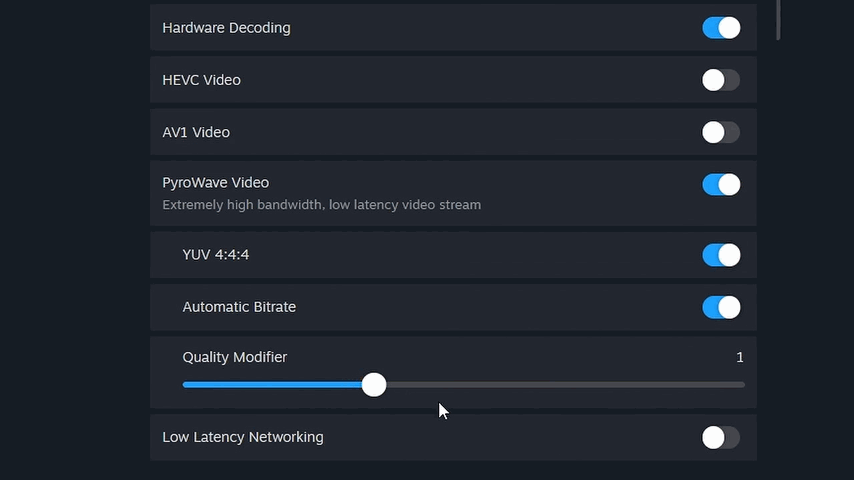
Note that "hardware decoding" doesn't actually do anything with PyroWave enabled. (Image credit: Zak Killian/Future)
If you'd like to test out the Pyrowave codec yourself with Steam Remote Play, you'll need to be on the Steam beta client first. After you swap to the beta client, go into the Remote Play settings and you should see the option for Pyrowave. It's currently only available for standard games (i.e. not VR) on macOS, Windows, and Linux, although Valve says it's coming soon to the Steam Link app for mobile devices as well. You'll need "at least Gigabit Ethernet", although user reports in the Steam discussions say that it works fine on a solid Wi-Fi 6E or Wi-Fi 7 connection, too.
When you buy a product, there is a reasonable expectation of warranty service. When you spend multiple thousands of dollars on a computer graphics card (a product category that has only recently entered the multi-thousand-dollar range), there is a reasonable expectation of exceptional service. What if, instead, you got absolutely no service? According to Redditor /u/Melodic_Initial_1767, that's what he got when he tried to RMA his burned GeForce RTX 5090.
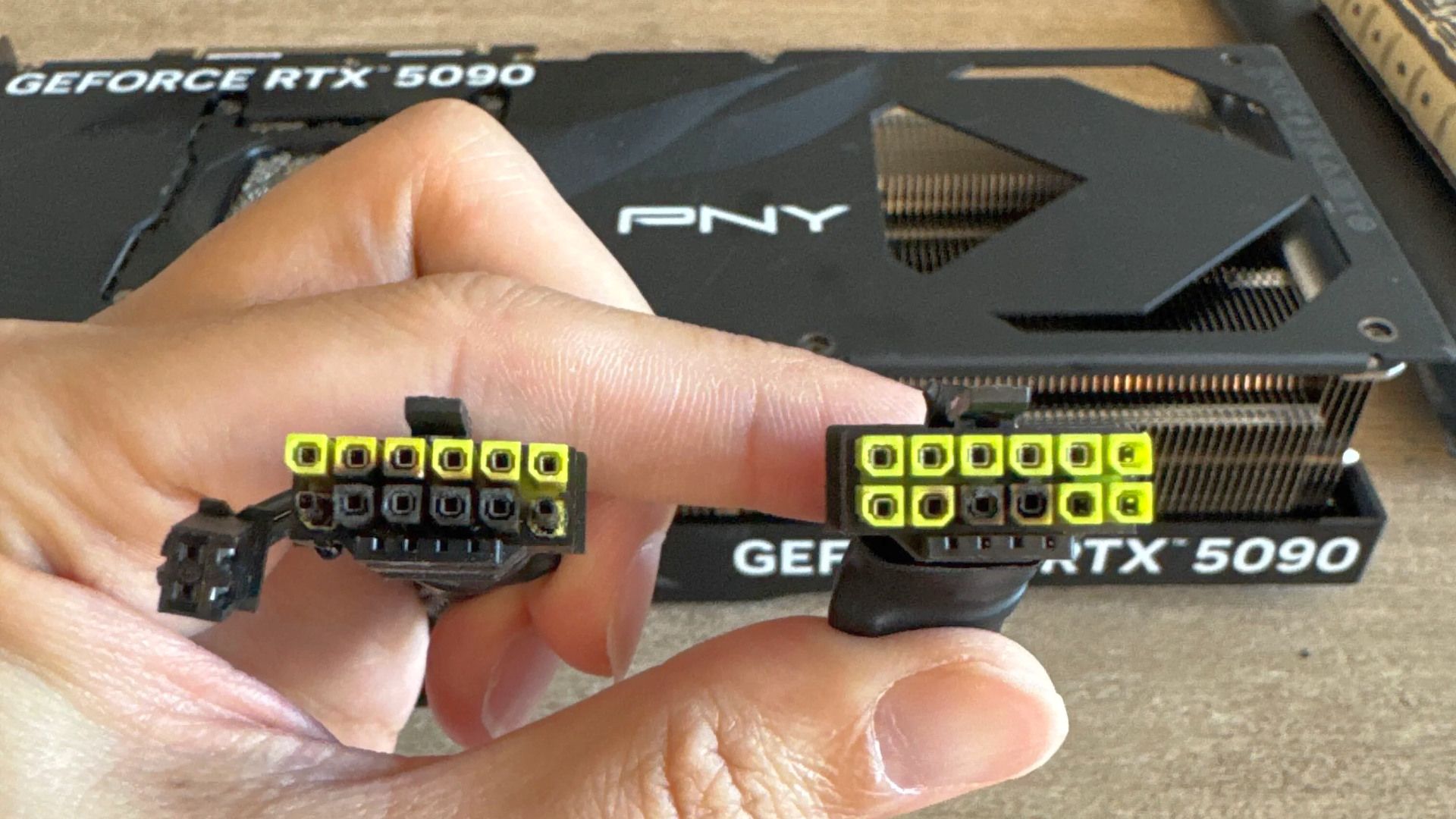
Like so many others, "Melodic" found his graphics card non-functional after melting the 12V-2x6 connectors on both ends of the modular cable that came with his 1600-watt ASRock power supply (the PG-1600G, which we reviewed last year). This happened despite the fact that he says he was using the stock BIOS, no overclocking, and, in fact, a manually reduced power limit. Moreover, the card was supposedly sitting idle when it died, although that doesn't really mean anything. He opened a ticket with PNY and says he was denied the next day with this response:
All PNY GPUs that require a 16-pin (12VHPWR / 12V-2x6) input include a PNY-approved power cable or adapter in the box. This cable is the only configuration covered under warranty. If a third-party power cable, adapter, or PSU cable is used and damage occurs - including melting, burning, overheating, or deformation of the connector - PNY cannot accept the product under warranty. Damage caused by non-PNY cables falls under the responsibility of the manufacturer of that cable or power supply.
Alleged PNY Support response (via /u/Melodic_Initial_1767)
Well, he wasn't using the included cable or an approved one, but he was using the native cable from his power supply; surely that should be good enough, right? After all, the warranty terms actually don't appear to say a single thing about 12VHPWR or 12V-2x6 cables. According to the Redditor, the only thing the warranty says about power is that the card has to be "installed in accordance with the installation guide provided herewith." Guess what the installation guide says?
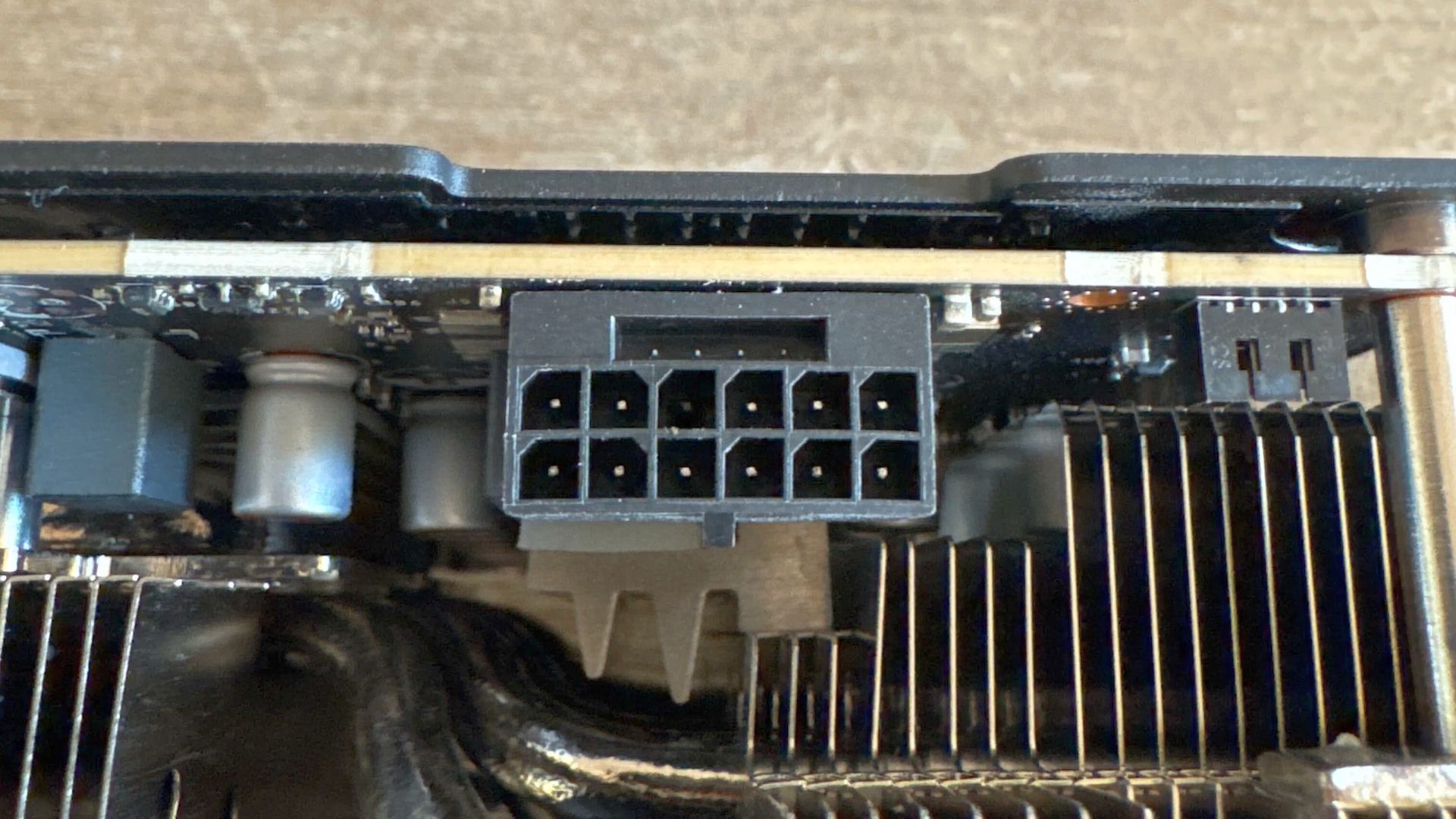
The card-side connector doesn't even look that bad, but apparently the card doesn't work at all. (Image credit: /u/Melodic_Initial_1767 on Reddit)
If you guessed "locate an unused power connector within your system and plug it into the corresponding connector on your graphics card," congratulations, you will also be denied warranty service from PNY, because apparently you have to intuit which cables are approved by PNY, since, as far as we can see, there's no list of approved cables anywhere on PNY's website, nor in the product documentation for its graphics cards. Besides, the card didn't come with a 16-pin cable, so it's not like he could have used PNY's own cable, and the idea that the firm would prefer him to use an "octopus" adapter over a native cable is shaky at best.
I personally have never had the pleasure of dealing with PNY support, but multiple other Redditors in the thread, which is nearing 1,200 replies at this point, have mentioned a history of difficulty getting support from PNY. When asking the company which clause of their warranty policy they are using to deny his warranty request, /u/Melodic_Initial_1767 was apparently told by a "Senior Technician" that the decision is final and that his ticket had been closed.
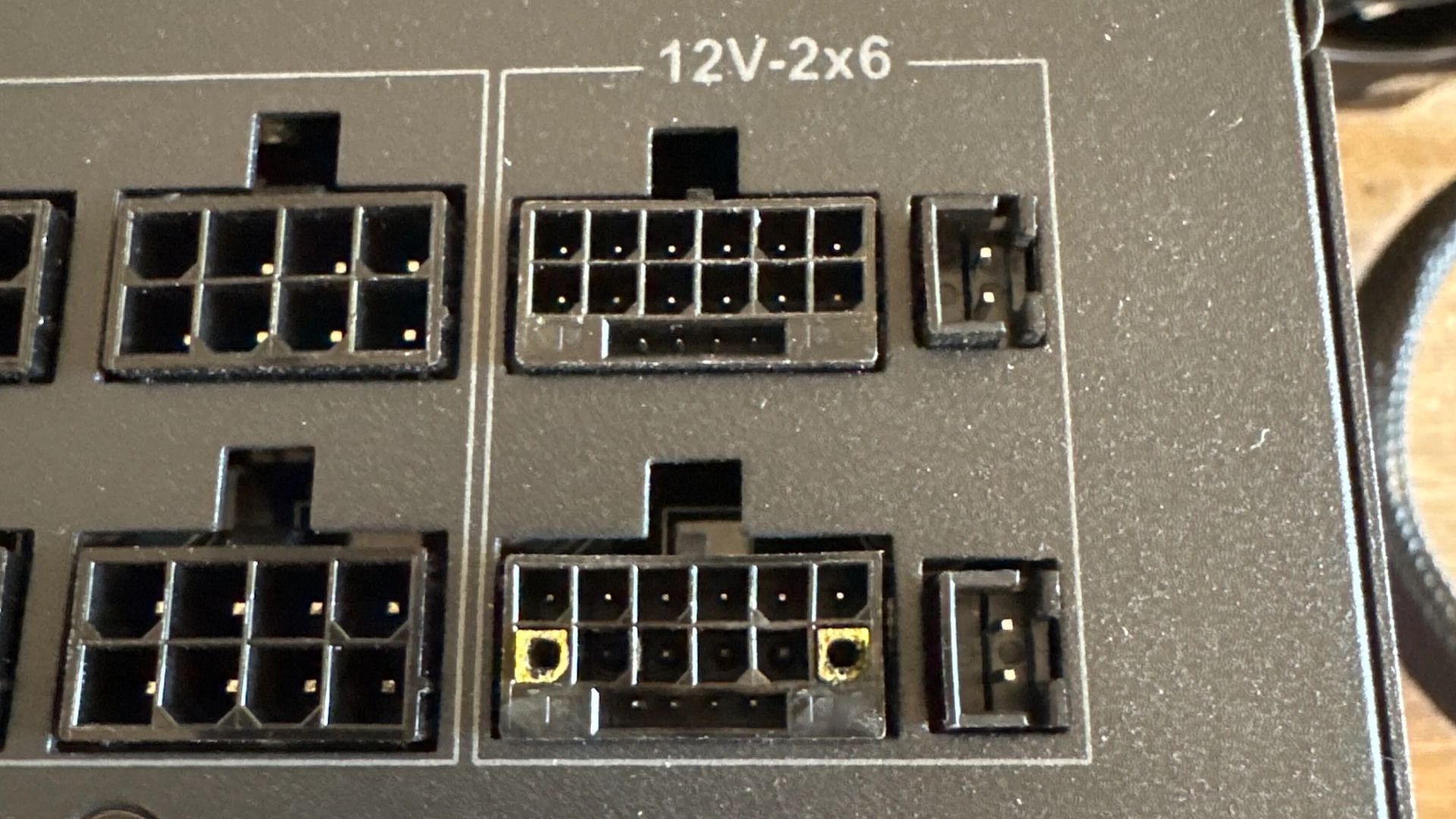
The power supply is supposed to include a temperature sensing mechanism to prevent this sort of thing from happening. (Image credit: /u/Melodic_Initial_1767 on Reddit)
A notable point brought up by /u/dusto_man in the thread is that the ASRock power supply used by "Melodic" advertises a "TempGuard" feature that supposedly monitors the temperature at the 12V-2x6 connector on the PSU side for safety, but clearly that either wasn't configured or also failed. ASRock offers a ten-year warranty on that unit; /u/dusto_man mentioned this in a thread where users were advising the original poster to contact ASRock and let that firm go after PNY to avoid covering the failed GPU, which is worth multiple thousands of dollars now.
Indeed, that could be why PNY is attempting to shut down the RMA attempt. The firm may not have any GeForce RTX 5090 cards to send him, and even if it does, the cheapest GeForce RTX 5090 card available to buy new on the market today is $4400 USD, and PNY would likely prefer to sell it at that price instead. While the board vendor is most likely only on the hook (legally) for /u/Melodic_Initial_1767's original purchase price, that could still easily be $2,000 or more. We have now seen these same RMA denial patterns with storage and memory devices from multiple vendors during the shortage, so it wouldn't be an exception. We'll have to wait and see if PNY will stand on unwritten technicalities rather than take a hit to its bottom line.
Forget RGB, OLED screens, figurines, and dioramas. We've never seen anything like the Cherry Bloom PC from Aftershock PC in Australia, though. This liquid-cooled, high-end gaming PC includes a Cherry Blossom tree, featuring 70 handcrafted, heat-reactive titanium-alloy cherry blossoms that unfurl when the machine heats up.
The 70 hand-crafted blossoms 'bloom' mechanically when the PC heats up, no motors or electricity required. (Image credit: Aftershock PC)
What makes this even more remarkable is that the PC — heat-reactive blossoms included — is actually commercially available, and isn't a one-off custom mod. You can buy one from Aftershock PC right now. There are no motors to break; the blooming blossoms are completely 'powered' by the heat generated from the high-end components in the PC, too. Those components include an AMD Ryzen 7 9800X3D processor, 64GB of fast DDR5 memory, a 1300-watt modular power supply, and most notably, a GeForce RTX 5080 graphics card.
The presence of an RTX 5080 might be surprising considering the price we mentioned in the headline; yes, this PC costs approximately $14,150 USD ($20,000 AUD, or around £10,650 GBP). But if you've got the cash to spare and are eyeing the PC up, just note that the eye-watering price doesn't include shipping. At that price, it's fair to expect truly top-end components, like a Ryzen 9 9950X3D2 Dual Edition and a GeForce RTX 5090 (as found in the very best PCs for gaming), but honestly, this machine is as much a work of art as a functional PC. You're not merely paying for the components; you're paying for the brilliant display inside.
It's not a small system, to be sure. The liquid cooling is fully custom for each system. (Image credit: Aftershock PC)
The chassis used for the Cherry Bloom is the "V2" by Taiwan's Advanced Performance Nexus, better known as APNX. The case has what APNX calls "one of the largest viewing area in its class," with wrap-around glass on three sides to allow you to admire the gorgeous sculpture in your case. Along with the previously mentioned components, you also get a 2TB Lexar NQ790 PCIe 4.0 SSD, a custom open-loop liquid cooling setup, eight Aftershock Chrome RGB fans, and Windows 11 Professional, naturally.
The high-end Gigabyte X870E motherboard offers gobs of connectivity. (Image credit: Aftershock PC)
Obviously, the Cherry Bloom PC isn't something that many people are going to buy. Much like the KFC console before it, it's a curious piece of marketing from Zotac Gaming, which designed the PC, according to the product listing. Nevertheless, the mechanism is indeed mind-bending enough. You can check out Aftershock's website and click through the slideshow to view videos showcasing the petals of the 'tree' unfurling; if nothing else, it's impressive to see the mechanism working in motion.
A new project on GitHub, simply titled "dlss-nr-on-intel", purports to provide exactly that: a port of NVIDIA's DLSS 5 Neural Rendering to Intel's Xe architecture. Specifically, the author (who goes by "Uzbekunknown") focused on porting the technology to the Intel Arc 140V graphics in his Lunar Lake system, and they seem to have succeeded, at least insofar as he's getting outputs that look reasonably like those of DLSS 5 on other hardware.
AI is at the center of this project, beyond the DLSS 5 neural rendering technique itself. Uzbekunknown credits Anthropic's Claude as well as OpenAI's GPT-6 Astra with the code and says that they "supplied the machine, the binary, and the direction, and made the decisions", while the AI agents did everything else. Amusingly, they note that "the wrong turns are in the notes, too, deliberately," including a hallucinated driver bug that does not exist and shaped three phases of development.
The end result, rather than being a wrapper around the DLSS 5 DLL as many other hacks have been, fully reimplements the 71-block U-Net that DLSS 5 uses and then runs it on the Intel Xe XMX units through a Vulkan extension called VK_KHR_cooperative_matrix. It's entirely run in FP16 with FP32 accumulate, because Xe2 doesn't support FP8. You can run the model on anything presenting its output through Vulkan, and the user presents proof-of-concept results from three fighting games: Dead or Alive 5 Last Round, Tekken 7, and Mortal Kombat 1.
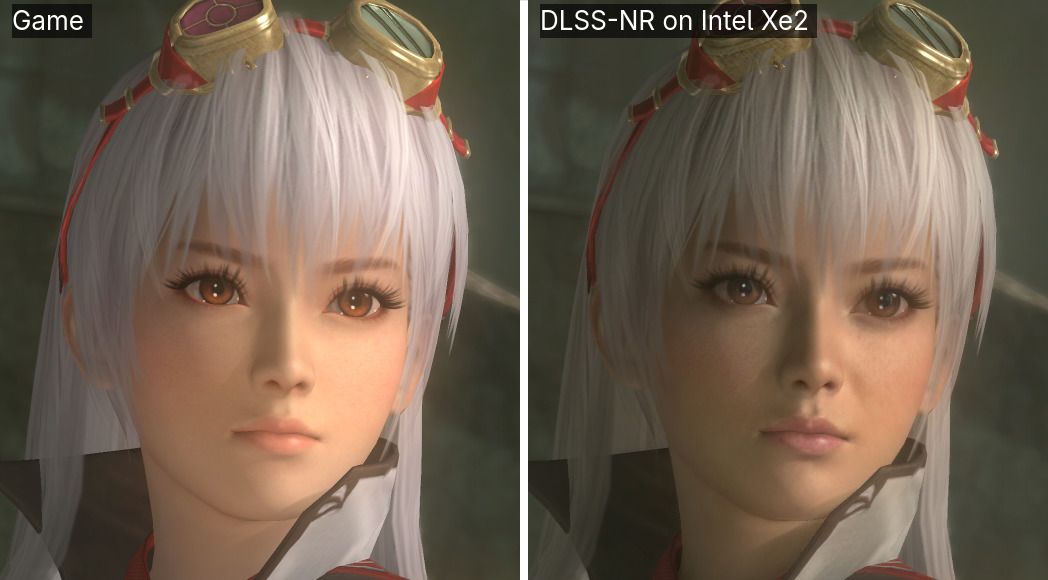
While DLSS 5 adds detail to the character, it also changes her look considerably, clashing with the visual style of the game. (Image credit: Uzbekunknown/GitHub)
It's not fast. Running the ten-year-old Tekken 7 in 640x360 resolution (1/9 of FHD) should be a trivial task for the potent Intel Arc 140V graphics, yet it apparently struggles at around 10.5 FPS with this model loaded. Note (as the author does) that the performance of DLSS 5 depends almost entirely on the game's output resolution, so running in hilariously low resolutions is required to try and achieve anything approaching a real-time frame rate on this limited hardware with this inefficient approach; apparently the DLSS 5 pass by itself takes some 412 milliseconds in full HD on the Arc 140V, which means that even if your game renders instantaneously, your maximum frame rate would still be around 2.4 FPS.
Still, it does appear to work, and that's the impressive part. I'm not sure I completely agree with the author's analysis of the effects on the three games he tested; he says that Mortal Kombat 1 loses detail in the DLSS 5 output, and while that may be statistically true, visually it does look more detailed to my eye. The DLSS 5 NR model is known to be specifically trained to produce a photorealistic look, and this has good effects on Mortal Kombat and Tekken, but not as much on Dead or Alive, which is more stylized to give an anime look; the model instead makes the character look older and less appealing.
DLSS 5 makes significant tone changes to Mortal Kombat 1, but opinions vary on whether it actually looks good. (Image credit: Uzbekunknown/GitHub)
As the author notes, this is more of a proof of concept than something you would actually want to use. However, there are efforts to get the work ported to both discrete Arc GPUs as well as AMD cards. AMD's RDNA 4 graphics already supports FP8, so you'd want to use the original model there, but this could allow RDNA 3 and Xe2 graphics cards to use DLSS 5. While it would almost assuredly be too slow for gameplay, it might be interesting for photo modes since you can toggle the function with a keystroke.
The project currently requires Linux, which is going to invalidate it for the majority of our audience, but as a user on Reddit, /u/arielcasari, says that they intend to "adapt it to run on Windows" and that they will post the results on the /r/IntelArc subreddit. If you're interested in fooling around with it yourself, head over to the developer's GitHub and make sure to read over the Readme.MD, as the project exposes all of Nvidia's own DLSS 5 controls, and you'll need to be familiar with them to get anything approaching decent results.
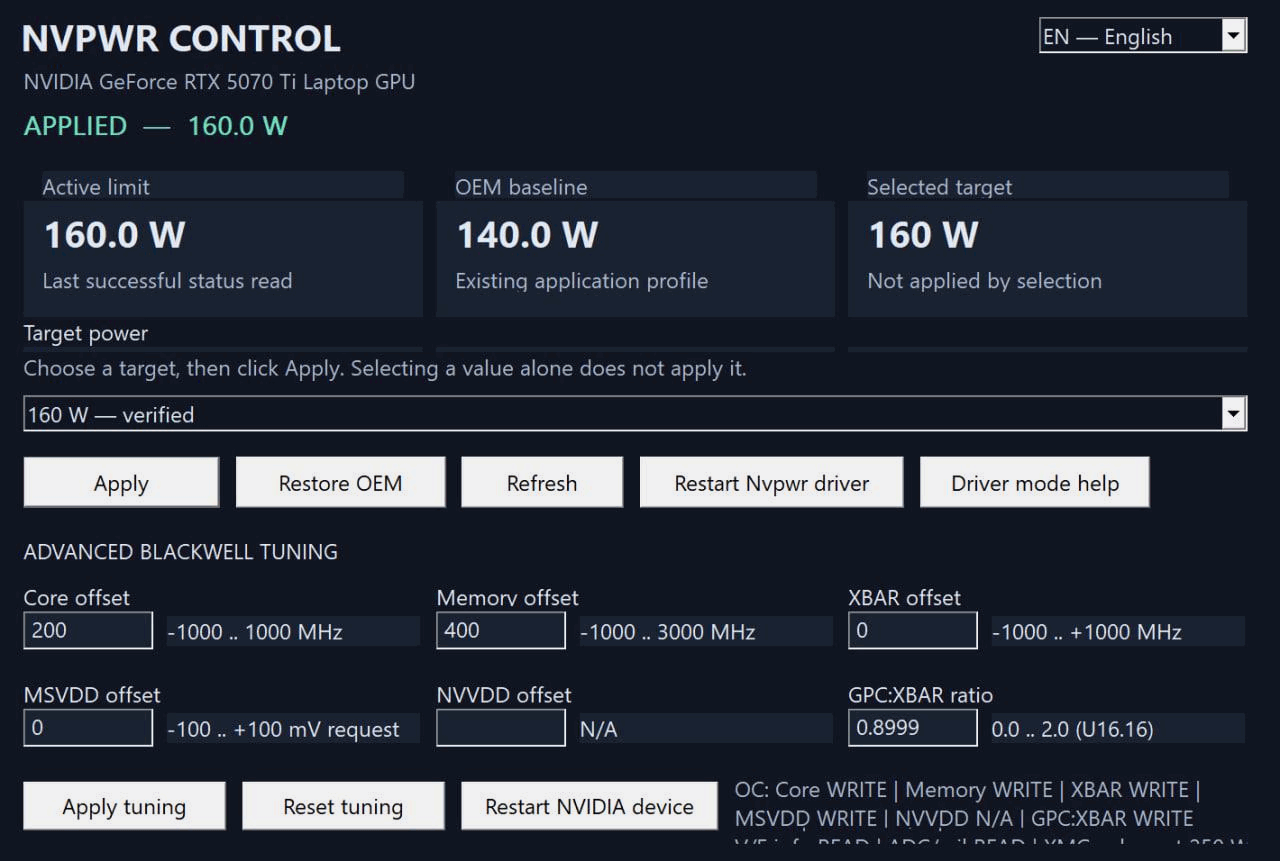
Folks with Nvidia-based gaming laptops can now use a new tool called NvpwrControl to unlock additional performance from their assuredly power-limited mobile GPU, as long as they're willing to accept the risks of cranking their GPU power limit by as much as 40 watts. The tool, spotted by VideoCardz, is available for download on GitHub, and it is labeled as 'experimental', so you'll want to be very sure you're willing to damage the reliability, if not the lifespan, of your fancy discrete GPU gaming laptop before using it.
NVIDIA GeForce RTX 50 Series Laptop GPU Power Limits
GPU Name
GPU Power (varies per laptop)
Dynamic Boost Max
Mod Max (Experimental)
GeForce RTX 5050 Laptop
35 - 100W
15W
140W
GeForce RTX 5060 Laptop
45 - 100W
15W
140W
GeForce RTX 5070 Laptop
50 - 100W
15W
140W
GeForce RTX 5070 Ti Laptop
60 - 115W
25W
180W
GeForce RTX 5080 Laptop
80 - 150W
25W
225W
GeForce RTX 5090 Laptop
95 - 150W
25W
225W
In Nvidia's case, the GPU models (aside from the RTX 30 Series) don't match at all between laptop and desktop, but even with the smaller size of the laptop GPUs, the chips are still sharply limited in performance by their stringent power limits. These limits top out at 150W, with an extra jolt, usually 25W, available from Dynamic Boost if the CPU isn't heavily loaded. This is, frankly put, not enough power for even the mobile GeForce RTX 5070 Ti to stretch its legs, to say nothing of the GeForce RTX 5080 Laptop or GeForce RTX 5090 Laptop. In high-intensity gaming situations, these GPUs can score pretty similarly due to having the same power limit.
That's what makes this tool attractive. By cranking the power limit, you can give these power-limited GPUs a performance boost. The developer doesn't provide any benchmarks, but I can say from experience that testing power limit adjustments on a power-limited GPU can give nearly linear performance gains, meaning that increasing the power limit from a stock 140W all the way up to 180W could potentially give a GPU performance uplift in the neighborhood of 25% or more, although it is impossible to verify this without testing.
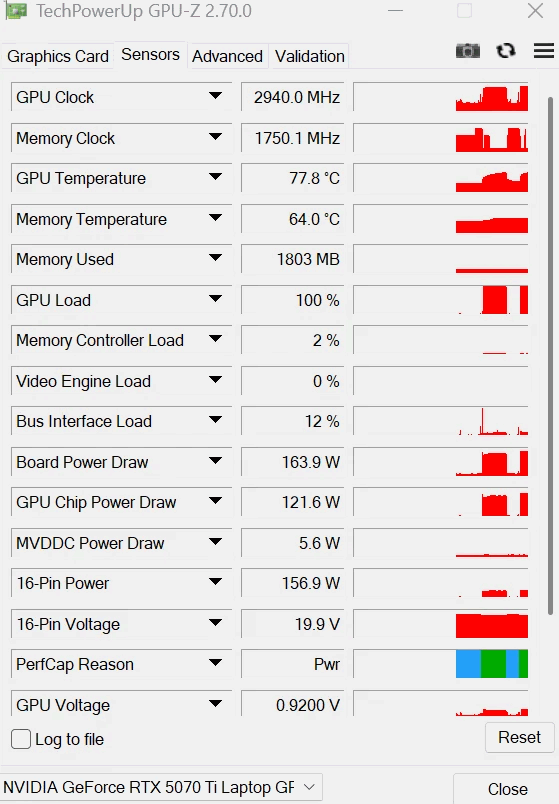
There are quite a few caveats to this utility, though. For one thing, even the author describes it as 'experimental ', and for another thing, it's clearly AI-generated in the largest part. The developer is called "LevinAI", after all, and there are the hallmarks of generative AI all over the GitHub repository. Still, there are a few reports on both GitHub and Reddit suggesting that users have been testing it, and the developer claims that it works on his GeForce RTX 5070 Ti laptop, posting the proof below.
The developer's screenshot of GPU-Z, showing a board power draw of 163.9 watts on a GeForce RTX 5070 TI Laptop, well above the stock 140W cap. (Image credit: /u/Ecstatic_Hamster2208 on Reddit)
Other notable qualifiers include that it only supports Blackwell GPUs for now, and it only enables power controls when it can recognize the power policy layout and OEM baseline. If your GPU already ships with a wacky power configuration, this tool may not work for you. It's also not verified to work on every brand of laptop nor every model of GeForce RTX 50-series GPU, so we absolutely wouldn't try this unless you're willing to replace your Blackwell-based laptop.
The partially AI-generated project description (likely chosen as the author's native language appears to be Russian) explains that the developer investigated numerous layers of the software stack on top of the GPU to see where the power limit could be modified. The controls that NVIDIA exposes generally won't let the user raise the power limit above the value set by the OEM for fear of potentially damaging the hardware, since the power delivery and cooling mechanisms were likely not designed with the higher power draw and thermal output in mind.
The solution he found was apparently to modify a low-level NVIDIA power policy that isn't normally exposed to end-users. He says, "One of the important findings was that the power-management chain contains internal policy values that are not exposed through the normal consumer power-limit controls. This is the path that eventually led to a working experimental implementation." However, due to the method employed, the tool does require the user to disable Windows driver signature verification, which is yet another 'gotcha' of the mod.
As amusing as it is to see that the developer left his AI assistant's instructions for constructing his GitHub repository (which he didn't follow), it's a reminder both of the reliability concerns around "vibe"-coded software in production as well as of the incredible potential of AI software development. Since we spotted the story on this utility, the developer has already bumped the version from 1.5.0 to 1.8.0 with a new release on GitHub, suggesting that the pace of improvements is extremely rapid.
A few users on Reddit, where the author posted the above screenshot, lambasted the developer for taking ownership of what they claim is "100% AI generated work" and also for not structuring his code repository correctly (since all of the source is packed in a ZIP file, not properly viewable on GitHub). However, the majority of other users seem enthusiastic about his work, and several have already posted proof that it seems to work, with huge gains in 3DMark and other benchmarks.
With the latest ROCm updates, AMD finally brought robust, official PyTorch and HIP SDK support to Windows for consumer GPUs, fully supporting the Radeon RX 7000 and the RX 9000 series. For native, supported frameworks, AMD on Windows is finally a viable reality, but what happens when you want to run a proprietary application, an older repository, or a specialized AI tool that absolutely refuses to support anything but NVIDIA's CUDA? That's where a new project, Speedstu's "CUDA-for-AMD-Windows," could save the day. It proves that running rigidly CUDA-exclusive workloads on AMD hardware in Windows is possible without virtualization or dual-booting.
To be clear, this project is not a brand-new runtime. Instead, it is a highly automated and reproducible PowerShell setup that bridges the gap between ZLUDA, the well-known, formerly AMD-funded translation layer, and AMD's native HIP/ROCm SDK for Windows. Through a series of clever scripts, the toolkit automatically detects the user's GPU architecture, grabs a specifically pinned version of ZLUDA (v6-preview.69), and, at least in theory, seamlessly maps it to the ROCm math libraries already present in Windows.
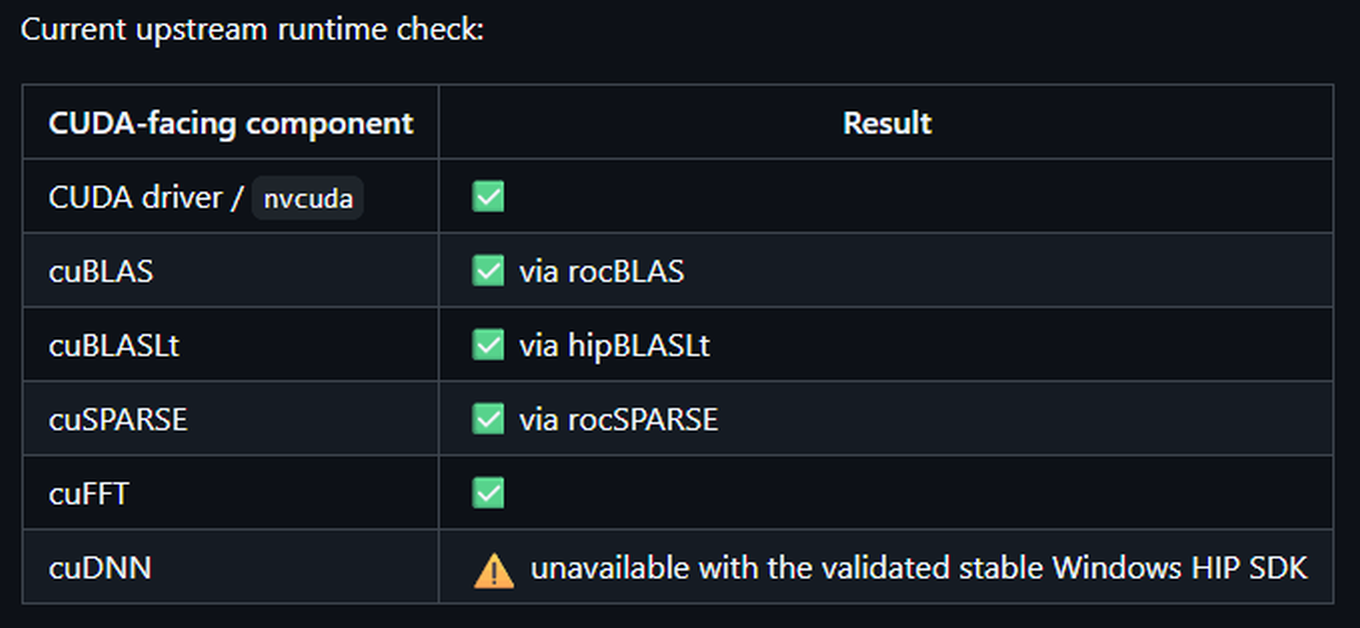
Several important CUDA libraries link up, but the important cuDNN doesn't work yet. (Image credit: Speedstu/GitHub)
The result is that the developer successfully intercepted and mapped the CUDA driver API as well as the cuBLAS, cuSPARSE, and cuFFT libraries directly over to their AMD equivalents. As a proof-of-concept, the author even trained a 2.2-million-parameter PPO reinforcement-learning network end-to-end using unmodified CUDA libraries on an AMD Radeon RX 9060 XT, which happens to be the only officially supported GPU at this time.
Even with AMD's official ROCm support on Windows, the local developer community frequently runs into dependency hell when trying out experimental GitHub repos or specialized AI tools that hardcode CUDA as a requirement. For developers who want to experiment with these CUDA-only tools natively on their Windows daily driver machines without dealing with WSL2 passthrough issues or waiting for the original author to write a HIP port, this project offers a highly desirable translation pipeline. It acts as a sort of hacky adapter for software that stubbornly demands an NVIDIA card.
Benchmark testing included in the project's documentation offers some interesting findings. In a controlled A/B test running a 2.2M-parameter reinforcement learning workload on a Radeon RX 9060 XT, the "public upstream path," which relies purely on official ZLUDA releases and AMD's stock HIP SDK 6.4, achieved a median throughput of 13,278 steps per second (SPS). By contrast, an optional "recovered custom overlay" apparently built from salvaged legacy ZLUDA binaries ran slightly worse at 12,876 SPS, making it roughly 3% slower. While the clean official setup is faster, the author notes that "a later rewrite removed LibTorch/ZLUDA from PPO and achieved substantially higher throughput," indicating that there is still a performance hit for this stack of translators.
CUDA for AMD Windows Official benchmarks (BENCHMARKS.md)
Metric
Public upstream
Recovered custom
Custom delta
Overall SPS, median
13,278.46
12,875.80
-3.03%
Overall SPS, mean
13,172.49
12,649.83
-3.97%
Collection SPS, median
63,306.00
59,360.67
-6.23%
Consumption SPS, median
16,806.36
16,445.66
-2.15%
Inference time, median
0.5863 s
0.6293 s
+7.33%
PPO learn time, median
3.2076 s
3.2958 s
+2.75%
Now, before anyone declares the CUDA moat officially drained, it is crucial to set realistic expectations. First, this is a solo open-source project, not an enterprise-grade solution. The author is extremely transparent about its narrow scope, as crucial machine learning libraries like cuDNN, TensorRT, and NCCL do not resolve yet. This means compatibility is strictly workload-dependent; if your specific AI tool relies heavily on cuDNN, this setup will fail. Furthermore, it's worth pointing out that ZLUDA itself is currently being maintained as a "weekend hobby project" after losing its commercial backing a second time. Relying on this pipeline for production-level work remains a massive risk. This repository is a tinkerer's tool, not a corporate IT deployment strategy.
Despite these limitations, "CUDA-for-AMD-Windows" is pretty exciting, as it proves that the barrier to entry for running CUDA-exclusive software on AMD GPUs isn't an insurmountable hardware flaw, but a relatively tractable translation tooling problem. Because the project is entirely open-source, its potential extends far beyond this initial proof-of-concept. With community contributions, we could see expanded hardware detection and clever patches to get more stubborn CUDA libraries resolving properly.
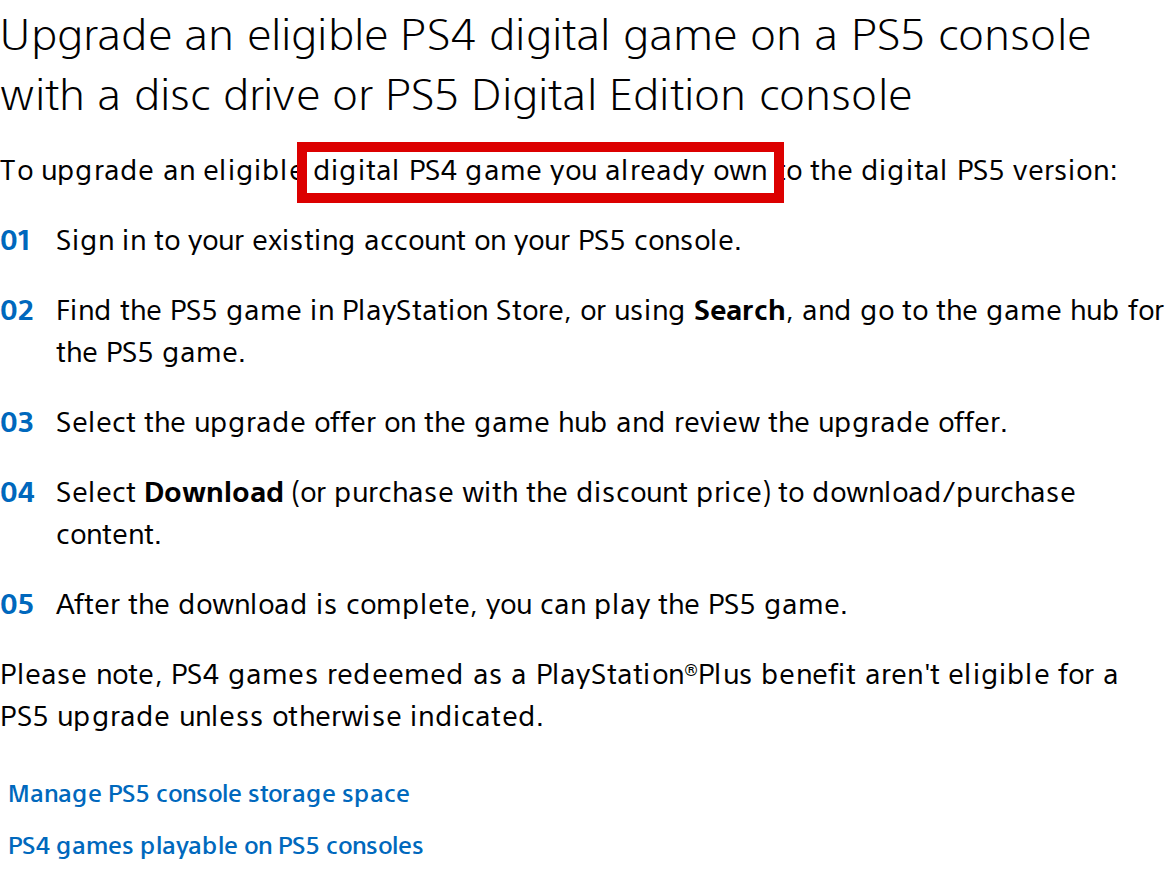
In a recent lawsuit against Sony, the firm argued that "reasonable consumers would not be misled" into believing they own digital games that they "purchased" on the PlayStation Store. Folks on the Consumer Rights Wiki have now compiled a humongous list of specific instances in which Sony currently states that users do, in fact, own their digital PS4 and/or PS5 games. The list is currently up to 44 specifically documented statements, but actually notes hundreds of examples where Sony explicitly states that users do, in fact, "own" their games across its various services and pages.
In this case, Sony says that no "reasonable person" would believe that, when they add a game to their cart and click "Purchase" on the PlayStation Store, they are entering a contract that entitles them to ownership of the digital goods in question. Instead, Sony believes it's obvious that what you're paying for is a limited, revocable license for a service that only remains available as long as Sony offers it, which is quite different from ownership in a legal context.
The case isn't exactly about ownership, though; it's really about consumer disclosure and product representation. The plaintiffs aren't arguing that buying a digital game somehow transfers ownership of Sony's underlying intellectual property, but rather that Sony's use of words such as "buy," "purchase," and "own" could reasonably lead consumers to believe that they were acquiring a durable right to use the game, rather than merely obtaining a revocable license. That distinction matters because Sony's defense depends in part on the claim that no reasonable consumer would interpret the transaction that way. At the same time, the plaintiffs have produced a substantial body of evidence showing that Sony itself routinely uses precisely that ownership language when describing the digital games its customers have purchased.
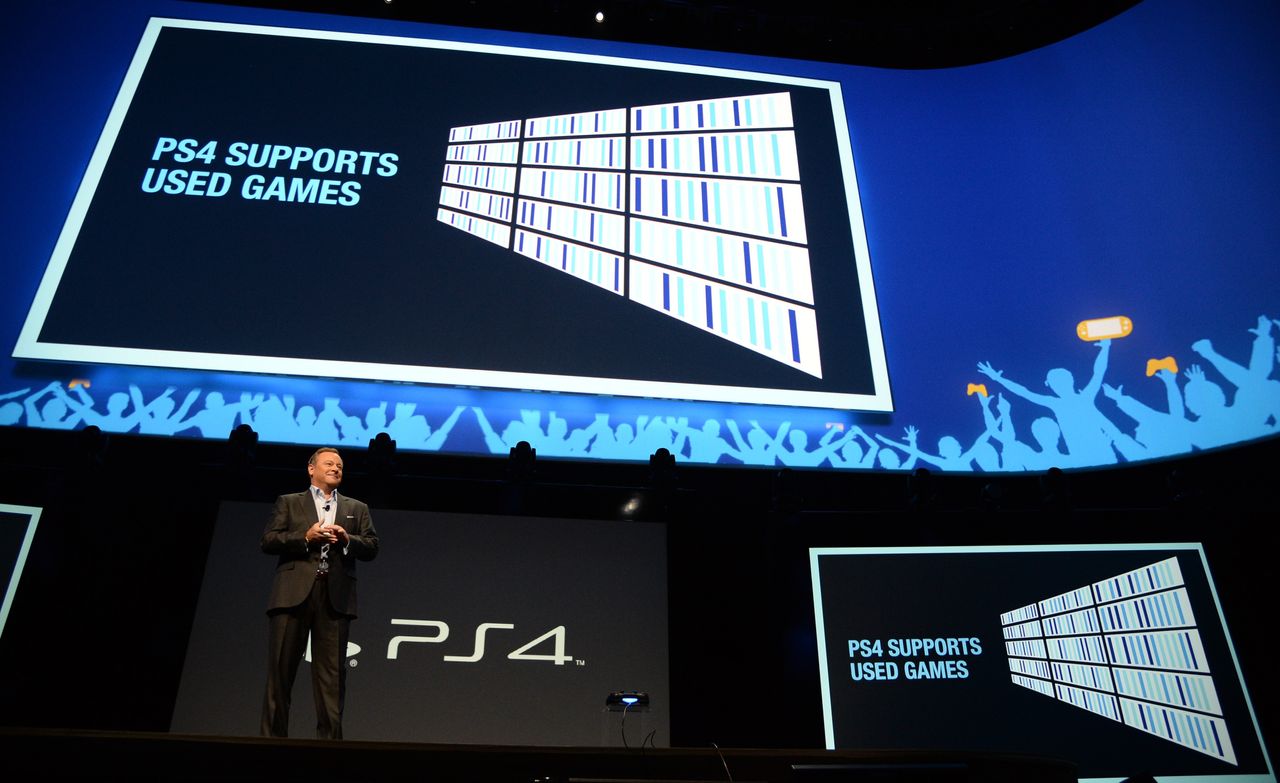
This issue is in particularly sharp relief now that Sony's digital store is confirmed to be the only way to purchase new PlayStation games from next year. The publisher's announcement that it would stop producing game discs in January of 2028 caused quite an uproar among gamers who value physical copies of games as a token of ownership. It's worth noting that most players do purchase games digitally (as much as 85% of PlayStation games, by some reporting), and also that disc production and usage become less practical as the manufacturing of both disc drives and discs slowly winds down.
The gamer outrage isn't really about the end of discs, though. This fury has been simmering for a good while now, as gamers resent perceived anti-consumer practices. The realization that discs are going away simply forced a lot of gamers outside the enthusiast sphere to confront the reality that they do not own their digital purchases and that they can be taken away at any time, just as Sony has already done in the past. This is especially pointed in light of the price increases asked by game publishers in the last few years, where games have gone from a typical ceiling of $60 USD up to $70 and now, more recently, $80 (with Mario Kart World, Zelda: Tears of the Kingdom, and now Grand Theft Auto VI), despite often struggling to provide the same level of satisfaction and enjoyment as older titles.
There are many more examples like this on the Consumer Rights Wiki page about the lawsuit. (Image credit: Screenshot of Sony Interactive Entertainment website — source: Consumer Rights Wiki, licensed under CC BY-SA 4.0. Screenshot by unknown author. No modifications.)
And so we come back around to the Consumer Rights Wiki and its list of times that Sony has explicitly used ownership language on its website and on its digital storefront. The Wiki catalogs these quotes with both links to live pages as well as archived snapshots and screenshots with the relevant text highlighted. The Consumer Rights Wiki was of course founded by consumer rights advocate and YouTuber Louis Rossmann, but much of the work was done by the community that has sprung up around the site as people rebel against the continuous erosion of their consumer rights, particularly by technology companies that argue against their own responsibility.
It's unfortunately still not clear if this case is actually going to trial yet. Sony is attempting to have the case moved to private arbitration, citing that all four plaintiffs agreed to such when signing up for the PlayStation Network; in that case, Sony will likely pay a small cash award to each plaintiff and the matter will be settled, legally speaking. If the case goes to trial, there's a possibility for real legal precedent to be set by a public ruling, at least in California. For the sake of consumer transparency on the PlayStation Store, let's hope that the court agrees to hear this one.
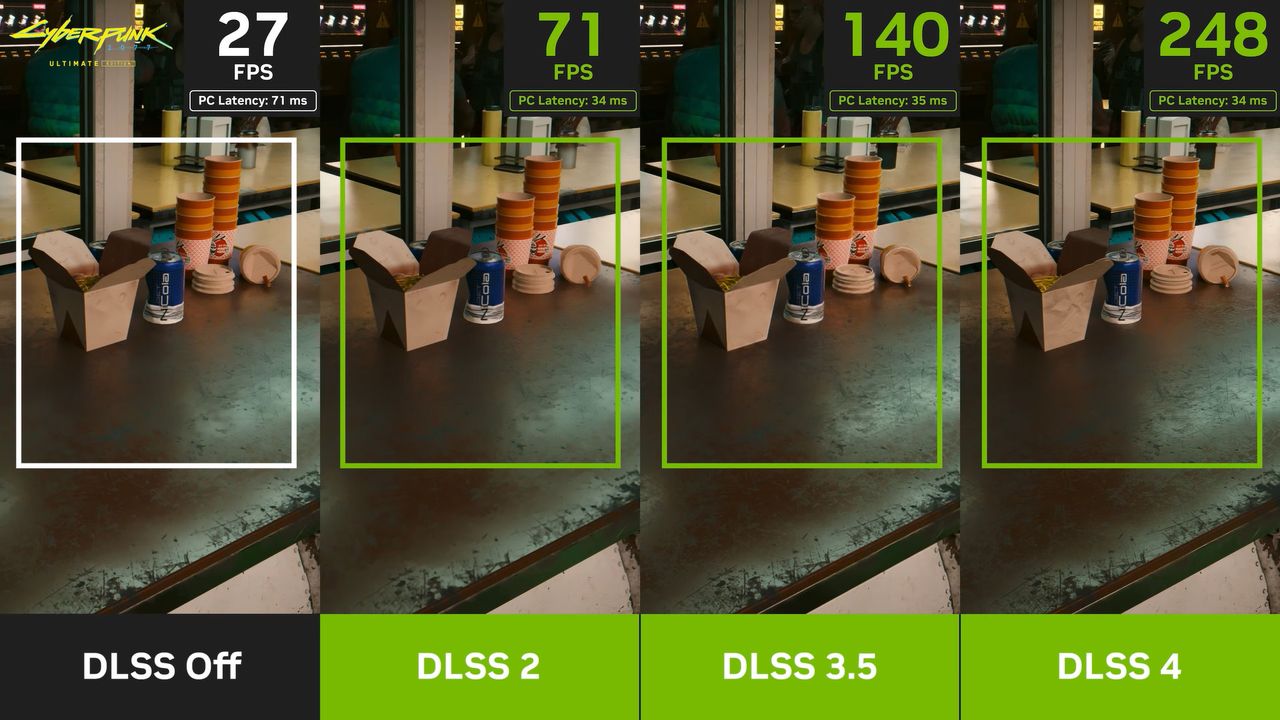
When NVIDIA launched the GeForce RTX 50 series, a major part of the hype surrounding the new GPU family was its support for DLSS Multi-Frame Generation. This feature was officially locked to the new RTX 50 "Blackwell" GPUs, but modders have been working on unlocking it for RTX 40-series cards for a while now. NVIDIA is clearly aware of these efforts, as it recently pushed an over-the-air update via the NVIDIA App that seemed targeted at blocking them due to its odd changes. Yet, as pointed out by Sebastian Castellanos on X, enterprising hackers had already found a workaround just hours later.
At the launch of Blackwell, NVIDIA explained that bringing Multi-Frame Generation to previous-generation RTX 40-series cards wasn't possible because those GPUs relied on a hardware optical flow generator incapable of producing multiple interpolated frames per rendered frame. Instead, Blackwell introduced a software-based optical flow method executed directly on the GPU shader cores without requiring the hardware unit. To tech-savvy gamers, the obvious question arose: why not use that same software method on Ada Lovelace GPUs and bypass their hardware optical flow units? NVIDIA showed no interest in enabling this, leading many to assume it was technically impossible.
I uploaded a video on how to enable DLSS Multi-Frame Generation on my RTX 4060 GPU.I tested RE9 and Forza Horizon 6. To be honest apart from the oblivious latency increase, it works extremely well!Thanks to @Sebasti66855537 for notifying me about this mod!Video linked below pic.twitter.com/Tldr9JZIxJSeptember 4, 2026
Put simply, it's possible. There are apparently various roadblocks within NVIDIA's software, but the strength of the PC platform lies in its openness; users can freely modify software running on their own hardware. And so, at least three distinct mods have emerged to unlock DLSS Multi-Frame Generation across multiple titles. It began with a Cyberpunk 2077 mod by creator "dashdogy" that relied on game-specific modding frameworks, but the technique has since been adapted into a broader ReShade plugin applicable to almost any game, and that's just one of at least three different multi-game unlock mods I found.
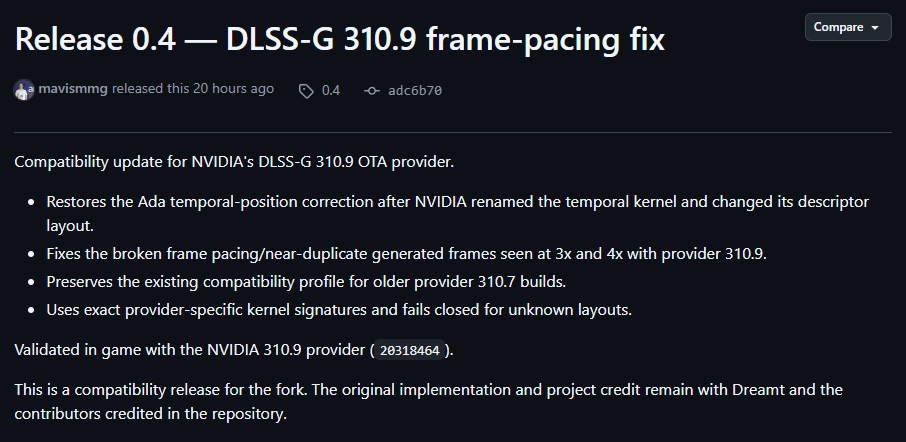
It's obviously in the company's best interest to protect its marketing narrative, and the narrative is that Multi-Frame Generation doesn't work on GeForce RTX 40 series graphics cards. However, user reports across X and Reddit tell a different story. Users report that the mods not only work, but also deliver surprisingly smooth frame pacing. NVIDIA had previously warned that Blackwell's specialized hardware flip metering was mandatory for proper frame pacing with multi-frame generation, but dashdogy noted that his mod backports "Blackwell-specific frame timing instructions to allow Ada to place the frames in the correct positions," suggesting that MFG's purported hardware dependency was greatly exaggerated.
There are already two more updates after this, both fixing major bugs. (Image credit: Future)
Earlier attempts to enable multi-frame generation on Ada Lovelace relied on GPU spoofing or hybrid solutions, like combining standard 2x DLSS Frame Generation with AMD's FSR 3 or Lossless Scaling's software frame generation. Those workarounds were significantly clunkier than native game mods that utilize NVIDIA's own DLSS-G framework. While I couldn't get this latest mod working in the limited time before publication, community developers have not only bypassed the latest roadblocks thrown up by Mean Green, but in fact, they've released at least two more updates for the mod in the last ten hours since Castellanos' X post.
All of this coincides rather neatly with the contentious rollout of DLSS 5 "Neural Rendering," which is another technology originally pitched as an RTX 50-series exclusive before NVIDIA made a last-minute reversal to promise it for RTX 40-series cards as well. That shift may well have been driven by hackers porting DLSS 5 Neural Rendering not just to older NVIDIA architectures, but even to AMD Radeon GPUs. Once it became common knowledge that DLSS 5 runs on non-Blackwell hardware, continuing to claim hardware exclusivity risked a major loss of consumer trust. It'll be fascinating to see if NVIDIA will pivot on DLSS Multi-Frame Generation in the same way. While it would be a nice bone to throw the company's loyal previous-generation customers, we wouldn't bet on it.
 登录
登录